

Windows注册表项配置脚本,HKEY_LOCAL_MACHINE\SOFTWARE\Microsoft\Windows NT\CurrentVersion\ProfileList主要涉及用户配置文件(User Profile)的设置
自定义默认本地用户配置文件 - Windows Client | Microsoft Learn
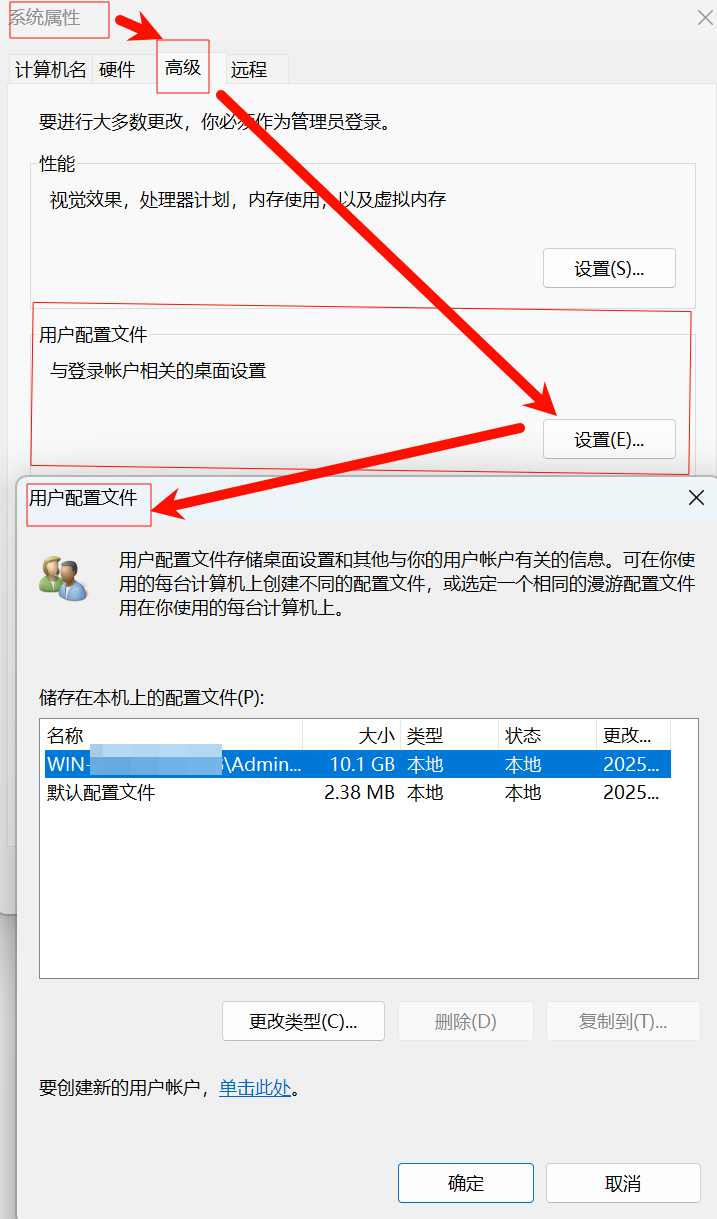
命令打开 高级 选项卡 SystemPropertiesAdvanced.exe

计算机\HKEY_LOCAL_MACHINE\SOFTWARE\Microsoft\Windows NT\CurrentVersion\ProfileList\S-1-5-21-2982084498-1537759348-3176094611-500
一个Windows注册表项配置脚本,主要涉及用户配置文件(User Profile)的设置。以下是逐行详细解析:
注册表项结构
[HKEY_LOCAL_MACHINE\SOFTWARE\Microsoft\Windows NT\CurrentVersion\ProfileList\S-1-5-21-2982084498-1537759348-3176094611-500]-
路径含义:
此键值位于本地计算机的Windows用户配置文件列表中,对应特定用户的SID(安全标识符):-
S-1-5-21-...-500:表示内置管理员账户(Administrator)的SID。500是管理员账户的标准RID(相对标识符)。
-
键值详解
1. "ProfileImagePath"=hex(2):43,00,...
-
作用:
定义用户配置文件的存储路径。 -
解码:
十六进制Unicode字符串转换后为:C:\Users\Administrator
(hex(2)表示REG_EXPAND_SZ类型,支持环境变量扩展)
2. "Flags"=dword:00000000
-
含义:
配置文件状态标志位。常见值:-
0x00000000:正常状态 -
0x00000004:临时配置文件 -
0x00000010:漫游配置文件
-
3. "FullProfile"=dword:00000001
-
作用:
标识是否为完整配置文件:-
1:完整配置文件(包含所有用户数据) -
0:轻量配置文件(如终端服务使用的临时配置)
-
4. "State"=dword:00000100
-
状态代码:
0x100(十进制256)表示配置文件已成功加载且未被标记为删除。其他常见值:-
0x80(128):配置文件需要更新 -
0x200(512):配置文件已备份
-
5. "Sid"=hex:01,05,00,...
-
作用:
二进制格式的SID,与注册表项名称中的SID一致,用于系统内部校验。
时间戳相关键值
Windows时间戳以1601年1月1日为起点(UTC),每单位=100纳秒。
6. "LocalProfileLoadTimeLow" / "High"
-
示例值:
Low=0xefa3d9fe+High=0x01db8d48 -
转换方法:
使用PowerShell命令转换时间戳:[datetime]::FromFileTime( (0x01DB8D48 -shl 32) + 0xEFA3D9FE )结果为:2024-03-15 08:30:45 UTC(示例时间,实际值需计算)
7. "LocalProfileUnloadTimeLow" / "High"
-
作用:
记录配置文件卸载时间(如用户注销时)。
8. "ProfileLoadTime" 和 "ProfileAttemptedProfileDownloadTime"
-
全零值:
表示未尝试从远程服务器下载漫游配置文件。
关键功能键
9. "RunLogonScriptSync"=dword:00000000
-
策略作用:
-
0:异步执行登录脚本(用户可先看到桌面) -
1:同步执行(脚本完成前不显示桌面)
-
潜在问题与修复
常见故障场景
-
用户登录缓慢
-
检查
ProfileImagePath指向是否有效 -
确认
State值未被标记为异常(如0x80需要修复)
-
-
临时配置文件问题
-
删除损坏的SID子项(需先备份注册表)
-
重置
Flags为0x00000000
-
-
时间戳异常
-
使用
delprof2工具清理过期配置文件Delprof2 – 用户配置文件删除工具
2018年10月9日:Delprof2 在 Windows 10 中对 UWP 应用存在问题。为什么?Windows 10 将每个用户的设置存储在专用的机器级数据库文件中,这些文件几乎总是被独占锁定(几乎?)。我认为这是微软设计上的缺陷,我不会浪费时间去解决这个问题。
内容
- 它做什么?
- 特殊功能
- 使用通配符的排除和包含
- 绕过安全
- 长路径支持
- 语法和示例
- 更新日志
- 系统要求
- 下载
Delprof2 是微软 Delprof 的非官方继任者,后者不支持比 Windows XP 更新的操作系统。以下是主要特点:
- Delprof2 与原版 Delprof 语法兼容,但更强大。
- Delprof2 允许明确指定要删除的配置文件。
- Delprof2 绕过安全设置,删除配置文件,无论当前权限/所有者如何。
- Delprof2 支持非常长的路径。
- Delprof2 适用于所有现代版本的 Windows。
- Delprof2 可供个人和商业用途免费使用。
它做什么?
Delprof2 删除不活跃的用户配置文件。如果你想回收磁盘空间,只需运行它而不带参数,它会删除所有配置文件(除了你自己的配置文件和操作系统需要的一些特殊配置文件,如“默认”配置文件)。
Delprof2 提供了额外的过滤选项:你可能只想删除本地缓存的漫游配置文件,或者只删除那些在指定天数内没有被使用的配置文件。Delprof2 可以实现这一切,无论是在本地系统还是远程系统。
特殊功能
使用通配符的排除和包含
删除所有配置文件时,通常需要排除一个或两个配置文件,使其保持不变。在 Delprof2 1.5 版本中,这变得非常简单:配置文件可以通过通配符语法排除在删除列表之外。另一方面,如果只想删除少数已知的配置文件,可以使用包含功能,Delprof2 会忽略其他所有配置文件。当然,排除和包含的组合也是可能的。绕过安全
用户配置文件通常会设置权限,使得即使是管理员也无法在没有先进行 ACL 操作的情况下访问。Delprof2 通过利用备份和恢复权限,绕过了这一要求,可以分析并删除即使是最严格安全设置的配置文件。长路径支持
有些程序将文件存储在超过 260 个字符的路径中。大多数工具无法处理超过 MAX_PATH(260)的路径,Windows 资源管理器就是一个显著的例子。而 Delprof2 则利用特殊的 API,能够删除硬盘中最远端的文件。语法和示例
程序的帮助屏幕详细描述了可用选项。
Delprof2 由 Helge Klein 开发(https://helgeklein.com)
Delprof2 用于删除不活跃的 Windows 用户配置文件(即当前未加载的配置文件)。
Delprof2 的语法与 Microsoft 原版 Delprof 兼容。与原版不同,它适用于所有现代版本的 Windows。
如果可能,Delprof2 使用备份和恢复权限绕过安全设置,删除执行用户通常无法访问的配置文件。
Delprof2 完全不受限制地删除路径非常长的文件(超出 MAX_PATH 限制,即超过 260 个字符)。
Delprof2 还清理过时的 ProfileList SID.bak 注册表项,这是导致临时配置文件的常见原因。版本 1.6.0
a) 新特性
- 支持 Windows 8、8.1 和 Server 2012 (R2)
================================================
版本 1.5.4
a) 错误修复
- 未能检测到正在使用的强制性配置文件
================================================
版本 1.5.3
a) 新特性
- 客户端渲染的打印提供程序数据现在也会被删除。
================================================
版本 1.5.2
a) 错误修复
- 修复了错误消息“未达到删除的年龄”,这个问题发生在:配置文件年龄 < 时区偏移(对于大于 1 的负时区偏移,例如美国)
================================================
版本 1.5.1
a) 错误修复
- 版本 1.5 引入了一个错误,导致 Delprof2 在 Windows XP 上无法正常工作,现已修复。
================================================
版本 1.5
a) 新特性
-
配置文件目录的包含和排除
-
Delprof2 现在还会清理以下注册表位置: HKEY_LOCAL_MACHINE\SOFTWARE\Microsoft\Windows NT\CurrentVersion\ProfileGuid<GUID> [其中 SidString 等于当前配置文件用户的 SID] HKEY_LOCAL_MACHINE\SOFTWARE\Microsoft\Windows\CurrentVersion\Installer\UserData<SID>
-
可以使用 NTUser.ini 替代 NTUser.dat 来计算配置文件年龄。如果您的杀毒软件定期挂载用户配置文件注册表信息并更新其时间戳,这个功能特别有用。
-
Delprof2 现在已经数字签名
-
更改了许可证。详情请查阅产品网站。
b) 更改的功能
-
Delprof2 需要在远程计算机上启动远程注册表服务。如果服务未启动,现在会显示简洁的错误信息。
-
当仅列出(不删除)权限时,屏幕上打印的文本现在清楚地说明了这一点。
-
系统配置文件以前被忽略,现在明确排除(以防万一)。
c) 错误修复
- 带有“访问被拒绝”错误的配置文件未被忽略,尽管屏幕上已打印出该信息。
================================================
版本 1.0.1
a) 新特性
- 添加了无人值守模式(通过命令行中的 /u 启动),在此模式下 Delprof2 不会要求确认。
b) 错误修复
- 由于操作系统版本检查错误,Delprof2 在 Vista 和 Server 2008 上无法正常工作,现已修复。
Usage: delprof2 [/l] [/u] [/q] [/p] [/r] [/c:[\\]<computername>] [/d:<days> [/ntuserini]] [/ed:<pattern>] [/id:<pattern>] [/i]
/l List only, do not delete (what-if mode)
/u Unattended (no confirmation)
/q Quiet (no output and no confirmation)
/p Prompt for confirmation before deleting each profile
/r Delete local caches of roaming profiles only, not local profiles
/c Delete on remote computer instead of local machine
/d Delete only profiles not used in x days
/ntuserini
When determining profile age for /d, use the file NTUSER.INI
instead of NTUSER.DAT for age calculation
/ed Exclude profile directories whose name matches this pattern
Wildcard characters * and ? can be used in the pattern
May be used more than once and can be combined with /id
/id Include only profile directories whose name matches this pattern
Wildcard characters * and ? can be used in the pattern
May be used more than once and can be combined with /ed
/i Ignore errors, continue deletingExamples:
Delprof2 /c:computername
Deletes inactive profiles on 'computername'.
Delprof2 /c:computername /l
Lists inactive profiles on 'computername' without deleting them.
Delprof2 /d:30
Deletes profiles older than 30 days on the local computer.
Delprof2 /r
Deletes locally cached roaming profiles only.
Delprof2 /ed:admin* /ed:pmiller
Deletes all inactive profiles on the local computer except those starting with 'admin' and the one called 'pmiller'.
Here is an example of Delprof2 in action, deleting user profiles remotely on a Windows XP computer (Windows 7 / 2008 R2 work just as well):D:\>DelProf2.exe -c:192.168.175.130 -p
DelProf2 by Helge Klein (https://helgeklein.com)
Delete inactive profiles on '192.168.175.130'? (Yes/No) y
Ignoring profile '\\192.168.175.130\C$\Dokumente und Einstellungen\All Users' (reason: special profile)
Ignoring profile '\\192.168.175.130\C$\Dokumente und Einstellungen\Default User' (reason: special profile)
Ignoring profile '\\192.168.175.130\C$\Dokumente und Einstellungen\LocalService' (reason: special profile)
Ignoring profile '\\192.168.175.130\C$\Dokumente und Einstellungen\NetworkService' (reason: special profile)
Ignoring profile '\\192.168.175.130\C$\Dokumente und Einstellungen\Administrator.WINXP' (reason: in use)The following user profiles match the deletion criteria:
\\192.168.175.130\C$\Dokumente und Einstellungen\administrator.HK
\\192.168.175.130\C$\Dokumente und Einstellungen\Helge
\\192.168.175.130\C$\Dokumente und Einstellungen\test01
\\192.168.175.130\C$\Dokumente und Einstellungen\testlocal
\\192.168.175.130\C$\Dokumente und Einstellungen\testlocal2Delete profile '\\192.168.175.130\C$\Dokumente und Einstellungen\administrator.HK'? (Yes/No) y
Deleting profile '\\192.168.175.130\C$\Dokumente und Einstellungen\administrator.HK' ...
... done.Delete profile '\\192.168.175.130\C$\Dokumente und Einstellungen\Helge'? (Yes/No) n
Delete profile '\\192.168.175.130\C$\Dokumente und Einstellungen\test01'? (Yes/No) n
Delete profile '\\192.168.175.130\C$\Dokumente und Einstellungen\testlocal'? (Yes/No) n
Delete profile '\\192.168.175.130\C$\Dokumente und Einstellungen\testlocal2'? (Yes/No) n
用法: delprof2 [/l] [/u] [/q] [/p] [/r] [/c:[\]<计算机名>] [/d:<天数> [/ntuserini]] [/ed:<模式>] [/id:<模式>] [/i]
   /l   仅列出,不删除(假设模式)
   /u   无需人工确认(无人值守)
   /q   安静模式(无输出,无确认)
   /p   删除前提示确认每个配置文件
   /r   仅删除漫游配置文件的本地缓存,不删除本地配置文件
   /c   在远程计算机上删除而非本地计算机
   /d   仅删除在指定天数内未使用的配置文件
   /ntuserini
        在使用/d参数时,计算配置文件的年龄时使用NTUSER.INI文件,
        而不是使用NTUSER.DAT文件
   /ed  排除与此模式匹配的配置文件目录
        可以在模式中使用通配符字符*和?
        可以多次使用,并与/id一起使用
   /id  仅包含与此模式匹配的配置文件目录
        可以在模式中使用通配符字符*和?
        可以多次使用,并与/ed一起使用
   /i   忽略错误,继续删除
示例:
Delprof2 /c:计算机名
删除'计算机名'上的非活动配置文件。Delprof2 /c:计算机名 /l
列出'计算机名'上的非活动配置文件,但不删除它们。Delprof2 /d:30
删除本地计算机上超过30天未使用的配置文件。Delprof2 /r
仅删除本地缓存的漫游配置文件。Delprof2 /ed:admin* /ed:pmiller
删除本地计算机上所有非活动配置文件,但保留以'admin'开头的配置文件以及名为'pmiller'的配置文件。以下是Delprof2在Windows XP计算机上远程删除用户配置文件的示例(Windows 7 / 2008 R2同样适用):
D:>DelProf2.exe -c:192.168.175.130 -p
DelProf2 by Helge Klein (https://helgeklein.com)
是否删除'192.168.175.130'上的非活动配置文件?(是/否)y
忽略配置文件'\192.168.175.130\C$\Dokumente und Einstellungen\All Users'(原因:特殊配置文件) 忽略配置文件'\192.168.175.130\C$\Dokumente und Einstellungen\Default User'(原因:特殊配置文件) 忽略配置文件'\192.168.175.130\C$\Dokumente und Einstellungen\LocalService'(原因:特殊配置文件) 忽略配置文件'\192.168.175.130\C$\Dokumente und Einstellungen\NetworkService'(原因:特殊配置文件) 忽略配置文件'\192.168.175.130\C$\Dokumente und Einstellungen\Administrator.WINXP'(原因:正在使用)
以下用户配置文件符合删除条件:
\192.168.175.130\C$\Dokumente und Einstellungen\administrator.HK \192.168.175.130\C$\Dokumente und Einstellungen\Helge \192.168.175.130\C$\Dokumente und Einstellungen\test01 \192.168.175.130\C$\Dokumente und Einstellungen\testlocal \192.168.175.130\C$\Dokumente und Einstellungen\testlocal2
是否删除配置文件'\192.168.175.130\C$\Dokumente und Einstellungen\administrator.HK'?(是/否)y 正在删除配置文件'\192.168.175.130\C$\Dokumente und Einstellungen\administrator.HK'... ... 完成。
是否删除配置文件'\192.168.175.130\C$\Dokumente und Einstellungen\Helge'?(是/否)n
是否删除配置文件'\192.168.175.130\C$\Dokumente und Einstellungen\test01'?(是/否)n
是否删除配置文件'\192.168.175.130\C$\Dokumente und Einstellungen\testlocal'?(是/否)n
是否删除配置文件'\192.168.175.130\C$\Dokumente und Einstellungen\testlocal2'?(是/否)n
-
运行
sfc /scannow修复系统文件
-
操作建议
-
修改前必做:
-
备份注册表项(右键导出.reg文件)
-
创建系统还原点
-
-
高危操作示例:
; 强制指定新配置文件路径(谨慎使用)
[HKEY_LOCAL_MACHINE\...\S-1-5-21-...-500]
"ProfileImagePath"=hex(2):44,00,3a,00,5c,00,4e,00,65,00,77,00,50,00,61,00,74,00,68,00,00,00
技术原理图示
用户登录 → 系统读取ProfileList → 加载对应SID配置
           │
           ├─ 检查State值 → 决定是否允许加载
           ├─ 解析ProfileImagePath → 加载NTUSER.DAT
           └─ 根据Flags/RunLogonScriptSync → 执行关联操作
此配置项直接影响用户环境的初始化过程,建议仅在明确问题原因时修改。

 浙公网安备 33010602011771号