
Laravel-Auth认证
1.建立数据表 admins
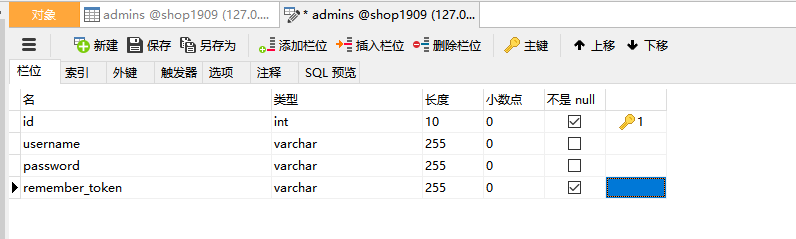
2.找到config下的auth.php 文件,加入如下代码
<?php

return [

    /*
    |--------------------------------------------------------------------------
    | Authentication Defaults
    |--------------------------------------------------------------------------
    |
    | This option controls the default authentication "guard" and password
    | reset options for your application. You may change these defaults
    | as required, but they're a perfect start for most applications.
    |
    */

    'defaults' => [
        'guard' => 'web',
        'passwords' => 'users',
    ],

    /*
    |--------------------------------------------------------------------------
    | Authentication Guards
    |--------------------------------------------------------------------------
    |
    | Next, you may define every authentication guard for your application.
    | Of course, a great default configuration has been defined for you
    | here which uses session storage and the Eloquent user provider.
    |
    | All authentication drivers have a user provider. This defines how the
    | users are actually retrieved out of your database or other storage
    | mechanisms used by this application to persist your user's data.
    |
    | Supported: "session", "token"
    |
    */

    'guards' => [
        'web' => [
            'driver' => 'session',
            'provider' => 'users',
        ],

        'api' => [
            'driver' => 'token',
            'provider' => 'users',
            'hash' => false,
        ],
        //加入admin,注意:admin 和app目录的admin.php名字要一致
        'admin' => [
            'driver' => 'session',
            'provider' => 'admins'
        ]
    ],

    /*
    |--------------------------------------------------------------------------
    | User Providers
    |--------------------------------------------------------------------------
    |
    | All authentication drivers have a user provider. This defines how the
    | users are actually retrieved out of your database or other storage
    | mechanisms used by this application to persist your user's data.
    |
    | If you have multiple user tables or models you may configure multiple
    | sources which represent each model / table. These sources may then
    | be assigned to any extra authentication guards you have defined.
    |
    | Supported: "database", "eloquent"
    |
    */

    'providers' => [
        'users' => [
            'driver' => 'eloquent',
            'model' => App\User::class,
        ],
        //admins 是刚才建立的admins表,名字同样也要保持一致
        'admins' => [
            'driver' => 'eloquent',
            'model' => App\Admin::class
        ]

        // 'users' => [
        //     'driver' => 'database',
        //     'table' => 'users',
        // ],
    ],

    /*
    |--------------------------------------------------------------------------
    | Resetting Passwords
    |--------------------------------------------------------------------------
    |
    | You may specify multiple password reset configurations if you have more
    | than one user table or model in the application and you want to have
    | separate password reset settings based on the specific user types.
    |
    | The expire time is the number of minutes that the reset token should be
    | considered valid. This security feature keeps tokens short-lived so
    | they have less time to be guessed. You may change this as needed.
    |
    */

    'passwords' => [
        'users' => [
            'provider' => 'users',
            'table' => 'password_resets',
            'expire' => 60,
            'throttle' => 60,
        ],
    ],

    /*
    |--------------------------------------------------------------------------
    | Password Confirmation Timeout
    |--------------------------------------------------------------------------
    |
    | Here you may define the amount of seconds before a password confirmation
    | times out and the user is prompted to re-enter their password via the
    | confirmation screen. By default, the timeout lasts for three hours.
    |
    */

    'password_timeout' => 10800,

];
3.在app下建立admin.php
<?php

namespace App;

use Illuminate\Foundation\Auth\User as Authenticatable;

class Admin extends Authenticatable
{

    protected $fillable = [
        'username', 'password',
    ];

    protected $hidden = [
        //remember_token 字段用于记住我的功能
        'password', 'remember_token',
    ];
    public static $rules = [
        'username'=>'required',
        'password'=>'required'
    ];
}
?>
4.建立AdminsController
<?php

namespace App\Http\Controllers;

use App\Http\Requests\UserRequest;
use Illuminate\Support\Facades\Auth;

class AdminsController extends Controller
{
    //
    public function login(){
        //echo bcrypt('123456');
        //die();
        return view('admins.login');
    }

    public function dologin(UserRequest $request){
        $credentials = $request->only('username', 'password');
        /**
         * 使用laravel自带的Auth登录
         * 1、密码使用的是hash加密 $crypt = password_hash($password, PASSWORD_DEFAULT);
         */
        if(Auth::guard('admin')->attempt($credentials)){
            return response()->json(['code' => 200, 'msg' => '登录成功']);
        }else{
            return response()->json(['code' => 403, 'msg' => '用户名或密码错误']);
        }
    }
}
5.建立登录视图页面
<link rel="stylesheet" href="https://stackpath.bootstrapcdn.com/bootstrap/3.4.1/css/bootstrap.min.css" integrity="sha384-HSMxcRTRxnN+Bdg0JdbxYKrThecOKuH5zCYotlSAcp1+c8xmyTe9GYg1l9a69psu" crossorigin="anonymous">

<div style="margin: 0 auto;width: 1000px">
    <h3>用户登录</h3>
    <hr>
    <form action="{{ url('/admins/dologin') }}" method="post">
        <div class="form-group">
            <input type="text" name="username" class="form-control" placeholder="请输入账号" style="width: 200px">
        </div>
        <div class="form-group">
            <input type="password"  name="password" class="form-control" placeholder="请输入密码" style="width: 200px">
        </div>

        <div class="form-group">
            <input type="text" name="code" class="form-control" placeholder="请输入验证码" style="width: 200px">
            <img src="{{captcha_src()}}" onclick="this.src='{{captcha_src()}}'+Math.random()">
        </div>
        @csrf
        <button type="submit" class="btn btn-info">登录</button>
        @if (count($errors) > 0)
            <div class="alert alert-danger">
                <ul>
                    @foreach ($errors->all() as $error)
                        <li>{{ $error }}</li>
                    @endforeach
                </ul>
            </div>
        @endif
    </form>
</div>
6.建立中间件,并配置中间件

Route::group(['prefix' =>'admin','middleware'=>['adminauth']],function(){
    Route::get('shop/list','ShopController@index');
});


Route::get('admins/login','AdminsController@login');
Route::post('admins/dologin','AdminsController@dologin');
<?php

namespace App\Http\Middleware;

use Closure;
use Illuminate\Support\Facades\Auth;

class AdminAuth
{
    /**
     * Handle an incoming request.
     *
     * @param \Illuminate\Http\Request $request
     * @param \Closure $next
     * @return mixed
     */
    public function handle($request, Closure $next, $guard = null)
    {
        //如果没有指定的话,默认 guard 是 web,
        //dump(Auth::guard($guard)->check()); 判断用户是否认证
        //Auth::guard($guard)->user() 获取用户信息
        //Auth::guard($guard)->guest() 是否是来宾
        if(Auth::guard($guard)->guest()){
            if($request->ajax() || $request->wantsJson()){
                return response('Unauthorized.', 401);
            }else{
                return redirect()->guest('admins/login');
            }
        }

        return $next($request);
    }
}
7.如果你在登录页面使用了验证码的话,可以借助独立验证器进行验证
<?php

namespace App\Http\Requests;

use Illuminate\Foundation\Http\FormRequest;

class UserRequest extends FormRequest
{
    /**
     * Determine if the user is authorized to make this request.
     *
     * @return bool
     */
    public function authorize()
    {
        return true;
    }

    /**
     * Get the validation rules that apply to the request.
     *
     * @return array
     */
    public function rules()
    {
        return [
            //
            'username' => 'required|max:30|min:6',
            'password' => 'required|min:6',
            'code' => 'required|captcha'
        ];
    }
    public function messages()
    {
        return [
            'username.required' => '账号不能为空',
            'username.max' => '账号过长',
            'username.min' => '账号格式不正确',
            'password.required' =>'密码不能为空',
            'password.min' => '密码过于简单',
            'code.required' =>'验证码不能为空',
            'code.captcha' => '验证码错误'
        ];
    }
}
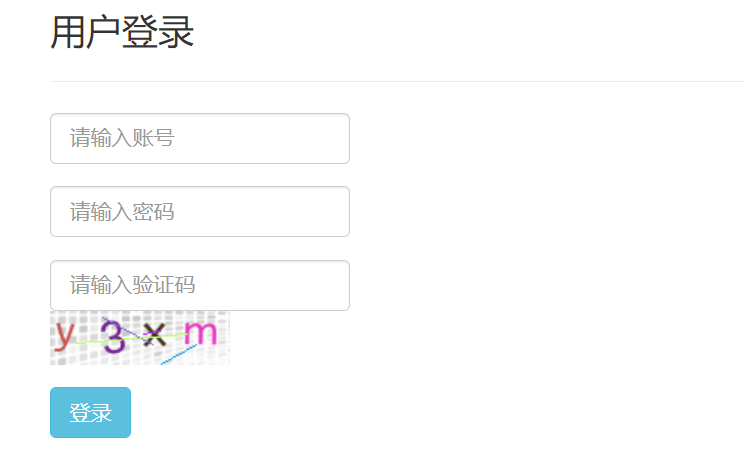
8.登录页面展示

 浙公网安备 33010602011771号