
FastDfs简单应用以及Demo搭建
FastDFS
1、FastDFS的使用:
链接地址:https://blog.csdn.net/zbx931197485/article/details/109449525
拉取镜像:docker pull delron/fastdfs
Track:
docker run -d \
--name tracker \
--net=host \
-v /opt/fastdfs/tracker:/data/fast_data \
delron/fastdfs tracker
Storage:
docker run -d \
--name storage \
--net=host \
-v /opt/fastdfs/storage:/data/fast_data \
-e TRACKER_SERVER=你的IP地址:22122 \
-e GROUP_NAME=group1 \
delron/fastdfs storage
检测方式:
将一个图片发送到docker映射的目录里面,比如我的opt/fdfs/storage
使用docker exec -it storage /bin/bash,进入到storage容器里面,进入目录/data/fast_data。
使用/usr/bin/fdfs_upload_file /etc/fdfs/client.conf test.png将文件传入到storage中,就会输出这个文件的存储的路径。
报错信息:
如果报错error:2,且你的设备不是第一次安装fastDFS,那么,请杀掉22122端口的进程,重新启动tracker的镜像。就可以正常使用了
SpringBoot集成FastDFS:
- 导入依赖
<dependency>
    <groupId>org.csource</groupId>
    <artifactId>fastdfs-client</artifactId>
    <version>1.26.5</version>
</dependency>
- 编写配置文件
connect_timeout = 10
network_timeout = 30
charset = UTF-8
http.tracker_http_port = 8080

tracker_server = 你的IP地址:22122
- 编写工具类
public class FastDfsUtil {
    private static final Logger logger = LoggerFactory.getLogger(FastDfsUtil.class);
    private static final String LOCATE_CONF = "fdfs_client.conf";
    /**
     * 上传文件到FastDFS上
     *
     * @param fileByte 文件byte数组
     * @param ext      文件后缀
     * @return 文件路径
     */
    public static String upload(byte[] fileByte, String ext) {
        TrackerServer trackerServer = null;
        String[] paths = new String[2];
        try {
            ClientGlobal.init(LOCATE_CONF);
            TrackerClient trackerClient = new TrackerClient();
            trackerServer = trackerClient.getTrackerServer();

            StorageClient storageClient = new StorageClient(trackerServer, null);
            paths = storageClient.upload_file(fileByte, ext, null);
        } catch (IOException | MyException e) {
            logger.warn("[FastDFS]上传文件出现错误:", e);
        }
        return paths[0] + "/" + paths[1];
    }

    /**
     * 从FastDFS上下载文件
     *
     * @param group          文件组名
     * @param remoteFileName 远程文件名
     * @return byte数组
     */
    public static byte[] download(String group, String remoteFileName) {
        byte[] result = new byte[0];
        TrackerServer trackerServer;
        StorageClient storageClient;
        try {
            ClientGlobal.init(LOCATE_CONF);
            TrackerClient trackerClient = new TrackerClient();
            trackerServer = trackerClient.getTrackerServer();
            storageClient = new StorageClient(trackerServer, null);
            result = storageClient.download_file(group, remoteFileName);
        } catch (Exception e) {
            logger.warn("[FastDFS]-下载文件出现错误:", e);
        }
        return result;
    }

    /**
     * 用来删除FastDFS上的文件
     *
     * @param group          文件组名
     * @param remoteFileName 远程文件名
     * @return 是否成功
     */
    public static boolean deleteFile(String group, String remoteFileName) {
        TrackerServer trackerServer;
        StorageClient storageClient;
        try {
            ClientGlobal.init(LOCATE_CONF);
            TrackerClient trackerClient = new TrackerClient();
            trackerServer = trackerClient.getTrackerServer();
            storageClient = new StorageClient(trackerServer, null);
            int code = storageClient.delete_file(group, remoteFileName);
            if (code == 0) {
                return true;
            } else {
                logger.warn("[FastDFS]-删除文件失败,错误代码:{}", code);
            }
        } catch (Exception e) {
            logger.warn("[FastDFS]-下载文件出现错误:", e);
        }
        return false;
    }
}
- entity层、service层和Mapper层略,请结合Mybtais和MySQL自行实现
创建数据库的脚本:
use demo;
-- 文档基本表
create or replace table basefile{
    fileid int not null primary key auto_increment,
    filesize int not null,
    filename varchar (20) not null,
    filext varchar (10) not null
    filepath varchar (50) not null,
);
- 编写controller:
@RestController
public class TestController {
    Logger logger = LoggerFactory.getLogger(TestController.class);

    @RequestMapping("test")
    public String test() {
        return "服务启动成功";
    }

    @RequestMapping("upload")
    public void upload(@RequestParam(value = "file", required = true) MultipartFile file,
                       @RequestParam(value = "filename", required = true) String fileName,
                       @RequestParam(value = "filext", required = true) String fileExt, HttpServletRequest req, HttpServletResponse resp) {
        long size = 0L;
        String originalFilename = file.getOriginalFilename();
        String contentType = file.getContentType();
        byte[] bytes = new byte[0];
        try {
            size = file.getSize();
            bytes = file.getBytes();
        } catch (IOException e) {
            logger.warn("[上传文件]-发生错误: ", e);
        }
        String docPath = FastDfsUtil.upload(bytes, "png");
        logger.info("[文件路径]:{}",docPath);
    }

    @RequestMapping("download")
    public void download(@RequestParam("group") String group,
                         @RequestParam(value = "path") String path,
                         HttpServletResponse resp) {
        //通过FastDFS获取文件内容
        byte[] bytes = FastDfsUtil.download(group, path);

        //将文件字节数组放到Response中,返回给前端
        resp.reset();
        resp.setCharacterEncoding("UTF-8");
        //指定文件的大小
        resp.addHeader("Content-Length", String.valueOf(bytes.length));
        resp.setContentType("application/octet-stream");
        try {
            resp.addHeader("Content-Disposition", "attachment;filename=" + URLEncoder.encode("test.png", "UTF-8"));
            ServletOutputStream outputStream = resp.getOutputStream();
            outputStream.write(bytes);
            outputStream.flush();
            outputStream.close();
        } catch (Exception e) {
            logger.warn("[下载文件]:错误:", e);
        }
    }
    /**
     * 在线预览图片文件的
     */
    @GetMapping(value = "getImg", produces = MediaType.IMAGE_PNG_VALUE)
    public ResponseEntity<byte[]> getImage(@RequestParam("docId") int intDocId) throws IOException {
        byte[] bytes = service.download(intDocId);
        HttpHeaders headers = new HttpHeaders();
        return new ResponseEntity<>(bytes, headers, HttpStatus.OK);
    }
}
测试接口:
使用PostMan进行测试:
上传文件:
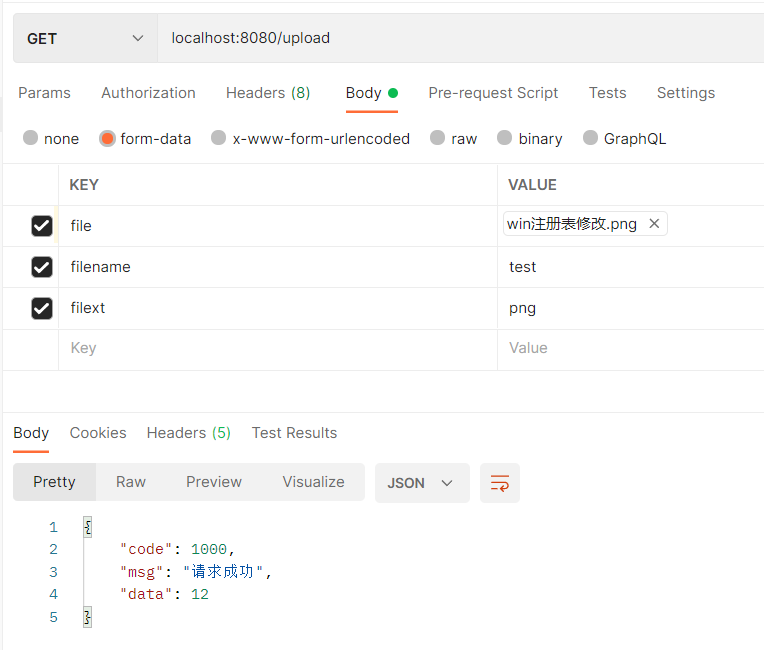
下载文件:

 浙公网安备 33010602011771号