
03.SpringCloud Alibaba Seata (分布式事务)
1.分布式事务问题
- 分布式前
单机单库没这个问题
- 分布式之后
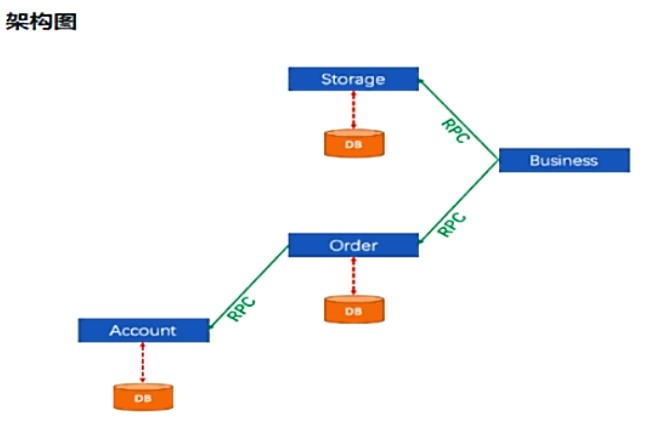
一次业务操作需要跨多个数据源或需要跨多个系统进行远程调用,就会产生分布式事务问题

2.Seata的简介
是什么
Seata是一款开源的分布式事务解决方案,致力于在微服务架构下提供高性能和简单易用的分布式事务服务
官网
能干吗
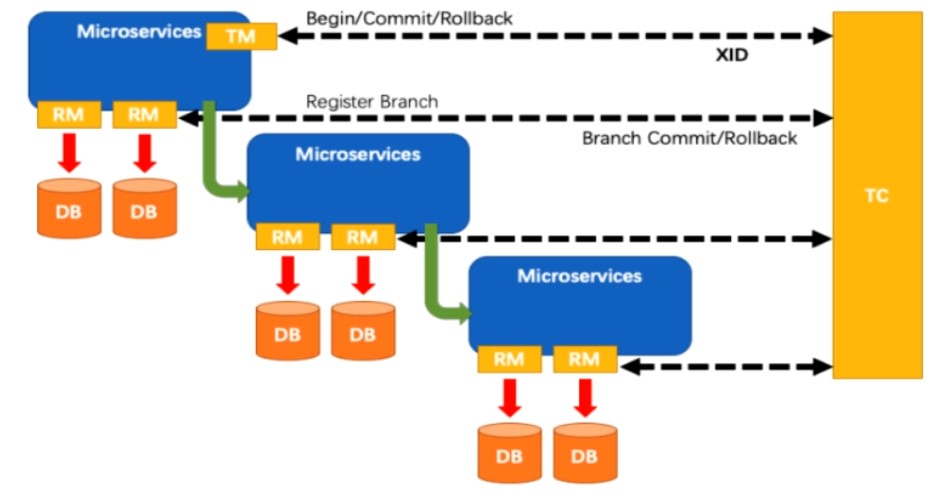
一个典型的分布式事务过程
分布式事务处理过程的-ID+三组件模型 (1带3)
- Transaction ID XID (全局事务ID)
三组件
- Transaction Coordinator(TC)
- Transaction Manager(TM)
- Resource Manager(RM)

去哪下
发布说明:
怎么玩
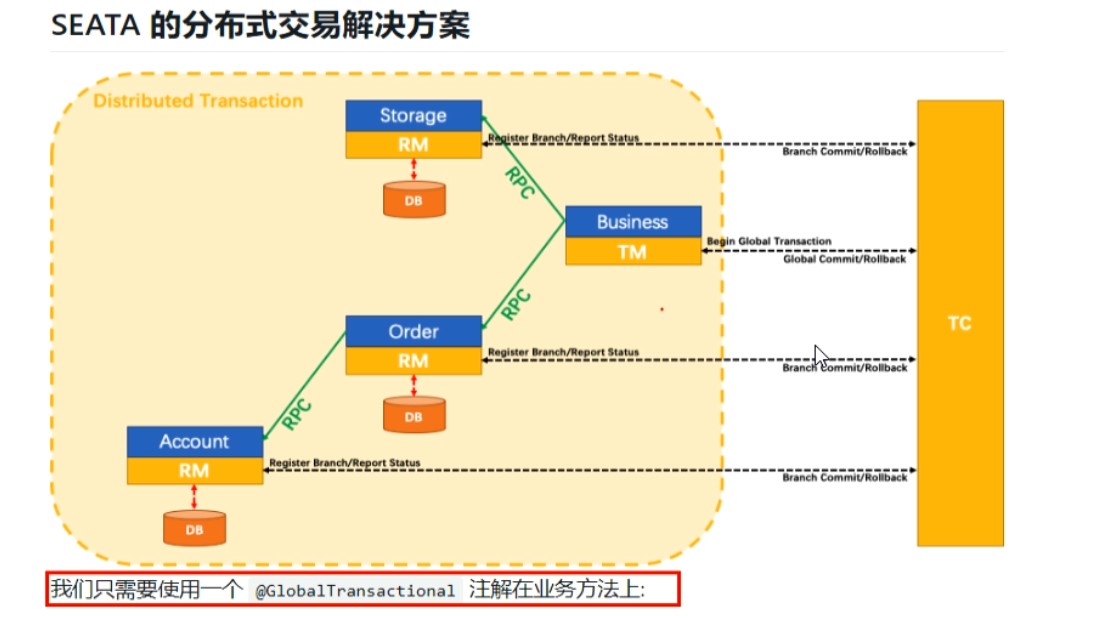
Spring 本地@Transactional
Seatal 全局@GlobalTransactional
3.Seata-Server安装
1.官网地址
2.下载版本
这次用的0.9
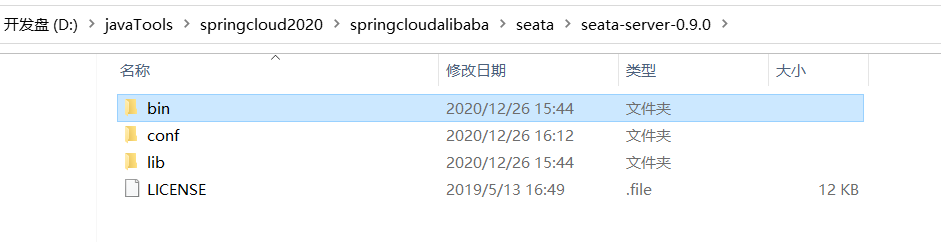
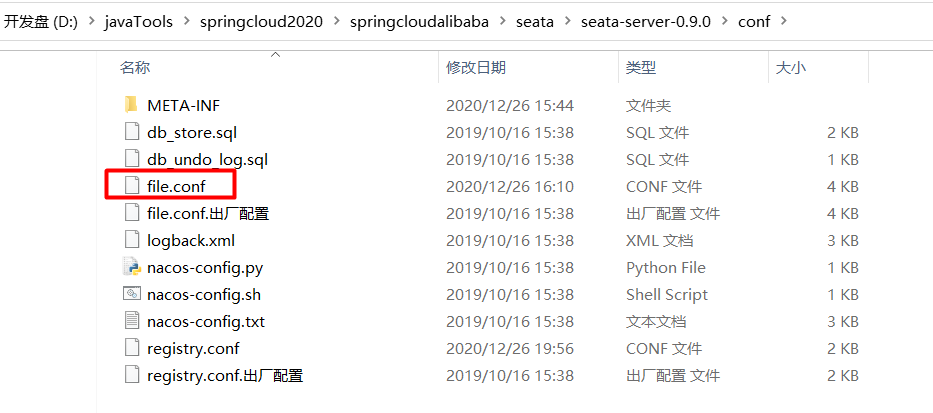
3.seata-server-0.9.0.zip解压到指定目录 并修改conf目录下的file.conf配置文件
修改file.conf配置文件
修改conf目录下的file.conf配置文件
每次该文件先备份原来的,再修改
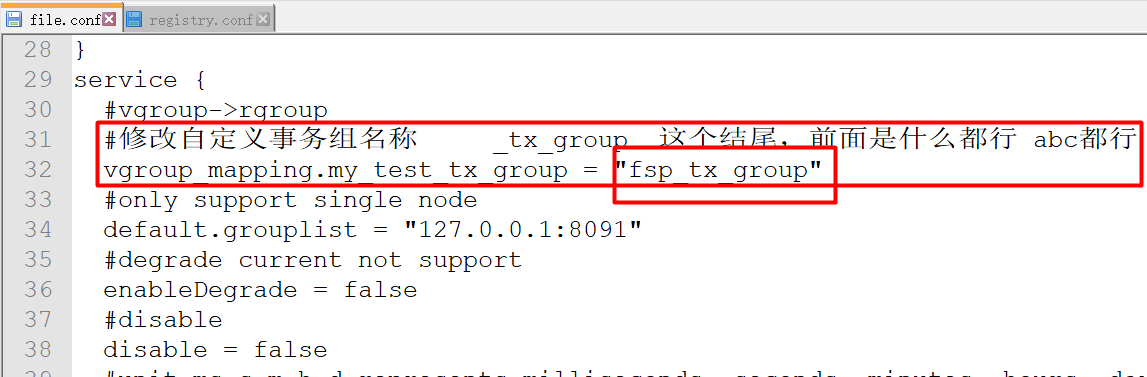
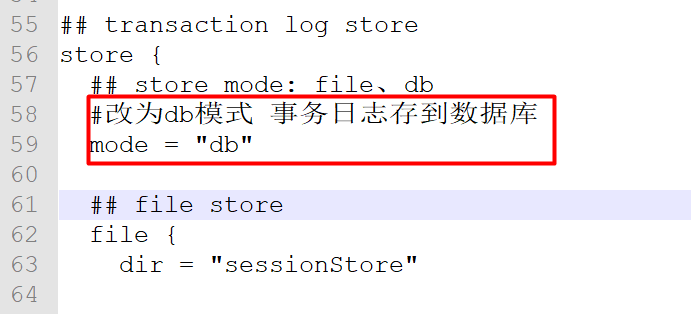
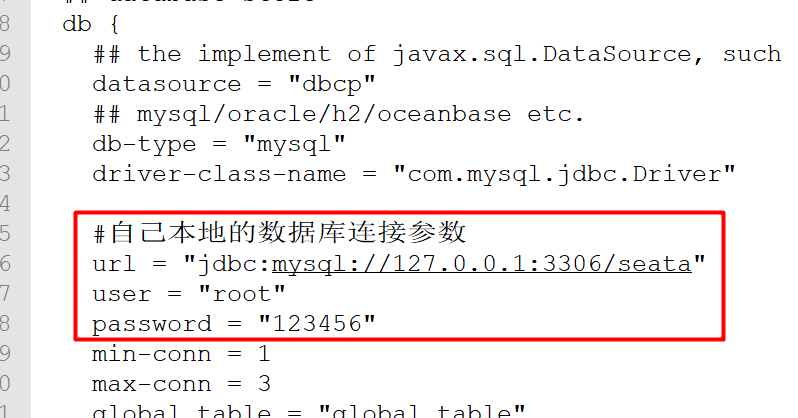
主要修改:自定义事务组名称+事务日志存储模式为db+数据库连接信息
service模块 (自定义事务组名称)
store模块 (事务日志存储模式为db+数据库连接信息)
4.mysql5.7数据库新建库seata
5.在seata库里建表
建表db_store.sql在\seata-server-0.9.0\seata\conf目录里面
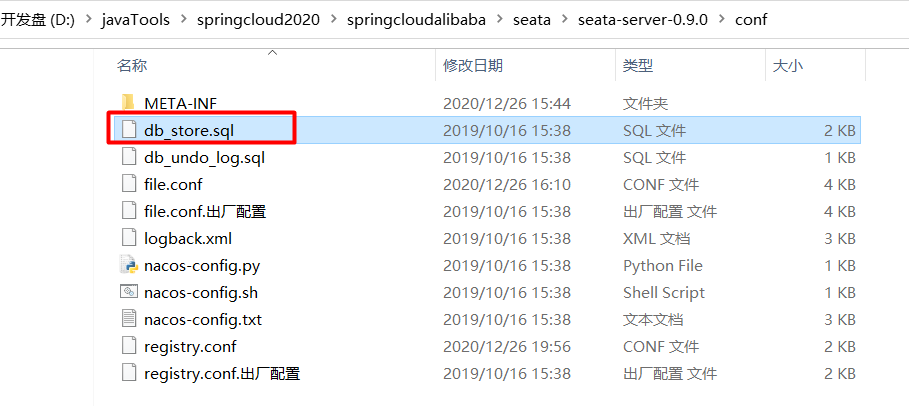
-- the table to store GlobalSession data
drop table if exists `global_table`;
create table `global_table` (
  `xid` varchar(128)  not null,
  `transaction_id` bigint,
  `status` tinyint not null,
  `application_id` varchar(32),
  `transaction_service_group` varchar(32),
  `transaction_name` varchar(128),
  `timeout` int,
  `begin_time` bigint,
  `application_data` varchar(2000),
  `gmt_create` datetime,
  `gmt_modified` datetime,
  primary key (`xid`),
  key `idx_gmt_modified_status` (`gmt_modified`, `status`),
  key `idx_transaction_id` (`transaction_id`)
);

-- the table to store BranchSession data
drop table if exists `branch_table`;
create table `branch_table` (
  `branch_id` bigint not null,
  `xid` varchar(128) not null,
  `transaction_id` bigint ,
  `resource_group_id` varchar(32),
  `resource_id` varchar(256) ,
  `lock_key` varchar(128) ,
  `branch_type` varchar(8) ,
  `status` tinyint,
  `client_id` varchar(64),
  `application_data` varchar(2000),
  `gmt_create` datetime,
  `gmt_modified` datetime,
  primary key (`branch_id`),
  key `idx_xid` (`xid`)
);

-- the table to store lock data
drop table if exists `lock_table`;
create table `lock_table` (
  `row_key` varchar(128) not null,
  `xid` varchar(96),
  `transaction_id` long ,
  `branch_id` long,
  `resource_id` varchar(256) ,
  `table_name` varchar(32) ,
  `pk` varchar(36) ,
  `gmt_create` datetime ,
  `gmt_modified` datetime,
  primary key(`row_key`)
);
6.修改seata-server-0.9.0\seata\conf目录下的registry.conf配置文件
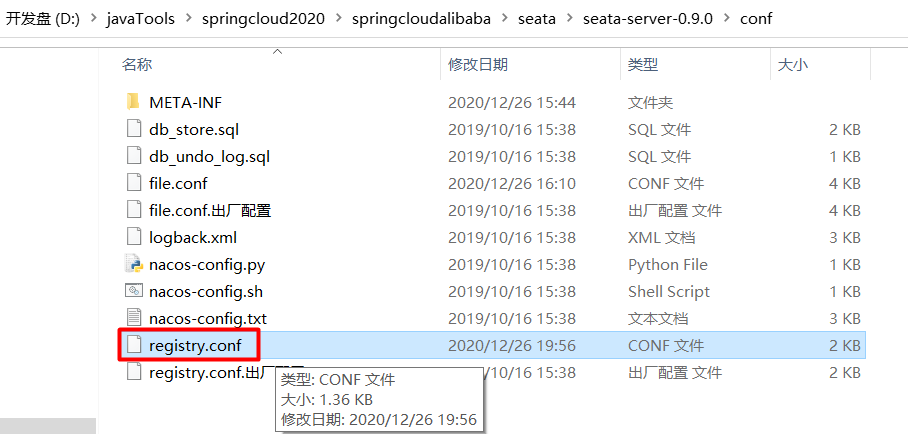
修改为自己的nacos,并修改自己的nacos配置
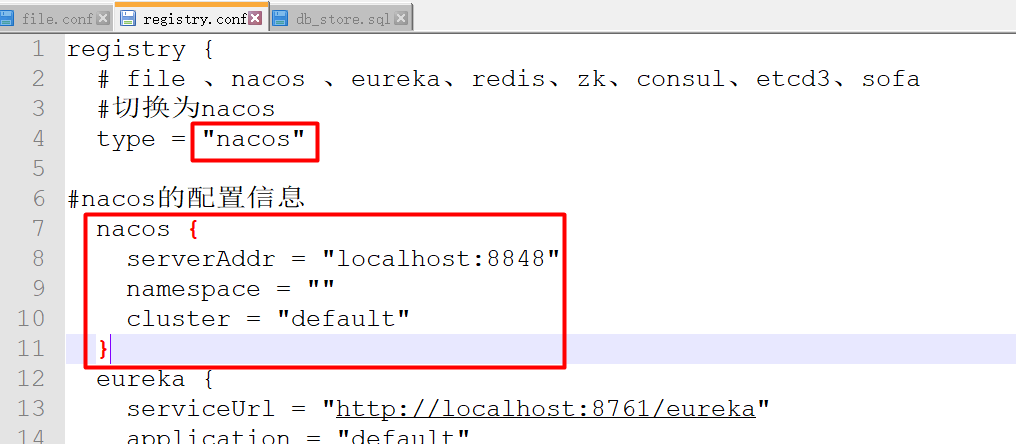
7.先启动Nacos端口号8848
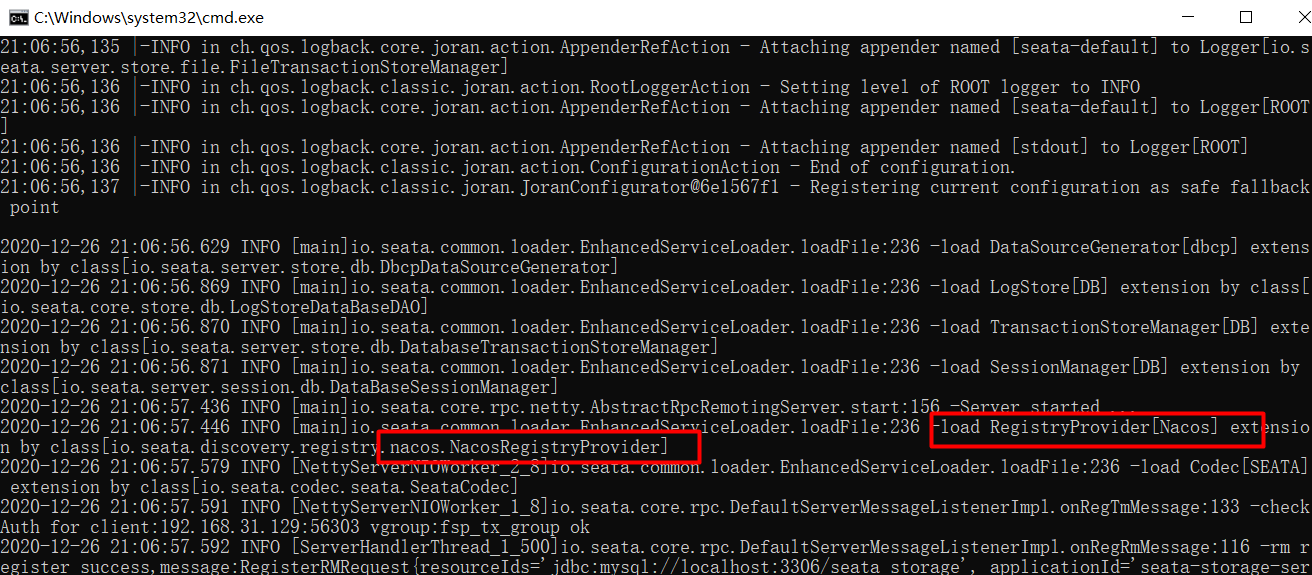
8.再启动seata-server
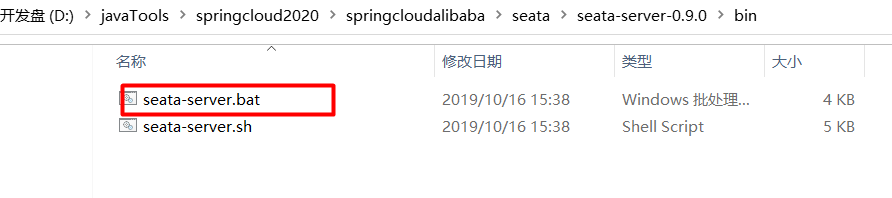
看到注册进nacos,就说明可以了
4.订单/库存/账户业务数据库准备
以下演示都需要先启动Nacos后启动Seata,保证两个都OK
Seata没启动报错no available server to connect
分布式事务业务说明
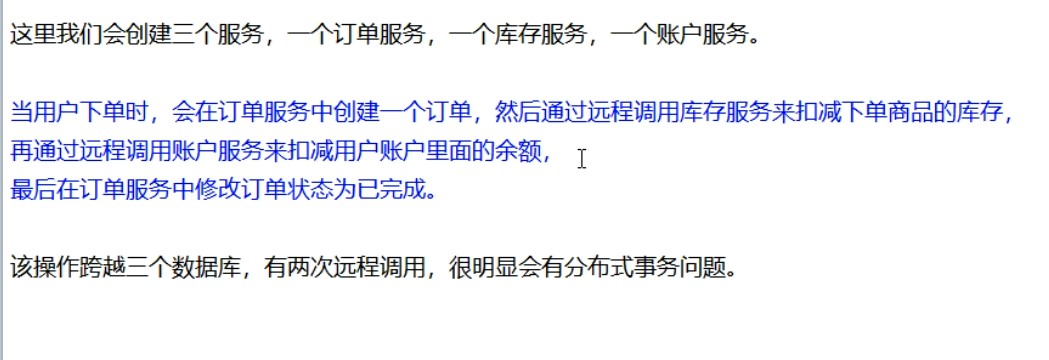
下订单-->扣库存-->减账户(余额)
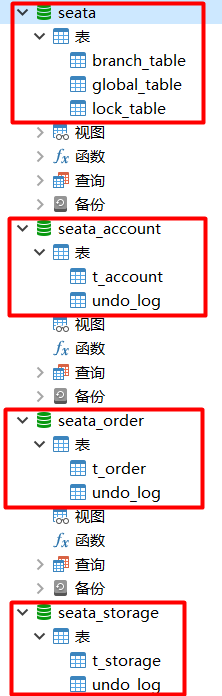
创建业务数据库
- seata_order: 存储订单的数据库
- seata_storage:存储库存的数据库
- seata_account: 存储账户信息的数据库
CREATE DATABASE seata_order;

CREATE DATABASE seata_storage;

CREATE DATABASE seata_account;
按照上述3库分别建对应业务表
- seata_order库下建t_order表
DROP TABLE IF EXISTS `t_order`;
CREATE TABLE `t_order`  (
  `id` bigint(11) NOT NULL AUTO_INCREMENT,
  `user_id` bigint(11) NULL DEFAULT NULL COMMENT '用户id',
  `product_id` bigint(11) NULL DEFAULT NULL COMMENT '产品id',
  `count` int(11) NULL DEFAULT NULL COMMENT '数量',
  `money` decimal(11, 0) NULL DEFAULT NULL COMMENT '金额',
  `status` int(1) NULL DEFAULT NULL COMMENT '订单状态:0:创建中; 1:已完结',
  PRIMARY KEY (`id`) USING BTREE
) - seata_storage库下建t_storage表
DROP TABLE IF EXISTS `t_storage`;
CREATE TABLE `t_storage`  (
  `id` bigint(11) NOT NULL AUTO_INCREMENT,
  `product_id` bigint(11) NULL DEFAULT NULL COMMENT '产品id',
  `total` int(11) NULL DEFAULT NULL COMMENT '总库存',
  `used` int(11) NULL DEFAULT NULL COMMENT '已用库存',
  `residue` int(11) NULL DEFAULT NULL COMMENT '剩余库存',
  PRIMARY KEY (`id`) USING BTREE
)

INSERT INTO `t_storage` VALUES (1, 1, 100, 0, 100);- seata_account库下建t_account表
CREATE TABLE `t_account`  (
  `id` bigint(11) NOT NULL AUTO_INCREMENT COMMENT 'id',
  `user_id` bigint(11) NULL DEFAULT NULL COMMENT '用户id',
  `total` decimal(10, 0) NULL DEFAULT NULL COMMENT '总额度',
  `used` decimal(10, 0) NULL DEFAULT NULL COMMENT '已用余额',
  `residue` decimal(10, 0) NULL COMMENT '剩余可用额度',
  PRIMARY KEY (`id`) USING BTREE
)

INSERT INTO `t_account` VALUES (1, 1, 1000, 0, 1000);
按照上述3库分别建对应的回滚日志表
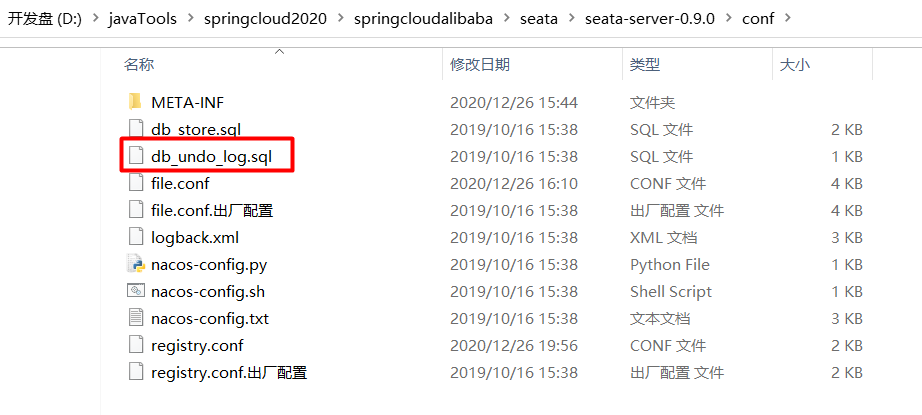
订单-库存-账户3个库下都需要建各自的回滚日志表
\seata-server-0.9.0\seata\conf目录下的db_undo_log.sql
-- the table to store seata xid data
-- 0.7.0+ add context
-- you must to init this sql for you business databese. the seata server not need it.
-- 此脚本必须初始化在你当前的业务数据库中,用于AT 模式XID记录。与server端无关(注:业务数据库)
-- 注意此处0.3.0+ 增加唯一索引 ux_undo_log
drop table `undo_log`;
CREATE TABLE `undo_log` (
  `id` bigint(20) NOT NULL AUTO_INCREMENT,
  `branch_id` bigint(20) NOT NULL,
  `xid` varchar(100) NOT NULL,
  `context` varchar(128) NOT NULL,
  `rollback_info` longblob NOT NULL,
  `log_status` int(11) NOT NULL,
  `log_created` datetime NOT NULL,
  `log_modified` datetime NOT NULL,
  `ext` varchar(100) DEFAULT NULL,
  PRIMARY KEY (`id`),
  UNIQUE KEY `ux_undo_log` (`xid`,`branch_id`)
) ENGINE=InnoDB AUTO_INCREMENT=1 DEFAULT CHARSET=utf8;
最终效果
5.订单/库存/账户业务微服务准备
依赖问题 父pom是如下
<!--spring cloud alibaba 2.1.0.RELEASE-->
<dependency>
  <groupId>com.alibaba.cloud</groupId>
  <artifactId>spring-cloud-alibaba-dependencies</artifactId>
  <version>2.1.0.RELEASE</version>
  <type>pom</type>
  <scope>import</scope>
</dependency>
本次使用的是druid 还有 mybatis
5.1新建订单Order-Module
5.1.1.新建seata-order-service2001模块
5.1.2.pom
<dependencies>
        <!--nacos-->
        <dependency>
            <groupId>com.alibaba.cloud</groupId>
            <artifactId>spring-cloud-starter-alibaba-nacos-discovery</artifactId>
        </dependency>
        <!--seata  这里引入seata 排除seata-all的-->
        <dependency>
            <groupId>com.alibaba.cloud</groupId>
            <artifactId>spring-cloud-starter-alibaba-seata</artifactId>
            <exclusions>
                <exclusion>
                    <artifactId>seata-all</artifactId>
                    <groupId>io.seata</groupId>
                </exclusion>
            </exclusions>
        </dependency>
        <!--这里我们再重新引入seata的 依赖 我们seata服务器用的是0.9,所以上面排除,用我们自己的0.9版本-->
        <dependency>
            <groupId>io.seata</groupId>
            <artifactId>seata-all</artifactId>
            <version>0.9.0</version>
        </dependency>
        <!--feign-->
        <dependency>
            <groupId>org.springframework.cloud</groupId>
            <artifactId>spring-cloud-starter-openfeign</artifactId>
        </dependency>
        <!--web-actuator-->
        <dependency>
            <groupId>org.springframework.boot</groupId>
            <artifactId>spring-boot-starter-web</artifactId>
        </dependency>
        <dependency>
            <groupId>org.springframework.boot</groupId>
            <artifactId>spring-boot-starter-actuator</artifactId>
        </dependency>
        <!--mysql-druid-->
        <dependency>
            <groupId>mysql</groupId>
            <artifactId>mysql-connector-java</artifactId>
            <version>5.1.37</version>
        </dependency>
        <dependency>
            <groupId>com.alibaba</groupId>
            <artifactId>druid-spring-boot-starter</artifactId>
            <version>1.1.10</version>
        </dependency>
        <dependency>
            <groupId>org.mybatis.spring.boot</groupId>
            <artifactId>mybatis-spring-boot-starter</artifactId>
            <version>2.0.0</version>
        </dependency>
        <dependency>
            <groupId>org.springframework.boot</groupId>
            <artifactId>spring-boot-starter-test</artifactId>
            <scope>test</scope>
        </dependency>
        <dependency>
            <groupId>org.projectlombok</groupId>
            <artifactId>lombok</artifactId>
            <optional>true</optional>
        </dependency>
    </dependencies>
5.1.3.YML
server:
  port: 2001

spring:
  application:
    name: seata-order-service
  cloud:
    alibaba:
      seata:
        #自定义事务组名称需要与seata-server中的对应   file.conf
        tx-service-group: fsp_tx_group
    nacos:    #nacos的依赖
      discovery:
        server-addr: localhost:8848
  datasource:
    driver-class-name: com.mysql.jdbc.Driver
    url: jdbc:mysql://localhost:3306/seata_order
    username: root
    password: 123456

#开启hystrix的feign
feign:
  hystrix:
    enabled: false

logging:   #日志
  level:
    io:
      seata: info

mybatis:
  mapperLocations: classpath:mapper/*.xml
5.1.4.file.conf
transport {
  # tcp udt unix-domain-socket
  type = "TCP"
  #NIO NATIVE
  server = "NIO"
  #enable heartbeat
  heartbeat = true
  #thread factory for netty
  thread-factory {
    boss-thread-prefix = "NettyBoss"
    worker-thread-prefix = "NettyServerNIOWorker"
    server-executor-thread-prefix = "NettyServerBizHandler"
    share-boss-worker = false
    client-selector-thread-prefix = "NettyClientSelector"
    client-selector-thread-size = 1
    client-worker-thread-prefix = "NettyClientWorkerThread"
    # netty boss thread size,will not be used for UDT
    boss-thread-size = 1
    #auto default pin or 8
    worker-thread-size = 8
  }
  shutdown {
    # when destroy server, wait seconds
    wait = 3
  }
  serialization = "seata"
  compressor = "none"
}

service {
  #这里的这个 fsp_tx_group 是我们服务器的file.conf 自定义的名称
  vgroup_mapping.fsp_tx_group = "default"

  default.grouplist = "127.0.0.1:8091"
  enableDegrade = false
  disable = false
  max.commit.retry.timeout = "-1"
  max.rollback.retry.timeout = "-1"
  disableGlobalTransaction = false
}


client {
  async.commit.buffer.limit = 10000
  lock {
    retry.internal = 10
    retry.times = 30
  }
  report.retry.count = 5
  tm.commit.retry.count = 1
  tm.rollback.retry.count = 1
}

## transaction log store
store {
  ## store mode: file、db
  #切换db
  mode = "db"

  ## file store
  file {
    dir = "sessionStore"

    # branch session size , if exceeded first try compress lockkey, still exceeded throws exceptions
    max-branch-session-size = 16384
    # globe session size , if exceeded throws exceptions
    max-global-session-size = 512
    # file buffer size , if exceeded allocate new buffer
    file-write-buffer-cache-size = 16384
    # when recover batch read size
    session.reload.read_size = 100
    # async, sync
    flush-disk-mode = async
  }

  ## database store
  db {
    ## the implement of javax.sql.DataSource, such as DruidDataSource(druid)/BasicDataSource(dbcp) etc.
    datasource = "dbcp"
    ## mysql/oracle/h2/oceanbase etc.
    db-type = "mysql"
    driver-class-name = "com.mysql.jdbc.Driver"

     #事务日志配置的seata配置
    url = "jdbc:mysql://127.0.0.1:3306/seata"
    user = "root"
    password = "123456"
    min-conn = 1
    max-conn = 3
    global.table = "global_table"
    branch.table = "branch_table"
    lock-table = "lock_table"
    query-limit = 100
  }
}
lock {
  ## the lock store mode: local、remote
  mode = "remote"

  local {
    ## store locks in user's database
  }

  remote {
    ## store locks in the seata's server
  }
}
recovery {
  #schedule committing retry period in milliseconds
  committing-retry-period = 1000
  #schedule asyn committing retry period in milliseconds
  asyn-committing-retry-period = 1000
  #schedule rollbacking retry period in milliseconds
  rollbacking-retry-period = 1000
  #schedule timeout retry period in milliseconds
  timeout-retry-period = 1000
}

transaction {
  undo.data.validation = true
  undo.log.serialization = "jackson"
  undo.log.save.days = 7
  #schedule delete expired undo_log in milliseconds
  undo.log.delete.period = 86400000
  undo.log.table = "undo_log"
}

## metrics settings
metrics {
  enabled = false
  registry-type = "compact"
  # multi exporters use comma divided
  exporter-list = "prometheus"
  exporter-prometheus-port = 9898
}

support {
  ## spring
  spring {
    # auto proxy the DataSource bean
    datasource.autoproxy = false
  }
}
5.1.5.registry.conf
这个文件跟seata服务器的配置文件的保持一样的配置信息
registry {
  # file 、nacos 、eureka、redis、zk、consul、etcd3、sofa
  type = "nacos"

  nacos {
    serverAddr = "localhost:8848"
    namespace = ""
    cluster = "default"
  }
  eureka {
    serviceUrl = "http://localhost:8761/eureka"
    application = "default"
    weight = "1"
  }
  redis {
    serverAddr = "localhost:6379"
    db = "0"
  }
  zk {
    cluster = "default"
    serverAddr = "127.0.0.1:2181"
    session.timeout = 6000
    connect.timeout = 2000
  }
  consul {
    cluster = "default"
    serverAddr = "127.0.0.1:8500"
  }
  etcd3 {
    cluster = "default"
    serverAddr = "http://localhost:2379"
  }
  sofa {
    serverAddr = "127.0.0.1:9603"
    application = "default"
    region = "DEFAULT_ZONE"
    datacenter = "DefaultDataCenter"
    cluster = "default"
    group = "SEATA_GROUP"
    addressWaitTime = "3000"
  }
  file {
    name = "file.conf"
  }
}

config {
  # file、nacos 、apollo、zk、consul、etcd3
  type = "file"

  nacos {
    serverAddr = "localhost"
    namespace = ""
  }
  consul {
    serverAddr = "127.0.0.1:8500"
  }
  apollo {
    app.id = "seata-server"
    apollo.meta = "http://192.168.1.204:8801"
  }
  zk {
    serverAddr = "127.0.0.1:2181"
    session.timeout = 6000
    connect.timeout = 2000
  }
  etcd3 {
    serverAddr = "http://localhost:2379"
  }
  file {
    name = "file.conf"
  }
}
5.1.6.domain
CommonResult
@Data
@AllArgsConstructor
@NoArgsConstructor
public class CommonResult<T> {
    private Integer code;
    private String  message;
    private T       data;

    public CommonResult(Integer code, String message) {
        this(code,message,null);
    }
}
Order
@Data
@AllArgsConstructor
@NoArgsConstructor
public class Order {
    private Long id;

    private Long userId;

    private Long productId;

    private Integer count;

    private BigDecimal money;

    private Integer status; //订单状态:0:创建中;1:已完结
}
5.1.7.Dao接口及实现
OrderDao
@Mapper
public interface OrderDao {
    //新建订单
    void create(Order order);

    //修改订单状态,从零改为1
    void update(@Param("userId") Long userId, @Param("status") Integer status);
}
resources文件夹下新建mapper文件夹后添加OrderMapper.xml
<mapper namespace="com.chl.springcloud.alibaba.dao.OrderDao">

    <resultMap id="BaseResultMap" type="com.chl.springcloud.alibaba.domain.Order">
        <id column="id" property="id" jdbcType="BIGINT"/>
        <result column="user_id" property="userId" jdbcType="BIGINT"/>
        <result column="product_id" property="productId" jdbcType="BIGINT"/>
        <result column="count" property="count" jdbcType="INTEGER"/>
        <result column="money" property="money" jdbcType="DECIMAL"/>
        <result column="status" property="status" jdbcType="INTEGER"/>
    </resultMap>

    <insert id="create">
        insert into t_order (id,user_id,product_id,count,money,status)
        values (null,#{userId},#{productId},#{count},#{money},0);
    </insert>


    <update id="update">
        update t_order set status = 1
        where user_id=#{userId} and status = #{status};
    </update>

</mapper>
5.1.8.Service接口及实现
OrderService 订单service
public interface OrderService{
    void create(Order order);
}
OrderServiceImpl
@Service
@Slf4j
public class OrderServiceImpl implements OrderService {
    @Resource
    private OrderDao orderDao;
    @Resource
    private StorageService storageService;
    @Resource
    private AccountService accountService;

    /**
     * 创建订单->调用库存服务扣减库存->调用账户服务扣减账户余额->修改订单状态
     */

    @Override
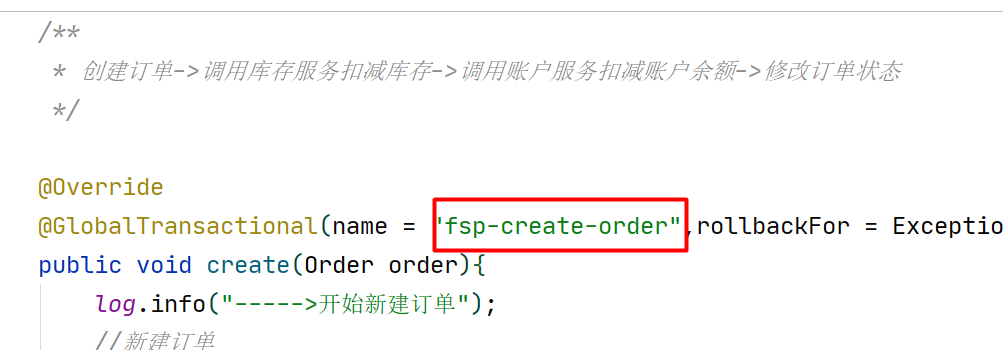
    @GlobalTransactional(name = "fsp-create-order",rollbackFor = Exception.class)
    public void create(Order order){
        log.info("----->开始新建订单");
        //新建订单
        orderDao.create(order);

        //扣减库存
        log.info("----->订单微服务开始调用库存,做扣减Count");
        storageService.decrease(order.getProductId(),order.getCount());
        log.info("----->订单微服务开始调用库存,做扣减end");

        //扣减账户
        log.info("----->订单微服务开始调用账户,做扣减Money");
        accountService.decrease(order.getUserId(),order.getMoney());
        log.info("----->订单微服务开始调用账户,做扣减end");


        //修改订单状态,从零到1代表已经完成
        log.info("----->修改订单状态开始");
        orderDao.update(order.getUserId(),0);
        log.info("----->修改订单状态结束");

        log.info("----->下订单结束了");

    }
}
StorageService (库存的 feign service )
/**
 * 库存的 feign service
 */
@FeignClient(value = "seata-storage-service")
public interface StorageService{
    @PostMapping(value = "/storage/decrease")
    CommonResult decrease(@RequestParam("productId") Long productId, @RequestParam("count") Integer count);
}
AccountService (账户的 feign service)
@FeignClient(value = "seata-account-service")
public interface AccountService{
    @PostMapping(value = "/account/decrease")
    CommonResult decrease(@RequestParam("userId") Long userId, @RequestParam("money") BigDecimal money);
}
5.1.9.Controller
@RestController
public class OrderController{
    @Resource
    private OrderService orderService;


    @GetMapping("/order/create")
    public CommonResult create(Order order) {
        orderService.create(order);
        return new CommonResult(200,"订单创建成功");
    }
}
5.1.10.Config配置
MyBatisConfig
@Configuration
@MapperScan({"com.chl.springcloud.alibaba.dao"})
public class MyBatisConfig {

}
DataSourceProxyConfig (druid的数据连接池)
/**
 * 数据连接池切换为druid
 */
@Configuration
public class DataSourceProxyConfig {


    @Value("${mybatis.mapperLocations}")
    private String mapperLocations;


    @Bean
    @ConfigurationProperties(prefix = "spring.datasource")
    public DataSource druidDataSource(){
        return new DruidDataSource();
    }


    @Bean
    public DataSourceProxy dataSourceProxy(DataSource dataSource) {
        return new DataSourceProxy(dataSource);
    }


    @Bean
    public SqlSessionFactory sqlSessionFactoryBean(DataSourceProxy dataSourceProxy) throws Exception {
        SqlSessionFactoryBean sqlSessionFactoryBean = new SqlSessionFactoryBean();
        sqlSessionFactoryBean.setDataSource((DataSource) dataSourceProxy);
        sqlSessionFactoryBean.setMapperLocations(new PathMatchingResourcePatternResolver().getResources(mapperLocations));
        sqlSessionFactoryBean.setTransactionFactory(new SpringManagedTransactionFactory());
        return sqlSessionFactoryBean.getObject();
    }

}
5.1.11.主启动
@EnableDiscoveryClient
@EnableFeignClients
//取消数据源自动创建的配置  用配置druid的
@SpringBootApplication(exclude = DataSourceAutoConfiguration.class)
public class SeataOrderMainApp2001{

    public static void main(String[] args) {
        SpringApplication.run(SeataOrderMainApp2001.class, args);
    }
}
5.2新建库存Storage-Module
5.2.1.新建seata-order-service2002模块
5.2.2.pom
<dependencies>
        <!--nacos-->
        <dependency>
            <groupId>com.alibaba.cloud</groupId>
            <artifactId>spring-cloud-starter-alibaba-nacos-discovery</artifactId>
        </dependency>
        <!--seata-->
        <dependency>
            <groupId>com.alibaba.cloud</groupId>
            <artifactId>spring-cloud-starter-alibaba-seata</artifactId>
            <exclusions>
                <exclusion>
                    <artifactId>seata-all</artifactId>
                    <groupId>io.seata</groupId>
                </exclusion>
            </exclusions>
        </dependency>
        <dependency>
            <groupId>io.seata</groupId>
            <artifactId>seata-all</artifactId>
            <version>0.9.0</version>
        </dependency>
        <!--feign-->
        <dependency>
            <groupId>org.springframework.cloud</groupId>
            <artifactId>spring-cloud-starter-openfeign</artifactId>
        </dependency>
        <dependency>
            <groupId>org.springframework.boot</groupId>
            <artifactId>spring-boot-starter-web</artifactId>
        </dependency>
        <dependency>
            <groupId>org.springframework.boot</groupId>
            <artifactId>spring-boot-starter-test</artifactId>
            <scope>test</scope>
        </dependency>
        <dependency>
            <groupId>org.mybatis.spring.boot</groupId>
            <artifactId>mybatis-spring-boot-starter</artifactId>
            <version>2.0.0</version>
        </dependency>
        <dependency>
            <groupId>mysql</groupId>
            <artifactId>mysql-connector-java</artifactId>
            <version>5.1.37</version>
        </dependency>
        <dependency>
            <groupId>com.alibaba</groupId>
            <artifactId>druid-spring-boot-starter</artifactId>
            <version>1.1.10</version>
        </dependency>
        <dependency>
            <groupId>org.projectlombok</groupId>
            <artifactId>lombok</artifactId>
            <optional>true</optional>
        </dependency>
    </dependencies>
5.2.3.YML
server:
  port: 2002

spring:
  application:
    name: seata-storage-service
  cloud:
    alibaba:
      seata:
        tx-service-group: fsp_tx_group
    nacos:
      discovery:
        server-addr: localhost:8848
  datasource:
    driver-class-name: com.mysql.jdbc.Driver
    url: jdbc:mysql://localhost:3306/seata_storage
    username: root
    password: 123456

logging:
  level:
    io:
      seata: info

mybatis:
  mapperLocations: classpath:mapper/*.xml
5.2.4.file.conf
transport {
  # tcp udt unix-domain-socket
  type = "TCP"
  #NIO NATIVE
  server = "NIO"
  #enable heartbeat
  heartbeat = true
  #thread factory for netty
  thread-factory {
    boss-thread-prefix = "NettyBoss"
    worker-thread-prefix = "NettyServerNIOWorker"
    server-executor-thread-prefix = "NettyServerBizHandler"
    share-boss-worker = false
    client-selector-thread-prefix = "NettyClientSelector"
    client-selector-thread-size = 1
    client-worker-thread-prefix = "NettyClientWorkerThread"
    # netty boss thread size,will not be used for UDT
    boss-thread-size = 1
    #auto default pin or 8
    worker-thread-size = 8
  }
  shutdown {
    # when destroy server, wait seconds
    wait = 3
  }
  serialization = "seata"
  compressor = "none"
}

service {
  #这里的这个 fsp_tx_group 是我们服务器的file.conf 自定义的名称
  vgroup_mapping.fsp_tx_group = "default"

  default.grouplist = "127.0.0.1:8091"
  enableDegrade = false
  disable = false
  max.commit.retry.timeout = "-1"
  max.rollback.retry.timeout = "-1"
  disableGlobalTransaction = false
}


client {
  async.commit.buffer.limit = 10000
  lock {
    retry.internal = 10
    retry.times = 30
  }
  report.retry.count = 5
  tm.commit.retry.count = 1
  tm.rollback.retry.count = 1
}

## transaction log store
store {
  ## store mode: file、db
  #切换db
  mode = "db"

  ## file store
  file {
    dir = "sessionStore"

    # branch session size , if exceeded first try compress lockkey, still exceeded throws exceptions
    max-branch-session-size = 16384
    # globe session size , if exceeded throws exceptions
    max-global-session-size = 512
    # file buffer size , if exceeded allocate new buffer
    file-write-buffer-cache-size = 16384
    # when recover batch read size
    session.reload.read_size = 100
    # async, sync
    flush-disk-mode = async
  }

  ## database store
  db {
    ## the implement of javax.sql.DataSource, such as DruidDataSource(druid)/BasicDataSource(dbcp) etc.
    datasource = "dbcp"
    ## mysql/oracle/h2/oceanbase etc.
    db-type = "mysql"
    driver-class-name = "com.mysql.jdbc.Driver"

     #事务日志配置的seata配置
    url = "jdbc:mysql://127.0.0.1:3306/seata"
    user = "root"
    password = "123456"
    min-conn = 1
    max-conn = 3
    global.table = "global_table"
    branch.table = "branch_table"
    lock-table = "lock_table"
    query-limit = 100
  }
}
lock {
  ## the lock store mode: local、remote
  mode = "remote"

  local {
    ## store locks in user's database
  }

  remote {
    ## store locks in the seata's server
  }
}
recovery {
  #schedule committing retry period in milliseconds
  committing-retry-period = 1000
  #schedule asyn committing retry period in milliseconds
  asyn-committing-retry-period = 1000
  #schedule rollbacking retry period in milliseconds
  rollbacking-retry-period = 1000
  #schedule timeout retry period in milliseconds
  timeout-retry-period = 1000
}

transaction {
  undo.data.validation = true
  undo.log.serialization = "jackson"
  undo.log.save.days = 7
  #schedule delete expired undo_log in milliseconds
  undo.log.delete.period = 86400000
  undo.log.table = "undo_log"
}

## metrics settings
metrics {
  enabled = false
  registry-type = "compact"
  # multi exporters use comma divided
  exporter-list = "prometheus"
  exporter-prometheus-port = 9898
}

support {
  ## spring
  spring {
    # auto proxy the DataSource bean
    datasource.autoproxy = false
  }
}
5.2.5.registry.conf
这个文件跟seata服务器的配置文件的保持一样的配置信息
registry {
  # file 、nacos 、eureka、redis、zk、consul、etcd3、sofa
  type = "nacos"

  nacos {
    serverAddr = "localhost:8848"
    namespace = ""
    cluster = "default"
  }
  eureka {
    serviceUrl = "http://localhost:8761/eureka"
    application = "default"
    weight = "1"
  }
  redis {
    serverAddr = "localhost:6379"
    db = "0"
  }
  zk {
    cluster = "default"
    serverAddr = "127.0.0.1:2181"
    session.timeout = 6000
    connect.timeout = 2000
  }
  consul {
    cluster = "default"
    serverAddr = "127.0.0.1:8500"
  }
  etcd3 {
    cluster = "default"
    serverAddr = "http://localhost:2379"
  }
  sofa {
    serverAddr = "127.0.0.1:9603"
    application = "default"
    region = "DEFAULT_ZONE"
    datacenter = "DefaultDataCenter"
    cluster = "default"
    group = "SEATA_GROUP"
    addressWaitTime = "3000"
  }
  file {
    name = "file.conf"
  }
}

config {
  # file、nacos 、apollo、zk、consul、etcd3
  type = "file"

  nacos {
    serverAddr = "localhost"
    namespace = ""
  }
  consul {
    serverAddr = "127.0.0.1:8500"
  }
  apollo {
    app.id = "seata-server"
    apollo.meta = "http://192.168.1.204:8801"
  }
  zk {
    serverAddr = "127.0.0.1:2181"
    session.timeout = 6000
    connect.timeout = 2000
  }
  etcd3 {
    serverAddr = "http://localhost:2379"
  }
  file {
    name = "file.conf"
  }
}
5.2.6.domain
CommonResult
@Data
@AllArgsConstructor
@NoArgsConstructor
public class CommonResult<T> {
    private Integer code;
    private String  message;
    private T       data;

    public CommonResult(Integer code, String message) {
        this(code,message,null);
    }
}
Storage
@Data
public class Storage {

    private Long id;

    // 产品id
    private Long productId;

    //总库存
    private Integer total;


    //已用库存
    private Integer used;


    //剩余库存
    private Integer residue;
}
5.2.7.Dao接口及实现
StorageDao
@Mapper
public interface StorageDao {


    //扣减库存信息
    void decrease(@Param("productId") Long productId, @Param("count") Integer count);
}
resources文件夹下新建mapper文件夹后添加StorageDao.xml
<mapper namespace="com.chl.springcloud.alibaba.dao.StorageDao">

    <resultMap id="BaseResultMap" type="com.chl.springcloud.alibaba.domain.Storage">
        <id column="id" property="id" jdbcType="BIGINT"/>
        <result column="product_id" property="productId" jdbcType="BIGINT"/>
        <result column="total" property="total" jdbcType="INTEGER"/>
        <result column="used" property="used" jdbcType="INTEGER"/>
        <result column="residue" property="residue" jdbcType="INTEGER"/>
    </resultMap>

    <!--库存减少多少,剩下多少都更新进去-->
    <update id="decrease">
        UPDATE
            t_storage
        SET
            used = used + #{count},residue = residue - #{count}
        WHERE
            product_id = #{productId}
    </update>

</mapper>
5.2.8.Service接口及实现
StorageService 库存service
public interface StorageService {

     // 扣减库存
    void decrease(Long productId, Integer count);
}
StorageService
@Service
@Slf4j
public class StorageServiceImpl implements StorageService {

    @Resource
    private StorageDao storageDao;

     // 扣减库存
    @Override
    public void decrease(Long productId, Integer count) {
        log.info("------->storage-service中扣减库存开始");
        storageDao.decrease(productId,count);
        log.info("------->storage-service中扣减库存结束");
    }
}
5.2.9.Controller
@RestController
public class StorageController {

    @Autowired
    private StorageService storageService;


    //扣减库存
    @RequestMapping("/storage/decrease")
    public CommonResult decrease(Long productId, Integer count) {
        storageService.decrease(productId, count);
        return new CommonResult(200,"扣减库存成功!");
    }
}
5.2.10.Config配置
MyBatisConfig
@Configuration
@MapperScan({"com.chl.springcloud.alibaba.dao"})
public class MyBatisConfig {

}
DataSourceProxyConfig (druid的数据连接池)
/**
 * 数据连接池切换为druid
 */
@Configuration
public class DataSourceProxyConfig {


    @Value("${mybatis.mapperLocations}")
    private String mapperLocations;


    @Bean
    @ConfigurationProperties(prefix = "spring.datasource")
    public DataSource druidDataSource(){
        return new DruidDataSource();
    }


    @Bean
    public DataSourceProxy dataSourceProxy(DataSource dataSource) {
        return new DataSourceProxy(dataSource);
    }


    @Bean
    public SqlSessionFactory sqlSessionFactoryBean(DataSourceProxy dataSourceProxy) throws Exception {
        SqlSessionFactoryBean sqlSessionFactoryBean = new SqlSessionFactoryBean();
        sqlSessionFactoryBean.setDataSource((DataSource) dataSourceProxy);
        sqlSessionFactoryBean.setMapperLocations(new PathMatchingResourcePatternResolver().getResources(mapperLocations));
        sqlSessionFactoryBean.setTransactionFactory(new SpringManagedTransactionFactory());
        return sqlSessionFactoryBean.getObject();
    }

}
5.2.11.主启动
@EnableDiscoveryClient
@EnableFeignClients
//取消数据源自动创建的配置  用配置druid的
@SpringBootApplication(exclude = DataSourceAutoConfiguration.class)
public class SeataStorageServiceApplication2002 {

    public static void main(String[] args) {
        SpringApplication.run(SeataStorageServiceApplication2002.class, args);
    }
}
5.3新建账户Account-Module
5.3.1.seata-order-service2003
5.3.2.pom
<dependencies>
        <!--nacos-->
        <dependency>
            <groupId>com.alibaba.cloud</groupId>
            <artifactId>spring-cloud-starter-alibaba-nacos-discovery</artifactId>
        </dependency>
        <!--seata-->
        <dependency>
            <groupId>com.alibaba.cloud</groupId>
            <artifactId>spring-cloud-starter-alibaba-seata</artifactId>
            <exclusions>
                <exclusion>
                    <artifactId>seata-all</artifactId>
                    <groupId>io.seata</groupId>
                </exclusion>
            </exclusions>
        </dependency>
        <dependency>
            <groupId>io.seata</groupId>
            <artifactId>seata-all</artifactId>
            <version>0.9.0</version>
        </dependency>
        <!--feign-->
        <dependency>
            <groupId>org.springframework.cloud</groupId>
            <artifactId>spring-cloud-starter-openfeign</artifactId>
        </dependency>
        <dependency>
            <groupId>org.springframework.boot</groupId>
            <artifactId>spring-boot-starter-web</artifactId>
        </dependency>
        <dependency>
            <groupId>org.springframework.boot</groupId>
            <artifactId>spring-boot-starter-test</artifactId>
            <scope>test</scope>
        </dependency>
        <dependency>
            <groupId>org.mybatis.spring.boot</groupId>
            <artifactId>mybatis-spring-boot-starter</artifactId>
            <version>2.0.0</version>
        </dependency>
        <dependency>
            <groupId>mysql</groupId>
            <artifactId>mysql-connector-java</artifactId>
            <version>5.1.37</version>
        </dependency>
        <dependency>
            <groupId>com.alibaba</groupId>
            <artifactId>druid-spring-boot-starter</artifactId>
            <version>1.1.10</version>
        </dependency>
        <dependency>
            <groupId>org.projectlombok</groupId>
            <artifactId>lombok</artifactId>
            <optional>true</optional>
        </dependency>
    </dependencies>
5.3.3.YML
server:
  port: 2003

spring:
  application:
    name: seata-account-service
  cloud:
    alibaba:
      seata:
        tx-service-group: fsp_tx_group
    nacos:
      discovery:
        server-addr: localhost:8848
  datasource:
    driver-class-name: com.mysql.jdbc.Driver
    url: jdbc:mysql://localhost:3306/seata_account
    username: root
    password: 123456

feign:
  hystrix:
    enabled: false

logging:
  level:
    io:
      seata: info

mybatis:
  mapperLocations: classpath:mapper/*.xml
5.3.4.file.conf
transport {
  # tcp udt unix-domain-socket
  type = "TCP"
  #NIO NATIVE
  server = "NIO"
  #enable heartbeat
  heartbeat = true
  #thread factory for netty
  thread-factory {
    boss-thread-prefix = "NettyBoss"
    worker-thread-prefix = "NettyServerNIOWorker"
    server-executor-thread-prefix = "NettyServerBizHandler"
    share-boss-worker = false
    client-selector-thread-prefix = "NettyClientSelector"
    client-selector-thread-size = 1
    client-worker-thread-prefix = "NettyClientWorkerThread"
    # netty boss thread size,will not be used for UDT
    boss-thread-size = 1
    #auto default pin or 8
    worker-thread-size = 8
  }
  shutdown {
    # when destroy server, wait seconds
    wait = 3
  }
  serialization = "seata"
  compressor = "none"
}

service {
  #这里的这个 fsp_tx_group 是我们服务器的file.conf 自定义的名称
  vgroup_mapping.fsp_tx_group = "default"

  default.grouplist = "127.0.0.1:8091"
  enableDegrade = false
  disable = false
  max.commit.retry.timeout = "-1"
  max.rollback.retry.timeout = "-1"
  disableGlobalTransaction = false
}


client {
  async.commit.buffer.limit = 10000
  lock {
    retry.internal = 10
    retry.times = 30
  }
  report.retry.count = 5
  tm.commit.retry.count = 1
  tm.rollback.retry.count = 1
}

## transaction log store
store {
  ## store mode: file、db
  #切换db
  mode = "db"

  ## file store
  file {
    dir = "sessionStore"

    # branch session size , if exceeded first try compress lockkey, still exceeded throws exceptions
    max-branch-session-size = 16384
    # globe session size , if exceeded throws exceptions
    max-global-session-size = 512
    # file buffer size , if exceeded allocate new buffer
    file-write-buffer-cache-size = 16384
    # when recover batch read size
    session.reload.read_size = 100
    # async, sync
    flush-disk-mode = async
  }

  ## database store
  db {
    ## the implement of javax.sql.DataSource, such as DruidDataSource(druid)/BasicDataSource(dbcp) etc.
    datasource = "dbcp"
    ## mysql/oracle/h2/oceanbase etc.
    db-type = "mysql"
    driver-class-name = "com.mysql.jdbc.Driver"

     #事务日志配置的seata配置
    url = "jdbc:mysql://127.0.0.1:3306/seata"
    user = "root"
    password = "123456"
    min-conn = 1
    max-conn = 3
    global.table = "global_table"
    branch.table = "branch_table"
    lock-table = "lock_table"
    query-limit = 100
  }
}
lock {
  ## the lock store mode: local、remote
  mode = "remote"

  local {
    ## store locks in user's database
  }

  remote {
    ## store locks in the seata's server
  }
}
recovery {
  #schedule committing retry period in milliseconds
  committing-retry-period = 1000
  #schedule asyn committing retry period in milliseconds
  asyn-committing-retry-period = 1000
  #schedule rollbacking retry period in milliseconds
  rollbacking-retry-period = 1000
  #schedule timeout retry period in milliseconds
  timeout-retry-period = 1000
}

transaction {
  undo.data.validation = true
  undo.log.serialization = "jackson"
  undo.log.save.days = 7
  #schedule delete expired undo_log in milliseconds
  undo.log.delete.period = 86400000
  undo.log.table = "undo_log"
}

## metrics settings
metrics {
  enabled = false
  registry-type = "compact"
  # multi exporters use comma divided
  exporter-list = "prometheus"
  exporter-prometheus-port = 9898
}

support {
  ## spring
  spring {
    # auto proxy the DataSource bean
    datasource.autoproxy = false
  }
}
5.3.5.registry.conf
这个文件跟seata服务器的配置文件的保持一样的配置信息
registry {
  # file 、nacos 、eureka、redis、zk、consul、etcd3、sofa
  type = "nacos"

  nacos {
    serverAddr = "localhost:8848"
    namespace = ""
    cluster = "default"
  }
  eureka {
    serviceUrl = "http://localhost:8761/eureka"
    application = "default"
    weight = "1"
  }
  redis {
    serverAddr = "localhost:6379"
    db = "0"
  }
  zk {
    cluster = "default"
    serverAddr = "127.0.0.1:2181"
    session.timeout = 6000
    connect.timeout = 2000
  }
  consul {
    cluster = "default"
    serverAddr = "127.0.0.1:8500"
  }
  etcd3 {
    cluster = "default"
    serverAddr = "http://localhost:2379"
  }
  sofa {
    serverAddr = "127.0.0.1:9603"
    application = "default"
    region = "DEFAULT_ZONE"
    datacenter = "DefaultDataCenter"
    cluster = "default"
    group = "SEATA_GROUP"
    addressWaitTime = "3000"
  }
  file {
    name = "file.conf"
  }
}

config {
  # file、nacos 、apollo、zk、consul、etcd3
  type = "file"

  nacos {
    serverAddr = "localhost"
    namespace = ""
  }
  consul {
    serverAddr = "127.0.0.1:8500"
  }
  apollo {
    app.id = "seata-server"
    apollo.meta = "http://192.168.1.204:8801"
  }
  zk {
    serverAddr = "127.0.0.1:2181"
    session.timeout = 6000
    connect.timeout = 2000
  }
  etcd3 {
    serverAddr = "http://localhost:2379"
  }
  file {
    name = "file.conf"
  }
}
5.3.6.domain
CommonResult
@Data
@AllArgsConstructor
@NoArgsConstructor
public class CommonResult<T> {
    private Integer code;
    private String  message;
    private T       data;

    public CommonResult(Integer code, String message) {
        this(code,message,null);
    }
}
Account
@Data
@AllArgsConstructor
@NoArgsConstructor
public class Account {

    private Long id;

    /**
     * 用户id
     */
    private Long userId;

    /**
     * 总额度
     */
    private BigDecimal total;

    /**
     * 已用额度
     */
    private BigDecimal used;

    /**
     * 剩余额度
     */
    private BigDecimal residue;
}
5.3.7.Dao接口及实现
AccountDao
@Mapper
public interface AccountDao {

    /**
     * 扣减账户余额
     */
    void decrease(@Param("userId") Long userId, @Param("money") BigDecimal money);
}
resources文件夹下新建mapper文件夹后添加AccountMapper.xml
<?xml version="1.0" encoding="UTF-8" ?>
<!DOCTYPE mapper PUBLIC "-//mybatis.org//DTD Mapper 3.0//EN" "http://mybatis.org/dtd/mybatis-3-mapper.dtd" >

<mapper namespace="com.chl.springcloud.alibaba.dao.AccountDao">

    <resultMap id="BaseResultMap" type="com.chl.springcloud.alibaba.domain.Account">
        <id column="id" property="id" jdbcType="BIGINT"/>
        <result column="user_id" property="userId" jdbcType="BIGINT"/>
        <result column="total" property="total" jdbcType="DECIMAL"/>
        <result column="used" property="used" jdbcType="DECIMAL"/>
        <result column="residue" property="residue" jdbcType="DECIMAL"/>
    </resultMap>

    <!--账户金额减少多少,剩下多少都更新进去-->
    <update id="decrease">
        UPDATE t_account
        SET
          residue = residue - #{money},used = used + #{money}
        WHERE
          user_id = #{userId};
    </update>

</mapper>
5.3.8.Service接口及实现
AccountService 账户service
public interface AccountService {

    /**
     * 扣减账户余额
     */
    void decrease(@RequestParam("userId") Long userId, @RequestParam("money") BigDecimal money);
}
AccountServiceImpl
/**
 * 账户业务实现类
 */
@Service
@Slf4j
public class AccountServiceImpl implements AccountService {
    @Resource
    AccountDao accountDao;

    /**
     * 扣减账户余额
     */
    @Override
    public void decrease(Long userId, BigDecimal money) {

        log.info("------->account-service中扣减账户余额开始");
        //睡 20秒 feign 默认超时是 1秒  用来测试全局事务
        try {
            TimeUnit.SECONDS.sleep(20);
        } catch (InterruptedException e) {
            e.printStackTrace();
        }
        accountDao.decrease(userId,money);
        log.info("------->account-service中扣减账户余额结束");
    }
}
5.3.9.Controller
@RestController
public class AccountController {

    @Resource
    AccountService accountService;

    /**
     * 扣减账户余额
     */
    @RequestMapping("/account/decrease")
    public CommonResult decrease(@RequestParam("userId") Long userId, @RequestParam("money") BigDecimal money){
        accountService.decrease(userId,money);
        return new CommonResult(200,"扣减账户余额成功!");
    }
}
5.3.10.Config配置
MyBatisConfig
@Configuration
@MapperScan({"com.chl.springcloud.alibaba.dao"})
public class MyBatisConfig {

}
DataSourceProxyConfig (druid的数据连接池)
/**
 * 数据连接池切换为druid
 */
@Configuration
public class DataSourceProxyConfig {


    @Value("${mybatis.mapperLocations}")
    private String mapperLocations;


    @Bean
    @ConfigurationProperties(prefix = "spring.datasource")
    public DataSource druidDataSource(){
        return new DruidDataSource();
    }


    @Bean
    public DataSourceProxy dataSourceProxy(DataSource dataSource) {
        return new DataSourceProxy(dataSource);
    }


    @Bean
    public SqlSessionFactory sqlSessionFactoryBean(DataSourceProxy dataSourceProxy) throws Exception {
        SqlSessionFactoryBean sqlSessionFactoryBean = new SqlSessionFactoryBean();
        sqlSessionFactoryBean.setDataSource((DataSource) dataSourceProxy);
        sqlSessionFactoryBean.setMapperLocations(new PathMatchingResourcePatternResolver().getResources(mapperLocations));
        sqlSessionFactoryBean.setTransactionFactory(new SpringManagedTransactionFactory());
        return sqlSessionFactoryBean.getObject();
    }

}
5.3.11.主启动
@EnableDiscoveryClient
@EnableFeignClients
//取消数据源自动创建的配置  用配置druid的
@SpringBootApplication(exclude = DataSourceAutoConfiguration.class)
public class SeataAccountMainApp2003 {

    public static void main(String[] args) {
        SpringApplication.run(SeataAccountMainApp2003.class, args);
    }
}
5.4测试全局事务
下订单->减库存->扣余额->改(订单)状态
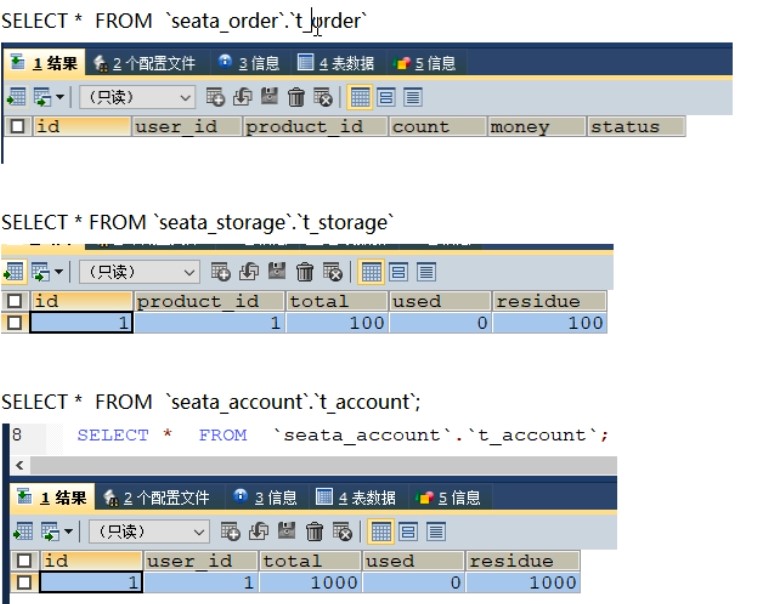
5.4.1数据库初始情况
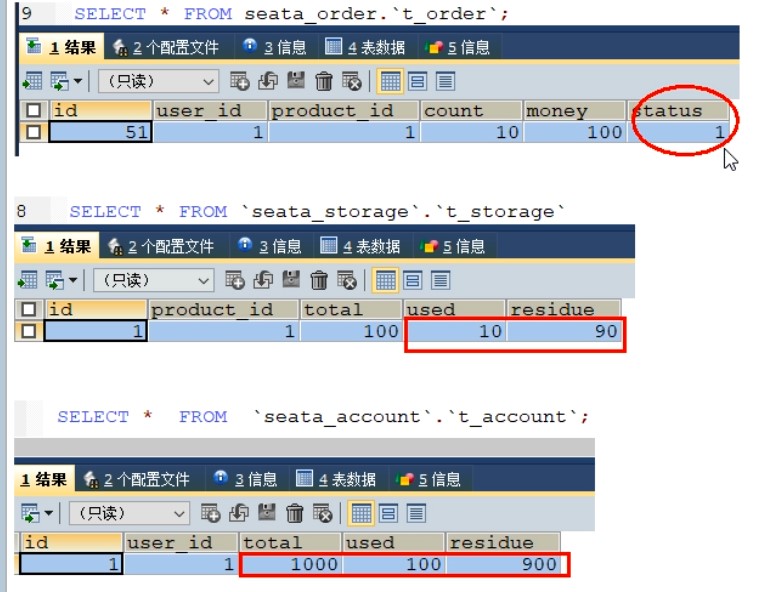
5.4.2正常下单
数据库情况
订单状态改为 1(已完结)
5.4.3超时异常,没加@GlobalTransactional
AccountServiceImpl添加超时
故障情况
当库存和账户余额扣减后,订单状态并没有设置为已经完成,没有从零改为1
而且由于feign的重试机制(1秒),账户的service,睡了20秒,所以超时
所以账户余额还有可能被多次扣减
5.4.4超时异常,添加@GlobalTransactional
在账户模块,AccountServiceImpl添加超时
/**
 * 账户业务实现类
 */
@Service
@Slf4j
public class AccountServiceImpl implements AccountService {
    @Resource
    AccountDao accountDao;

    /**
     * 扣减账户余额
     */
    @Override
    public void decrease(Long userId, BigDecimal money) {

        log.info("------->account-service中扣减账户余额开始");
        //睡 20秒 feign 默认超时是 1秒  用来测试全局事务
        try {
            TimeUnit.SECONDS.sleep(20);
        } catch (InterruptedException e) {
            e.printStackTrace();
        }
        accountDao.decrease(userId,money);
        log.info("------->account-service中扣减账户余额结束");
    }
}
在订单模块的下单方法添加@GlobalTransactional
@Service
@Slf4j
public class OrderServiceImpl implements OrderService {
    @Resource
    private OrderDao orderDao;
    @Resource
    private StorageService storageService;
    @Resource
    private AccountService accountService;

    /**
     * 创建订单->调用库存服务扣减库存->调用账户服务扣减账户余额->修改订单状态
     */

    @Override
    //对全部异常都回滚
    @GlobalTransactional(name = "fsp-create-order",rollbackFor = Exception.class)
    public void create(Order order){
        log.info("----->开始新建订单");
        //新建订单
        orderDao.create(order);

        //扣减库存
        log.info("----->订单微服务开始调用库存,做扣减Count");
        storageService.decrease(order.getProductId(),order.getCount());
        log.info("----->订单微服务开始调用库存,做扣减end");

        //扣减账户
        log.info("----->订单微服务开始调用账户,做扣减Money");
        accountService.decrease(order.getUserId(),order.getMoney());
        log.info("----->订单微服务开始调用账户,做扣减end");


        //修改订单状态,从零到1代表已经完成
        log.info("----->修改订单状态开始");
        orderDao.update(order.getUserId(),0);
        log.info("----->修改订单状态结束");

        log.info("----->下订单结束了");

    }
}
下单后数据库数据并没有任何改变,记录都添加不进来,所以全局异常起作用了
6.Seata之原理简介
2019年1月份蚂蚁金服和阿里巴巴共同开源的分布式事务解决方案
Simple Extensible Autonomous Transaction Architecture,简单可扩展自治事务框架
2020起初,参加工作后用1.0以后的版本 0.9 不支持集群
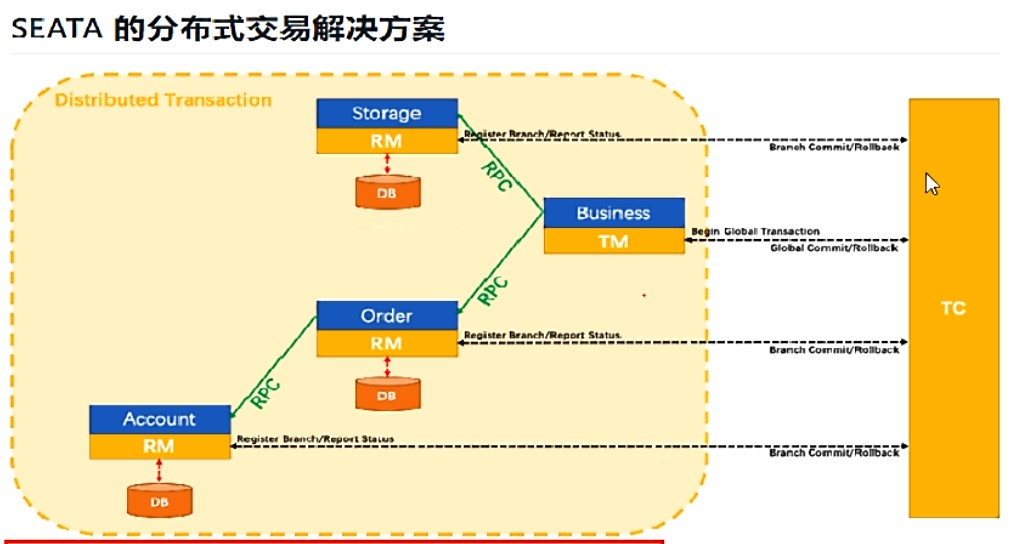
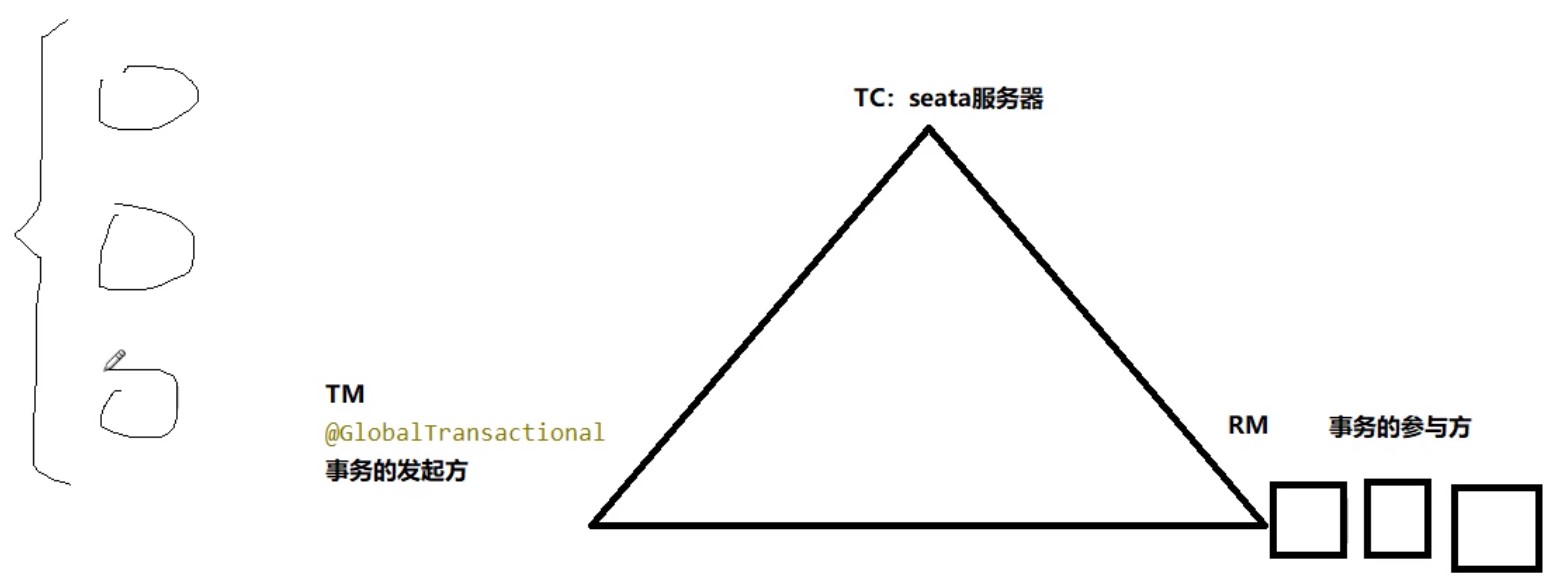
TC/TM/RM三大组件
Transaction ID XID (全局事务ID)
- Transaction Coordinator(TC)
- Transaction Manager(TM)
- Resource Manager(RM)
- TC可以简单的理解为,本地安装的seata服务器
- TM可以简单理解为加上@GlobalTransactional 的方法 事务的发起方
- RM可以简单理解为涉及的一个数据库,就是一个RM 事务的参与方
- 这三个组件都是用 同一个 XID 一起管理
分布式事务的执行流程
- TM开启分布式事务(TM向TC注册全局事务记录)
- 换业务场景,编排数据库,服务等事务内资源(RM向TC汇报资源准备状态)
- TM结束分布式事务,事务一阶段结束(TM通知TC提交/回滚分布式事务)
- TC汇总事务信息,决定分布式事务是提交还是回滚
- TC通知所有RM提交/回滚资源,事务二阶段结束。
AT模式如何做到对业务的无侵入
seata有四个模式如下,默认是AT
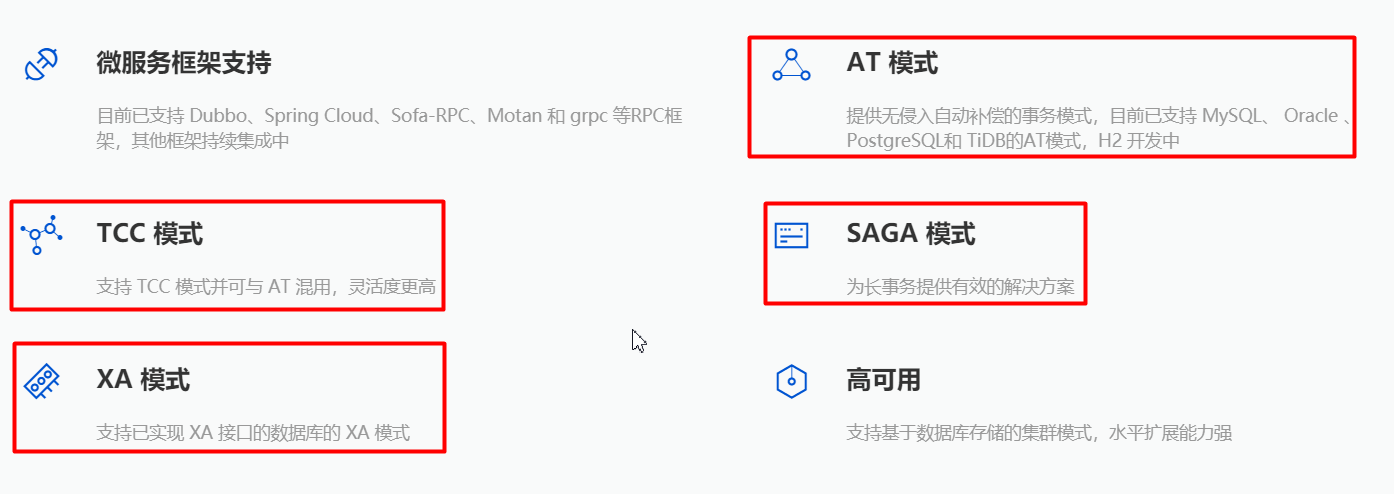
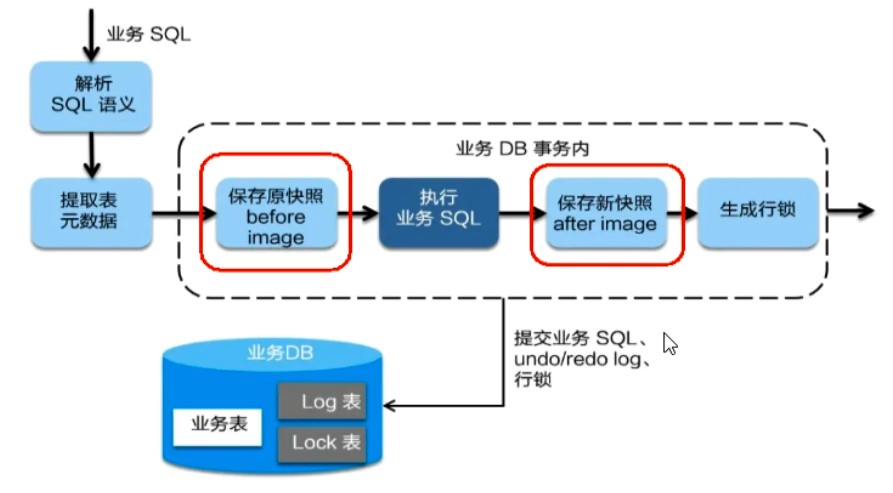
AT模式的简介
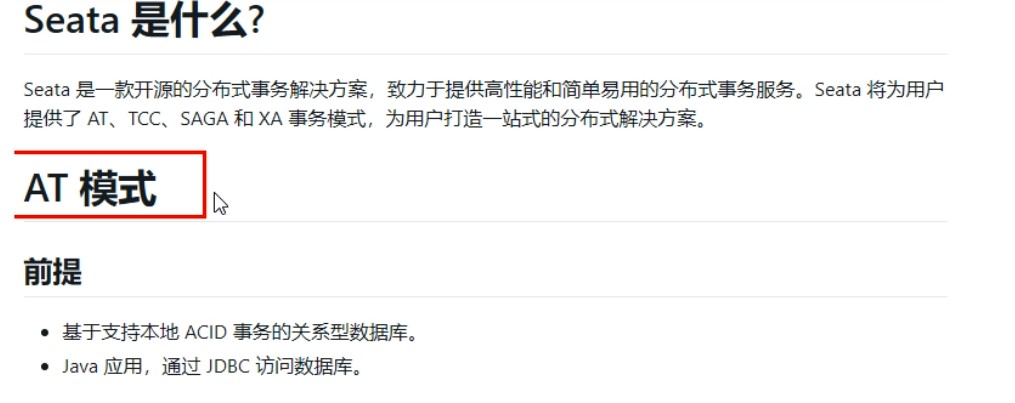
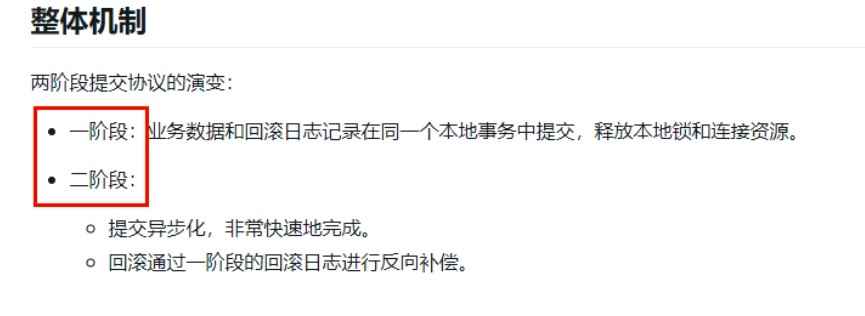
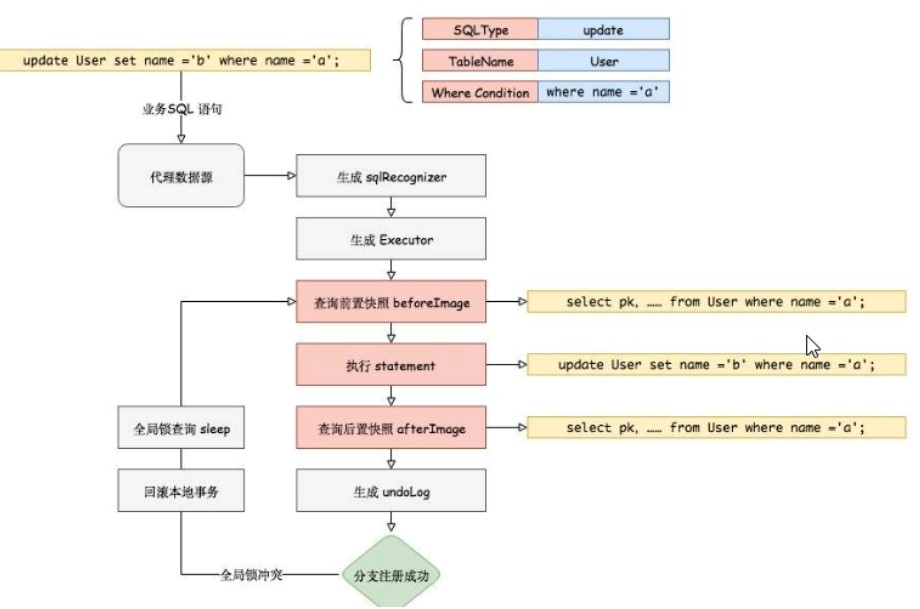
一阶段加载
- 在执行sql之前,先将之前的数据保存为 之前镜像
- 然后再执行sql
- 执行sql后的,再查询,再保存为新的镜像 然后生成行锁

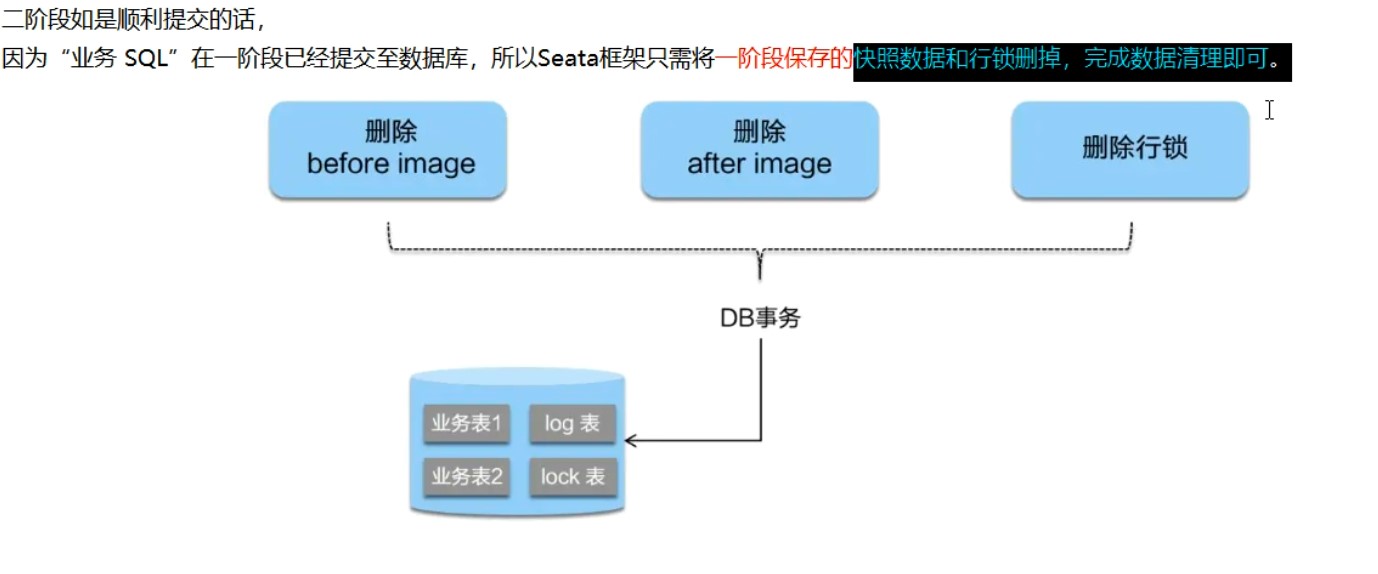
二阶段提交
正常提交,就将之前的镜像和之后的镜像和行锁删除
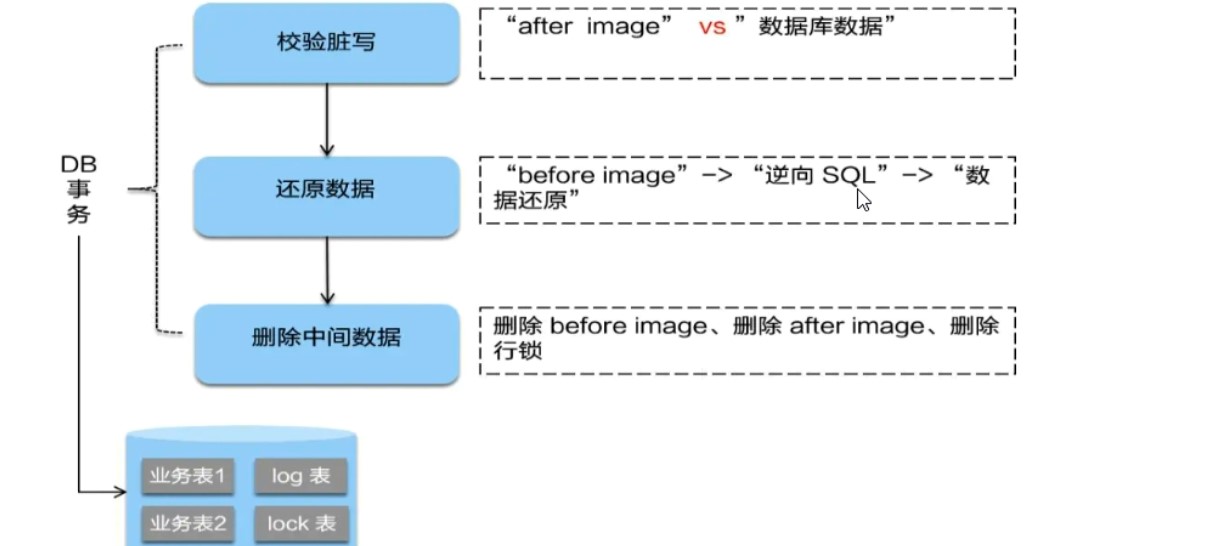
二阶段回滚
根据一阶段的保存的之前镜像来还原数据

Debug测试
这里的相关表都是 用 xid 进行统一 关联来管理
branch_table 分支表,这次事务,设计的三个表 创建的3个分支
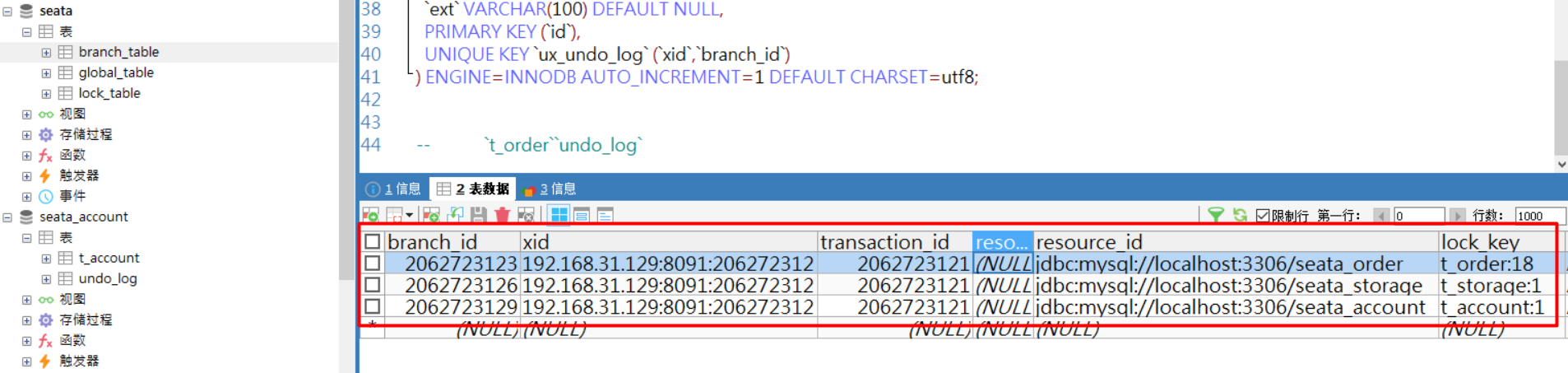
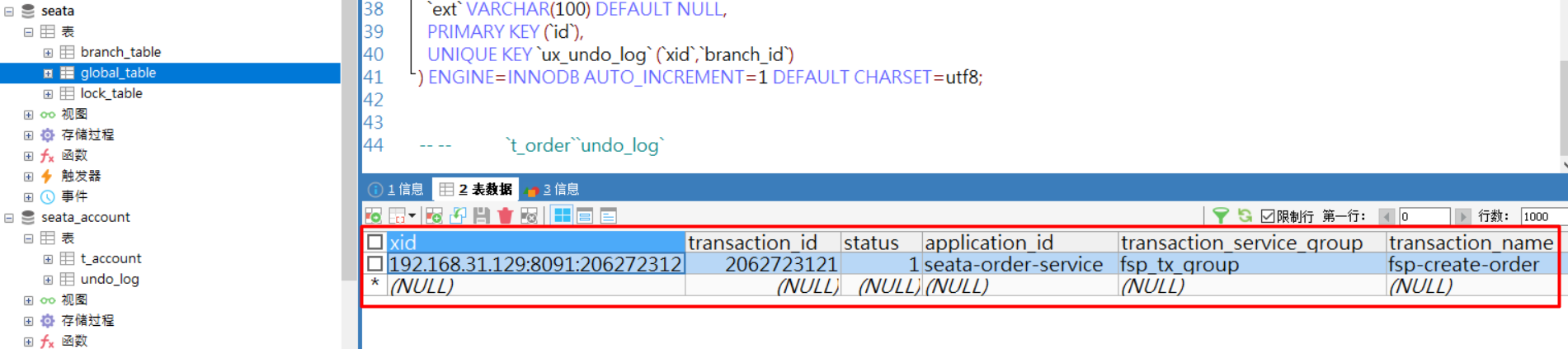
global_table 全局事务的表,这里的transsaction_name,是方法发起定义的名字
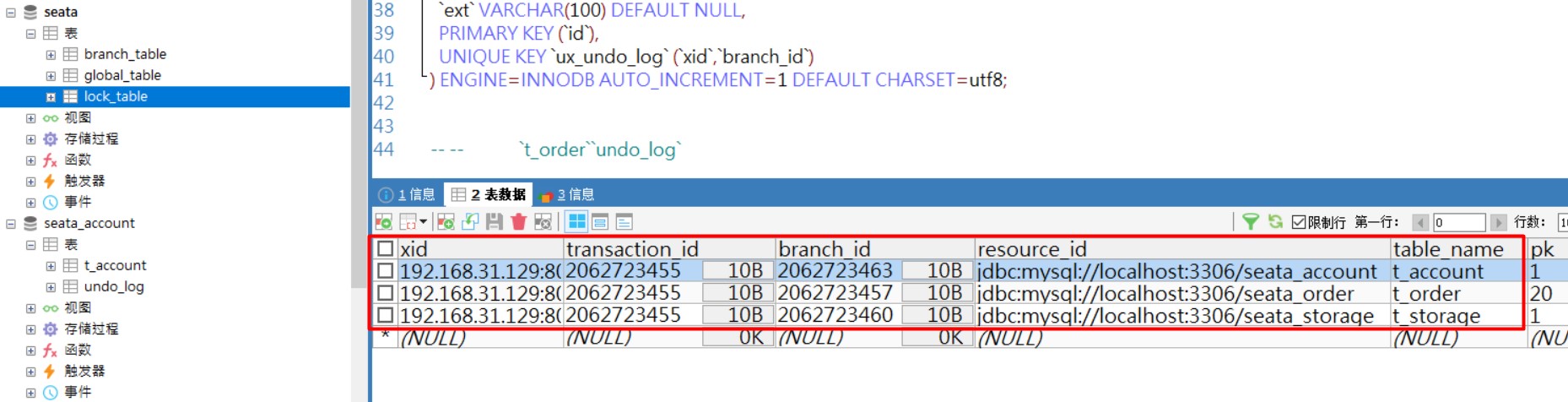
lock_table 行锁表 订单,库存,账户 ,都加的行锁,存在这个表
在订单,库存,账户 的undo_log 分别有1条记录,在rollback_info字段存的数据包含之前镜像和之后镜像的内容



这里拿账户的undo_log表 的rollback_info 如下,就是根据这个里面之前镜像和之后镜像,来回滚数据
{
    "@class": "io.seata.rm.datasource.undo.BranchUndoLog",
    "xid": "192.168.31.129:8091:2062724649",
    "branchId": 2062724657,
    "sqlUndoLogs": [
        "java.util.ArrayList",
        [
            {
                "@class": "io.seata.rm.datasource.undo.SQLUndoLog",
                "sqlType": "UPDATE",
                "tableName": "t_account",
               //之前镜像
                "beforeImage": {
                    "@class": "io.seata.rm.datasource.sql.struct.TableRecords",
                    "tableName": "t_account",
                    "rows": [
                        "java.util.ArrayList",
                        [
                            {
                                "@class": "io.seata.rm.datasource.sql.struct.Row",
                                "fields": [
                                    "java.util.ArrayList",
                                    [
                                        {
                                            "@class": "io.seata.rm.datasource.sql.struct.Field",
                                            "name": "id",
                                            "keyType": "PrimaryKey",
                                            "type": -5,
                                            "value": [
                                                "java.lang.Long",
                                                1
                                            ]
                                        },
                                        {
                                            "@class": "io.seata.rm.datasource.sql.struct.Field",
                                            "name": "residue",
                                            "keyType": "NULL",
                                            "type": 3,
                                            "value": [
                                                "java.math.BigDecimal",
                                                800   //更改之前的数据
                                            ]
                                        },
                                        {
                                            "@class": "io.seata.rm.datasource.sql.struct.Field",
                                            "name": "used",
                                            "keyType": "NULL",
                                            "type": 3,
                                            "value": [
                                                "java.math.BigDecimal",
                                                200    //更改之前的数据
                                            ]
                                        }
                                    ]
                                ]
                            }
                        ]
                    ]
                },

               //之后镜像
                "afterImage": {
                    "@class": "io.seata.rm.datasource.sql.struct.TableRecords",
                    "tableName": "t_account",
                    "rows": [
                        "java.util.ArrayList",
                        [
                            {
                                "@class": "io.seata.rm.datasource.sql.struct.Row",
                                "fields": [
                                    "java.util.ArrayList",
                                    [
                                        {
                                            "@class": "io.seata.rm.datasource.sql.struct.Field",
                                            "name": "id",
                                            "keyType": "PrimaryKey",
                                            "type": -5,
                                            "value": [
                                                "java.lang.Long",
                                                1
                                            ]
                                        },
                                        {
                                            "@class": "io.seata.rm.datasource.sql.struct.Field",
                                            "name": "residue",
                                            "keyType": "NULL",
                                            "type": 3,
                                            "value": [
                                                "java.math.BigDecimal",
                                                700   //更改后的数据
                                            ]
                                        },
                                        {
                                            "@class": "io.seata.rm.datasource.sql.struct.Field",
                                            "name": "used",
                                            "keyType": "NULL",
                                            "type": 3,
                                            "value": [
                                                "java.math.BigDecimal",
                                                300   //更改后的数据
                                            ]
                                        }
                                    ]
                                ]
                            }
                        ]
                    ]
                }
            }
        ]
    ]
}
事务正常执行后,相应的数据,就会全部删除了
补充
附件列表

 浙公网安备 33010602011771号