
网站集成微软账户一键登录(支持Windows Hello 面容、指纹等)-微软Azure的Oauth2.0的集成
简介
在个人网站中集成微软 OAuth 2.0 登录,可以显著降低用户的使用门槛。用户无需再单独注册账号或记忆新的密码,只需使用已有的 Microsoft 账户即可快速完成登录。借助 Windows Hello,用户可以直接通过人脸识别或指纹验证完成身份认证,在保证安全性的同时,获得更流畅、自然的登录体验。如今越来越多的网站选择集成,特别是pc网站。在个人手机网站上集成Apple ID登录的比较多。
本文将介绍怎么创建Oauth 2.0 账户,来让网站集成微软登录,包括azure的应用配置和对应关系,后端代码将使用 spring oauth2 client (spring boot 3.5.X版本),不包含oauth 2.0协议的讲解。
触发微软登录的效果,可以用电脑的指纹或者面容、PIN码登录在支持Windows Hello的设备上面。
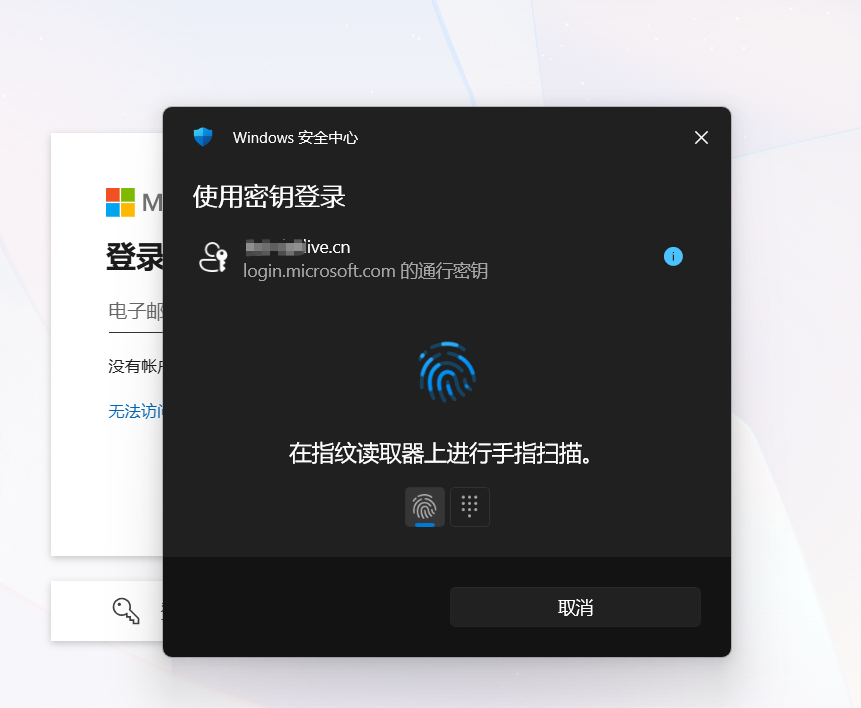
如今越来越多的网址,集成微软登录 或者苹果登录,方便用户快速注册登录:
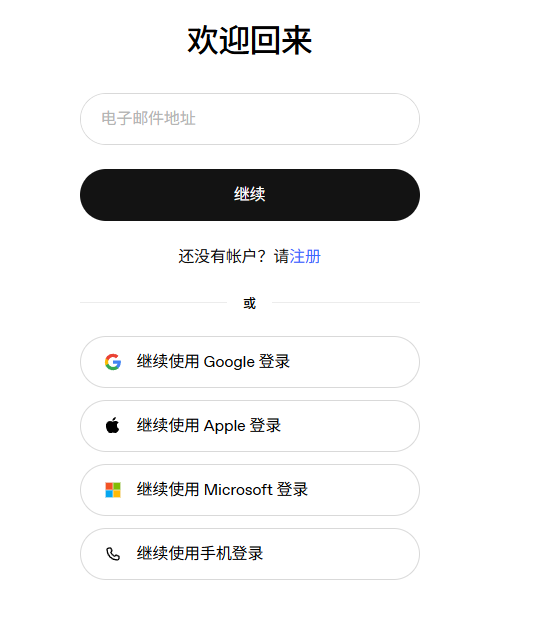
注册Oauth 2.0 应用方法
1、注册Azure的账户。主页 - Microsoft Azure
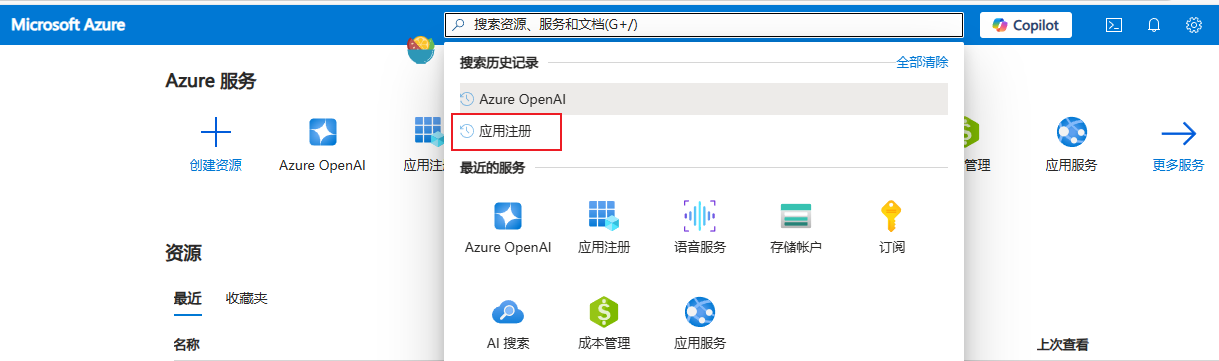
2、完成注册了进行Azure首页,搜索:应用注册。
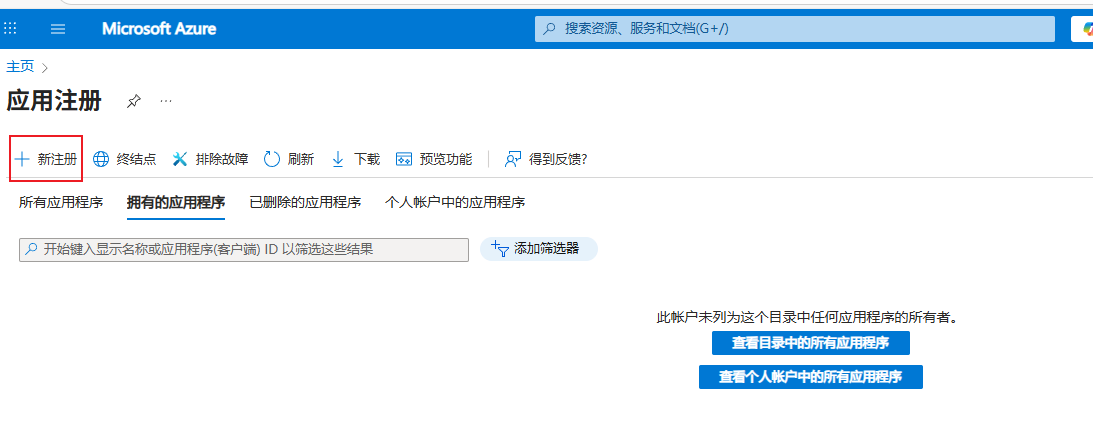
3、点击新注册。
4、填写应用基本信息和后端的回调地址
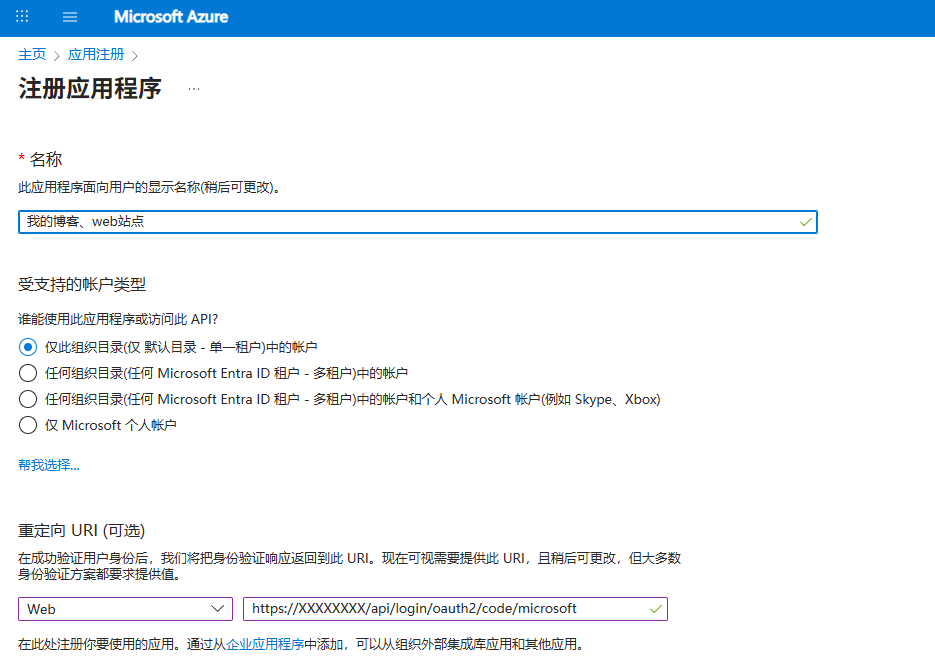
5、填写之后下一步,然后打开刚刚注册的应用,关注下面几个选项:
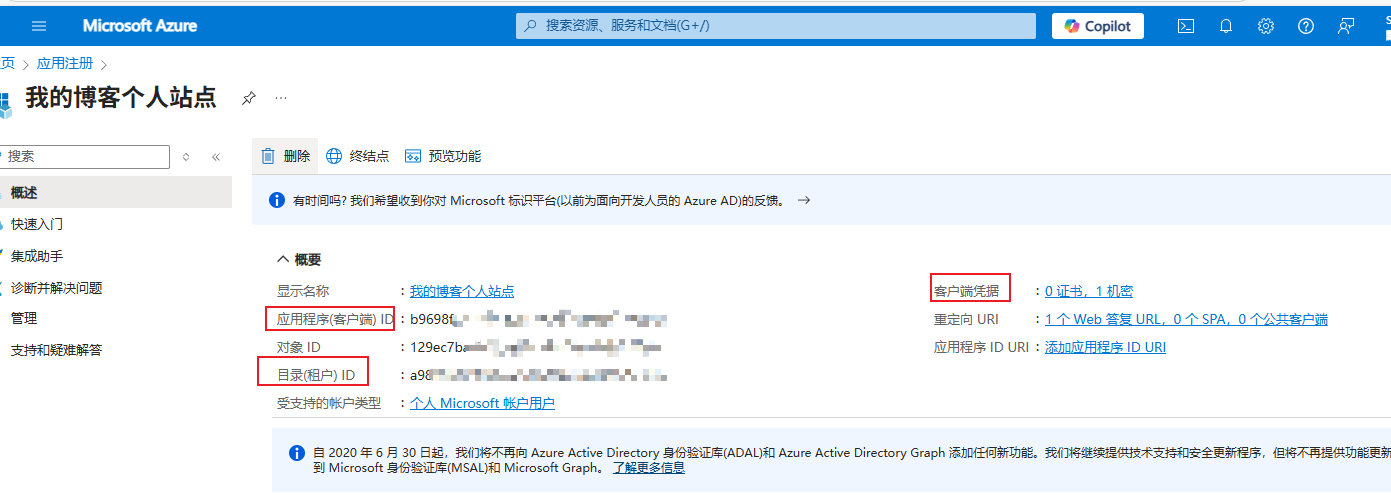
根据协议,可以访问 https://login.microsoftonline.com/a98**********************/v2.0/.well-known/openid-configuration 端点,来获取Oauth 2.0的端点信息,比如授权接口、获取accessToken的接口。
由于我使用了spring oauth2 client 框架会自动读取这些端点信息,帮我完成oauth2的流程,从而获取用户信息。打印这些端点,便于一些不使用框架的情况下,方便他们手动请求接口。
{
  "token_endpoint": "https://login.microsoftonline.com/a98*************************************/oauth2/v2.0/token",
  "token_endpoint_auth_methods_supported": [
    "client_secret_post",
    "private_key_jwt",
    "client_secret_basic",
    "self_signed_tls_client_auth"
  ],
  "jwks_uri": "https://login.microsoftonline.com/a98*************************************/discovery/v2.0/keys",
  "response_modes_supported": [
    "query",
    "fragment",
    "form_post"
  ],
  "subject_types_supported": [
    "pairwise"
  ],
  "id_token_signing_alg_values_supported": [
    "RS256"
  ],
  "response_types_supported": [
    "code",
    "id_token",
    "code id_token",
    "id_token token"
  ],
  "scopes_supported": [
    "openid",
    "profile",
    "email",
    "offline_access"
  ],
  "issuer": "https://login.microsoftonline.com/a98*************************************/v2.0",
  "request_uri_parameter_supported": false,
  "userinfo_endpoint": "https://graph.microsoft.com/oidc/userinfo",
  "authorization_endpoint": "https://login.microsoftonline.com/a98*************************************/oauth2/v2.0/authorize",
  "device_authorization_endpoint": "https://login.microsoftonline.com/a98*************************************/oauth2/v2.0/devicecode",
  "http_logout_supported": true,
  "frontchannel_logout_supported": true,
  "end_session_endpoint": "https://login.microsoftonline.com/a98*************************************/oauth2/v2.0/logout",
  "claims_supported": [
    "sub",
    "iss",
    "cloud_instance_name",
    "cloud_instance_host_name",
    "cloud_graph_host_name",
    "msgraph_host",
    "aud",
    "exp",
    "iat",
    "auth_time",
    "acr",
    "nonce",
    "preferred_username",
    "name",
    "tid",
    "ver",
    "at_hash",
    "c_hash",
    "email"
  ],
  "kerberos_endpoint": "https://login.microsoftonline.com/a98*************************************/kerberos",
  "mtls_endpoint_aliases": {
    "token_endpoint": "https://mtlsauth.microsoft.com/a98*************************************/oauth2/v2.0/token"
  },
  "tls_client_certificate_bound_access_tokens": true,
  "tenant_region_scope": "AS",
  "cloud_instance_name": "microsoftonline.com",
  "cloud_graph_host_name": "graph.windows.net",
  "msgraph_host": "graph.microsoft.com",
  "rbac_url": "https://pas.windows.net"
}
后端spring security oauth 2.0 应用配置:
根据上面的应用注册的信息,我们配置spring boot 后端项目的配置:
spring:
  security:
    oauth2:
      client:
        registration:
          microsoft:
            provider: microsoft
            client-id: 328******************************************
            client-secret: V*****************************************
            redirect-uri: "https://xxx域名/api/login/oauth2/code/{registrationId}"
            scope: openid,email,profile   # 申请的权限(根据需要填写)
        provider:
          microsoft:
            issuer-uri: https://login.microsoftonline.com/a98********************/v2.0
@Slf4j
@Controller
public class DefaultController {


    @GetMapping("/authorized")//此次我配置了 oauth2Login成功后跳转到的successHandler,此次可以写入cookie等 重定向的方式来通知前端。

    public String authorized(Authentication authentication, HttpServletResponse response) {
        //断点在 Authetication 中已经可以获取,到微软账户登录成功的信息了,包括用户名、邮箱等,可以根据业务需要注册账户 或者使用TokenRelay filter处理accessToken令牌
        oauth2LoginService.handleOAuth2LoginSuccess(authentication, response);

        log.info("重定向到前端: {} (domain={}, secure={})",
                this.appBaseUri, cookieDomain, cookieSecure);
        return "redirect:" + this.appBaseUri;
    }
<dependency>
            <groupId>org.springframework.boot</groupId>
            <artifactId>spring-boot-starter-oauth2-client</artifactId>
        </dependency>
登录流程:
1. 前端放按钮,用户点击按钮跳转下面链接(这个地址并不是 redirect-uri,这是框架定义的 ):
api/oauth2/authorization/microsoft
2. 重定向到:
https://login.microsoftonline.com/.../authorize
3. 用户完成人脸 / 指纹(Windows Hello)
4. Microsoft 回调(这个对应redirect-uri):
/login/oauth2/code/microsoft?code=xxx
5. Spring Security 完成认证 、也获取到了用户的信息、引导用户注册或者使用TokenRelay 转发给后面api资源服务器、通知前端登录成功。
项目参考
我的项目用到了spring官方的代码参考,你可以下载官方的参考代码来当初始化模板改写:
spring-authorization-server/samples at main · spring-projects/spring-authorization-server · GitHub

 浙公网安备 33010602011771号