一个测量人用的小软件
发现分析问题:1.作为一名大三测绘工程的学生,平时在测量的时候会遇到计算坐标方位角的问题,当计算数据量大的时候,人工计算十分麻烦,如果能有一个小软件帮助计算那会更加的省时省力。2.但是要输入大量的测量数据那也是十分的麻烦,如果能够将全站仪中的数据以txt格式导出,然后导入小软件中那将会更为方便。
解决问题:在本学期学习了<C# 程序设计>之后便决定利用VS2010版编写一个程序,拥有导入全站仪txt格式数据的功能和计算坐标方位角的功能。方便以后在学校的测量计算。 ----------实习时候发现用的新款 莱卡全站仪拥有直接计算的功能 。但是学校 瑞德全站仪的老款没有此功能。
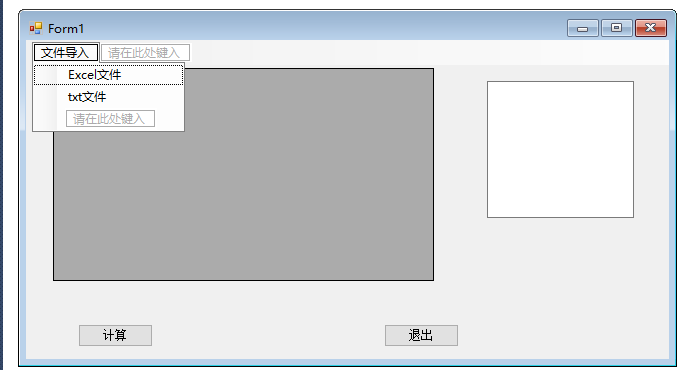
测量软件设计:在VS2010中设计出如下界面
程序代码:
using System;
using System.Collections.Generic;
using System.ComponentModel;
using System.Data;
using System.Drawing;
using System.Linq;
using System.Data.OleDb;
using System.IO;
using System.Text;
using System.Windows.Forms;
using System.Collections.Generic;
using System.ComponentModel;
using System.Data;
using System.Drawing;
using System.Linq;
using System.Data.OleDb;
using System.IO;
using System.Text;
using System.Windows.Forms;
namespace 测量软件
{
public partial class Form1 : Form
{
public Form1()
{
InitializeComponent();
}
{
public partial class Form1 : Form
{
public Form1()
{
InitializeComponent();
}
private void excel文件ToolStripMenuItem_Click(object sender, EventArgs e)
{
//Excel模式文件导入
{
//Excel模式文件导入
dataGridView1.DataSource = null;//对原表格进行清空
dataGridView1.Rows.Clear();
dataGridView1.Columns.Clear();
OpenFileDialog file = new OpenFileDialog();//声明 打开文件对话框
file.Filter = "Excel文件|*.xls|Excel文件|*.xlsx";//文件过滤 仅显示Excel文件
if (file.ShowDialog() == DialogResult.OK) //如果文件打开正常
{
string fname = file.FileName;//获取打开的文件名称
string strSource = @"provider=Microsoft.ACE.OLEDB.12.0;" + "Data Source=" + fname + ";Extended Properties='Excel 8.0;HDR=Yes;IMEX=1'";//准备文件来源信息
OleDbConnection conn = new OleDbConnection(strSource);
string sqlstring = @"SELECT * FROM [Sheet1$]";//选择表中的sheet1
OleDbDataAdapter adapter = new OleDbDataAdapter(sqlstring, conn);//实例化数据适配
DataSet da = new DataSet();//实例化数据集
adapter.Fill(da);
dataGridView1.DataSource = da.Tables[0];//进行数据源的替换
}
else
{ return; }
}
dataGridView1.Rows.Clear();
dataGridView1.Columns.Clear();
OpenFileDialog file = new OpenFileDialog();//声明 打开文件对话框
file.Filter = "Excel文件|*.xls|Excel文件|*.xlsx";//文件过滤 仅显示Excel文件
if (file.ShowDialog() == DialogResult.OK) //如果文件打开正常
{
string fname = file.FileName;//获取打开的文件名称
string strSource = @"provider=Microsoft.ACE.OLEDB.12.0;" + "Data Source=" + fname + ";Extended Properties='Excel 8.0;HDR=Yes;IMEX=1'";//准备文件来源信息
OleDbConnection conn = new OleDbConnection(strSource);
string sqlstring = @"SELECT * FROM [Sheet1$]";//选择表中的sheet1
OleDbDataAdapter adapter = new OleDbDataAdapter(sqlstring, conn);//实例化数据适配
DataSet da = new DataSet();//实例化数据集
adapter.Fill(da);
dataGridView1.DataSource = da.Tables[0];//进行数据源的替换
}
else
{ return; }
}
private void txt文件ToolStripMenuItem_Click(object sender, EventArgs e)
{
//txt模式文件导入
{
//txt模式文件导入
dataGridView1.DataSource = null;
dataGridView1.Rows.Clear();
dataGridView1.Columns.Clear();
OpenFileDialog file = new OpenFileDialog();
file.Filter = "文本文件|*.txt";
if (file.ShowDialog() == DialogResult.OK)
{ StreamReader sr = new StreamReader(file.FileName, System.Text.Encoding.Default); //声明以文本编码格式读取
textBox1.Text = sr.ReadToEnd(); //将sr中的内容全部放到textBox1.Text中 sr.Close();
}
else
return;
string [] str=textBox1.Text.Split(new string[] {"\r\n" }, StringSplitOptions.RemoveEmptyEntries); //将textBox1.Text中按行分割,并放在一维字符串数组中
string [][] k=new string [str.Length][]; //定义二维字符串数组
for (int i = 0; i < str.Length; i++) k[i] = str[i].Split(',');
dataGridView1.RowCount = str.Length+1;
dataGridView1.ColumnCount = 3; //定义表格列数,并赋表头名称
dataGridView1.Columns[0].Name = "点名";
dataGridView1.Columns[1].Name = "观测角度";
dataGridView1.Columns[2].Name = "方位角";
for (int i = 0; i < str.Length;i++ )
{ for(int j=0;j<3; j++) dataGridView1.Rows[i].Cells[j].Value = k[i][j]; }
}
dataGridView1.Rows.Clear();
dataGridView1.Columns.Clear();
OpenFileDialog file = new OpenFileDialog();
file.Filter = "文本文件|*.txt";
if (file.ShowDialog() == DialogResult.OK)
{ StreamReader sr = new StreamReader(file.FileName, System.Text.Encoding.Default); //声明以文本编码格式读取
textBox1.Text = sr.ReadToEnd(); //将sr中的内容全部放到textBox1.Text中 sr.Close();
}
else
return;
string [] str=textBox1.Text.Split(new string[] {"\r\n" }, StringSplitOptions.RemoveEmptyEntries); //将textBox1.Text中按行分割,并放在一维字符串数组中
string [][] k=new string [str.Length][]; //定义二维字符串数组
for (int i = 0; i < str.Length; i++) k[i] = str[i].Split(',');
dataGridView1.RowCount = str.Length+1;
dataGridView1.ColumnCount = 3; //定义表格列数,并赋表头名称
dataGridView1.Columns[0].Name = "点名";
dataGridView1.Columns[1].Name = "观测角度";
dataGridView1.Columns[2].Name = "方位角";
for (int i = 0; i < str.Length;i++ )
{ for(int j=0;j<3; j++) dataGridView1.Rows[i].Cells[j].Value = k[i][j]; }
}
//封装方法1:角度转弧度
public double dmstorad(string s)
{
string[] ss = s.Split(new char[3] { '°', '′', '″' },
StringSplitOptions.RemoveEmptyEntries);
//用°、 ′、 ″分割字符串s
double[] d = new double[ss.Length]; //新建一个双精度数值数组
for (int i = 0; i < d.Length; i++)
//将度分秒存入这个双精度数值数组中
d[i] = Convert.ToDouble(ss[i]);
double sign = d[0] >= 0.0 ? 1.0 : -1.0; //判断角度值是否为负值
double rad = 0;
if (d.Length == 1) //根据数组的长度进行判断计算
rad = Math.Abs(d[0]) * Math.PI / 180; //将度取绝对值,并转换为弧度
else if (d.Length == 2)
rad = (Math.Abs(d[0]) + d[1] / 60) * Math.PI / 180;、
else
rad = (Math.Abs(d[0]) + d[1] / 60 + d[2] / 60 / 60) * Math.PI / 180;
rad = sign * rad;
return rad;
}
public double dmstorad(string s)
{
string[] ss = s.Split(new char[3] { '°', '′', '″' },
StringSplitOptions.RemoveEmptyEntries);
//用°、 ′、 ″分割字符串s
double[] d = new double[ss.Length]; //新建一个双精度数值数组
for (int i = 0; i < d.Length; i++)
//将度分秒存入这个双精度数值数组中
d[i] = Convert.ToDouble(ss[i]);
double sign = d[0] >= 0.0 ? 1.0 : -1.0; //判断角度值是否为负值
double rad = 0;
if (d.Length == 1) //根据数组的长度进行判断计算
rad = Math.Abs(d[0]) * Math.PI / 180; //将度取绝对值,并转换为弧度
else if (d.Length == 2)
rad = (Math.Abs(d[0]) + d[1] / 60) * Math.PI / 180;、
else
rad = (Math.Abs(d[0]) + d[1] / 60 + d[2] / 60 / 60) * Math.PI / 180;
rad = sign * rad;
return rad;
}
//封装方法2;弧度转角度
public string radtodms(double rad)
{
double sign = rad >= 0.0 ? 1.0 : -1.0;
rad = Math.Abs(rad) * 180 / Math.PI;
double[] d = new double[3];
d[0] = (int)rad;//取整获取度
d[1] = (int)((rad - d[0]) * 60);
d[2] = (rad - d[0] - d[1] / 60) * 60 * 60;
d[2] = Math.Round(d[2], 2)
if (d[2] == 60)
{
d[1] += 1; d[2] -= 60;
public string radtodms(double rad)
{
double sign = rad >= 0.0 ? 1.0 : -1.0;
rad = Math.Abs(rad) * 180 / Math.PI;
double[] d = new double[3];
d[0] = (int)rad;//取整获取度
d[1] = (int)((rad - d[0]) * 60);
d[2] = (rad - d[0] - d[1] / 60) * 60 * 60;
d[2] = Math.Round(d[2], 2)
if (d[2] == 60)
{
d[1] += 1; d[2] -= 60;
if (d[1] == 60)
{
d[0] += 1;
d[1] -= 60;
}
} d[0] = sign * d[0];
string s = Convert.ToString(d[0]) + "°" + Convert.ToString(d[1]) + "′"
+ Convert.ToString(d[2]) + "″";
//将度分秒赋值给文本框,并添加°、 ′、 ″
return s;
}
{
d[0] += 1;
d[1] -= 60;
}
} d[0] = sign * d[0];
string s = Convert.ToString(d[0]) + "°" + Convert.ToString(d[1]) + "′"
+ Convert.ToString(d[2]) + "″";
//将度分秒赋值给文本框,并添加°、 ′、 ″
return s;
}
private void button2_Click(object sender, EventArgs e)
{
Application.Exit();
}
{
Application.Exit();
}
private void button1_Click(object sender, EventArgs e)
{
string[] sd = new string[dataGridView1.RowCount];
double[] sdr = new double[dataGridView1.RowCount];
double[] cr = new double[dataGridView1.RowCount];
double sum = 0;
cr[0] = dmstorad(Convert.ToString(dataGridView1.Rows[0].Cells[2].Value));
dataGridView1.Rows[dataGridView1.RowCount - 1].Cells[0].Value = "总和";
{
string[] sd = new string[dataGridView1.RowCount];
double[] sdr = new double[dataGridView1.RowCount];
double[] cr = new double[dataGridView1.RowCount];
double sum = 0;
cr[0] = dmstorad(Convert.ToString(dataGridView1.Rows[0].Cells[2].Value));
dataGridView1.Rows[dataGridView1.RowCount - 1].Cells[0].Value = "总和";
for (int i = 1; i < dataGridView1.RowCount - 2; i++)
{
sd[i] = Convert.ToString(dataGridView1.Rows[i].Cells[1].Value);
sdr[i] = dmstorad(sd[i]);//将观测角度的原始值转换为弧度值
sum += sdr[i]; cr[i] = cr[i - 1] + sdr[i] - Math.PI;
if (cr[i] >= Math.PI * 2)
{ cr[i] -= Math.PI * 2; }
else if (cr[i] < 0.0) { cr[i] += Math.PI * 2; }
dataGridView1.Rows[i].Cells[2].Value = radtodms(cr[i]); //将计算出来的坐标方位角赋值给对应的表格元素 }
dataGridView1.Rows[dataGridView1.RowCount - 1].Cells[1].Value = radtodms(sum);
}
}
{
sd[i] = Convert.ToString(dataGridView1.Rows[i].Cells[1].Value);
sdr[i] = dmstorad(sd[i]);//将观测角度的原始值转换为弧度值
sum += sdr[i]; cr[i] = cr[i - 1] + sdr[i] - Math.PI;
if (cr[i] >= Math.PI * 2)
{ cr[i] -= Math.PI * 2; }
else if (cr[i] < 0.0) { cr[i] += Math.PI * 2; }
dataGridView1.Rows[i].Cells[2].Value = radtodms(cr[i]); //将计算出来的坐标方位角赋值给对应的表格元素 }
dataGridView1.Rows[dataGridView1.RowCount - 1].Cells[1].Value = radtodms(sum);
}
}
}
}
成果展示:
}
成果展示:
以下利用简单几组数据进行展示:
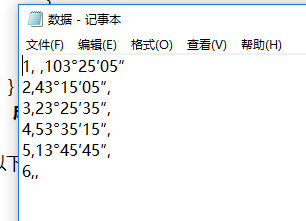
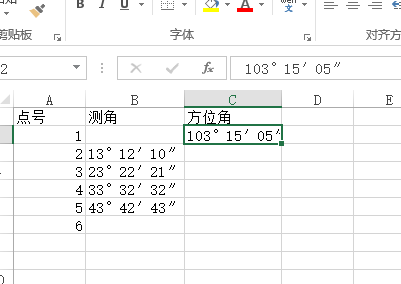
软件导入并计算的成果:
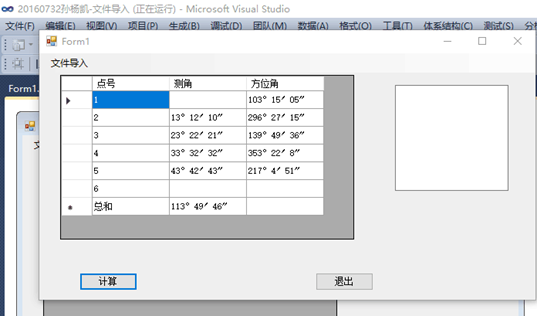
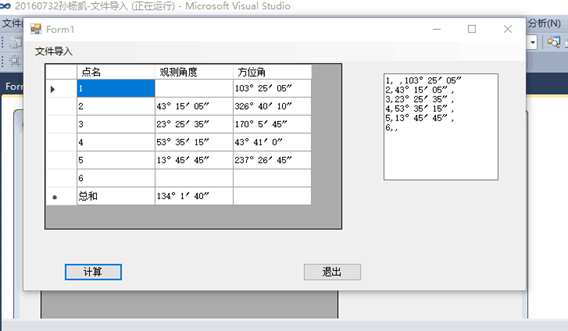
一个测量角度导入,进行坐标方位角计算的小软件做成。。。。。。。。。。。。。。。。有何指教请评论区留言 。。虚心ing


 浙公网安备 33010602011771号