
table多表头和select
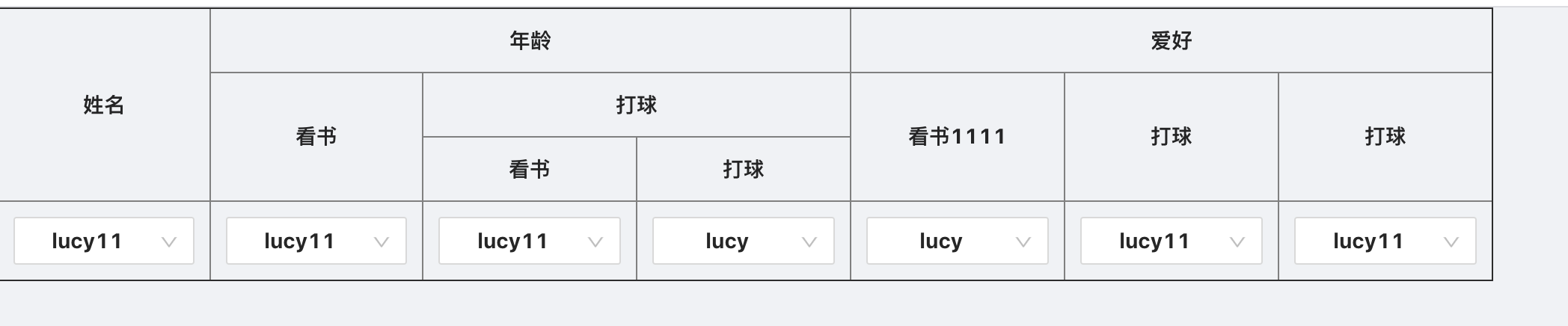
一.React方式:
import React from 'react';
import { Select, Button } from 'antd';
const { Option } = Select;
interface Props {
  width: string | number;
  bordered: string | number;
}
interface State {
  trs: any;
  columns: any;
  selectOption: any;
}
class ImportExcel extends React.Component<Props, State> {
  constructor(props) {
    super(props);
    this.state = {
      trs: [], //tr的集合
      selectOption: [
        { key: '1', value: 'lucy' },
        { key: '2', value: 'lucy11' },
      ],
      columns: [
        //后端返回数据
        {
          name: '姓名',
          key: 'name',
          type: 1,
          subItem: null,
        },
        {
          name: '年龄',
          key: 'age',
          type: 2,
          subItem: [
            {
              name: '看书',
              key: 'age111',
              subItem: null,
              type: 1,
            },
            {
              name: '打球',
              key: 'placeport',
              subItem: null,
              type: 1,
              subItem: [
                {
                  name: '看书',
                  key: 'age111',
                  subItem: null,
                  type: 1,
                },
                {
                  name: '打球',
                  key: 'placeport',
                  subItem: null,
                  type: 1,
                },
              ],
            },
          ],
        },
        {
          name: '爱好',
          key: 'like',
          type: 2,
          subItem: [
            {
              name: '看书1111',
              key: 'like1',
              subItem: null,
              type: 1,
            },
            {
              name: '打球',
              key: 'like22222',
              subItem: null,
              type: 1,
            },
            {
              name: '打球',
              key: 'like22222',
              subItem: null,
              type: 1,
            },
          ],
        },
      ],
    };
  }

  componentWillMount() {
    let { columns } = this.state;
    this.foo(columns);
  }

  //对初始化数据进行处理
  foo = (arr, parent) => {
    if (!arr || (arr && !arr.length)) return;
    let arrResult = JSON.parse(JSON.stringify(arr));
    arrResult.map(item => {
      let len = item.subItem ? item.subItem.length : 0;
      item.rank = parent ? parent.rank + 1 : 0;
      if (len) {
        //subItem 存在
        item.rowspan = 1;
        this.foo(item.subItem, item);
      } else {
        //subItem 不存在
        item.colSpan = 1;
      }
      if (parent) {
        //parent的colSpan为subItem的colSpan总和
        parent.colSpan = parent.colSpan ? parent.colSpan : 0;
        parent.colSpan += item.colSpan;
      }
    });
    this.pushTrs(arrResult);
  };

  pushTrs = arr => {
    let { trs } = this.state;
    let rank = arr[0].rank;
    if (trs[rank]) {
      for (let i in arr) {
        trs[rank].push(arr[i]);
      }
    } else {
      trs[rank] = arr;
    }
  };

  //渲染table
  renderTable = () => {
    let { trs } = this.state;
    return trs.map((item: any) => {
      return (
        <tr align="center">
          {item.map((inner: any) => (
            <th
              colSpan={inner.colSpan}
              rowSpan={inner.rowspan ? inner.rowspan : trs.length - inner.rank}
            >
              {inner.name}
            </th>
          ))}
        </tr>
      );
    });
  };

  //渲染select
  renderSelect = () => {
    let { trs, selectOption } = this.state;
    let arr = trs.flat().filter(item => !item.subItem);
    return (
      <tr align="center">
        {arr.map(item => (
          <th colSpan={item.colSpan}>
            <Select
              placeholder="请选择"
              onChange={e => this.handleChange(e, item.key)}
              style={{
                width: '100%',
                minWidth: '120px',
              }}
            >
              {selectOption.map(({ key, value }) => (
                <Option value={key}> {value} </Option>
              ))}
            </Select>
          </th>
        ))}
      </tr>
    );
  };

  //select选择填充数据
  handleChange = (e, key) => {
    let { columns } = this.state;
    columns.forEach(one => {
      //添加新字段 selectValue
      if (one.key === key) one.selectValue = e;
      if (one.subItem && one.subItem.length > 0) {
        one.subItem.forEach(two => {
          if (two.key === key) two.selectValue = e;
        });
      }
      //组装后的数据 columns
      this.props.handleChange && this.props.handleChange(columns);
    });
  };

  render() {
    let { width = 1000, ...rest } = this.props;

    const currentProps = {
      cellSpacing: '0',
      cellPadding: 10,
      border: '1',
      width,
      ...rest,
    };

    return (
      <div>
        <table {...currentProps}>
          <thead>
            {this.renderTable()}
            {this.renderSelect()}
          </thead>
        </table>
      </div>
    );
  }
}

export default ImportExcel;
有待完善...... 粗略版本!
二.Vue方式
<template>
  <div class="hello">
    <div class="table">
    <table border="1" cellspacing="0" cellpadding="10" width="100%">
      <thead>
        <tr class="firstHead">
          <th :rowspan="!th.subItem&&2" :colspan="th.subItem&&th.subItem.length" v-for="(th,index) in firstTh" :key="index">{{th.name}}</th>
        </tr>
        <tr class="twoHead">
          <th v-for="(th,index) in secondTh" :key="index">{{th.name}}</th>
        </tr>
        </thead>
        <tbody>
          <tr>
            <td v-for="(a,index2) in tdLength" :key="index2">
              <select v-model="tdValList[index2]">
                <option value="1">1</option>
                <option value="2">2</option>
                <option value="3">3</option>
              </select>
            </td>
          </tr>
        </tbody>
      </table>
      <button @click="getSubmitData()">获取提交数据</button>
    </div>
  </div>
</template>

<script>
export default {
  name: "HelloWorld",
  data() {
    return {
        tableData: [
          {
            name: "姓名",
            subItem: null,
            type: 1
          },
          {
            name: "性別",
            subItem: null,
            type: 1
          },
          {
            name: "教育经历",
            subItem: [
              {
                name: "开始时间",
                subItem: null,
                type: 1
              },
              {
                name: "结束时间",
                subItem: null,
                type: 1
              },
              {
                name: "学校",
                subItem: null,
                type: 1
              },
              {
                name: "学历",
                subItem: null,
                type: 1
              }
            ],
            type: 2
          },
          {
            name: "工作经历",
            subItem: [
              {
                name: "开始时间",
                subItem: null,
                type: 1
              },
              {
                name: "结束时间",
                subItem: null,
                type: 1
              },
              {
                name: "公司",
                subItem: null,
                type: 1
              },
              {
                name: "职位",
                subItem: null,
                type: 1
              }
            ],
            type: 2
          },
          {
            name: "年龄",
            subItem: null,
            type: 1
          }
        ],
        firstTh: [],
        secondTh: [],
        tdValList:[],
        tdLength: 0
    };
  },
  created(){
    this.tableInit();
  },
  methods:{
    tableInit(){
      this.tableData.forEach(val=>{
        if(val.type == 1&&!val.subItem){
          this.tdLength++;
        }else if(val.subItem&&val.type == 2){
          this.tdLength += val.subItem.length;
        }
        this.firstTh.push(val);
        if(val.subItem&&val.type == 2){
          this.secondTh = this.secondTh.concat(val.subItem);
        }
      })

      for(let i = 0;i<this.tdLength;i++){
        this.tdValList.push('');
      }

    },
    getSubmitData(){
      console.log(this.tdValList)
    }
  }
};
</script>

<!-- Add "scoped" attribute to limit CSS to this component only -->
<style scoped>
td,
th {
  font-style: normal;
  font-weight: normal;
  text-align: center;
}

tr {
  height: 48px;
}

.twoHead th {
  width: 6.25%;
  height: 48px;
  padding: 0 10px;
  font-size: 14px;
  font-weight: normal;
}

.firstHead th {
  font-size: 14px;
  font-weight: bold;
}

table {
  border: none;
  border-collapse: collapse;
  border-color: #d8dfe6;
}

table thead {
  background: #f3fdff;
}
</style>

 浙公网安备 33010602011771号