

canvas在组件中循环画图时图片闪烁
有一个页面,要用 canvas 画出背景图片和文字,并且定时刷新页面。
这个图分三层, 第一层画红色和蓝色的矩形框,第二层画背景图,第三层写文字。
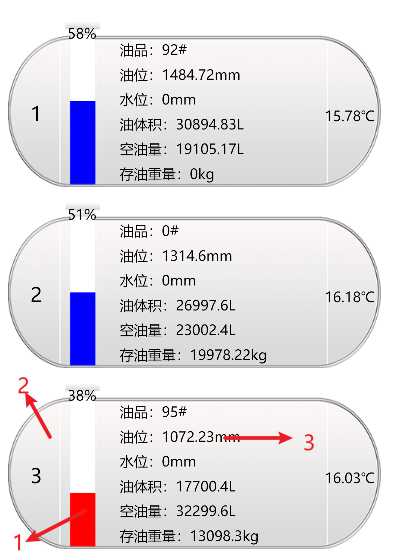
原来的代码中我直接把canvasContext.fillRect、canvasContext.drawImage、cacanvasContextnvas.fillText 放在一个函数中,循环多少次就画多少次。
这种写法直接放在页面中时,页面中的背景图片并不会闪烁。
但后来我优化了代码,把 canvas 画图部分挪到了组件中,然后在上级页面中调用 canvas 的组件页面。每秒更新数据,也就是每秒 canvas 重绘。
新版 canvas (type="2d") 获取 canvas 节点的方式变了:
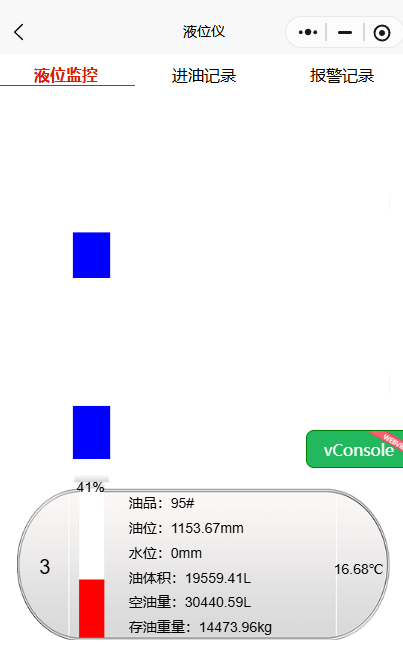
或许是子页面与主页面的通讯增加了性能开销,也可能是wx.createSelectorQuery() 和 this.createSelectorQuery() 开销不同,总之这个页面开始闪烁,每次刷新都只能随机显示一张背景图。
分析
为了判断是哪一部分性能消耗大,我注释了 canvasContext.drawImage 部分,发现刷新时页面不闪烁了。由此判定是 背景图片 的问题。
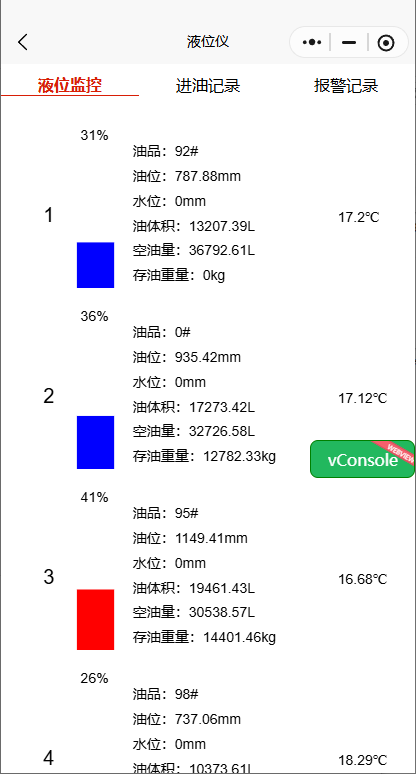
经过进一步排查,this.createSelectorQuery() 性能消耗没有我想的大,问题还在别处。
this.createSelectorQuery()
  .select(`#oil${id}`)
  .node(({ node: canvas }) => {
    console.log("canvas: ", canvas);
  })
  .exec();
进一步排查,问题的确在图片上,但不是我以为的 canvasContext.drawImage 而在加载图片资源上。
因为在 canvas 中,不能直接使用 canvasContext.drawImage(imageUrl),而要先用 canvasContext.createImage(); 创建一个图片实例,再修改 bgImg.src ,然后才能使用 canvasContext.drawImage
const bgImg = canvas.createImage(); bgImg.src = "/static/hcbgimg.png"; const canvasContext = canvas.getContext("2d"); canvasContext.drawImage(bgImg, 0, 0, bgimgWidth, bgimgHeight);
在原先代码中,每次循环都重新创建图片实例,也就是每次都调用 canvas.createImage() ,所以页面闪烁。
解决办法
-
创建 canvas 实例和
canvasContext.draw分开,创建 canvas 实例只运行一次,每次更新数据后 canvas 实例不重新调用。 -
把创建图片实例放在创建第一个 canvas 实例之后,也只调用一次
-
把
bgImg缓存起来,以后每一次canvasContext.drawImage(bgImg)都调用这个缓存的对象
组件代码(部分)
<template >
<view>
<view v-for= "item in tankList" >
<canvas type= "2d" :id="'oil' + item.id" class= "canvas" ></canvas >
</view>
</view>
</template >
<script >
import { converIntToRgb, getSysInfo } from "/utils/utils.js";
export default {
props: {
tankList: {
type: Array,
default: [],
},
},
data() {
return {
// 油罐图片的宽高
bgimgWidth: 0,
bgimgHeight: 0,
context: [],
canvasList: [],
bgImg: null,
};
},
mounted() {
const screenWidth = getSysInfo();
this.bgimgWidth = screenWidth * 0.9;
this.bgimgHeight = screenWidth * 0.4;
},
watch: {
tankList(newValue, oldValue) {
// 第一次进入页面,等有数据了再画图
if (oldValue.length == 0 && newValue.length != 0) {
this.createContexts(this.bgimgWidth, this.bgimgHeight); //每次进来的时候先画一次
}
// if 防止没有context还要画图报错
if (this.context.length != 0) {
this.refreshCanvas(this.bgimgWidth, this.bgimgHeight);
}
},
},
methods: {
// 这个页面只运行一次
createContexts() {
// ❗❗❗ 新版canvas需要消除锯齿
const windowInfo = wx.getWindowInfo();
const availableWidth = windowInfo.windowWidth;
const dpr = windowInfo.pixelRatio; //设备像素比
// 1. 给 context[] 赋值(在这个页面只创建一次)
this.tankList.forEach((tank, index) => {
this.createSelectorQuery()
.select(`#oil${tank.id}`)
.node(({ node: canvas }) => {
console.log("canvas: ", canvas);
// 获取到第一个canvas节点时创建图片对象,以免后续加载图片太慢
if (!this.bgImg) {
this.bgImg = canvas.createImage();
this.bgImg.src = "/static/bgimg.png";
}
this.context[index] = canvas.getContext("2d");
canvas.width = availableWidth * dpr;
canvas.height = availableWidth * 0.4 * dpr; //按照下面css的尺寸比例
this.context[index].scale(dpr, dpr); //必须有
this.canvasList[index] = canvas; //存储全局变量,其她函数中也可以使用已存储的canvas实例
if (index === this.tankList.length - 1) {
//全部建立成功后再画图,调用一遍,防止等待时间过长
setTimeout(() => {
this.refreshCanvas(this.bgimgWidth, this.bgimgHeight);
}, 100);
}
})
.exec();
});
},
refreshCanvas(bgimgWidth, bgimgHeight) {
const context = this.context; // 为了下面画canvas时少写一个 this
// 2. 设置不同油罐油品的颜色
let oilColors = []; //存储不同油罐油品的颜色
this.tankList.forEach((tank) => {
oilColors.push(converIntToRgb(tank.oilColor));
});
this.tankList.forEach((tank, index) => {
// // ❗❗❗ 每次画新的之前先清空画布(包括图片)
context[index].clearRect(0, 0, bgimgWidth, bgimgHeight);
// // 3. 画油和水的矩形块,然后画背景图片
const rectStartPointX = bgimgWidth * 0.15;
const rectWidth = bgimgWidth * 0.1;
let yOil = bgimgHeight * (1 - (0.9 * tank.oilRatio) / 100); // 一次性数据,只在传参时用一次,不用定义数组
let yWater = bgimgHeight * (1 - (0.9 * tank.waterRatio) / 100); // 一次性数据,只在传参时用一次,不用定义数组
// 3.1 画油位矩形
context[index].fillStyle = oilColors[index];
context[index].fillRect(rectStartPointX, yOil, rectWidth, bgimgHeight);
// // 3.3 新版canvas画背景图片,将图片绘制到 canvas 上
this.context[index].drawImage(
this.bgImg,
0,
0,
bgimgWidth,
bgimgHeight
);
// 4. 写详细信息(放外面会被图片挡住,因为图片加载较慢)
// 4.1 设置文字颜色:在线黑色,离线红色
const textColor = tank.connect ? "black" : "red";
context[index].fillStyle = textColor;
// 4.2 写罐号 1
context[index].font = "20px sans-serif";
context[index].fillText(tank.id, bgimgWidth * 0.06, bgimgHeight * 0.6);
});
},
},
};
</script>
<style scoped>
/* .canvas样式不需要需改!! */
.canvas {
/* border: 1rpx solid black; */
width: 750rpx;
height: 300rpx;
margin-top: 30rpx;
margin-left: 37rpx;
margin-right: 37rpx;
}
</style>

 浙公网安备 33010602011771号