Java设计RestfulApi接口,实现统一格式返回
创建返回状态码枚举
package com.sunny.tool.api.enums;

/**
 * @Author sunt
 * @Description 响应枚举状态码
 * @Date 2019/10/31
 **/
public enum ResultCode {

    // 成功
    SUCCESS(200),

    // 失败
    FAIL(400),

    // 未认证(签名错误)
    UNAUTHORIZED(401),

    // 接口不存在
    NOT_FOUND(404),

    // 服务器内部错误
    INTERNAL_SERVER_ERROR(500);

    public int code;

    ResultCode(int code) {
        this.code = code;
    }
}
返回结果集封装
package com.sunny.tool.api.entity;

import com.sunny.tool.api.enums.ResultCode;

/**
 * @ClassName: ResponseResult
 * @Description: 返回结果集封装
 * @Author: sunt
 * @Date: 2019/10/31 16:11
 * @Version 1.0
 **/
public class ResponseResult<T> {

    public int code; //返回状态码200成功

    private String msg; //返回描述信息

    private T data; //返回内容体

    public ResponseResult<T> setCode(ResultCode retCode) {
        this.code = retCode.code;
        return this;
    }

    public int getCode() {
        return code;
    }

    public ResponseResult<T> setCode(int code) {
        this.code = code;
        return this;
    }

    public String getMsg() {
        return msg;
    }

    public ResponseResult<T> setMsg(String msg) {
        this.msg = msg;
        return this;
    }

    public T getData() {
        return data;
    }

    public ResponseResult<T> setData(T data) {
        this.data = data;
        return this;
    }

}
响应客户端结果集封装
package com.sunny.tool.api.entity;

import com.sunny.tool.api.enums.ResultCode;

/**
 * @ClassName: Response
 * @Description:将结果转换为封装后的对象
 * @Author: sunt
 * @Date: 2019/10/31 16:11
 * @Version 1.0
 **/
public class Response {

    private final static String SUCCESS = "success";

    private final static String FAIL = "fail";

    public static <T> ResponseResult<T> makeOKRsp() {
        return new ResponseResult<T>().setCode(ResultCode.SUCCESS).setMsg(SUCCESS);
    }

    public static <T> ResponseResult<T> makeOKRsp(String message) {
        return new ResponseResult<T>().setCode(ResultCode.SUCCESS).setMsg(message);
    }

    public static <T> ResponseResult<T> makeOKRsp(T data) {
        return new ResponseResult<T>().setCode(ResultCode.SUCCESS).setMsg(SUCCESS).setData(data);
    }

    public static <T> ResponseResult<T> makeErrRsp(String message) {
        return new ResponseResult<T>().setCode(ResultCode.INTERNAL_SERVER_ERROR).setMsg(message);
    }

    public static <T> ResponseResult<T> makeRsp(int code, String msg) {
        return new ResponseResult<T>().setCode(code).setMsg(msg);
    }

    public static <T> ResponseResult<T> makeRsp(int code, String msg, T data) {
        return new ResponseResult<T>().setCode(code).setMsg(msg).setData(data);
    }
}
以查询用户列表为例讲解具体使用
创建查询用户的Controller
package com.sunny.tool.api.controller;

import com.sunny.tool.api.entity.Response;
import com.sunny.tool.api.entity.ResponseResult;
import com.sunny.tool.api.entity.UserBean;
import com.sunny.tool.api.service.UserService;
import org.springframework.beans.factory.annotation.Autowired;
import org.springframework.web.bind.annotation.RequestMapping;
import org.springframework.web.bind.annotation.RestController;

import java.util.List;

/**
 * @ClassName: TestController
 * @Description:
 * @Author: sunt
 * @Date: 2019/10/31 16:12
 * @Version 1.0
 **/
@RestController
@RequestMapping("/test")
public class TestController {

    @Autowired
    private UserService userService;

    @RequestMapping("/queryUserList")
    public ResponseResult<List<UserBean>> queryUserList() {
        try {
            //调用业务层返回用户列表
            List<UserBean> userList = userService.queryUserList();
            return Response.makeOKRsp(userList);
        } catch (Exception e) {
            e.printStackTrace();
            return Response.makeErrRsp("查询用户信息异常");
        }
    }
}
查询成功返回结果集信息
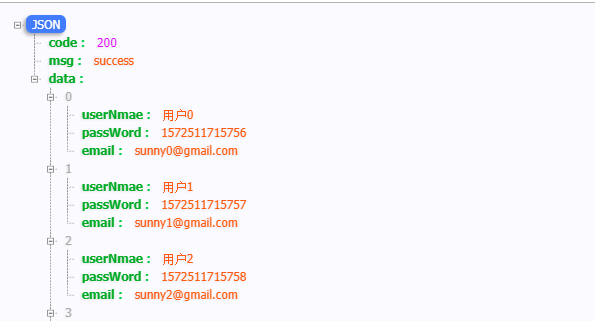
服务器异常返回结果集信息
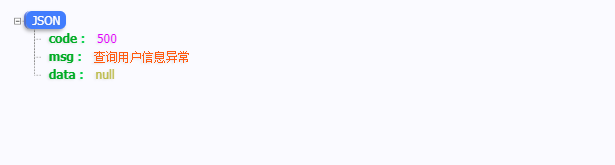
最新同步更新地址:https://www.sunnyblog.top/
感谢您花时间阅读此篇文章,如果您觉得这篇文章你学到了东西也是为了犒劳下博主的码字不易不妨打赏一下吧,让博主能喝上一杯咖啡,在此谢过了!
如果您觉得阅读本文对您有帮助,请点一下左下角“推荐”按钮,您的“推荐”将是我最大的写作动力!另外您也可以选择【关注我】,可以很方便找到我!
本文版权归作者和博客园共有,来源网址:https://www.cnblogs.com/sunny1009 欢迎各位转载,但是未经作者本人同意,转载文章之后必须在文章页面明显位置给出作者和原文连接,否则保留追究法律责任的权利!

 浙公网安备 33010602011771号