
elasticsearch分词器 character filter ,tokenizer,token filter
分词器:
- 规范化:normalization
- 字符过滤器:character filter
- 分词器:tokenizer
- 令牌过滤器:token filter
无论是内置的分析器(analyzer),还是自定义的分析器(analyzer),都由三种构件块组成的:character filters , tokenizers , token filters。
内置的analyzer将这些构建块预先打包到适合不同语言和文本类型的analyzer中。
Character filters (字符过滤器)
字符过滤器以字符流的形式接收原始文本,并可以通过添加、删除或更改字符来转换该流。
举例来说,一个字符过滤器可以用来把阿拉伯数字(٠١٢٣٤٥٦٧٨٩)转成成Arabic-Latin的等价物(0123456789)。
一个分析器可能有0个或多个字符过滤器,它们按顺序应用。
(PS:类似Servlet中的过滤器,或者拦截器,想象一下有一个过滤器链)
Tokenizer (分词器)
一个分词器接收一个字符流,并将其拆分成单个token (通常是单个单词),并输出一个token流。例如,一个whitespace分词器当它看到空白的时候就会将文本拆分成token。它会将文本“Quick brown fox!”转换为[Quick, brown, fox!]
(PS:Tokenizer 负责将文本拆分成单个token ,这里token就指的就是一个一个的单词。就是一段文本被分割成好几部分,相当于Java中的字符串的 split )
分词器还负责记录每个term的顺序或位置,以及该term所表示的原单词的开始和结束字符偏移量。(PS:文本被分词后的输出是一个term数组)
一个分析器必须只能有一个分词器
Token filters (token过滤器)
token过滤器接收token流,并且可能会添加、删除或更改tokens。
例如,一个lowercase token filter可以将所有的token转成小写。stop token filter可以删除常用的单词,比如 the 。synonym token filter可以将同义词引入token流。
不允许token过滤器更改每个token的位置或字符偏移量。
一个分析器可能有0个或多个token过滤器,它们按顺序应用。
小结&回顾
- analyzer(分析器)是一个包,这个包由三部分组成,分别是:character filters (字符过滤器)、tokenizer(分词器)、token filters(token过滤器)
- 一个analyzer可以有0个或多个character filters
- 一个analyzer有且只能有一个tokenizer
- 一个analyzer可以有0个或多个token filters
- character filter 是做字符转换的,它接收的是文本字符流,输出也是字符流
- tokenizer 是做分词的,它接收字符流,输出token流(文本拆分后变成一个一个单词,这些单词叫token)
- token filter 是做token过滤的,它接收token流,输出也是token流
- 由此可见,整个analyzer要做的事情就是将文本拆分成单个单词,文本 ----> 字符 ----> token

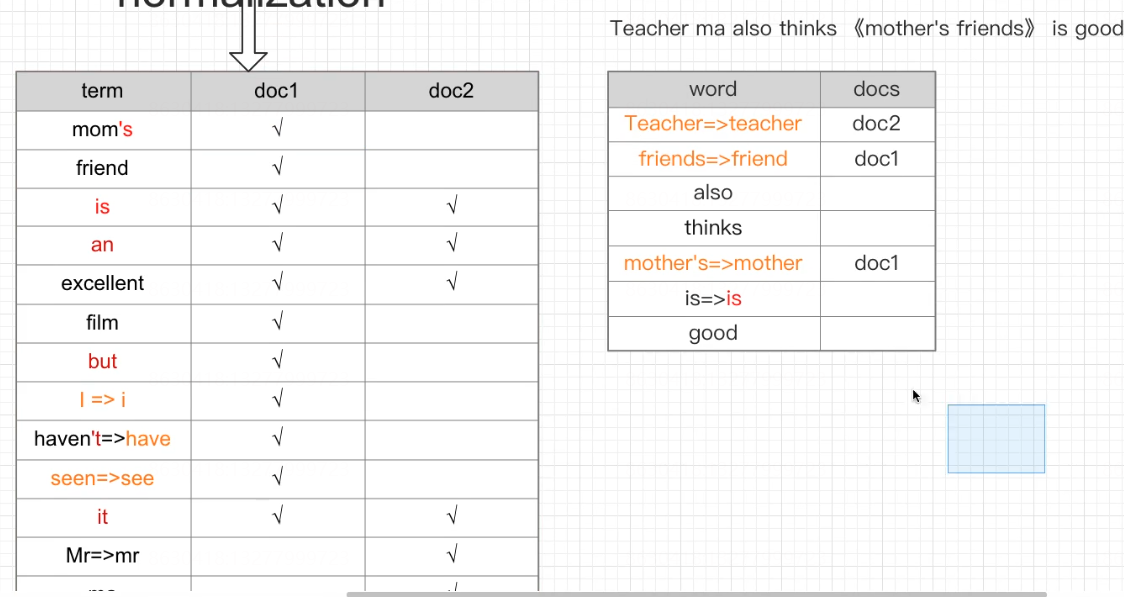
1 normalization:文档规范化,提高召回率
- 停用词
- 时态转换
- 大小写
- 同义词
- 语气词
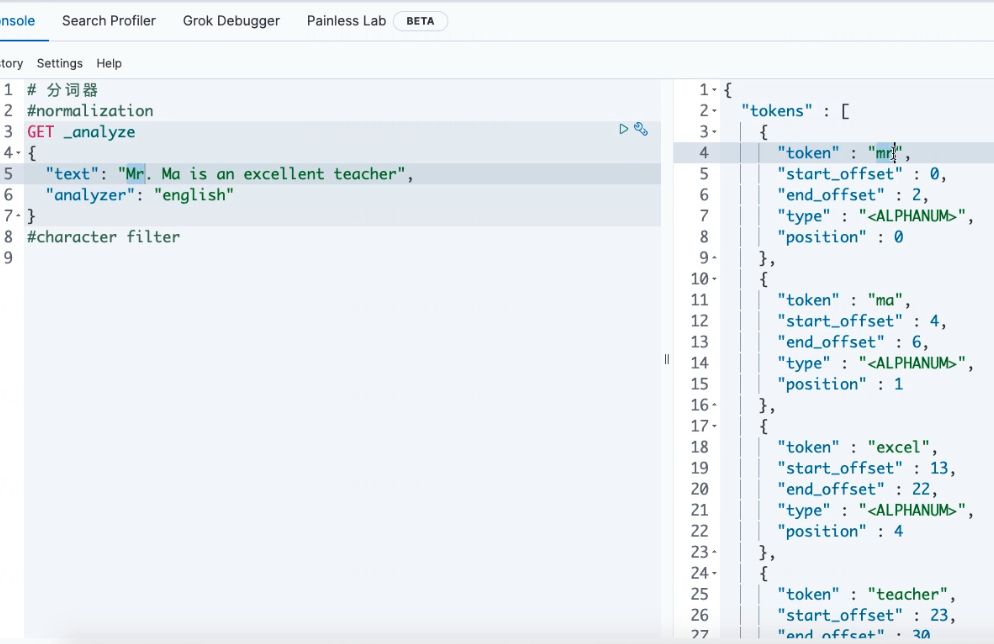
#normalization
GET _analyze
{
  "text": "Mr. Ma is an excellent teacher",
  "analyzer": "english"
}
2 字符过滤器(character filter):分词之前的预处理,过滤无用字符
- HTML Strip
- Mapping
- Pattern Replace
HTML Strip
##HTML Strip Character Filter ###测试数据<p>I'm so <a>happy</a>!</p> DELETE my_index PUT my_index { "settings": { "analysis": { "char_filter": { "my_char_filter(自定义的分析器名字)":{ "type":"html_strip", "escaped_tags":["a"] } }, "analyzer": { "my_analyzer":{ "tokenizer":"keyword", "char_filter":["my_char_filter(自定义的分析器名字)"] } } } } } GET my_index/_analyze { "analyzer": "my_analyzer", "text": "<p>I'm so <a>happy</a>!</p>" }
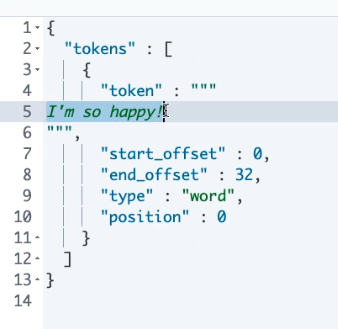
Mapping
##Mapping Character Filter
DELETE my_index
PUT my_index
{
  "settings": {
    "analysis": {
      "char_filter": {
        "my_char_filter":{
          "type":"mapping",
          "mappings":[
            "滚 => *",
            "垃 => *",
            "圾 => *"
            ]
        }
      },
      "analyzer": {
        "my_analyzer":{
          "tokenizer":"keyword",
          "char_filter":["my_char_filter"]
        }
      }
    }
  }
}
GET my_index/_analyze
{
  "analyzer": "my_analyzer",
  "text": "你就是个垃圾!滚"
}
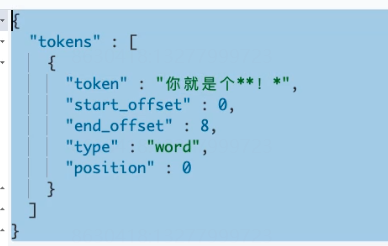
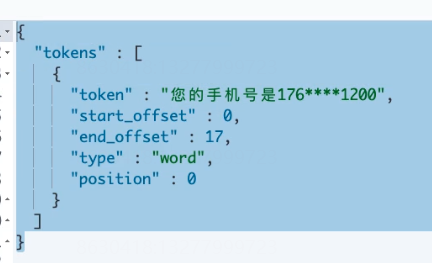
Pattern Replace
##Pattern Replace Character Filter
#17611001200
DELETE my_index
PUT my_index
{
  "settings": {
    "analysis": {
      "char_filter": {
        "my_char_filter":{
          "type":"pattern_replace",
          "pattern":"(\\d{3})\\d{4}(\\d{4})",
          "replacement":"$1****$2"
        }
      },
      "analyzer": {
        "my_analyzer":{
          "tokenizer":"keyword",
          "char_filter":["my_char_filter"]
        }
      }
    }
  }
}
GET my_index/_analyze
{
  "analyzer": "my_analyzer",
  "text": "您的手机号是17611001200"
}
3 令牌过滤器(token filter)
--停用词、时态转换、大小写转换、同义词转换、语气词处理等。比如:has=>have him=>he apples=>apple the/oh/a=>干掉
- 大小写
- 时态
- 停用词
- 同义词
- 语气词
#token filter
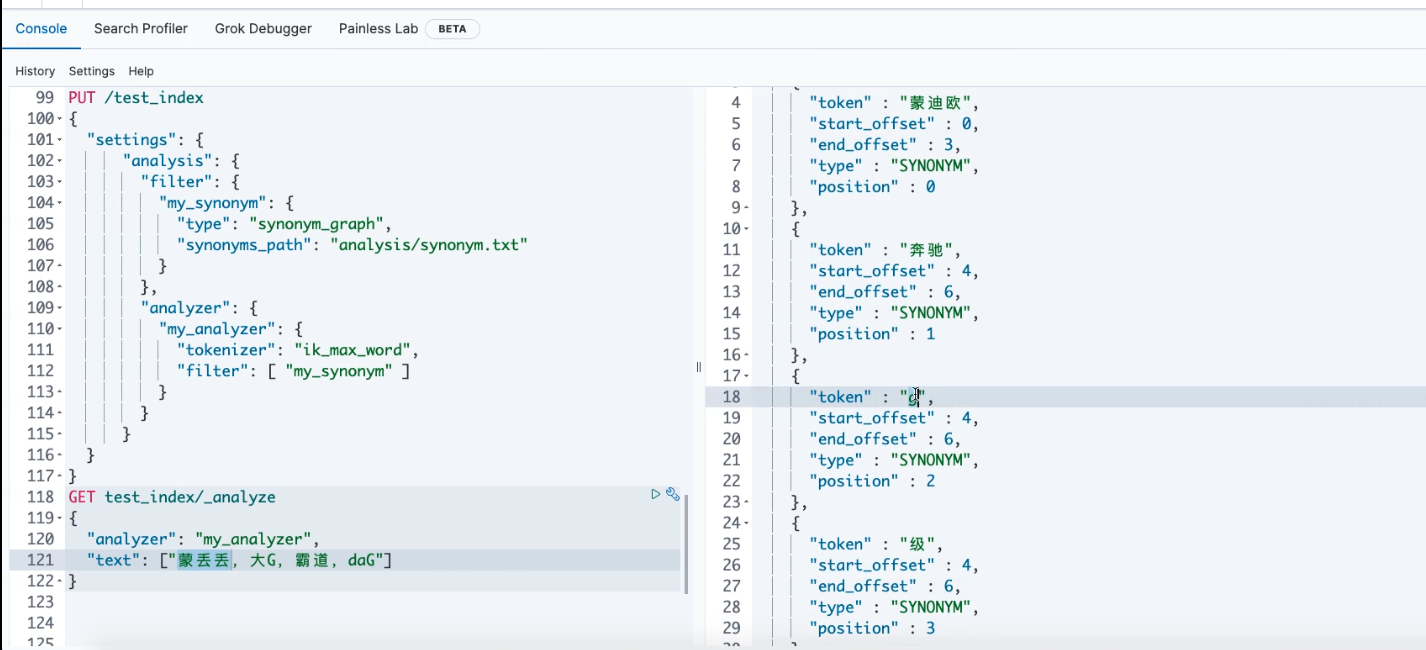
DELETE test_index
PUT /test_index
{
  "settings": {
      "analysis": {
        "filter": {
          "my_synonym": {
            "type": "synonym_graph",
            "synonyms_path": "analysis/synonym.txt"
          }
        },
        "analyzer": {
          "my_analyzer": {
            "tokenizer": "ik_max_word",
            "filter": [ "my_synonym" ]
          }
        }
      }
  }
}
GET test_index/_analyze
{
  "analyzer": "my_analyzer",
  "text": ["蒙丢丢,大G,霸道,daG"]
}
GET test_index/_analyze
{
  "analyzer": "ik_max_word",
  "text": ["奔驰G级"]
}



近义词匹配
DELETE test_index
PUT /test_index
{
  "settings": {
      "analysis": {
        "filter": {
          "my_synonym": {
            "type": "synonym",
            "synonyms": ["赵,钱,孙,李=>吴","周=>王"]
          }
        },
        "analyzer": {
          "my_analyzer": {
            "tokenizer": "standard",
            "filter": [ "my_synonym" ]
          }
        }
      }
  }
}
GET test_index/_analyze
{
  "analyzer": "my_analyzer",
  "text": ["赵,钱,孙,李","周"]
}


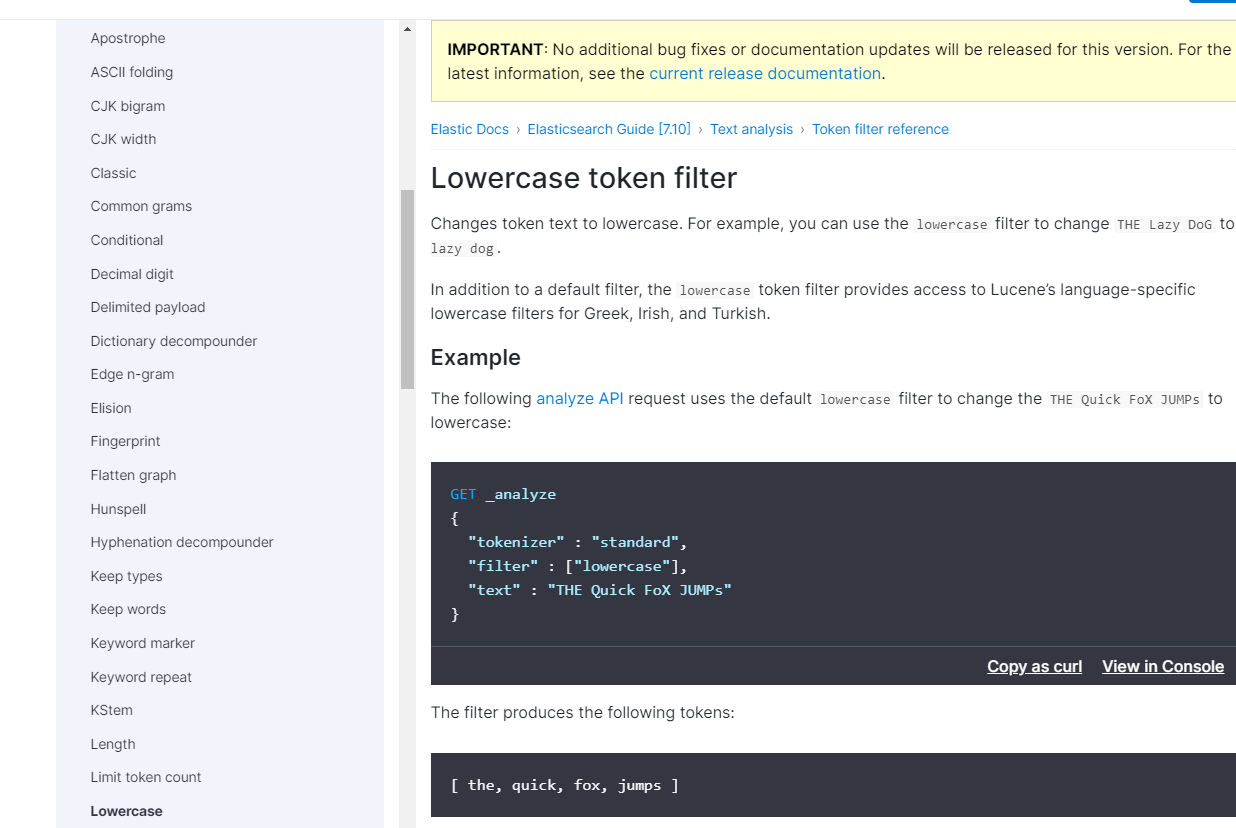
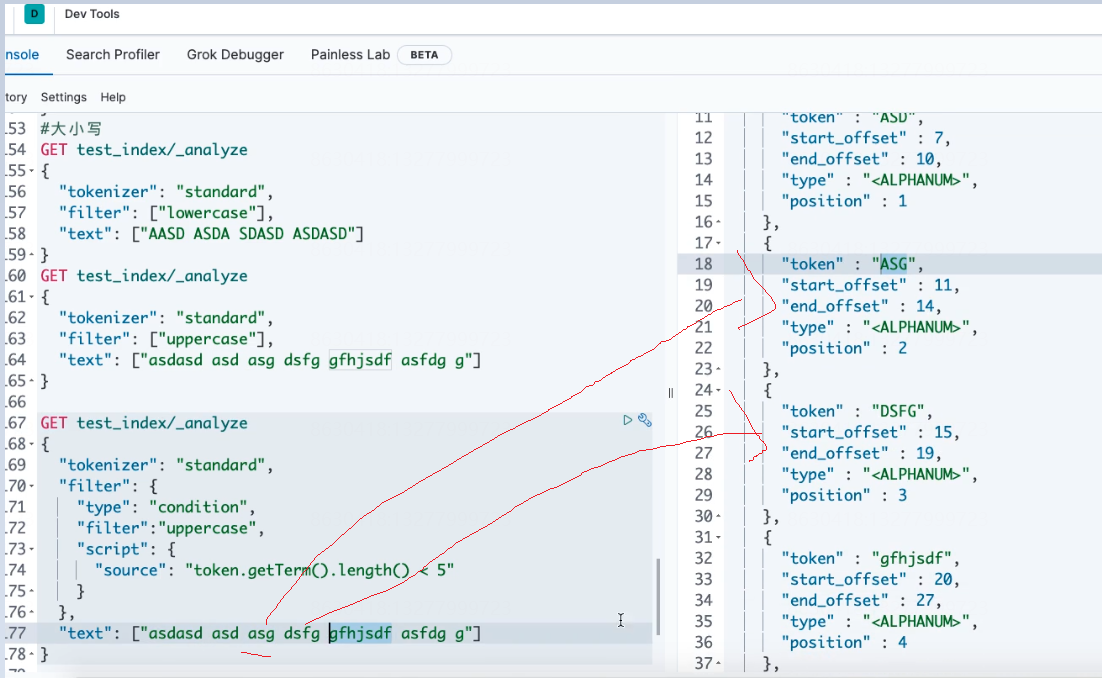
大小写
#大小写
GET test_index/_analyze
{
  "tokenizer": "standard",
  "filter": ["lowercase"],
  "text": ["AASD ASDA SDASD ASDASD"]
}
GET test_index/_analyze
{
  "tokenizer": "standard",
  "filter": ["uppercase"],
  "text": ["asdasd asd asg dsfg gfhjsdf asfdg g"]
}
#长度小于5的转大写
GET test_index/_analyze
{
  "tokenizer": "standard",
  "filter": {
    "type": "condition",
    "filter":"uppercase",
    "script": {
      "source": "token.getTerm().length() < 5"
    }
  },
  "text": ["asdasd asd asg dsfg gfhjsdf asfdg g"]
}
转小写
转大写

长度小于5的转大写
停用词
https://www.elastic.co/guide/en/elasticsearch/reference/7.10/analysis-stop-tokenfilter.html
#停用词
DELETE test_index
PUT /test_index
{
  "settings": {
      "analysis": {
        "analyzer": {
          "my_analyzer自定义名字": {
            "type": "standard",
            "stopwords":["me","you"]
          }
        }
      }
  }
}
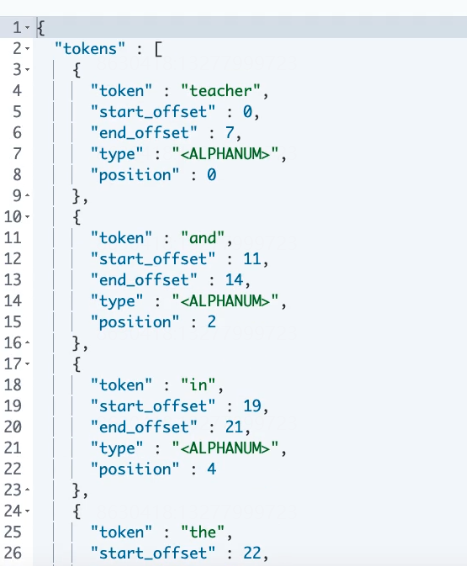
GET test_index/_analyze
{
  "analyzer": "my_analyzer自定义名字",
  "text": ["Teacher me and you in the china"]
}

#####返回 teacher and  you in the china
官方案例:
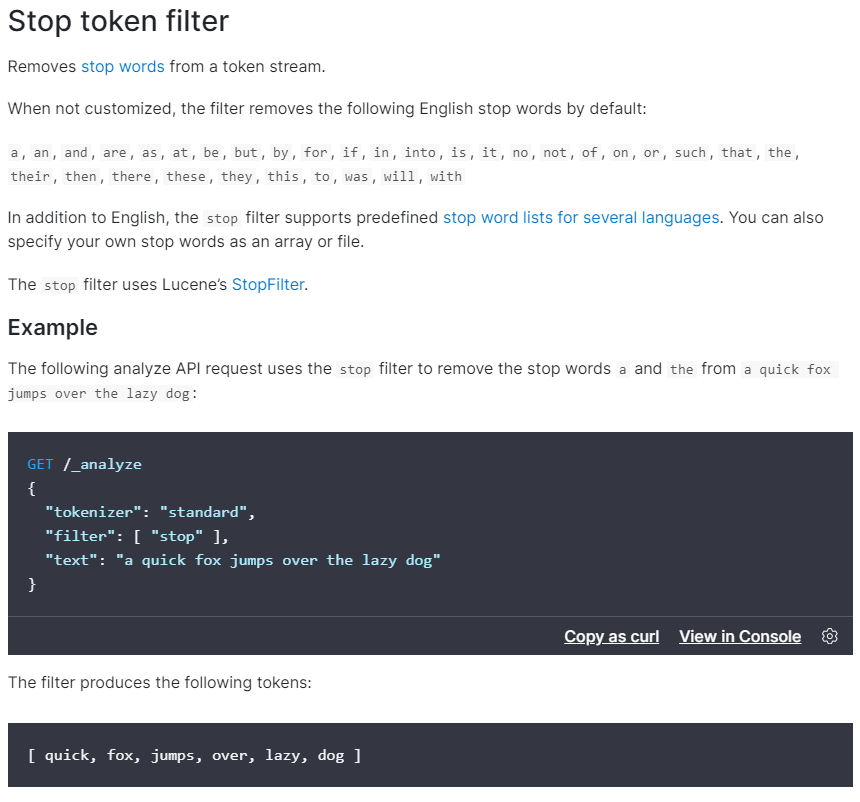
官方支持的 token filter
https://www.elastic.co/guide/en/elasticsearch/reference/7.10/analysis-stop-tokenfilter.html

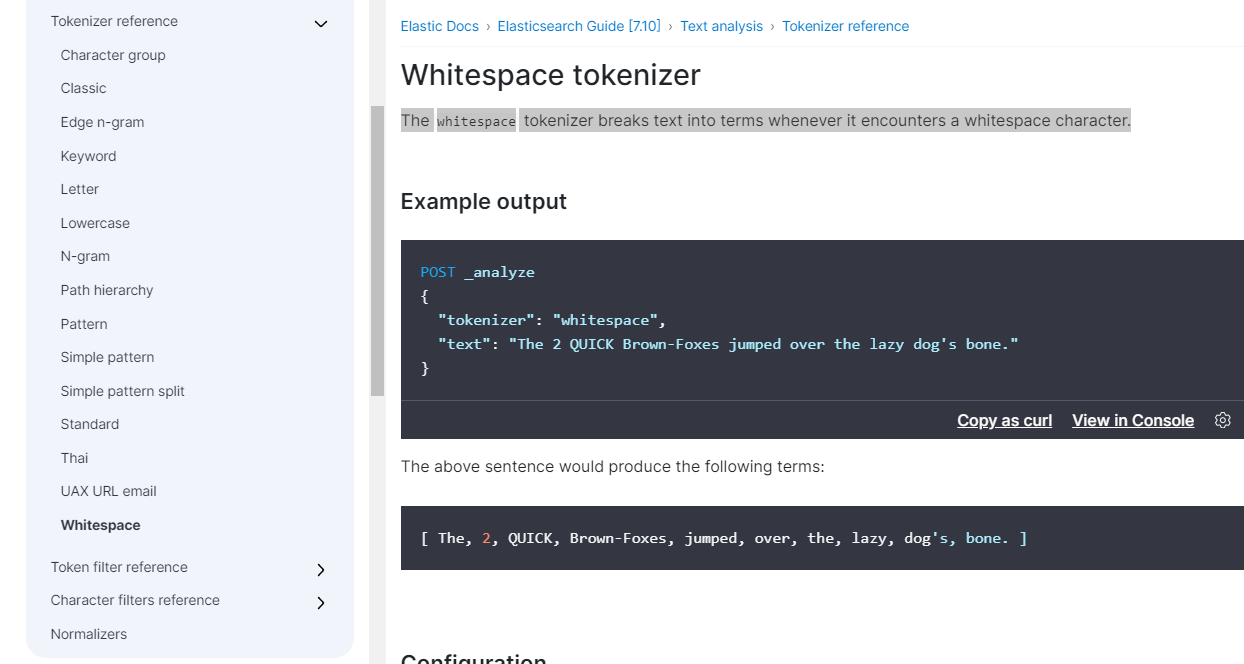
4 分词器(tokenizer):切词
- 默认分词器:standard(英文切割,根据空白切割)
- 中文分词器:ik分词
https://www.elastic.co/guide/en/elasticsearch/reference/7.10/analysis-whitespace-tokenizer.html
配置内置的分析器
内置的分析器不用任何配置就可以直接使用。当然,默认配置是可以更改的。例如,standard分析器可以配置为支持停止字列表:
curl -X PUT "localhost:9200/my_index" -H 'Content-Type: application/json' -d'
{
  "settings": {
    "analysis": {
      "analyzer": {
        "std_english": {
          "type":      "standard",
          "stopwords": "_english_"
        }
      }
    }
  },
  "mappings": {
    "_doc": {
      "properties": {
        "my_text": {
          "type":     "text",
          "analyzer": "standard",
          "fields": {
            "english": {
              "type":     "text",
              "analyzer": "std_english"
            }
          }
        }
      }
    }
  }
}
'
在这个例子中,我们基于standard分析器来定义了一个std_englisth分析器,同时配置为删除预定义的英语停止词列表。后面的mapping中,定义了my_text字段用standard,my_text.english用std_english分析器。因此,下面两个的分词结果会是这样的:
curl -X POST "localhost:9200/my_index/_analyze" -H 'Content-Type: application/json' -d'
{
  "field": "my_text",
  "text": "The old brown cow"
}
'
curl -X POST "localhost:9200/my_index/_analyze" -H 'Content-Type: application/json' -d'
{
  "field": "my_text.english",
  "text": "The old brown cow"
}
'
第一个由于用的standard分析器,因此分词的结果是:[ the, old, brown, cow ]
第二个用std_english分析的结果是:[ old, brown, cow ]
--------------------------Standard Analyzer (默认)---------------------------
如果没有特别指定的话,standard 是默认的分析器。它提供了基于语法的标记化(基于Unicode文本分割算法),适用于大多数语言。
例如:
curl -X POST "localhost:9200/_analyze" -H 'Content-Type: application/json' -d'
{
  "analyzer": "standard",
  "text": "The 2 QUICK Brown-Foxes jumped over the lazy dog\u0027s bone."
}
'
上面例子中,那段文本将会输出如下terms:
[ the, 2, quick, brown, foxes, jumped, over, the, lazy, dog's, bone ]
-------------------案例3---------------------
标准分析器接受下列参数:
- max_token_length : 最大token长度,默认255
- stopwords : 预定义的停止词列表,如_english_ 或 包含停止词列表的数组,默认是 _none_
- stopwords_path : 包含停止词的文件路径
curl -X PUT "localhost:9200/my_index" -H 'Content-Type: application/json' -d'
{
  "settings": {
    "analysis": {
      "analyzer": {
        "my_english_analyzer": {
          "type": "standard",
          "max_token_length": 5,
          "stopwords": "_english_"
        }
      }
    }
  }
}
'
curl -X POST "localhost:9200/my_index/_analyze" -H 'Content-Type: application/json' -d'
{
  "analyzer": "my_english_analyzer",
  "text": "The 2 QUICK Brown-Foxes jumped over the lazy dog\u0027s bone."
}
'
以上输出下列terms:
[ 2, quick, brown, foxes, jumpe, d, over, lazy, dog's, bone ]
---------------------定义--------------------
standard分析器由下列两部分组成:
Tokenizer
- Standard Tokenizer
Token Filters
- Standard Token Filter
- Lower Case Token Filter
- Stop Token Filter (默认被禁用)
你还可以自定义
curl -X PUT "localhost:9200/standard_example" -H 'Content-Type: application/json' -d'
{
  "settings": {
    "analysis": {
      "analyzer": {
        "rebuilt_standard": {
          "tokenizer": "standard",
          "filter": [
            "lowercase"
          ]
        }
      }
    }
  }
}
'
-------------------- Simple Analyzer---------------------------
simple 分析器当它遇到只要不是字母的字符,就将文本解析成term,而且所有的term都是小写的。例如:
curl -X POST "localhost:9200/_analyze" -H 'Content-Type: application/json' -d'
{
  "analyzer": "simple",
  "text": "The 2 QUICK Brown-Foxes jumped over the lazy dog\u0027s bone."
}
'
输入结果如下:
[ the, quick, brown, foxes, jumped, over, the, lazy, dog, s, bone ]
5 常见分词器:
- standard analyzer:默认分词器,中文支持的不理想,会逐字拆分。
- keyword分词器,不对输入的text内容做热呢和处理,而是将整个输入text作为一个token
- pattern tokenizer:以正则匹配分隔符,把文本拆分成若干词项。
- simple pattern tokenizer:以正则匹配词项,速度比pattern tokenizer快。
- whitespace analyzer:以空白符分隔 Tim_cookie
6 自定义分词器:custom analyzer
- char_filter:内置或自定义字符过滤器 。
- token filter:内置或自定义token filter 。
- tokenizer:内置或自定义分词器。
分词器(Analyzer)由0个或者多个字符过滤器(Character Filter),1个标记生成器(Tokenizer),0个或者多个标记过滤器(Token Filter)组成
说白了就是将一段文本经过处理后输出成单个单个单词
PUT custom_analysis
{
  "settings":{
    "analysis":{

    }
  }
}
#自定义分词器
DELETE custom_analysis
PUT custom_analysis
{
  "settings": {
    "analysis": {#第一步:字符过滤器 接收原始文本,并可以通过添加,删除或者更改字符来转换字符串,转换成可识别的的字符串
      "char_filter": {
        "my_char_filter": {
          "type": "mapping",
          "mappings": [
            "& => and",
            "| => or"
          ]
        },
        "html_strip_char_filter":{
          "type":"html_strip",
          "escaped_tags":["a"]
        }
      },
      "filter": {
   #第三步:令牌(token)过滤器 ,接收切割好的token流(单词,term),并且会添加,删除或者更改tokens,
   如:lowercase token fileter可以把所有token(单词)转成小写,stop token filter停用词,可以删除常用的单词;
   synonym token filter 可以将同义词引入token流
        "my_stopword": {
          "type": "stop",
          "stopwords": [
            "is",
            "in",
            "the",
            "a",
            "at",
            "for"
          ]
        }
      },
      "tokenizer": {#第2步:分词器,切割点,切割成一个个单个的token(单词),并输出token流。它会将文本“Quick brown fox!”转换为[Quick, brown, fox!],就是一段文本被分割成好几部分。
        "my_tokenizer": {
          "type": "pattern",
          "pattern": "[ ,.!?]"
        }
      },
      "analyzer": {
        "my_analyzer":{
          "type":"custom",#告诉
          "char_filter":["my_char_filter","html_strip_char_filter"],
          "filter":["my_stopword","lowercase"],
          "tokenizer":"my_tokenizer"
        }
      }
    }
  }
}

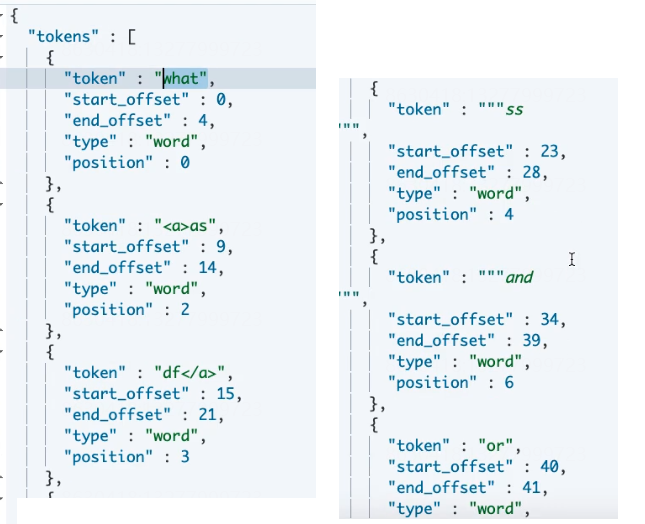
GET custom_analysis/_analyze
{
  "analyzer": "my_analyzer",
  "text": ["What is ,<a>as.df</a>  ss<p> in ? &</p> | is ! in the a at for "]
}
------------------------------自义定2---------------------------------------------
curl -X PUT "localhost:9200/simple_example" -H 'Content-Type: application/json' -d'
{
  "settings": {
    "analysis": {
      "analyzer": {
        "rebuilt_simple": {
          "tokenizer": "lowercase",
          "filter": [
          ]
        }
      }
    }
  }
}
'
Whitespace Analyzer
whitespace 分析器,当它遇到空白字符时,就将文本解析成terms
示例:
curl -X POST "localhost:9200/_analyze" -H 'Content-Type: application/json' -d'
{
  "analyzer": "whitespace",
  "text": "The 2 QUICK Brown-Foxes jumped over the lazy dog\u0027s bone."
}
'
输出结果如下:
[ The, 2, QUICK, Brown-Foxes, jumped, over, the, lazy, dog's, bone. ]
------------------------------Stop Analyzer-----------------
top 分析器 和 simple 分析器很像,唯一不同的是,stop 分析器增加了对删除停止词的支持。默认用的停止词是 _englisht_
(PS:意思是,假设有一句话“this is a apple”,并且假设“this” 和 “is”都是停止词,那么用simple的话输出会是[ this , is , a , apple ],而用stop输出的结果会是[ a , apple ],到这里就看出二者的区别了,stop 不会输出停止词,也就是说它不认为停止词是一个term)
(PS:所谓的停止词,可以理解为分隔符)
curl -X POST "localhost:9200/_analyze" -H 'Content-Type: application/json' -d'
{
    "analyzer": "stop",
    "text": "The 2 QUICK Brown-Foxes jumped over the lazy dog\u0027s bone."
}
'
输出
[ quick, brown, foxes, jumped, over, lazy, dog, s, bone ]
stop 接受以下参数:
- stopwords : 一个预定义的停止词列表(比如,_englisht_)或者是一个包含停止词的列表。默认是 _english_
- stopwords_path : 包含停止词的文件路径。这个路径是相对于Elasticsearch的config目录的一个路径
curl -X PUT "localhost:9200/my_index" -H 'Content-Type: application/json' -d'
{
  "settings": {
    "analysis": {
      "analyzer": {
        "my_stop_analyzer": {
          "type": "stop",
          "stopwords": ["the", "over"]
        }
      }
    }
  }
}
'
上面配置了一个stop分析器,它的停止词有两个:the 和 over
curl -X POST "localhost:9200/my_index/_analyze" -H 'Content-Type: application/json' -d'
{
  "analyzer": "my_stop_analyzer",
  "text": "The 2 QUICK Brown-Foxes jumped over the lazy dog\u0027s bone."
}
'
基于以上配置,这个请求输入会是这样的:

[ quick, brown, foxes, jumped, lazy, dog, s, bone ]
Pattern Analyzer
curl -X POST "localhost:9200/_analyze" -H 'Content-Type: application/json' -d'
{
  "analyzer": "pattern",
  "text": "The 2 QUICK Brown-Foxes jumped over the lazy dog\u0027s bone."
}
'
由于默认按照非单词字符分割,因此输出会是这样的:
[ the, 2, quick, brown, foxes, jumped, over, the, lazy, dog, s, bone ]
pattern 分析器接受如下参数:
- pattern : 一个Java正则表达式,默认 \W+
- flags : Java正则表达式flags。比如:CASE_INSENSITIVE 、COMMENTS
- lowercase : 是否将terms全部转成小写。默认true
- stopwords : 一个预定义的停止词列表,或者包含停止词的一个列表。默认是 _none_
- stopwords_path : 停止词文件路径
curl -X PUT "localhost:9200/my_index" -H 'Content-Type: application/json' -d'
{
  "settings": {
    "analysis": {
      "analyzer": {
        "my_email_analyzer": {
          "type":      "pattern",
          "pattern":   "\\W|_",
          "lowercase": true
        }
      }
    }
  }
}
'
上面的例子中配置了按照非单词字符或者下划线分割,并且输出的term都是小写
curl -X POST "localhost:9200/my_index/_analyze" -H 'Content-Type: application/json' -d'
{
  "analyzer": "my_email_analyzer",
  "text": "John_Smith@foo-bar.com"
}
'
因此,基于以上配置,本例输出如下:
[ john, smith, foo, bar, com ]
Language Analyzers
支持不同语言环境下的文本分析。内置(预定义)的语言有:arabic, armenian, basque, bengali, brazilian, bulgarian, catalan, cjk, czech, danish, dutch, english, finnish, french, galician, german, greek, hindi, hungarian, indonesian, irish, italian, latvian, lithuanian, norwegian, persian, portuguese, romanian, russian, sorani, spanish, swedish, turkish, thai
7 中文分词器:ik分词
-
安装和部署
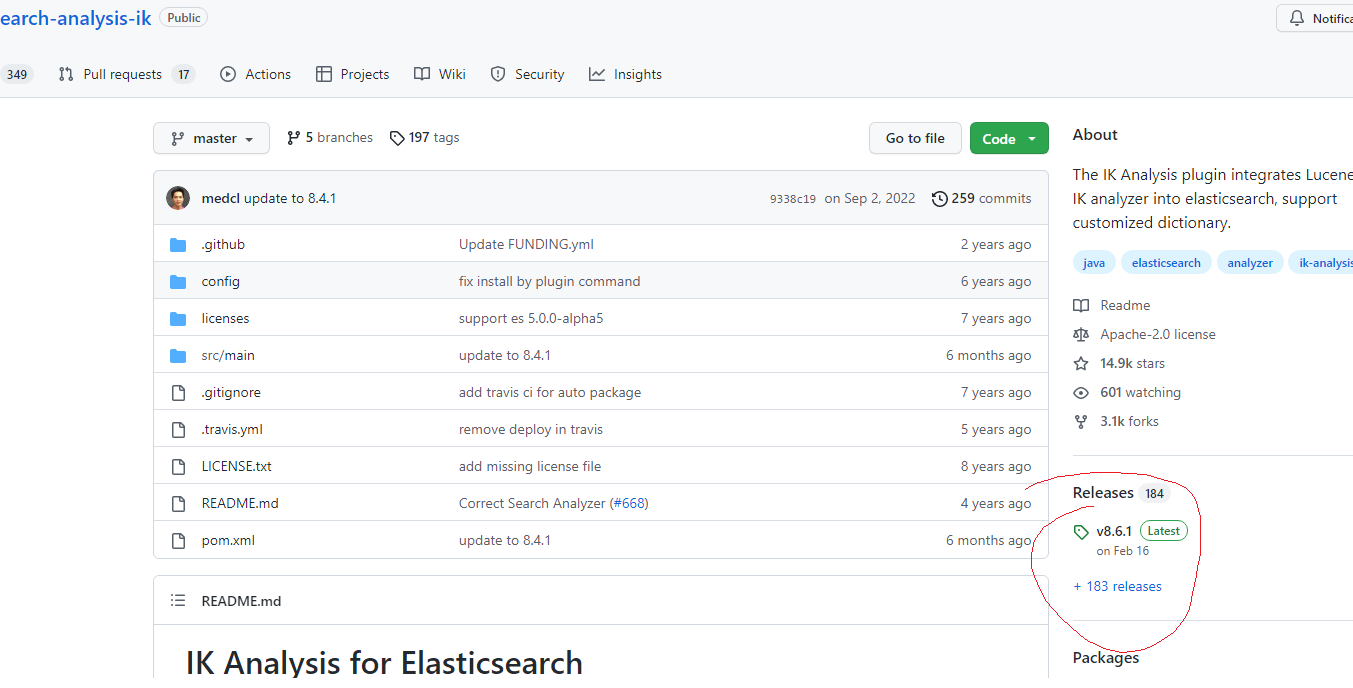
- ik下载地址:https://github.com/medcl/elasticsearch-analysis-ik
- Github加速器:https://github.com/fhefh2015/Fast-GitHub
- 创建插件文件夹 cd your-es-root/plugins/ && mkdir ik
- 将插件解压缩到文件夹 your-es-root/plugins/ik
- 重新启动es
-
IK文件描述
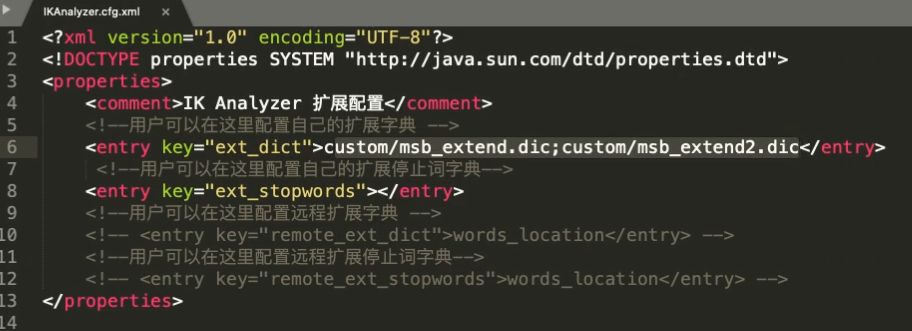
- IKAnalyzer.cfg.xml:IK分词配置文件
- 主词库:main.dic
- 英文停用词:stopword.dic,不会建立在倒排索引中
- 特殊词库:
- quantifier.dic:特殊词库:计量单位等
- suffix.dic:特殊词库:行政单位
- surname.dic:特殊词库:百家姓
- preposition:特殊词库:语气词
- 自定义词库:网络词汇、流行词、自造词等
-
ik提供的两种analyzer:
- ik_max_word会将文本做最细粒度的拆分,比如会将“中华人民共和国国歌”拆分为“中华人民共和国,中华人民,中华,华人,人民共和国,人民,人,民,共和国,共和,和,国国,国歌”,会穷尽各种可能的组合,适合 Term Query;
- ik_smart: 会做最粗粒度的拆分,比如会将“中华人民共和国国歌”拆分为“中华人民共和国,国歌”,适合 Phrase 查询。
-
热更新
- 远程词库文件
- 优点:上手简单
- 缺点:
- 词库的管理不方便,要操作直接操作磁盘文件,检索页很麻烦
- 文件的读写没有专门的优化性能不好
- 多一层接口调用和网络传输
- ik访问数据库
- 远程词库文件
演示下载安装:



扩展词库:
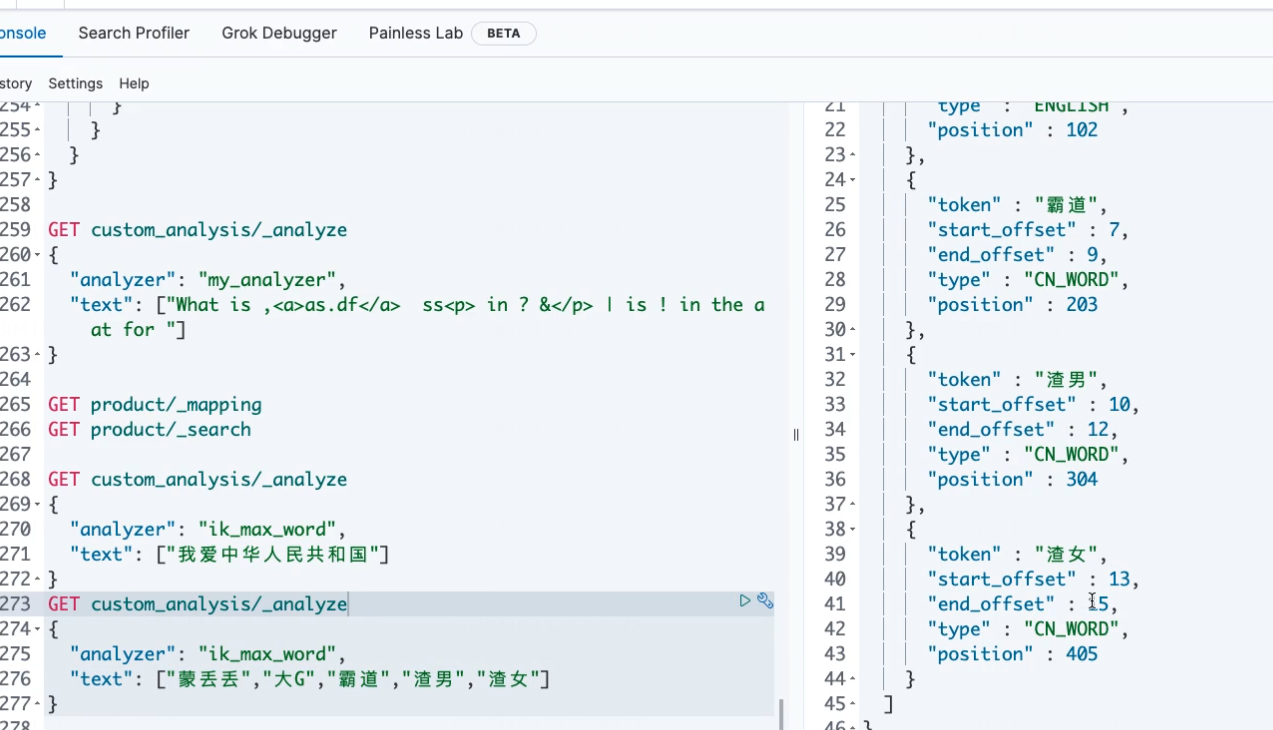
重启es后生效=》
本文来自博客园,作者:孙龙-程序员,转载请注明原文链接:https://www.cnblogs.com/sunlong88/p/17093708.html

 浙公网安备 33010602011771号