
ansible作业 -系统基础配置
完成系统基础配置:
1、时区设置为Asia/Shanghai,时钟同步
2、主机名和hosts文件配置
3、公钥分发
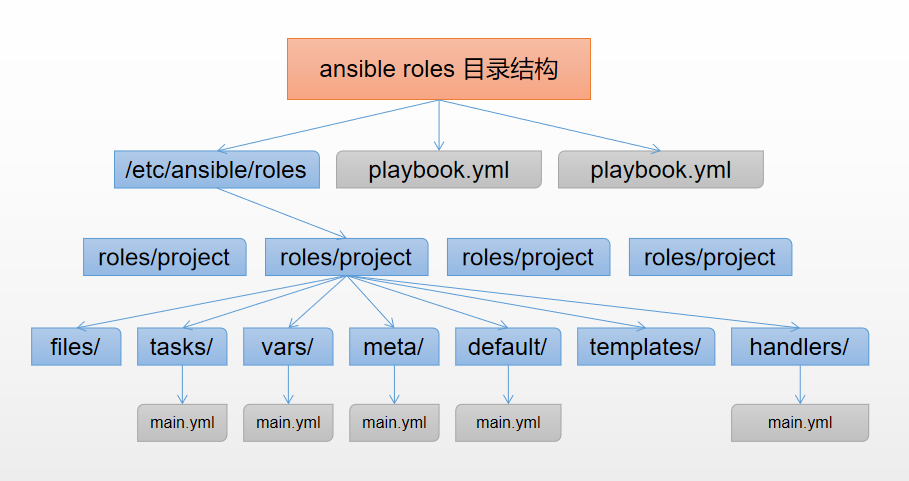

上图是一张ansible roles的目录结构图,我们在创建roles时根据自己的需求创建各目录,用不到的目录可创建为空目录,或不创建 。
1、创建目录
~]# mkdir -p test/{tasks,templates,files,vars}
[root@ansible roles]# tree . └── test ├── files │ ├── tasks │ ├── templates │ └── vars
[root@ansible roles]# tree
.
└── test
    ├── files
    │   └── hosts
    ├── tasks
    │   ├── hostsfile.yml
    │   ├── main.yml
    │   ├── ntpfile.yml
    │   ├── ssh_key.yml
    │   └── timezone.yml
    ├── templates
    │   └── ntp.conf.j2
    └── vars
        └── main.yml
3、准备变量文件 vars/main.yml
ntp_server: 192.168.43.10
time_zone: Asia/Shanghai
1)把Asia/Shanghai定义为变量,让task去引用这个变量,可以根据不同的场景修改;
(2)ntp server 设置成一个变量,并设置ntp server服务器地址;

cp /etc/ntp.conf /etc/ansible/roles/templates/ntp.conf.j2
5、任务剧本编写
(1)时区设置的task,只需一步,使用shell模块,去引用前面在vars中设置的变量time_zone;
vim timezone.yml

- name: set timezone

  shell: /usr/bin/timedatectl set-timezone {{ time_zone }}
2)时钟同步的task, 需要两步完成,先设置ntp server ,使用template模块,将设置好的conf.j2配置文件复制到远程主机的etc下,然后重启ntpd
vim ntpfile.yml

- name: set ntp server

  template:

    src: ntp.conf.j2

    dest: /etc/ntp.conf

- name: restart ntpd

  systemd:

    name:ntpd

    daemon_reload: yes

    state: started
(3)主机和hosts文件配置的task,将写好的host文件存放在hosts目录下,使用template模块,将host文件分发到其他主机;
- name: copy host file

  template:

    src: /etc/hosts

    dest: /etc
(4)公钥分发的task:(完成各个主机之间SSH免密钥登陆)
- 由于在运行过程中发现了root下的.ssh目录存在会影响到运行结果,所以先对root/.ssh目录做初始化操作,
- 第二步使用shell模块,生成密钥对;
- 第三步将本地的公钥复制到远程主机上;
- 第四步关闭初次访问提示询问,
- 第五步从各被控制主机将公钥拷贝到本机;
- 将各个公钥合并成一个文件;
- 将合成的公钥分发给各主机。
- name: delete /root/.ssh/
file: path=/root/.ssh/ state=absent #初始化.ssh目录
- name: create sshkey                                 #创建sshkey
  shell: ssh-keygen -N "" -f /root/.ssh/id_rsa -q     #生成密钥对

- name: copy sshkey
  authorized_key:
    user: root                                                #被控制的远程主机上的用户名
    key: "{{ lookup('file','/root/.ssh/id_rsa.pub') }}"       #本机的公钥地址

- name: close ssh check                                      #关闭初次访问提示询问
  shell: sed -i "s/^.*StrictHostKeyChecking.*$/   StrictHostKeyChecking no/g" /etc/ssh/ssh_config

- name: fetch copy                                           #从各被控制主机将公钥拷贝到本机
  fetch: src=/root/.ssh/id_rsa.pub dest=/tmp/ssh/

- name: append file authorized_keys.log                       #将各个公钥合并成一个文件
  shell: find /tmp/ssh/* -type f -exec sh -c 'cat {}>>/tmp/ssh/authorized_keys.log' \;
  run_once: true
,
- name: copy authorized_keys                                 # 将合成的公钥进行分发
  copy: src=/tmp/ssh/authorized_keys.log dest=/root/.ssh/authorized_keys mode=0600
(5)编写main.yml,将所有task引进来
- include: timezone.yml
- include: hostsfile.yml
- include: ntpfile.yml
- include: ssh_key.yml
6、编写主的test.yml文件调用test角色
- name: set timezone and ntpd

  hosts: test

  remote_user: root

  roles:

    - test
7、整体框架查看
[root@ansible ansible]# tree
.
├── hosts
├── roles
│    └── test
│        ├── files
│        │    └── hosts
│        ├── tasks
│        │    ├── hostsfile.yml
│        │    ├── main.yml
│        │    ├── ntpfile.yml
│        │    ├── ssh_key.yml
│        │    └── timezone.yml
│        ├── templates
│        │     └── ntp.conf.j2
│        └── vars
│          └── main.yml
└── test.yml

6 directories, 11 files
8.执行playbook
ansible-playbook -i hosts test.yml


 浙公网安备 33010602011771号