
(翻译 gafferongames) Snapshot Interpolation 快照插值
https://gafferongames.com/post/snapshot_interpolation/
In the previous article we networked a physics simulation using deterministic lockstep. Now, in this article we’re going to network the same simulation with a completely different technique: snapshot interpolation.
在上一篇文章中,我们使用确定性锁步(deterministic lockstep)对物理模拟进行了联网处理。现在,在本文中,我们将使用一种完全不同的技术——快照插值(snapshot interpolation)——来对同样的模拟进行联网。
Background
While deterministic lockstep is very efficient in terms of bandwidth, it’s not always possible to make your simulation deterministic. Floating point determinism across platforms is hard.
Also, as the player counts increase, deterministic lockstep becomes problematic: you can’t simulate frame n until you receive input from all players for that frame, so players end up waiting for the most lagged player. Because of this, I recommend deterministic lockstep for 2-4 players at most.
So if your simulation is not deterministic or you want higher player counts then you need a different technique. Snapshot interpolation fits the bill nicely. It is in many ways the polar opposite of deterministic lockstep: instead of running two simulations, one on the left and one on the right, and using perfect determinism and synchronized inputs keep them in sync, snapshot interpolation doesn’t run any simulation on the right side at all!
背景
虽然**确定性锁步(Deterministic Lockstep)**在带宽方面非常高效,但并非所有情况下都能保证模拟的确定性。跨平台实现浮点数的确定性非常困难。
此外,随着玩家数量的增加,确定性锁步会变得更加棘手:你必须等到所有玩家都提交了某一帧的输入后,才能模拟该帧的游戏状态。因此,所有玩家都会被最慢的玩家拖累。这也是为什么我建议最多只在2-4 名玩家的情况下使用确定性锁步。
如果你的模拟无法保证确定性,或者你希望支持更多玩家,那么你需要一种不同的技术。快照插值(Snapshot Interpolation)正好符合需求。它在许多方面与确定性锁步完全相反:后者依赖于两个同步运行的模拟(本地与远端),通过完美的确定性和同步输入保持一致,而快照插值则完全不在远端运行任何模拟!
Snapshots
Instead, we capture a snapshot of all relevant state from the simulation on the left and transmit it to the right, then on the right side we use those snapshots to reconstruct a visual approximation of the simulation, all without running the simulation itself.
As a first pass, let’s send across the state required to render each cube:
快照
相反,我们会从左侧(本地)模拟中捕获所有相关状态的快照,并将其传输到右侧(远端)。然后,在右侧使用这些快照来重建一个视觉上的近似模拟,而无需运行实际的模拟。
作为第一步,我们先传输渲染每个立方体所需的状态:
    struct CubeState
    {
        bool interacting;
        vec3f position;
        quat4f orientation;
    };
I’m sure you’ve worked out by now that the cost of this technique is increased bandwidth usage. Greatly increased bandwidth usage. Hold on to your neckbeards, because a snapshot contains the visual state for the entire simulation. With a bit of math we can see that each cube serializes down to 225 bits or 28.1 bytes. Since there are 900 cubes in our simulation that means each snapshot is roughly 25 kilobytes. That’s pretty big!
你可能已经意识到,这种技术的代价是带宽的增加——而且是大幅增加。
请系好安全带(或者抓紧你的络腮胡),因为一个快照包含整个模拟的视觉状态。稍微计算一下,每个立方体序列化后大约占 225 比特(28.1 字节)。由于我们的模拟中有 900 个立方体,这意味着每个快照大约 25 KB,确实是个不小的开销!
bool 1bit + 4*8 *3 + 4*8*4 = 225
At this point I would like everybody to relax, take a deep breath, and imagine we live in a world where I can actually send a packet this large 60 times per-second over the internet and not have everything explode. Imagine I have FIOS (I do), or I’m sitting over a backbone link to another computer that is also on the backbone. Imagine I live in South Korea. Do whatever you need to do to suspend disbelief, but most of all, don’t worry, because I’m going to spend the entire next article showing you how to optimize snapshot bandwidth.
到这里,我希望大家都能放松一下,深呼吸,想象一下我们生活在一个理想的世界:
在这个世界里,我可以每秒 60 次发送这么大的数据包,网络不会崩溃,一切运行流畅。
想象我有 FIOS(光纤宽带,我确实有),或者我正坐在直连骨干网的电脑前,并且接收端的电脑也在骨干网内。
甚至,想象我住在韩国(你懂的)。无论如何,请暂时放下怀疑,但最重要的是,不用担心!
因为在接下来的整篇文章里,我会教你如何优化快照带宽,让它变得高效可行!
When we send snapshot data in packets, we include at the top a 16 bit sequence number. This sequence number starts at zero and increases with each packet sent. We use this sequence number on receive to determine if the snapshot in a packet is newer or older than the most recent snapshot received. If it’s older then it’s thrown away.
Each frame we just render the most recent snapshot received on the right:
当我们在数据包中发送快照数据时,会在包头加入一个 16 位的序列号(sequence number)。
-
这个序列号从 0 开始,每发送一个新数据包,就递增 1。
-
在接收端,我们利用序列号来判断该快照数据是否比最近接收到的快照更新或更旧。
-
如果是旧的快照(即比最新的序列号更小),则直接丢弃,避免回退到过时状态。
每一帧,右侧(客户端)只需渲染最新收到的快照,确保游戏画面尽可能同步且流畅。
https://gafferongames.com/videos/snapshot_interpolation_60pps_jitter.mp4
Look closely though, and even though we’re sending the data as rapidly as possible (one packet per-frame) you can still see hitches on the right side. This is because the internet makes no guarantee that packets sent 60 times per-second arrive nicely spaced 1/60 of a second apart. Packets are jittered. Some frames you receive two snapshot packets. Other frames you receive none.
尽管我们尽可能快速地发送数据(每帧一个数据包),你仍然可能会看到右侧画面有卡顿。这是因为互联网并不保证每秒 60 次的数据包能够均匀地间隔 1/60 秒到达。
数据包抖动是造成问题的根源。网络中,数据包的到达时间常常会有波动:
-
有些帧,你会接收到两个快照数据包。
-
而其他帧,你可能会什么都没有收到。
这种情况会导致快照渲染不同步,从而产生可见的卡顿或跳帧现象。
Jitter and Hitches
This is actually a really common thing when you first start networking. You start out playing your game over LAN and notice you can just slam out packets really fast (60pps) and most of the time your game looks great because over the LAN those packets actually do tend to arrive at the same rate they were sent… and then you start trying to play your game over wireless or the internet and you start seeing hitches. Don’t worry. There are ways to handle this!
抖动与卡顿
这是当你开始进行网络编程时,非常常见的一个问题。你可能最初在**局域网(LAN)**上玩游戏,发现你可以以非常快的速度发送数据包(每秒 60 个数据包),而且大多数时候游戏看起来都非常流畅,因为在局域网中,这些数据包的到达速度和发送速率通常是保持一致的。
然而,一旦你开始尝试通过无线网络或互联网进行游戏,你就会开始注意到卡顿现象。这时,你会发现数据包的到达不再那么顺畅了——它们有延迟,甚至可能会出现丢包现象。
别担心,这其实是可以解决的!接下来的内容会介绍一些方法来应对这种网络抖动和卡顿的问题。
First, let’s look at how much bandwidth we’re sending with this naive approach. Each packet is 25312.5 bytes plus 28 bytes for IP + UDP header and 2 bytes for sequence number. That’s 25342.5 bytes per-packet and at 60 packets per-second this gives a total of 1520550 bytes per-second or 11.6 megabit/sec. Now there are certainly internet connections out there that can support that amount of traffic… but since, let’s be honest, we’re not really getting a lot of benefit blasting packets out 60 times per-second with all the jitter, let’s pull it back a bit and send only 10 snapshots per-second:
首先,让我们看看使用这种简单方法时,我们每秒发送的数据量有多大。
每个数据包的大小为 25312.5 字节,再加上 28 字节的 IP + UDP 头部和 2 字节的 序列号,总大小是:
25312.5+28+2=25342.5 字节/包
如果每秒发送 60 个数据包,那么总带宽需求为:
25342.5×60=1520550 字节/秒≈11.6 兆比特/秒
显然,某些互联网连接可以支持这么大的带宽需求,但考虑到网络抖动和不必要的传输,我们并没有得到太多的额外收益。为了避免浪费带宽,我们可以将发送频率降低到每秒 10 个快照,从而减少带宽的消耗。
将发送频率从 60 个包/秒 降低到 10 个包/秒 后,带宽需求将大大减少。这样不仅可以减少网络负担,还能更好地处理网络抖动。
https://gafferongames.com/videos/snapshot_interpolation_10pps_no_interpolation.mp4
You can see how this looks above. Not so great on the right side but at least we’ve reduced bandwidth by a factor of six to around 2 megabit/sec. We’re definitely headed in the right direction.
如上所示,虽然右侧的画面看起来仍然不太理想,但我们至少通过减少数据包的发送频率,将带宽需求降低了六倍,降至大约 2 兆比特/秒。
这确实是一个积极的进展!我们已经朝着更高效的网络传输方向迈出了重要的一步。通过减少每秒发送的快照数量,我们不仅能降低带宽占用,还能更好地应对网络抖动和延迟问题。
Linear Interpolation
Now for the trick with snapshots. What we do is instead of immediately rendering snapshot data received is that we buffer snapshots for a short amount of time in an interpolation buffer. This interpolation buffer holds on to snapshots for a period of time such that you have not only the snapshot you want to render but also, statistically speaking, you are very likely to have the next snapshot as well. Then as the right side moves forward in time we interpolate between the position and orientation for the two slightly delayed snapshots providing the illusion of smooth movement. In effect, we’ve traded a small amount of added latency for smoothness.
You may be surprised at just how good it looks with linear interpolation @ 10pps:
线性插值
接下来是使用快照的技巧。我们不再立即渲染接收到的快照数据,而是将快照缓冲一小段时间,存储在一个插值缓冲区中。这个插值缓冲区会保存接收到的快照一段时间,确保你不仅拥有当前要渲染的快照,而且统计上,你也很可能会收到下一个快照。
然后,随着右侧(客户端)时间的推进,我们在这两个稍微延迟的快照之间进行线性插值,计算出它们之间的位置和朝向,从而实现平滑的运动效果。实际上,我们用了一点点增加的延迟,换来了更平滑的表现。
效果
你可能会对每秒 10 个快照的线性插值效果感到惊讶——看起来非常不错!这表明,即使我们在带宽和延迟上做了一些妥协,通过插值,我们仍然能够呈现一个平滑、连贯的动画效果。
https://gafferongames.com/videos/snapshot_interpolation_10pps_linear_interpolation.mp4
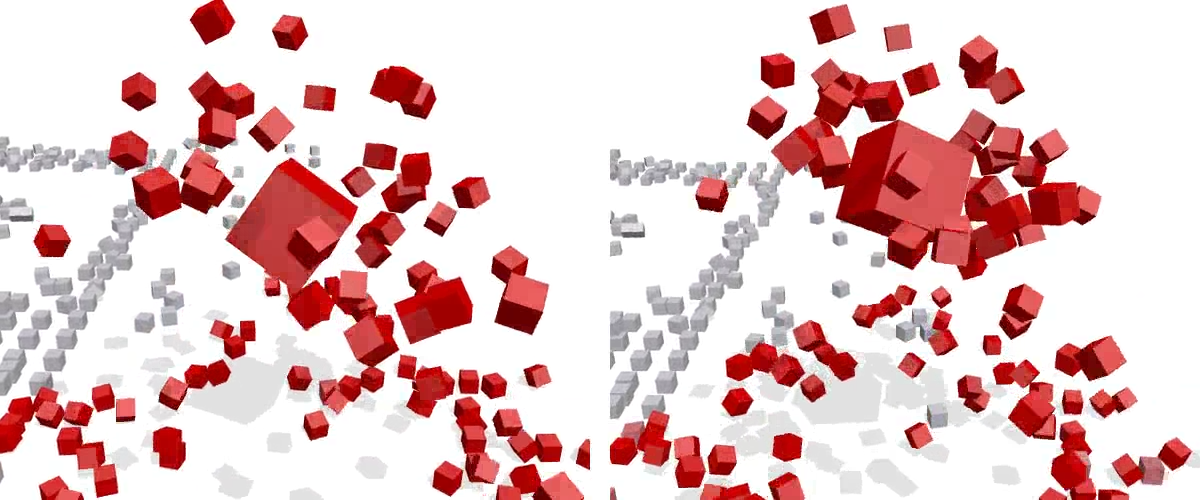
Look closely though and you can see some artifacts on the right side. The first is a subtle position jitter when the player cube is hovering in the air. This is your brain detecting 1st order discontinuity at the sample points of position interpolation. The other artifact occurs when a bunch of cubes are in a katamari ball, you can see a sort of “pulsing” as the speed of rotation increases and decreases. This occurs because attached cubes interpolate linearly between two sample points rotating around the player cube, effectively interpolating through the player cube as they take the shortest linear path between two points on a circle.
仔细看,你会在右侧看到一些伪影。第一个是当玩家方块悬浮在空中时的细微位置抖动。这是你的大脑在位置插值的采样点处检测到的一阶不连续性。另一个伪影出现在多个方块形成卡塔玛里球时,你会看到一种“脉动”现象,随着旋转速度的增加和减少。这是因为附加的方块在线性插值的过程中,围绕玩家方块旋转,在两个采样点之间插值时,实际上穿过了玩家方块,因为它们沿着圆上的两点之间的最短线性路径插值。
Hermite Interpolation
I find these artifacts unacceptable but I don’t want to increase the packet send rate to fix them. Let’s see what we can do to make it look better at the same send rate instead. One thing we can try is upgrading to a more accurate interpolation scheme for position, one that interpolates between position samples while considering the linear velocity at each sample point.
Hermite插值
我认为这些伪影是不可接受的,但我不想通过增加数据包发送率来修复它们。让我们看看在相同的发送率下,能做些什么来让效果更好。我们可以尝试的一件事是升级到一种更精确的位置插值方案,它在插值位置样本的同时,考虑到每个采样点的线性速度。
This can be done with an hermite spline (pronounced “air-mitt”)
Unlike other splines with control points that affect the curve indirectly, the hermite spline is guaranteed to pass through the start and end points while matching the start and end velocities. This means that velocity is smooth across sample points and cubes in the
这可以通过赫尔米特样条(发音为“air-mitt”)来实现。
与其他通过控制点间接影响曲线的样条不同,赫尔米特样条保证通过起始点和结束点,并匹配起始和结束速度。这意味着速度在采样点之间是平滑的,并且卡塔玛里球中的方块倾向于围绕玩家方块旋转,而不是在高速下插值通过它。
Above you can see hermite interpolation for position @ 10pps. Bandwidth has increased slightly because we need to include linear velocity with each cube in the snapshot, but we’re able to significantly increase the quality at the same send rate. I can no longer see any artifacts. Go back and compare this with the raw, non-interpolated 10pps version. It really is amazing that we’re able to reconstruct the simulation with this level of quality at such a low send rate.
在上面你可以看到使用了 Hermite 插值来处理位置数据,采样率为 10pps。由于我们需要在每个快照中包含线性速度,带宽略微增加,但我们能够在相同的发送速率下显著提高质量。我现在已经看不见任何伪影了。回去对比一下未经插值的 10pps 版本,真的很惊讶我们能在如此低的发送速率下重建出如此高质量的模拟。
As an aside, I found it was not necessary to perform higher order interpolation for orientation quaternions to get smooth interpolation. This is great because I did a lot of research into exactly interpolating between orientation quaternions with a specified angular velocity at sample points and it seemed difficult. All that was needed to achieve an acceptable result was to switch from linear interpolation + normalize (nlerp) to spherical linear interpolation (slerp) to ensure constant angular speed for orientation interpolation.
顺便提一下,我发现对于方向四元数的平滑插值并不需要进行高阶插值。这很好,因为我曾做了很多研究,试图精确地在具有指定角速度的采样点之间进行四元数插值,但这似乎很困难。为了获得一个可接受的结果,所需要做的只是将线性插值 + 归一化(nlerp)转换为球面线性插值(slerp),以确保方向插值时的角速度保持恒定。
I believe this is because cubes in the simulation tend to have mostly constant angular velocity while in the air and large angular velocity changes occur only discontinuously when collisions occur. It could also be because orientation tends to change slowly while in the air vs. position which changes rapidly relative to the number of pixels affected on screen. Either way, it seems that slerp is good enough and that’s great because it means we don’t need to send angular velocity in the snapshot.
我认为这是因为模拟中的立方体在空中通常保持大致恒定的角速度,而只有在碰撞发生时才会出现较大的角速度变化。这也可能是因为在空中时,方向变化相较于位置变化较慢,而位置变化相对于屏幕上受影响的像素数量变化较快。无论如何,看来 slerp 已经足够好,这很好,因为这意味着我们不需要在快照中发送角速度。
Handling Real World Conditions
Now we have to deal with packet loss. After the discussion of UDP vs. TCP in the previous article I’m sure you can see why we would never consider sending snapshots over TCP.
napshots are time critical but unlike inputs in deterministic lockstep snapshots don’t need to be reliable. If a snapshot is lost we can just skip past it and interpolate towards a more recent snapshot in the interpolation buffer. We don’t ever want to stop and wait for a lost snapshot packet to be resent. This is why you should always use UDP for sending snapshots.
处理真实世界条件
现在我们必须处理数据包丢失。在上一篇文章中讨论了 UDP 与 TCP,相信你已经明白为什么我们绝不会考虑通过 TCP 发送快照。
快照是时间关键的,但与确定性锁步中的输入不同,快照不需要可靠性。如果一个快照丢失,我们可以直接跳过它,并在插值缓冲区中朝着更近期的快照进行插值。我们绝不希望停下来等待丢失的快照包重新发送。这就是为什么发送快照时应该始终使用 UDP。
I’ll let you in on a secret. Not only were the linear and hermite interpolation videos above recorded at a send rate of 10 packets per-second, they were also recorded at 5% packet loss with +/- 2 frames of jitter @ 60fps. How I handled packet loss and jitter for those videos is by simply ensuring that snapshots are held in the interpolation buffer for an appropriate amount of time before interpolation.
我来告诉你一个秘密。不仅上面的线性和 Hermite 插值视频是在每秒 10 个数据包的发送速率下录制的,它们还在 5% 的数据包丢失率和 +/- 2 帧的抖动(60fps)下录制。我处理这些视频中的数据包丢失和抖动的方法是,通过确保在插值之前,快照在插值缓冲区中保持适当的时间。
My rule of thumb is that the interpolation buffer should have enough delay so that I can lose two packets in a row and still have something to interpolate towards. Experimentally I’ve found that the amount of delay that works best at 2-5% packet loss is 3X the packet send rate. At 10 packets per-second this is 300ms. I also need some extra delay to handle jitter, which in my experience is typically only one or two frames @ 60fps, so the interpolation videos above were recorded with a delay of 350ms.
我的经验法则是,插值缓冲区应该有足够的延迟,以便即使丢失连续两个数据包,我仍然能够有数据可供插值。通过实验,我发现,在 2-5% 的数据包丢失率下,最佳的延迟时间是数据包发送速率的 3 倍。在每秒 10 个数据包的情况下,这就是 300 毫秒。我还需要一些额外的延迟来处理抖动,根据我的经验,抖动通常只有一两帧(60fps),所以上面的插值视频是以 350 毫秒的延迟录制的。
Adding 350 milliseconds delay seems like a lot. And it is. But, if you try to skimp you end up hitching for 1/10th of a second each time a packet is lost. One technique that people often use to hide the delay added by the interpolation buffer in other areas (such as FPS, flight simulator, racing games and so on) is to use extrapolation. But in my experience, extrapolation doesn’t work very well for rigid bodies because their motion is non-linear and unpredictable. Here you can see an extrapolation of 200ms, reducing overall delay from 350 ms to just 150ms:
增加 350 毫秒的延迟看起来很多,确实是的。但如果你试图节省这个延迟,结果就是每次丢失数据包时,都会出现大约 1/10 秒的卡顿。人们通常用来隐藏插值缓冲区带来的延迟的技术(比如在 FPS、飞行模拟器、赛车游戏等领域)是使用外推。然而,根据我的经验,外推对于刚体的效果并不好,因为它们的运动是非线性的和不可预测的。在这里,你可以看到 200 毫秒的外推,将整体延迟从 350 毫秒减少到仅 150 毫秒:
Problem is it’s just not very good. The reason is that the extrapolation doesn’t know anything about the physics simulation. Extrapolation doesn’t know about collision with the floor so cubes extrapolate down through the floor and then spring back up to correct. Prediction doesn’t know about the spring force holding the player cube up in the air so it the cube moves slower initially upwards than it should and has to snap to catch up. It also doesn’t know anything about collision and how collision response works, so the cube rolling across the floor and other cubes are also mispredicted. Finally, if you watch the katamari ball you’ll see that the extrapolation predicts the attached cubes as continuing to move along their tangent velocity when they should rotate with the player cube.
问题是,外推效果并不好。原因在于外推并不了解物理模拟的细节。外推不了解与地面的碰撞,因此立方体会外推穿过地面,然后再弹回来进行修正。预测不了支撑玩家立方体在空中漂浮的弹簧力,所以立方体开始向上移动时速度比预期慢,最后必须“猛地”修正以追赶上。此外,外推也不了解碰撞及碰撞响应的工作原理,因此立方体在地面上滚动以及其他立方体的运动都会被错误预测。最后,如果你观察加塔玛里球,你会发现外推预测附着的立方体继续沿着它们的切向速度移动,而它们实际上应该跟随玩家立方体一起旋转。
Conclusion
You could conceivably spend a great deal of time to improve the quality of this extrapolation and make it aware of various movement modes for the cubes. You could take each cube and make sure that at minimum the cube doesn’t go through the floor. You could add some approximate collision detection or response using bounding spheres between cubes. You could even take the cubes in the katamari ball and make them predict motion to rotate around with the player cube.
But even if you do all this there will still be misprediction because you simply can’t accurately match a physics simulation with an approximation. If your simulation is mostly linear motion, eg. fast moving planes, boats, space ships – you may find that a simple extrapolation works well for short time periods (50-250ms or so), but in my experience as soon as objects start colliding with other non-stationary objects, extrapolation starts to break down.
How can we reduce the amount of delay added for interpolation? 350ms still seems unacceptable and we can’t use extrapolation to reduce this delay without adding a lot of inaccuracy. The solution is simple: increase the send rate! If we send 30 snapshots per-second we can get the same amount of packet loss protection with a delay of 150ms. 60 packets per-second needs only 85ms.
In order to increase the send rate we’re going to need some pretty good bandwidth optimizations. But don’t worry, there’s a lot we can do to optimize bandwidth. So much so that there was too much stuff to fit in this article and I had to insert an extra unplanned article just to cover all of it!
结论
你可以花费大量时间来改进外推的质量,使其能够了解立方体的各种运动模式。你可以逐个处理每个立方体,确保至少立方体不会穿过地面。你还可以使用边界球进行近似的碰撞检测或响应,处理立方体之间的碰撞。你甚至可以让加塔玛里球中的立方体预测运动,使它们围绕玩家立方体旋转。
但即使你做了所有这些改进,依然会存在误预测,因为你无法用近似方法准确匹配物理模拟。如果你的模拟主要是线性运动,例如快速移动的飞机、船只、宇宙飞船——你可能会发现对于短时间(大约 50-250 毫秒),简单的外推方法效果不错。但根据我的经验,一旦物体开始与其他非静止物体发生碰撞,外推就开始失效了。
如何减少插值带来的延迟?350 毫秒仍然显得不可接受,而我们又不能通过使用外推来减少这个延迟,因为那样会引入大量的不准确性。解决方案很简单:提高发送速率!如果我们每秒发送 30 个快照,就能在 150 毫秒的延迟下获得相同的丢包保护。而每秒 60 个数据包只需要 85 毫秒的延迟。
为了提高发送速率,我们需要一些相当不错的带宽优化。不过不用担心,我们可以做很多优化带宽的工作。实际上,优化的内容太多了,甚至让我不得不插入一篇额外的、未计划的文章来涵盖所有这些内容!

 浙公网安备 33010602011771号