
java GUI编程
AWT
Frame
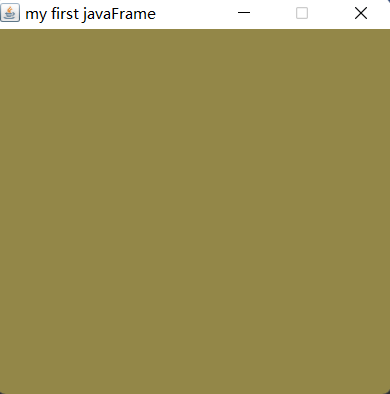
 public class TestFrame {
     public static void main(String[] args) {
         Frame frame = new Frame("my first javaFrame");
         //设置可见性
         frame.setVisible(true);
         //设置大小
         frame.setSize(400,400);//也可以用frame.setBounds(700,300,400,400);一步设置到位
         //设置背景颜色
         frame.setBackground(new Color(147, 135, 72));
         //设置弹出的初使位置
         frame.setLocation(700,300);
         //设置初始大小固定
         frame.setResizable(false);

     }
 }
panel
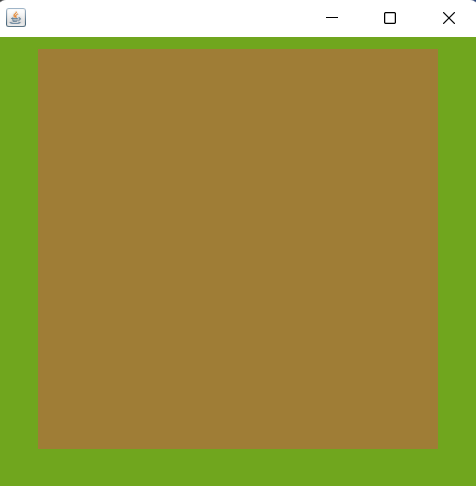
public class TestPanel {
public static void main(String[] args) {
Frame frame = new Frame();
//布局的概念
Panel panel = new Panel();
//设置布局
frame.setLayout(null);
//坐标
frame.setBounds(300,300,500,500);
frame.setBackground(new Color(112, 166, 30));
//panel设置坐标,相对于frame(相当于在布局,窗口大小等和frame一样的方法)
panel.setBounds(50,50,400,400);
panel.setBackground(new Color(159, 125, 54));
//frame.add(panel)
frame.add(panel);
frame.setVisible(true);
//监听事件,监听窗口关闭事件System.exit(0)
//适配器模式
frame.addWindowListener(new WindowAdapter() {
//窗口关闭应该做什么事情
布局管理器
流式布局
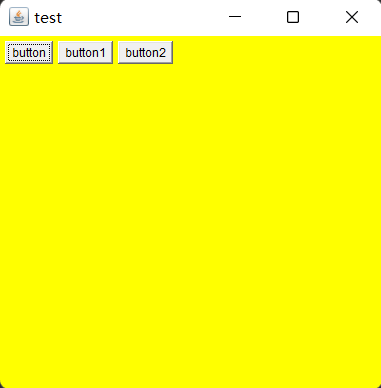
public class TestFlowLayout {
public static void main(String[] args) {
Frame frame = new Frame("test");
//组件 按钮
Button button = new Button("button");
Button button1 = new Button("button1");
Button button2= new Button("button2");
//设置为流式布局
// frame.setLayout(new FlowLayout());//默认为中
frame.setLayout(new FlowLayout(FlowLayout.LEFT));//改变布局
frame.setSize(400,400);
//添加按钮
frame.add(button);
frame.add(button1);
frame.add(button2);
frame.addWindowListener(new WindowAdapter() {
东西南北中
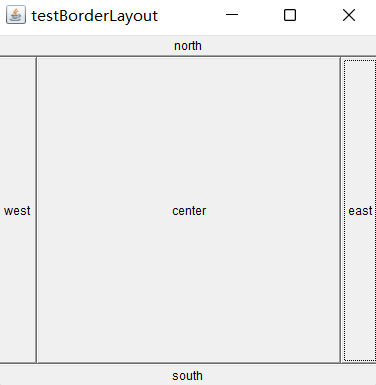
public class TestBorderLayout {
public static void main(String[] args) {
Frame frame = new Frame("testBorderLayout");
Button east = new Button("east");
Button west=new Button("west");
Button north=new Button("north");
Button south=new Button("south");
Button center=new Button("center");
frame.add(east,BorderLayout.EAST);
frame.add(west,BorderLayout.WEST);
frame.add(south,BorderLayout.SOUTH);
frame.add(north,BorderLayout.NORTH);
frame.add(center,BorderLayout.CENTER);
frame.setSize(400,400);
frame.setVisible(true);
}
}
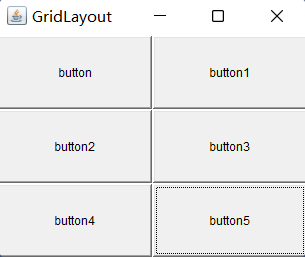
网格布局
public class TestGridLayout {
public static void main(String[] args) {
Frame frame = new Frame("GridLayout");
Button button = new Button("button");
Button button1 = new Button("button1");
Button button2= new Button("button2");
Button button3 = new Button("button3");
Button button4 = new Button("button4");
Button button5= new Button("button5");
//网格布局几行几列 和行间距和列间距
frame.setLayout(new GridLayout(3,2,1,1));
frame.add(button);
frame.add(button1);
frame.add(button2);
frame.add(button3);
frame.add(button4);
frame.add(button5);
frame.pack();//java的给出的最优大小
// frame.setSize(400,400);
frame.setVisible(true);
}
}
布局组合
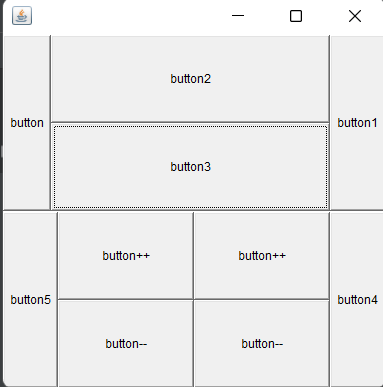
参考代码:
public class testPB {
public static void main(String[] args) {
Frame frame = new Frame();
frame.setLayout(new GridLayout(2,1,1,1));
//画上半部分,注意panel初始化BorderLayout
Panel panel1 = new Panel(new BorderLayout());
Panel panel3 = new Panel(new GridLayout(2,1));
panel1.add(new Button("button"),BorderLayout.WEST);
panel1.add(new Button("button1"),BorderLayout.EAST);
panel3.add(new Button("button2"));
panel3.add(new Button("button3"));
panel1.add(panel3,BorderLayout.CENTER);
//画下半部分,注意panel初始化BorderLayout
Panel panel2 = new Panel(new BorderLayout());
Panel panel4 = new Panel(new GridLayout(2,2));
panel2.add(new Button("button4"),BorderLayout.EAST);
panel2.add(new Button("button5"),BorderLayout.WEST);
panel4.add(new Button("button++"));
panel4.add(new Button("button++"));
panel4.add(new Button("button--"));
panel4.add(new Button("button--"));
panel2.add(panel4);
frame.add(panel1);
frame.add(panel2);
frame.setSize(400,400);
frame.setVisible(true);
}
}
事件监听
public class TestInformation {
public static void main(String[] args) {
Frame frame = new Frame("test");
Button bt1 = new Button("bt1");
Button bt2 = new Button("bt2");
bt1.setActionCommand("这是bt1");//区别不同按钮
//创建一个自定义myActionListen,来作为监听事件
myActionListen myActionListe = new myActionListen();
bt1.addActionListener(myActionListe);
bt2.addActionListener(myActionListe);
frame.add(bt1,BorderLayout.NORTH);
frame.add(bt2,BorderLayout.SOUTH);
closeWin(frame);//创建一个点击关闭的方法
frame.setSize(400,400);
frame.setVisible(true);
}
//关闭窗口的事件
public static void closeWin(Frame frame){
frame.addWindowListener(new WindowAdapter() {
输入框事件
public class TestText {
public static void main(String[] args) {
MyFrame myFrame = new MyFrame();
}
}
class MyFrame extends Frame{
public MyFrame(){
TextField textField = new TextField();
this.add(textField);
MyActionListen2 myActionListen2 = new MyActionListen2();
textField.addActionListener(myActionListen2);
closeWin(this);
//设置其他编码格式
textField.setEchoChar('*');//展示出来为*
pack();
setVisible(true);
}
public static void closeWin(Frame frame){
frame.addWindowListener(new WindowAdapter() {
我的简易计算器以及内部类优化
public class Calculator {
public static void main(String[] args) {
new MycalculatorFrame("计算器");
}
}
class MycalculatorFrame extends Frame{
//属性
TextField textField1,textField2,textField3;
//方法
public MycalculatorFrame(String a){
setTitle(a);
textField1 = new TextField(10);
textField2 = new TextField(10);
textField3 = new TextField(11);
Label label = new Label("+");
Button button = new Button("=");
button.addActionListener(new calculatorlistener(this));
setLayout(new FlowLayout());
add(textField1);
add(label);
add(textField2);
add(button);
add(textField3);
closeWin(this);
pack();
setVisible(true);
}
public static void closeWin(Frame frame){
frame.addWindowListener(new WindowAdapter() {

ps 可以使用内部类优化
public class Calculator {
public static void main(String[] args) {
new MycalculatorFrame().myCalculatorLoad("计算器");
}
}
class MycalculatorFrame extends Frame{
//属性
TextField textField1,textField2,textField3;
//方法
public void myCalculatorLoad(String a){
setTitle(a);
textField1 = new TextField(10);
textField2 = new TextField(10);
textField3 = new TextField(11);
Label label = new Label("+");
Button button = new Button("=");
button.addActionListener(new calculatorlistener());
setLayout(new FlowLayout());
add(textField1);
add(label);
add(textField2);
add(button);
add(textField3);
closeWin(this);
pack();
setVisible(true);
}
public static void closeWin(Frame frame){
frame.addWindowListener(new WindowAdapter() {
画笔
public class TestPaint {
public static void main(String[] args) {
new MyPaint().Paint();
}
}
class MyPaint extends Frame {
public void Paint(){
WinClose(this);
setBounds(200,200,600,400);
setVisible(true);
}
public void WinClose(Frame frame){
frame.addWindowListener(new WindowAdapter() {
鼠标监听
public class TestMouseListener {
public static void main(String[] args) {
new Mypaint("画图");
}
}
class Mypaint extends Frame{
ArrayList points;
public Mypaint(String title){
super(title);
setBounds(200,200,600,400);
//鼠标监听器
this.addMouseListener(new MouseListener());
//存鼠标的点
points=new ArrayList<Point>();
cw(this);
setVisible(true);
}
public void cw(Frame frame){
frame.addWindowListener(new WindowAdapter() {
窗口监听
public class TestWindowsListener {
public static void main(String[] args) {
new MyWindows();
}
}
class MyWindows extends Frame{
public MyWindows(){
setBounds(100,100,600,400);
addWindowListener(new WindowAdapter() {//推荐这种写法 匿名内部类
//激活窗口
主要就用两种事件:激活窗口和关闭窗口的事件
键盘监听
public class TestKeyListener {
public static void main(String[] args) {
new keyFrame();
}
}
class keyFrame extends Frame{
public keyFrame(){
setBounds(100,100,600,400);
setVisible(true);
addWindowListener(new WindowAdapter() {
Swing
窗口、面板
public class TestJFrame {
public static void init() {
JFrame jFrame = new JFrame("title");
jFrame.setBounds(100,100,600,400);
jFrame.setVisible(true);
//需要容器才能设置颜色
Container contentPane = jFrame.getContentPane();
contentPane.setBackground(Color.BLUE);
JLabel jLabel = new JLabel("dcllll");
jFrame.add(jLabel, BorderLayout.NORTH);
//关闭事件
jFrame.setDefaultCloseOperation(WindowConstants.EXIT_ON_CLOSE);
}
public static void main(String[] args) {
init();
}
}
弹窗 JDialog
public class TestDialog {
public static void main(String[] args) {
new MyDialog();
}
}
//主窗口
class MyDialog extends JFrame{
public MyDialog(){
setBounds(100,100,600,400);
setVisible(true);
JButton jButton = new JButton("按下按钮弹出Dialog");
jButton.setSize(100,100);
jButton.addActionListener(new ActionListener() {
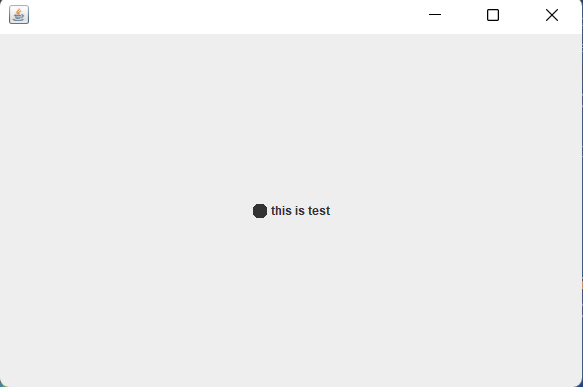
标签 ImageIcon
public class TestIcon {
public static void main(String[] args) {
new Icondemo().init();
}
}
class Icondemo extends JFrame implements Icon{
private int width;
private int high;
public Icondemo() {
}
public Icondemo(int width, int high) {
this.width = width;
this.high = high;
}
public void init(){
Icondemo icondemo = new Icondemo(15, 15);
//加上图标
JLabel label = new JLabel("this is test",icondemo,SwingConstants.CENTER);
Container contentPane = getContentPane();
contentPane.add(label);
setBounds(100,100,600,400);
setVisible(true);
setDefaultCloseOperation(WindowConstants.EXIT_ON_CLOSE);
}
//重写方法
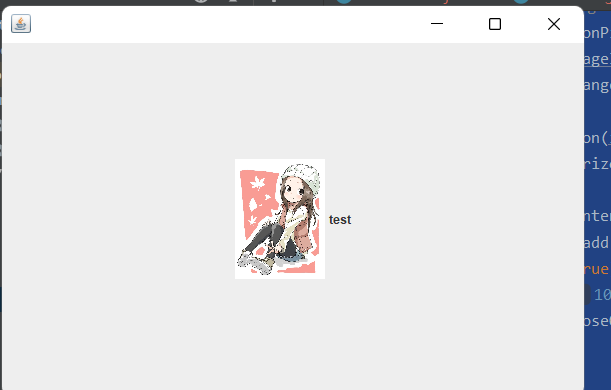
以下为放图片:
public class TestIconPicture {
public static void main(String[] args) {
new IconPicture();
}
}
class IconPicture extends JFrame{
public IconPicture() {
JLabel jLabel = new JLabel("test");
//创建一个ImageIcon,给图片
URL url = IconPicture.class.getResource("takaki.jpg");
ImageIcon imageIcon = new ImageIcon(url);
imageIcon=change(imageIcon,0.1);//缩放图片为原来的0.1倍
jLabel.setIcon(imageIcon);
jLabel.setHorizontalAlignment(SwingConstants.CENTER);
Container contentPane = getContentPane();
contentPane.add(jLabel);
setVisible(true);
setBounds(100,100,600,400);
setDefaultCloseOperation(WindowConstants.EXIT_ON_CLOSE);
}
//缩小标签图片
public ImageIcon change(ImageIcon image,double i){// i 为放缩的倍数
int width=(int) (image.getIconWidth()*i);
int height=(int) (image.getIconHeight()*i);
Image img=image.getImage().getScaledInstance(width, height, Image.SCALE_DEFAULT);//第三个值可以去查api是图片转化的方式
ImageIcon image2=new ImageIcon(img);
return image2;
}
}
面板和Scroll
Jpanel
public class JpanelDemo extends JFrame {
public JpanelDemo() throws HeadlessException {
Container contentPane = getContentPane();
contentPane.setLayout(new GridLayout(2,1,10,10));
JPanel jPanel = new JPanel(new GridLayout(1,3));
jPanel.add(new Button("1"));
jPanel.add(new Button("1"));
jPanel.add(new Button("1"));
contentPane.add(jPanel);
setVisible(true);
setBounds(100,100,600,400);
setDefaultCloseOperation(WindowConstants.EXIT_ON_CLOSE);
}
public static void main(String[] args) {
new JpanelDemo();
}
}
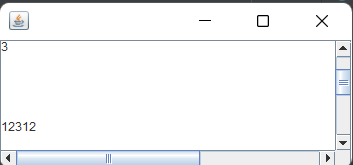
JScrollpane
public class JScrolldemo extends JFrame {
public static void main(String[] args) {
new JScrolldemo();
}
public JScrolldemo() {
Container contentPane = getContentPane();
//文本域
JTextArea jTextArea = new JTextArea(20, 50);
jTextArea.setText("hello world!");
contentPane.add(jTextArea);
//JScroll部分
JScrollPane jScrollPane = new JScrollPane(jTextArea);
contentPane.add(jScrollPane);
setBounds(100,100,600,400);
setVisible(true);
setDefaultCloseOperation(WindowConstants.EXIT_ON_CLOSE);
}
}
按钮 -图片按钮 单选按钮JRadioButton 复选按钮JCheckBox
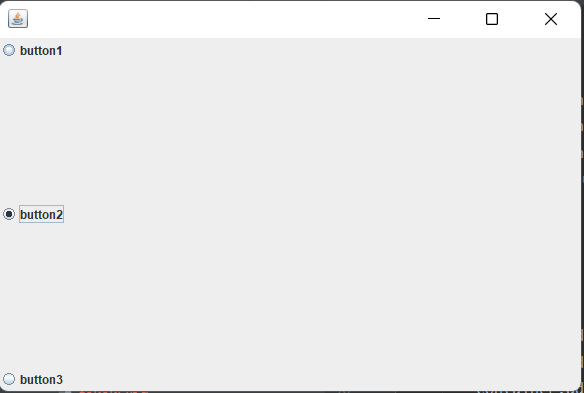
public class JButtonDemo extends JFrame {
public static void main(String[] args) {
new JButtonDemo();
}
public JButtonDemo() {
Container container = getContentPane();
//添加图片
// URL url = JButtonDemo.class.getResource("takaki.jpg");
// ImageIcon imageIcon = new ImageIcon(url);
JRadioButton jButton = new JRadioButton("button1");
JRadioButton jButton1 = new JRadioButton("button2");
JRadioButton jButton2 = new JRadioButton("button3");
//创建Radiobutton和单选框组ButtonGroup
ButtonGroup buttonGroup = new ButtonGroup();
buttonGroup.add(jButton);
buttonGroup.add(jButton1);
buttonGroup.add(jButton2);
//多选就直接加add JCheckBox
container.add(jButton,BorderLayout.NORTH);
container.add(jButton1,BorderLayout.CENTER);
container.add(jButton2,BorderLayout.SOUTH);
setBounds(100,100,600,400);
setVisible(true);
setDefaultCloseOperation(WindowConstants.EXIT_ON_CLOSE);
}
}
下拉框 JComboBox 列表框 JList
public class testComboBox extends JFrame {
public static void main(String[] args) {
new testComboBox();
}
public testComboBox() {
Container container = getContentPane();
container.setLayout(new FlowLayout(FlowLayout.LEFT));
JPanel jPanel = new JPanel();
jPanel.setSize(100,50);
//下拉框
JComboBox jComboBox = new JComboBox();
jComboBox.addItem(null);
jComboBox.addItem("正在播放");
jComboBox.addItem("不再播放");
jComboBox.addItem("即将开始");
jPanel.add(jComboBox);
container.add(jPanel);
setBounds(100,100,600,400);
setVisible(true);
setDefaultCloseOperation(WindowConstants.EXIT_ON_CLOSE);
}
}
列表框+Scroll
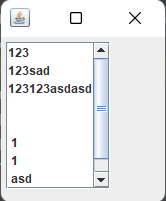
public class ComboBoxDemo extends JFrame {
public static void main(String[] args) {
new ComboBoxDemo();
}
public ComboBoxDemo() {
Container container = getContentPane();
container.setLayout(new FlowLayout(FlowLayout.LEFT));
String[] strings={"123","123sad","123123asdasd"," "," "," 1"," 1"," asd","123"};
//创建Jlist ,再使用JScrollPane就能滚动了
JList jList = new JList(strings);
JScrollPane jScrollPane = new JScrollPane(jList);
container.add(jScrollPane);
setBounds(100,100,600,400);
setVisible(true);
setDefaultCloseOperation(WindowConstants.EXIT_ON_CLOSE);
}
}
文本框 JTextField 密码框 JPasswordField 文本域 JTextArea
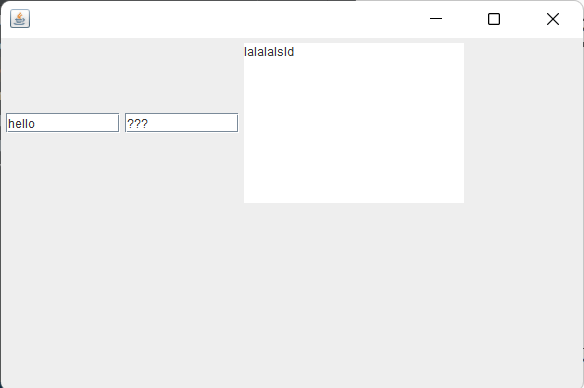
public class TestText extends JFrame {
public static void main(String[] args) {
new TestText();
}
public TestText() {
Container container = getContentPane();
container.setLayout(new FlowLayout(FlowLayout.LEFT));
//文本框
JTextField jTextField = new JTextField("hello",10);
//密码框
JPasswordField jPasswordField = new JPasswordField(10);
jPasswordField.setEchoChar('?');
//文本域
JTextArea jtextArea = new JTextArea(10,20);
jtextArea.setText("lalalalsld");
container.add(jTextField);
container.add(jPasswordField);
container.add(jtextArea);
setBounds(100,100,600,400);
setVisible(true);
setDefaultCloseOperation(WindowConstants.EXIT_ON_CLOSE);
}
}

 浙公网安备 33010602011771号