
超简单实现将swagger文档转word
超简单实现将swagger文档转word
1、项目pom文件引入依赖包:
        <dependency>
            <groupId>io.springfox</groupId>
            <artifactId>springfox-swagger2</artifactId>
            <version>2.7.0</version>
        </dependency>
        <dependency>
            <groupId>io.springfox</groupId>
            <artifactId>springfox-swagger-ui</artifactId>
            <version>2.7.0</version>
        </dependency>
2、项目代码中写入相关配置:
##### 1、新增配置类

import org.springframework.context.annotation.Bean;
import org.springframework.context.annotation.Configuration;
import springfox.documentation.builders.ApiInfoBuilder;
import springfox.documentation.builders.PathSelectors;
import springfox.documentation.builders.RequestHandlerSelectors;
import springfox.documentation.spi.DocumentationType;
import springfox.documentation.spring.web.plugins.Docket;
import springfox.documentation.swagger2.annotations.EnableSwagger2;

/**
 * Created with IntelliJ IDEA.
 * @Author: subtlman_ljx
 * @Date: 2020/09/09/9:22
 * @Description: Swagger配置信息
*/
@Configuration
@EnableSwagger2
//@Profile({"dev","test"})
public class SwaggerConfig {
    @Bean
    public Docket createRestApi() {
        return new Docket(DocumentationType.SWAGGER_2)
                .pathMapping("/")
                .select()
                .apis(RequestHandlerSelectors.basePackage("com.aaaa.aaa.aaaaa.controller"))
                .paths(PathSelectors.any())
                .build().apiInfo(new ApiInfoBuilder()
                        .title("AAAAAA服务")
                        .description("AAAAAAA接口服务")
                        .version("1.0")
                        .build());
    }
}

##### 2、添加注解代码:
在controller类上:@Api(tags = "AAAAA")
在controller方法上:@ApiOperation("AAAAAAAA")
在controller方法参数上:@ApiParam(value="AAAAAAA")
在dto实体类上:@ApiModel(value="AAAAAAA")
在dto实体类属性上:@ApiModelProperty(value="AAAAA")
3、打开swagger文档:

4、拿到json字符串:

5、将json字符串进行在线转换:
https://tools.kalvinbg.cn/dev/swagger2word

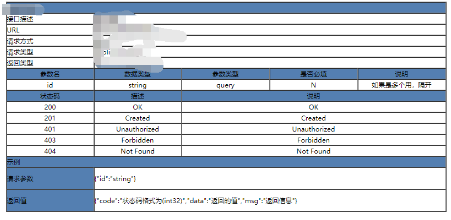
6、文档展示样例:
7、注意点:
① 生成的doc文档用wps打开默认是 web版本,看起来非常不适用,切换到页面并做简要调整就变成熟悉的样式了:

② 对生成的文档查看其目录:

③ 这里对生成的文档表格做简要说明:
i、状态码
200 OK——客户端发来的请求在服务器端被正常处理
201 Created——已创建
401 Unauthorized——发送的请求需有通过HTTP认证的认证信息
403 Forbidden——对请求资源的访问被服务器拒绝了
404 Not Found——服务器上无法找到请求的资源
ii、说明
可通过注解中的value属性填充
iii、请求参数
这里的-d 样式为curl请求样式
iv、参数名
这里参数名有1或是1.1、1.2的样式,此为对象及其属性
以上仅作为参考:

 浙公网安备 33010602011771号