
Web前端笔记-16、Vue3-组合式API(ref、computed、watch、生命周期函数、父子通信、模板引用)
搭建Vue3项目-create-vue
create-vue是Vue官方新的脚手架工具,底层切换到了vite(下一代前端工具链),为开发提供极速响应。
- 前提环境条件。已安装 16.0或更高版本的 Node.js
- 创建一个Vue应用
npm init vue@latest,这一指令将会安装并执行 create-vue
关键文件:
- vite.config.js - 项目的配置文件 基于vite的配置
- package.json - 项目包文件 核心依赖项变成了 Vue3.x 和 vite
- main.js - 入口文件 createApp函数创建应用实例
- app.vue - 根组件 SFC单文件组件 script -template - style
变化一:脚本script和模板template顺序调整
变化二:模板template不再要求唯一根元素
变化三:脚本script添加setup标识支持组合式API - index.html-单页入口 提供id为app的挂载点
组合式API
setup选项
在beforeCreate之前自动执行的。
原始写法: export default{ setup(){ return{} }}
语法糖:<script setup>
只需要定义数据和函数。不需要写 export default setup函数和return
setup中的this还指向组件实例吗?指向undefined
reactive函数和ref函数
reactive()
作用:接受对象类型数据的参数传入并返回一个响应式的对象
传入:一个对象
返回:一个响应式对象
先导入后使用。
<script setup>
import { reactive } from "vue";
const state = reactive({
  count: 0,
});
</script>

<template>
  <div>
    <button @click="state.count++">{{ state.count }}</button>
  </div>
</template>
ref()
作用:接收简单类型或者对象类型的数据传入并返回一个响应式的对象
传入:一个简单类型数据或者对象
返回:一个响应式对象
先导入后使用。
<script setup>
import { ref } from "vue";
const state = ref(0);
</script>

<template>
  <div>
    <button @click="state++">{{ state }}</button>
  </div>
</template>
在模板区域直接使用变量名即可,但要在脚本区域使用值需要
state.value
computed计算属性
计算属性基本思想和Vue2的完全一致,组合式API下的计算属性只是修改了写法。
- 导入computed函数
- 执行函数 在回调参数中return基于响应式数据(ref)做计算的值,用变量接收
<script setup>
import { ref, computed } from "vue";
const list = ref([1, 2, 3, 4, 5, 6, 7, 8]);
const computedList = computed(() => {
  return list.value.fil,ter((item) => item > 2);
});

setTimeout(() => {
  list.value.push(9, 10);
}, 3000);
</script>

<template>
  <div>原始:{{ list }}</div>
  <div>计算后:{{ computedList }}</div>
</template>
最佳实践
- 计算属性中不应该有“副作用”。副作用:比如异步请求/修改dom
- 避免直接修改计算属性的值。应该是只读的。
watch函数
作用:侦听一个或者多个响应式数据的变化,数据变化时执行回调函数
俩个额外参数:1.immediate(立即执行)2.deep(深度侦听)
侦听单个响应式数据
- 导入watch函数
- 执行watch函数
watch(ref, (newVal, oldVal)=>{}),传入要侦听的响应式数据(ref对象)和回调函数
注意:在watch中,传入的ref对象是不需要.value的,watch会自动处理。
<script setup>
import { ref, watch } from "vue";
const count = ref(0);

watch(count, (val) => {
  console.log("new value:" + val);
});
</script>

<template>
  <button @click="count++">{{ count }}</button>
</template>
同时侦听多个响应式数据
同时侦听多个响应式数据的变化,不管哪个数据变化都需要执行回调。
<script setup>
import { ref, watch } from "vue";
const count = ref(0);
const name = ref("cp");

watch([count, name], ([newCount, newName], [oldCount, oldName]) => {
  if (newCount != oldCount) console.log("new count:" + newCount);
  if (newName != oldName) console.log("new name:" + newName);
});
</script>

<template>
  <button @click="count++">{{ count }}</button>
  <button @click="name = name + 'a'">{{ name }}</button>
</template>
深度侦听
<script setup>
import { ref, watch } from "vue";
const state = ref({ count: 0, age: 8 });

watch(state, () => console.log("变化"), {
  deep: true,
});
</script>

<template>
  <button @click="state.count++">{{ state.count }}</button>
</template>
精确侦听对象的某个属性
需求:在不开启deep的前提下,侦听age的变化,只有age变化时才执行回调
<script setup>
import { ref, watch } from "vue";
const state = ref({ count: 0, age: 8 });

watch(
  () => state.value.age,
  () => console.log("age变化了")
);
</script>

<template>
  <button @click="state.age++">{{ state.age }}</button>
</template>
deep性能损耗 尽量不开启deep
生命周期函数
生命周期函数基本使用
- 导入生命周期函数
- 执行生命周期函数 传入回调
| 选项式API | 组合式API |
|---|---|
| beforeCreate/created | setup |
| beforeMount | onBeforeMount |
| mounted | onMounted |
| beforeUpdate | onBeforeUpdate |
| updated | onUpdated |
| beforeUnmount | onBeforeUnmount |
| unmounted | onUnmounted |
生命周期函数是可以执行多次的,多次执行时传入的回调会在时机成熟时依次执行。
父子通信
父传子
- 父组件中给子组件绑定属性
- 子组件内部通过
defineProps()接收
setup语法糖下局部组件无需注册直接使用,直接导入写标签即可。
// 父
const count = ref(100);

<SonVom message="father" :count="count"/>
// 子
const props = defineProps({
  message: String,
  count: Number,
});
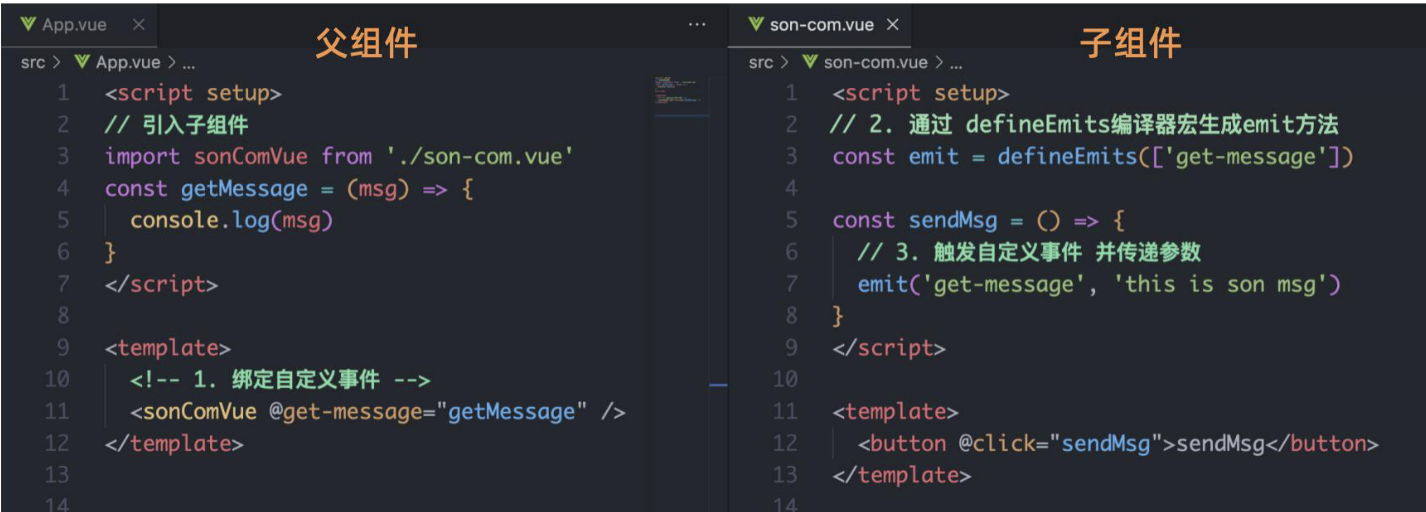
子传父
- 父组件中给子组件标签通过
@绑定自定义事件 - 子组件内部通过defineEmits方法生成emit方法。触发自定义事件,并传递参数
模板引用
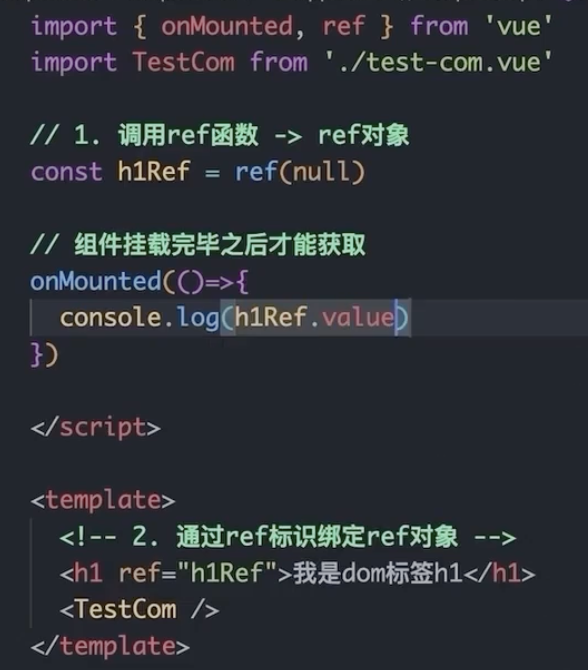
通过ref标识获取真实的dom对象或者组件实例对象
- 调用ref函数生成一个ref对象
- 通过ref标识绑定ref对象到标签
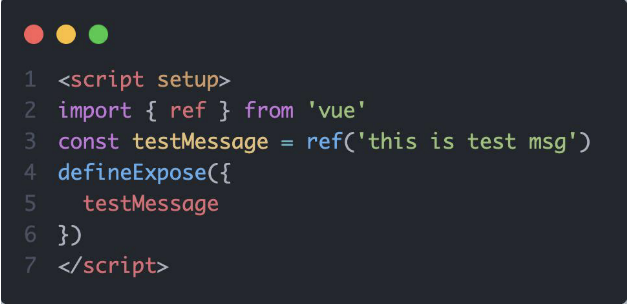
默认情况下在<script setup>语法糖下组件内部的属性和方法是不开放给父组件访问的,可以通过defineExpose编译宏指定哪些属性和方法允许访问
provide和inject
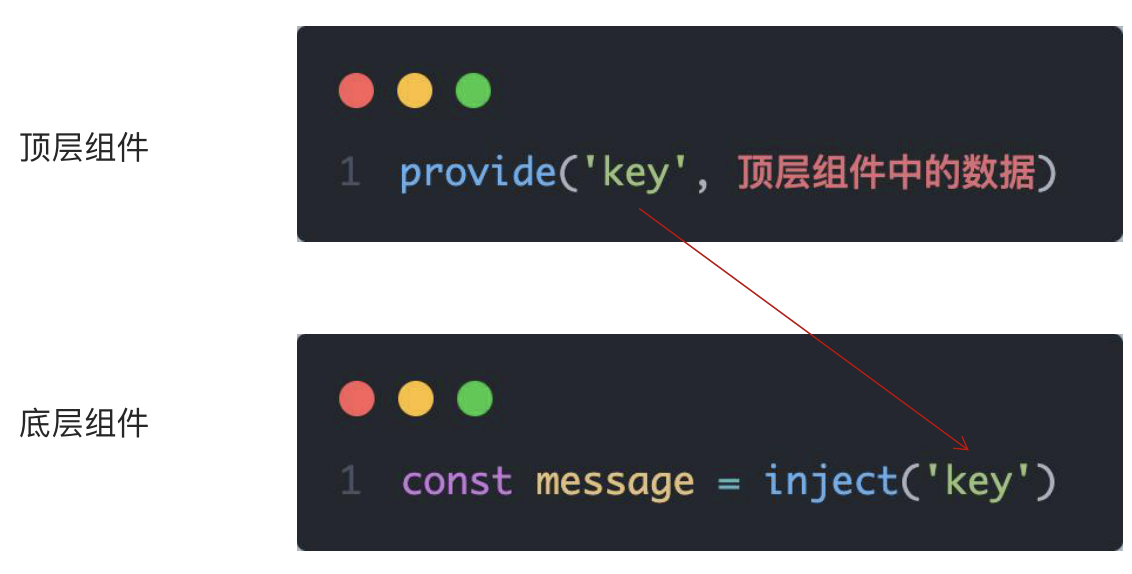
作用和场景:顶层组件向任意的底层组件传递数据和方法,实现跨层组件通信。
跨层传递普通数据、响应数据、方法
- 顶层组件通过provide函数提供数据(普通数据或ref响应数据)、方法(谁的数据谁负责修改,把修改方法传出去)
- 底层组件通过inject函数获取数据

 浙公网安备 33010602011771号