
Java笔记-17、Web后端基础 Java操作数据库
JDBC
- sun公司官方定义的一套操作所有关系型数据库的规范,即接口。
- 各个数据库厂商去实现这套接口,提供数据库驱动jar包。
- 我们可以使用这套接口(JDBC)编程,真正执行的代码是驱动jar包中的实现类。
public void testUpdate() throws Exception {
        // 注册驱动
        Class.forName("com.mysql.cj.jdbc.Driver");
        // 获取连接
        String url = "jdbc:mysql://localhost:3306/web01";
        String userName = "root";
        String passWord = "123456";
        Connection connection = DriverManager.getConnection(url, userName, passWord);
        // 获取SQL语句执行对象
        Statement statement = connection.createStatement();
        // 执行SQL
        statement.executeUpdate("update user set age = 23 where id = 1");
        // 关闭连接
        statement.close();
        connection.close();
    }
@Test
    public void testSelect(){
        String URL = "jdbc:mysql://localhost:3306/web01";
        String USER = "root";
        String PASSWORD = "1234";

        Connection conn = null;
        PreparedStatement stmt = null;
        ResultSet rs = null; //封装查询返回的结果

        try {
            // 1. 注册 JDBC 驱动
            Class.forName("com.mysql.cj.jdbc.Driver");

            // 2. 打开链接
            conn = DriverManager.getConnection(URL, USER, PASSWORD);

            // 3. 执行查询
            String sql = "SELECT id, username, password, name, age FROM user WHERE username = ? AND password = ?"; //预编译SQL
            stmt = conn.prepareStatement(sql);

            stmt.setString(1, "daqiao");
            stmt.setString(2, "123456");

            rs = stmt.executeQuery();

            // 4. 处理结果集
            while (rs.next()) {
                User user = new User(
                        rs.getInt("id"),
                        rs.getString("username"),
                        rs.getString("password"),
                        rs.getString("name"),
                        rs.getInt("age")
                );
                System.out.println(user); // 使用 Lombok 的 @Data 自动生成的 toString 方法
            }
        } catch (SQLException se) {
            // Handle errors for JDBC
            se.printStackTrace();
        } catch (Exception e) {
            // Handle errors for Class.forName
            e.printStackTrace();
        } finally {
            // 5. 关闭资源
            try {
                if (rs != null) rs.close();
                if (stmt != null) stmt.close();
                if (conn != null) conn.close();
            } catch (SQLException se) {
                se.printStackTrace();
            }
        }
    }
ResultSet(结果集对象):ResultSet rs = statement.executeQuery()
- next():将光标从当前位置向前移动一行,并判断当前行是否为有效行,返回值为boolean。true:有效行,当前行有数据;false:无效行,当前行没有数据
- getXxx(...):获取数据,可以根据列的编号获取,也可以根据列名获取(推荐)。
预编译SQL
参数动态传递。
优势一:可以防止SQL注入,更安全。
SQL注入:通过控制输入来修改事先定义好的SQL语句,以达到执行代码对服务器进行攻击的方法。
优势二:性能更高。
MyBatis入门
MyBatis是一款优秀的数据访问层(DAO,持久层)框架,用于简化JDBC的开发。
MyBatis本是Apache的一个开源项目iBatis,2010年这个项目由apache迁移到了google code,并且改名为MyBatis。2013年11月迁移到Github。
使用
- 创建SpringBoot工程、引入Mybatis相关依赖
- 准备数据库表和实体类
- 配置Mybatis(在application.properties中数据库连接信息)
- 编写Mybatis的持久层接口,定义SQL(注解/XML)
Mybatis的持久层接口命名规范为 XxxMapper,也称为 Mapper接口。
spring.datasource.url=jdbc:mysql://localhost:3306/web
spring.datasource.driver-class-name=com.mysql.cj.jdbc.Driver
spring.datasource.username=root
spring.datasource.password=1234
@Mapper //会自动为该接口创建一个实现类对象(代理对象),并自动将该实现类对象存入IOC容器
public interface UserMapper {

    @Select("select * from user")
    public List<User> findAll();

}
@SpringBootTest
class MybatisdemoApplicationTests {
	@Autowired
	private UserMapper userMapper;

	@Test
	public void testFindAll(){
		List<User> userList = userMapper.findAll();
		userList.forEach(System.out::println);
	}
}
@SpringBootTest: 会在单元测试运行时,加载springBoot的环境。
测试类所在包需要与引导类包名相同(或放在引导类所在包的子包下)
辅助配置
配置SQL提示
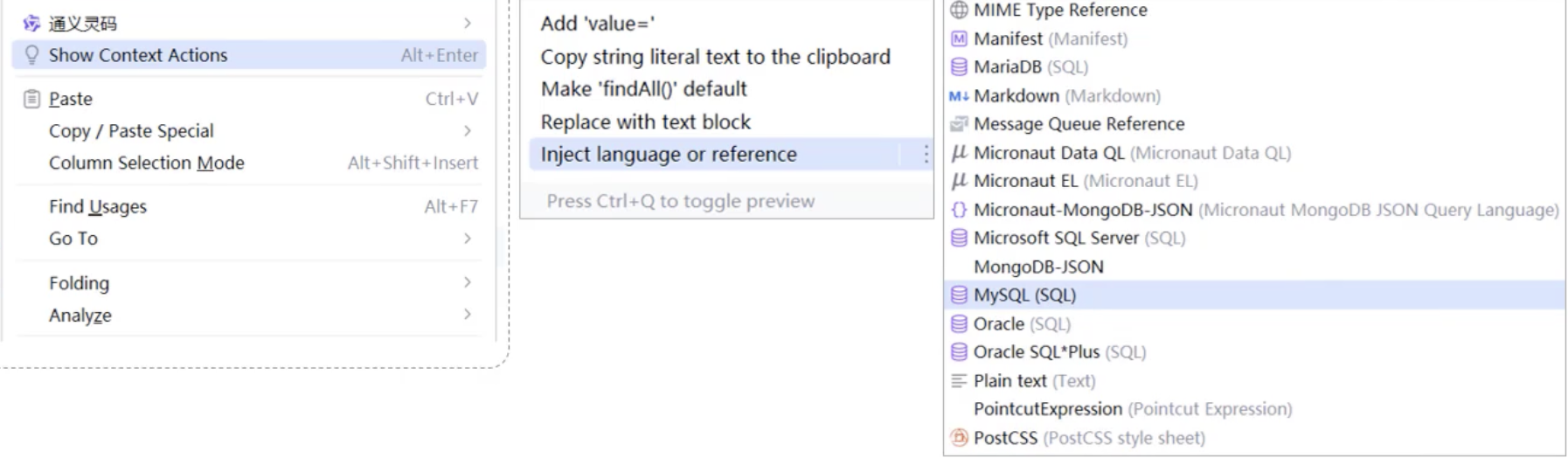
配置Mybatis的日志输出
mybatis.configuration.log-impl=org.apache.ibatis.logging.stdout.stdOutImpl

 浙公网安备 33010602011771号