
Java入门笔记(二)输入与输出
目录
标准输入输出
输入
方法一:java.util.Scanner类
读取一个字符串(空格截止):next()
Scanner scanner = new Scanner(System.in);
if (scanner.hasNext()) {
      String str1 = scanner.next();
      System.out.println("输入的数据为:" + str1);
}
scanner.close();
// 从第一个不为空格的字符开始,到下一个空格结束,不可以捕获空
读取一行字符:nextLine()
Scanner scanner = new Scanner(System.in);
if (scanner.hasNextLine()) {
      String str1 = scanner.nextLine();
      System.out.println("输入的数据为:" + str1);
}
scanner.close();
读取一个整数:nextInt()
Scanner scanner = new Scanner(System.in);
if (scanner.hasNextInt()) {
      int v1 = scanner.nextInt();
      System.out.println("输入的数据为:" + v1);
}
scanner.close();
读取一个浮点数:nextDouble()
Scanner scanner = new Scanner(System.in);
if (scanner.hasNextDouble()) {
      double v1 = scanner.nextDouble();
      System.out.println("输入的数据为:" + v1);
}
scanner.close();
p.s. 在使用nextInt和nextDouble时若输入错误格式,会InputMismatchException异常
方法二:java.io
读一个字符:System.in.read()
try{
      char c = (char) System.in.read();
}
catch(IOException e){
}
读一行字符
try{
      BufferReader in = new BufferReader( new InputStreamReader( System.in ) );
      s = in.readline();
}
catch(IOException e){

}
输入数字
try{
      BufferReader in = new BufferReader( new InputStreamReader( System.in ) );
      s = in.readline();
      n = Integer.parseInt(s);
}
catch(IOException e){

}
Integer.parseInt和Double.parseDouble方法在传入错误格式字符串时会产生NumberFormatException异常
输出
方法
System.out.print()
System.out.printf()
与C++一致,%s(字符串)、%d(整数)、%f(浮点数)、%0m.n(格式化,有0表示前方补0,-表示左对齐)
System.out.println()
println会直接补上换行
p.s. 如果想要使用中文输出,注意编码设置,可以在编译时加上-encoding UTF-8
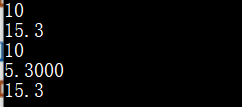
示例
public class Test{
    public static void main(String args[]){
        int a = 10;
        double b = 5.3;

        System.out.print(a+"\n");
        System.out.print(a+b+"\n");
        System.out.printf(a+"\n");
        System.out.printf("%04.2f\n", b);
        System.out.println(a+b);

        System.out.print("%07.4f\n", b); // 报错
    }
}
文件读写
文件读取
方法一:创建输入流 InputStream
close() throws IOException 关闭文件
finalize() throws IOException 清除文件连接
int read(int w) throws IOException 读取指定字节,返回整数,如果已经到结尾返回-1
int read(byte[] r) throws IOException 读取r.length长度的字节,存入r,如果到结尾返回-1
int available() throws IOException 返回可以读取的字节数
      public String readFile(String filename){
        try{
            InputStream input = new FileInputStream("HelloWorldDemo.java");
            int valid = input.available();
            byte[] bytes = new byte[valid];
            input.read(bytes);
            return new String(bytes);
        }
        catch(Exception e){
            e.printStackTrace();
            return "";
        }
    }
可以指定编码
File f = new File(filename);
FileInputStream fip = new FileInputStream(f);
InputStreamReader reader = new InputStreamReader(fip, "URF-8");
while(reader.ready()){
      reader.read();
}
reader.close();
fip.close();
方法二:FileReader
int read() 读取单个字符
int read(char[], int offset, int len) 读取到数组
File file = new File("file.txt");
FileReader reader = new FileReader(file);
char[] a = new char[10];
fr.read(a);
文件写入
方法一:创建输出流OutStream
close/finalize/write(int)/write(byte[])
输出时可以指定编码
File f = new File(filename);
FileOutputStream fop = new FileOutputStream(f);
OutputStreamWriter writer = new OutputStreamWriter(fop, "UTF-8");
writer.append("中文输入");
writer.close();
fop.close();
方法二:FileWriter类
    public void writeFile(String filename, String content){
        try{
            File file = new File(filename);
            if(!file.exists()){
                file.createNewFile();
            }
            FileWriter writer = new FileWriter(file.getName(), false);
            writer.write(content);
            writer.close();
        }
        catch(Exception e){
            e.printStackTrace();
        }
    }
Email:1252418308@qq.com

 浙公网安备 33010602011771号