
python给excel单元格批量生成超链接(pandas+openpyxl)
最近做些数据处理,要给Excel表单元格根据规则批量生成超链接,选了一圈发现pandas+openpyxl能较好满足需求。
我需要根据表格1的【代码】【名称】列,调用函数生成链接到新表格的【链接1】【链接2】列:
源文件: 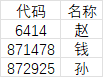 目标文件(含有链接):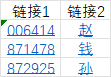
直接上代码。要先装好pandas和openpyxl。pip install pandas openpyxl
import pandas as pd

def process_urls(filename='data\\20241209.xlsx'): # 传入源文件路径
    # pandas用openpyxl引擎读取Excel文件,获取源文件的第1、2列
    df = pd.read_excel(filename,engine = 'openpyxl',usecols = [0,1])
    '''
       【链接1】生成逻辑:
        1. HYPERLINK函数格式: =HYPERLINK(link_location, [friendly_name])
        2. Series.apply(),对df['代码']这个序列的所有元素,运行str()和url_gen()函数,生成 link_location
        3. Series.apply(),对df['代码']这个序列的所有元素,运行str()rjust()函数,生成 friendly_name
    '''
    df['链接1'] = '=HYPERLINK("' + df['代码'].apply(url_gen,args=(0,)) + '","' + df['代码'].apply(str).apply(str.rjust,args=(6,'0')) + '")'
    '''
        【链接2】生成逻辑:
        1. HYPERLINK函数格式: =HYPERLINK(link_location, [friendly_name])
        2. Series.apply(),对df['代码']这个序列的所有元素,运行str()和url_gen()函数,生成 link_location
        3. 直接使用df['名称']列生成 friendly_name
        '''
    df['链接2'] = '=HYPERLINK("' + df['代码'].apply(url_gen, args=(1,)) + '","' + df['名称'] + '")'

    # 在源文件名后加上_out生成新文件名
    file_out= insert_string(filename,-5,'_out')
    '''
      df.to_excel():
      index=False 不写入DataFrame索引,
      header=True 写入字段名,
      startrow=0, startcol=0 从Excel的1行A列开始写入
    '''
    df.to_excel(file_out, index=False, header=True, startrow=0, startcol=0)

def insert_string(string, index, insert_str):
    # 在字符串特定位置插入新字符串
    return string[:index] + insert_str + string[index:]

def url_gen(code,type):
    scode = str(code).strip()
    if len(scode) < 6:
        scode = scode.rjust(6, '0')
    if type == 0:
        pass  # 具体逻辑不展示了
    elif type == 1:
        pass
    else:
        pass

 浙公网安备 33010602011771号