将本地仓库的 jar 包批量上传到 nexus
前面的博客中介绍了如何搭建 nexus,以及如何将本地代码打包上传到 nexus,这里不再赘述,详见以下链接:
docker-compose 部署 nexus:https://www.cnblogs.com/studyjobs/p/18178359
nexus 在内网部署好之后,里面没有任何 jar 包。我们可以在外网搭建好项目,并将所依赖的 jar 包下载到了本地仓库,然后将本地仓库的 jar 包导入内网,批量上传到 nexus 中,团队成员就可以使用 nexus 作为远程仓库,方便 jar 包的统一管理,提高开发效率。
一、创建远程仓库
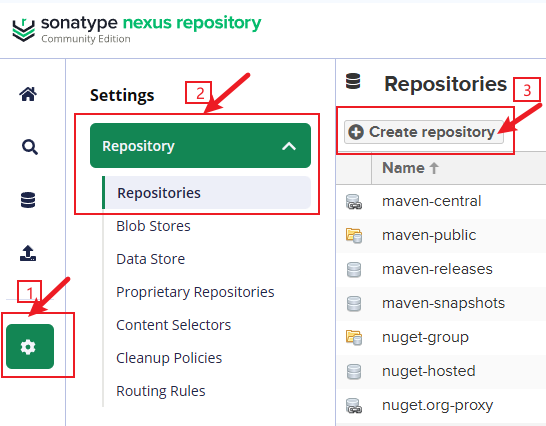
登录 nexus 后,在左侧菜单中依次点击 settings 、Repositories 、Create repository
选择 maven2(hosted)进入创建仓库页面:
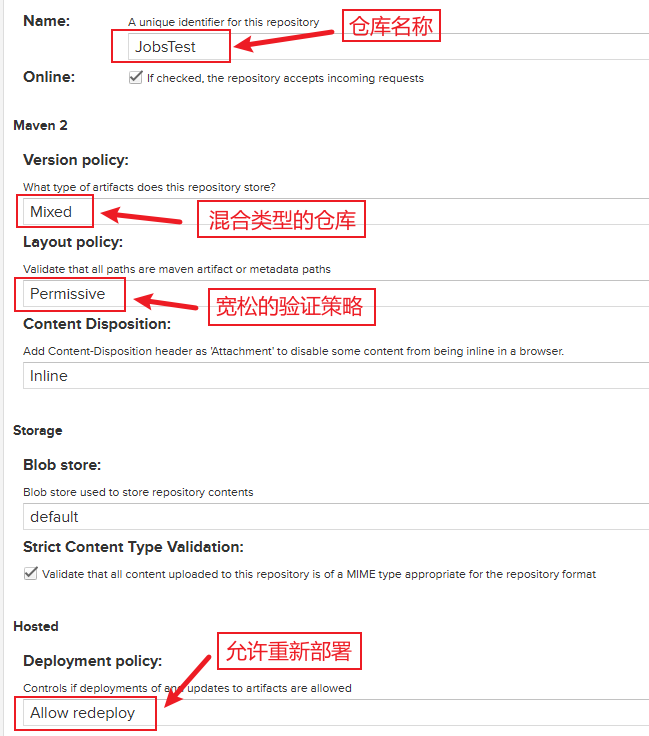
我这里创建了一个名称为 JobsTest 的远程仓库,创建好之后,点击列表中的 copy 按钮,可以看到仓库的内网地址:
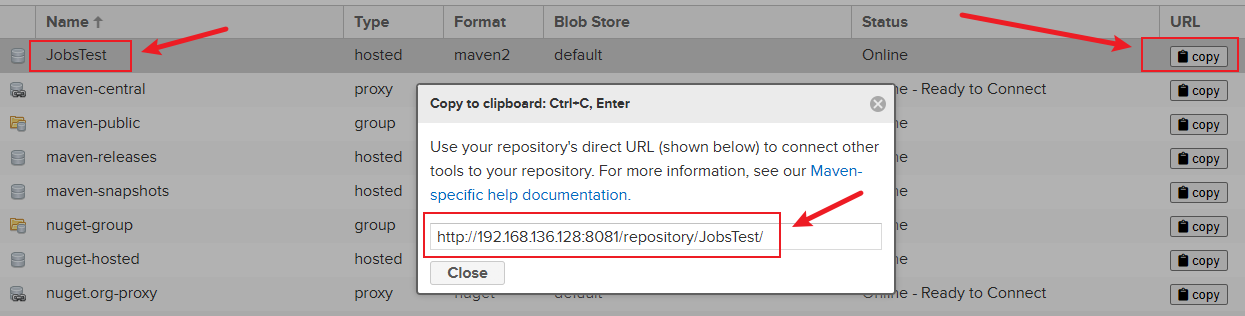
这个内网地址 http://192.168.136.128:8081/repository/JobsTest/ 就是要把本地的 jar 包上传到 nexus 的地址
二、上传本地仓库的 jar 包到 nexus
在自己电脑上,找到本地仓库的文件夹,我电脑上是 D:\DownloadJar 文件夹,在文件夹中创建一个 clear.bat 文件,内容如下:
rem 正在搜索...
for /f "delims=" %%i in ('dir /b /s "%REPOSITORY_PATH%\*lastUpdated*"') do (
    del /s /q %%i
)
rem 搜索完毕
pause
该脚本的作用是:在本地仓库文件夹中搜索名称包含 lastUpdated 的文件,然后删除掉。双击 clear.bat 运行即可。
如果本地仓库的文件比较多的话,可能耗费的时间比较多,也可以利用 windows 自带的搜索功能,搜索出包含 lastUpdated 的文件,自己手动删除掉:

由于 windows 系统文件名不区分大小写,因此只要字母输入正确,就能够搜索出具体的文件,手动删除掉即可。
然后在本地仓库文件夹中,再创建一个名称为 uploadToNexus.sh 的脚本,内容如下:
#!/bin/bash
# copy and run this script to the root of the repository directory containing files
# this script attempts to exclude uploading itself explicitly so the script name is important
# Get command line params
while getopts ":r:u:p:" opt; do
	case $opt in
		r) REPO_URL="$OPTARG"
		;;
		u) USERNAME="$OPTARG"
		;;
		p) PASSWORD="$OPTARG"
		;;
	esac
done

find . -type f -not -path './mavenimport\.sh*' -not -path '*/\.*' -not -path '*/\^archetype\-catalog\.xml*' -not -path '*/\^maven\-metadata\-local*\.xml' -not -path '*/\^maven\-metadata\-deployment*\.xml' | sed "s|^\./||" | xargs -I '{}' curl -u "$USERNAME:$PASSWORD" -X PUT -v -T {} ${REPO_URL}/{} ;
注意:该脚本是 linux 的脚本,需要使用 git bash 执行,不能使用 cmd 执行
如果你已经安装了 Git 的话,在本地仓库文件夹中,通过鼠标右键菜单,选择 Open Git Bash here 菜单:
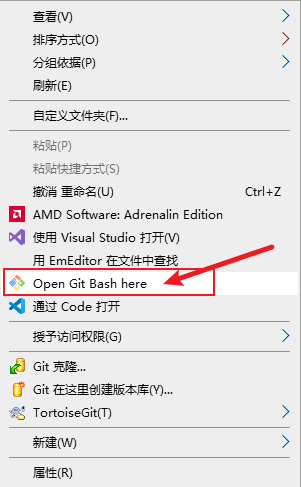
然后输入以下命令,运行即可:
# ./uploadToNexus.sh -u 你的nexus用户名 -p 你的nexus密码 -r http://127.0.0.1:8081/repository/你的远程仓库名/
./uploadToNexus.sh -u admin -p 123456 -r http://192.168.136.128:8081/repository/JobsTest/
三、Maven 和 IDEA 配置文件
对 maven 的 settings.xml 文件配置主要如下:
一、配置 maven 向 Nexus 上传 jar 包的 hosted 仓库,以及账号密码,如下所示:
<servers>
    <server>
      <!--远程仓库的名称-->
      <id>JobsTest</id>
      <!--访问 Nexus 的账号-->
      <username>admin</username>
      <!--访问 Nexus 的密码-->
      <password>123456</password>
    </server>
</servers>
二、配置 maven 从 Nexus 下载 jar 包的 group 地址,以及让 maven 通过 Nexus 进行所有 jar 包的下载
<mirrors>
    <mirror>
        <!--远程仓库的名称-->
        <id>JobsTest</id>
        <!--镜像名称,可以随便取名-->
        <name>Nexus私服</name>
        <!--远程仓库的地址-->
        <url>http://192.168.136.128:8081/repository/JobsTest/</url>
        <!--此处配置为星号(*),表示 maven 下载所有 jar 包,都必须从 Nexus 上面配置的远程仓库地址中获取-->
        <mirrorOf>*</mirrorOf>
    </mirror>
</mirrors>
如果想要把 IDEA 中打包的 jar 包 Install 到远程仓库中,可以在项目的父 pom 文件中增加如下配置即可:
<distributionManagement>
    <repository>
        <id>JobsTest</id>
        <url>http://192.168.136.128:8081/repository/JobsTest/</url>
    </repository>
</distributionManagement>

 浙公网安备 33010602011771号