
.net core 发布、跨域问题
1、netcore 跨域配置。
①、在ConfigureServices里面添加如下代码
1 services.AddCors(options=> {
2                 options.AddPolicy("any", builder => {//any 策略名
3                     builder.AllowAnyHeader()
4                    .AllowAnyMethod()
5                     .AllowAnyOrigin()
6                     .AllowCredentials();
7
8                 });
9             });
②、在Configure下app.UseMvc()前添加以下代码
app.UseCors("any");
③、在控制器加以下代码
1     [EnableCors("any")]
2     public class BaseApiController : ControllerBase
3     {
4     }
2、将网站发布put方法类型出504错误,这可能只能解决一部分问题
①、打开发布网站文件目录的web.config

②、添加如下代码
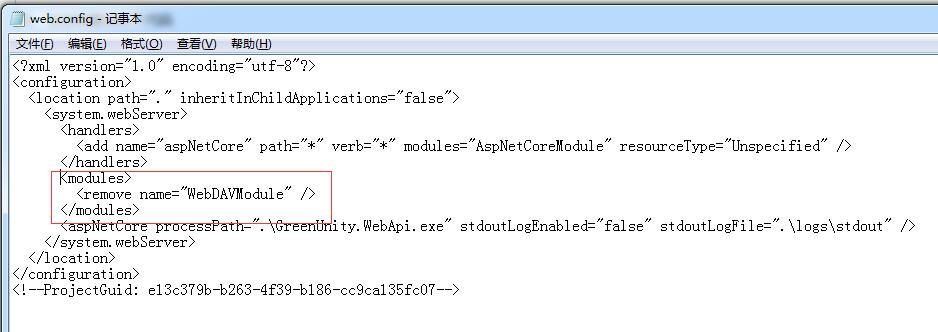
代码:
   <modules>
    <remove name="WebDAVModule"/>
   </modules>
3、发布网站访问文件出错
①、打开IIS将网站设置成非托管状态

②、加载文件问题

如有帮助,欢迎转载,转载请注明原文链接:https://www.cnblogs.com/study10000/p/10461914.html

 浙公网安备 33010602011771号