

【转载+整理】Python正则表达式使用指南
【原文地址1:https://www.cnblogs.com/huxi/archive/2010/07/04/1771073.html#!comments】
【原文地址2:https://www.liaoxuefeng.com/wiki/0014316089557264a6b348958f449949df42a6d3a2e542c000/00143193331387014ccd1040c814dee8b2164bb4f064cff000】
【原文地址3:http://blog.csdn.net/u010951938/article/details/43196947】
1. 正则表达式基础
1.1. 简单介绍
下图展示了使用正则表达式进行匹配的实现流程:
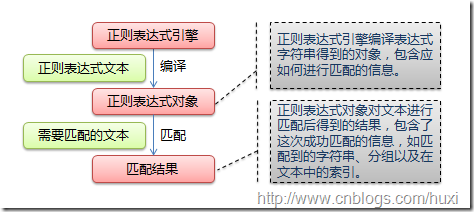
正则表达式的大致匹配过程是:依次拿出表达式和文本中的字符比较,如果每一个字符都能匹配,则匹配成功;一旦有匹配不成功的字符则匹配失败。如果表达式中有量词或边界,这个过程会稍微有一些不同,但也是很好理解的,看下图中的示例以及自己多使用几次就能明白。
下图列出了Python支持的正则表达式元字符和语法:

1.2. 数量词的贪婪模式与非贪婪模式
正则表达式通常用于在文本中查找匹配的字符串。Python里数量词默认是贪婪的(在少数语言里也可能是默认非贪婪),总是尝试匹配尽可能多的字符;非贪婪的则相反,总是尝试匹配尽可能少的字符。例如:正则表达式"ab*"如果用于查找"abbbc",将找到"abbb"。而如果使用非贪婪的数量词"ab*?",将找到"a"。同理,如果使用“ab+”匹配“abbbc”,结果也是贪婪模式“abbb”,改成“ab+?”,结果是"ab"
<记住:*代表0次或无限次,*?则代表0次。+代表1次或无限次,+?则代表1次>
在线的正则表达式测试工具很多,例如 http://tool.oschina.net/regex/
1.3. 反斜杠的困扰
与大多数编程语言相同,正则表达式里使用"\"作为转义字符,这就可能造成反斜杠困扰。假如你需要匹配文本中的字符"\",那么使用编程语言表示的正则表达式里将需要4个反斜杠"\\":前两个和后两个分别用于在编程语言里转义成反斜杠,转换成两个反斜杠后再在正则表达式里转义成一个反斜杠。Python里的原生字符串很好地解决了这个问题,这个例子中的正则表达式可以使用r"\"表示。同样,匹配一个数字的"\d"可以写成r"\d"。有了原生字符串,你再也不用担心是不是漏写了反斜杠,写出来的表达式也更直观。
1.4. 匹配模式
正则表达式提供了一些可用的匹配模式,比如忽略大小写、多行匹配等,这部分内容将在Pattern类的工厂方法re.compile(pattern[, flags])中一起介绍。
1.5.举个栗子
直接给出字符,就是精确匹配,”abc“可以匹配”abcd“,但无法匹配”a1c“
'00\d'可以匹配'007',但无法匹配'00A';
'\d\d\d'可以匹配'010'
'\w\w\d'可以匹配'py3'
'py.'可以匹配'pyc'、'pyo'、'py!'等等
要匹配变长的字符,在正则表达式中,用*表示任意个字符(包括0个),用+表示至少一个字符,用?表示0个或1个字符,用{n}表示n个字符,用{n,m}表示n-m个字符
来看一个复杂的例子:\d{3}\s+\d{3,8}。
我们来从左到右解读一下:
-
\d{3}表示匹配3个数字,例如'010'; -
\s可以匹配一个空格(也包括Tab等空白符),所以\s+表示至少有一个空格,例如匹配' ',' '等; -
\d{3,8}表示3-8个数字,例如'1234567'。
综合起来,上面的正则表达式可以匹配以任意个空格隔开的带区号的电话号码。
如果要匹配'010-12345'这样的号码呢?由于'-'是特殊字符,在正则表达式中,要用'\'转义,所以,上面的正则是\d{3}\-\d{3,8}。
但是,仍然无法匹配'010 - 12345',因为带有空格。所以我们需要更复杂的匹配方式。
1.6.再举个栗子
要做更精确地匹配,可以用[]表示范围,比如:
-
[0-9a-zA-Z\_]可以匹配一个数字、字母或者下划线; -
[0-9a-zA-Z\_]+可以匹配至少由一个数字、字母或者下划线组成的字符串,比如'a100','0_Z','Py3000'等等; -
[a-zA-Z\_][0-9a-zA-Z\_]*可以匹配由字母或下划线开头,后接任意个由一个数字、字母或者下划线组成的字符串,也就是Python合法的变量; -
[a-zA-Z\_][0-9a-zA-Z\_]{0, 19}更精确地限制了变量的长度是1-20个字符(前面1个字符+后面最多19个字符)。
A|B可以匹配A或B,所以(P|p)ython可以匹配'Python'或者'python'。
^表示行的开头,^\d表示必须以数字开头。
$表示行的结束,\d$表示必须以数字结束。
你可能注意到了,py也可以匹配'python',但是加上^py$就变成了整行匹配,就只能匹配'py'了
1.7.关于分组的栗子
除了简单地判断是否匹配之外,正则表达式还有提取子串的强大功能。用()表示的就是要提取的分组(Group)。比如:
^(\d{3})-(\d{3,8})$分别定义了两个组,可以直接从匹配的字符串中提取出区号和本地号码:
>>> m = re.match(r'^(\d{3})-(\d{3,8})$', '010-12345')
>>> m
<_sre.SRE_Match object; span=(0, 9), match='010-12345'>
>>> m.group(0)
'010-12345'
>>> m.group(1)
'010'
>>> m.group(2)
'12345'
如果正则表达式中定义了组,就可以在Match对象上用group()方法提取出子串来。
注意到group(0)是匹配出来的完整字符串,group(1)、group(2)……表示第1、2、……个子串。
提取子串非常有用。来看一个更凶残的例子:
>>> t = '19:05:30'
>>> m = re.match(r'^(0[0-9]|1[0-9]|2[0-3]|[0-9])\:(0[0-9]|1[0-9]|2[0-9]|3[0-9]|4[0-9]|5[0-9]|[0-9])\:(0[0-9]|1[0-9]|2[0-9]|3[0-9]|4[0-9]|5[0-9]|[0-9])$', t)
>>> m.groups()
('19', '05', '30')
这个正则表达式可以直接识别合法的时间。但是有些时候,用正则表达式也无法做到完全验证,比如识别日期:
'^(0[1-9]|1[0-2]|[0-9])-(0[1-9]|1[0-9]|2[0-9]|3[0-1]|[0-9])$'
对于'2-30','4-31'这样的非法日期,用正则还是识别不了,或者说写出来非常困难,这时就需要程序配合识别了。
2. re模块
2.1. 开始使用re
Python通过re模块提供对正则表达式的支持。使用re的一般步骤是先将正则表达式的字符串形式编译为Pattern实例,然后使用Pattern实例处理文本并获得匹配结果(一个Match实例),最后使用Match实例获得信息,进行其他的操作。
import re
# 将正则表达式编译成Pattern对象
pattern = re.compile(r'hello')
# 使用Pattern匹配文本,获得匹配结果,无法匹配时将返回None
match = pattern.match('hello world!')
if match:
    # 使用Match获得分组信息
    print(match.group())
输出结果:
hello
re.compile(strPattern[, flag]):
这个方法是Pattern类的工厂方法,用于将字符串形式的正则表达式编译为Pattern对象。 第二个参数flag是匹配模式,取值可以使用按位或运算符'|'表示同时生效,比如re.I | re.M。另外,你也可以在regex字符串中指定模式,比如re.compile('pattern', re.I | re.M)与re.compile('(?im)pattern')是等价的。 可选值有:
-
re.I(re.IGNORECASE): 忽略大小写(括号内是完整写法,下同)
-
M(MULTILINE): 多行模式,改变'^'和'$'的行为(参见上图)
-
S(DOTALL): 点任意匹配模式,改变'.'的行为
-
L(LOCALE): 使预定字符类 \w \W \b \B \s \S 取决于当前区域设定
-
U(UNICODE): 使预定字符类 \w \W \b \B \s \S \d \D 取决于unicode定义的字符属性
-
X(VERBOSE): 详细模式。这个模式下正则表达式可以是多行,忽略空白字符,并可以加入注释。以下两个正则表达式是等价的:
a = re.compile(r"""\d +  # the integral part
                   \.    # the decimal point
                   \d *  # some fractional digits""", re.X)
b = re.compile(r"\d+\.\d*")
re提供了众多模块方法用于完成正则表达式的功能。这些方法可以使用Pattern实例的相应方法替代,唯一的好处是少写一行re.compile()代码,但同时也无法复用编译后的Pattern对象。这些方法将在Pattern类的实例方法部分一起介绍。如上面这个例子可以简写为:
m = re.match(r'hello', 'hello world!')
print(m.group())
re模块还提供了一个方法escape(string),用于将string中的正则表达式元字符如*/+/?等之前加上转义符再返回,在需要大量匹配元字符时有那么一点用。
2.2. Match
Match对象是一次匹配的结果,包含了很多关于此次匹配的信息,可以使用Match提供的可读属性或方法来获取这些信息。
-
属性:
-
string: 匹配时使用的文本。
-
re: 匹配时使用的Pattern对象。
-
pos: 文本中正则表达式开始搜索的索引。值与Pattern.match()和Pattern.seach()方法的同名参数相同。
-
endpos: 文本中正则表达式结束搜索的索引。值与Pattern.match()和Pattern.seach()方法的同名参数相同。
-
lastindex: 最后一个被捕获的分组在文本中的索引。如果没有被捕获的分组,将为None。
-
lastgroup: 最后一个被捕获的分组的别名。如果这个分组没有别名或者没有被捕获的分组,将为None。
-
方法:
-
group([group1, …]): 获得一个或多个分组截获的字符串;指定多个参数时将以元组形式返回。group1可以使用编号也可以使用别名;编号0代表整个匹配的子串;不填写参数时,返回group(0);没有截获字符串的组返回None;截获了多次的组返回最后一次截获的子串。
-
groups([default]): 以元组形式返回全部分组截获的字符串。相当于调用group(1,2,…last)。default表示没有截获字符串的组以这个值替代,默认为None。
-
groupdict([default]): 返回以有别名的组的别名为键、以该组截获的子串为值的字典,没有别名的组不包含在内。default含义同上。
-
start([group]): 返回指定的组截获的子串在string中的起始索引(子串第一个字符的索引)。group默认值为0。
-
end([group]): 返回指定的组截获的子串在string中的结束索引(子串最后一个字符的索引+1)。group默认值为0。
-
span([group]): 返回(start(group), end(group))。
-
expand(template): 将匹配到的分组代入template中然后返回。template中可以使用\id或\g<id>、\g<name>引用分组,但不能使用编号0。\id与\g<id>是等价的;但\10将被认为是第10个分组,如果你想表达\1之后是字符'0',只能使用\g<1>0。
import re m = re.match(r'(\w+) (\w+)(?P<sign>.*)', 'hello world!') print("m.string:", m.string) #输出 m.string: hello world! print("m.re:", m.re) #输出 m.re: <_sre.SRE_Pattern object at 0x016E1A38> print("m.pos:", m.pos) #输出 m.pos: 0 print("m.endpos:", m.endpos) #输出 m.endpos: 12 print("m.lastindex:", m.lastindex) #输出 m.lastindex: 3 print("m.lastgroup:", m.lastgroup) #输出 m.lastgroup: sign print("m.group(1,2):", m.group(1, 2)) #输出 m.group(1,2): ('hello', 'world') print("m.groups():", m.groups()) #输出 m.groups(): ('hello', 'world', '!') print("m.groupdict():", m.groupdict()) #输出 m.groupdict(): {'sign': '!'} print("m.start(2):", m.start(2)) #输出 m.start(2): 6 print("m.end(2):", m.end(2)) #输出 m.end(2): 11 print("m.span(2):", m.span(2)) #输出 m.span(2): (6, 11) print(r"m.expand(r'\2 \1\3'):", m.expand(r'\2 \1\3')) #输出 m.expand(r'\2 \1\3'): world hello!注:(?P<sign>.*)表示第三个分组(任意长度的任意字符)的别名为sign。个人感觉,这些貌似实用性不大,group方法应该是使用最多的吧。
2.3. Pattern
Pattern对象是一个编译好的正则表达式,通过Pattern提供的一系列方法可以对文本进行匹配查找。
Pattern不能直接实例化,必须使用re.compile()进行构造。
Pattern提供了几个可读属性用于获取表达式的相关信息:
-
pattern: 编译时用的表达式字符串。
-
flags: 编译时用的匹配模式。数字形式。
-
groups: 表达式中分组的数量。
-
groupindex: 以表达式中有别名的组的别名为键、以该组对应的编号为值的字典,没有别名的组不包含在内。
import re
p = re.compile(r'(\w+) (\w+)(?P<sign>.*)', re.DOTALL)
print("p.pattern:", p.pattern)
#输出  p.pattern: (\w+) (\w+)(?P<sign>.*)
print("p.flags:", p.flags)
#输出 p.flags: 16
print("p.groups:", p.groups)
#输出 p.groups: 3
print("p.groupindex:", p.groupindex)
#输出 p.groupindex: {'sign': 3}
-
-
实例方法[ | re模块方法]:
-
match(string[, pos[, endpos]]) | re.match(pattern, string[, flags]): 这个方法将从string的pos下标处起尝试匹配pattern;如果pattern结束时仍可匹配,则返回一个Match对象;如果匹配过程中pattern无法匹配,或者匹配未结束就已到达endpos,则返回None。 pos和endpos的默认值分别为0和len(string);re.match()无法指定这两个参数,参数flags用于编译pattern时指定匹配模式。 注意:这个方法并不是完全匹配。当pattern结束时若string还有剩余字符,仍然视为成功。想要完全匹配,可以在表达式末尾加上边界匹配符'$'。 示例参见2.1小节。
-
search(string[, pos[, endpos]]) | re.search(pattern, string[, flags]): 这个方法用于查找字符串中可以匹配成功的子串。从string的pos下标处起尝试匹配pattern,如果pattern结束时仍可匹配,则返回一个Match对象;若无法匹配,则将pos加1后重新尝试匹配;直到pos=endpos时仍无法匹配则返回None。 pos和endpos的默认值分别为0和len(string));re.search()无法指定这两个参数,参数flags用于编译pattern时指定匹配模式。
import re # 将正则表达式编译成Pattern对象 pattern = re.compile(r'world') # 使用search()查找匹配的子串,不存在能匹配的子串时将返回None # 这个例子中使用match()无法成功匹配,参见文末的match方法比较 match = pattern.search('hello world!') if match: # 使用Match获得分组信息 print(match.group()) ### 输出 ### # world -
split(string[, maxsplit]) | re.split(pattern, string[, maxsplit]): 按照能够匹配的子串将string分割后返回列表。maxsplit用于指定最大分割次数,不指定将全部分割。
import re p = re.compile(r'\d+') print(p.split('one1two2three3four4')) ### output ### # ['one', 'two', 'three', 'four', ''] -
findall(string[, pos[, endpos]]) | re.findall(pattern, string[, flags]): 搜索string,以列表形式返回全部能匹配的子串。
import re p = re.compile(r'\d+') print(p.findall('one1two2three3four4')) ### output ### # ['1', '2', '3', '4'] -
finditer(string[, pos[, endpos]]) | re.finditer(pattern, string[, flags]): 搜索string,返回一个顺序访问每一个匹配结果(Match对象)的迭代器。
import re p = re.compile(r'\d+') for m in p.finditer('one1two2three3four4'): print(m.group(),' ',end='') ### output ### # 1 2 3 4 -
sub(repl, string[, count]) | re.sub(pattern, repl, string[, count]): 使用repl替换string中每一个匹配的子串后返回替换后的字符串。 当repl是一个字符串时,可以使用\id或\g<id>、\g<name>引用分组,但不能使用编号0。 当repl是一个方法时,这个方法应当只接受一个参数(Match对象),并返回一个字符串用于替换(返回的字符串中不能再引用分组)。count用于指定最多替换次数,不指定时全部替换。
import re p = re.compile(r'(\w+) (\w+)') s = 'i say, hello world!' print(p.sub(r'\2 \1', s)) def func(m): return m.group(1).title() + ' ' + m.group(2).title() print(p.sub(func, s)) ### output ### # say i, world hello! # I Say, Hello World! -
subn(repl, string[, count]) |re.sub(pattern, repl, string[, count]): 返回 (sub(repl, string[, count]), 替换次数)。
import re

p = re.compile(r'(\w+) (\w+)')
s = 'i say, hello world!'

print(p.subn(r'\2 \1', s))

def func(m):
    return m.group(1).title() + ' ' + m.group(2).title()

print p.subn(func, s)

### output ###
# ('say i, world hello!', 2)
# ('I Say, Hello World!', 2)
-
常用实例方法match、search、findall、finditer的区别
| 方法/属性 | 作用 |
|---|---|
| match() | RE在字符串刚开始的位置匹配 |
| search() | 扫描字符串,找到这个 RE 匹配的位置 |
| findall() | 找到 RE 匹配的所有子串,并把它们作为一个列表返回 |
| finditer() | 找到 RE 匹配的所有子串,并把它们作为一个迭代器返回 |
1、match和search的比较:
    match():
      print(re.match('super', 'superstition').span())会返回(0, 5)
      print(re.match('super', 'superstition').group())会返回super
      print(re.match('super', 'insuperable'))则返回None
   search():
      print(re.search('super', 'superstition').span())返回(0, 5)
      print(re.search('super','superstition').group())返回super
      print(re.search('super', 'insuperable').span())返回(2, 7)
        print(re.search('super','insuperstition').group())返回super
2、看一个更全面的示例:
 1 import re
 2 if __name__ == '__main__':
 3     strVal = '''test<a href="http://www.andylin02.com" target="_blank" class="dsdfv">aaaa</a>
 4 <a href="http://www.congfeng.com" target="_blank" class="tdsfv">bbbbsdf</a>
 5 <a href="http://www.st.com" target="_blank" class="txx">ccccccc</a>
 6 <a href="http://www.qs.com" target="_blank" class="xxx">ddddd</a>
 7     '''#三个单引号是为了字符串中每行不可见的换行符能正常保留
 8
 9     print(strVal) #打印原始字符串
10
11     strPattern = r"(<\s*a\s.*href\s*=.*)"  #正则表达式
12
13     #match--因为第一个字符匹配失败,所以匹配结束
14     mtMatch = re.match(strPattern, strVal)
15     print("======================= match result =======================");
16     if mtMatch:
17         print("%s ==> %d" % (mtMatch.groups(), len(mtMatch.groups())));
18     else:
19         print('match fail!')
20
21     #search--因为.不能匹配换行符,所以到第一个行换行符匹配结束
22     mtReSearch = re.search(strPattern, strVal)
23
24     print("======================= search result =======================")
25     print("%s ==> %d" %(mtReSearch.groups(), len(mtReSearch.groups()) ))
26
27     #findall--扫描整个字符串进行匹配,找到4个匹配成功的子串,打印列表
28     lsFind = re.findall(strPattern, strVal)
29     print("\n===================== findall result ========================")
30     print("%s ==> %d" %(lsFind, len(lsFind)))
31
32     #finditer--扫描整个字符串进行匹配,找到4个匹配成功的子串,迭代打印子串
33     print("\n===================== finditer result =======================")
34     for mtFind in re.finditer(strPattern, strVal):
35         print(mtFind.groups())
36         print("------")
运行结果如下:
test<a href="http://www.andylin02.com" target="_blank" class="dsdfv">aaaa</a> <a href="http://www.congfeng.com" target="_blank" class="tdsfv">bbbbsdf</a> <a href="http://www.st.com" target="_blank" class="txx">ccccccc</a> <a href="http://www.qs.com" target="_blank" class="xxx">ddddd</a> ======================= match result ======================= match fail! ======================= search result ======================= ('<a href="http://www.andylin02.com" target="_blank" class="dsdfv">aaaa</a> ',) ==> 1 ===================== findall result ======================== ['<a href="http://www.andylin02.com" target="_blank" class="dsdfv">aaaa</a> ', '<a href="http://www.congfeng.com" target="_blank" class="tdsfv">bbbbsdf</a> ', '<a href="http://www.st.com" target="_blank" class="txx">ccccccc</a> ', '<a href="http://www.qs.com" target="_blank" class="xxx">ddddd</a> '] ==> 4 ===================== finditer result ======================= ('<a href="http://www.andylin02.com" target="_blank" class="dsdfv">aaaa</a> ',) ------ ('<a href="http://www.congfeng.com" target="_blank" class="tdsfv">bbbbsdf</a> ',) ------ ('<a href="http://www.st.com" target="_blank" class="txx">ccccccc</a> ',) ------ ('<a href="http://www.qs.com" target="_blank" class="xxx">ddddd</a> ',) ------
结论是:findall和finditer实用性比较高,search次之,match最次

 浙公网安备 33010602011771号