


eclipse配置文件xml中添加代码提示
编写spring配置文件时,不能出现帮助信息
由于spring的schema文件位于网络上,如果机器不能连接到网络,那么在编写配置信息时候就无法出现提示信息,解决方法有两种:
1.让机器上网,eclipse会自动从网络上下载schema文件并缓存在硬盘上。
2.手动添加schema文件,方法如下:
windwos->preferences->myeclipse->files and editors->xml->xmlcatalog
1.点"add",在出现的窗口中的Key Type中选择URI,在location中选"File system",
2.然后在spring解压目录的dist/resources目录中选择spring-beans-2.5.xsd,
3.回到设置窗口的时候不要急着关闭窗口,
4.应把窗口中的Key Type改为Schema location,Key改为http://www.springframework.org/schema/beans/spring-beans-2.5.xsd
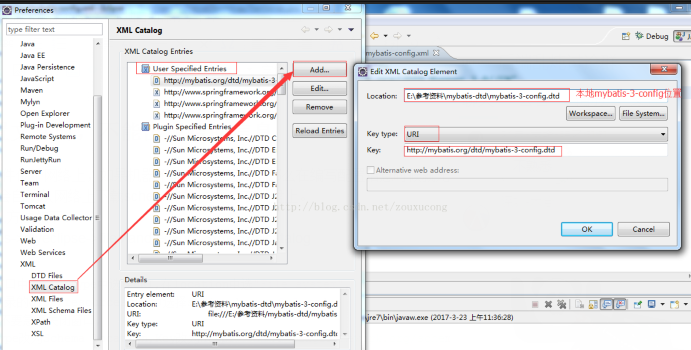
在mybatis-config.xml文件中,若想有属性自动提示功能,需要Eclipse本地中配置mybatis-3-config.dtd
windwos->preferences->XML->XML catalog中选择user specified entries->add如图:

 浙公网安备 33010602011771号