

自动格式设置
自动格式设置
先看个图
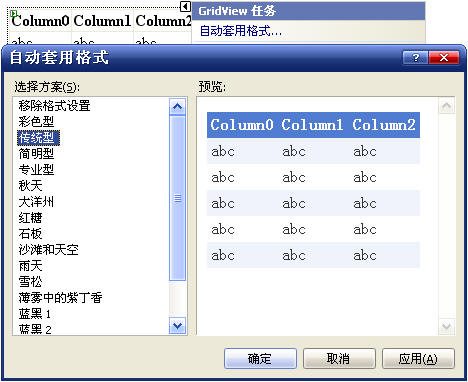
相信大家都很熟悉吧,我们可以用这个面板很方面的使用预定的样式.我们可以称之为自动格式设置或者自动套用样式.
ControlDesigner类提供了AutoFormats属性,其提供了DesignerAutoFormat类的DesignerAutoFormatCollection集合.我们来看下相关的类.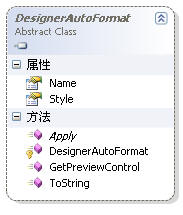
DesignerAutoFormat 是一个基类,如果你想为你的控件在设计时提供格式化的功能,你可以从此类派生,你必须实现Apply方法,此方法会将相关联的控件设置样式.由于实现比较简单就不再多多了,就直接拿MSDN的例子来看吧. 注意给 IndentLabelDesigner 加上SupportsPreviewControl元数据,这样可以支持预览功能.
 [Designer(typeof(IndentLabelDesigner)),
        ToolboxData("<{0}:IndentLabel Runat=\"server\"></{0}:IndentLabel>")]
    public class IndentLabel : Label
    {
        [SupportsPreviewControl(true)]
        public class IndentLabelDesigner : LabelDesigner
        {
            private DesignerAutoFormatCollection _autoFormats = null;

            public override DesignerAutoFormatCollection AutoFormats
            {
                get
                {
                    if (_autoFormats == null)
                    {
                        _autoFormats = new DesignerAutoFormatCollection();
                        _autoFormats.Add(new IndentLabelAutoFormat("MyClassic"));
                        _autoFormats.Add(new IndentLabelAutoFormat("MyBright"));
                        _autoFormats.Add(new IndentLabelAutoFormat("Default"));
                    }
                    return _autoFormats;
                }
            }
        }

        private class IndentLabelAutoFormat : DesignerAutoFormat
        {
            public IndentLabelAutoFormat(string name)
                : base(name)
            { }

            public override void Apply(Control inLabel)
            {
                if (inLabel is IndentLabel)
                {
                    IndentLabel ctl = (IndentLabel)inLabel;


                    if (this.Name == "MyClassic")
                    {

                        ctl.ForeColor = Color.Gray;
                        ctl.BackColor = Color.LightGray;
                        ctl.Font.Size = FontUnit.XSmall;
                        ctl.Font.Name = "Verdana,Geneva,Sans-Serif";
                    }
                    else if (this.Name == "MyBright")
                    {

                        this.Style.ForeColor = Color.Maroon;
                        this.Style.BackColor = Color.Yellow;
                        this.Style.Font.Size = FontUnit.Medium;
                        ctl.MergeStyle(this.Style);
                    }
                    else
                    {
                        ctl.ForeColor = Color.Black;
                        ctl.BackColor = Color.Empty;
                        ctl.Font.Size = FontUnit.XSmall;
                    }
                }
            }
        }
    }


 浙公网安备 33010602011771号