


VUE如何接入mockApi
mockApi
开发过程中,前端开发大多数情况下根本就等不到后端的接口。经常会前后同步开发,后期联调。这样前端进行mockApi来模拟和后端交互就尤为重要了。
安装 mocker-api
因为只在开发环境使用
  PS E:\DDD\Vue3CLI\stones7> yarn add -D mocker-api
  Done in 10.58s.
安装完成后在项目根目录下新建mocker文件夹,用来存储我们模拟的接口数据,文件夹下添加index.js 用来作为数据入口。还可以新建其他模块的数据
例如test1,/test2
  // index.js
  module.exports = {
    ...require("./test1"),
    ...require("./test2")
  };

  // test1.js
  module.exports = {
    "GET /api/menu": {
      code: 0,
      msg: "success",
      data: [{
        id: 1,
        name: 'menu1'
      },
      {
        id: 2,
        name: 'menu1'
      }],
      success: true
    }
  }

  // test2.js
  module.exports = {
    "GET /api/menu2": {
      code: 0,
      msg: "success",
      data: [{
        id: 3,
        name: 'menu3'
      },
      {
        id: 4,
        name: 'menu4'
      }],
      success: true
    }
  }
关联添加的模拟数据,找到,vue.config.js,添加如下代码
  const apiMocker = require('mocker-api')
  const path = require('path')

  module.exports = {
    devServer: {
      before(app) {
        apiMocker(app, path.resolve('./mocker/index.js'))
      }
    }
  }
重新运行
  PS E:\DDD\Vue3CLI\stones7> yarn serve
  yarn run v1.22.17
  $ vue-cli-service serve
  INFO  Starting development server...
  10% building 2/2 modules 0 activeadcaA
  Done:  Hot Mocker \mocker\index.js file replacement success!
  Done:  Hot Mocker \mocker\test1.js file replacement success!
  Done:  Hot Mocker \mocker\test2.js file replacement success!
  98% after emitting CopyPlugin

  DONE  Compiled successfully in 3523ms                                                       下午3:55:10

    App running at:
    - Local:   http://localhost:5000/
    - Network: http://10.88.40.48:5000/

    Note that the development build is not optimized.
    To create a production build, run yarn build.

  No issues found.
可以看到。成功关联的模块会有提示。
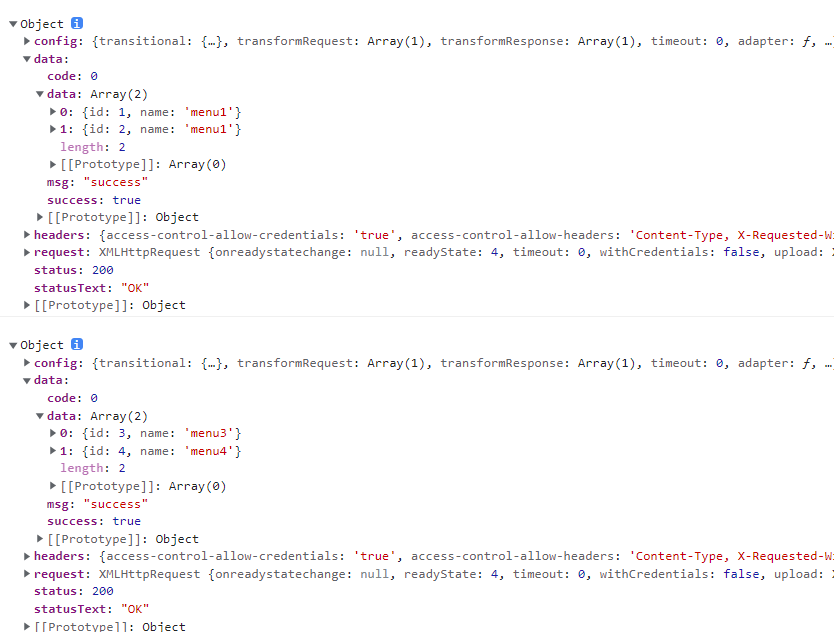
我们调用看下是否能够请求成功:
<template>
  <div class="home">
    <img alt="Vue logo" src="../assets/logo.png" />
    <HelloWorld msg="Welcome to Your Vue.js + TypeScript App" />
  </div>
</template>

<script lang="ts">
import { Options, Vue } from "vue-class-component";
import HelloWorld from "@/components/HelloWorld.vue"; // @ is an alias to /src
import axios from "axios";

@Options({
  components: {
    HelloWorld,
  },
})
export default class Home extends Vue {
  created() {
    axios.get("/api/menu").then(response => {
      console.log(response)
    })
    axios.get("/api/menu2").then(response => {
      console.log(response)
    })
  }
}
</script>
打印结果.调用成功。入手很简单吧

 浙公网安备 33010602011771号