

Mybatis学习笔记
@
1.Mybatis
1.1 搭建环境及其配置
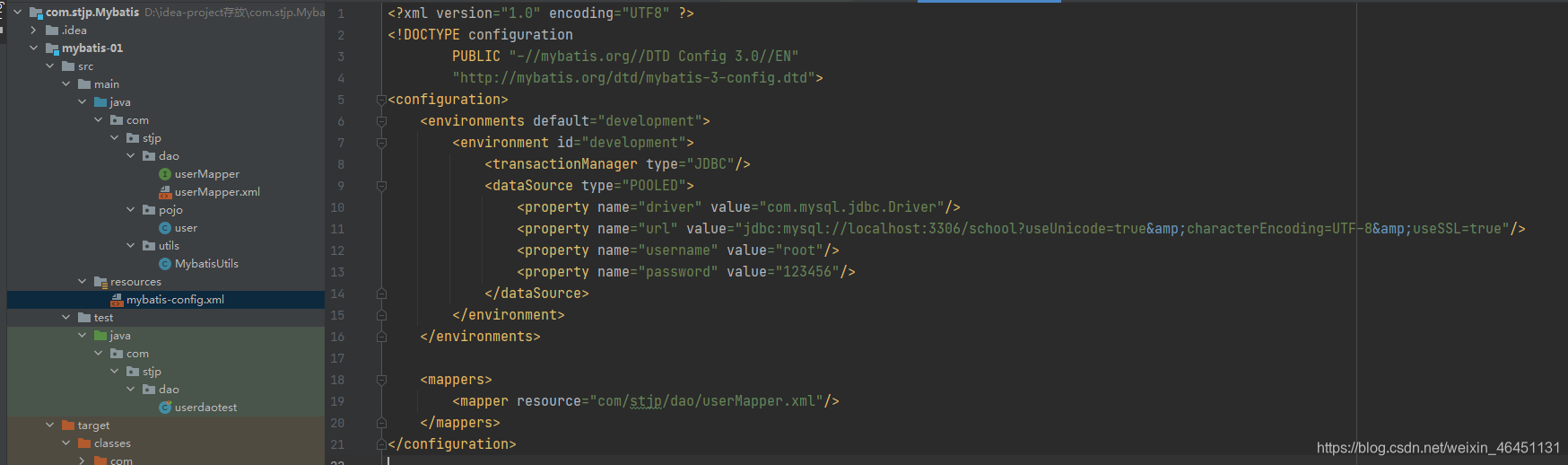
<?xml version="1.0" encoding="UTF8" ?>
<!DOCTYPE configuration
        PUBLIC "-//mybatis.org//DTD Config 3.0//EN"
        "http://mybatis.org/dtd/mybatis-3-config.dtd">
<configuration>

    <properties resource="db.properties"/>

    <settings>
        <setting name="mapUnderscoreToCamelCase" value="true"/>
        <setting name="logImpl" value="LOG4J"/>
    </settings>

    <typeAliases>
        <typeAlias type="com.stjp.pojo.Blog" alias="blog"/>
    </typeAliases>

    <environments default="development">
        <environment id="development">
            <transactionManager type="JDBC"/>
            <dataSource type="POOLED">
                <property name="driver" value="${driver}"/>
                <property name="url" value="${url}"/>
                <property name="username" value="${username}"/>
                <property name="password" value="${password}"/>
            </dataSource>
        </environment>
    </environments>

<mappers>
    <mapper resource="com/stjp/dao/BlogMapper.xml"/>
</mappers>

</configuration>
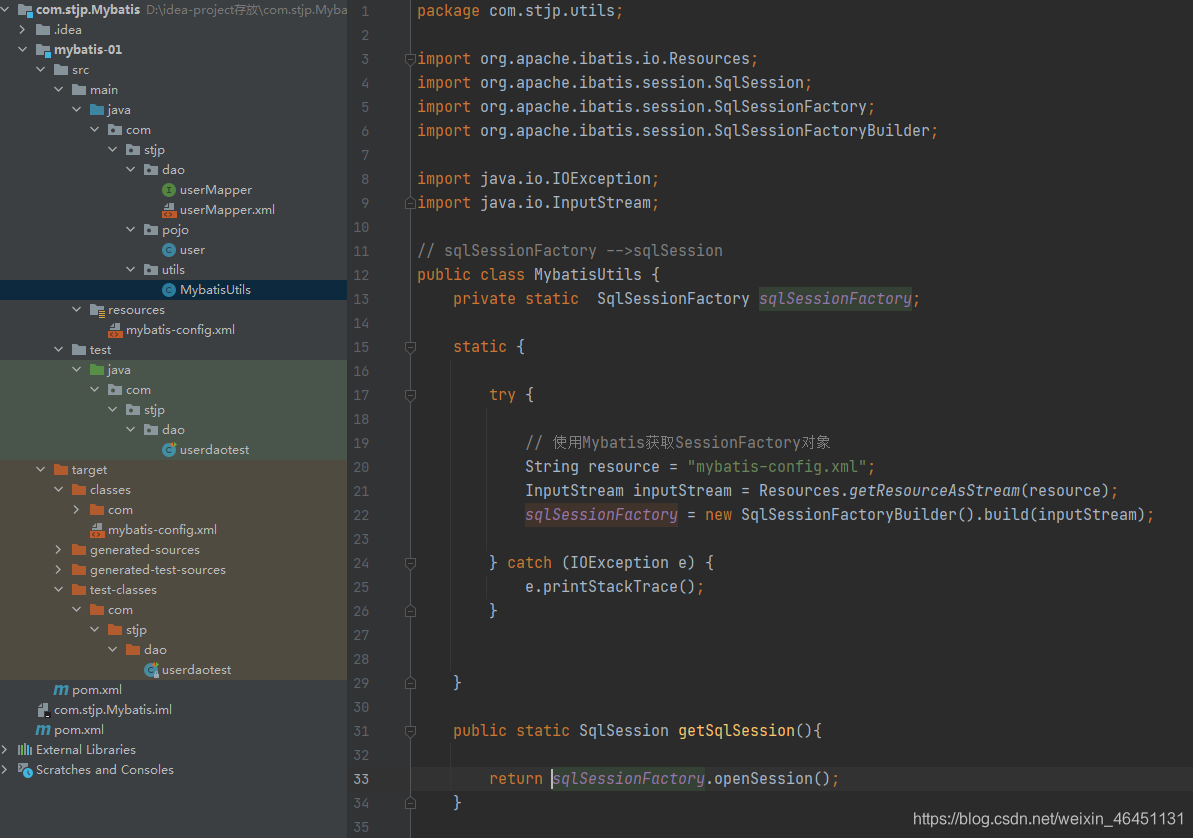
package com.stjp.utils;

import org.apache.ibatis.io.Resources;
import org.apache.ibatis.session.SqlSession;
import org.apache.ibatis.session.SqlSessionFactory;
import org.apache.ibatis.session.SqlSessionFactoryBuilder;

import java.io.IOException;
import java.io.InputStream;

// sqlSessionFactory -->sqlSession
public class MybatisUtils {
    private static  SqlSessionFactory sqlSessionFactory;

    static {

        try {

            // 使用Mybatis获取SessionFactory对象
            String resource = "mybatis-config.xml";
            InputStream inputStream = Resources.getResourceAsStream(resource);
            sqlSessionFactory = new SqlSessionFactoryBuilder().build(inputStream);

        } catch (IOException e) {
            e.printStackTrace();
        }


    }

    public static SqlSession getSqlSession(){

        return sqlSessionFactory.openSession();
    }

}
资源文件导出问题解决:在pom.xml中添加
<build>
        <resources>
            <resource>
                <directory>src/main/resources</directory>
                <includes>
                    <include>**/*.properties</include>
                    <include>**/*.xml</include>
                </includes>

            </resource>
            <resource>
                <directory>src/main/java</directory>
                <includes>
                    <include>**/*.properties</include>
                    <include>**/*.xml</include>
                </includes>

            </resource>
        </resources>
    </build>
2.CRUD(增删改要提交事务)
xxxMapper.xml相当于dao接口的实现类
namespace:填写接口目录
id:填写接口方法名
resultType:方法返回值类型
paramterType:参数类型(对象中的属性可以直接取出)
#{这里写传递的值}:相当于问号

1、select

2、insert
paramterType:参数类型(对象中的属性可以直接取出)
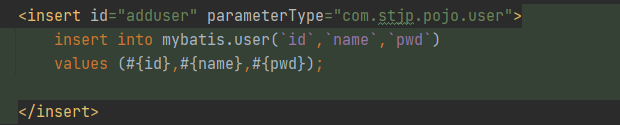
3、update

4、delete

3.配置解析
https://mybatis.org/mybatis-3/zh/configuration.html
[外链图片转存失败,源站可能有防盗链机制,建议将图片保存下来直接上传(img-5tA2cL1u-1629706182046)(images/image-20210724210244321.png)]
3.1 起别名(typeAliases)
<!--可以给实体类起别名-->
<!--方法一-->
<typeAliases>
    <typeAlias type="com.kuang.pojo.User" alias="User"/>
</typeAliases>


<!--方法二-->
<typeAliases>
    <package name="com.kuang.pojo"/>
</typeAliases>
3.2 映射器(mappers)
方法一
<!--每一个Mapper.xml都需要在Mybatis核心配置文件中注册-->
<mappers>
    <mapper resource="com/kuang/dao/UserMapper.xml"/>
</mappers>
方法二
<!--每一个Mapper.xml都需要在Mybatis核心配置文件中注册-->
<mappers>
    <mapper class="com.kuang.dao.UserMapper"/>
</mappers>
方法三
`<!--每一个Mapper.xml都需要在Mybatis核心配置文件中注册-->
<mappers>
    <package name="com.kuang.dao"/>
</mappers>
方法二和方法三的注意点:
- 接口和他的Mapper配置文件必须同名
- 接口和他的Mapper配置文件必须在同一个包下
4.解决字段不同映射问题
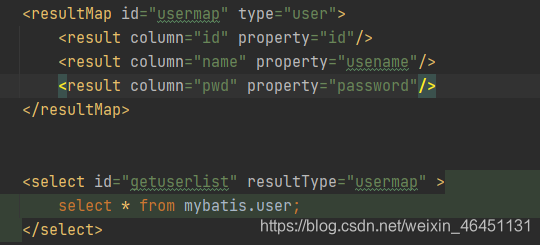
重点:通过resultMap解决
column:数据库字段
property:实体类属性
5.日志
5.1日志详细信息
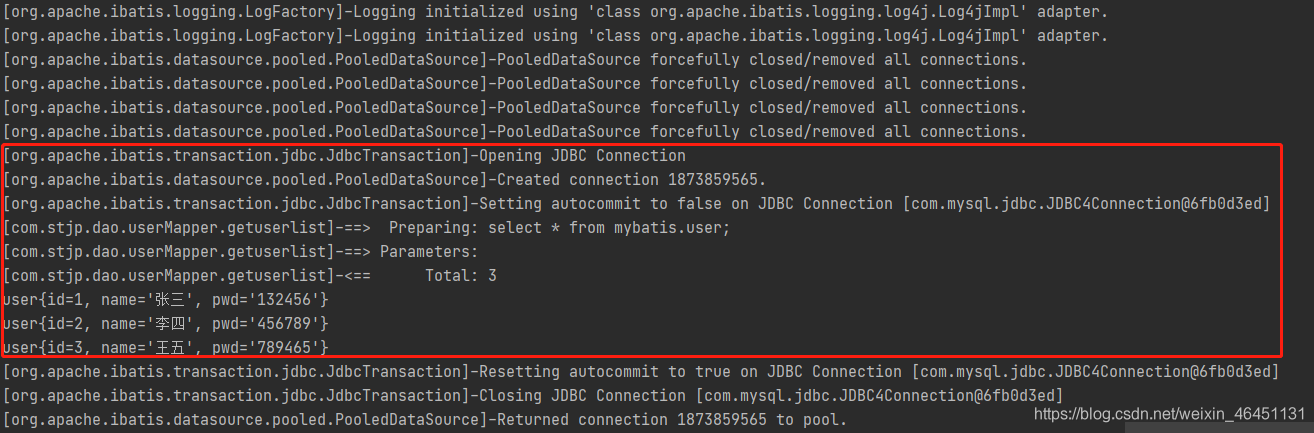
5.2日志使用(log4j)
资源目录下新建一个log4j.properties
#将等级为DEBUG的日志信息输出到console和file这两个目的地,console和file的定义在下面的代码
log4j.rootLogger=DEBUG,console,file

#控制台输出的相关设置
log4j.appender.console = org.apache.log4j.ConsoleAppender
log4j.appender.console.Target = System.out
log4j.appender.console.Threshold=DEBUG
log4j.appender.console.layout = org.apache.log4j.PatternLayout
log4j.appender.console.layout.ConversionPattern=[%c]-%m%n

#文件输出的相关设置
log4j.appender.file = org.apache.log4j.RollingFileAppender
log4j.appender.file.File=./log/stjp.log
log4j.appender.file.MaxFileSize=10mb
log4j.appender.file.Threshold=DEBUG
log4j.appender.file.layout=org.apache.log4j.PatternLayout
log4j.appender.file.layout.ConversionPattern=[%p][%d{yy-MM-dd}][%c]%m%n

#日志输出级别
log4j.logger.org.mybatis=DEBUG
log4j.logger.java.sql=DEBUG
log4j.logger.java.sql.Statement=DEBUG
log4j.logger.java.sql.ResultSet=DEBUG
log4j.logger.java.sql.PreparedStatement=DEBUG
mybatis-config下
<settings>
        <setting name="logImpl" value="LOG4J"/>
    </settings>
pom.xml下
<!-- https://mvnrepository.com/artifact/log4j/log4j -->
        <dependency>
            <groupId>log4j</groupId>
            <artifactId>log4j</artifactId>
            <version>1.2.17</version>
        </dependency>
在要输出日志的类中加入相关语句:
定义属性:static Logger logger = Logger.getLogger(LogDemo.class) 括号内为当前使用类
解决idea无法打开.log文件问题
typeAliases里使用typeAlias,mapper里使用class或者resource来导包
6.Limit分页
法一:注解@Parma()
//分页查询
    List<user> getUserByLimit(@Param("startIndex")int startIndex, @Param("pageSize") int pageSize);
  <select id="getUserByLimit" resultType="user" >
        select * from mybatis.user limit #{startIndex},#{pageSize}
    </select>
法二:使用万能的map
//分页查询用map
    List<user> getUserByLimit2(Map<String,Integer> map);
<select id="getUserByLimit2" resultType="user" parameterType="map">
        select * from mybatis.user limit #{startIndex},#{pageSize}
    </select>
6.1Lombok偷懒插件
Lombok 可以提高开发效率。
-
@Setter @Getter 生成 get、set 方法
-
@NoArgsConstructor @AllArgsConstructor 生成无参、全参构造器
-
@ToString 生成toString方法,与序列化不同(序列化属性不是按照定义的顺序排列的,可以自行探讨)
-
@Data:作用于类上,是以下注解的集合:@ToString @EqualsAndHashCode @Getter @Setter @RequiredArgsConstructor
7.复杂查询
association:用于对象
collection:用于集合、数组
javaType:java类型
ofType:容器泛型类型
使用SQL语句简单些的方法:
1.properties:对应pojo类属性
2.column:上一次查询结果作用于下一趟查询的条件
7.1多对一查询
例子:多个学生对应一个老师
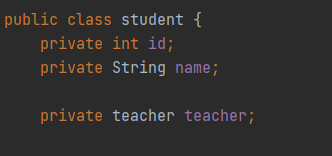
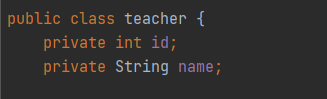
<!--   方法一  -->
    <select id="getStudent" resultMap="studentteacher">
    select * from mybatis.student
    </select>
    <resultMap id="studentteacher" type="student">
        <result property="id" column="id"/>
        <result property="name" column="name"/>
        <association property="teacher" column="tid" javaType="teacher" select="getTeacher"/>
    </resultMap>

    <select id="getTeacher" resultType="teacher">
        select * from mybatis.teacher
    </select>


<!-- 方法二 -->

    <select id="getStudent2" resultMap="studentteacher2">
        select s.id as sid,s.name as sname,t.name as tname
        from mybatis.student as s,mybatis.teacher as t
        where s.tid = t.id
    </select>

    <resultMap id="studentteacher2" type="student">
        <result property="id" column="sid" />
        <result property="name" column="sname" />
        <association property="teacher" javaType="teacher">
            <result property="name" column="tname" />
        </association>
    </resultMap>
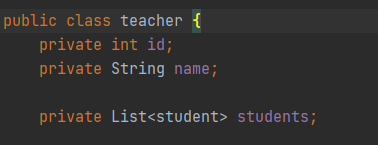
7.2一对多查询
例子:一个老师对应多个学生
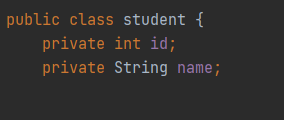
<!--方法一-->
        <select id="getTeacher2" resultMap="teacherstudent2">
            select * from mybatis.teacher
        </select>
        <resultMap id="teacherstudent2" type="teacher">
         <collection property="student" column="id" javaType="ArrayList" ofType="student" select="getStudent"/>
        </resultMap>

        <select id="getStudent" resultType="student">
            select * from mybatis.student
        </select>

<!--方法二-->
    <select id="getTeacher" resultMap="teacherstudent">
        select s.id as sid,s.name as sname,t.name as tname,t.id as tid
        from mybatis.student as s,mybatis.teacher as t
        where s.tid = t.id
    </select>
    <resultMap id="teacherstudent" type="teacher">
        <result property="name" column="tname"/>
        <result property="id" column="tid"/>
        <collection property="students" ofType="student">
            <result property="id" column="sid"/>
            <result property="name" column="sname"/>
        </collection>
    </resultMap>
8.动态SQL
8.1 IF标签
 <select id="getBlogIF" resultType="blog" parameterType="map">
        select * from mybatis.blog where 1=1
        <if test="title!=null">
            and title = #{title}
        </if>
    </select>
List<Blog> getBlogIF(Map map);
8.2 chooser(when,otherwise)
不想使用所有的条件,而只是想从多个条件中选择一个使用
<select id="queryBlogChoose" parameterType="map"resultType="blog">
  select * from blog
   <where>
       <choose>
           <when test="title != null">
                title = #{title}
           </when>
           <when test="author != null">
              and author = #{author}
           </when>
           <otherwise>
              and views = #{views}
           </otherwise>
       </choose>
   </where>
</select>
8.3 trim(where,set)
trim可定制化where和set
- where 元素只会在子元素返回任何内容的情况下才插入 “WHERE” 子句。而且,若子句的开头为 “AND” 或 “OR”,where 元素也会将它们去除**
<select id="queryBlogIf" parameterType="map"resultType="blog">
  select * from blog
   <where>
       <if test="title != null">
          title = #{title}
       </if>
       <if test="author != null">
          and author = #{author}
       </if>
   </where>
</select>
- set元素可以省去拼接语句时逗号的问题
 <update id="updateBlog" parameterType="map">
        update mybatis.blog

    <set>
        <if test="title!=null">
            title = #{title},
        </if>
        <if test="author!=null">
            author =#{author},
        </if>

    </set>

         where id = #{id}
    </update>
8.4 SQL片段
有时候可能某个 sql 语句我们用的特别多,为了增加代码的重用性,简化代码,我们需要将这些代码抽取出来,然后使用时直接调用。
- 使用SQL标签抽取公共部分
- 在需要使用的地方使用include标签引用即可
<sql id="if-title-author">
   <if test="title != null">
      title = #{title}
   </if>
   <if test="author != null">
      and author = #{author}
   </if>
</sql>
<select id="queryBlogIf" parameterType="map"resultType="blog">
  select * from blog
   <where>
       <!-- 引用 sql 片段,如果refid 指定的不在本文件中,那么需要在前面加上 namespace -->
       <include refid="if-title-author"></include>
       <!-- 在这里还可以引用其他的 sql 片段 -->
   </where>
</select>
注意:
①、最好基于 单表来定义 sql 片段,提高片段的可重用性
②、在 sql 片段中不要包括 where
8.5Foreach
语法
<select id="queryBlogForeach" parameterType="map"resultType="blog">
  select * from blog
   <where>
       <!--
       collection:指定输入对象中的集合属性
       item:每次遍历生成的对象
       open:开始遍历时的拼接字符串
       close:结束时拼接的字符串
       separator:遍历对象之间需要拼接的字符串
       select * from blog where 1=1 and (id=1 or id=2 or id=3)
     -->
       <foreach collection="ids"  item="id" open="and (" close=")"separator="or">
          id=#{id}
       </foreach>
   </where>
</select>
```java
@Test
public void testQueryBlogForeach(){
   SqlSession session = MybatisUtils.getSession();
   BlogMapper mapper = session.getMapper(BlogMapper.class);

   HashMap map = new HashMap();
  * List<Integer> ids = new ArrayList<Integer>();
   ids.add(1);
   ids.add(2);
   ids.add(3);
  * map.put("ids",ids);

   List<Blog> blogs = mapper.queryBlogForeach(map);

   System.out.println(blogs);

   session.close();
}
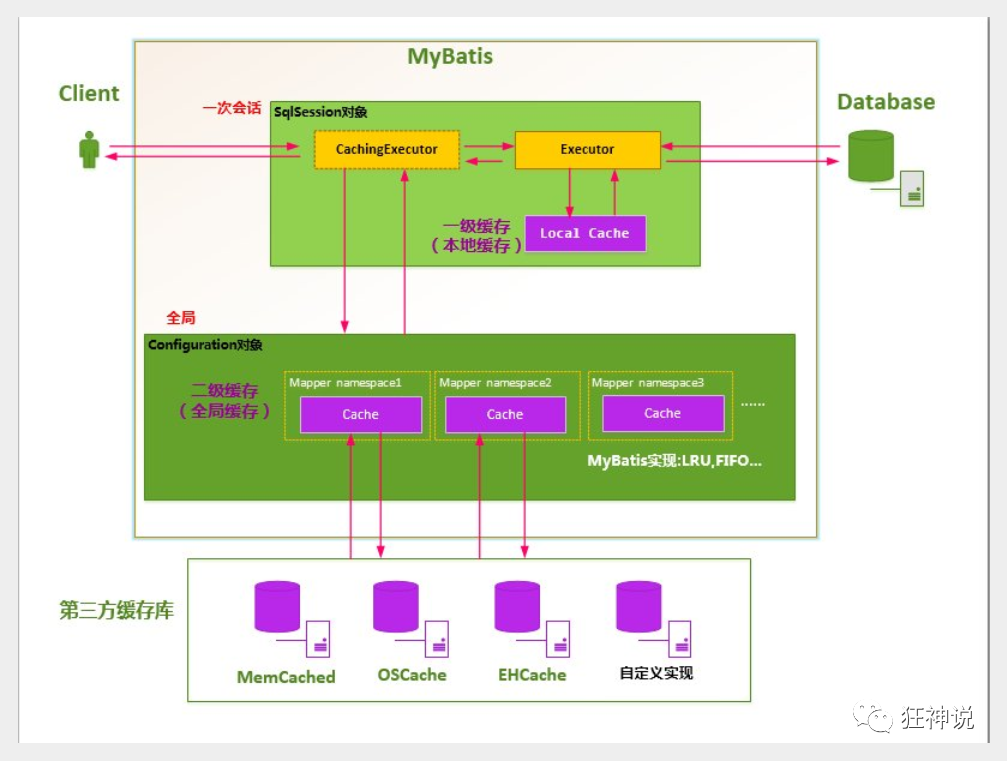
9.缓存(读写分离)
减少和数据库的交互次数,减少系统开销,提高系统效率

 浙公网安备 33010602011771号