
12.logstash解耦之队列消息02
通过redis-in.conf和redis-out.conf明白了redis的具体用法,
下面结合ES集群实现把完整版的all.conf,将日志写到node1的redis里面,然后node2,负责从redis里面去读,并且输出到ES
node1:192.168.56.11
将日志从目录地址里面读取出来,输出到redis里面
vim shipper.conf
input {
file {
path => "/var/log/messages"
type => "system"
start_position => "beginning"
}
file {
path => "/var/log/nginx/access_json.log"
codec => "json"
start_position => "beginning"
type => "nginx-log"
}
file {
path => "/var/log/elasticsearch/kye.log"
type => "es-error"
start_position => "beginning"
codec => multiline{
pattern => "^\["
negate => "true"
what => "previous"
}
}
}
output {
if [type] == "system"{
redis{
hosts => "192.168.56.11:9200"
port => "6379"
db => "6"
data_type => "list"
key => "system"
}
}
if [type] == "es-error"{
redis{
hosts => "192.168.56.11:9200"
port => "6379"
db => "6"
data_type => "list"
key => "es-error"
}
}
if [type] == "nginx-log"{
redis{
hosts => "192.168.56.11:9200"
port => "6379"
db => "6"
data_type => "list"
key => "nginx-log"
}
}
}
/opt/logstash/bin/logstash -f shipper.conf
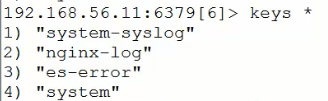
可以发现数据已经写到redis里面了
node2:192.168.56.12
从node1 192.168.56.11的redis里面读取数据(input),输出到ES里面(output)
vim redis_to_ES.conf
input {
redis{
type => "system"
hosts => "192.168.56.11:9200"
port => "6379"
db => "6"
data_type => "list"
key => "system"
}
redis{
type => "es-log"
hosts => "192.168.56.11:9200"
port => "6379"
db => "6"
data_type => "list"
key => "es-log"
}
redis{
type => "nginx-log"
hosts => "192.168.56.11:9200"
port => "6379"
db => "6"
data_type => "list"
key => "nginx-log"
}
}
output {
if [type] == "system"{
elasticsearch {
hosts => ["192.168.56.11:9200"]
index => "system-%{+YYYY.MM.dd}"
}
}
if [type] == "es-error"{
elasticsearch {
hosts => ["192.168.56.11:9200"]
index => "es-error-%{+YYYY.MM.dd}"
}
}
if [type] == "nginx-log"{
elasticsearch {
hosts => ["192.168.56.11:9200"]
index => "nginx-log-%{+YYYY.MM.dd}"
}
}
}
/opt/logstash/bin/logstash -f redis_to_ES.conf
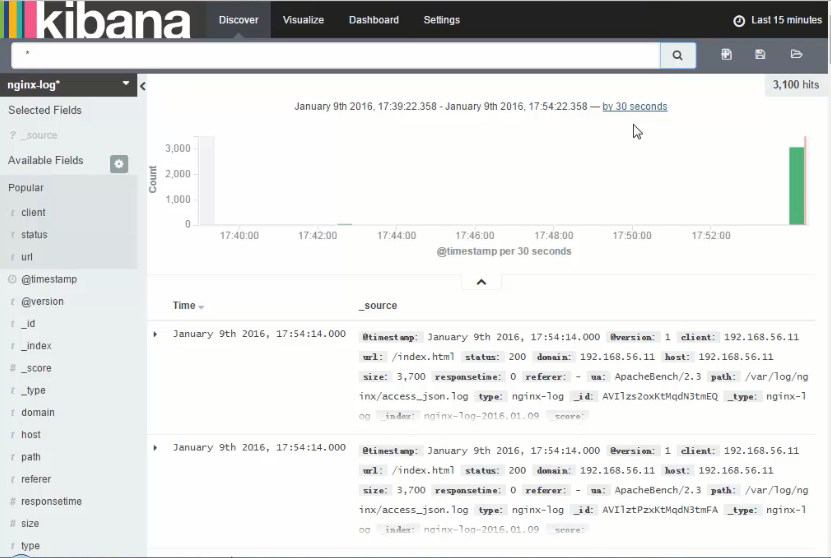
从kibana可以发现数据已经传到ES里面了

 浙公网安备 33010602011771号