
C# 写入文件、string字符串处理、预处理器指令(转载)
本篇文章主要用于整理最近用到的一些技巧
- C#写入文件的几种方式(转自http://www.cnblogs.com/researcher/p/4989395.html)
1. FileStream.Write
string filePath = Directory.GetCurrentDirectory() + "\\" + Process.GetCurrentProcess().ProcessName + ".txt";
if (File.Exists(filePath))
File.Delete(filePath);FileStream fs = new FileStream(filePath, FileMode.Create);
//获得字节数组string xyPointer = string.Format("X: {0}, Y: {1}", this.Location.X.ToString(), this.Location.Y.ToString());
string highWidth = string.Format("\nW: {0}, H: {1}", this.Width.ToString(), this.Height.ToString());
byte[] data = System.Text.Encoding.Default.GetBytes(xyPointer + highWidth);
//开始写入
fs.Write(data, 0, data.Length);
//清空缓冲区、关闭流
fs.Flush();
fs.Close();2. File.WriteAllLines
//如果文件不存在,则创建;存在则覆盖
//该方法写入字符数组换行显示
string[] lines = { "first line", "second line", "third line", "第四行" };
System.IO.File.WriteAllLines(@"C:\testDir\test.txt", lines, Encoding.UTF8);3. File.WriteAllText
//如果文件不存在,则创建;存在则覆盖
string strTest = "该例子测试一个字符串写入文本文件。";
System.IO.File.WriteAllText(@"C:\testDir\test1.txt", strTest, Encoding.UTF8);4. StreamWriter.Write
//在将文本写入文件前,处理文本行
//StreamWriter一个参数默认覆盖
//StreamWriter第二个参数为false覆盖现有文件,为true则把文本追加到文件末尾
using (System.IO.StreamWriter file = new System.IO.StreamWriter(@"C:\testDir\test2.txt", true))
{
foreach (string line in lines)
{
if (!line.Contains("second"))
{
file.Write(line);//直接追加文件末尾,不换行
file.WriteLine(line);// 直接追加文件末尾,换行
}
}
} - C#中使用‘@’
这个@符号有几个作用:
1.假设str是一个路径名称的话,在我们的路径中通常都有“\”符号,而这个符号又是一个,如果不转义字符加@符号的话,那么你不得不把路径中的“\”进行处理,但是这样造成工作量大,所以使用这个@符号就不需要转义路径中的特殊字符了。
2、@符号可以是str中的字符显示,有换行功能。
- C#预处理指令(转载自https://www.cnblogs.com/cathytong/p/6128428.html)
1,#define(告诉编译器存在给定名称的符号) #undefine(删除符号)
- 使用#define 告诉编译器存在给定的符号
- 在VS中添加名称符号
- 在Unity使用
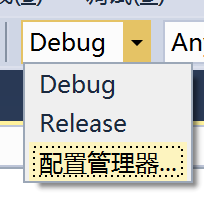


平台定义
| UNITY_EDITOR | 编辑器调用。 |
| UNITY_STANDALONE_OSX | 专门为Mac OS(包括Universal,PPC和Intelarchitectures)平台的定义。 |
| UNITY_DASHBOARD_WIDGET | Mac OS Dashboard widget (Mac OS仪表板小部件)。 |
| UNITY_STANDALONE_WIN | Windows。 |
| UNITY_STANDALONE_LINUX | Linux的独立的应用程序。 |
| UNITY_STANDALONE | 独立的平台(Mac,Windows或Linux)。 |
| UNITY_WEBPLAYER | 网页播放器(包括Windows和Mac Web播放器可执行文件)。 |
| UNITY_WII | Wii游戏机平台。 |
| UNITY_IPHONE | iPhone平台。 |
| UNITY_ANDROID | Android平台。 |
| UNITY_PS3 | PlayStation 3。 |
| UNITY_XBOX360 | Xbox 360。 |
| UNITY_NACL | 谷歌原生客户端(使用这个必须另外使用UNITY_WEBPLAYER)。 |
| UNITY_FLASH | Adobe Flash。 |
也可以判断Unity版本,目前支持的版本
| UNITY_2_6 | 平台定义为主要版本的Unity 2.6。 |
| UNITY_2_6_1 | 平台定义的特定版本1的主要版本2.6。 |
| UNITY_3_0 | 平台定义为主要版本的Unity 3.0。 |
| UNITY_3_0_0 | 平台定义的特定版本的Unity 3.0 0。 |
| UNITY_3_1 | 平台定义为主要版本的Unity 3.1。 |
| UNITY_3_2 | 平台定义为主要版本的Unity 3.2。 |
| UNITY_3_3 | 平台定义为主要版本的Unity 3.3。 |
| UNITY_3_4 | 平台定义为主要版本的Unity 3.4。 |
| UNITY_3_5 | 平台定义为主要版本的Unity 3.5。 |
| UNITY_4_0 | 平台定义为主要版本的Unity 4.0。 |
| UNITY_4_0_1 | 主要版本4.0.1统一的平台定义。 |
| UNITY_4_1 | 平台定义为主要版本的Unity 4.1。 |

 浙公网安备 33010602011771号