


Unit10:服务
异步更新
UI不能在子线程中使用,为了操作UI,必须使用异步更新的方式。
原理图
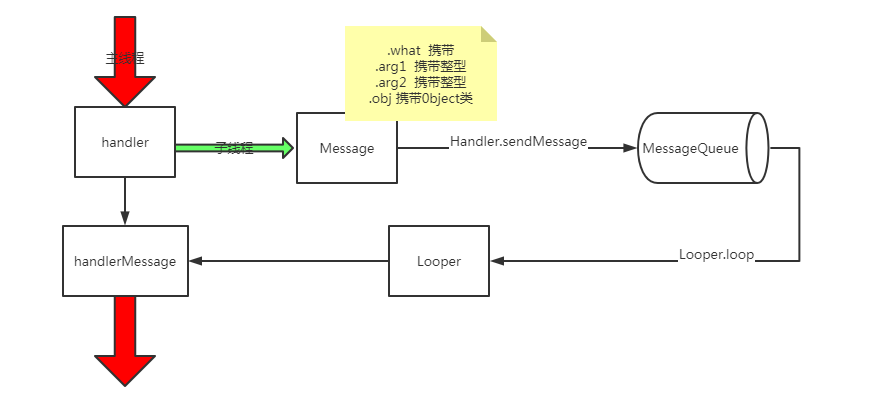
正常异步
    private TextView text;
      // 主线程开启Handler处理Message
    private Handler handler = new Handler() {
        @Override
        public void handleMessage(@NonNull Message msg) {
            super.handleMessage(msg);
            switch (msg.what) {
                case 1:
                    text.setText("nice to meet you");
                    break;
                default:
                    break;
            }
        }
    };

    @Override
    protected void onCreate(Bundle savedInstanceState) {
        super.onCreate(savedInstanceState);
        setContentView(R.layout.activity_main);
        Button button = findViewById(R.id.button);
        text = findViewById(R.id.text_view);
        button.setOnClickListener(new View.OnClickListener() {
            @Override
            public void onClick(View v) {
                new Thread(new Runnable() {
                    @Override
                    public void run() {
      // 子线程发送Message
                        Message message = new Message();
                        message.what = 1;
                        handler.sendMessage(message);
                    }
                }).start();
            }
        });
    }
2. AsyncTask
java中:
继承AsyncTask类:
public class DownloadTask extends AsyncTask<Void,Integer,Boolean> {

    /**
     * 初始化操作
     */
    @Override
    protected void onPreExecute() {
        super.onPreExecute();
    }

    /**
     * 执行具体的耗时任务
     * @param voids
     * @return
     */
    @Override
    protected Boolean doInBackground(Void... voids) {
        return null;
    }

    /**
     * 进行UI操作
     *
     */
    @Override
    protected void onProgressUpdate(Integer... values) {
        super.onProgressUpdate(values);
    }

    /**
     * 收尾操作
     */
    @Override
    protected void onPostExecute(Boolean aBoolean) {
        super.onPostExecute(aBoolean);
    }
}
java.Activity中:
new DownloadTask().execute();
服务
原理图
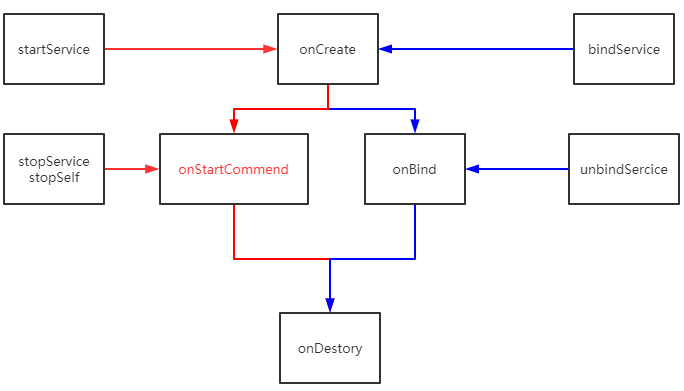
- 新建Service
继承service和.xml中注册
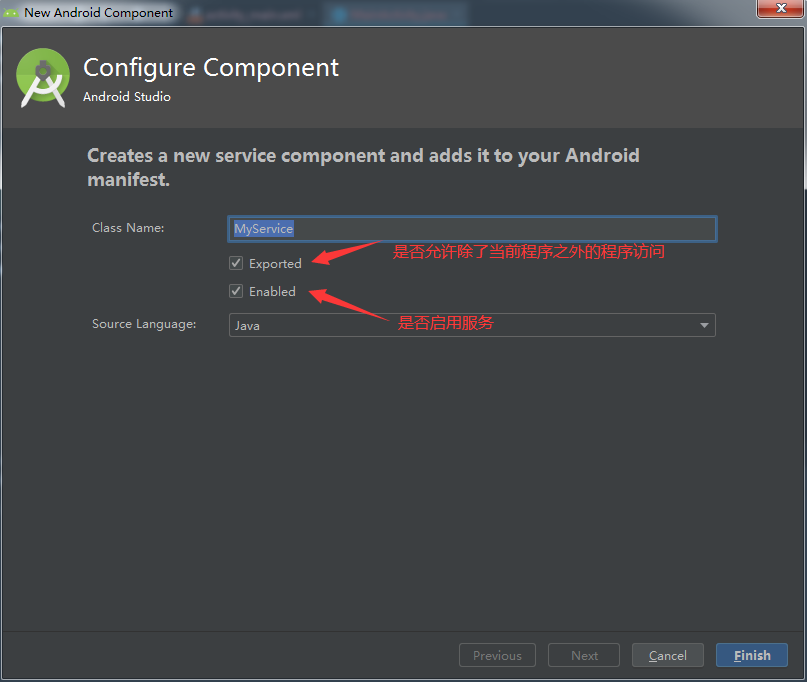
2.java中:(继承Service)
public class MyService extends Service {
    private DownLoadBinder mBinder = new DownLoadBinder();
    class DownLoadBinder extends Binder {
        public void startDownload() {
            System.out.println("开始下载");
        }

        public int getProgress() {
            System.out.println("查看下载进度");
            return 0;
        }

    }

    public MyService() {
    }

    @Override
    public IBinder onBind(Intent intent) {
//        throw new UnsupportedOperationException("Not yet implemented");
        return mBinder;
    }

    @Override
    public void onCreate() {
        super.onCreate();
//               1. 启动通知服务,创建Manager进行通知管理
        NotificationManager manager = (NotificationManager)getSystemService(NOTIFICATION_SERVICE);

        //高版本需要渠道
        if(Build.VERSION.SDK_INT >= android.os.Build.VERSION_CODES.O){
            //只在Android O之上需要渠道,这里的第一个参数要和下面的channelId一样
            NotificationChannel notificationChannel = new NotificationChannel("1","name",NotificationManager.IMPORTANCE_HIGH);
            //如果这里用IMPORTANCE_NOENE就需要在系统的设置里面开启渠道,通知才能正常弹出
            manager.createNotificationChannel(notificationChannel);
        }

        Intent intent = new Intent(this, MainActivity.class);
        PendingIntent pi = PendingIntent.getActivity(this, 0, intent, 0);
        Notification notification = new NotificationCompat.Builder(this,"1")
                .setContentTitle("this is content title")
                .setContentText("this is content text")
                .setWhen(System.currentTimeMillis())
                .setSmallIcon(R.mipmap.ic_launcher)
                .setLargeIcon(BitmapFactory.decodeResource(getResources(), R.mipmap.ic_launcher))
                .setContentIntent(pi)
                .build();
        startForeground(1,notification);
    }

    /**
     * 服务被调用的时候启用
     * @param intent
     * @param flags
     * @param startId
     * @return
     */
    @Override
    public int onStartCommand(Intent intent, int flags, int startId) {
        System.out.println("使用service");
        return super.onStartCommand(intent, flags, startId);

    }

    @Override
    public void onDestroy() {
        super.onDestroy();
        System.out.println("停止service");
    }
}
3.java.Activity中:
        startButton.setOnClickListener(new View.OnClickListener() {
            @Override
            public void onClick(View v) {
                Intent intent = new Intent(MainActivity.this, MyService.class);
                startService(intent);

            }
        });

        stopButton.setOnClickListener(new View.OnClickListener() {
            @Override
            public void onClick(View v) {
                Intent intent = new Intent(MainActivity.this, MyService.class);
                stopService(intent);

            }
        });

//        绑定服务
        bindButton.setOnClickListener(new View.OnClickListener() {
            @Override
            public void onClick(View v) {
                // 三个参数(1.intent,2.ServiceConnection实例,3.标志位,绑定后自动创建服务)
                Intent intent = new Intent(MainActivity.this, MyService.class);
                bindService(intent,connection,BIND_AUTO_CREATE);
            }
        });

        unBindButton.setOnClickListener(new View.OnClickListener() {
            @Override
            public void onClick(View v) {
                unbindService(connection);

            }
        });
    }
----------------------------------------------------------------------------------------------------------
    private ServiceConnection connection = new ServiceConnection() {
        @Override
        public void onServiceConnected(ComponentName name, IBinder service) {
            downLoadBinder = (MyService.DownLoadBinder) service;
            downLoadBinder.startDownload();
            downLoadBinder.getProgress();
        }

        @Override
        public void onServiceDisconnected(ComponentName name) {

        }
    };
IntentService
1.java中:(继承IntentService)
public class MyIntentService extends IntentService {
    /**
     * Creates an IntentService.  Invoked by your subclass's constructor.
     */
    public MyIntentService() {
        super("MyIntentService");
    }

    @Override
    protected void onHandleIntent(@Nullable Intent intent) {
        System.out.println("Thread id is " + Thread.currentThread().getId());;


    }

    @Override
    public void onDestroy() {
        super.onDestroy();
        System.out.println("MyIntentService中关闭服务");
    }
}
2.java.Activity中:
//        自建线程和关闭服务
        intentButton.setOnClickListener(new View.OnClickListener() {
            @Override
            public void onClick(View v) {
                System.out.println("Thread id is " + Thread.currentThread().getId());
                Intent intentService = new Intent(MainActivity.this, MyIntentService.class);
                startService(intentService);

            }
        });

 浙公网安备 33010602011771号