

Cert-Manager 实现基于阿里云的自动证书签发
简介
Cert-Manager[1]是一款用于 Kubernetes 集群中自动化管理 TLS 证书的开源工具,它使用了 Kubernetes 的自定义资源定义(CRD)机制,让证书的创建、更新和删除变得非常容易。
设计理念
Cert-Manager 是将 TLS 证书视为一种资源,就像 Pod、Service 和 Deployment 一样,可以使用 Kubernetes API 进行管理。它使用了自定义资源定义(CRD)机制,通过扩展 Kubernetes API,为证书的生命周期提供了标准化的管理方式。
架构设计
Cert-Manager 的架构分为两层:控制层和数据层。
控制层: 负责证书的管理,包括证书的创建、更新和删除等。
数据层: 负责存储证书相关的数据,包括证书的私钥、证书请求、证书颁发机构等。
Cert-Manager 支持多种证书颁发机构,包括**自签名证书selfSigned**、Let's Encrypt、HashiCorp Vault、Venafi 等。它还支持多种验证方式,包括 HTTP 验证、DNS 验证和 TLS-SNI 验证等。这些验证方式可以帮助确保证书的颁发机构是可信的,并且确保证书的私钥不会泄露。
使用场景
Cert-Manager 的使用场景非常广泛,包括以下几个方面:
- HTTPS 访问:通过 Cert-Manager 可以方便地为 Kubernetes 集群中的 Service 和 Ingress 创建 TLS 证书,以便实现 HTTPS 访问。
- 部署安全:Cert-Manager 可以为 Kubernetes 集群中的 Pod 创建 TLS 证书,以确保 Pod 之间的通信是加密的。
- 服务间认证:Cert-Manager 可以为 Kubernetes 集群中的 Service 创建 TLS 证书,以确保 Service 之间的通信是加密的。
- 其他应用场景:Cert-Manager 还可以用于为其他应用程序创建 TLS 证书,以确保通信是加密的。
解决的实际问题
- 自动化管理证书:Cert-Manager 可以自动化地管理 TLS 证书,无需人工干预,自动签发证书以及过期前 renew 证书等问题,避免了证书管理的复杂性和错误。
- 安全性:Cert-Manager 可以帮助确保证书的颁发机构是可信的,并确保证书的私钥不会泄露,从而提高了通信的安全性。
- 管理成本:Cert-Manager 可以通过标准化证书的管理方式,简化证书管理的成本和流程。
cert-manager 创建证书的过程
在 Kubernetes 中,cert-manager 通过以下流程创建资源对象以签发证书:
- 创建一个 CertificateRequest 对象,包含证书的相关信息,例如证书名称、域名等。该对象指定了使用的 Issuer 或 ClusterIssuer,以及证书签发完成后,需要存储的 Secret 的名称。
- Issuer 或 ClusterIssuer 会根据证书请求的相关信息,创建一个 Order 对象,表示需要签发一个证书。该对象包含了签发证书所需的域名列表、证书签发机构的名称等信息。
- 证书签发机构根据 Order 对象中的信息创建一个或多个 Challenge 对象,用于验证证书申请者对该域名的控制权。Challenge 对象包含一个 DNS 记录或 HTTP 服务,证明域名的所有权。
- cert-manager 接收到 Challenge 对象的回应ChallengeResponse后,会将其更新为已解决状态。证书签发机构会检查所有的 Challenge 对象,如果全部通过验证,则会签发证书。
- 签发证书完成后,证书签发机构会将证书信息写入 Secret 对象,同时将 Order 对象标记为已完成。证书信息现在可以被其他部署对象使用。
cert-manager 在 k8s 中创建证书的整个过程可以通过以下流程图来描述:
+-------------+
              |             |
              |   Ingress/  |
              | annotations |
              |             |
              +------+------+
                     |
                     | watch ingress change
                     |
                     v
              +-------------+
              |             |
              |   Issuer/   |
              | ClusterIssuer |
              |             |
              +------+------+
                     |
                     | Create CertificateRequest
                     |
                     v
              +------+------+
              |             |
              |CertificateRequest|
              |             |
              +------+------+
                     |
                     | Create Order
                     |
                     v
              +------+------+
              |             |
              |      Order  |
              |             |
              +------+------+
                     |
                     | Create Challenges
                     |
                     v
              +------+------+
              |             |
              |  Challenge  |
              |             |
              +------+------+
                     |
                     | Respond to Challenge
                     |
                     v
              +------+------+
              |             |
              |ChallengeResponse|
              |             |
              +------+------+
                     |
                     | Issue Certificate
                     |
                     v
              +------+------+
              |             |
              |     Secret  |
              |             |
              +------+------+
实际上在我们手动实践的时候,可以通过以下命令查看各个过程的信息:
复制
kubectl get CertificateRequests,Orders,Challenges
安装和配置
安装 cert-manager。
复制
kubectl apply -f https://github.com/cert-manager/cert-manager/releases/download/v1.11.0/cert-manager.yaml

NAME                                       READY   STATUS    RESTARTS   AGE
cert-manager-5d495db6fc-6rtxx              1/1     Running   0          9m56s
cert-manager-cainjector-5f9c9d977f-bxchd   1/1     Running   0          9m56s
cert-manager-webhook-57bd45f9c-89q87       1/1     Running   0          9m56s
创建 cert-manager 的证书颁发实体对象
cert-manager 的 Issuer 和 ClusterIssuer 都是用来定义证书颁发的实体的资源对象。
- Issuer 是命名空间级别的资源,用于在命名空间内颁发证书。例如,当您需要使用自签名证书来保护您的服务,或者使用 Let's Encrypt 等公共证书颁发机构来颁发证书时,可以使用 Issuer。
- ClusterIssuer 是集群级别的资源,用于在整个集群内颁发证书。例如,当您需要使用公司的内部 CA 来颁发证书时,可以使用 ClusterIssuer。
知道两者之间的区别之后,你就可以根据自己的使用情况来决定自己的 issuer 的类型。这里列出几种常用的 issuer 使用模板:
- 创建 staging 环境的证书颁发者 issuer。
apiVersion: cert-manager.io/v1
kind: Issuer
metadata:
  name: letsencrypt-staging
spec:
  acme:
    # The ACME server URL
    server: https://acme-staging-v02.api.letsencrypt.org/directory
    # Email address used for ACME registration
    email: xxx@qq.com #此处填写你的邮箱地址
    # Name of a secret used to store the ACME account private key
    privateKeySecretRef:
      name: letsencrypt-staging
    # Enable the HTTP-01 challenge provider
    solvers:
      - http01:
          ingress:
            class:  nginx
使用 staging 环境颁发的证书无法正常在公网使用,需要本地添加受信任根证书。
- 创建 prod 环境的证书颁发者 issuer。
apiVersion: cert-manager.io/v1
kind: Issuer
metadata:
  name: letsencrypt-prod
spec:
  acme:
    # The ACME server URL
    server: https://acme-v02.api.letsencrypt.org/directory
    # Email address used for ACME registration 欢迎关注·云原生生态圈
    email: xxx@qq.com
    # Name of a secret used to store the ACME account private key
    privateKeySecretRef:
      name: letsencrypt-prod
    # Enable the HTTP-01 challenge provider
    solvers:
      - http01:
          ingress:
            class: nginx
- 创建 staging 环境的证书颁发者 ClusterIssuer。
apiVersion: cert-manager.io/v1
kind: ClusterIssuer
metadata:
  name: letsencrypt-staging
spec:
  acme:
    # The ACME server URL
    server: https://acme-staging-v02.api.letsencrypt.org/directory
    # Email address used for ACME registration 欢迎关注·云原生生态圈
    email: xxx@qq.com
    # Name of a secret used to store the ACME account private key
    privateKeySecretRef:
      name: letsencrypt-staging
    # Enable the HTTP-01 challenge provider
    solvers:
      - http01:
          ingress:
            class:  nginx
- 创建 Prod 环境的证书颁发者 ClusterIssuer。
apiVersion: cert-manager.io/v1
kind: ClusterIssuer
metadata:
  name: letsencrypt-prod
spec:
  acme:
    # The ACME server URL
    server: https://acme-v02.api.letsencrypt.org/directory
    # Email address used for ACME registration 欢迎关注·云原生生态圈
    email: xxx@qq.com
    # Name of a secret used to store the ACME account private key
    privateKeySecretRef:
      name: letsencrypt-prod
    # Enable the HTTP-01 challenge provider
    solvers:
      - http01:
          ingress:
            class: nginx
基于ali-webhook实现自动签发证书
- 创建alidns-secret文件
kubectl apply -f - << EOF
apiVersion: v1
kind: Secret
metadata:
  name: alidns-secret
  namespace: cert-manager
data:
  access-key: abc
  secret-key: abc
type: Opaque
EOF
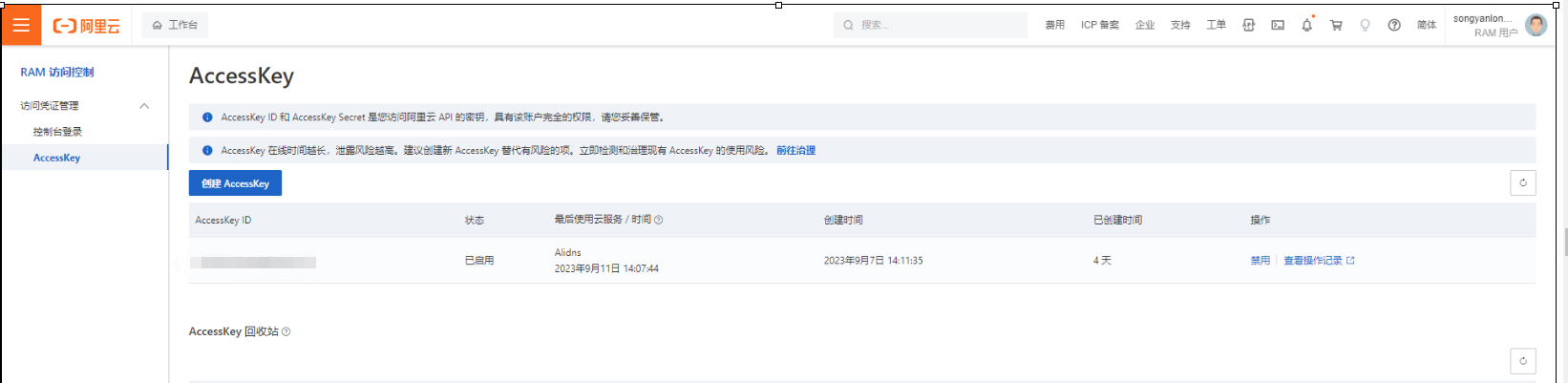
- accesskey获取方法如下:
![]()
- 创建webhook
apiVersion: v1
kind: Secret
metadata:
  name: alidns-secret
  namespace: cert-manager
data:
  access-key: TFRBSTV0SmRWOHJkQTZiQmlFTjJ2YlRu
  secret-key: UTdHQnN6a2o0azMxWlVOaHVmaHlmUnFIaHZGcFZH
type: Opaque

root@node1:/home/ubuntu/cert-manager# LS -LRT
程序“LS”尚未安装。 您可以使用以下命令安装:
apt install sl
root@node1:/home/ubuntu/cert-manager# cat bundle.yaml
---
apiVersion: v1
kind: ServiceAccount
metadata:
  name: alidns-webhook
  namespace: cert-manager
  labels:
    app: alidns-webhook

---
apiVersion: rbac.authorization.k8s.io/v1
kind: Role
metadata:
  name: alidns-webhook
  namespace: cert-manager
  labels:
    app: alidns-webhook
rules:
  - apiGroups:
      - ''
    resources:
      - 'secrets'
    verbs:
      - 'get'

---
apiVersion: rbac.authorization.k8s.io/v1
kind: ClusterRole
metadata:
  name: alidns-webhook:flowcontrol-solver
  labels:
    app: alidns-webhook
rules:
  - apiGroups:
      - "flowcontrol.apiserver.k8s.io"
    resources:
      - 'prioritylevelconfigurations'
      - 'flowschemas'
    verbs:
      - 'list'
      - 'watch'

---
apiVersion: rbac.authorization.k8s.io/v1
kind: ClusterRoleBinding
metadata:
  name: alidns-webhook:flowcontrol-solver
  labels:
    app: alidns-webhook
roleRef:
  apiGroup: rbac.authorization.k8s.io
  kind: ClusterRole
  name: alidns-webhook:flowcontrol-solver
subjects:
  - apiGroup: ""
    kind: ServiceAccount
    name: alidns-webhook
    namespace: cert-manager

---
apiVersion: rbac.authorization.k8s.io/v1
kind: RoleBinding
metadata:
  name: alidns-webhook
  namespace: cert-manager
  labels:
    app: alidns-webhook
roleRef:
  apiGroup: rbac.authorization.k8s.io
  kind: Role
  name: alidns-webhook
subjects:
  - apiGroup: ""
    kind: ServiceAccount
    name: alidns-webhook
    namespace: cert-manager

---
# Grant the webhook permission to read the ConfigMap containing the Kubernetes
# apiserver's requestheader-ca-certificate.
# This ConfigMap is automatically created by the Kubernetes apiserver.
apiVersion: rbac.authorization.k8s.io/v1
kind: RoleBinding
metadata:
  name: alidns-webhook:webhook-authentication-reader
  namespace: kube-system
  labels:
    app: alidns-webhook
roleRef:
  apiGroup: rbac.authorization.k8s.io
  kind: Role
  name: extension-apiserver-authentication-reader
subjects:
  - apiGroup: ""
    kind: ServiceAccount
    name: alidns-webhook
    namespace: cert-manager
---
# apiserver gets the auth-delegator role to delegate auth decisions to
# the core apiserver
apiVersion: rbac.authorization.k8s.io/v1
kind: ClusterRoleBinding
metadata:
  name: alidns-webhook:auth-delegator
  namespace: cert-manager
  labels:
    app: alidns-webhook
roleRef:
  apiGroup: rbac.authorization.k8s.io
  kind: ClusterRole
  name: system:auth-delegator
subjects:
  - apiGroup: ""
    kind: ServiceAccount
    name: alidns-webhook
    namespace: cert-manager
---
# Grant cert-manager permission to validate using our apiserver
apiVersion: rbac.authorization.k8s.io/v1
kind: ClusterRole
metadata:
  name: alidns-webhook:domain-solver
  labels:
    app: alidns-webhook
rules:
  - apiGroups:
      - acme.yourcompany.com
    resources:
      - '*'
    verbs:
      - 'create'
---
apiVersion: rbac.authorization.k8s.io/v1
kind: ClusterRoleBinding
metadata:
  name: alidns-webhook:domain-solver
  labels:
    app: alidns-webhook
roleRef:
  apiGroup: rbac.authorization.k8s.io
  kind: ClusterRole
  name: alidns-webhook:domain-solver
subjects:
  - apiGroup: ""
    kind: ServiceAccount
    name: cert-manager
    namespace: cert-manager

---
# Source: alidns-webhook/templates/service.yaml
apiVersion: v1
kind: Service
metadata:
  name: alidns-webhook
  namespace: cert-manager
  labels:
    app: alidns-webhook
spec:
  type: ClusterIP
  ports:
    - port: 443
      targetPort: https
      protocol: TCP
      name: https
  selector:
    app: alidns-webhook

---
# Source: alidns-webhook/templates/deployment.yaml
apiVersion: apps/v1
kind: Deployment
metadata:
  name: alidns-webhook
  namespace: cert-manager
  labels:
    app: alidns-webhook
spec:
  replicas:
  selector:
    matchLabels:
      app: alidns-webhook
  template:
    metadata:
      labels:
        app: alidns-webhook
    spec:
      serviceAccountName: alidns-webhook
      containers:
        - name: alidns-webhook
          image: pragkent/alidns-webhook:0.1.1
          imagePullPolicy: IfNotPresent
          args:
            - --tls-cert-file=/tls/tls.crt
            - --tls-private-key-file=/tls/tls.key
          env:
            - name: GROUP_NAME
              value: "acme.yourcompany.com"    ## 需要注意这里的Group Name需要和issue中对应
          ports:
            - name: https
              containerPort: 443
              protocol: TCP
          livenessProbe:
            httpGet:
              scheme: HTTPS
              path: /healthz
              port: https
          readinessProbe:
            httpGet:
              scheme: HTTPS
              path: /healthz
              port: https
          volumeMounts:
            - name: certs
              mountPath: /tls
              readOnly: true
          resources:
            {}

      volumes:
        - name: certs
          secret:
            secretName: alidns-webhook-webhook-tls

---
apiVersion: apiregistration.k8s.io/v1
kind: APIService
metadata:
  name: v1alpha1.acme.yourcompany.com
  labels:
    app: alidns-webhook
  annotations:
    cert-manager.io/inject-ca-from: "cert-manager/alidns-webhook-webhook-tls"
spec:
  group: acme.yourcompany.com
  groupPriorityMinimum: 1000
  versionPriority: 15
  service:
    name: alidns-webhook
    namespace: cert-manager
  version: v1alpha1

---
# Create a selfsigned Issuer, in order to create a root CA certificate for
# signing webhook serving certificates
apiVersion: cert-manager.io/v1
kind: Issuer
metadata:
  name: alidns-webhook-selfsign
  namespace: cert-manager
  labels:
    app: alidns-webhook
spec:
  selfSigned: {}

---

# Generate a CA Certificate used to sign certificates for the webhook
apiVersion: cert-manager.io/v1
kind: Certificate
metadata:
  name: alidns-webhook-ca
  namespace: cert-manager
  labels:
    app: alidns-webhook
spec:
  secretName: alidns-webhook-ca
  duration: 43800h # 5y
  issuerRef:
    name: alidns-webhook-selfsign
  commonName: "ca.alidns-webhook.cert-manager"
  isCA: true

---

# Create an Issuer that uses the above generated CA certificate to issue certs
apiVersion: cert-manager.io/v1
kind: Issuer
metadata:
  name: alidns-webhook-ca
  namespace: cert-manager
  labels:
    app: alidns-webhook
spec:
  ca:
    secretName: alidns-webhook-ca

---

# Finally, generate a serving certificate for the webhook to use
apiVersion: cert-manager.io/v1
kind: Certificate
metadata:
  name: alidns-webhook-webhook-tls
  namespace: cert-manager
  labels:
    app: alidns-webhook
spec:
  secretName: alidns-webhook-webhook-tls
  duration: 8760h # 1y
  issuerRef:
    name: alidns-webhook-ca
  dnsNames:
  - alidns-webhook
  - alidns-webhook.cert-manager
  - alidns-webhook.cert-manager.svc
  - alidns-webhook.cert-manager.svc.cluster.local
- 创建基于dns的ClusterIssuer
apiVersion: cert-manager.io/v1
kind: ClusterIssuer
metadata:
  name: letsencrypt
spec:
  acme:
    # Change to your letsencrypt email
    email: songyanlong@unionstrongtech.com #申请者邮箱地址
    server: https://acme-v02.api.letsencrypt.org/directory
    privateKeySecretRef:
      name: letsencrypt-account-key
    solvers:
    - dns01:
        webhook:
          groupName: acme.yourcompany.com #须和bundle.yaml文件中定义的groupname 一致
          solverName: alidns
          config:
            region: ""
            accessKeySecretRef:
              name: alidns-secret
              key: access-key
            secretKeySecretRef:
              name: alidns-secret
              key: secret-key
- 创建一个单独的certificate
apiVersion: cert-manager.io/v1
kind: Certificate
metadata:
  name: a-cn-tls
spec:
  secretName: a-cn-tls   # 证书保存在这个 secret 中
  dnsNames: # 填入需要签发证书的域名列表,支持泛域名,确保域名是使用 dnspod 管理的
  - a.corriwa.net
  issuerRef: # 这里使用自动生成出来的 ClusterIssuer
    name: letsencrypt
    kind: ClusterIssuer
- 基于ingress实现证书自动签发
kind: Ingress
apiVersion: extensions/v1beta1
metadata:
  name: plusrequest-ingress
  namespace: plus-request
  annotations:
    cert-manager.io/cluster-issuer: letsencrypt           ##指定cluster issuer
    konghq.com/https-redirect-status-code: '308'
    konghq.com/protocols: https
    kubernetes.io/ingress.class: kong
    kubesphere.io/creator: admin
spec:
  ingressClassName: kong
  tls:
    - hosts:
        - testplusrequest.unionstrongtech.com
      secretName: testplusrequest-tls
  rules:
    - host: testplusrequest.unionstrongtech.com
      http:
        paths:
          - path: /
            pathType: ImplementationSpecific
            backend:
              serviceName: plus-request-nginx-svc
              servicePort: 8200
注意:证书签发预计10分钟左右,可以查看Challenge的状态日志确认证书是否完成签发。

 浙公网安备 33010602011771号