

Java集成验证码
EasyCaptcha
maven地址
        <dependency>
            <groupId>com.github.whvcse</groupId>
            <artifactId>easy-captcha</artifactId>
            <version>1.6.2</version>
        </dependency>
https://gitee.com/ele-admin/EasyCaptcha
效果图展示:




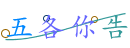





package com.epb.test;

import com.wf.captcha.*;

import java.io.FileOutputStream;

public class Test001 {
    private static final String path = "C:\\Users\\Administrator\\Documents\\CaptchaTest";

    public static void main(String[] args)  {
        for (int i = 0; i < 5; i++) {
            //普通字母验证码
//            specCaptcha(path+"/"+System.currentTimeMillis()+".png");
            //普通字母闪烁验证码
//            gifCaptcha(path+"/"+System.currentTimeMillis()+".gif");
            //中文验证码
            chineseCaptcha(path+"/"+System.currentTimeMillis()+".png");
            //中文闪烁验证码
//            chineseGifCaptcha(path+"/"+System.currentTimeMillis()+".gif");
            //算数验证码
//            arithmeticCaptcha(path + "/" + System.currentTimeMillis() + ".png");
        }
    }

    public static void specCaptcha(String filePath) {
        // png类型
        try (FileOutputStream os = new FileOutputStream(filePath)) {
            SpecCaptcha captcha = new SpecCaptcha(130, 48);
            captcha.text();  // 获取验证码的字符
            captcha.textChar();  // 获取验证码的字符数组
            captcha.out(os);
        } catch (Exception e) {
            e.printStackTrace();
        }
        ;
    }

    public static void gifCaptcha(String filePath) {
        // png类型
        try (FileOutputStream os = new FileOutputStream(filePath)) {
            GifCaptcha captcha = new GifCaptcha(130, 48);
            captcha.text();  // 获取验证码的字符
            captcha.textChar();  // 获取验证码的字符数组
            captcha.out(os);
        } catch (Exception e) {
            e.printStackTrace();
        }
        ;
    }

    public static void chineseCaptcha(String filePath) {
        // png类型
        try (FileOutputStream os = new FileOutputStream(filePath)) {
            ChineseCaptcha captcha = new ChineseCaptcha(130, 48);
            System.out.println(captcha.getFont().hashCode());
            captcha.text();  // 获取验证码的字符
            captcha.textChar();  // 获取验证码的字符数组
            captcha.out(os);
        } catch (Exception e) {
            e.printStackTrace();
        }
        ;
    }

    public static void chineseGifCaptcha(String filePath) {
        // png类型
        try (FileOutputStream os = new FileOutputStream(filePath)) {
            ChineseGifCaptcha captcha = new ChineseGifCaptcha(130, 48);
            captcha.text();  // 获取验证码的字符
            captcha.textChar();  // 获取验证码的字符数组
            captcha.out(os);
        } catch (Exception e) {
            e.printStackTrace();
        }
        ;
    }

    public static void arithmeticCaptcha(String filePath) {
        // png类型
        try (FileOutputStream os = new FileOutputStream(filePath)) {
            ArithmeticCaptcha captcha = new ArithmeticCaptcha(130, 48);
            captcha.setLen(3);  // 几位数运算,默认是两位
            String arithmetic = captcha.getArithmeticString();// 获取运算的公式
            System.out.println(arithmetic + " " + captcha.text());  // 获取运算的结果
            captcha.out(os);  // 输出验证码
        } catch (Exception e) {
            e.printStackTrace();
        }
        ;
    }
}
kaptcha
可以随机文本,也可以自定义文本,参考链接:https://juejin.cn/post/6844903894661890055
maven地址:
        <dependency>
            <groupId>com.github.penggle</groupId>
            <artifactId>kaptcha</artifactId>
            <version>2.3.2</version>
        </dependency>
package com.epb.test;

import com.google.code.kaptcha.impl.DefaultKaptcha;
import com.google.code.kaptcha.util.Config;

import javax.imageio.ImageIO;
import java.awt.image.BufferedImage;
import java.io.FileOutputStream;
import java.io.IOException;
import java.util.Properties;

import static com.google.code.kaptcha.Constants.*;
import static com.google.code.kaptcha.Constants.KAPTCHA_OBSCURIFICATOR_IMPL;

public class KaptchaTest {

    private static final String path = "C:\\Users\\Administrator\\Documents\\CaptchaTest";

    public static void main(String[] args) {
        DefaultKaptcha producer  = new DefaultKaptcha();
        Config config = buildConfig();
        producer.setConfig(config);
//        String codeString = producer.createText();
        //可以自定义文本
        String codeString = "8+3+9=";
        //生成图片验证码
        BufferedImage image = producer.createImage(codeString);
        try(FileOutputStream os = new FileOutputStream(path+"/"+System.currentTimeMillis()+".png")) {
            ImageIO.write(image, "png", os);//写入流中
        } catch (IOException e) {
            e.printStackTrace();
        }
    }


    public static Config buildConfig(){
        Properties properties = new Properties();
        // 设置验证码图片宽度,默认为200
        properties.setProperty(KAPTCHA_IMAGE_WIDTH, "160");
        // 设置验证码图片高度,默认为50
        properties.setProperty(KAPTCHA_IMAGE_HEIGHT, "60");
        // 验证码文本字符大小 默认为40
        properties.setProperty(KAPTCHA_TEXTPRODUCER_FONT_SIZE, "38");
        // 设置边框,默认有  yes/no
        properties.setProperty(KAPTCHA_BORDER, "yes");
        // 设置验证码文本字符颜色,默认为Color.BLACK
        properties.setProperty(KAPTCHA_TEXTPRODUCER_FONT_COLOR, "black");
//        properties.put(KAPTCHA_TEXTPRODUCER_CHAR_STRING, "1234567890");
        // KAPTCHA_SESSION_KEY
        properties.setProperty(KAPTCHA_SESSION_CONFIG_KEY, "kaptchaCode");
        // 验证码文本字符长度,默认为5
        properties.setProperty(KAPTCHA_TEXTPRODUCER_CHAR_LENGTH, "4");
        // 验证码文本字体样式,默认为new Font("Arial", 1, fontSize), new Font("Courier", 1, fontSize)
        properties.setProperty(KAPTCHA_TEXTPRODUCER_FONT_NAMES, "Arial,Courier");
        // 图片样式 水纹com.google.code.kaptcha.impl.WaterRipple 鱼眼com.google.code.kaptcha.impl.FishEyeGimpy 阴影com.google.code.kaptcha.impl.ShadowGimpy
        properties.setProperty(KAPTCHA_OBSCURIFICATOR_IMPL, "com.google.code.kaptcha.impl.WaterRipple");
        return new Config(properties);
    }
}
HutoolCaptcha
maven引入
        <dependency>
            <groupId>cn.hutool</groupId>
            <artifactId>hutool-all</artifactId>
            <version>5.8.15</version>
        </dependency>
文档地址:
https://www.hutool.cn/docs/#/captcha/概述
package com.epb.test;

import cn.hutool.captcha.CaptchaUtil;
import cn.hutool.captcha.LineCaptcha;
import cn.hutool.captcha.ShearCaptcha;
import cn.hutool.captcha.generator.MathGenerator;
import cn.hutool.captcha.generator.RandomGenerator;

public class HutoolCaptchaTest {

    private static final String path = "C:\\Users\\Administrator\\Documents\\CaptchaTest";

    public static void main(String[] args) {
        for (int i = 0; i < 5; i++) {
            //随机英文
//            lineCaptcha(path + "/" + System.currentTimeMillis() + ".png");
            //随机数字
//            randomNumber(path + "/" + System.currentTimeMillis() + ".png");
            // 随机算术式
            mathNumber(path + "/" + System.currentTimeMillis() + ".png");
        }
    }

    public static void lineCaptcha(String filePath){
        //定义图形验证码的长和宽
        LineCaptcha lineCaptcha = CaptchaUtil.createLineCaptcha(200, 100, 4, 20);

        //图形验证码写出,可以写出到文件,也可以写出到流
        lineCaptcha.write(filePath+"1.png");
        //验证图形验证码的有效性,返回boolean值
        lineCaptcha.verify("1234");

        //重新生成验证码
        lineCaptcha.createCode();
        lineCaptcha.write(filePath+"2.png");
    }


    public static void randomNumber(String filePath){
        //定义图形验证码的长和宽
        LineCaptcha lineCaptcha = CaptchaUtil.createLineCaptcha(200, 100, 4, 20);
        RandomGenerator randomGenerator = new RandomGenerator("0123456789", 4);
        lineCaptcha.setGenerator(randomGenerator);
        //图形验证码写出,可以写出到文件,也可以写出到流
        lineCaptcha.write(filePath+"1.png");
        //验证图形验证码的有效性,返回boolean值
        lineCaptcha.verify("1234");
        System.out.println(lineCaptcha.getCode());

    }
    public static void mathNumber(String filePath){
        //定义图形验证码的长和宽
        ShearCaptcha captcha = CaptchaUtil.createShearCaptcha(200, 45, 4, 4);
        captcha.setGenerator(new MathGenerator());
        //图形验证码写出,可以写出到文件,也可以写出到流
        captcha.write(filePath+"1.png");
        //验证图形验证码的有效性,返回boolean值
        captcha.verify("1234");
        //90+69=  81-80=
        System.out.println(captcha.getCode());
    }
}

 浙公网安备 33010602011771号