Selenium 元素定位
一、元素定位
- find_element_by_id
- find_element_by_name
- find_element_by_class_name
- find_element_by_xpath()
- find_element_by_css_selector()
- find_element_by_tag_name()
- find_element_by_link_text() 【全匹配】
- find_element_by_partial_link_text() 【模糊匹配】
案例:
from selenium import webdriver

driver = webdriver.Chrome()
driver.get('http://www.huya.com')

driver.find_element_by_id('search-bar-input').send_keys('张大仙')
driver.find_element_by_class_name('btn-search').click()
driver.find_element_by_link_text('广播电视节目制作经营许可证').click()
driver.find_element_by_partial_link_text('广播电视节目')
driver.find_element_by_name('hsk').send_keys('英雄联盟')
# 元素多个时取按顺序取第一个
driver.find_element_by_tag_name('span').click()
# css定位,多个时按顺序取第一个
driver.find_element_by_css_selector('a.title').click()
driver.find_element_by_xpath('//*[@id="hy-nav-category"]').click()
tips:
1.定位的元素是超链接,可以使用超链接文本匹配,文本可以是全匹配和模糊匹配

2.css选择器(往下翻)
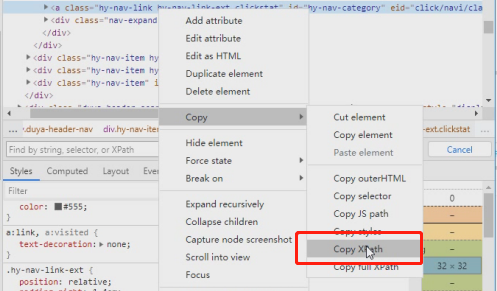
3.xpath(往下翻)
①定位元素后,直接copy
②语法去匹配
二、CSS选择器
1.css属性 标签定位
标签根据控件选择,input标签则以input开头,button、span等标签同理
class--> 用.表示
id------->用#表示
案例:
属性:.btn-search
标签:span
标签和属性组合:input#kw

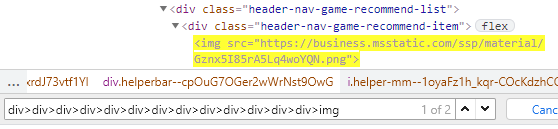
2.层级关系
用>表示层级
案例:
div>div>div>div>div>div>div>div>div>div>div>div>div>img
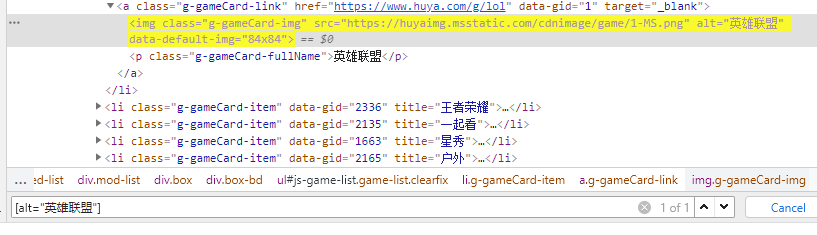
3.其他属性
格式:[alt="英雄联盟"] or [alt=英雄联盟]
4.官方文档
官方:https://www.w3school.com.cn/cssref/css_selectors.asp
| 选择器 | 例子 | 例子描述 |
|---|---|---|
| .class | .intro | 选择 class="intro" 的所有元素。 |
| .class1.class2 | .name1.name2 | 选择 class 属性中同时有 name1 和 name2 的所有元素。 |
| .class1 .class2 | .name1 .name2 | 选择作为类名 name1 元素后代的所有类名 name2 元素。 |
| #id | #firstname | 选择 id="firstname" 的元素。 |
| * | * | 选择所有元素。 |
| element | p | 选择所有 <p> 元素。 |
| element.class | p.intro | 选择 class="intro" 的所有 <p> 元素。 |
| element,element | div, p | 选择所有 <div> 元素和所有 <p> 元素。 |
| element element | div p | 选择 <div> 元素内的所有 <p> 元素。 |
| element>element | div > p | 选择父元素是 <div> 的所有 <p> 元素。 |
| element+element | div + p | 选择紧跟 <div> 元素的首个 <p> 元素。 |
| element1~element2 | p ~ ul | 选择前面有 <p> 元素的每个 <ul> 元素。 |
| [attribute] | [target] | 选择带有 target 属性的所有元素。 |
| [attribute=value] | [target=_blank] | 选择带有 target="_blank" 属性的所有元素。 |
| [attribute~=value] | [title~=flower] | 选择 title 属性包含单词 "flower" 的所有元素。 |
| [attribute|=value] | [lang|=en] | 选择 lang 属性值以 "en" 开头的所有元素。 |
| [attribute^=value] | a[href^="https"] | 选择其 src 属性值以 "https" 开头的每个 <a> 元素。 |
| [attribute$=value] | a[href$=".pdf"] | 选择其 src 属性以 ".pdf" 结尾的所有 <a> 元素。 |
| [attribute*=value] | a[href*="w3schools"] | 选择其 href 属性值中包含 "abc" 子串的每个 <a> 元素。 |
| :active | a:active | 选择活动链接。 |
| ::after | p::after | 在每个 <p> 的内容之后插入内容。 |
| ::before | p::before | 在每个 <p> 的内容之前插入内容。 |
| :checked | input:checked | 选择每个被选中的 <input> 元素。 |
| :default | input:default | 选择默认的 <input> 元素。 |
| :disabled | input:disabled | 选择每个被禁用的 <input> 元素。 |
| :empty | p:empty | 选择没有子元素的每个 <p> 元素(包括文本节点)。 |
| :enabled | input:enabled | 选择每个启用的 <input> 元素。 |
| :first-child | p:first-child | 选择属于父元素的第一个子元素的每个 <p> 元素。 |
| ::first-letter | p::first-letter | 选择每个 <p> 元素的首字母。 |
| ::first-line | p::first-line | 选择每个 <p> 元素的首行。 |
| :first-of-type | p:first-of-type | 选择属于其父元素的首个 <p> 元素的每个 <p> 元素。 |
| :focus | input:focus | 选择获得焦点的 input 元素。 |
| :fullscreen | :fullscreen | 选择处于全屏模式的元素。 |
| :hover | a:hover | 选择鼠标指针位于其上的链接。 |
| :in-range | input:in-range | 选择其值在指定范围内的 input 元素。 |
| :indeterminate | input:indeterminate | 选择处于不确定状态的 input 元素。 |
| :invalid | input:invalid | 选择具有无效值的所有 input 元素。 |
| :lang(language) | p:lang(it) | 选择 lang 属性等于 "it"(意大利)的每个 <p> 元素。 |
| :last-child | p:last-child | 选择属于其父元素最后一个子元素每个 <p> 元素。 |
| :last-of-type | p:last-of-type | 选择属于其父元素的最后 <p> 元素的每个 <p> 元素。 |
| :link | a:link | 选择所有未访问过的链接。 |
| :not(selector) | :not(p) | 选择非 <p> 元素的每个元素。 |
| :nth-child(n) | p:nth-child(2) | 选择属于其父元素的第二个子元素的每个 <p> 元素。 |
| :nth-last-child(n) | p:nth-last-child(2) | 同上,从最后一个子元素开始计数。 |
| :nth-of-type(n) | p:nth-of-type(2) | 选择属于其父元素第二个 <p> 元素的每个 <p> 元素。 |
| :nth-last-of-type(n) | p:nth-last-of-type(2) | 同上,但是从最后一个子元素开始计数。 |
| :only-of-type | p:only-of-type | 选择属于其父元素唯一的 <p> 元素的每个 <p> 元素。 |
| :only-child | p:only-child | 选择属于其父元素的唯一子元素的每个 <p> 元素。 |
| :optional | input:optional | 选择不带 "required" 属性的 input 元素。 |
| :out-of-range | input:out-of-range | 选择值超出指定范围的 input 元素。 |
| ::placeholder | input::placeholder | 选择已规定 "placeholder" 属性的 input 元素。 |
| :read-only | input:read-only | 选择已规定 "readonly" 属性的 input 元素。 |
| :read-write | input:read-write | 选择未规定 "readonly" 属性的 input 元素。 |
| :required | input:required | 选择已规定 "required" 属性的 input 元素。 |
| :root | :root | 选择文档的根元素。 |
| ::selection | ::selection | 选择用户已选取的元素部分。 |
| :target | #news:target | 选择当前活动的 #news 元素。 |
| :valid | input:valid | 选择带有有效值的所有 input 元素。 |
| :visited | a:visited | 选择所有已访问的链接。 |
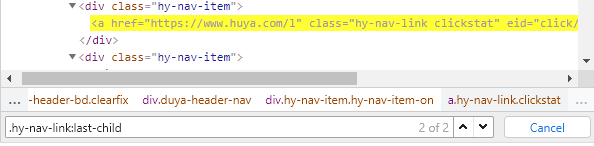
小练习:
三、Xpath定位
官方文档:https://www.runoob.com/xpath/xpath-syntax.html
四、拓展
拓展1-查找元素有两个时,用1个即可

拓展2-判断查找元素是否唯一
1、使用css定位-id选择器,搜索框输入关键字,返回格式高亮黄色,看返回数据是否唯一
2、使用JavaScript获取HTML DOM元素的方法,看返回数据是否唯一
使用JavaScript获取HTML DOM元素的方法,语法如下:
-
id 获取:document.getElementById()
-
class 获取:document.getElementsByClassName()
-
name 获取:document.getElementsByName()
-
tag 获取:document.getElementsByTagName()
-
CSS 获取:document.querySelector()

拓展3-element单复数
find_element_by_ 返回单数,直接定位到元素
find_elements_by 返回list

 浙公网安备 33010602011771号