
java-集合
集合
- 可以动态保存任意多个对象,使用比较方便
- 提供了一系列方便的操作对象的方法:add remove set get 等
- 使用集合添加,删除新元素的示意代码 -简洁
Java的集合类有很多 ,主要分为两大类
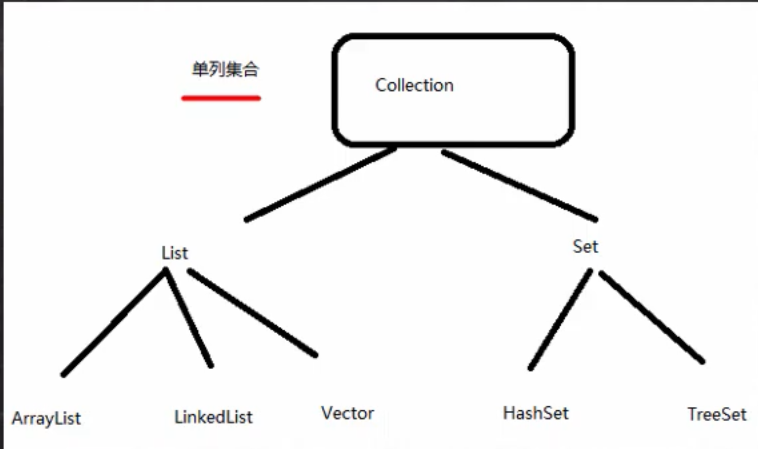

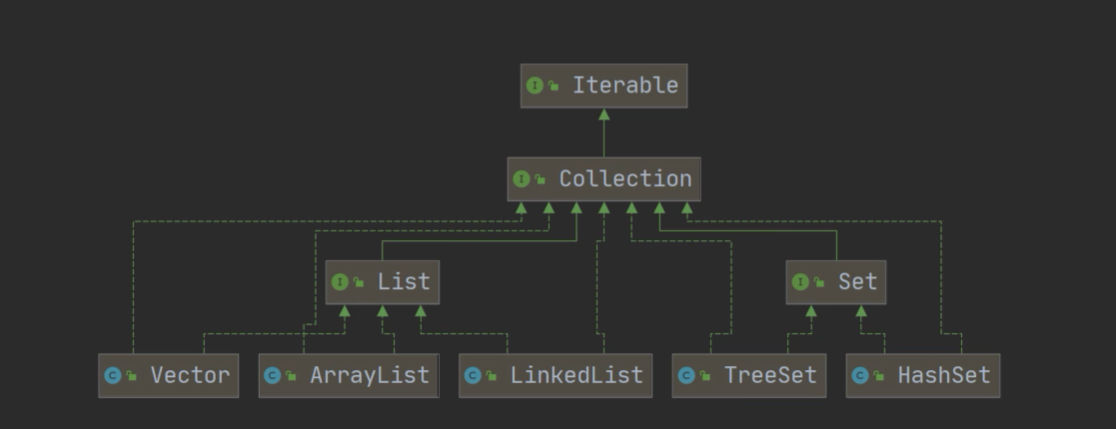
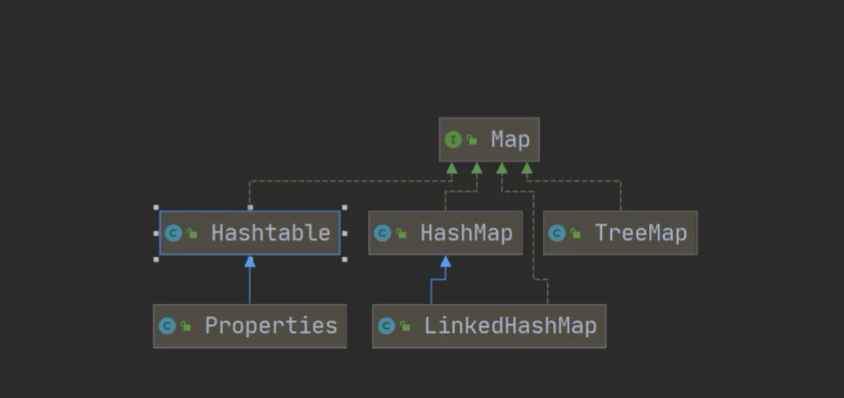
package com.xxb.collection;

import java.util.ArrayList;
import java.util.HashMap;
//import java.util.Collection;

public class Collection_ {
    //去掉警告注解
    @SuppressWarnings({"all"})
    public static void main(String[] args) {
        //Collection
        //1。集合主要式两组(单列集合, 双列集合)
        //2.Collection 接口有2个重要的子接口  List Set ,他们实现子类都是单列集合
        //3. Map 接口的实现子了是双列集合  K-v 键值对

        //单列集合
        ArrayList arrayList=new ArrayList<String>();
        arrayList.add("jack");
        arrayList.add("tom");
        System.out.println(arrayList);

        //双列集合
        HashMap hashMap=new HashMap();
        hashMap.put("NO1","北京");
        hashMap.put("NO2","上海");
        System.out.println(hashMap);
    }
}
Collection 接口和常用方法
- collection 实现子类可以存放多个元素,每个元素可以是Object
- 有些Collection的实现类,可以ucnf重复的元素,有些不可以
- 有些Collection的实现类,有些是有序的(List), 有些不是有序(Set)
- Collection 接口没有直接的实现子类,是通过它的子接口Set和List来实现
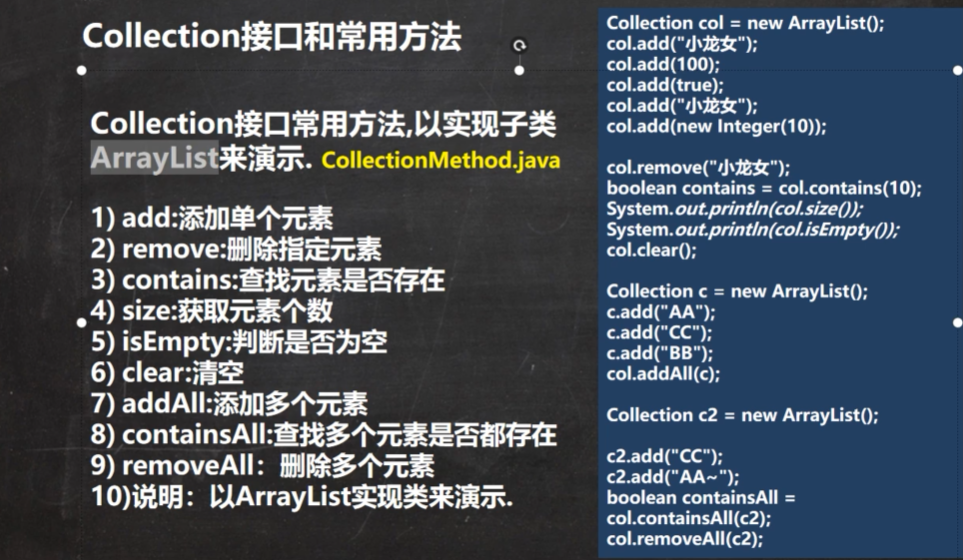
package com.xxb.collection;

import java.sql.SQLOutput;
import java.util.ArrayList;
import java.util.List;

public class Collection_ {
    //去掉警告注解
    @SuppressWarnings({"all"})
    public static void main(String[] args) {
        List list = new ArrayList();
        list.add("jack");
        list.add(10);
        System.out.println(list);
        //list.remove(0);//删除第一个元素
        //list.remove("jack");//指定删除某个元素
        System.out.println("list="+list);
        //判断是否有这个元素
        System.out.println(list.contains(("jack")));
        //判断list的长度
        System.out.println(list.size());
        //判断list是否为空
        System.out.println(list.isEmpty());
        //清空数组
//        list.clear();
        System.out.println(list);
        ArrayList list2=new ArrayList();
        list2.add("红楼梦");
        list2.add("三国演义");

        //添加多个元素
        list.addAll(list2);
        System.out.println(list);
        //查找多个元素是否都存在
        System.out.println(list.containsAll(list2));
        //removeAll  删除多个元素
        list.removeAll(list2);
        System.out.println(list);
    }
}
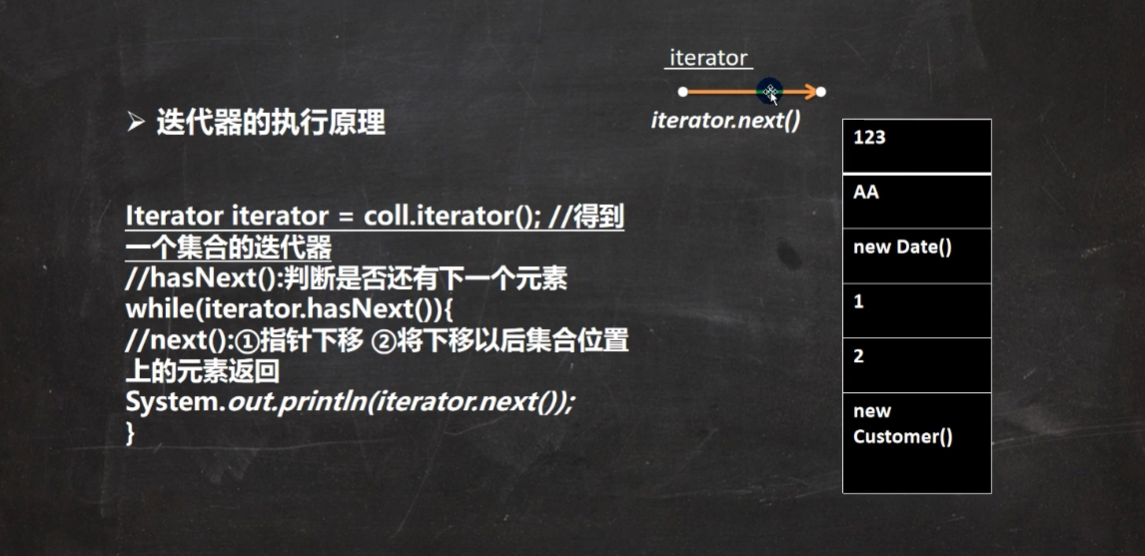
Collection接口遍历元素方式1---使用lterator(迭代器)
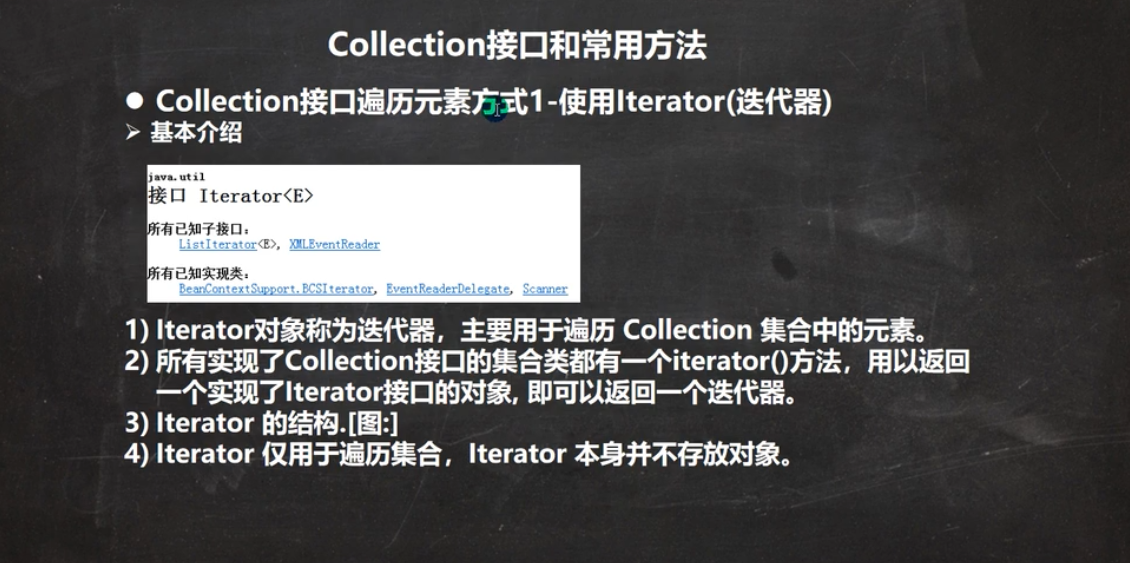
package com.xxb.collection;

import java.util.ArrayList;
import java.util.Collection;
import java.util.Iterator;

public class Collection_ {
    //去掉警告注解
    @SuppressWarnings({"all"})
    public static void main(String[] args) {
        Collection col = new ArrayList();
        col.add(new Book("红楼梦", "罗贯中", 10.1));
        col.add(new Book("三国演义", "曹雪芹",34.6));
        col.add(new Book("爱国者", "方式",34.6));
        System.out.println(col);
        //遍历col集合
        //1.先得到col对应的迭代器
        Iterator iterator=col.iterator();
        //2.使用wehile循环遍历
        while(iterator.hasNext()){
            //返回下一个元素 ,类型是object
            Object obj=iterator.next();
            System.out.println(obj);
        }
        //快速生成while itit 快捷键   ctrl+J 显示所有快捷键的快捷键
        //3.当退出while循环后 这是iterator迭代器,指向最后的元素
        //iterator.next(); //NOSuchElementException
        //4.如果希望再次遍历,需要重置我们的迭代器
        //iterator=col.iterator();

    }
}

class Book {
    private String name;
    private String author;
    private double price;

    public Book(String name, String author, double price) {
        this.name = name;
        this.author = author;
        this.price = price;
    }

    public String getName() {
        return name;
    }

    public void setName(String name) {
        this.name = name;
    }

    public String getAuthor() {
        return author;
    }

    public void setAuthor(String author) {
        this.author = author;
    }

    public double getPrice() {
        return price;
    }

    public void setPrice(double price) {
        this.price = price;
    }

    @Override
    public String toString() {
        return "Book{" +
                "name='" + name + '\'' +
                ", author='" + author + '\'' +
                ", price=" + price +
                '}';
    }
}
package com.xxb.collection;

import java.util.ArrayList;
import java.util.Collection;

public class CollectionFor {
    @SuppressWarnings({"all"})
    public static void main(String[] args) {
        Collection col = new ArrayList();
        col.add(new Book("红楼梦", "罗贯中", 10.1));
        col.add(new Book("三国演义", "曹雪芹",34.6));
        col.add(new Book("爱国者", "方式",34.6));
        System.out.println(col);
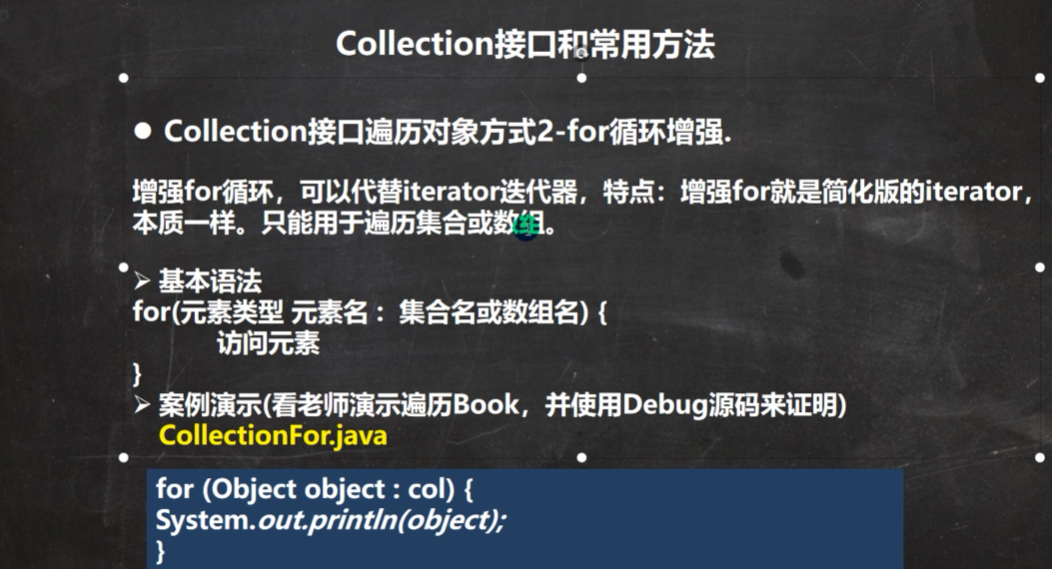
        //使用增强for 快捷键I
        //2.增强for 底层还是迭代器
        for(Object book:col){
            System.out.println(book);
        }
        //增强for ,也可以直接在数组使用
        int[] nums={1,8,10,90};
        for(int i:nums){
            System.out.println(i);
        }
    }
}
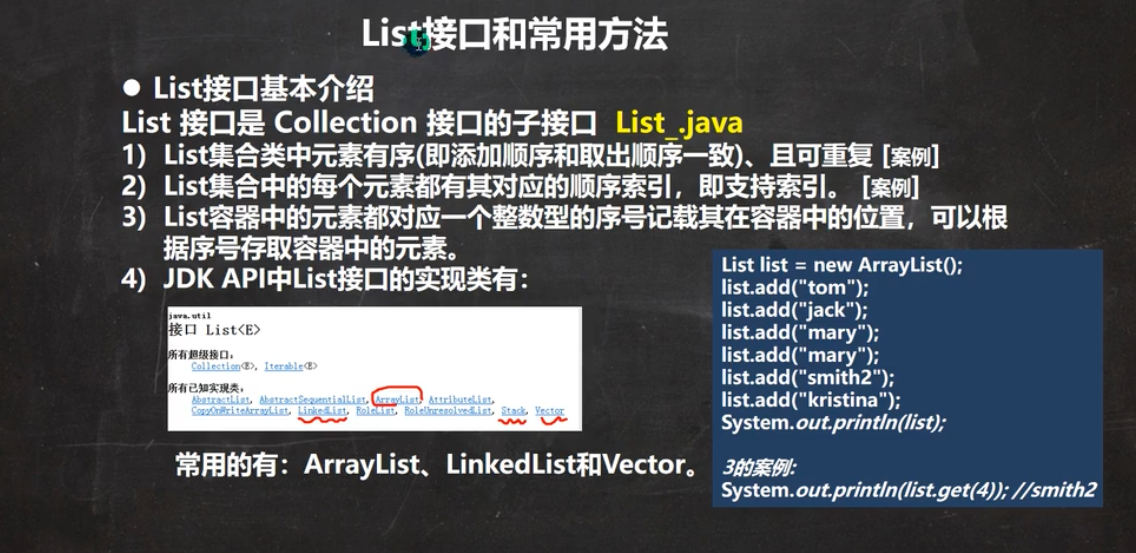
list接口和常用方法
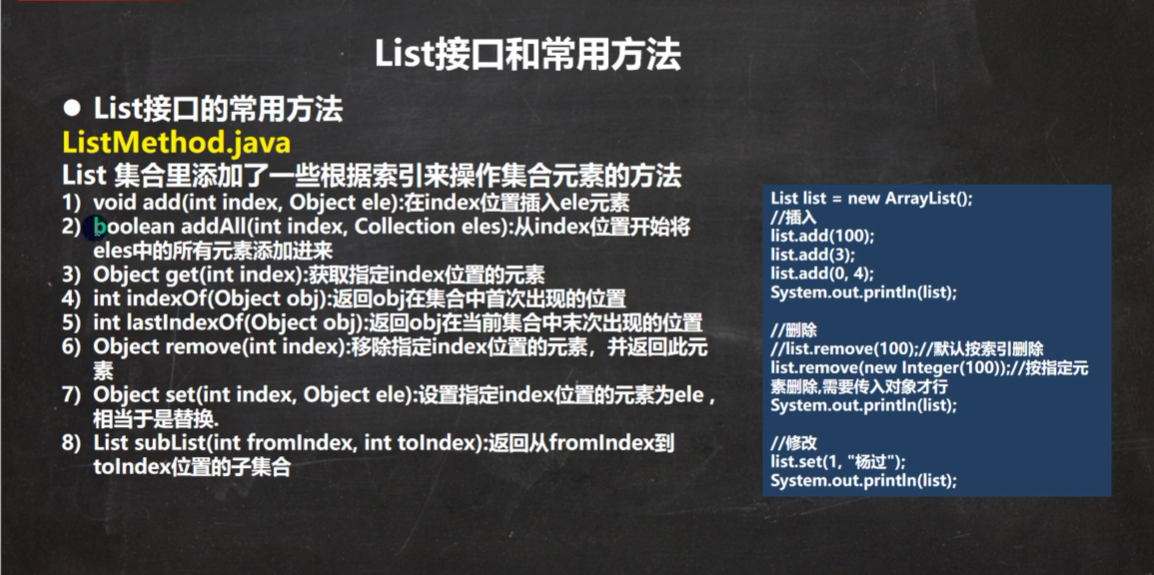
package com.xxb.list;

import java.util.ArrayList;
import java.util.List;

public class ListMethod {
    @SuppressWarnings({"all"})
    public static void main(String[] args) {
        List list = new ArrayList();
        list.add("jack");
        list.add("tom");
        list.add("marry");
        //void add(int  index, object ele) 在index位置插入ele元素
        list.add(1,"财经");
        System.out.println(list);//[jack, 财经, tom, marry]
        List list2=new ArrayList();
        list2.add("muzi");
        list2.add("muzm");
        list2.add("muzx");
        //新增addAll()
        list.addAll(1,list2);
        System.out.println(list);//[jack, muzi, muzm, muzx, 财经, tom, marry]
        //int indexOf(object obj)  返回obj在集合中首次出现的位置
        System.out.println(list.indexOf("tom"));//5
        //int lastIndexOf(object obj)  返回obj在集合中最后一次次出现的位置
        System.out.println(list.lastIndexOf("marry"));//6
        //Object remove(int index): 移除指定index位置的元素,并返回此元素
        list.remove(0);
        System.out.println(list);
        //Object set(int index,Object ele): 设置指定index位置的元素为ele,相当于是替换
        list.set(1,"测试位");
        System.out.println(list);
        //List subList(int fromIndex,int toIndex): 返回从fromIndex到toIndex位置的子集合(不含toIndex)
        List tempList = list.subList(1, 3);//[测试位, muzx]
        System.out.println(tempList);

    }
}
List的遍历
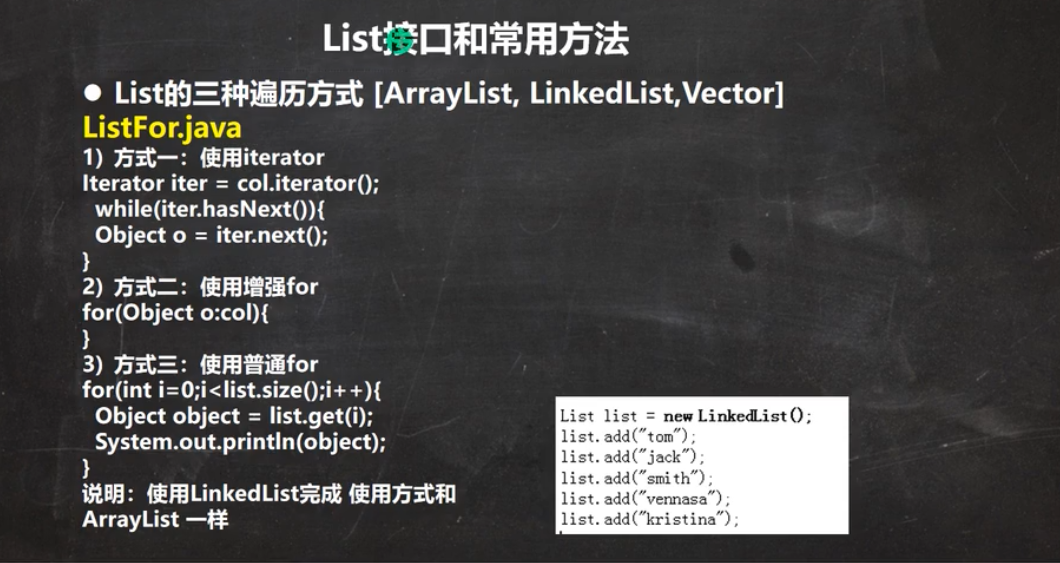
package com.xxb.list;

import java.util.ArrayList;
import java.util.Iterator;
import java.util.List;

public class ListMethod {
    @SuppressWarnings({"all"})
    public static void main(String[] args) {
        List list = new ArrayList();
        list.add("jack");
        list.add("tom");
        list.add("marry");
        //void add(int  index, object ele) 在index位置插入ele元素
        list.add(1,"财经");
        System.out.println(list);//[jack, 财经, tom, marry]
        List list2=new ArrayList();
        list2.add("muzi");
        list2.add("muzm");
        list2.add("muzx");
        //新增addAll()
        list.addAll(1,list2);
        System.out.println(list);//[jack, muzi, muzm, muzx, 财经, tom, marry]
        //int indexOf(object obj)  返回obj在集合中首次出现的位置
        System.out.println(list.indexOf("tom"));//5
        //int lastIndexOf(object obj)  返回obj在集合中最后一次次出现的位置
        System.out.println(list.lastIndexOf("marry"));//6
        //Object remove(int index): 移除指定index位置的元素,并返回此元素
        list.remove(0);
        System.out.println(list);
        //Object set(int index,Object ele): 设置指定index位置的元素为ele,相当于是替换
        list.set(1,"测试位");
        System.out.println(list);
        //List subList(int fromIndex,int toIndex): 返回从fromIndex到toIndex位置的子集合(不含toIndex)
        List tempList = list.subList(1, 3);//[测试位, muzx]
        System.out.println(tempList);

        //遍历
        //1.迭代器 itit
        Iterator iterator=list.iterator();
        while (iterator.hasNext()) {
            Object obj= iterator.next();
//            System.out.println(obj);
        }
        //2.增强for I
        for (Object obj :list) {
            //获取索引
            System.out.println(list.indexOf(obj));
            //获取值
            System.out.println(obj);
        }
        //3.普通for
        for (int i=0;i<list.size();i++){
//            System.out.println(list.get(i));
        }


    }
}
ArrayList注意事项
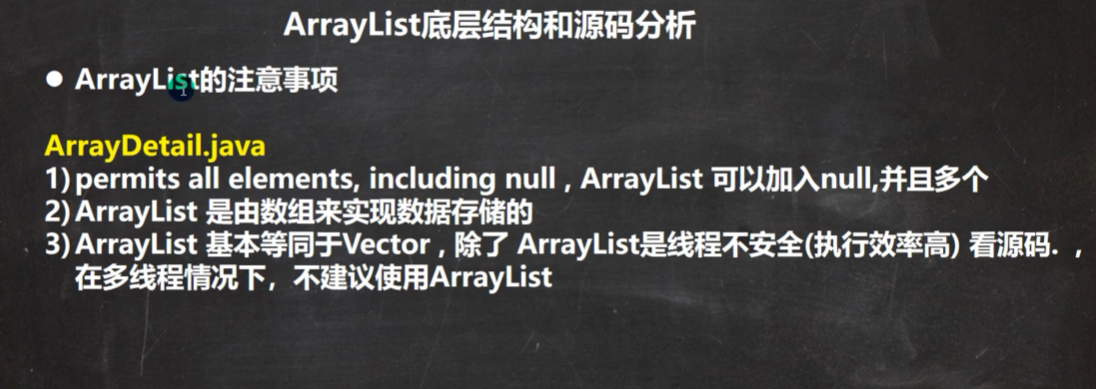
Vector
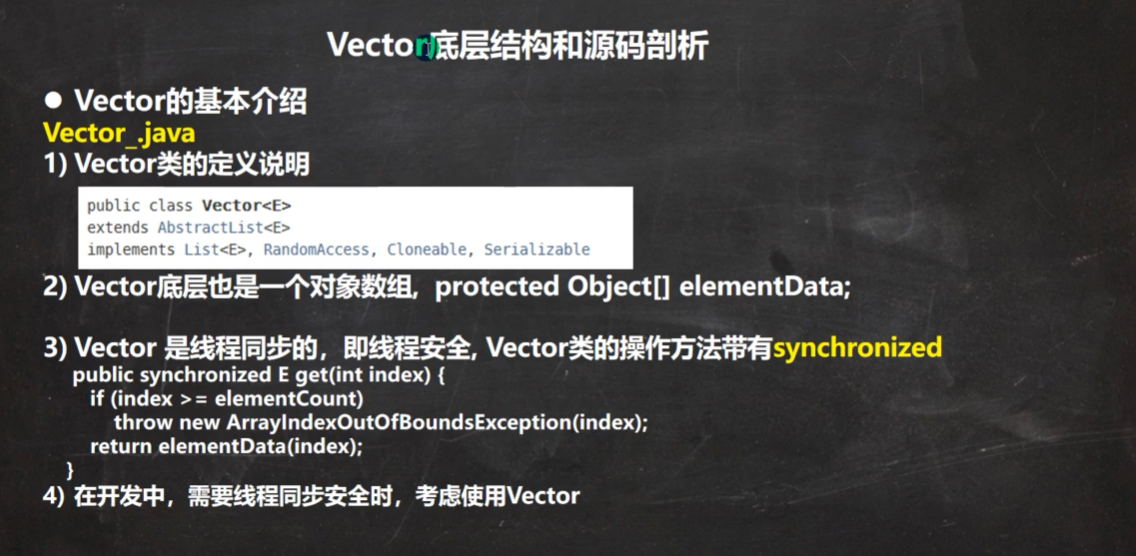
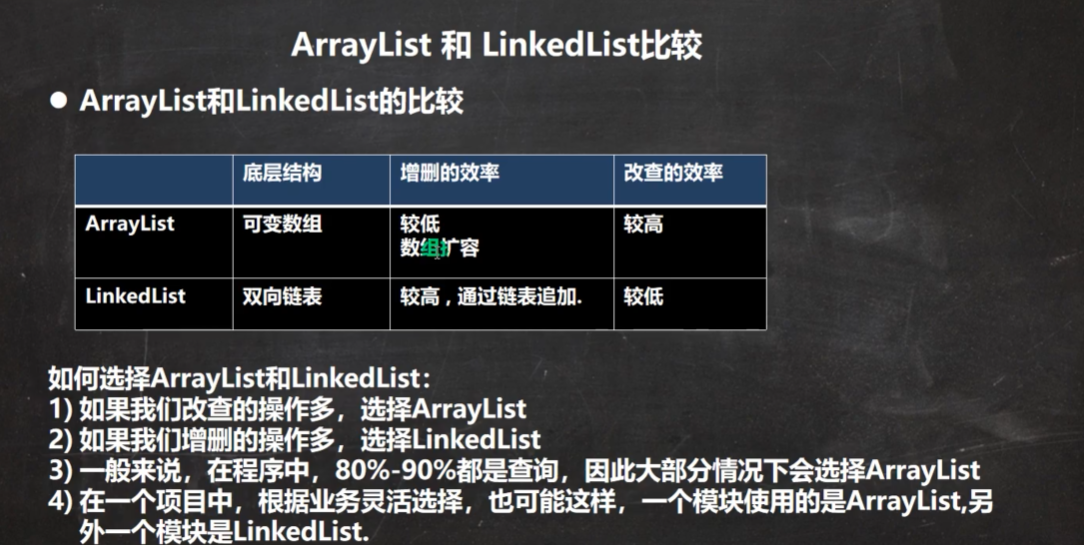
List集合选择
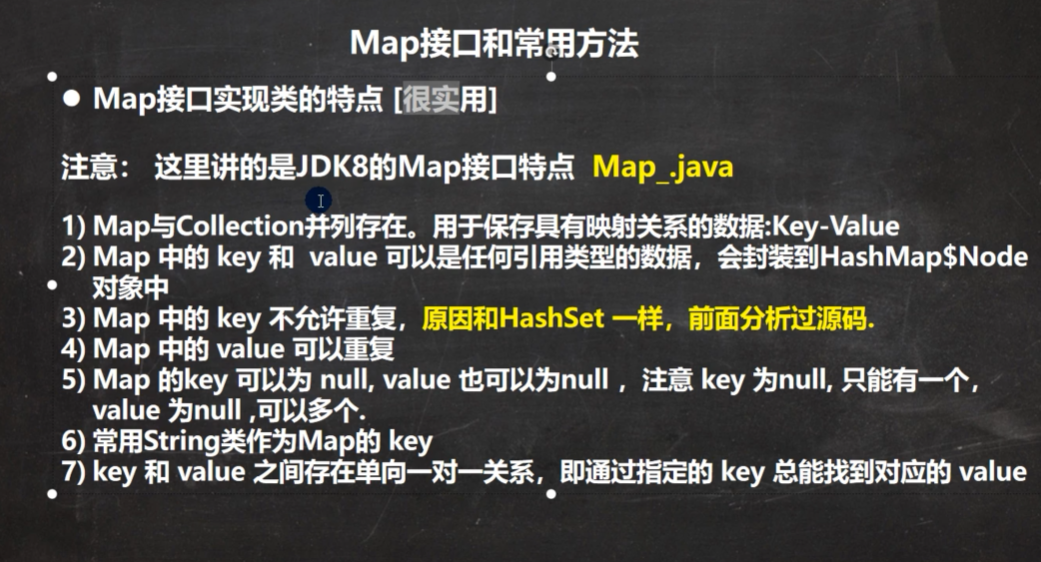
Map
package com.xxb.map;

import java.util.HashMap;
import java.util.Map;
import java.util.Set;

public class Map_ {
    @SuppressWarnings({"all"})
    public static void main(String[] args) {
        //使用接口实现类的特点,使用实现类HashMap  (无序)
        //1.Map与Collection并列存在。Map用于保存具有映射关系的数据Key-Value(双列元素)
        //2. Map中的key 和value 可以实任何引用类型的数据,会封装到HashMap$Node对象中。
        //3.key 不允许重复, value可以重复
        //4. 常用String类作为Map的key
        Map map=new HashMap();
        map.put("1","kay");
        map.put("2","kay2");
        map.put("3","kay3");
        map.put("4","kay4");
        map.put("1","mark"); //相同key,等同于替换
        map.put(null,null);
        map.put(1,"xxx");
        map.put(new Object(),"xxv");
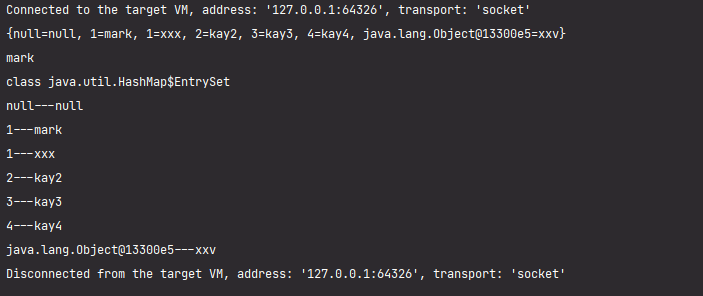
        System.out.println(map);
        //通过get方法,传入key,会返回对应的value
        System.out.println(map.get("1"));//mark

        //备注
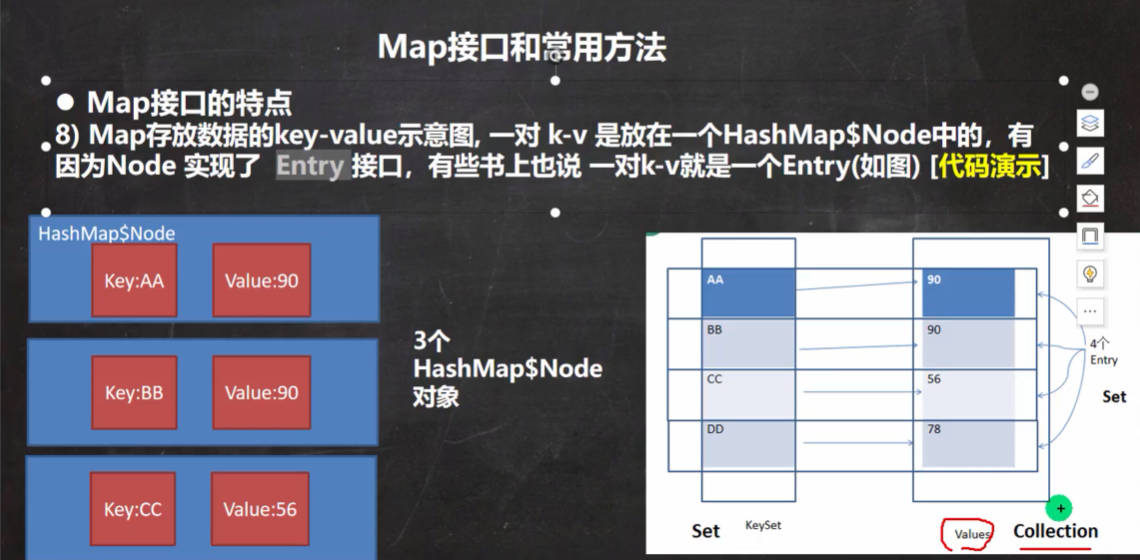
        //1.k-v 最后是HashMap$Node node=newHode(hash,key,value,null)
        //2.k-v 为了方便程序员的遍历,还会创建EntrySet集合,该集合存放的元素的类型 Entry
        //3. 对象就有k,v EntrySet<Entry<k,v>> 即: transient Set<Map.Entry<k,v>> entrySet;
        //4. entrySet中,定义的类型是Map.Entry,但实际上存放的还是HashMap$Node
        //这是因为 static class Node<K,V> implements Map。Entry<K,V>
        // 5. 当把HashMap$Node 对象存放到entrySet就方便我们的遍历 因为Map.Enttry 提供了很多的遍历方法。
        Set set=map.entrySet();
        System.out.println(set.getClass()); //HashMap$EntrySet
        for (Object obj:set) {
            //System.out.println(entry.getClass());//HashMap$Node
            //1.先做一个向下转型
            Map.Entry entry=(Map.Entry) obj;
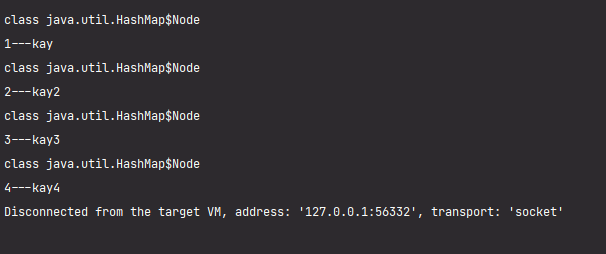
            System.out.println(entry.getKey()+"---"+entry.getValue());
        }


    }

}
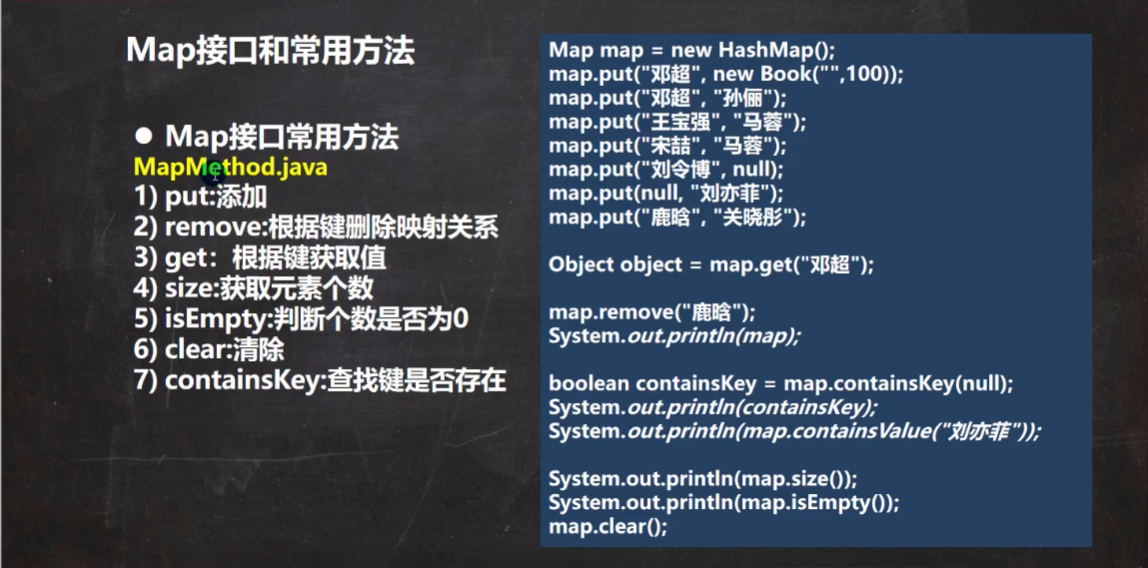
map的接口方法
map接口遍历方法
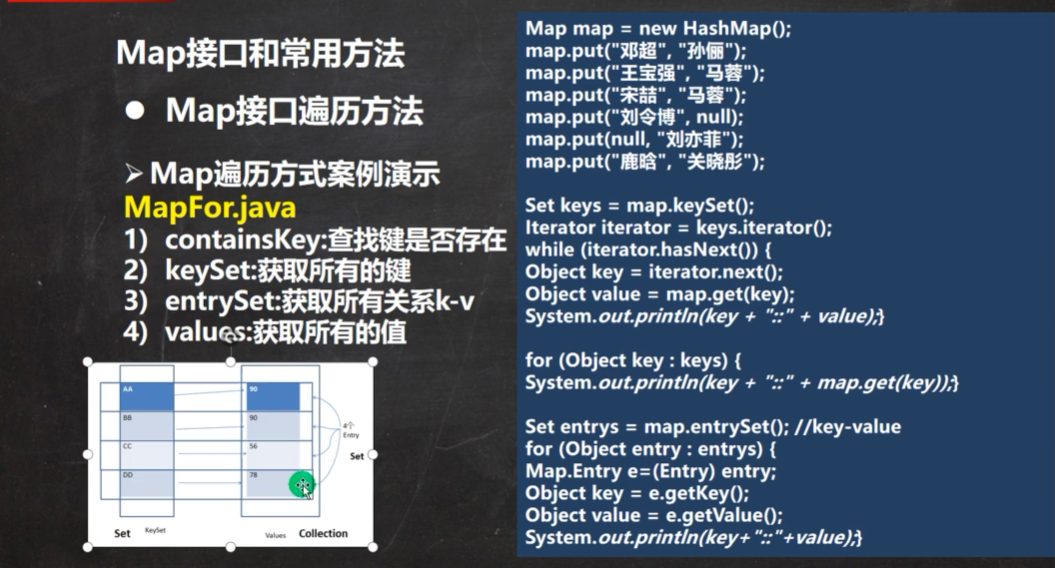
package com.xxb.map;

import java.util.*;

public class MapFor {
    @SuppressWarnings({"all"})
    public static void main(String[] args) {
        Map map=new HashMap();
        map.put("1","kay");
        map.put("2","kay2");
        map.put("3","kay3");
        map.put("4","kay4");

        //第一组  先取出所有的Key,通过Key取出对应的Value
        Set keySet=map.keySet();
        //1.增强for I
        for (Object key :keySet) {
            System.out.println(key+"-"+map.get(key));
        }
        System.out.println("-----");
        //2.迭代器 itit
        Iterator iterator=keySet.iterator();
        while (iterator.hasNext()) {
            Object key =  iterator.next();
            System.out.println(key+"-"+map.get(key));

        }
        System.out.println("-----");

        //第二组  先取出所有的values,

        Collection values = map.values();
        //1.增强for I
        for (Object val :values) {
            System.out.println(val);
        }
        System.out.println("-----");
        //2.迭代器
        Iterator iterator1=values.iterator();
        while (iterator1.hasNext()) {
            Object val =  iterator1.next();
            System.out.println(val);
        }

        //第三组  通过EntrySet来获取k-v
        System.out.println("------");
        Set entrySet=map.entrySet();
        //1.增强for I
        for (Object entry :entrySet) {
            //将entry 转成 Map.Entry
            Map.Entry m=(Map.Entry) entry;
            System.out.println(m.getKey()+"---"+m.getValue());
        }
        System.out.println("------");
        //2. 迭代器
        Iterator iterator2 = entrySet.iterator();
        while (iterator2.hasNext()) {
            Object next =  iterator2.next();
            System.out.println(next.getClass());////HashMap$Node
            //向下转型
            Map.Entry m=(Map.Entry) next;
            System.out.println(m.getKey()+"---"+m.getValue());

        }


    }
}
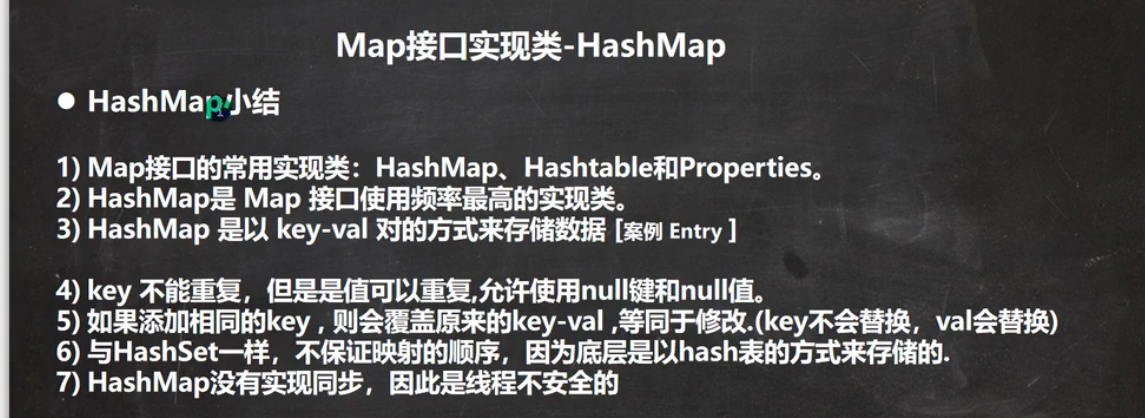
HMap阶段小结
Map接口实现类 -Hashtable
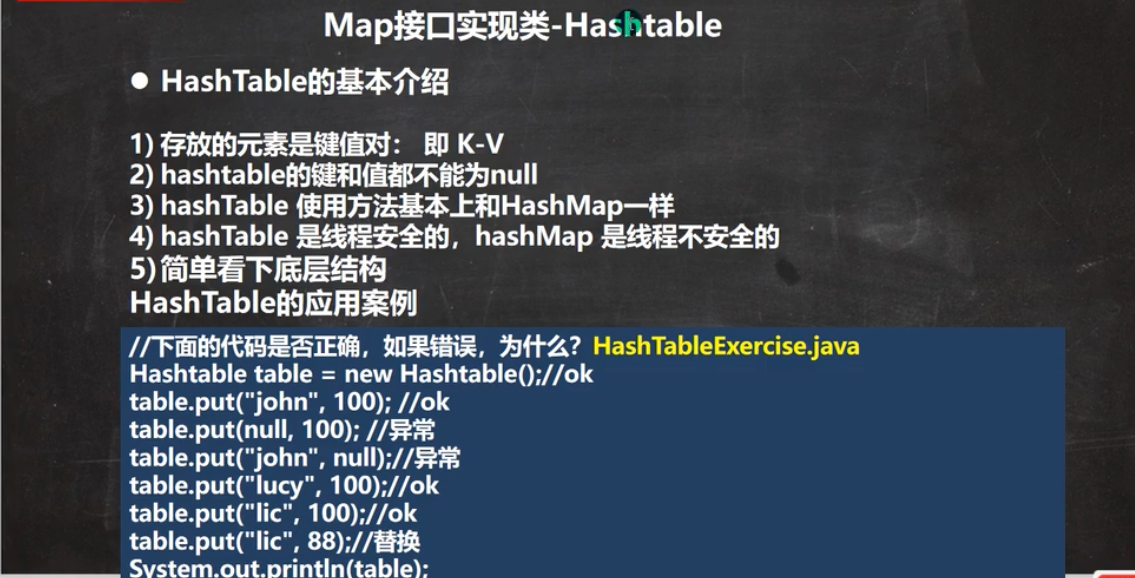
Map接口实现-

package com.xxb.map;

import java.util.Properties;

public class Properties_ {
    @SuppressWarnings({"all"})
    public static void main(String[] args) {
        //1. Properties 继承 Hashtable
        //2. 可以通过k-v 存放数据,当然key和value 不能为null;
        //增加
        Properties properties=new Properties();
        properties.put("joah",100);
        properties.put("lucy",200);
        properties.put("lucr",300);
        System.out.println(properties);

        //通过k获取对应值
        System.out.println(properties.get("lucy"));

        //删除
        properties.remove("lucr");
        //查
        properties.getProperty("lucy");
    }
}
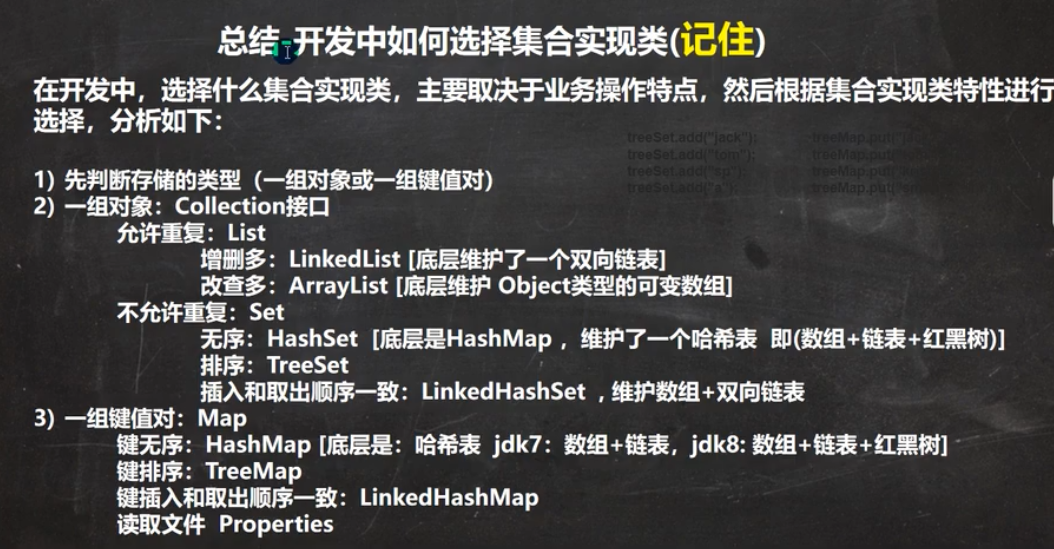
集合选型规则
Collections工具类
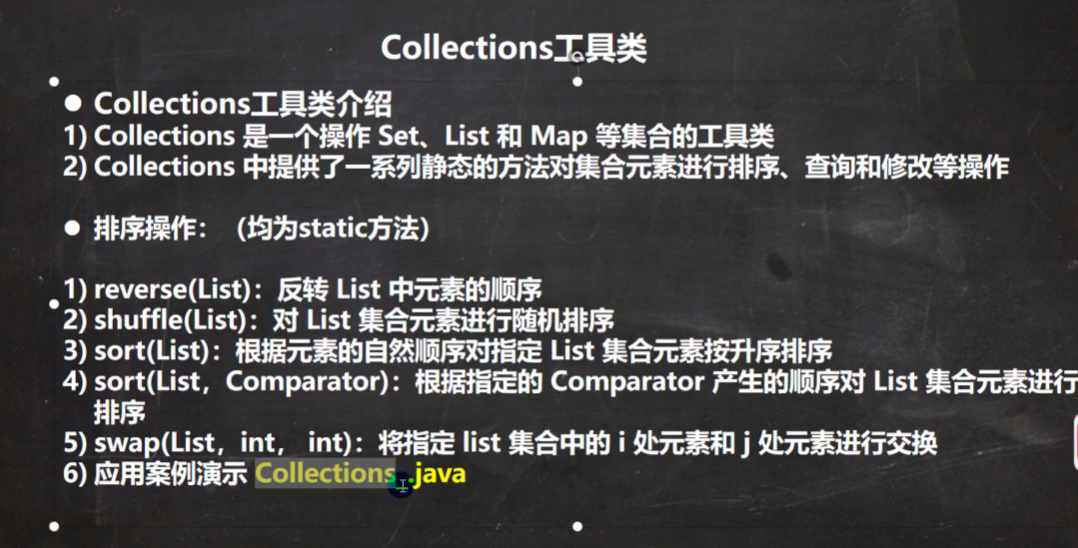
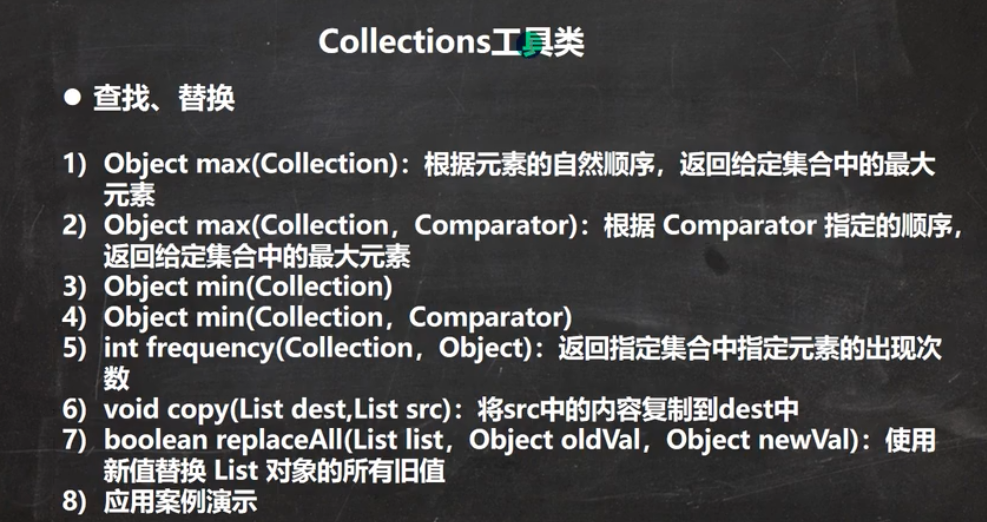
package com.xxb.collectionsUtils;

import com.sun.xml.internal.ws.policy.privateutil.PolicyUtils;

import java.util.*;

public class collectionsUtils_ {
    @SuppressWarnings({"all"})
    public static void main(String[] args) {
        List list=new ArrayList<String>();
        list.add("tom");
        list.add("tom");
        list.add("sm");
        list.add("king");
        list.add("kid");

        //1.反转静态方法reverse
        Collections.reverse(list);//[kid, king, sm, tom]
        System.out.println(list);
        System.out.println("-------");
        //2.随机排序shuffle
        Collections.shuffle(list);
        System.out.println(list);
        System.out.println("-------");
        //排序 sort 自然排序
        Collections.sort(list);
        System.out.println(list);
        //按照字符串的长度大小排序
        Collections.sort(list, new Comparator<Object>() {
            @Override
            public int compare(Object o1,Object o2){
                return ((String) o1).length()-((String) o2).length();
            }
        });
        System.out.println(list);//[sm, kid, tom, king]

        //swap交换 0 和1 位置互换
        Collections.swap(list,0,1);
        System.out.println(list);//[kid, sm, tom, king]
        System.out.println("-------");
        //根据自然长度返回最大的元素
        System.out.println(Collections.max(list)); //tom
        System.out.println("-------");
        //返回长度最大的长度
        Object maxEle = Collections.max(list, new Comparator<Object>() {
            @Override
            public int compare(Object o1, Object o2) {
                return ((String) o1).length() - ((String) o2).length();
            }
        });
        System.out.println(maxEle);//king
        //统计元素出现次数
        System.out.println(Collections.frequency(list,"tom"));//2

        //拷贝copy
        ArrayList dest=new ArrayList();
        //为了完成一个完整拷贝,先给dest赋值 itli 大小和list.size()一样

        for (int i = 0; i < list.size(); i++) {
            dest.add("");
        }

        //拷贝
        Collections.copy(dest,list);
        System.out.println(dest);
        //替换
        Collections.replaceAll(list,"tom","汤姆");
        System.out.println(list); //[kid, sm, 汤姆, 汤姆, king]
    }


}

 浙公网安备 33010602011771号