
vue+WebSocket实现消息提醒+提示音
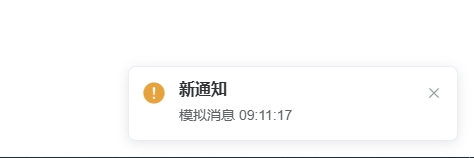
我这是本地测试的 写了定时器模拟消息推送 后面有跟后端对接的代码 有备注,实际开发的时候打开就好
我是把音频文件放在src="@/assets/mp3/mp3.mp3下的 没测打包后部署 防止打包后出问题 也可以放在public目录下
<template>
  <div>
    <audio ref="audio" src="@/assets/mp3/mp3.mp3" hidden></audio>
    <!-- public目录下的地址 -->
    <!-- <audio ref="audio" src="/mp3.mp3" hidden></audio> -->
  </div>
</template>

<script>
export default {
  data() {
    return {
      websocket: null,
      mockInterval: null, // 明确声明定时器变量
    };
  },
  mounted() {
    this.mockInterval = setInterval(() => {
      this.mockMessage();
    }, 10000);
    // 实际跟后端联调的时候调用的方法
    // this.initWebSocket();
  },
  beforeDestroy() {
    // 清除WebSocket和定时器
    if (this.websocket) this.websocket.close();
    if (this.mockInterval) clearInterval(this.mockInterval);
  },
  methods: {
    mockMessage() {
      const mockData = `模拟消息 ${new Date().toLocaleTimeString()}`;
      this.handleWebSocketMessage(mockData);
    },
    // 初始化WebSocket连接   跟后端联调的
    initWebSocket() {
      const wsUrl = "wss://your-websocket-url"; // 替换为你的WebSocket地址
      try {
        this.websocket = new WebSocket(wsUrl);
        // 连接成功
        this.websocket.onopen = () => {
          console.log("WebSocket连接已建立");
        };
        // 接收消息
        this.websocket.onmessage = (event) => {
          this.handleWebSocketMessage(event.data);
        };
        // 连接关闭
        this.websocket.onclose = () => {
          console.log("WebSocket连接已关闭");
        };
        // 错误处理
        this.websocket.onerror = (error) => {
          console.error("WebSocket错误:", error);
          this.$notify.error({
            title: "连接错误",
            message: "实时通信连接异常",
          });
        };
      } catch (error) {
        console.error("WebSocket初始化失败:", error);
      }
    },
    handleWebSocketMessage(data) {
      this.$notify({
        /* 通知配置 */
        title: "新通知",
        message: data,
        type: "warning",
        position: "bottom-right",
      });
      this.playAudio().catch((e) => console.error(e)); // 捕获播放错误
    },

    playAudio() {
      return new Promise((resolve, reject) => {
        const audio = this.$refs.audio;
        // 强化元素存在性检查
        if (!audio || !(audio instanceof HTMLAudioElement)) {
          reject("音频元素未找到或类型错误");
          return;
        }

        audio.currentTime = 0;
        audio
          .play()
          .then(resolve)
          .catch((error) => {
            console.error("播放失败:", error);
            this.$message.warning("请点击页面后重试");
            reject(error);
          });
      });
    },
  },
};
</script>

 浙公网安备 33010602011771号