
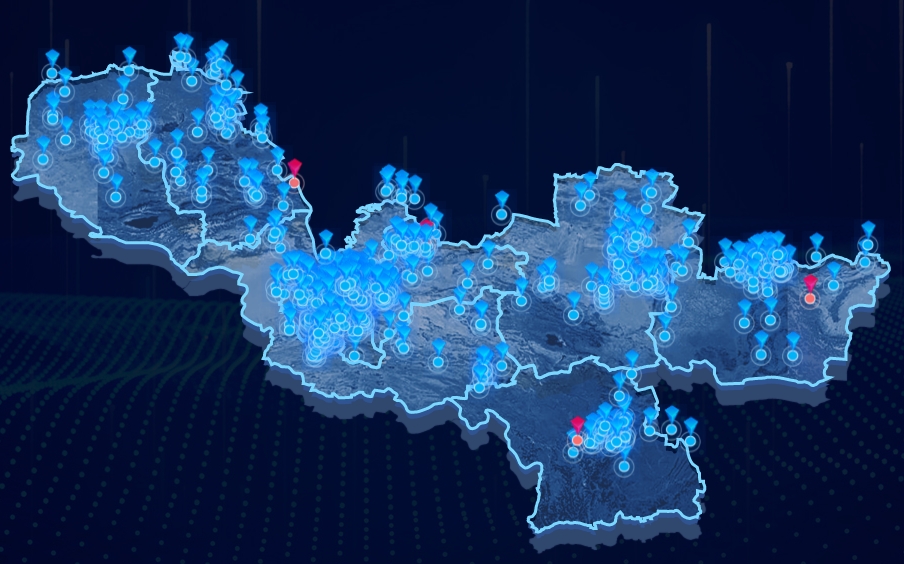
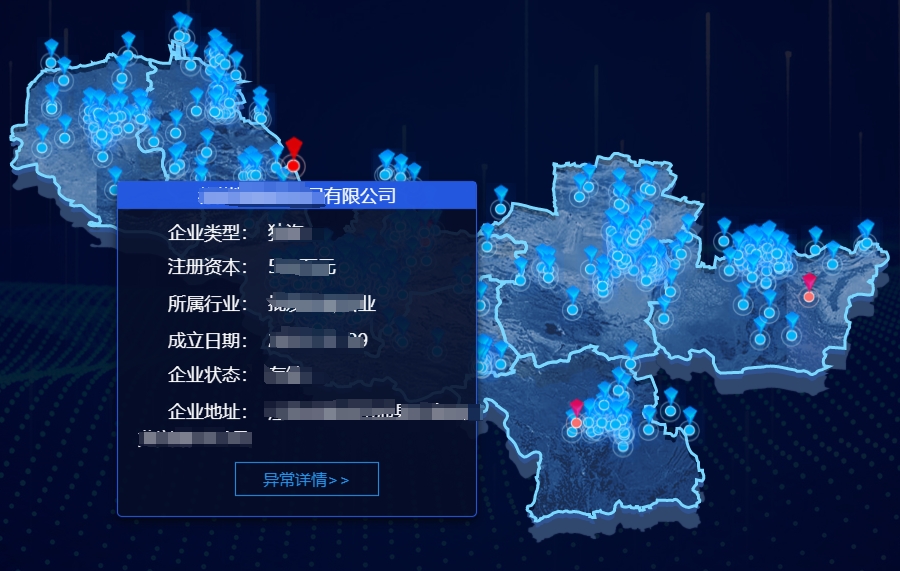
实现3D地图 并且显示地图动态跳动标识,鼠标滑过标识 显示此标识下的详细信息,红色为异常标识,悬浮框内显示查看详情信息
<template>
  <div>
    <div
      class="container"
      style="height: 650px; width: 100%"
      ref="mapContainer"
      v-loading="loading"
      element-loading-background="rgba(0, 0, 0, 0.6)"
      element-loading-text="拼命加载中"
      element-loading-spinner="el-icon-loading"
    ></div>
  </div>
</template>
  <script>
import * as echarts from 'echarts';
import 'echarts/lib/component/geo';
import WLImg from '@/assets/dlkwzImg/dtWlbg.png';

export default {
  name: 'TongshanMap',
  props: {
    mapData: {
      type: Array,
      default: []
    }
  },
  data() {
    return {
      tableData: [],
      loading: false,
      myChart: null,
      mapInfo: [
        require('@/assets/dlkwzImg/wxz.png'),
        require('@/assets/dlkwzImg/xz.png'),
        require('@/assets/dlkwzImg/1.png'),
        require('@/assets/dlkwzImg/2.png')
      ]
    };
  },
  watch: {
    mapData: {
      handler: function (val, oldVal) {
        this.updateChart();
      }
    },
  },
  mounted() {
    this.initChart();
  },
  beforeDestroy() {
    if (this.myChart) {
      this.myChart.dispose();
      this.myChart = null;
    }
  },
  computed: {
    getOption() {
      const that = this;
      const mapData = this.mapData.map((item) => {
        const data = {
          value: [
            item.lng,
            item.lat,
            item.companyName,
            item.companyType,
            item.registerMoney,
            item.industry,
            item.createDate,
            item.companyStatus,
            item.address,
            item.abnormalCount
          ]
        };
        return data;
      });
      let option = {
        tooltip: {
          show: false
        },
        label: {
          normal: {
            show: true,
            textStyle: { color: '#fff', fontSize: '20px' }
          },
          emphasis: {
            show: true,
            textStyle: { color: '#fff', fontSize: '20px' }
          }
        },

        geo: [
          {
            map: '铜山',
            aspectScale: 1,
            zoom: 0.75,
            roam: true,
            animationDurationUpdate: 0, //实现缩放、拖动同步且不卡顿
            layoutCenter: ['50%', '50%'],
            layoutSize: '180%',
            show: true,
            itemStyle: {
              borderWidth: 2,
              // 线性渐变,前四个参数分别是 x0, y0, x2, y2, 范围从 0 - 1,相当于在图形包围盒中的百分比,如果 globalCoord 为 `true`,则该四个值是绝对的像素位置
              // areaColor: {
              //   type: 'linear',
              //   x: 0,
              //   y: 0,
              //   x2: 0,
              //   y2: 700,
              //   colorStops: [
              //     {
              //       offset: 0,
              //       color: '#1858b4' // 0% 处的颜色
              //     },
              //     {
              //       offset: 1,
              //       color: '#1fcdff' // 100% 处的颜色
              //     }
              //   ],
              //   global: true // 整体渐变,缺省为 false,区块渐变
              // },
              // 添加纹理图片
              normal: {
                borderColor: '#7ad8ff',
                borderWidth: 3,
                color: {
                  image: WLImg,
                  repeat: 'repeat'
                }
              }
            },
            emphasis: {
              disabled: true
            },
            z: 2,
            // 点位提示
            tooltip: {
              show: true,
              // 将 tooltip 框限制在图表的区域内
              enterable: true,
              confine: true,
              trigger: 'item',
              shadowBlur: 0,
              triggerOn: 'mousemove',
              backgroundColor: 'rgba(255, 255, 255, 0)',
              borderWidth: 0,
              padding: 0,
              formatter: (params) => {
                let arr = params?.value ?? [];
                if (Array.isArray(arr) && arr.length > 0) {
                  function leftslide() {
                    that.$emit('handleAbnormal',arr[2]);
                  }
                  window.leftslide = leftslide;
                  // 可在JS文件单独引入CSS文件(import 'xx.css';),这里把CSS文件里定义的样式复制到style
                  let html = `<div class="custom-tooltip-box" style="width: 360px;height: auto;font-size: 18px;box-sizing: border-box;background: rgba(6,13,39,0.88);border: 1px solid #265DED;box-shadow: 0px 4px 10px 0px rgba(3,6,11,0.84);border-radius: 5px;">`;
                  html += `<div class="title" style="font-size: 18px;color: #fff;line-height: 40px;background: rgba(38,93,237,0.93);text-align: center;white-space: pre-wrap;line-height: 1.5;">${arr[2]}</div>`;
                  html += `<div class="row" style="margin-top: 3px;padding-left:20px;padding-top:10px">`;
                  html += `<span class="label" style="font-size: 18px;color: #fff;margin-right: 10px;padding-left:30px;">企业类型:</span>`;
                  html += `<span style="color: #fff; font-size: 18px;" class="content">${arr[3]}</span>`;
                  html += `</div>`;
                  html += `<div class="row" style="margin-top: 3px;padding-left:20px;padding-top:10px"">`;
                  html += `<span class="label" style="font-size: 18px;color: #fff;margin-right: 10px;padding-left:30px;">注册资本:</span>`;
                  html += `<span style="color: #fff; font-size: 18px;" class="content">${arr[4] == '-' ? '-': (arr[4] + '万元')}</span>`;
                  html += `</div>`;
                  html += `<div class="row" style="margin-top: 3px;padding-left:20px;padding-top:10px"">`;
                  html += `<span class="label" style="font-size: 18px;color: #fff;margin-right: 10px;padding-left:30px;">所属行业:</span>`;
                  html += `<span style="color: #fff; font-size: 18px;white-space: pre-wrap;line-height: 1.5;" class="content">${arr[5]}</span>`;
                  html += `</div>`;
                  html += `<div class="row" style="margin-top: 3px;padding-left:20px;padding-top:10px"">`;
                  html += `<span class="label" style="font-size: 18px;color: #fff;margin-right: 10px;padding-left:30px;">成立日期:</span>`;
                  html += `<span style="color: #fff; font-size: 18px;" class="content">${arr[6]}</span>`;
                  html += `</div>`;
                  html += `<div class="row" style="margin-top: 3px;padding-left:20px;padding-top:10px"">`;
                  html += `<span class="label" style="font-size: 18px;color: #fff;margin-right: 10px;padding-left:30px;">企业状态:</span>`;
                  html += `<span style="color: #fff; font-size: 18px;" class="content">${arr[7]}</span>`;
                  html += `</div>`;
                  html += `<div class="row" style="margin-top: 3px;padding-left:20px;padding-top:10px"">`;
                  html += `<span class="label" style="font-size: 18px;color: #fff;margin-right: 10px;padding-left:30px;">企业地址:</span>`;
                  html += `<span style="color: #fff; font-size: 18px;white-space: pre-wrap;line-height: 1.5;" class="content" >${arr[8]}</span>`;
                  if(arr[9] && arr[9] > 0){
                    html += `<div style="font-size: 16px;color: #2697F0;background: rgba(38,151,240,0);border: 1px solid #2697F0;width: 144px;line-height:32px;text-align:center;margin: 0 auto;margin-top:10px"><a onclick="leftslide()">异常详情>></a></div>`;
                  }
                  html += `<div style="height:20px;line-height:20px;"></div>`
                  html += `</div>`;
                  html += `</div>`;
                  return html;
                }
              },
              // 提示框浮层的位置,让提示框在鼠标正上方或正下方
              position: (point, params, dom, rect, size) => {
                // 当前鼠标位置
                let pointX = point[0];
                let pointY = point[1];
                // 提示框大小
                let boxWidth = size.contentSize[0];
                let boxHeight = size.contentSize[1];
                let x = pointX - boxWidth / 2; // X坐标位置
                let y = 0; // Y坐标位置
                // boxHeight > pointY 说明鼠标上边放不下提示框
                if (boxHeight > pointY) {
                  y = pointY + 10;
                } else {
                  y = pointY - boxHeight - 10;
                }
                return [x, y];
              }
            }
          },
          // 重影
          {
            map: '铜山',
            roam: false,
            animationDurationUpdate: 0, //实现缩放、拖动同步且不卡顿
            zlevel: -1,
            aspectScale: 1,
            zoom: 0.75,
            layoutCenter: ['50%', '51%'],
            layoutSize: '180%',
            silent: true,
            itemStyle: {
              areaColor: '#305391',
              borderWidth: 0,
              shadowColor: '#30476e',
              shadowBlur: 1,
              shadowOffsetX: 1,
              shadowOffsetY: 15
            }
          }
        ],
        series: [
          {
            // 自定义系列, 实现地图点位跳动
            type: 'custom',
            // 该系列使用的坐标系
            coordinateSystem: 'geo',
            geoIndex: 0,
            zlevel: 1,
            data: mapData,

            // 图形渲染逻辑
            renderItem(params, api) {
              // 节点名称
              let name = api.value(2, params.dataIndex);
              // 等级关键字
              let riskKey = api.value(4, params.dataIndex);
              // 异常数据个数
              let abnormalCount = api.value(9, params.dataIndex);
              // 点位图片
              let imgPath =
                abnormalCount > 0 ? that.mapInfo[2] : that.mapInfo[0];
              // 点位图片-鼠标悬浮
              let imgPathEmphasis =
                abnormalCount > 0 ? that.mapInfo[3] : that.mapInfo[1];
              // 字体样式
              let fontStyle = api.font({
                fontStyle: 'normal',
                fontWeight: 400,
                fontSize: 18,
                fontFamily: 'Microsoft Yahei'
              });
              // 获取点位经纬度
              let coord = api.coord([
                api.value(0, params.dataIndex),
                api.value(1, params.dataIndex)
              ]);
              return {
                type: 'group',
                x: coord[0],
                y: coord[1],
                children: [
                  {
                    type: 'image',
                    style: {
                      image: imgPath,
                      x: -15,
                      y: -41,
                      width: 30,
                      height: 41
                    },
                    // 关键帧动画 Jump animation.
                    keyframeAnimation: {
                      duration: 1500,
                      loop: true,
                      delay: Math.random() * 3000,
                      keyframes: [
                        {
                          y: -10,
                          percent: 0.5,
                          // 点位跳动状态,参考缓动示例
                          easing: 'circularOut'
                        },
                        {
                          y: 0,
                          percent: 1,
                          easing: 'quarticOut'
                        }
                      ]
                    },
                    // 高量状态
                    emphasis: {
                      style: {
                        image: imgPathEmphasis,
                        x: -18,
                        y: -49,
                        width: 36,
                        height: 49
                      }
                    }
                  }
                ]
              };
            }
          }
        ]
      };
      return option;
    }
  },
  // mounted() {
  //   const _this = this;
  //   window.myDialog = function (title) {
  //     // 写你的逻辑 我这里该页面以子组件存在父组件中,触发的父组件中的一个方法 该方法里写的展示弹窗的相关逻辑
  //     _this.$emit('showDetail', title);
  //   };
  // },
  methods: {
    initChart() {
      this.loading = true;
      if (!this.myChart) {
        this.myChart = echarts.init(this.$refs.mapContainer);
      }
      echarts.registerMap('铜山', require('@/static/json/xuzhou.json')); // 重要代码
      this.loading = false;
      const that = this;
      this.myChart.setOption(this.getOption);
      this.myChart.on('georoam', (params) => {
        let myOption = that.myChart.getOption();
        if (params.zoom != null) {
          //捕捉到缩放时
          myOption.geo[1].zoom = myOption.geo[0].zoom; //下层geo的缩放等级跟着上层的geo一起改变
          myOption.geo[1].center = myOption.geo[0].center; //下层的geo的中心位置随着上层geo一起改变
        } else {
          //捕捉到拖曳时
          myOption.geo[1].center = myOption.geo[0].center; //下层的geo的中心位置随着上层geo一起改变
        }
        that.myChart.setOption(myOption);
      });
      // 添加 resize 事件监听
      window.addEventListener('resize', function () {
        // 重新计算图表容器大小
        that.myChart && that.myChart.resize();
      });
    },
    updateChart() {
      // 绘制折线图
      this.myChart.setOption(this.getOption);
    },
  }
};
</script>
<style lang="scss" scoped>
@import './style.scss';
.dialogTable {
  padding: 0 10px;
  ::v-deep .el-table thead tr {
    // box-shadow: 0px 0px 30px 5px #203468 inset;
    // background: none !important;
    box-shadow: none !important;
  }
  ::v-deep .el-table tr:nth-child(2n-1) {
    box-shadow: 0px 0px 30px 5px #203468 inset;
    background: none;
  }
  ::v-deep .el-table tr:nth-child(2n) {
    background: none;
  }
}
::v-deep .el-dialog__header {
  background-color: #07083a;
  background-image: url(~@/assets/dlkwzImg/biaoti.png);
  background-size: 100% 100%;
  background-repeat: no-repeat;
  // background: url(~@/assets/dlkwzImg/biaoti.png) no-repeat;
  .el-dialog__title {
    color: #fff;
    font-size: 30;
    font-weight: 900;
    padding-left: 40px;
  }
}
::v-deep .el-dialog__body {
  background: #07083a;
  color: #fff;
}
::v-deep .el-dialog__headerbtn .el-dialog__close {
  color: #fff;
}
.hong {
  background: rgba(251, 64, 65, 0.13);
  color: #fc4141;
  border: none;
}
.huang {
  background: rgba(252, 224, 87, 0.2);
  color: #fce057;
  border: none;
}
</style>

 浙公网安备 33010602011771号