
04ifconfig命令报错:command not found 解决方法
在Linux系统下,当要查询当前主讲的ip地址时,输入命令ifconfig,但是却出了 command not found 的提示

ifconfig命令失败,说明没有将ipconfig命令配置到环境变量,需要进行如下配置
- 使用管理员权限 运行以下命令
vi /etc/profile

# 在profile文件里面
PATH=$PATH:/sbin
export PATH=$PATH:/sbin
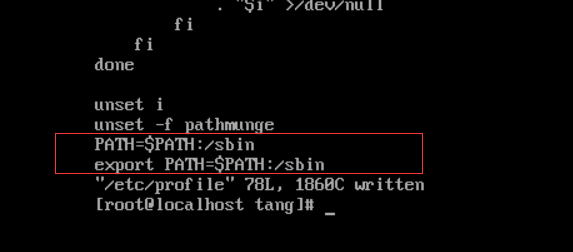
- 保存文件并退出
ctrl+c ,然后 :wq 保存文件
- 让配置文件生效
source /etc/profile
- 但是如果你安装的是CentOS最小安装包模式,还需要安装网络工具
yum install upgrade
yum install net-tools
安装完后,再次执行ifconfig,显示成功

 浙公网安备 33010602011771号