
Nginx安装
2020-08-01 23:59 宋海宾 阅读(215) 评论(0) 收藏 举报1.介绍
Nginx是lgor Sysoev为俄罗斯访问量第二的rambler.ru站点设计开发的。从2004年发布至今,凭借开源的力量,已经接近成熟与完善。
Nginx功能丰富,可作为HTTP服务器,也可作为反向代理服务器,邮件服务器。支持FastCGI、SSL、Virtual Host、URL Rewrite、Gzip等功能。并且支持很多第三方的模块扩展。
Nginx的稳定性、功能集、示例配置文件和低系统资源的消耗让他后来居上,在全球活跃的网站中有12.18%的使用比率,大约为2220万个网站。
牛逼吹的差不多啦,如果你还不过瘾,你可以百度百科或者一些书上找到这样的夸耀,比比皆是
2.功能
2.1 Http代理
代理和反向代理,
反向代理:作为web服务器最常用的功能之一,尤其是反向代理。
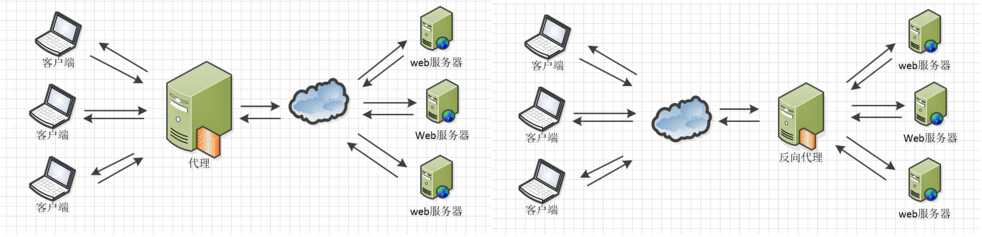
Nginx在做反向代理时,提供性能稳定,并且能够提供配置灵活的转发功能。Nginx可以根据不同的正则匹配,采取不同的转发策略,比如图片文件结尾的走文件服务器,动态页面走web服务器,只要你正则写的没问题,又有相对应的服务器解决方案,你就可以随心所欲的玩。并且Nginx对返回结果进行错误页跳转,异常判断等。如果被分发的服务器存在异常,他可以将请求重新转发给另外一台服务器,然后自动去除异常服务器。
2.2 负载均衡
Nginx提供的负载均衡策略有2种:内置策略和扩展策略。内置策略为轮询,加权轮询,Ip hash。扩展策略,就天马行空,只有你想不到的没有他做不到的啦,你可以参照所有的负载均衡算法,给他一一找出来做下实现。
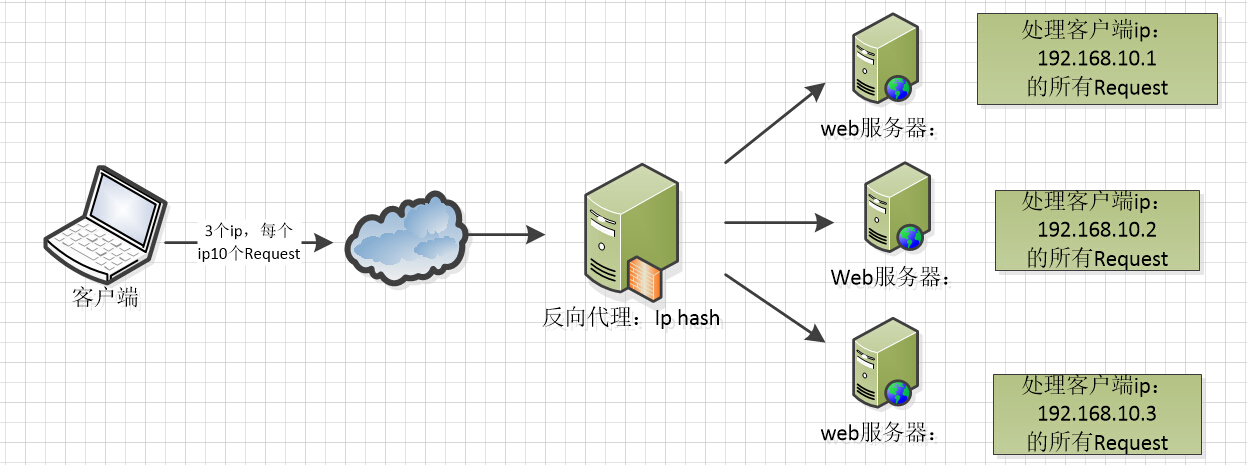
上3个图,理解这三种负载均衡算法的实现

p hash算法,对客户端请求的ip进行hash操作,然后根据hash结果将同一个客户端ip的请求分发给同一台服务器进行处理,可以解决session不共享的问题。
2.3 web缓存
Nginx可以对不同的文件做不同的缓存处理,配置灵活,并且支持FastCGI_Cache,主要用于对FastCGI的动态程序进行缓存。配合着第三方的ngx_cache_purge,对制定的URL缓存内容可以的进行增删管理。
2.4 Nginx相关地址
源码:https://trac.nginx.org/nginx/browser
3.准备安装包
/usr/local/nginx 目录
下载nginx: wget http://nginx.org/download/nginx-1.8.0.tar.gz
curl -O http://nginx.org/download/nginx-1.8.0.tar.gz
下载openssl : wget http://www.openssl.org/source/openssl-fips-2.0.9.tar.gz
curl -O http://www.openssl.org/source/openssl-fips-2.0.9.tar.gz
下载zlib : wget http://zlib.net/zlib-1.2.8.tar.gz
curl -O http://zlib.net/zlib-1.2.8.tar.gz
下载pcre : wget ftp://ftp.csx.cam.ac.uk/pub/software/programming/pcre/pcre-8.38.tar.gz
curl -O ftp://ftp.csx.cam.ac.uk/pub/software/programming/pcre/pcre-8.38.tar.gz
3.1 open-ssl
从openssl官网下载最新的稳定版本,https://www.openssl.org/source/ 当前的稳定版是 openssl-fips-2.0.16.tar.gz(联邦信息处理标准(Federal Information Processing Standards,FIPS)是一套描述文件处理、加密算法和其他信息技术标准(在非军用政府机构和与这些机构合作的政府承包商和供应商中应用的标准)的标准。),下载后上传到服务器的/usr/local/src目录下。
可以看出gcc版本较老,我们可以使用yum命令对其进行升级对其进行升级,
yum update gcc
1
如果需要安装的话,使用以下命令
yum -y install gcc
1
4,解压openssl包
tar -xzf openssl-fips-2.0.16.tar.gz
1
得到openssl-fips-2.0.16目录,然后进入openssl-fips-2.0.16目录中。
5,检查是否已安装zlib库
whereis zlib
1
如果已安装,会打印出zlib的路径,如果没有打印出路径,则表示没有安装,需要我们下载安装。
yum -y install zlib
1
5,安装openssl到 /usr/local/openssl 目录,安装之后,编译;
./config shared zlib --prefix=/usr/local/openssl && make && make install
1
安装结束后执行以下命令
./config -t
make depend
1
2
进入/usr/local目录下,执行以下命令
ln -s openssl ssl
1
在/etc/ld.so.conf文件的最后面,添加如下内容:/usr/local/openssl/lib
然后执行以下命令
ldconfig
1
添加OPESSL的环境变量,在etc/的profile的最后一行,添加:
export OPENSSL=/usr/local/openssl/bin
export PATH=$OPENSSL:$PATH:$HOME/bin
1
2
退出命令界面,再从新登录,使配置生效。
使用源码按过于繁琐,如果对软件版本没有特殊要求的话可以使用yum命令安装和更新,既方便又快捷
yum install openssl
1
yum update openssl
3.2 zlib
安装zlib
- home : http://www.gzip.org/zlib/
- package(linux source) : http://www.gzip.org/zlib/
our configuration
- install to : /usr/local
- module types : dynamically and staticly loaded modules, *.so and *.a
zlib标准安装指导:
zlib library files are placed into /usr/local/lib and zlib header files are placed into /usr/local/include, by default.
- build static libraries
.../zlib-1.2.1]# ./configure.../zlib-1.2.1]# make test.../zlib-1.2.1]# make install
- build shared libraries
.../zlib-1.2.1]# make clean.../zlib-1.2.1]# ./configure --shared.../zlib-1.2.1]# make test.../zlib-1.2.1]# make install
.../zlib-1.2.1]# cp zutil.h /usr/local/include.../zlib-1.2.1]# cp zutil.c /usr/local/include- /usr/local/lib should now contain...
libz.a
libz.so -> libz.so.1.2.1
libz.so.1 -> libz.so.1.2.1
libz.so.1.2.1 - /usr/local/include should now contain...
zconf.h
zlib.h
zutil.h - 可选择的zlib非标准安装指导:
-
- create the directory that will contain zlib
.../zlib-1.2.1]# mkdir /usr/local/zlib
- follow the given procedure above, except
.../zlib-1.2.1]# ./configure --prefix=/usr/local/zlib
- create the directory that will contain zlib
更新软连接:update the run-time linker
/etc/ld.so.cache will need to be updated with the new zlib shared lib: libz.so.1.2.1
- for standard zlib installation...
- add
/usr/local/libto /etc/ld.so.conf.d/*conf if specifie path is not present /etc]# ldconfig如果还是不行的话,则在/lib下建立一个libz.so.1.2.1的软链接名字为libz.so
- add
- if zlib was installed with a prefix...
- add
/usr/local/zlib/libto /etc/ld.so.conf /etc]# ldconfig
- add
3.3 PCRE
安装prce模块: PCRE(Perl Compatible Regular Expressions)是一个Perl库,包括 perl 兼容的正则表达式库。nginx的http模块使用pcre来解析正则表达式,所以需要在linux上安装pcre库。 地址 : http://www.pcre.org/
#下载 wget https://netix.dl.sourceforge.net/project/pcre/pcre/8.40/pcre-8.40.tar.gz
#解压安装包: tar -zxvf pcre-8.40.tar.gz
#进入安装包目录 cd pcre-8.40
#编译安装 ./configure make && make install
#查看pcre版本 pcre-config --version
(base) ali-1:nginx steven$ which pcre-config
/Users/steven/anaconda3/bin/pcre-config
4.安装
1)openssl :
[root@localhost] tar zxvf openssl-fips-2.0.9.tar.gz
[root@localhost] cd openssl-fips-2.0.9
[root@localhost] ./config && make && make install

2)pcre:
[root@localhost] tar zxvf pcre-8.36.tar.gz
[root@localhost] cd pcre-8.36
[root@localhost]  ./configure && make && make install

3)zlib:
[root@localhost]tar zxvf zlib-1.2.8.tar.gz
[root@localhost] cd zlib-1.2.8
[root@localhost]  ./configure && make && make install

4)最后安装nginx
[root@localhost]tar zxvf nginx-1.8.0.tar.gz
[root@localhost] cd nginx-1.8.0
[root@localhost]  ./configure && make && make install
5.启动
进入 /usr/local/nginx/sbin/ 目录。 通过 ./nginx 启动nginx服务;
可以通过 kill 杀掉nginx的主进程 (master为主进程)。
ps –ef|grep nginx

//关闭进程
kill -QUIT 主进程号(上面ps命令看到的带master字样的进程号)
nginx验证方法
浏览器访问如:http:// IP:80
如果能正常显示nginx首页,则表示安装成功,测试关闭
4. 配置
目录位置:
/usr/local/etc/nginx 配置目录
/System/Volumes/Data/usr/local/Cellar/nginx/1.19.1/bin/nginx 执行文件目录
如果你下载好啦,你的安装文件,不妨打开conf文件夹的nginx.conf文件,Nginx服务器的基础配置,默认的配置也存放在此。
在 nginx.conf 的注释符号为: #
默认的 nginx 配置文件 nginx.conf 内容如下:
#user  nobody;
worker_processes  1;

#error_log  logs/error.log;
#error_log  logs/error.log  notice;
#error_log  logs/error.log  info;

#pid        logs/nginx.pid;


events {
    worker_connections  1024;
}


http {
    include       mime.types;
    default_type  application/octet-stream;

    #log_format  main  '$remote_addr - $remote_user [$time_local] "$request" '
    #                  '$status $body_bytes_sent "$http_referer" '
    #                  '"$http_user_agent" "$http_x_forwarded_for"';

    #access_log  logs/access.log  main;

    sendfile        on;
    #tcp_nopush     on;

    #keepalive_timeout  0;
    keepalive_timeout  65;

    #gzip  on;

    server {
        listen       80;
        server_name  localhost;

        #charset koi8-r;

        #access_log  logs/host.access.log  main;

        location / {
            root   html;
            index  index.html index.htm;
        }

        #error_page  404              /404.html;

        # redirect server error pages to the static page /50x.html
        #
        error_page   500 502 503 504  /50x.html;
        location = /50x.html {
            root   html;
        }

        # proxy the PHP scripts to Apache listening on 127.0.0.1:80
        #
        #location ~ \.php$ {
        #    proxy_pass   http://127.0.0.1;
        #}

        # pass the PHP scripts to FastCGI server listening on 127.0.0.1:9000
        #
        #location ~ \.php$ {
        #    root           html;
        #    fastcgi_pass   127.0.0.1:9000;
        #    fastcgi_index  index.php;
        #    fastcgi_param  SCRIPT_FILENAME  /scripts$fastcgi_script_name;
        #    include        fastcgi_params;
        #}

        # deny access to .htaccess files, if Apache's document root
        # concurs with nginx's one
        #
        #location ~ /\.ht {
        #    deny  all;
        #}
    }


    # another virtual host using mix of IP-, name-, and port-based configuration
    #
    #server {
    #    listen       8000;
    #    listen       somename:8080;
    #    server_name  somename  alias  another.alias;

    #    location / {
    #        root   html;
    #        index  index.html index.htm;
    #    }
    #}


    # HTTPS server
    #
    #server {
    #    listen       443 ssl;
    #    server_name  localhost;

    #    ssl_certificate      cert.pem;
    #    ssl_certificate_key  cert.key;

    #    ssl_session_cache    shared:SSL:1m;
    #    ssl_session_timeout  5m;

    #    ssl_ciphers  HIGH:!aNULL:!MD5;
    #    ssl_prefer_server_ciphers  on;

    #    location / {
    #        root   html;
    #        index  index.html index.htm;
    #    }
    #}

}
nginx 文件结构
...              #全局块

events {         #events块
   ...
}

http      #http块
{
    ...   #http全局块
    server        #server块
    {
        ...       #server全局块
        location [PATTERN]   #location块
        {
            ...
        }
        location [PATTERN]
        {
            ...
        }
    }
    server
    {
      ...
    }
    ...     #http全局块
}
- 1、全局块:配置影响nginx全局的指令。一般有运行nginx服务器的用户组,nginx进程pid存放路径,日志存放路径,配置文件引入,允许生成worker process数等。
- 2、events块:配置影响nginx服务器或与用户的网络连接。有每个进程的最大连接数,选取哪种事件驱动模型处理连接请求,是否允许同时接受多个网路连接,开启多个网络连接序列化等。
- 3、http块:可以嵌套多个server,配置代理,缓存,日志定义等绝大多数功能和第三方模块的配置。如文件引入,mime-type定义,日志自定义,是否使用sendfile传输文件,连接超时时间,单连接请求数等。
- 4、server块:配置虚拟主机的相关参数,一个http中可以有多个server。
- 5、location块:配置请求的路由,以及各种页面的处理情况。
下面给大家上一个配置文件,作为理解。
上面是nginx的基本配置,需要注意的有以下几点:
1、几个常见配置项:
- 1.$remote_addr 与 $http_x_forwarded_for 用以记录客户端的ip地址;
- 2.$remote_user :用来记录客户端用户名称;
- 3.$time_local : 用来记录访问时间与时区;
- 4.$request : 用来记录请求的url与http协议;
- 5.$status : 用来记录请求状态;成功是200;
- 6.$body_bytes_s ent :记录发送给客户端文件主体内容大小;
- 7.$http_referer :用来记录从那个页面链接访问过来的;
- 8.$http_user_agent :记录客户端浏览器的相关信息;
2、惊群现象:一个网路连接到来,多个睡眠的进程被同时叫醒,但只有一个进程能获得链接,这样会影响系统性能。
3、每个指令必须有分号结束。
########### 每个指令必须有分号结束。#################
#user administrator administrators;  #配置用户或者组,默认为nobody nobody。
#worker_processes 2;  #允许生成的进程数,默认为1
#pid /nginx/pid/nginx.pid;   #指定nginx进程运行文件存放地址
error_log log/error.log debug;  #制定日志路径,级别。这个设置可以放入全局块,http块,server块,级别以此为:debug|info|notice|warn|error|crit|alert|emerg
events {
    accept_mutex on;   #设置网路连接序列化,防止惊群现象发生,默认为on
    multi_accept on;  #设置一个进程是否同时接受多个网络连接,默认为off
    #use epoll;      #事件驱动模型,select|poll|kqueue|epoll|resig|/dev/poll|eventport
    worker_connections  1024;    #最大连接数,默认为512
}
http {
    include       mime.types;   #文件扩展名与文件类型映射表
    default_type  application/octet-stream; #默认文件类型,默认为text/plain
    #access_log off; #取消服务日志
    log_format myFormat '$remote_addr–$remote_user [$time_local] $request $status $body_bytes_sent $http_referer $http_user_agent $http_x_forwarded_for'; #自定义格式
    access_log log/access.log myFormat;  #combined为日志格式的默认值
    sendfile on;   #允许sendfile方式传输文件,默认为off,可以在http块,server块,location块。
    sendfile_max_chunk 100k;  #每个进程每次调用传输数量不能大于设定的值,默认为0,即不设上限。
    keepalive_timeout 65;  #连接超时时间,默认为75s,可以在http,server,location块。

    upstream mysvr {
      server 127.0.0.1:7878;
      server 192.168.10.121:3333 backup;  #热备
    }
    error_page 404 https://www.baidu.com; #错误页
    server {
        keepalive_requests 120; #单连接请求上限次数。
        listen       4545;   #监听端口
        server_name  127.0.0.1;   #监听地址
        location  ~*^.+$ {       #请求的url过滤,正则匹配,~为区分大小写,~*为不区分大小写。
           #root path;  #根目录
           #index vv.txt;  #设置默认页
           proxy_pass  http://mysvr;  #请求转向mysvr 定义的服务器列表
           deny 127.0.0.1;  #拒绝的ip
           allow 172.18.5.54; #允许的ip
        }
    }
}
4.1 目录设置
nginx指定文件路径有两种方式root和alias,这两者的用法区别,使用方法总结了下,方便大家在应用过程中,快速响应。root与alias主要区别在于nginx如何解释location后面的uri,这会使两者分别以不同的方式将请求映射到服务器文件上。
[root]
语法:root path
默认值:root html
配置段:http、server、location、if
[alias]
语法:alias path
配置段:location
root实例:
location ^~ /t/ {
     root /www/root/html/;
}
如果一个请求的URI是/t/a.html时,web服务器将会返回服务器上的/www/root/html/t/a.html的文件。
alias实例:
location ^~ /t/ {
 alias /www/root/html/new_t/;
}
如果一个请求的URI是/t/a.html时,web服务器将会返回服务器上的/www/root/html/new_t/a.html的文件。注意这里是new_t,因为alias会把location后面配置的路径丢弃掉,把当前匹配到的目录指向到指定的目录。
注意:
1. 使用alias时,目录名后面一定要加"/"。
3. alias在使用正则匹配时,必须捕捉要匹配的内容并在指定的内容处使用。
4. alias只能位于location块中。(root可以不放在location中)
5.Mac上的安装目录
安装命令:brew install nginx
安装目录:/System/Volumes/Data/usr/local/Cellar/nginx/1.19.1/bin/nginx
配置文件:/usr/local/etc/nginx

 浙公网安备 33010602011771号