LVS性能分析
2020-09-04 11:28 宋海宾 阅读(342) 评论(0) 收藏 举报链接:https://www.zhihu.com/question/21237968/answer/24946322
来源:知乎
著作权归作者所有。商业转载请联系作者获得授权,非商业转载请注明出处。
LVS 的性能主要需要通过3个方面来提高
1. ipvs connection table size
官方的解释已经非常清楚了:IPVS connection table size (the Nth power of 2)
The IPVS connection hash table uses the chaining scheme to handle
hash collisions. Using a big IPVS connection hash table will greatly
reduce conflicts when there are hundreds of thousands of connections
in the hash table.

Note the table size must be power of 2. The table size will be the
value of 2 to the your input number power. The number to choose is
from 8 to 20, the default number is 12, which means the table size
is 4096. Don't input the number too small, otherwise you will lose
performance on it. You can adapt the table size yourself, according
to your virtual server application. It is good to set the table size
not far less than the number of connections per second multiplying
average lasting time of connection in the table.  For example, your
virtual server gets 200 connections per second, the connection lasts
for 200 seconds in average in the connection table, the table size
should be not far less than 200x200, it is good to set the table
size 32768 (2**15).

Another note that each connection occupies 128 bytes effectively and
each hash entry uses 8 bytes, so you can estimate how much memory is
needed for your box.

You can overwrite this number setting conn_tab_bits module parameter
or by appending ip_vs.conn_tab_bits=? to the kernel command line
if IP VS was compiled built-in.
我们通常将线上的机器设置为 20
2. CPU Soft Interrupt 压力的优化
贴上一段我以前在公司内部整理的资料,简单的说,是利用网卡多 IRQ 的特性,将其分摊到多个 CPU,达到性能最大化压榨:
1.寻找支持多 IRQ 的网卡
2.使用 RPS
由于我们也是在去年后期才接触到 RPS 这种方式,所以对 RPS 很多细节性能还不熟悉,正好这次我比较一下。
先看第一点,Dell R410 使用了 Broadcom Corporation NetXtreme II BCM5716 网卡,在系统中使用 bnx2 驱动,以下是 dmesg 的 log:
bnx2: Broadcom NetXtreme II Gigabit Ethernet Driver bnx2 v2.2.3f (Oct 25, 2012)
bnx2 0000:01:00.0: PCI INT A -> GSI 36 (level, low) -> IRQ 36
bnx2 0000:01:00.0: setting latency timer to 64
bnx2 0000:01:00.0: eth0: Broadcom NetXtreme II BCM5716 1000Base-T (C0) PCI Express found at mem da000000, IRQ 36, node addr d4:ae:52:a3:fe:15
bnx2 0000:01:00.1: PCI INT B -> GSI 48 (level, low) -> IRQ 48
bnx2 0000:01:00.1: setting latency timer to 64
bnx2 0000:01:00.1: eth1: Broadcom NetXtreme II BCM5716 1000Base-T (C0) PCI Express found at mem dc000000, IRQ 48, node addr d4:ae:52:a3:fe:16
bnx2 0000:01:00.0: irq 60 for MSI/MSI-X
bnx2 0000:01:00.0: irq 61 for MSI/MSI-X
bnx2 0000:01:00.0: irq 62 for MSI/MSI-X
bnx2 0000:01:00.0: irq 63 for MSI/MSI-X
bnx2 0000:01:00.0: irq 64 for MSI/MSI-X
bnx2 0000:01:00.0: irq 65 for MSI/MSI-X
bnx2 0000:01:00.0: irq 66 for MSI/MSI-X
bnx2 0000:01:00.0: irq 67 for MSI/MSI-X
bnx2 0000:01:00.0: irq 68 for MSI/MSI-X
bnx2 0000:01:00.0: em1: using MSIX
bnx2 0000:01:00.0: em1: NIC Copper Link is Up, 1000 Mbps full duplex
bnx2 0000:01:00.1: irq 69 for MSI/MSI-X
bnx2 0000:01:00.1: irq 70 for MSI/MSI-X
bnx2 0000:01:00.1: irq 71 for MSI/MSI-X
bnx2 0000:01:00.1: irq 72 for MSI/MSI-X
bnx2 0000:01:00.1: irq 73 for MSI/MSI-X
bnx2 0000:01:00.1: irq 74 for MSI/MSI-X
bnx2 0000:01:00.1: irq 75 for MSI/MSI-X
bnx2 0000:01:00.1: irq 76 for MSI/MSI-X
bnx2 0000:01:00.1: irq 77 for MSI/MSI-X
bnx2 0000:01:00.1: em2: using MSIX
bnx2 0000:01:00.1: em2: NIC Copper Link is Up, 1000 Mbps full duplex
运气不错这个网卡已经有8个 irq,看来目前便宜的网卡都有这个支持了,再看一眼 /proc/interrupts:
我们这台机器是 Xeon E5620 x 2,4 core 8 HT per CPU,所以当 HT 功能打开时,我们会看到 16 个逻辑CPU。这张截图已经是关闭了 HT 的时候,所以只看到 8 个逻辑CPU。请注意!当开启 HT 时,一个网卡有 8 个 irq,所以如果有 16个 CPU 那么 这些 irq 如何分配一定要小心。
通过 /proc/cpuinfo 可以找到每一个逻辑 CPU 对应的物理core以及物理CPU。要尽量的把 irq 平均的分布到每一个物理 core 上。具体的判断方式大家自己 Google 了,我写一下结果:
L1 = 逻辑 CPU1
P1 = 物理 Core1
L0,L8 = P1
L1,L9 = P2
L2,L10 = P3
L3,L11 = P4
L4,L12 = P5
L5,L13 = P6
L6,L14 = P7
L7,L15 = P8
在这里我还没有区分 物理CPU 的位置(我们有两个),在某些情况下是有必要区分的。
根据这样的格局当时我把 irq 平均分布到每个 Core 的 第一个 HT:
echo 2 > /proc/irq/60/smp_affinity
echo 8 > /proc/irq/61/smp_affinity
echo 20 > /proc/irq/62/smp_affinity
echo 80 > /proc/irq/63/smp_affinity
echo 0 > /proc/irq/64/smp_affinity
echo 4 > /proc/irq/65/smp_affinity
echo 10 > /proc/irq/66/smp_affinity
echo 40 > /proc/irq/67/smp_affinity
通过这样的调整后,你就会看到类似这样的现象:
soft irq (si) 的压力可以被平均的分布到每一个 CPU。
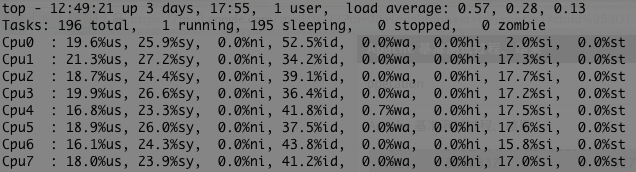
在生产环境中,我们通常不会用 Broadcom 的网卡,而是用 Intel 的 350 系列,给你看看线上的 IRQ 数量:
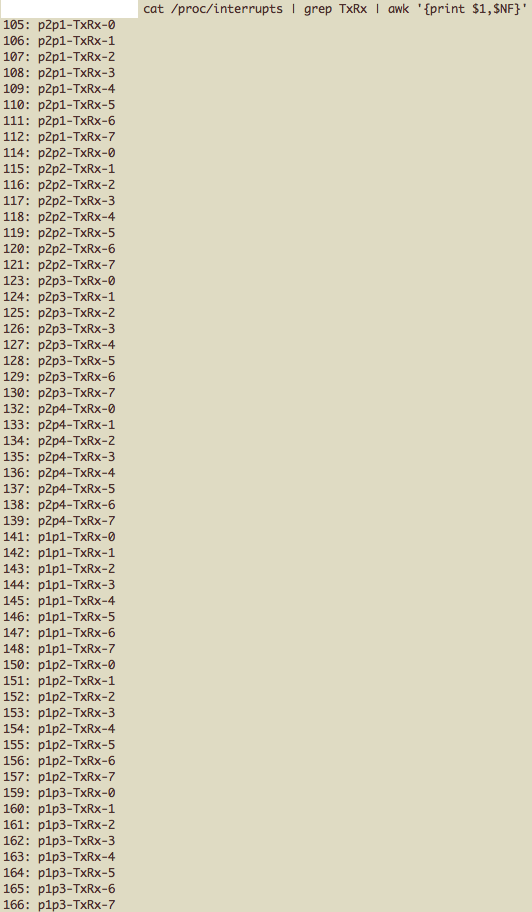
一屏幕有点显示不下,你自行脑补一下。

可惜的是,我有 64 个 IRQ,CPU 缺只有 12 个呢。
3. iptables raw 表
用了 LVS 的必定在用 iptables 吧,哪家公司的前端居然不用防火墙请尽快通知各位乌云白毛刷分啊~~
那么默认情况下 iptables 也会记录 connection 的状态呢,很多情况下,我并不需要 iptables 来做这件事,怎么办呢?没关系,我们有 raw 表:
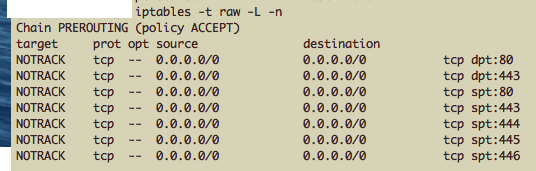
是的,我们可以告诉它 NOTRACK,别记录啦~
最后回到楼主的问题,LVS 有极限么?我不知道,我只能说,我还没看到极限。2008 年的时候,我也用一台 Dell 1950(和今天 1950 配置不同) 做了大约2个月的测试,那个时候压到 10w connections 是妥妥的。
今天我们用 Dell R420 Xeon E5-2430 ,能上到多少?我是真不知道了…… 因为压一台 LVS ,前端发压力的机器,和后端做 RealServer 的机器实在是需要太多了,办公环境局限,我真搞不出这么多机器了。
目前大约 PV 3亿每天,connection PS 估计只有 4K, package PS 大约是 50K,压力是什么状况?我都不好意思说:
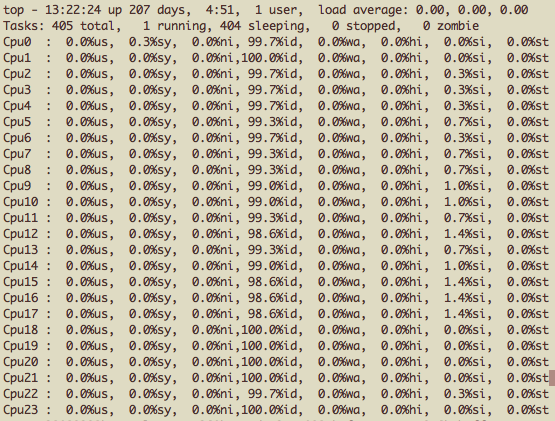
所以题主的 900K Package PS 距离极限还很远呢。
我也希望谁能弄个 64 Core 的机器,再找个几十台前后端,好好的压一压看个结果,然后心里也有个答案。
--------
题主啊,我又想起来一件事,你后面的 Real Server 是否开启了 syn cookie ? 这是否是你丢包的原因呢?我刚才自己也在想 ipvs 是否会被系统层面的 syn cookie 影响,后来想想不太可能,因为 syn cookie 的逻辑必须有应用层接管的时候才能触发。ipvs 上根本没有应用层呢。
后来看到这个邮件 [lvs-users] IPVS SYN-cookies ,发现基本的思路和我一致,所以问题就变成了,你的 Real Server 是否有 syn cookie 呢?



稍微补充下:
一、前言:
曾负责整IDC入口LVS, 单机流量10G+, 用于web、mysql、RMQ等场景, 经历过多次LVS的CPU跑满引致的故障, 分享一点优化经验
二、楼主硬件:
Dell-1950属2008年古董机型,庆幸LVS只依赖网卡和CPU,内存带宽不太敏感;connection_table调为20bit(100w)只占2G内存, 楼主机器够用.
三、软件优化:
传统LB_MODE中, 性能从高到底: DR、TUNNEL、NAT. DR模式回包不经LVS, 少了响应包的处理, 故CPU的softirq%会下降, 同CPU使用率下DR模式的PPS显著上升, 楼主追求极限则用DR吧, 若线上RealServer大于254台(一子网),可考虑Tunnel
四、各场景极限性能:
- 开源版LVS(图-1):
物理机:24核32G万兆网卡Dell-R730,
过程:网卡还没跑满10G(250Mbps), CPU已跑满90%, 因软中断不均匀
极限: 新建连接数5w
- 改内核LVS
业界大佬:腾讯TGW, 美团LVS
物理机:16核32G
过程:10G+流量, 每秒新建连接数100w+.
结论: 改内核后LVS性能可10倍于开源版LVS,最好能有C内核能力
五、内核级优化:
楼主若有C基础,可看看LVS和协议栈源码,还有很大优化空间的,另一种趋势是byPass kernel的DPDK, 我也做过一个DPDK-LVS的版本, 后续我个心得分析下

 浙公网安备 33010602011771号