多表关联查询N+1查询(多对一)
查询所有学生及其对应的班级信息
数据库准备:
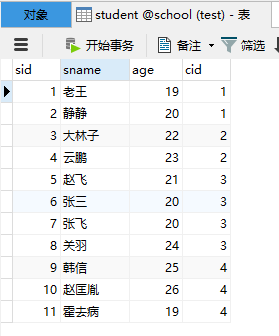
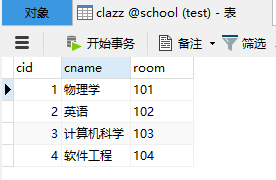
一、业务装配实现多表查询(手动)
mapper层只做单表查询操作,在service层进行手动装配,实现关联查询的结果
-- sql语句查询
select * from student s join clazz c on s.cid = c.cid;
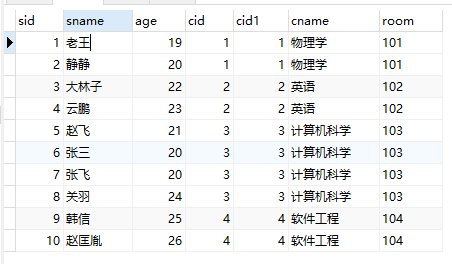
pojo类
//学生类(多)
public class Student implements Serializable {
  private long sid;
  private String sname;
  private long age;
  private long cid;
  //多对一,多中持有一的对象
  private Clazz clazz;

  getter()/setter()
  toString()
}
//班级类(一)
public class Clazz implements Serializable {

  private long cid;
  private String cname;
  private String room;

  getter()/setter()
  toString()
}
1.手动在service层装配
1.1 mapper
接口:
public interface StudentMapper {
    //查询学生信息及其所在班级的信息
    public List<Student> getStu();
}

public interface ClazzMapper {
    //查询班级信息
    public Clazz getClazzByCid(int cid);
}
1.2 xml映射文件:
<mapper namespace="com.yd.mapper.StudentMapper">
    <cache></cache>
    <select id="getStu" resultType="Student">
        select * from student
    </select>
</mapper>

<mapper namespace="com.yd.mapper.ClazzMapper">
    <cache></cache>

    <select id="getClazzByCid" resultType="Clazz">
        select * from clazz where cid = #{param1}
    </select>
</mapper>
1.3 运行代码:
@Test
public void getStuWithClz(){
    //查学生信息
    List<Student> students = studentMapper.getStu();
    for (Student s:students) {
        int cid = (int)s.getCid();
        Clazz clazz = clazzMapper.getClazzByCid(cid);
        //手动装配学生类中的Clazz信息
        s.setClazz(clazz);
    }
    System.out.println(students);
    sqlSession.close();
}
查询结果:
[Student{sid=1, sname='老王', age=19, cid=1, clazz=Clazz{cid=1, cname='物理学', room='101'}}, Student{sid=2, sname='静静', age=20, cid=1, clazz=Clazz{cid=1, cname='物理学', room='101'}},....]
二、使用resultMap方式实现N+1
在配置文件中直接完成装配
2.1 mapper接口(不变):
public interface StudentMapper {
    //查询学生信息及其所在班级的信息
    public List<Student> getStu();
}

public interface ClazzMapper {
    //查询班级信息
    public Clazz getClazzByCid(int cid);
}
2.2 xml映射文件
<association>用于关联一个对象
-
property: 指定要关联的属性名
-
select: 设定要继续引用的查询, namespace+id
-
column: 查询时需要传递的列
-
javaType:返回的类型
<mapper namespace="com.yd.mapper.StudentMapper">
    <cache></cache>

    <resultMap id="rm" type="Student">
        <!-- 属性名与数据库列名相同可以省略-->
    <!--<id property="sid" column="sid"></id>-->
    <!--<result property="sname" column="sname"></result>-->
    <!--<result property="age" column="age"></result>-->
    <!--外键要写上,不可以省略-->
    <result property="cid" column="cid"></result>
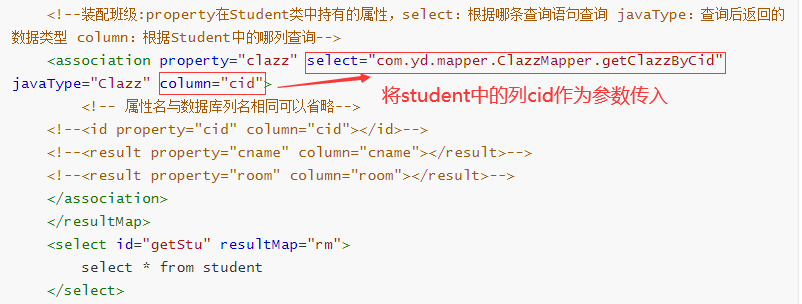
    <!--装配班级:property在Student类中持有的属性,select:根据哪条查询语句查询 javaType:查询后返回的数据类型 column:根据Student中的哪列查询-->
    <association property="clazz" select="com.yd.mapper.ClazzMapper.getClazzByCid" javaType="Clazz" column="cid">
        <!-- 属性名与数据库列名相同可以省略-->
	<!--<id property="cid" column="cid"></id>-->
	<!--<result property="cname" column="cname"></result>-->
	<!--<result property="room" column="room"></result>-->
    </association>
    </resultMap>
    <select id="getStu" resultMap="rm">
        select * from student
    </select>
</mapper>


<mapper namespace="com.yd.mapper.ClazzMapper">
    <cache></cache>

    <select id="getClazzByCid" resultType="Clazz">
        select * from clazz where cid = #{param1}
    </select>
</mapper>
2.3 运行代码:
由于装配已经完成, service 层只需要调用 mapper 即可, 不需要再进行装配了.
@Test
public void getStuWithClz(){
    List<Student> students = studentMapper.getStu();
    System.out.println(students);
}
查询结果:
[Student{sid=1, sname='老王', age=19, cid=1, clazz=Clazz{cid=1, cname='物理学', room='101'}}, Student{sid=2, sname='静静', age=20, cid=1, clazz=Clazz{cid=1, cname='物理学', room='101'}},....]
三、resultMap的sql关联语句方式实现(N+1)
利用sql的关联查询直接查出所有结果
3.1 mapper接口
- 不需要关联对象单独查询,一次查所有
public interface StudentMapper {
    //查询学生信息及其所在班级的信息
    public List<Student> getStuBySql();
}
3.2 xml映射文件
-
在 StudentMapper.xml 中定义多表连接查询 SQL 语句, 一次性查到需要的所有数据, 包括对应班级的信息.
-
通过<resultMap>定义映射关系, 并通过<association>指定对象属性的映射关系. 可以<association>看成一个
<resultMap>使用. javaType 属性表示当前对象的类型, 可以写全限定路径或别名.
<resultMap id="rm2" type="Student">
    <id property="sid" column="sid"></id>
    <!-- 属性名与数据库列名的映射关系不能省略-->
    <result property="sname" column="sname"></result>
    <result property="age" column="age"></result>
    <result property="cid" column="cid"></result>
    <association property="clazz" javaType="Clazz">
        <!-- 属性名与数据库列名的映射关系不能省略-->
        <id property="cid" column="cid"></id>
        <result property="cname" column="cname"></result>
        <result property="room" column="room"></result>
    </association>
</resultMap>
<!-- 两种语句均可,第一种可查询时去除同名列,效率比第二种高-->
<select id="getStuBySql" resultMap="rm2">
    select s.sid,s.sname,s.age,s.cid,c.cname,c.room from student s join clazz c on s.cid = c.cid
    <!-- select * from student s join clazz c on s.cid = c.cid -->
</select>
3.3 运行代码:
@Test
public void getStuBySql(){
    List<Student> students = studentMapper.getStuBySql();
    System.out.println(students);
}
查询结果:

四、总结
- 前两种装配方式中,外键装配的信息需要进行多次查询;
- 第三种关联查询只要查一次;
- 前两中装配方式中,xml映射文件中属性和列名相同的可以省略不写;关联查询中,所有列名都必须写上
- 若属性(列)过多,推荐使用前两种装配方式。

 浙公网安备 33010602011771号