
原文:http://blog.csdn.net/jiutao_tang/article/details/6563646
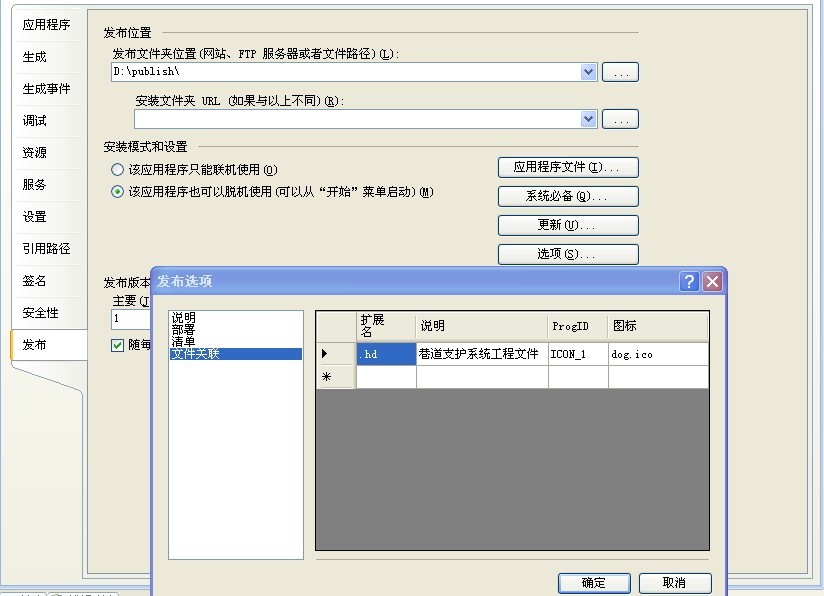
事实上有三种方式可以实现文件类型的注册,笔者在网上看到的都是手动实现的或程序实现的,其实也可以直接在工程属性里进行设置。
1. 工程属性定义
项目--->工程属性--->发布--->选项--->文件关联--->设置扩展名、说明、ProgID(自定义)、图标即可。
2. 手工实现文件类型关联
每一个文件类型的信息被保存在注册表中的 'HKEY_CLASSES_ROOT'下面。假设我们自定义的文件类型的后缀为.hyp,文件名为Test_File_Hype (中间不能有空格).
首先在HKEY_CLASSES_ROOT下创建 .hyp
HKEY_CLASSES_ROOT/.hyp
将[默认]键值改为"Test_File_Hype"。然后在HKEY_CLASSES_ROOT下添加主键 Test_File_Hype
HKEY_CLASSES_ROOT/Test_File_Hype
按照下面的路径添加新的主键
HKEY_CLASSES_ROOT/Test_File_Hype/Shell
HKEY_CLASSES_ROOT/Test_File_Hype/Shell/Open
HKEY_CLASSES_ROOT/Test_File_Hype/Shell/Open/Command
将下面的字符作为Command的键值
your application path.exe %1
(例如 C:/WINDOWS/HYP/HYP.EXE %1)
或许你还想为自己的文件类型加上同自己的执行文件一样的图标,很简单,照下面的方法添加就行了。
HKEY_CLASSES_ROOT/Test_File_Hype/DefaultIcon
输入键值:
your application path.EXE,0
后面的零表示文件的图标同程序的主图标一致,如果你的程序有很多图标,换一换数字就可改变文件显
参考:http://www.codesky.net/article/doc/200308/2003082482622669.htm
3. C#编程实现自定义文件类型关联应用程序
在我们自己编写的应用中,经常会用自定义类型的文件的来保存与应用相关的数据,比如.xcf文件就是XCodeFactory应用程序的项目文件。如果没 有向Windows注册表注册该文件类型,那么.xcf文件的图标将是windows的文件默认图标,并且你双击一个a.xcf文件,也不会自动启动 XCodeFactory应用程序来加载a.xcf文件。如何使.xcf文件的图标变成我自己喜爱的图标、如何完成像点击.doc文件就自动打开word 程序的功能,下面将告诉你解决方案。
我们可以通过手动修改注册表来完成上述任务,更好的方式是,通过程序来实现。这样,在安装应用程序时,就可以自动的注册自定义文件类型 了。我通过FileTypeRegister静态类来完成这些功能。首先,将注册需要用到的信息封装成FileTypeRegInfo,定义如下:
- public class FileTypeRegInfo
- {
- /// <summary>
- /// 目标类型文件的扩展名
- /// </summary>
- public string ExtendName; //".xcf"
- /// <summary>
- /// 目标文件类型说明
- /// </summary>
- public string Description; //"XCodeFactory项目文件"
- /// <summary>
- /// 目标类型文件关联的图标
- /// </summary>
- public string IcoPath;
- /// <summary>
- /// 打开目标类型文件的应用程序
- /// </summary>
- public string ExePath;
- public FileTypeRegInfo()
- {
- }
- public FileTypeRegInfo(string extendName)
- {
- this.ExtendName = extendName;
- }
- }
FileTypeRegister类主要是操作注册表中的内容,实现如下:
- /// <summary>
- /// FileTypeRegister 用于注册自定义的文件类型。
- /// zhuweisky 2005.08.31
- /// </summary>
- public class FileTypeRegister
- {
- #region RegisterFileType
- /// <summary>
- /// RegisterFileType 使文件类型与对应的图标及应用程序关联起来。
- /// </summary>
- public static void RegisterFileType(FileTypeRegInfo regInfo)
- {
- if (FileTypeRegistered(regInfo.ExtendName))
- {
- return;
- }
- string relationName = regInfo.ExtendName.Substring(1, regInfo.ExtendName.Length - 1).ToUpper() + "_FileType";
- RegistryKey fileTypeKey = Registry.ClassesRoot.CreateSubKey(regInfo.ExtendName);
- fileTypeKey.SetValue("", relationName);
- fileTypeKey.Close();
- RegistryKey relationKey = Registry.ClassesRoot.CreateSubKey(relationName);
- relationKey.SetValue("", regInfo.Description);
- RegistryKey iconKey = relationKey.CreateSubKey("DefaultIcon");
- iconKey.SetValue("", regInfo.IcoPath);
- RegistryKey shellKey = relationKey.CreateSubKey("Shell");
- RegistryKey openKey = shellKey.CreateSubKey("Open");
- RegistryKey commandKey = openKey.CreateSubKey("Command");
- commandKey.SetValue("", regInfo.ExePath + " %1");
- relationKey.Close();
- }
- /// <summary>
- /// GetFileTypeRegInfo 得到指定文件类型关联信息
- /// </summary>
- public static FileTypeRegInfo GetFileTypeRegInfo(string extendName)
- {
- if (!FileTypeRegistered(extendName))
- {
- return null;
- }
- FileTypeRegInfo regInfo = new FileTypeRegInfo(extendName);
- string relationName = extendName.Substring(1, extendName.Length - 1).ToUpper() + "_FileType";
- RegistryKey relationKey = Registry.ClassesRoot.OpenSubKey(relationName);
- regInfo.Description = relationKey.GetValue("").ToString();
- RegistryKey iconKey = relationKey.OpenSubKey("DefaultIcon");
- regInfo.IcoPath = iconKey.GetValue("").ToString();
- RegistryKey shellKey = relationKey.OpenSubKey("Shell");
- RegistryKey openKey = shellKey.OpenSubKey("Open");
- RegistryKey commandKey = openKey.OpenSubKey("Command");
- string temp = commandKey.GetValue("").ToString();
- regInfo.ExePath = temp.Substring(0, temp.Length - 3);
- return regInfo;
- }
- /// <summary>
- /// UpdateFileTypeRegInfo 更新指定文件类型关联信息
- /// </summary>
- public static bool UpdateFileTypeRegInfo(FileTypeRegInfo regInfo)
- {
- if (!FileTypeRegistered(regInfo.ExtendName))
- {
- return false;
- }
- string extendName = regInfo.ExtendName;
- string relationName = extendName.Substring(1, extendName.Length - 1).ToUpper() + "_FileType";
- RegistryKey relationKey = Registry.ClassesRoot.OpenSubKey(relationName, true);
- relationKey.SetValue("", regInfo.Description);
- RegistryKey iconKey = relationKey.OpenSubKey("DefaultIcon", true);
- iconKey.SetValue("", regInfo.IcoPath);
- RegistryKey shellKey = relationKey.OpenSubKey("Shell");
- RegistryKey openKey = shellKey.OpenSubKey("Open");
- RegistryKey commandKey = openKey.OpenSubKey("Command", true);
- commandKey.SetValue("", regInfo.ExePath + " %1");
- relationKey.Close();
- return true;
- }
- /// <summary>
- /// FileTypeRegistered 指定文件类型是否已经注册
- /// </summary>
- public static bool FileTypeRegistered(string extendName)
- {
- RegistryKey softwareKey = Registry.ClassesRoot.OpenSubKey(extendName);
- if (softwareKey != null)
- {
- return true;
- }
- return false;
- }
- #endregion
- }
要注意的是commandKey.SetValue("" ,regInfo.ExePath + " %1") ;其中" %1"表示将被双击的文件的路径传给目标应用程序,这样在双击a.xcf文件时,XCodeFactory才知道要打开哪个文件,所以应用程序的Main方法要被改写为带有参数的形式,就像下面的样子:
- [STAThread]
- static void Main(string[] args)
- {
- if ((args != null) && (args.Length > 0))
- {
- string filePath = "";
- for (int i = 0; i < args.Length; i++)
- {
- filePath += " " + args[i];
- }
- MainForm.XcfFilePath = filePath.Trim();
- }
- Application.Run(new MainForm());
- }
关于自定义文件类型的注册,本文实现的是最基本的功能,如果需要更多的高级功能,也可以类推实现之。
注:
(1)应用程序的Main方法在Program.cs文件中,可以把原来无参的main方法注释掉;
(2)MainForm就是应用程序的启动窗体,可以改为自己的
(3)filePath.Trim() 就是获取的文件路径了
(4)using Microsoft.Win32; //RegistryKey 位于 Microsoft.Win32 命名空间
(5)注册文件类型后,文件图标可能并不会立即生效(需注销登录或重启Explorer进程)。我们可以采取重启Explorer进程的方式使之立即生效,可参考示例程序中的代码。
我的一个实例:在Form_load事件中进行注册:
- private void Form1_Load(object sender, EventArgs e)
- {
- action = true;
- if (!FileTypeRegister.FileTypeRegistered(".hd")) //如果文件类型没有注册,则进行注册
- {
- FileTypeRegInfo fileTypeRegInfo = new FileTypeRegInfo(".hd"); //文件类型信息
- fileTypeRegInfo.Description = "巷道支护系统工程文件";
- fileTypeRegInfo.ExePath = Application.ExecutablePath;
- fileTypeRegInfo.ExtendName = ".hd";
- fileTypeRegInfo.IcoPath = Application.ExecutablePath; //文件图标使用应用程序的
- FileTypeRegister fileTypeRegister = new FileTypeRegister(); //注册
- FileTypeRegister.RegisterFileType(fileTypeRegInfo);
- Process[] process = Process.GetProcesses(); //重启Explorer进程,使更新立即生效
- var p = (from proc in process
- where proc.ProcessName.Equals("explorer")
- select proc).FirstOrDefault();
- p.Kill();
- }
- }
参考:http://www.chenjiliang.com/Article/View.aspx?ArticleID=527&TypeID=79
