


内网服务器连接互联网apt指令
刚把内网的服务器配置好,PC在工位可以通过有线网接入内网,PC可以访问互联网,但是内网的服务器没法访问互联网。
这导致一个尴尬的情况,虽然PC能通过ssh连接服务器,但是在服务器上配环境麻烦到家了,连最简单的apt指令都用不了。
这里需要通过SSH反向代理,来让apt能够获取网络资源。
通过ssh连接服务器:
ssh username@server_ip在PC上安装clash,这里用的clash verge
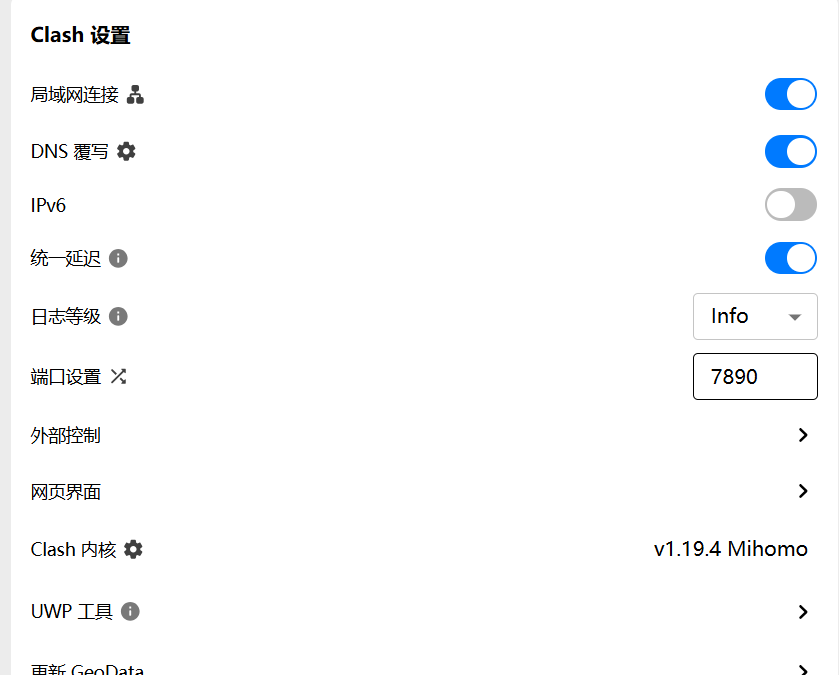
默认混合代理端口为7890
新开一个终端窗口,再次连接服务器:
ssh -R serverip:7891:127.0.0.1:7890 servername@serverip然后在该窗口上执行:
export https_proxy=http://127.0.0.1:7891 http_proxy=http://127.0.0.1:7891 all_proxy=socks5://127.0.0.1:7891直接在执行时临时指定代理:
sudo apt-get -o Acquire::http::Proxy="http://127.0.0.1:7891/" install python3-venv这里可能存在一个问题,就是服务器本身ssh配置可能默认禁止了这种连接方式,它可能在连接时输出这个:Warning: remote port forwarding failed for listen port 7891
这里只需要去它的配置文件里改一下,然后重启ssh服务就完事了
vim vim /etc/ssh/sshd_config修改
gatewayports yes
allowtcpforwarding yes
然后重启
systemctl restart sshd然后把上述开个新窗口ssh连接的步骤再重复一遍就完事了。
pip操作指定代理:pip install --proxy http://127.0.0.1:7891 -r requirements.txt
wget操作指定代理:
wget -e use_proxy=yes -e http_proxy=127.0.0.1:7891 -e https_proxy=127.0.0.1:7891 https://cn.download.nvidia.com/XFree86/Linux-x86_64/580.95.05/NVIDIA-Linux-x86_64-580.95.05.run

 浙公网安备 33010602011771号