
lazyvim 折腾日记(3)
lazyvim 折腾日记(3)
前言
在调整了能够输入中文输入法后, 可以对 lazyvim 的 ui 进行适当的调整, 在本文中主要针对 lualine 以及 bufferline 进行调整
具体操作
在本次 ui 的调整中涉及 lualine 以及 bufferline 两个插件
其中, lualine 是 lazyvim 底下的状态栏, bufferline 是顶部的状态栏
本文新建一个配置文件对以上两个插件进行配置
$> mkdir ui
$> touch ./ui/init.lua
$> pwd
/home/soapsu/.config/nvim/lua/plugins
$> tree -L 2
.
├── ai
│   └── init.lua
├── cmp
│   └── init.lua
├── dadbod
│   └── init.lua
├── java
│   └── init.lua
├── nvim-treesitter
│   └── init.lua
├── rime-ls
│   └── init.lua
├── ui
│   └── init.lua # 新建配置文件
└── zh-input
    └── init.lua

9 directories, 8 files
lualine 插件配置
lualine 配置的是 lazyvim 底下的状态栏
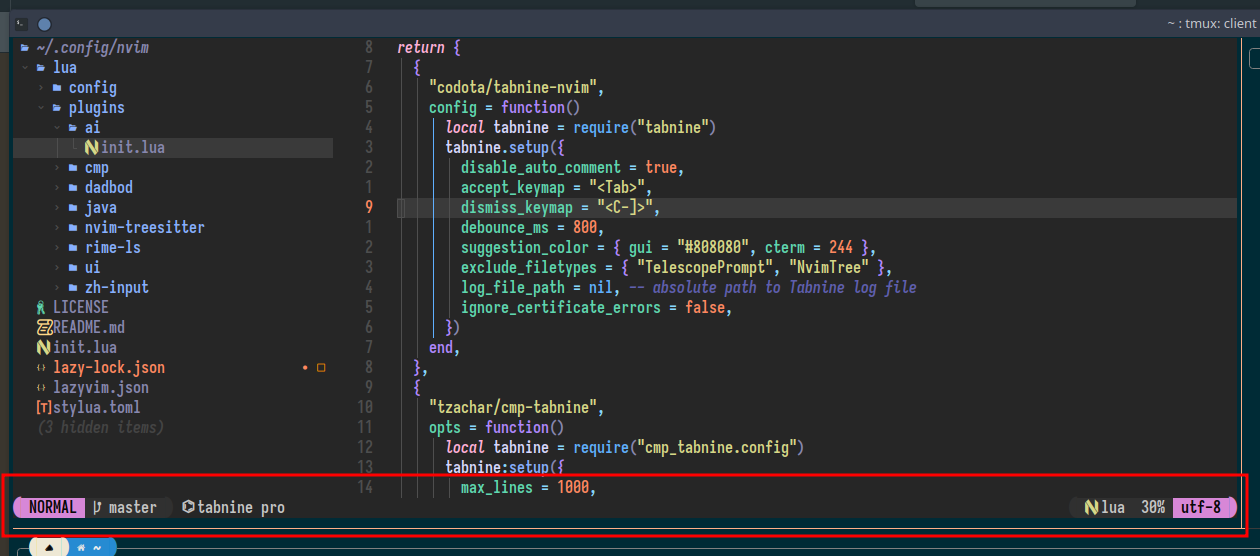
对于该状态栏, 有两大点可以进行配置
- 状态栏样式
- 状态栏显示内容
lualine 样式
如 lualine 主页 screenshot 章节所示, 可以根据需要调整 lualine 样式, 为配合前文 tmux 的配置, 在本文中以 bubbles 为主题进行配置
在 init.lua 中加入bubbles 主题配置 片段即可完成配置
lualine 显示内容
如图所示, lualine 可以在不同的地方对显示内容进行配置
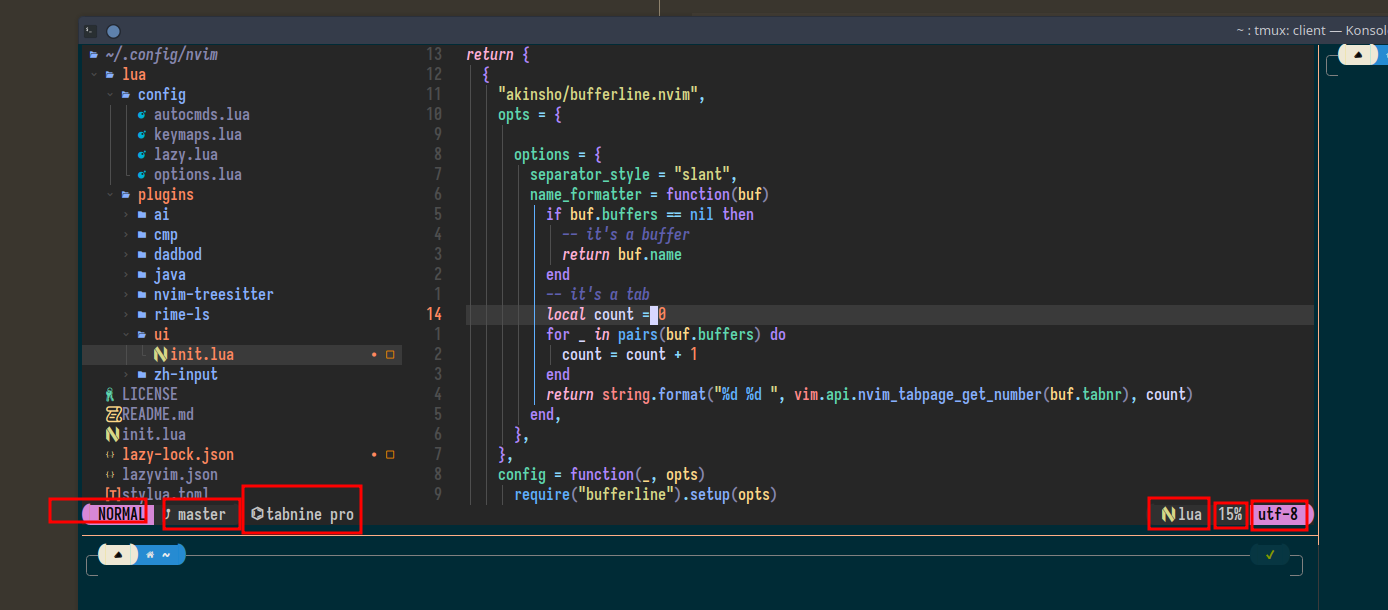
其配置内容于文档中有涉及, lualine_a/b/c x/y/x 分别上图由左至右的四个方框
而其可配置的内容于文档, 中也有涉及
由于 lualine 的配置内容被 lazyvim 默认配置所覆盖, lazyvim 的 lualine 默认 globalstatus 为 true 状态, 导致多窗口无法显示多个 lualine
这其中涉及到了 sections 与 inactive_sections 的配置能否同时生效的问题, 基于以上论述, 给出最终配置内容
最终配置内容
return {
{
"nvim-lualine/lualine.nvim",
dependencies = { "nvim-tree/nvim-web-devicons" },
opts = function()
local colors = {
blue = "#80a0ff",
cyan = "#79dac8",
black = "#080808",
white = "#c6c6c6",
red = "#ff5189",
violet = "#d183e8",
grey = "#303030",
}
local bubbles_theme = {
normal = {
a = { fg = colors.black, bg = colors.violet },
b = { fg = colors.white, bg = colors.grey },
c = { fg = colors.white },
},
insert = { a = { fg = colors.black, bg = colors.blue } },
visual = { a = { fg = colors.black, bg = colors.cyan } },
replace = { a = { fg = colors.black, bg = colors.red } },
inactive = {
a = { fg = colors.white, bg = colors.black },
b = { fg = colors.white, bg = colors.black },
c = { fg = colors.white },
},
}
local opts = {
options = {
theme = bubbles_theme,
component_separators = "",
section_separators = { left = "", right = "" },
globalstatus = false,
},
sections = {
lualine_a = { { "mode", separator = { left = "" }, right_padding = 2 } },
lualine_b = { "branch" },
lualine_c = {
"%=", --[[ add your center compoentnts here in place of this comment ]]
},
lualine_x = {},
lualine_y = { "filetype", "progress" },
lualine_z = {
{ "encoding", separator = { right = "" }, left_padding = 2 },
},
},
inactive_sections = {
lualine_a = { "filename" },
lualine_b = {},
lualine_c = {},
lualine_x = {},
lualine_y = {},
lualine_z = { "encoding", "location" },
},
tabline = {},
extensions = {},
}
return opts
end,
}
}
bufferline 插件配置
bufferline 可作为 lazyvim 的顶栏进行安装配置
以下是 bufferline 的具体配置
{
    "akinsho/bufferline.nvim",
    opts = {
      options = {
        separator_style = "slant",
        name_formatter = function(buf)
          if buf.buffers == nil then
            return buf.name
          end
          local count = 0
          for _ in pairs(buf.buffers) do
            count = count + 1
          end
          return string.format("%d %d ", vim.api.nvim_tabpage_get_number(buf.tabnr), count)
        end,
      },
    },
    config = function(_, opts)
      require("bufferline").setup(opts)
      vim.keymap.set("n", "gb", "<cmd>BufferLinePick<CR>")
    end,
  }
separator 选项为 bufferline 的样式, 具体样式可参考 :h bufferline-styling
name_formatter 选项为 bufferline 的显示内容
设置的 keymap 是为了能够快捷选择 buffer
总结
没必要搞太多的 ui 适合自己就好

 浙公网安备 33010602011771号