

第15章、ssh,为 Secure Shell 的缩写,可以代替Telnet的安全协议。telnet是不安全的,在网络上用明文传送口令和数据,安全验证方式容易受到“中间人”(man-in-the-middle)的攻击。
简单网络管理语言(Simple Network Management Language)是一种类自然语言的脚本语言,它采用snmp、telnet、ping、dns、arp、ssh、tcp、udp、web等协议访问网络设备,内置smtp协议用于告警等邮件的发送,支持excel、mysql、sqlite等3种方式进行网管数据的存取。
最新版本: snml8.13(ladybird20200205) utf8&ipv6
项目托管地址:https://github.com/ladybirdSnml/snmlipv6utf8snmptelnetsshweb
打包下载:https://ladybirdsnml.github.io/snmlipv6utf8snmptelnetsshweb/snml_utf8ipv6.zip
本手册编辑日期:20200205
技术支持邮箱1:ladybird_snml@protonmail.com
技术支持邮箱2:ladybird_snml@hotmail.com
简单网络管理语言(snml)支持CLI(命令行接口)和SNMP(简单网络管理协议)两种方式自动化的进行网络设备配置和管理。CLI 是基于telnet、ssh的人机交互界面,用于设备的参数配置和状态的查看。SNMP 是基于通讯协议的管理工具,实现网络设备参数的自动化监控和远程配置。
网络设备的配置和管理的新技术是SDN(Software Defined Netrork)。软件定义网络是2006年斯坦福大学提出的网络设备分层编程控制系统,全新的网络设备自动化配置和管理体系。
手册最新版:https://ladybirdsnml.github.io/snmlipv6utf8snmptelnetsshweb/snmldoc_utf8ipv6.html
第15章、ssh
SSH 为 Secure Shell 的缩写,可以代替Telnet的安全协议。telnet是不安全的,在网络上用明文传送口令和数据,安全验证方式容易受到“中间人”(man-in-the-middle)的攻击。
1、ssh语句分析
ssh.connect ip {192.168.186.132} port {22} username {cisco} password {cisco}
登录远程设备,设备的IPV4地址为:192.168.186.132,服务端口号为:22,用户名“cisco”密码“cisco”
ssh.connect ip {FE80::1} port {22} username {cisco} password {cisco}
登录远程设备,设备的IPV6 地址为:[FE80::1],服务端口号为:22,用户名“cisco”密码“cisco”
ssh.set onrecv {-More-} send { %0a}
设置ssh自动输入选项,当接收到“-More-”时,自动发送一个空格和换行符
ssh.recv expect {Version}
接收服务器发送的文本,一直接收到指定字符串“Version”
ssh.recv for {3} seconds
接收3秒钟内服务器发送的文本,当服务器发送的文本中含有“-More-”时,自动发送一个空格和换行符
ssh.send {show version%0a}
发送字符串“show version”命令和换行键。
ssh.send text
发送选中的文本区域
ssh.close
关闭ssh连接。
2、示例脚本[C:\snmlipv6\ssh\ssh_ipv4.txt]
| C:\snmlipv6\ssh\ssh_ipv4.txt | |
|---|---|
| 001 | screen.text at point {150} {30} string {15. ssh (ipv4) Test, (use ssh you need to get ssh.key License File)} |
| 002 | var {v_y} value {60} |
| 003 | screen.text at point {10} {~v_y~} string {No. server ip:port send command recv } |
| 004 | |
| 005 | screen.line from point {10} {75} to point {30} {75} |
| 006 | screen.line from point {50} {75} to point {270} {75} |
| 007 | screen.line from point {300} {75} to point {630} {75} |
| 008 | |
| 009 | screen.text at point {10} {425} string {1. run ssh_req.bat 2. send email with file ssh_req.txt%0d%0a} |
| 010 | screen.text at point {10} {450} string {email1: ladybird_snml@protonmail.com, email2: ladybird_snml@hotmail.com%0d%0a} |
| 011 | |
| 012 | var {v_time} value datetime |
| 013 | var {v_i} value {0} |
| 014 | run.set loglevel {debug} |
| 015 | loop.begin |
| 016 | |
| 017 | var {v_i} add number {1} |
| 018 | var {v_y} add number {18} |
| 019 | |
| 020 | ssh.connect ip {192.168.186.132} port {22} username {cisco} password {cisco} |
| 021 | ssh.set onrecv {-More-} send { %0a} |
| 022 | ssh.recv for {3} seconds |
| 023 | ssh.send {show version%0a} |
| 024 | ssh.recv expect {Version} |
| 025 | ssh.recv for {3} seconds |
| 026 | ssh.close |
| 027 | text.headpointer move to head |
| 028 | text.tailpointer move to tail |
| 029 | text.save append to file {C:\snmlipv6\ssh\ssh_out_ipv4~v_i~.txt} |
| 030 | screen.text at point {10} {~v_y~} string {~v_i~} |
| 031 | screen.text at point {50} {~v_y~} string {192.168.186.132:22 send 'show version'} |
| 032 | screen.text at point {300} {~v_y~} string {ssh.recv : ~text.bytes~ Bytes } |
| 033 | text.delete from headpointer |
| 034 | |
| 035 | if.var {v_y} > {100} |
| 036 | loop.exit |
| 037 | if.end |
| 038 | loop.end |
| 039 | run.end |
脚本执行画面如下: 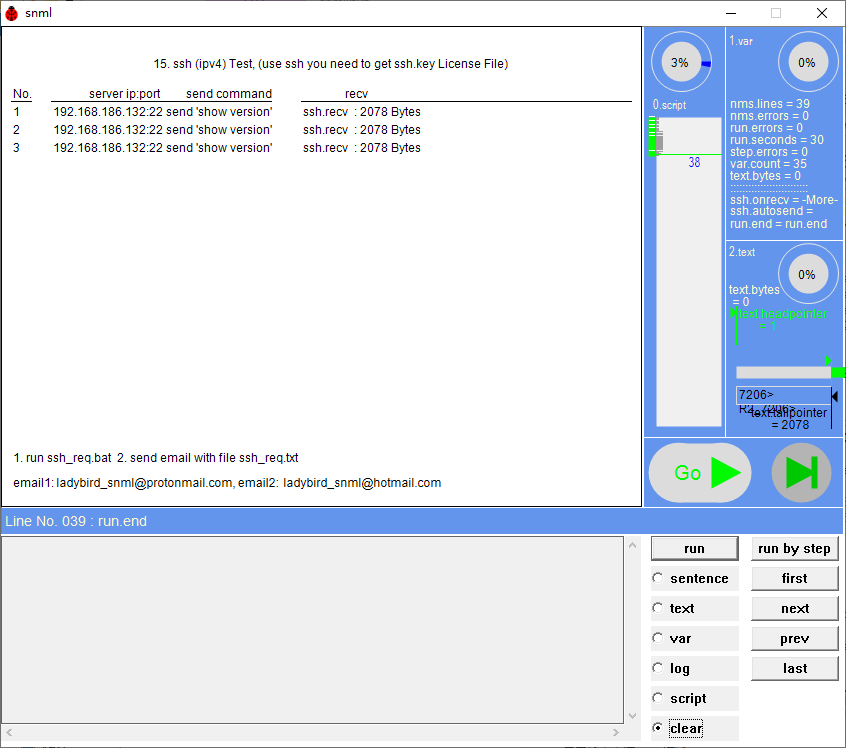
3、 示例脚本[C:\snmlipv6\ssh\sshreg_nms.txt]
| C:\snmlipv6\ssh\sshreg_nms.txt | |
|---|---|
| 001 | screen.text at point {150} {30} string {15. ssh Test, Ssh needs a License. Please write email to get ssh.key file.} |
| 002 | var {v_y} value {60} |
| 003 | |
| 004 | screen.line from point {10} {75} to point {630} {75} |
| 005 | screen.line from point {10} {425} to point {630} {425} |
| 006 | |
| 007 | |
| 008 | screen.text at point {10} {80} string {1. run ssh_req.bat 2. send email with file ssh_req.txt%0d%0a} |
| 009 | screen.text at point {10} {100} string {email1: ladybird_snml@protonmail.com, email2: ladybird_snml@hotmail.com%0d%0a} |
| 010 | |
| 011 | var {v_time} value datetime |
| 012 | var {v_i} value {0} |
| 013 | |
| 014 | text.add {run.version=[~run.version~]%0d%0a} |
| 015 | text.add {run.arg.1=[~run.arg.1~]%0d%0a} |
| 016 | text.add {v_time=[~v_time~]%0d%0a} |
| 017 | |
| 018 | text.add {os.type=[~os.type~]%0d%0a} |
| 019 | text.add {os.version=[~os.version~]%0d%0a} |
| 020 | |
| 021 | text.add {nic.ip=[~nic.ip~]%0d%0a} |
| 022 | text.add {nic.description=[~nic.description~]%0d%0a} |
| 023 | text.add {nic.mac=[~nic.mac~]%0d%0a} |
| 024 | |
| 025 | text.add {1. run ssh_req.bat 2. send email with file ssh_req.txt%0d%0a} |
| 026 | text.add {email1: ladybird_snml@protonmail.com, email2: ladybird_snml@hotmail.com%0d%0a} |
| 027 | |
| 028 | text.headpointer move to head |
| 029 | text.tailpointer move to tail |
| 030 | text.save append to file {C:\snmlipv6\ssh\ssh_req.txt} |
| 031 | |
| 032 | screen.text at point {120} {180} string { File C:\snmlipv6\ssh\ssh_req.txt created ok!, total ~text.bytes~ bytes.} |
| 033 | run.end |
脚本执行画面如下: 
4、示例脚本[C:\snmlipv6\ssh\ssh_ipv6.txt]
| C:\snmlipv6\ssh\ssh_ipv6.txt | |
|---|---|
| 001 | screen.text at point {150} {30} string {15.3 ssh (ipv6) Test, (use ssh you need to get ssh.key License File)} |
| 002 | var {v_y} value {60} |
| 003 | screen.text at point {10} {~v_y~} string {No. server ip:port send command recv } |
| 004 | |
| 005 | screen.line from point {10} {75} to point {30} {75} |
| 006 | screen.line from point {50} {75} to point {270} {75} |
| 007 | screen.line from point {300} {75} to point {630} {75} |
| 008 | |
| 009 | screen.text at point {10} {425} string {1. run ssh_req.bat 2. send email with file ssh_req.txt%0d%0a} |
| 010 | screen.text at point {10} {450} string {email1: ladybird_snml@protonmail.com, email2: ladybird_snml@hotmail.com%0d%0a} |
| 011 | |
| 012 | var {v_time} value datetime |
| 013 | var {v_i} value {0} |
| 014 | run.set loglevel {debug} |
| 015 | loop.begin |
| 016 | |
| 017 | var {v_i} add number {1} |
| 018 | var {v_y} add number {18} |
| 019 | |
| 020 | ssh.connect ip {FE80::1} port {22} username {cisco} password {cisco} |
| 021 | ssh.set onrecv {-More-} send { %0a} |
| 022 | ssh.recv for {3} seconds |
| 023 | ssh.send {show version%0a} |
| 024 | ssh.recv expect {Version} |
| 025 | ssh.recv for {3} seconds |
| 026 | ssh.close |
| 027 | text.headpointer move to head |
| 028 | text.tailpointer move to tail |
| 029 | text.save append to file {C:\snmlipv6\ssh\ssh_out_ipv4~v_i~.txt} |
| 030 | screen.text at point {10} {~v_y~} string {~v_i~} |
| 031 | screen.text at point {50} {~v_y~} string {[FE80::1]:22 send 'show version'} |
| 032 | screen.text at point {300} {~v_y~} string {ssh.recv : ~text.bytes~ Bytes } |
| 033 | text.delete from headpointer |
| 034 | |
| 035 | if.var {v_y} > {100} |
| 036 | loop.exit |
| 037 | if.end |
| 038 | loop.end |
| 039 | run.end |
脚本执行画面如下: 
目录: 1、var 2、screen 3、snmp 4、telnet 5、text 6、if 7、loop 8、dns 9、ping 10、arp 11、excel 12、smtp 13、tcp 14、udp 15、ssh 16、web 17、mysql 18、sqlite 19、Run 20、sys 21、macro 附录1、全部语句

 浙公网安备 33010602011771号