Nginx(六):Nginx模块配置
命令nginx -V获取NGINX详细信息
[root@smoker-linux nginx]# nginx -V
nginx version: nginx/1.14.0
built by gcc 4.8.5 20150623 (Red Hat 4.8.5-16) (GCC)
built with OpenSSL 1.0.2k-fips  26 Jan 2017
TLS SNI support enabled
configure arguments:
--prefix=/etc/nginx --sbin-path=/usr/sbin/nginx --modules-path=/usr/lib64/nginx/modules --conf-path=/etc/nginx/nginx.conf
--error-log-path=/var/log/nginx/error.log --http-log-path=/var/log/nginx/access.log --pid-path=/var/run/nginx.pid
--lock-path=/var/run/nginx.lock --http-client-body-temp-path=/var/cache/nginx/client_temp
--http-proxy-temp-path=/var/cache/nginx/proxy_temp --http-fastcgi-temp-path=/var/cache/nginx/fastcgi_temp
--http-uwsgi-temp-path=/var/cache/nginx/uwsgi_temp --http-scgi-temp-path=/var/cache/nginx/scgi_temp
--user=nginx --group=nginx
--with-compat --with-file-aio
--with-threads --with-http_addition_module
--with-http_auth_request_module
--with-http_dav_module --with-http_flv_module --with-http_gunzip_module
--with-http_gzip_static_module --with-http_mp4_module --with-http_random_index_module --with-http_realip_module
--with-http_secure_link_module --with-http_slice_module --with-http_ssl_module --with-http_stub_status_module
--with-http_sub_module --with-http_v2_module --with-mail --with-mail_ssl_module --with-stream --with-stream_realip_module
--with-stream_ssl_module --with-stream_ssl_preread_module
--with-cc-opt='-O2 -g -pipe -Wall -Wp,-D_FORTIFY_SOURCE=2 -fexceptions -fstack-protector-strong --param=ssp-buffer-size=4 -grecord-gcc-switches -m64 -mtune=generic -fPIC'
--with-ld-opt='-Wl,-z,relro -Wl,-z,now -pie'
--with-http_stub_status_module 展示当前NGINX处理连接的状态,监控Nginx当前连接的信息
http_stub_status_module的配置语法:
Syntax:stub_status
Default:——
Context:server,location
在Nginx default.conf中配置此模块:
在server下添加此配置
   location /mystatus{
        stub_status;
    }

#检查配置文件 确认没有问题
[root@smoker-linux conf.d]# nginx -tc /etc/nginx/nginx.conf
nginx: the configuration file /etc/nginx/nginx.conf syntax is ok
nginx: configuration file /etc/nginx/nginx.conf test is successful
[root@smoker-linux conf.d]#
#重载服务
[root@smoker-linux conf.d]# nginx -s reload -c nginx.con
在浏览器访问ip/mystatus 如下:
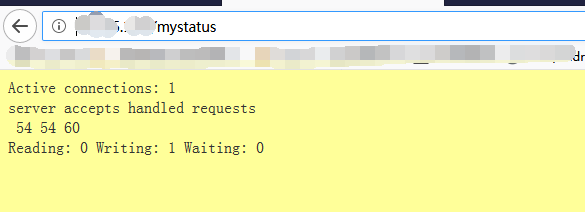
Active connections: 1  #Nginx当前连接的活跃数

server accepts handled requests
 54 54 60
第一个数表示Nginx接收握手的总次数
第二个数表示Nginx所处理的连接数
第三个数表示总的请求数
正常情况下 第一个数和第二个数相等 表示没有丢失

Reading: 0 Writing: 1 Waiting: 0
Reading 表示正在读的个数
Writing 表示正在写的个数
Waiting 表示当前空闲状态下的连接数(KeepAlive开启的情况下)
--with-http_random_index_module 目录中随机选择一个文件作为主页
http_random_index_module的配置:
Syntax:random_index on|off;
Default:random_index off;
Context:location
在Nginx中配置此模块:
在Nginx default.conf中配置此模块:
在server下修改location配置
    location / {
        root   /opt/app/code;
        random_index on;
    }
#放入多个html文件
[root@smoker-linux app]# cd code
[root@smoker-linux code]# ls
baseInfor.html  images  index.html  jay.html  movie.html  music.html  tvseries.html
输入浏览器地址 不断刷新 就会看到随机出现的页面
--with-http_sub_module
http_sub_module的配置1:
http内容替换
Syntax:sub_filter string replacement;
Default:—
Context:http,server,location
如下:
  location / {
        root   /opt/app/code;
        sub_filter '无标题文档' 'jay的不同主页';
    }

http_sub_module的配置2:
#此配置校验服务端内容是否有变更 有返回最新的内容没有就不再返回
Syntax:sub_filter_last_modified on|off;
Default:sub_filter_last_modified off;
Context:http,server,location

http_sub_module的配置3:
#用于设置字符串替换次数,默认只替换一次。如果是on,默认只替换第一次匹配到的到字 符,如果是off,那么所有匹配到的字符都会被替换;
Syntax:sub_filter_once on|off;
Default:sub_filter_once on;
Context:http,server,location;
如下:
    location / {
        root   /opt/app/code;
           #开启随机主页
     random_index on;
    #替换某个文本
     sub_filter '作品' '专辑';
    #开启替换所有匹配到的文本
    sub_filter_once off;
}

 浙公网安备 33010602011771号