

failover实验
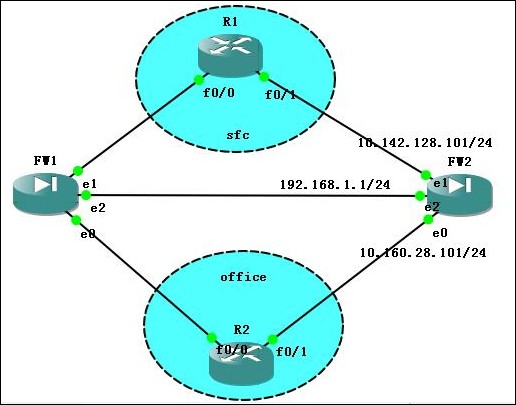
說明:
FW2 主防火牆 / FW1 輔防火牆
FW2主要配置:
interface Ethernet0
speed 100
duplex full
nameif office
security-level 0
ip address 10.160.28.101 255.255.255.0
!
interface Ethernet1
speed 100
duplex full
nameif sfc
security-level 0
ip address 10.142.128.101 255.255.255.0
!
interface Ethernet2
description LAN Failover Interface
speed 100
duplex full
failover
failover lan unit primary
failover lan interface failover Ethernet2
failover lan enable
failover key 123
failover interface ip failover 192.168.1.1 255.255.255.0 standby 192.168.1.2
FW1輔防火牆主要配置:
failover
failover lan unit secondary
failover lan interface failover Ethernet2
failover lan enable
failover polltime unit 8 holdtime 24
failover key 123
failover interface ip failover 192.168.1.1 255.255.255.0 standby 192.168.1.2
配置成功會有提示,而且你可通過show failover,查看:
pixfirewall# sh failover
Failover On
Cable status: N/A - LAN-based failover enabled
Failover unit Primary
Failover LAN Interface: failover Ethernet2 (up)
Unit Poll frequency 8 seconds, holdtime 24 seconds
Interface Poll frequency 5 seconds, holdtime 25 seconds
Interface Policy 1
Monitored Interfaces 2 of 250 maximum
Version: Ours 8.0(4), Mate 8.0(4)
Last Failover at: 08:16:39 UTC Feb 11 2011
This host: Primary - Active
Active time: 464 (sec)
Interface office (10.160.28.101): Normal (Waiting)
Interface sfc (10.142.128.101): Normal (Waiting)
Other host: Secondary - Standby Ready
Active time: 216 (sec)
Interface office (0.0.0.0): Normal (Waiting)
Interface sfc (0.0.0.0): Normal (Waiting)
Stateful Failover Logical Update Statistics
Link : Unconfigured.

 浙公网安备 33010602011771号