
运维工具
OS Provisioning: PXE, Cobbler(repository, distritution, profile)
PXE: dhcp, tftp, (http, ftp)
dnsmasq: dhcp, dns
OS Config:
puppet, saltstack, func
Task Excute:
fabric, func, saltstack
Deployment:
fabric
运维工具分类:
agent: puppet, fuc
agentless: ansible, fabric
ssh service
ansible的核心组件:
ansible core
host iventory
core modules
custom modules
playbook (yaml, jinjia2)
connect plugin
ansible的特性
基于Python语言实现,由Paramiko, PyYAML和Jinjia2三个关键模块;
部署简单,agentless
默认使用SSH协议;
(1) 基于密钥认证;
(2) 在Inventory文件中制定帐号和密码;
主从模式:
master: ansible, ssh client
slave: ssh server
支持自定义模块:支持各种变成语言
支持Playbook
基于“模块”完成各种“任务”
安装:依赖于epel源
配置文件:/etc/ansible/ansible.cfg
Invertory: /etc/ansible/hosts
如何查看模块帮助:
ansible-doc -l
ansible-doc -s MODULE_NAME
ansible命令应用基础:
语法:ansible <host-pattern> [-f forks] [-m module_name] [-a args]
-f forks: 启动的并发线程数;
-m module_name: 要使用的模块;
-a args: 模块特有的参数;
常见模块:
command: 命令模块,默认模块,用于在远程执行命令;
ansible all -a 'date'
cron:
state:
present: 安装
absent: 移除
# ansible websrvs -m cron -a 'minute="*/10" job="/bin/echo hello" name="test cron job"'
user:
name=: 指明创建的用户的名字;
# ansible websrvs -m user -a 'name=mysql uid=306 system=yes group=mysql'
group:
# ansible websrvs -m group -a 'name=mysql gid=306 system=yes'
copy: 复制文件
src=: 定义本地源文件路径
dest=: 定义远程目标文件路径
content=: 群v带src=, 表示直接用此处指定的信息生成目标文件内容;
# ansible all -m copy -a 'src=/etc/fstab dest=/tmp/fstab.ansible owner=root mode=640'
# ansible all -m copy -a 'content="Hello Ansible\nHi Smoke" dest=/tmp/test.ansible'
file: 设定文件属性
path=: 指定文件路径,可以使用name或dest来替换;
创建文件的符号链接:
src=: 指明源文件
path=: 指明符号链接文件路径
# ansible all -m file -a 'path=/tmp/fstab.link src=/tmp/fstab.ansible state=link'
ping: 测试指定主机是否能连接;
servie: 指定服务运行状态;
enabled=: 是否开机自动启动,取值为true或false;
name=: 服务名称
state=: 状态,取值started, stopped, restarted;
shell: 在运程主机上运行命令
尤其是用到管道等功能的复杂命令;
script: 将本地脚本复制到远程主机并运行;
注意:要使用相对路径指定脚本
yum: 安装程序包
name=: 指明要安装的程序包,可以带上版本号;
state=: present, lastest表示安装,absent表示卸载;
setup: 收集远程主机的facts
每个被管理节点在接收并运行管理命令之前,会将自己主机相关信息,如操作系统版本、IP地址等报告给远程的ansible主机;
Ansible & Cobbler, In Context

OS Provisioning
PXE, cobbler
OS config
cfengine, puppet, saltstack, chef
Deployment
func(ssl)
fabric(ssh)
ansible
Ansible
A year old today
1100+ followers on github
Top 10 New OSS Projects of 2012
Several Tools In One
Configuration (cfengine, Chef, Puppet)
Deployment (Capistrano, Fabric)
Ad-Hoc Tasks (Func)
Multi-Tier Orchestration (Juju, sort of)
Properties
Minimal learning curve, auditability
No bootstrapping
No DAG ordering, Fails Fast
No agents (other than sshd) - O resource consumption when not in use
No server
No additional PKI
Modules in any language
YAML, not code
SSH by default
Strong multi-tier solution
Architecture
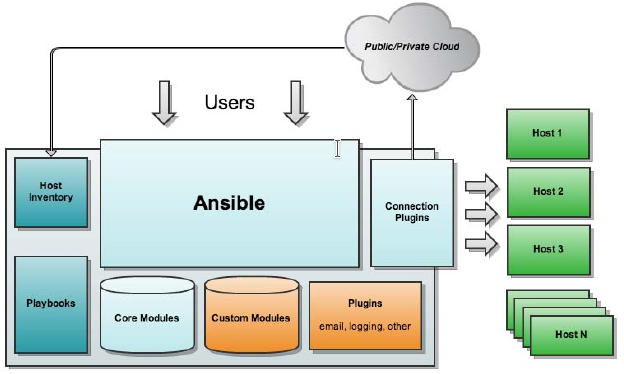
实验环境:
node1:
主机名:node1.smoke.com
操作系统:centos 6.10
内核版本:2.6.32-754.el6.x86_64
网卡1:vmnet8 172.16.100.6/24
node2:
主机名:node1.smoke.com
操作系统:centos 6.10
内核版本:2.6.32-754.el6.x86_64
网卡1:vmnet8 172.16.100.7/24
node3:
主机名:node1.smoke.com
操作系统:centos 6.10
内核版本:2.6.32-754.el6.x86_64
网卡1:vmnet8 172.16.100.8/24
node4:
主机名:node1.smoke.com
操作系统:centos 6.10
内核版本:2.6.32-754.el6.x86_64
网卡1:vmnet8 172.16.100.9/24
node1:
[root@node1 ~]# hostname
node1.smoke.com
[root@node1 ~]# ip addr show
1: lo: <LOOPBACK,UP,LOWER_UP> mtu 65536 qdisc noqueue state UNKNOWN
    link/loopback 00:00:00:00:00:00 brd 00:00:00:00:00:00
    inet 127.0.0.1/8 scope host lo
    inet6 ::1/128 scope host
       valid_lft forever preferred_lft forever
2: eth0: <BROADCAST,MULTICAST,UP,LOWER_UP> mtu 1500 qdisc pfifo_fast state UP qlen 1000
    link/ether 00:0c:29:e7:1c:38 brd ff:ff:ff:ff:ff:ff
    inet 172.16.100.6/24 brd 172.16.100.255 scope global eth0
    inet6 fe80::20c:29ff:fee7:1c38/64 scope link
       valid_lft forever preferred_lft forever
[root@node1 ~]# ip route show
172.16.100.0/24 dev eth0  proto kernel  scope link  src 172.16.100.6
169.254.0.0/16 dev eth0  scope link  metric 1002
default via 172.16.100.2 dev eth0
[root@node1 ~]# vim /etc/hosts
172.16.100.6    node1.smoke.com node1
172.16.100.7    node2.smoke.com node2
172.16.100.8    node3.smoke.com node3
172.16.100.9    node4.smoke.com node4
[root@node1 ~]# ntpdate ntp1.aliyun.com
[root@node1 ~]# crontab -l
*/5 * * * * /usr/sbin/ntpdate ntp1.aliyun.com &> /dev/null
[root@node1 ~]# setenforce 0
[root@node1 ~]# vim /etc/selinux/config
SELINUX=permissive
node2:
[root@node2 ~]# hostname
node2.smoke.com
[root@node2 ~]# ip addr show
1: lo: <LOOPBACK,UP,LOWER_UP> mtu 65536 qdisc noqueue state UNKNOWN
    link/loopback 00:00:00:00:00:00 brd 00:00:00:00:00:00
    inet 127.0.0.1/8 scope host lo
    inet6 ::1/128 scope host
       valid_lft forever preferred_lft forever
2: eth0: <BROADCAST,MULTICAST,UP,LOWER_UP> mtu 1500 qdisc pfifo_fast state UP qlen 1000
    link/ether 00:0c:29:94:e5:67 brd ff:ff:ff:ff:ff:ff
    inet 172.16.100.7/24 brd 172.16.100.255 scope global eth0
    inet6 fe80::20c:29ff:fe94:e567/64 scope link
       valid_lft forever preferred_lft forever
[root@node2 ~]# ip route show
172.16.100.0/24 dev eth0  proto kernel  scope link  src 172.16.100.7
169.254.0.0/16 dev eth0  scope link  metric 1002
default via 172.16.100.2 dev eth0
[root@node2 ~]# vim /etc/hosts
172.16.100.6    node1.smoke.com node1
172.16.100.7    node2.smoke.com node2
172.16.100.8    node3.smoke.com node3
172.16.100.9    node4.smoke.com node4
[root@node2 ~]# ntpdate ntp1.aliyun.com
[root@node2 ~]# crontab -e
*/5 * * * * /usr/sbin/ntpdate ntp1.aliyun.com &> /dev/null
[root@node2 ~]# setenforce 0
[root@node2 ~]# vim /etc/selinux/config
SELINUX=permissive
node3:
[root@node3 ~]# hostname
node3.smoke.com
[root@node3 ~]# ip addr show
1: lo: <LOOPBACK,UP,LOWER_UP> mtu 65536 qdisc noqueue state UNKNOWN
    link/loopback 00:00:00:00:00:00 brd 00:00:00:00:00:00
    inet 127.0.0.1/8 scope host lo
    inet6 ::1/128 scope host
       valid_lft forever preferred_lft forever
2: eth0: <BROADCAST,MULTICAST,UP,LOWER_UP> mtu 1500 qdisc pfifo_fast state UP qlen 1000
    link/ether 00:0c:29:b5:3d:ff brd ff:ff:ff:ff:ff:ff
    inet 172.16.100.8/24 brd 172.16.100.255 scope global eth0
    inet6 fe80::20c:29ff:feb5:3dff/64 scope link
       valid_lft forever preferred_lft forever
[root@node3 ~]# ip route show
172.16.100.0/24 dev eth0  proto kernel  scope link  src 172.16.100.8
169.254.0.0/16 dev eth0  scope link  metric 1002
default via 172.16.100.2 dev eth0
[root@node3 ~]# vim /etc/hosts
172.16.100.6    node1.smoke.com node1
172.16.100.7    node2.smoke.com node2
172.16.100.8    node3.smoke.com node3
172.16.100.9    node4.smoke.com node4
[root@node3 ~]# ntpdate ntp1.aliyun.com
[root@node3 ~]# crontab -l
*/5 * * * * /usr/sbin/ntpdate ntp1.aliyun.com &> /dev/null
[root@node3 ~]# setenforce 0
[root@node3 ~]# vim /etc/selinux/config
SELINUX=permissive
node4:
[root@node4 ~]# hostname
node4.smoke.com
[root@node4 ~]# ip addr show
1: lo: <LOOPBACK,UP,LOWER_UP> mtu 65536 qdisc noqueue state UNKNOWN
    link/loopback 00:00:00:00:00:00 brd 00:00:00:00:00:00
    inet 127.0.0.1/8 scope host lo
    inet6 ::1/128 scope host
       valid_lft forever preferred_lft forever
2: eth0: <BROADCAST,MULTICAST,UP,LOWER_UP> mtu 1500 qdisc pfifo_fast state UP qlen 1000
    link/ether 00:0c:29:85:18:c6 brd ff:ff:ff:ff:ff:ff
    inet 172.16.100.9/24 brd 172.16.100.255 scope global eth0
    inet6 fe80::20c:29ff:fe85:18c6/64 scope link
       valid_lft forever preferred_lft forever
[root@node4 ~]# ip route show
172.16.100.0/24 dev eth0  proto kernel  scope link  src 172.16.100.9
169.254.0.0/16 dev eth0  scope link  metric 1002
default via 172.16.100.2 dev eth0
[root@node4 ~]# vim /etc/hosts
172.16.100.6    node1.smoke.com node1
172.16.100.7    node2.smoke.com node2
172.16.100.8    node3.smoke.com node3
172.16.100.9    node4.smoke.com node4
[root@node4 ~]# ntpdate ntp1.aliyun.com
[root@node4 ~]# crontab -l
*/5 * * * * /usr/sbin/ntpdate ntp1.aliyun.com &> /dev/null
[root@node4 ~]# setenforce 0
[root@node4 ~]# vim /etc/selinux/config
SELINUX=permissive
node1:
[root@node1 ~]# mkdir -pv /etc/yum.repos.d/OldMirrorFile
[root@node1 ~]# mv /etc/yum.repos.d/CentOS-* /etc/yum.repos.d/OldMirrorFile/
[root@node1 ~]# curl -o /etc/yum.repos.d/CentOS-Base.repo https://mirrors.aliyun.com/repo/Centos-6.repo
[root@node1 ~]# curl -o  /etc/yum.repos.d/epel.repo http://mirrors.aliyun.com/repo/epel-6.repo
node2:
[root@node2 ~]# mkdir -pv /etc/yum.repos.d/OldMirrorFile
[root@node3 ~]# mv /etc/yum.repos.d/CentOS-* /etc/yum.repos.d/OldMirrorFile/
[root@node2 ~]# curl -o /etc/yum.repos.d/CentOS-Base.repo https://mirrors.aliyun.com/repo/Centos-6.repo
[root@node2 ~]# curl -o  /etc/yum.repos.d/epel.repo http://mirrors.aliyun.com/repo/epel-6.repo
node3:
[root@node3 ~]# mkdir -pv /etc/yum.repos.d/OldMirrorFile
[root@node3 ~]# mv /etc/yum.repos.d/CentOS-* /etc/yum.repos.d/OldMirrorFile/
[root@node3 ~]# curl -o /etc/yum.repos.d/CentOS-Base.repo https://mirrors.aliyun.com/repo/Centos-6.repo
[root@node3 ~]# curl -o  /etc/yum.repos.d/epel.repo http://mirrors.aliyun.com/repo/epel-6.repo
node4:
[root@node4 ~]# mkdir -pv /etc/yum.repos.d/OldMirrorFile
[root@node4 ~]# mv /etc/yum.repos.d/CentOS-* /etc/yum.repos.d/OldMirrorFile/
[root@node4 ~]# curl -o /etc/yum.repos.d/CentOS-Base.repo https://mirrors.aliyun.com/repo/Centos-6.repo
[root@node4 ~]# curl -o  /etc/yum.repos.d/epel.repo http://mirrors.aliyun.com/repo/epel-6.repo
node1:
[root@node4 ~]# yum list all *ansible*
[root@node4 ~]# yum info ansible
已加载插件:fastestmirror
Loading mirror speeds from cached hostfile
 * base: mirrors.aliyun.com
 * extras: mirrors.aliyun.com
 * updates: mirrors.aliyun.com
可安装的软件包
Name        : ansible
Arch        : noarch
Version     : 2.6.20
Release     : 1.el6
Size        : 10 M
Repo        : epel
Summary     : SSH-based configuration management, deployment, and task execution system
URL         : http://ansible.com
License     : GPLv3+
Description : Ansible is a radically simple model-driven configuration management,
            : multi-node deployment, and remote task execution system. Ansible works
            : over SSH and does not require any software or daemons to be installed
            : on remote nodes. Extension modules can be written in any language and
            : are transferred to managed machines automatically.
[root@node4 ~]# yum -y install ansible
[root@node4 ~]# rpm -ql ansible
[root@node1 ~]# cd /etc/ansible/
[root@node1 ansible]# ls
ansible.cfg  hosts  roles
[root@node1 ansible]# cp hosts{,.bak}
[root@node1 ansible]# vim hosts
[websrvs]
172.16.100.7
172.16.100.8
[dbsrvs]
172.16.100.9
[root@node1 ansible]# ssh-keygen -t rsa
[root@node1 ansible]# ssh-copy-id -i /root/.ssh/id_rsa.pub root@172.16.100.7
[root@node1 ansible]# ssh-copy-id -i /root/.ssh/id_rsa.pub root@172.16.100.8
[root@node1 ansible]# ssh-copy-id -i /root/.ssh/id_rsa.pub root@172.16.100.9
[root@node1 ansible]# ssh root@172.16.100.7 'date'
2020年 10月 08日 星期四 21:45:00 CST
[root@node1 ansible]# ssh root@172.16.100.8 'date'
2020年 10月 08日 星期四 21:45:09 CST
[root@node1 ansible]# ssh root@172.16.100.9 'date'
2020年 10月 08日 星期四 21:45:12 CST
[root@node1 ansible]# man ansible-doc
[root@node1 ansible]# ansible-doc -l    #查看ansible支持的所有模块
[root@node1 ansible]# ansible-doc -s yum
[root@node1 ansible]# man ansible
[root@node1 ansible]# ansible-doc -s command
[root@node1 ansible]# ansible 172.16.100.6 -m command -a 'date'
 [WARNING]: Could not match supplied host pattern, ignoring: 172.16.100.6

 [WARNING]: No hosts matched, nothing to do
[root@node1 ansible]# ansible 172.16.100.7 -m command -a 'date'
172.16.100.7 | SUCCESS | rc=0 >>
2020年 10月 08日 星期四 22:02:18 CST
[root@node1 ansible]# ansible websrvs -m command -a 'date'
172.16.100.7 | SUCCESS | rc=0 >>
2020年 10月 08日 星期四 22:03:31 CST

172.16.100.8 | SUCCESS | rc=0 >>
2020年 10月 08日 星期四 22:03:31 CST
[root@node1 ansible]# ansible dbsrvs -m command -a 'date'
172.16.100.9 | SUCCESS | rc=0 >>
2020年 10月 08日 星期四 22:03:53 CST
[root@node1 ansible]# ansible all -m command -a 'date'
172.16.100.8 | SUCCESS | rc=0 >>
2020年 10月 08日 星期四 22:04:04 CST

172.16.100.9 | SUCCESS | rc=0 >>
2020年 10月 08日 星期四 22:04:04 CST

172.16.100.7 | SUCCESS | rc=0 >>
2020年 10月 08日 星期四 22:04:04 CST
[root@node1 ansible]# ansible all -m command -a 'tail -2 /etc/passwd'
172.16.100.9 | SUCCESS | rc=0 >>
sshd:x:74:74:Privilege-separated SSH:/var/empty/sshd:/sbin/nologin
ntp:x:38:38::/etc/ntp:/sbin/nologin

172.16.100.8 | SUCCESS | rc=0 >>
sshd:x:74:74:Privilege-separated SSH:/var/empty/sshd:/sbin/nologin
ntp:x:38:38::/etc/ntp:/sbin/nologin

172.16.100.7 | SUCCESS | rc=0 >>
sshd:x:74:74:Privilege-separated SSH:/var/empty/sshd:/sbin/nologin
ntp:x:38:38::/etc/ntp:/sbin/nologin
[root@node1 ansible]# ansible all -a 'tail -2 /etc/passwd'
172.16.100.8 | SUCCESS | rc=0 >>
sshd:x:74:74:Privilege-separated SSH:/var/empty/sshd:/sbin/nologin
ntp:x:38:38::/etc/ntp:/sbin/nologin

172.16.100.7 | SUCCESS | rc=0 >>
sshd:x:74:74:Privilege-separated SSH:/var/empty/sshd:/sbin/nologin
ntp:x:38:38::/etc/ntp:/sbin/nologin

172.16.100.9 | SUCCESS | rc=0 >>
sshd:x:74:74:Privilege-separated SSH:/var/empty/sshd:/sbin/nologin
ntp:x:38:38::/etc/ntp:/sbin/nologin
[root@node1 ~]# ansible-doc -s cron
[root@node1 ~]# ansible websrvs -m cron -a 'minute="*/10" job="/bin/echo hello" name="test  cron job"'
172.16.100.8 | SUCCESS => {
    "changed": false,
    "envs": [],
    "jobs": [
        "test  cron job"
    ]
}
172.16.100.7 | SUCCESS => {
    "changed": false,
    "envs": [],
    "jobs": [
        "test  cron job"
    ]
}
[root@node1 ~]# ansible websrvs -a 'crontab -l'
172.16.100.8 | SUCCESS | rc=0 >>
*/5 * * * * /usr/sbin/ntpdate ntp1.aliyun.com &> /dev/null
#Ansible: test cron job
*/10 * * * * /bin/echo hello

172.16.100.7 | SUCCESS | rc=0 >>
*/5 * * * * /usr/sbin/ntpdate ntp1.aliyun.com &> /dev/null
#Ansible: test cron job
*/10 * * * * /bin/echo hello
node2:
[root@node2 ~]# crontab -l
*/5 * * * * /usr/sbin/ntpdate ntp1.aliyun.com &> /dev/null
#Ansible: test cron job
*/10 * * * * /bin/echo hello
node1:
[root@node1 ~]# ansible websrvs -m cron -a 'minute="*/10" job="/bin/echo hello" name="test cron job" state=absent'
172.16.100.8 | SUCCESS => {
    "changed": false,
    "envs": [],
    "jobs": []
}
172.16.100.7 | SUCCESS => {
    "changed": false,
    "envs": [],
    "jobs": []
}
node2:
[root@node2 ~]# crontab -l
*/5 * * * * /usr/sbin/ntpdate ntp1.aliyun.com &> /dev/null
node1:
[root@node1 ~]# ansible-doc -s user
[root@node1 ~]# ansible all -m user -a 'name="user1"'
172.16.100.9 | SUCCESS => {
    "changed": true,
    "comment": "",
    "create_home": true,
    "group": 500,
    "home": "/home/user1",
    "name": "user1",
    "shell": "/bin/bash",
    "state": "present",
    "system": false,
    "uid": 500
}
172.16.100.8 | SUCCESS => {
    "changed": true,
    "comment": "",
    "create_home": true,
    "group": 500,
    "home": "/home/user1",
    "name": "user1",
    "shell": "/bin/bash",
    "state": "present",
    "system": false,
    "uid": 500
}
172.16.100.7 | SUCCESS => {
    "changed": true,
    "comment": "",
    "create_home": true,
    "group": 500,
    "home": "/home/user1",
    "name": "user1",
    "shell": "/bin/bash",
    "state": "present",
    "system": false,
    "uid": 500
}
node2:
[root@node2 ~]# tail /etc/passwd
games:x:12:100:games:/usr/games:/sbin/nologin
gopher:x:13:30:gopher:/var/gopher:/sbin/nologin
ftp:x:14:50:FTP User:/var/ftp:/sbin/nologin
nobody:x:99:99:Nobody:/:/sbin/nologin
vcsa:x:69:69:virtual console memory owner:/dev:/sbin/nologin
saslauth:x:499:76:Saslauthd user:/var/empty/saslauth:/sbin/nologin
postfix:x:89:89::/var/spool/postfix:/sbin/nologin
sshd:x:74:74:Privilege-separated SSH:/var/empty/sshd:/sbin/nologin
ntp:x:38:38::/etc/ntp:/sbin/nologin
user1:x:500:500::/home/user1:/bin/bash
[root@node2 ~]# tail /etc/group
cdrom:x:11:
tape:x:33:
dialout:x:18:
saslauth:x:76:
postdrop:x:90:
postfix:x:89:
fuse:x:499:
sshd:x:74:
ntp:x:38:
user1:x:500:
node1:
[root@node1 ~]# ansible all -m user -a 'name="user1" state=absent'
172.16.100.7 | SUCCESS => {
    "changed": true,
    "force": false,
    "name": "user1",
    "remove": false,
    "state": "absent"
}
172.16.100.9 | SUCCESS => {
    "changed": true,
    "force": false,
    "name": "user1",
    "remove": false,
    "state": "absent"
}
172.16.100.8 | SUCCESS => {
    "changed": true,
    "force": false,
    "name": "user1",
    "remove": false,
    "state": "absent"
}
node2:
[root@node2 ~]# tail /etc/passwd
operator:x:11:0:operator:/root:/sbin/nologin
games:x:12:100:games:/usr/games:/sbin/nologin
gopher:x:13:30:gopher:/var/gopher:/sbin/nologin
ftp:x:14:50:FTP User:/var/ftp:/sbin/nologin
nobody:x:99:99:Nobody:/:/sbin/nologin
vcsa:x:69:69:virtual console memory owner:/dev:/sbin/nologin
saslauth:x:499:76:Saslauthd user:/var/empty/saslauth:/sbin/nologin
postfix:x:89:89::/var/spool/postfix:/sbin/nologin
sshd:x:74:74:Privilege-separated SSH:/var/empty/sshd:/sbin/nologin
ntp:x:38:38::/etc/ntp:/sbin/nologin
node1:
[root@node1 ~]# ansible-doc -s group
[root@node1 ~]# ansible websrvs -m group -a 'name=mysql gid=306 system=yes'
172.16.100.7 | SUCCESS => {
    "changed": true,
    "gid": 306,
    "name": "mysql",
    "state": "present",
    "system": true
}
172.16.100.8 | SUCCESS => {
    "changed": true,
    "gid": 306,
    "name": "mysql",
    "state": "present",
    "system": true
}
[root@node1 ~]# ansible websrvs -m user -a 'name=mysql uid=306 system=yes group=mysql'
172.16.100.7 | SUCCESS => {
    "changed": true,
    "comment": "",
    "create_home": true,
    "group": 306,
    "home": "/home/mysql",
    "name": "mysql",
    "shell": "/bin/bash",
    "state": "present",
    "system": true,
    "uid": 306
}
172.16.100.8 | SUCCESS => {
    "changed": true,
    "comment": "",
    "create_home": true,
    "group": 306,
    "home": "/home/mysql",
    "name": "mysql",
    "shell": "/bin/bash",
    "state": "present",
    "system": true,
    "uid": 306
}
[root@node1 ~]# ansible-doc -s copy
[root@node1 ~]# ansible all -m copy -a 'src=/etc/fstab dest=/tmp/fstab.ansible owner=root mode=640'
172.16.100.7 | SUCCESS => {
    "changed": false,
    "checksum": "a4f8c4805188c00e669733275a3ae2736ff6e88e",
    "dest": "/tmp/fstab.ansible",
    "gid": 0,
    "group": "root",
    "mode": "0640",
    "owner": "root",
    "path": "/tmp/fstab.ansible",
    "secontext": "unconfined_u:object_r:admin_home_t:s0",
    "size": 860,
    "state": "file",
    "uid": 0
}
172.16.100.8 | SUCCESS => {
    "changed": false,
    "checksum": "a4f8c4805188c00e669733275a3ae2736ff6e88e",
    "dest": "/tmp/fstab.ansible",
    "gid": 0,
    "group": "root",
    "mode": "0640",
    "owner": "root",
    "path": "/tmp/fstab.ansible",
    "secontext": "unconfined_u:object_r:admin_home_t:s0",
    "size": 860,
    "state": "file",
    "uid": 0
}
172.16.100.9 | SUCCESS => {
    "changed": true,
    "checksum": "a4f8c4805188c00e669733275a3ae2736ff6e88e",
    "dest": "/tmp/fstab.ansible",
    "gid": 0,
    "group": "root",
    "md5sum": "06c1abc67d4f955569f6062836595188",
    "mode": "0640",
    "owner": "root",
    "secontext": "unconfined_u:object_r:admin_home_t:s0",
    "size": 860,
    "src": "/root/.ansible/tmp/ansible-tmp-1602250182.31-176432090151304/source",
    "state": "file",
    "uid": 0
}
node2:
[root@node2 ~]# ll /tmp/
总用量 4
-rw-r-----. 1 root root 860 10月  9 21:29 fstab.ansible
-rw-------. 1 root root   0 10月  8 06:12 yum.log
node1:
[root@node1 ~]# ansible all -m copy -a 'content="Hello Ansible\nHi Smoke" dest=/tmp/test.ansible'
172.16.100.7 | SUCCESS => {
    "changed": true,
    "checksum": "e285d1752157f4fdbe8e50b72379ea008bb5ba2d",
    "dest": "/tmp/test.ansible",
    "gid": 0,
    "group": "root",
    "md5sum": "daa6dc21995a3e13bdeec3823e1228a8",
    "mode": "0644",
    "owner": "root",
    "secontext": "unconfined_u:object_r:admin_home_t:s0",
    "size": 22,
    "src": "/root/.ansible/tmp/ansible-tmp-1602250628.26-76622724687758/source",
    "state": "file",
    "uid": 0
}
172.16.100.9 | SUCCESS => {
    "changed": true,
    "checksum": "e285d1752157f4fdbe8e50b72379ea008bb5ba2d",
    "dest": "/tmp/test.ansible",
    "gid": 0,
    "group": "root",
    "md5sum": "daa6dc21995a3e13bdeec3823e1228a8",
    "mode": "0644",
    "owner": "root",
    "secontext": "unconfined_u:object_r:admin_home_t:s0",
    "size": 22,
    "src": "/root/.ansible/tmp/ansible-tmp-1602250628.23-38941085593249/source",
    "state": "file",
    "uid": 0
}
172.16.100.8 | SUCCESS => {
    "changed": true,
    "checksum": "e285d1752157f4fdbe8e50b72379ea008bb5ba2d",
    "dest": "/tmp/test.ansible",
    "gid": 0,
    "group": "root",
    "md5sum": "daa6dc21995a3e13bdeec3823e1228a8",
    "mode": "0644",
    "owner": "root",
    "secontext": "unconfined_u:object_r:admin_home_t:s0",
    "size": 22,
    "src": "/root/.ansible/tmp/ansible-tmp-1602250628.27-100778446114165/source",
    "state": "file",
    "uid": 0
}
node2:
[root@node2 ~]# ll /tmp/
总用量 8
-rw-r-----. 1 root root 860 10月  9 21:29 fstab.ansible
-rw-r--r--. 1 root root  22 10月  9 21:37 test.ansible
-rw-------. 1 root root   0 10月  8 06:12 yum.log
[root@node2 ~]# cat /tmp/test.ansible
Hello Ansible
Hi Smoke[root@node2 ~]#
node1:
[root@node1 ~]# ansible-doc -s file
[root@node1 ~]# ansible websrvs -m file -a 'owner=mysql group=mysql mode=644 path=/tmp/fstab.ansible'
172.16.100.8 | SUCCESS => {
    "changed": false,
    "gid": 306,
    "group": "mysql",
    "mode": "0644",
    "owner": "mysql",
    "path": "/tmp/fstab.ansible",
    "secontext": "unconfined_u:object_r:admin_home_t:s0",
    "size": 860,
    "state": "file",
    "uid": 306
}
172.16.100.7 | SUCCESS => {
    "changed": false,
    "gid": 306,
    "group": "mysql",
    "mode": "0644",
    "owner": "mysql",
    "path": "/tmp/fstab.ansible",
    "secontext": "unconfined_u:object_r:admin_home_t:s0",
    "size": 860,
    "state": "file",
    "uid": 306
}
node2:
[root@node2 ~]# ll /tmp/
总用量 8
-rw-r--r--. 1 mysql mysql 860 10月  9 21:29 fstab.ansible
-rw-r--r--. 1 root  root   22 10月  9 21:37 test.ansible
-rw-------. 1 root  root    0 10月  8 06:12 yum.log
node1:
[root@node1 ~]# ansible all -m file -a 'path=/tmp/fstab.link src=/tmp/fstab.ansible state=link'
172.16.100.8 | SUCCESS => {
"changed": false,
"dest": "/tmp/fstab.link",
"gid": 0,
"group": "root",
"mode": "0777",
"owner": "root",
"secontext": "unconfined_u:object_r:user_tmp_t:s0",
"size": 18,
"src": "/tmp/fstab.ansible",
"state": "link",
"uid": 0
}
172.16.100.7 | SUCCESS => {
"changed": false,
"dest": "/tmp/fstab.link",
"gid": 0,
"group": "root",
"mode": "0777",
"owner": "root",
"secontext": "unconfined_u:object_r:user_tmp_t:s0",
"size": 18,
"src": "/tmp/fstab.ansible",
"state": "link",
"uid": 0
}
172.16.100.9 | SUCCESS => {
"changed": true,
"dest": "/tmp/fstab.link",
"gid": 0,
"group": "root",
"mode": "0777",
"owner": "root",
"secontext": "unconfined_u:object_r:user_tmp_t:s0",
"size": 18,
"src": "/tmp/fstab.ansible",
"state": "link",
"uid": 0
}
node2:
[root@node2 ~]# ll /tmp/
总用量 8
-rw-r--r--. 1 mysql mysql 860 10月  9 21:29 fstab.ansible
lrwxrwxrwx. 1 root  root   18 10月  9 21:48 fstab.link -> /tmp/fstab.ansible
-rw-r--r--. 1 root  root   22 10月  9 21:37 test.ansible
-rw-------. 1 root  root    0 10月  8 06:12 yum.log
node1:
[root@node1 ~]# ansible all -m ping
172.16.100.7 | SUCCESS => {
    "changed": false,
    "ping": "pong"
}
172.16.100.9 | SUCCESS => {
    "changed": false,
    "ping": "pong"
}
172.16.100.8 | SUCCESS => {
    "changed": false,
    "ping": "pong"
}
[root@node1 ~]# ansible-doc -s service
[root@node1 ~]#  ansible websrvs -m yum -a 'name=httpd state=latest'
[root@node1 ~]# ansible websrvs -a 'service httpd status'
 [WARNING]: Consider using the service module rather than running service.  If you need to use command because service is insufficient you can add warn=False to this command task
or set command_warnings=False in ansible.cfg to get rid of this message.

172.16.100.8 | FAILED | rc=3 >>
httpd 已停non-zero return code

172.16.100.7 | FAILED | rc=3 >>
httpd 已停non-zero return code
[root@node1 ~]# ansible websrvs -a 'chkconfig --list httpd'
172.16.100.7 | SUCCESS | rc=0 >>
httpd          	0:关闭	1:关闭	2:关闭	3:关闭	4:关闭	5:关闭	6:关闭

172.16.100.8 | SUCCESS | rc=0 >>
httpd          	0:关闭	1:关闭	2:关闭	3:关闭	4:关闭	5:关闭	6:关闭
[root@node1 ~]# ansible websrvs -m service -a 'enabled=true name=httpd state=started'
172.16.100.7 | SUCCESS => {
    "changed": true,
    "enabled": true,
    "name": "httpd",
    "state": "started"
}
172.16.100.8 | SUCCESS => {
    "changed": true,
    "enabled": true,
    "name": "httpd",
    "state": "started"
}
[root@node1 ~]# ansible websrvs -a 'service httpd status'
 [WARNING]: Consider using the service module rather than running service.  If you need to use command because service is insufficient you can add warn=False to this command task
or set command_warnings=False in ansible.cfg to get rid of this message.

172.16.100.7 | SUCCESS | rc=0 >>
httpd (pid  7127) 正在运行...

172.16.100.8 | SUCCESS | rc=0 >>
httpd (pid  7068) 正在运行...
[root@node1 ~]# ansible websrvs -a 'chkconfig --list httpd'
172.16.100.7 | SUCCESS | rc=0 >>
httpd          	0:关闭	1:关闭	2:启用	3:启用	4:启用	5:启用	6:关闭

172.16.100.8 | SUCCESS | rc=0 >>
httpd          	0:关闭	1:关闭	2:启用	3:启用	4:启用	5:启用	6:关闭
[root@node1 ~]# ansible-doc -s shell
[root@node1 ~]# ansible all -m user -a 'name=user1'
172.16.100.8 | SUCCESS => {
    "changed": true,
    "comment": "",
    "create_home": true,
    "group": 500,
    "home": "/home/user1",
    "name": "user1",
    "shell": "/bin/bash",
    "state": "present",
    "stderr": "useradd:警告:此主目录已经存在。\n不从 skel 目录里向其中复制任何文件。\n正在创建信箱文件: 文件已存在\n",
    "stderr_lines": [
        "useradd:警告:此主目录已经存在。",
        "不从 skel 目录里向其中复制任何文件。",
        "正在创建信箱文件: 文件已存在"
    ],
    "system": false,
    "uid": 500
}
172.16.100.9 | SUCCESS => {
    "changed": true,
    "comment": "",
    "create_home": true,
    "group": 500,
    "home": "/home/user1",
    "name": "user1",
    "shell": "/bin/bash",
    "state": "present",
    "stderr": "useradd:警告:此主目录已经存在。\n不从 skel 目录里向其中复制任何文件。\n正在创建信箱文件: 文件已存在\n",
    "stderr_lines": [
        "useradd:警告:此主目录已经存在。",
        "不从 skel 目录里向其中复制任何文件。",
        "正在创建信箱文件: 文件已存在"
    ],
    "system": false,
    "uid": 500
}
172.16.100.7 | SUCCESS => {
    "changed": true,
    "comment": "",
    "create_home": true,
    "group": 500,
    "home": "/home/user1",
    "name": "user1",
    "shell": "/bin/bash",
    "state": "present",
    "stderr": "useradd:警告:此主目录已经存在。\n不从 skel 目录里向其中复制任何文件。\n正在创建信箱文件: 文件已存在\n",
    "stderr_lines": [
        "useradd:警告:此主目录已经存在。",
        "不从 skel 目录里向其中复制任何文件。",
        "正在创建信箱文件: 文件已存在"
    ],
    "system": false,
    "uid": 500
}
[root@node1 ~]# ansible all -m command -a 'echo smoke520 | passwd --stdin user1'
172.16.100.9 | SUCCESS | rc=0 >>
smoke520 | passwd --stdin user1

172.16.100.8 | SUCCESS | rc=0 >>
smoke520 | passwd --stdin user1

172.16.100.7 | SUCCESS | rc=0 >>
smoke520 | passwd --stdin user1
node2:
[root@node2 ~]# tail /etc/shadow    #user1没有密码
ftp:*:17246:0:99999:7:::
nobody:*:17246:0:99999:7:::
vcsa:!!:18542::::::
saslauth:!!:18542::::::
postfix:!!:18542::::::
sshd:!!:18542::::::
ntp:!!:18542::::::
mysql:!!:18544::::::
apache:!!:18544::::::
user1:!!:18544:0:99999:7:::
node1:
[root@node1 ~]# ansible all -m shell -a 'echo smoke520 | passwd --stdin user1'
172.16.100.8 | SUCCESS | rc=0 >>
更改用户 user1 的密码 。
passwd: 所有的身份验证令牌已经成功更新。

172.16.100.7 | SUCCESS | rc=0 >>
更改用户 user1 的密码 。
passwd: 所有的身份验证令牌已经成功更新。

172.16.100.9 | SUCCESS | rc=0 >>
更改用户 user1 的密码 。
passwd: 所有的身份验证令牌已经成功更新。
node2:
[root@node2 ~]# tail /etc/shadow
ftp:*:17246:0:99999:7:::
nobody:*:17246:0:99999:7:::
vcsa:!!:18542::::::
saslauth:!!:18542::::::
postfix:!!:18542::::::
sshd:!!:18542::::::
ntp:!!:18542::::::
mysql:!!:18544::::::
apache:!!:18544::::::
user1:$6$W4WIekan$JGF2o9eBysd7WmVHDos74f1/vpyz9sku8nWS5eKdzamkspcBNCBj0/HPgcgf..HAeYXo5jUIrT2eXueZrBAyE/:18544:0:99999:7:::
node1:
[root@node1 ~]# ansible-doc -s script
[root@node1 ~]# vim /tmp/test.sh
#!/bin/sh
echo "hello ansible from script" > /tmp/script.ansible
useradd user2
[root@node1 ~]# chmod +x /tmp/test.sh
[root@node1 ~]# ansible all -m script -a '/tmp/test.sh'
172.16.100.9 | SUCCESS => {
    "changed": true,
    "rc": 0,
    "stderr": "Shared connection to 172.16.100.9 closed.\r\n",
    "stderr_lines": [
        "Shared connection to 172.16.100.9 closed."
    ],
    "stdout": "",
    "stdout_lines": []
}
172.16.100.8 | SUCCESS => {
    "changed": true,
    "rc": 0,
    "stderr": "Shared connection to 172.16.100.8 closed.\r\n",
    "stderr_lines": [
        "Shared connection to 172.16.100.8 closed."
    ],
    "stdout": "",
    "stdout_lines": []
}
172.16.100.7 | SUCCESS => {
    "changed": true,
    "rc": 0,
    "stderr": "Shared connection to 172.16.100.7 closed.\r\n",
    "stderr_lines": [
        "Shared connection to 172.16.100.7 closed."
    ],
    "stdout": "",
    "stdout_lines": []
}
node2:
[root@node2 ~]# tail /etc/passwd
nobody:x:99:99:Nobody:/:/sbin/nologin
vcsa:x:69:69:virtual console memory owner:/dev:/sbin/nologin
saslauth:x:499:76:Saslauthd user:/var/empty/saslauth:/sbin/nologin
postfix:x:89:89::/var/spool/postfix:/sbin/nologin
sshd:x:74:74:Privilege-separated SSH:/var/empty/sshd:/sbin/nologin
ntp:x:38:38::/etc/ntp:/sbin/nologin
mysql:x:306:306::/home/mysql:/bin/bash
apache:x:48:48:Apache:/var/www:/sbin/nologin
user1:x:500:500::/home/user1:/bin/bash
user2:x:501:501::/home/user2:/bin/bash
[root@node2 ~]# ll /tmp/
总用量 12
-rw-r--r--. 1 mysql mysql 860 10月  9 21:29 fstab.ansible
lrwxrwxrwx. 1 root  root   18 10月  9 21:48 fstab.link -> /tmp/fstab.ansible
-rw-r--r--. 1 root  root   26 10月  9 22:18 script.ansible
-rw-r--r--. 1 root  root   22 10月  9 21:37 test.ansible
-rw-------. 1 root  root    0 10月  8 06:12 yum.log
[root@node2 ~]# cat /tmp/script.ansible
hello ansible from script
node1:
[root@node1 ~]# ansible-doc -s yum
[root@node1 ~]# ansible all -m yum -a 'name=zsh'
node2:
[root@node2 ~]# rpm -q zsh
zsh-4.3.11-11.el6_10.x86_64
node1:
[root@node1 ~]# ansible all -m yum -a 'name=zsh state=absent'
node2:
[root@node2 ~]# rpm -q zsh
package zsh is not installed
node1:
[root@node1 ~]# ansible-doc -s setup
[root@node1 ~]# ansible all -m setup

 浙公网安备 33010602011771号