
helm
myapp, nginx
tomcat, redis, etcd, ...
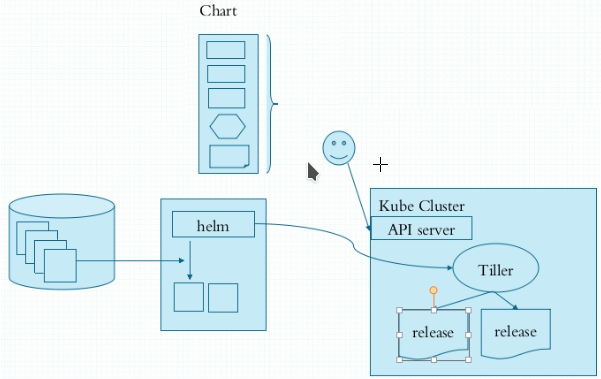
helm:
核心术语句:
Chart: 一个helm程序包
Repository: Charts仓库,https/http服务器;
Release: 特定的Chart部署于目标集群上的一个事例;
Chart -> Config -> Release
程序架构:
helm: 客户端,管理本地的Chart仓库,管理Chart,与Tiller服务器交互,发送Chart,实现安装、查询、卸载等操作
Tiller: 服务端,接受helm发来的Charts与Config,合并生成release;
rbac配置文件示例:
https://github.com/helm/helm/blob/v2.9.1/docs/rbac.md
helm官网:
https://helm.sh/
官方可用的Chart列表:
https://hub.kubeapps.com/
helm常用命令:
release管理:
install
delete
upgrade/rollback
list
history
history: release的历史信息;
status:获取release状态信息;
chart管理:
create
fetch
get
inspect
package
verify
helm下载地址:
https://github.com/helm/helm/releases/tag/v2.9.1
master:
[root@master ~]# wget https://get.helm.sh/helm-v2.9.1-linux-amd64.tar.gz
[root@master ~]# tar xf helm-v2.9.1-linux-amd64.tar.gz
[root@master ~]# cd linux-amd64/
[root@master linux-amd64]# ls
helm  LICENSE  README.md
[root@master linux-amd64]# cp helm /usr/bin/
[root@master linux-amd64]# helm --help
[root@master ~]# ls .kube/
cache  config  http-cache
[root@master ~]# cd manifests/
[root@master manifests]# mkdir helm
[root@master manifests]# cd helm/
[root@master helm]# vim tiller-rbac.yaml
apiVersion: v1
kind: ServiceAccount
metadata:
  name: tiller
  namespace: kube-system
---
apiVersion: rbac.authorization.k8s.io/v1beta1
kind: ClusterRoleBinding
metadata:
  name: tiller
roleRef:
  apiGroup: rbac.authorization.k8s.io
  kind: ClusterRole
  name: cluster-admin
subjects:
  - kind: ServiceAccount
    name: tiller
    namespace: kube-system
[root@master helm]# kubectl apply -f tiller-rbac.yaml
[root@master helm]# kubectl get sa -n kube-system
NAME                                 SECRETS   AGE
attachdetach-controller              1         81d
bootstrap-signer                     1         81d
canal                                1         42d
certificate-controller               1         81d
clusterrole-aggregation-controller   1         81d
coredns                              1         81d
cronjob-controller                   1         81d
daemon-set-controller                1         81d
dashboard-admin                      1         51d
default                              1         81d
deployment-controller                1         81d
disruption-controller                1         81d
endpoint-controller                  1         81d
expand-controller                    1         81d
flannel                              1         19d
generic-garbage-collector            1         81d
horizontal-pod-autoscaler            1         81d
job-controller                       1         81d
kube-proxy                           1         81d
kubernetes-dashboard                 1         51d
metrics-server                       1         12d
namespace-controller                 1         81d
node-controller                      1         81d
persistent-volume-binder             1         81d
pod-garbage-collector                1         81d
pv-protection-controller             1         81d
pvc-protection-controller            1         81d
replicaset-controller                1         81d
replication-controller               1         81d
resourcequota-controller             1         81d
service-account-controller           1         81d
service-controller                   1         81d
statefulset-controller               1         81d
tiller                               1         21s    #tiller帐号
token-cleaner                        1         81d
ttl-controller                       1         81d
[root@master helm]# export NO_PROXY='172.20.0.0/16,127.0.0.0/8'
[root@master helm]# helm init --service-account tiller
[root@master helm]# kubectl get pods -n kube-system
NAME                                       READY     STATUS    RESTARTS   AGE
canal-997tb                                3/3       Running   0          42d
canal-j6t4j                                3/3       Running   0          42d
canal-jxq25                                3/3       Running   0          42d
coredns-78fcdf6894-bt5g6                   1/1       Running   1          81d
coredns-78fcdf6894-zzbll                   1/1       Running   1          81d
etcd-master.smoke.com                      1/1       Running   1          81d
kube-apiserver-master.smoke.com            1/1       Running   1          81d
kube-controller-manager-master.smoke.com   1/1       Running   1          81d
kube-flannel-ds-g69pn                      1/1       Running   0          19d
kube-flannel-ds-rkd4c                      1/1       Running   0          19d
kube-flannel-ds-stnlp                      1/1       Running   0          19d
kube-proxy-5jppm                           1/1       Running   1          80d
kube-proxy-7lg96                           1/1       Running   1          81d
kube-proxy-qmrq7                           1/1       Running   1          80d
kube-scheduler-master.smoke.com            1/1       Running   1          81d
kubernetes-dashboard-6948bdb78-fdpt2       1/1       Running   0          26d
metrics-server-v0.2.1-84678c956-bd8dr      2/2       Running   0          11d
tiller-deploy-759cb9df9-lz295              1/1       Running   0          3m
[root@master helm]# helm version
Client: &version.Version{SemVer:"v2.9.1", GitCommit:"20adb27c7c5868466912eebdf6664e7390ebe710", GitTreeState:"clean"}
Server: &version.Version{SemVer:"v2.9.1", GitCommit:"20adb27c7c5868466912eebdf6664e7390ebe710", GitTreeState:"clean"}
[root@master helm]# helm repo update
[root@master helm]# helm repo list
NAME  	URL
stable	https://kubernetes-charts.storage.googleapis.com
local 	http://127.0.0.1:8879/charts
[root@master helm]# helm search
[root@master helm]# helm search jenkins
NAME          	CHART VERSION	APP VERSION	DESCRIPTION
stable/jenkins	2.5.4        	lts        	DEPRECATED - Open source continuous integration...
[root@master helm]# helm inspect jenkins
[root@master helm]# helm repo update
[root@master helm]# helm inspect stable/jenkins
[root@master helm]# helm search memcache
NAME            	CHART VERSION	APP VERSION	DESCRIPTION
stable/memcached	3.2.3        	1.5.20     	Free & open source, high-performance, distribut...
stable/mcrouter 	1.0.3        	0.36.0     	Mcrouter is a memcached protocol router for sca...
[root@master helm]# helm inspect stable/memcached
[root@master helm]# helm install --name mem1 stable/memcached
NAME:   mem1
LAST DEPLOYED: Sun Sep  6 22:26:14 2020
NAMESPACE: default
STATUS: DEPLOYED

RESOURCES:
==> v1/Service
NAME            TYPE       CLUSTER-IP  EXTERNAL-IP  PORT(S)    AGE
mem1-memcached  ClusterIP  None        <none>       11211/TCP  3s

==> v1/StatefulSet
NAME            DESIRED  CURRENT  AGE
mem1-memcached  3        0        3s

==> v1/Pod(related)
NAME              READY  STATUS             RESTARTS  AGE
mem1-memcached-0  0/1    ContainerCreating  0         2s


NOTES:
Memcached can be accessed via port 11211 on the following DNS name from within your cluster:
mem1-memcached.default.svc.cluster.local

If you'd like to test your instance, forward the port locally:

  export POD_NAME=$(kubectl get pods --namespace default -l "app.kubernetes.io/name=memcached,app.kubernetes.io/instance=mem1" -o jsonpath="{.items[0].metadata.name}")
  kubectl port-forward $POD_NAME 11211

In another tab, attempt to set a key:

  $ echo -e 'set mykey 0 60 5\r\nhello\r' | nc localhost 11211

You should see:

  STORED
[root@master helm]# kubectl get pods --namespace default -l "app.kubernetes.io/name=memcached,app.kubernetes.io/instance=mem1" -o jsonpath="{.items[0].metadata.name}"
mem1-memcached-0
[root@master helm]# helm delete --help
[root@master helm]# helm delete mem1
[root@master helm]# helm list
[root@master helm]# helm search
[root@master helm]# helm search redis
NAME                            	CHART VERSION	APP VERSION	DESCRIPTION
stable/prometheus-redis-exporter	3.5.1        	1.3.4      	DEPRECATED Prometheus exporter for Redis metrics
stable/redis                    	10.5.7       	5.0.7      	DEPRECATED Open source, advanced key-value stor...
stable/redis-ha                 	4.4.4        	5.0.6      	Highly available Kubernetes implementation of R...
stable/sensu                    	0.2.3        	0.28       	Sensu monitoring framework backed by the Redis ...
[root@master helm]# helm install --name redis1 stable/redis
[root@master helm]# kubectl get pods
NAME                     READY     STATUS    RESTARTS   AGE
myapp-6985749785-9zzkl   1/1       Running   0          3d
redis1-master-0          0/1       Pending   0          1m
redis1-slave-0           0/1       Pending   0          1m
[root@master helm]# kubectl describe pods redis1-master-0
Events:
  Type     Reason            Age               From               Message
  ----     ------            ----              ----               -------
  Warning  FailedScheduling  2m                default-scheduler  persistentvolumeclaim "redis-data-redis1-master-0" not found
  Warning  FailedScheduling  1m (x24 over 2m)  default-scheduler  pod has unbound PersistentVolumeClaims (repeated 2 times)
[root@master helm]# helm list
NAME  	REVISION	UPDATED                 	STATUS  	CHART       	NAMESPACE
redis1	1       	Sun Sep  6 22:54:18 2020	DEPLOYED	redis-10.5.7	default
[root@master helm]# cd /root/.helm/cache/archive
[root@master archive]# ls
jenkins-2.5.4.tgz  memcached-3.2.3.tgz  redis-10.5.7.tgz
[root@master archive]# tar xf jenkins-2.5.4.tgz
[root@master archive]# tree jenkins
jenkins
├── CHANGELOG.md
├── Chart.yaml
├── OWNERS
├── README.md
├── templates
│   ├── config.yaml
│   ├── deprecation.yaml
│   ├── _helpers.tpl
│   ├── home-pvc.yaml
│   ├── jcasc-config.yaml
│   ├── jenkins-agent-svc.yaml
│   ├── jenkins-backup-cronjob.yaml
│   ├── jenkins-backup-rbac.yaml
│   ├── jenkins-master-alerting-rules.yaml
│   ├── jenkins-master-backendconfig.yaml
│   ├── jenkins-master-deployment.yaml
│   ├── jenkins-master-ingress.yaml
│   ├── jenkins-master-networkpolicy.yaml
│   ├── jenkins-master-route.yaml
│   ├── jenkins-master-servicemonitor.yaml
│   ├── jenkins-master-svc.yaml
│   ├── jobs.yaml
│   ├── NOTES.txt
│   ├── rbac.yaml
│   ├── secret-https-jks.yaml
│   ├── secret.yaml
│   ├── service-account-agent.yaml
│   ├── service-account.yaml
│   └── tests
│       ├── jenkins-test.yaml
│       └── test-config.yaml
└── values.yaml

2 directories, 30 files
[root@master archive]# tar xf redis-10.5.7.tgz
[root@master archive]# tree redis
redis
├── Chart.yaml
├── ci
│   ├── default-values.yaml
│   ├── dev-values.yaml
│   ├── extra-flags-values.yaml
│   ├── insecure-sentinel-values.yaml
│   ├── production-sentinel-values.yaml
│   ├── production-values.yaml
│   ├── redisgraph-module-values.yaml
│   └── redis-lib-values.yaml
├── README.md
├── templates
│   ├── configmap.yaml
│   ├── headless-svc.yaml
│   ├── health-configmap.yaml
│   ├── _helpers.tpl
│   ├── metrics-prometheus.yaml
│   ├── metrics-svc.yaml
│   ├── networkpolicy.yaml
│   ├── NOTES.txt
│   ├── prometheusrule.yaml
│   ├── psp.yaml
│   ├── redis-master-statefulset.yaml
│   ├── redis-master-svc.yaml
│   ├── redis-rolebinding.yaml
│   ├── redis-role.yaml
│   ├── redis-serviceaccount.yaml
│   ├── redis-slave-statefulset.yaml
│   ├── redis-slave-svc.yaml
│   ├── redis-with-sentinel-svc.yaml
│   └── secret.yaml
├── values-production.yaml
├── values.schema.json
└── values.yaml

2 directories, 32 files
[root@master archive]# cat redis/templates/redis-master-statefulset.yaml
[root@master archive]# helm install --help
[root@master archive]# cat redis/values.yaml
[root@master archive]# helm list
NAME  	REVISION	UPDATED                 	STATUS  	CHART       	NAMESPACE
redis1	1       	Sun Sep  6 22:54:18 2020	DEPLOYED	redis-10.5.7	default
[root@master archive]# helm delete redis1
[root@master archive]# cp redis/values.yaml /root/manifests/helm/
[root@master archive]# cd /root/manifests/helm/
[root@master helm]# vim values.yaml
## Global Docker image parameters
## Please, note that this will override the image parameters, including dependencies, configured to use the global value
## Current available global Docker image parameters: imageRegistry and imagePullSecrets
##
global:
#   imageRegistry: myRegistryName
#   imagePullSecrets:
#     - myRegistryKeySecretName
#   storageClass: myStorageClass
  redis: {}

## Bitnami Redis image version
## ref: https://hub.docker.com/r/bitnami/redis/tags/
##
image:
  registry: docker.io
  repository: bitnami/redis
  ## Bitnami Redis image tag
  ## ref: https://github.com/bitnami/bitnami-docker-redis#supported-tags-and-respective-dockerfile-links
  ##
  tag: 5.0.7-debian-10-r32
  ## Specify a imagePullPolicy
  ## Defaults to 'Always' if image tag is 'latest', else set to 'IfNotPresent'
  ## ref: http://kubernetes.io/docs/user-guide/images/#pre-pulling-images
  ##
  pullPolicy: IfNotPresent
  ## Optionally specify an array of imagePullSecrets.
  ## Secrets must be manually created in the namespace.
  ## ref: https://kubernetes.io/docs/tasks/configure-pod-container/pull-image-private-registry/
  ##
  # pullSecrets:
  #   - myRegistryKeySecretName

## String to partially override redis.fullname template (will maintain the release name)
##
# nameOverride:

## String to fully override redis.fullname template
##
# fullnameOverride:

## Cluster settings
cluster:
  enabled: false
  slaveCount: 2

## Use redis sentinel in the redis pod. This will disable the master and slave services and
## create one redis service with ports to the sentinel and the redis instances
sentinel:
  enabled: false
  ## Require password authentication on the sentinel itself
  ## ref: https://redis.io/topics/sentinel
  usePassword: true
  ## Bitnami Redis Sentintel image version
  ## ref: https://hub.docker.com/r/bitnami/redis-sentinel/tags/
  ##
  image:
    registry: docker.io
    repository: bitnami/redis-sentinel
    ## Bitnami Redis image tag
    ## ref: https://github.com/bitnami/bitnami-docker-redis-sentinel#supported-tags-and-respective-dockerfile-links
    ##
    tag: 5.0.7-debian-10-r27
    ## Specify a imagePullPolicy
    ## Defaults to 'Always' if image tag is 'latest', else set to 'IfNotPresent'
    ## ref: http://kubernetes.io/docs/user-guide/images/#pre-pulling-images
    ##
    pullPolicy: IfNotPresent
    ## Optionally specify an array of imagePullSecrets.
    ## Secrets must be manually created in the namespace.
    ## ref: https://kubernetes.io/docs/tasks/configure-pod-container/pull-image-private-registry/
    ##
    # pullSecrets:
    #   - myRegistryKeySecretName
  masterSet: mymaster
  initialCheckTimeout: 5
  quorum: 2
  downAfterMilliseconds: 60000
  failoverTimeout: 18000
  parallelSyncs: 1
  port: 26379
  ## Additional Redis configuration for the sentinel nodes
  ## ref: https://redis.io/topics/config
  ##
  configmap:
  ## Enable or disable static sentinel IDs for each replicas
  ## If disabled each sentinel will generate a random id at startup
  ## If enabled, each replicas will have a constant ID on each start-up
  ##
  staticID: false
  ## Configure extra options for Redis Sentinel liveness and readiness probes
  ## ref: https://kubernetes.io/docs/tasks/configure-pod-container/configure-liveness-readiness-probes/#configure-probes)
  ##
  livenessProbe:
    enabled: true
    initialDelaySeconds: 5
    periodSeconds: 5
    timeoutSeconds: 5
    successThreshold: 1
    failureThreshold: 5
  readinessProbe:
    enabled: true
    initialDelaySeconds: 5
    periodSeconds: 5
    timeoutSeconds: 1
    successThreshold: 1
    failureThreshold: 5
  ## Redis Sentinel resource requests and limits
  ## ref: http://kubernetes.io/docs/user-guide/compute-resources/
  # resources:
  #   requests:
  #     memory: 256Mi
  #     cpu: 100m
  ## Redis Sentinel Service properties
  service:
    ##  Redis Sentinel Service type
    type: ClusterIP
    sentinelPort: 26379
    redisPort: 6379

    ## Specify the nodePort value for the LoadBalancer and NodePort service types.
    ## ref: https://kubernetes.io/docs/concepts/services-networking/service/#type-nodeport
    ##
    # sentinelNodePort:
    # redisNodePort:

    ## Provide any additional annotations which may be required. This can be used to
    ## set the LoadBalancer service type to internal only.
    ## ref: https://kubernetes.io/docs/concepts/services-networking/service/#internal-load-balancer
    ##
    annotations: {}
    labels: {}
    loadBalancerIP:

## Specifies the Kubernetes Cluster's Domain Name.
##
clusterDomain: cluster.local

networkPolicy:
  ## Specifies whether a NetworkPolicy should be created
  ##
  enabled: false

  ## The Policy model to apply. When set to false, only pods with the correct
  ## client label will have network access to the port Redis is listening
  ## on. When true, Redis will accept connections from any source
  ## (with the correct destination port).
  ##
  # allowExternal: true

  ## Allow connections from other namespacess. Just set label for namespace and set label for pods (optional).
  ##
  ingressNSMatchLabels: {}
  ingressNSPodMatchLabels: {}

serviceAccount:
  ## Specifies whether a ServiceAccount should be created
  ##
  create: false
  ## The name of the ServiceAccount to use.
  ## If not set and create is true, a name is generated using the fullname template
  name:

rbac:
  ## Specifies whether RBAC resources should be created
  ##
  create: false

  role:
    ## Rules to create. It follows the role specification
    # rules:
    #  - apiGroups:
    #    - extensions
    #    resources:
    #      - podsecuritypolicies
    #    verbs:
    #      - use
    #    resourceNames:
    #      - gce.unprivileged
    rules: []

## Redis pod Security Context
securityContext:
  enabled: true
  fsGroup: 1001
  runAsUser: 1001
  ## sysctl settings for master and slave pods
  ##
  ## Uncomment the setting below to increase the net.core.somaxconn value
  ##
  # sysctls:
  # - name: net.core.somaxconn
  #   value: "10000"

## Use password authentication
usePassword: true
## Redis password (both master and slave)
## Defaults to a random 10-character alphanumeric string if not set and usePassword is true
## ref: https://github.com/bitnami/bitnami-docker-redis#setting-the-server-password-on-first-run
##
password: ""
## Use existing secret (ignores previous password)
# existingSecret:
## Password key to be retrieved from Redis secret
##
# existingSecretPasswordKey:

## Mount secrets as files instead of environment variables
usePasswordFile: false

## Persist data to a persistent volume (Redis Master)
persistence: {}
  ## A manually managed Persistent Volume and Claim
  ## Requires persistence.enabled: true
  ## If defined, PVC must be created manually before volume will be bound
  # existingClaim:

# Redis port
redisPort: 6379

##
## Redis Master parameters
##
master:
  ## Redis command arguments
  ##
  ## Can be used to specify command line arguments, for example:
  ##
  command: "/run.sh"
  ## Additional Redis configuration for the master nodes
  ## ref: https://redis.io/topics/config
  ##
  configmap:
  ## Redis additional command line flags
  ##
  ## Can be used to specify command line flags, for example:
  ##
  ## extraFlags:
  ##  - "--maxmemory-policy volatile-ttl"
  ##  - "--repl-backlog-size 1024mb"
  extraFlags: []
  ## Comma-separated list of Redis commands to disable
  ##
  ## Can be used to disable Redis commands for security reasons.
  ## Commands will be completely disabled by renaming each to an empty string.
  ## ref: https://redis.io/topics/security#disabling-of-specific-commands
  ##
  disableCommands:
  - FLUSHDB
  - FLUSHALL

  ## Redis Master additional pod labels and annotations
  ## ref: https://kubernetes.io/docs/concepts/overview/working-with-objects/labels/
  podLabels: {}
  podAnnotations: {}

  ## Redis Master resource requests and limits
  ## ref: http://kubernetes.io/docs/user-guide/compute-resources/
  # resources:
  #   requests:
  #     memory: 256Mi
  #     cpu: 100m
  ## Use an alternate scheduler, e.g. "stork".
  ## ref: https://kubernetes.io/docs/tasks/administer-cluster/configure-multiple-schedulers/
  ##
  # schedulerName:

  ## Configure extra options for Redis Master liveness and readiness probes
  ## ref: https://kubernetes.io/docs/tasks/configure-pod-container/configure-liveness-readiness-probes/#configure-probes)
  ##
  livenessProbe:
    enabled: true
    initialDelaySeconds: 5
    periodSeconds: 5
    timeoutSeconds: 5
    successThreshold: 1
    failureThreshold: 5
  readinessProbe:
    enabled: true
    initialDelaySeconds: 5
    periodSeconds: 5
    timeoutSeconds: 1
    successThreshold: 1
    failureThreshold: 5

  ## Redis Master Node selectors and tolerations for pod assignment
  ## ref: https://kubernetes.io/docs/concepts/configuration/assign-pod-node/#nodeselector
  ## ref: https://kubernetes.io/docs/concepts/configuration/assign-pod-node/#taints-and-tolerations-beta-feature
  ##
  # nodeSelector: {"beta.kubernetes.io/arch": "amd64"}
  # tolerations: []
  ## Redis Master pod/node affinity/anti-affinity
  ##
  affinity: {}

  ## Redis Master Service properties
  service:
    ##  Redis Master Service type
    type: ClusterIP
    port: 6379

    ## Specify the nodePort value for the LoadBalancer and NodePort service types.
    ## ref: https://kubernetes.io/docs/concepts/services-networking/service/#type-nodeport
    ##
    # nodePort:

    ## Provide any additional annotations which may be required. This can be used to
    ## set the LoadBalancer service type to internal only.
    ## ref: https://kubernetes.io/docs/concepts/services-networking/service/#internal-load-balancer
    ##
    annotations: {}
    labels: {}
    loadBalancerIP:
    # loadBalancerSourceRanges: ["10.0.0.0/8"]

  ## Enable persistence using Persistent Volume Claims
  ## ref: http://kubernetes.io/docs/user-guide/persistent-volumes/
  ##
  persistence:
    enabled: false
    ## The path the volume will be mounted at, useful when using different
    ## Redis images.
    path: /data
    ## The subdirectory of the volume to mount to, useful in dev environments
    ## and one PV for multiple services.
    subPath: ""
    ## redis data Persistent Volume Storage Class
    ## If defined, storageClassName: <storageClass>
    ## If set to "-", storageClassName: "", which disables dynamic provisioning
    ## If undefined (the default) or set to null, no storageClassName spec is
    ##   set, choosing the default provisioner.  (gp2 on AWS, standard on
    ##   GKE, AWS & OpenStack)
    ##
    # storageClass: "-"
    accessModes:
    - ReadWriteOnce
    size: 8Gi
    ## Persistent Volume selectors
    ## https://kubernetes.io/docs/concepts/storage/persistent-volumes/#selector
    matchLabels: {}
    matchExpressions: {}

  ## Update strategy, can be set to RollingUpdate or onDelete by default.
  ## https://kubernetes.io/docs/tutorials/stateful-application/basic-stateful-set/#updating-statefulsets
  statefulset:
    updateStrategy: RollingUpdate
    ## Partition update strategy
    ## https://kubernetes.io/docs/concepts/workloads/controllers/statefulset/#partitions
    # rollingUpdatePartition:

  ## Redis Master pod priorityClassName
  # priorityClassName: {}

##
## Redis Slave properties
## Note: service.type is a mandatory parameter
## The rest of the parameters are either optional or, if undefined, will inherit those declared in Redis Master
##
slave:
  ## Slave Service properties
  service:
    ## Redis Slave Service type
    type: ClusterIP
    ## Redis port
    port: 6379
    ## Specify the nodePort value for the LoadBalancer and NodePort service types.
    ## ref: https://kubernetes.io/docs/concepts/services-networking/service/#type-nodeport
    ##
    # nodePort:

    ## Provide any additional annotations which may be required. This can be used to
    ## set the LoadBalancer service type to internal only.
    ## ref: https://kubernetes.io/docs/concepts/services-networking/service/#internal-load-balancer
    ##
    annotations: {}
    labels: {}
    loadBalancerIP:
    # loadBalancerSourceRanges: ["10.0.0.0/8"]

  ## Redis slave port
  port: 6379
  ## Can be used to specify command line arguments, for example:
  ##
  command: "/run.sh"
  ## Additional Redis configuration for the slave nodes
  ## ref: https://redis.io/topics/config
  ##
  configmap:
  ## Redis extra flags
  extraFlags: []
  ## List of Redis commands to disable
  disableCommands:
  - FLUSHDB
  - FLUSHALL

  ## Redis Slave pod/node affinity/anti-affinity
  ##
  affinity: {}

  ## Configure extra options for Redis Slave liveness and readiness probes
  ## ref: https://kubernetes.io/docs/tasks/configure-pod-container/configure-liveness-readiness-probes/#configure-probes)
  ##
  livenessProbe:
    enabled: true
    initialDelaySeconds: 30
    periodSeconds: 10
    timeoutSeconds: 5
    successThreshold: 1
    failureThreshold: 5
  readinessProbe:
    enabled: true
    initialDelaySeconds: 5
    periodSeconds: 10
    timeoutSeconds: 10
    successThreshold: 1
    failureThreshold: 5

  ## Redis slave Resource
  # resources:
  #   requests:
  #     memory: 256Mi
  #     cpu: 100m

  ## Redis slave selectors and tolerations for pod assignment
  # nodeSelector: {"beta.kubernetes.io/arch": "amd64"}
  # tolerations: []

  ## Use an alternate scheduler, e.g. "stork".
  ## ref: https://kubernetes.io/docs/tasks/administer-cluster/configure-multiple-schedulers/
  ##
  # schedulerName:

  ## Redis slave pod Annotation and Labels
  podLabels: {}
  podAnnotations: {}

  ## Redis slave pod priorityClassName
  # priorityClassName: {}

  ## Enable persistence using Persistent Volume Claims
  ## ref: http://kubernetes.io/docs/user-guide/persistent-volumes/
  ##
  persistence:
    enabled: true
    ## The path the volume will be mounted at, useful when using different
    ## Redis images.
    path: /data
    ## The subdirectory of the volume to mount to, useful in dev environments
    ## and one PV for multiple services.
    subPath: ""
    ## redis data Persistent Volume Storage Class
    ## If defined, storageClassName: <storageClass>
    ## If set to "-", storageClassName: "", which disables dynamic provisioning
    ## If undefined (the default) or set to null, no storageClassName spec is
    ##   set, choosing the default provisioner.  (gp2 on AWS, standard on
    ##   GKE, AWS & OpenStack)
    ##
    # storageClass: "-"
    accessModes:
    - ReadWriteOnce
    size: 8Gi
    ## Persistent Volume selectors
    ## https://kubernetes.io/docs/concepts/storage/persistent-volumes/#selector
    matchLabels: {}
    matchExpressions: {}

  ## Update strategy, can be set to RollingUpdate or onDelete by default.
  ## https://kubernetes.io/docs/tutorials/stateful-application/basic-stateful-set/#updating-statefulsets
  statefulset:
    updateStrategy: RollingUpdate
    ## Partition update strategy
    ## https://kubernetes.io/docs/concepts/workloads/controllers/statefulset/#partitions
    # rollingUpdatePartition:

## Prometheus Exporter / Metrics
##
metrics:
  enabled: false

  image:
    registry: docker.io
    repository: bitnami/redis-exporter
    tag: 1.4.0-debian-10-r3
    pullPolicy: IfNotPresent
    ## Optionally specify an array of imagePullSecrets.
    ## Secrets must be manually created in the namespace.
    ## ref: https://kubernetes.io/docs/tasks/configure-pod-container/pull-image-private-registry/
    ##
    # pullSecrets:
    #   - myRegistryKeySecretName

  ## Metrics exporter resource requests and limits
  ## ref: http://kubernetes.io/docs/user-guide/compute-resources/
  ##
  # resources: {}

  ## Extra arguments for Metrics exporter, for example:
  ## extraArgs:
  ##   check-keys: myKey,myOtherKey
  # extraArgs: {}

  ## Metrics exporter pod Annotation and Labels
  podAnnotations:
    prometheus.io/scrape: "true"
    prometheus.io/port: "9121"
  # podLabels: {}

  # Enable this if you're using https://github.com/coreos/prometheus-operator
  serviceMonitor:
    enabled: false
    ## Specify a namespace if needed
    # namespace: monitoring
    # fallback to the prometheus default unless specified
    # interval: 10s
    ## Defaults to what's used if you follow CoreOS [Prometheus Install Instructions](https://github.com/helm/charts/tree/master/stable/prometheus-operator#tldr)
    ## [Prometheus Selector Label](https://github.com/helm/charts/tree/master/stable/prometheus-operator#prometheus-operator-1)
    ## [Kube Prometheus Selector Label](https://github.com/helm/charts/tree/master/stable/prometheus-operator#exporters)
    selector:
      prometheus: kube-prometheus

  ## Custom PrometheusRule to be defined
  ## The value is evaluated as a template, so, for example, the value can depend on .Release or .Chart
  ## ref: https://github.com/coreos/prometheus-operator#customresourcedefinitions
  prometheusRule:
    enabled: false
    additionalLabels: {}
    namespace: ""
    rules: []
      ## These are just examples rules, please adapt them to your needs.
      ## Make sure to constraint the rules to the current postgresql service.
      #  - alert: RedisDown
      #    expr: redis_up{service="{{ template "redis.fullname" . }}-metrics"} == 0
      #    for: 2m
      #    labels:
      #      severity: error
      #    annotations:
      #      summary: Redis instance {{ "{{ $instance }}" }} down
      #      description: Redis instance {{ "{{ $instance }}" }} is down.
      #  - alert: RedisMemoryHigh
      #    expr: >
      #       redis_memory_used_bytes{service="{{ template "redis.fullname" . }}-metrics"} * 100
      #       /
      #       redis_memory_max_bytes{service="{{ template "redis.fullname" . }}-metrics"}
      #       > 90 =< 100
      #    for: 2m
      #    labels:
      #      severity: error
      #    annotations:
      #      summary: Redis instance {{ "{{ $instance }}" }} is using too much memory
      #      description: Redis instance {{ "{{ $instance }}" }} is using {{ "{{ $value }}" }}% of its available memory.
      #  - alert: RedisKeyEviction
      #    expr: increase(redis_evicted_keys_total{service="{{ template "redis.fullname" . }}-metrics"}[5m]) > 0
      #    for: 1s
      #    labels:
      #      severity: error
      #    annotations:
      #      summary: Redis instance {{ "{{ $instance }}" }} has evicted keys
      #      description: Redis instance {{ "{{ $instance }}" }} has evicted {{ "{{ $value }}" }} keys in the last 5 minutes.


  ## Metrics exporter pod priorityClassName
  # priorityClassName: {}
  service:
    type: ClusterIP
    ## Use serviceLoadBalancerIP to request a specific static IP,
    ## otherwise leave blank
    # loadBalancerIP:
    annotations: {}
    labels: {}

##
## Init containers parameters:
## volumePermissions: Change the owner of the persist volume mountpoint to RunAsUser:fsGroup
##
volumePermissions:
  enabled: false
  image:
    registry: docker.io
    repository: bitnami/minideb
    tag: buster
    pullPolicy: Always
    ## Optionally specify an array of imagePullSecrets.
    ## Secrets must be manually created in the namespace.
    ## ref: https://kubernetes.io/docs/tasks/configure-pod-container/pull-image-private-registry/
    ##
    # pullSecrets:
    #   - myRegistryKeySecretName
  resources: {}
  # resources:
  #   requests:
  #     memory: 128Mi
  #     cpu: 100m

## Redis config file
## ref: https://redis.io/topics/config
##
configmap: |-
  # Enable AOF https://redis.io/topics/persistence#append-only-file
  appendonly yes
  # Disable RDB persistence, AOF persistence already enabled.
  save ""

## Sysctl InitContainer
## used to perform sysctl operation to modify Kernel settings (needed sometimes to avoid warnings)
sysctlImage:
  enabled: false
  command: []
  registry: docker.io
  repository: bitnami/minideb
  tag: buster
  pullPolicy: Always
  ## Optionally specify an array of imagePullSecrets.
  ## Secrets must be manually created in the namespace.
  ## ref: https://kubernetes.io/docs/tasks/configure-pod-container/pull-image-private-registry/
  ##
  # pullSecrets:
  #   - myRegistryKeySecretName
  mountHostSys: false
  resources: {}
  # resources:
  #   requests:
  #     memory: 128Mi
  #     cpu: 100m

## PodSecurityPolicy configuration
## ref: https://kubernetes.io/docs/concepts/policy/pod-security-policy/
##
podSecurityPolicy:
  ## Specifies whether a PodSecurityPolicy should be created
  ##
  create: false
[root@master helm]# helm install --name redis1 -f values.yaml stable/redis
[root@master helm]# kubectl get pods
NAME                     READY     STATUS    RESTARTS   AGE
myapp-6985749785-9zzkl   1/1       Running   0          6d
redis1-master-0          1/1       Running   0          1d
[root@master helm]# helm inspect stable/redis
[root@master helm]# helm history redis1
REVISION	UPDATED                 	STATUS  	CHART       	DESCRIPTION
1       	Mon Sep  7 22:25:42 2020	DEPLOYED	redis-10.5.7	Install complete
[root@master helm]# helm status redis1

 浙公网安备 33010602011771号