
Glance镜像服务:
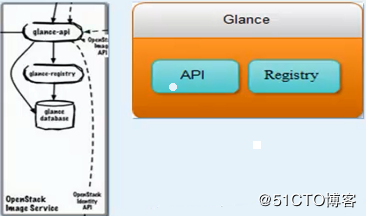
Glance主要由三部分构成:glance-api、glance-registry以及image store
Glance-api:接受系统镜像的创建、删除、读取请求。
Glance-Registry:云系统的镜像注册服务
Glance安装:
[root@hostnamelinux-node1 ~]# yum -y install openstack-glance python-glance python-glanceclient
[root@hostnamelinux-node1 ~]# vim /etc/glance/glance-api.conf
[database]
connection=mysql://glance:glance@192.168.56.11/glance
[root@hostnamelinux-node1 ~]# vim /etc/glance/glance-registry.conf
[database]
connection=mysql://glance:glance@192.168.56.11/glance
同步数据库:
[root@hostnamelinux-node1 ~]# su -s /bin/sh -c "glance-manage db_sync" glance
No handlers could be found for logger "oslo_config.cfg"(可以忽略)
[root@hostnamelinux-node1 ~]# mysql -uglance -pglance -h192.168.56.11
Welcome to the MariaDB monitor.  Commands end with ; or \g.
Your MariaDB connection id is 16
Server version: 10.1.20-MariaDB MariaDB Server

Copyright (c) 2000, 2016, Oracle, MariaDB Corporation Ab and others.

Type 'help;' or '\h' for help. Type '\c' to clear the current input statement.

MariaDB [(none)]> use glance;
Database changed
MariaDB [glance]> show tables;
+----------------------------------+
| Tables_in_glance                 |
+----------------------------------+
| artifact_blob_locations          |
| artifact_blobs                   |
| artifact_dependencies            |
| artifact_properties              |
| artifact_tags                    |
| artifacts                        |
| image_locations                  |
| image_members                    |
| image_properties                 |
| image_tags                       |
| images                           |
| metadef_namespace_resource_types |
| metadef_namespaces               |
| metadef_objects                  |
| metadef_properties               |
| metadef_resource_types           |
| metadef_tags                     |
| migrate_version                  |
| task_info                        |
| tasks                            |
+----------------------------------+
20 rows in set (0.00 sec)

MariaDB [glance]> exit
Bye
创建glance用户:
[root@hostnamelinux-node1 ~]# openstack user create --domain default --password=glance glance
+-----------+----------------------------------+
| Field     | Value                            |
+-----------+----------------------------------+
| domain_id | default                          |
| enabled   | True                             |
| id        | 85b0cebbbb9f4cc890cdeff577ee0989 |
| name      | glance                           |
+-----------+----------------------------------+
将glance用户加入到service项目并赋予admin权限;
[root@hostnamelinux-node1 ~]# openstack role add --project service --user glance admin
配置glance:
[root@hostnamelinux-node1 ~]# vim /etc/glance/glance-api.conf
[keystone_authtoken]
auth_uri = http://192.168.56.11:5000
auth_url = http://192.168.56.11:35357
auth_plugin = password
project_domain_id = default
user_domain_id = default
project_name = service
username = glance
password = glance
[paste_deploy]
flavor=keystone
[DEFAULT]
verbose=True
notification_driver = noop
[glance_store]
default_store=file
filesystem_store_datadir=/var/lib/glance/images/
[root@hostnamelinux-node1 ~]# vim /etc/glance/glance-registry.conf
[keystone_authtoken]
auth_uri = http://192.168.56.11:5000
auth_url = http://192.168.56.11:35357
auth_plugin = password
project_domain_id = default
user_domain_id = default
project_name = service
username = glance
password = glance
[paste_deploy]
flavor=keystone
[root@hostnamelinux-node1 ~]# grep '^[a-z]' /etc/glance/glance-api.conf
verbose=True
notification_driver = noop
connection=mysql://glance:glance@192.168.56.11/glance
default_store=file
filesystem_store_datadir=/var/lib/glance/images/
auth_uri = http://192.168.56.11:5000
auth_url = http://192.168.56.11:35357
auth_plugin = password
project_domain_id = default
user_domain_id = default
project_name = service
username = glance
password = glance
flavor=keystone
[root@hostnamelinux-node1 ~]# grep '^[a-z]' /etc/glance/glance-registry.conf
connection=mysql://glance:glance@192.168.56.11/glance
auth_uri = http://192.168.56.11:5000
auth_url = http://192.168.56.11:35357
auth_plugin = password
project_domain_id = default
user_domain_id = default
project_name = service
username = glance
password = glance
flavor=keystone
启动glance服务:
[root@hostnamelinux-node1 ~]# systemctl enable openstack-glance-api
Created symlink from /etc/systemd/system/multi-user.target.wants/openstack-glance-api.service to /usr/lib/systemd/system/openstack-glan
ce-api.service.
[root@hostnamelinux-node1 ~]# systemctl enable openstack-glance-registry
Created symlink from /etc/systemd/system/multi-user.target.wants/openstack-glance-registry.service to /usr/lib/systemd/system/openstack
-glance-registry.service.
[root@hostnamelinux-node1 ~]# systemctl start openstack-glance-api
[root@hostnamelinux-node1 ~]# systemctl start openstack-glance-registry
openstack-glance-api监听端口9292,openstack-glance-registry监听端口9191;
[root@hostnamelinux-node1 ~]# netstat -tnlp
Active Internet connections (only servers)
Proto Recv-Q Send-Q Local Address           Foreign Address         State       PID/Program name
tcp        0      0 0.0.0.0:15672           0.0.0.0:*               LISTEN      970/beam.smp
tcp        0      0 127.0.0.1:25            0.0.0.0:*               LISTEN      1427/master
tcp        0      0 0.0.0.0:9191            0.0.0.0:*               LISTEN      13004/python2
tcp        0      0 0.0.0.0:25672           0.0.0.0:*               LISTEN      970/beam.smp
tcp        0      0 0.0.0.0:11211           0.0.0.0:*               LISTEN      2105/memcached
tcp        0      0 0.0.0.0:9292            0.0.0.0:*               LISTEN      12983/python2
tcp        0      0 0.0.0.0:4369            0.0.0.0:*               LISTEN      1/systemd
tcp        0      0 0.0.0.0:22              0.0.0.0:*               LISTEN      969/sshd
tcp6       0      0 ::1:25                  :::*                    LISTEN      1427/master
tcp6       0      0 :::35357                :::*                    LISTEN      3754/httpd
tcp6       0      0 :::5000                 :::*                    LISTEN      3754/httpd
tcp6       0      0 :::5672                 :::*                    LISTEN      970/beam.smp
tcp6       0      0 :::3306                 :::*                    LISTEN      1250/mysqld
tcp6       0      0 ::1:11211               :::*                    LISTEN      2105/memcached
tcp6       0      0 :::80                   :::*                    LISTEN      3754/httpd
tcp6       0      0 :::22                   :::*                    LISTEN      969/sshd
keytone注册glance服务:
创建glance服务:
[root@hostnamelinux-node1 ~]# openstack service create --name glance --description "OpenStack Image service" image
+-------------+----------------------------------+
| Field       | Value                            |
+-------------+----------------------------------+
| description | OpenStack Image service          |
| enabled     | True                             |
| id          | d7f04da42efc4c6c8b75c1848385598c |
| name        | glance                           |
| type        | image                            |
+-------------+----------------------------------+
外网注册:
[root@hostnamelinux-node1 ~]# openstack endpoint create --region RegionOne image public http://192.168.56.11:9292
+--------------+----------------------------------+
| Field        | Value                            |
+--------------+----------------------------------+
| enabled      | True                             |
| id           | 08ee7445c6094fcaa8499f6223cd055f |
| interface    | public                           |
| region       | RegionOne                        |
| region_id    | RegionOne                        |
| service_id   | d7f04da42efc4c6c8b75c1848385598c |
| service_name | glance                           |
| service_type | image                            |
| url          | http://192.168.56.11:9292        |
+--------------+----------------------------------+
内网注册:
[root@hostnamelinux-node1 ~]# openstack endpoint create --region RegionOne image internal http://192.168.56.11:9292
+--------------+----------------------------------+
| Field        | Value                            |
+--------------+----------------------------------+
| enabled      | True                             |
| id           | 95134907b0b547f9a1e2c0cbf2a10137 |
| interface    | internal                         |
| region       | RegionOne                        |
| region_id    | RegionOne                        |
| service_id   | d7f04da42efc4c6c8b75c1848385598c |
| service_name | glance                           |
| service_type | image                            |
| url          | http://192.168.56.11:9292        |
+--------------+----------------------------------+
admin注册:
[root@hostnamelinux-node1 ~]# openstack endpoint create --region RegionOne image admin http://192.168.56.11:9292
+--------------+----------------------------------+
| Field        | Value                            |
+--------------+----------------------------------+
| enabled      | True                             |
| id           | b8892b9813bc4f43af23bfeb373534b7 |
| interface    | admin                            |
| region       | RegionOne                        |
| region_id    | RegionOne                        |
| service_id   | d7f04da42efc4c6c8b75c1848385598c |
| service_name | glance                           |
| service_type | image                            |
| url          | http://192.168.56.11:9292        |
+--------------+----------------------------------+
glance环境变量:
[root@hostnamelinux-node1 ~]# echo "export OS_IMAGE_API_VERSION=2" \
>  | tee -a admin-openrc.sh demo-openrc.sh
export OS_IMAGE_API_VERSION=2
[root@hostnamelinux-node1 ~]# cat admin-openrc.sh
export OS_PROJECT_DOMAIN_ID=default
export OS_USER_DOMAIN_ID=default
export OS_PROJECT_NAME=admin
export OS_TENANT_NAME=admin
export OS_USERNAME=admin
export OS_PASSWORD=admin
export OS_AUTH_URL=http://192.168.56.11:35357/v3
export OS_IDENTITY_API_VERSION=3
export OS_IMAGE_API_VERSION=2
[root@hostnamelinux-node1 ~]# cat demo-openrc.sh
export OS_PROJECT_DOMAIN_ID=default
export OS_USER_DOMAIN_ID=default
export OS_PROJECT_NAME=demo
export OS_TENANT_NAME=demo
export OS_USERNAME=demo
export OS_PASSWORD=demo
export OS_AUTH_URL=http://192.168.56.11:5000/v3
export OS_IDENTITY_API_VERSION=3
export OS_IMAGE_API_VERSION=2
[root@hostnamelinux-node1 ~]# glance image-list
+----+------+
| ID | Name |
+----+------+
+----+------+
下载镜像:
[root@hostnamelinux-node1 ~]# wget http://download.cirros-cloud.net/0.3.4/cirros-0.3.4-x86_64-disk.img
上传镜像:
[root@hostnamelinux-node1 ~]# glance image-create --name "cirros" \
--file cirros-0.3.4-x86_64-disk.img \
--disk-format qcow2 --container-format bare \
--visibility public --progress
[=============================>] 100%
+------------------+--------------------------------------+
| Property         | Value                                |
+------------------+--------------------------------------+
| checksum         | ee1eca47dc88f4879d8a229cc70a07c6     |
| container_format | bare                                 |
| created_at       | 2018-10-07T09:56:40Z                 |
| disk_format      | qcow2                                |
| id               | 0297b83c-f9d7-4c19-ab05-762fd4616c49 |
| min_disk         | 0                                    |
| min_ram          | 0                                    |
| name             | cirros                               |
| owner            | d7064a9e91934300b28cccc787161fdb     |
| protected        | False                                |
| size             | 13287936                             |
| status           | active                               |
| tags             | []                                   |
| updated_at       | 2018-10-07T09:56:41Z                 |
| virtual_size     | None                                 |
| visibility       | public                               |
+------------------+--------------------------------------+
[root@hostnamelinux-node1 ~]# glance image-list
+--------------------------------------+--------+
| ID                                   | Name   |
+--------------------------------------+--------+
| 0297b83c-f9d7-4c19-ab05-762fd4616c49 | cirros |
+--------------------------------------+--------+
[root@hostnamelinux-node1 ~]# cd /var/lib/glance/images/
[root@hostnamelinux-node1 images]# ll
总用量 12980
-rw-r-----. 1 glance glance 13287936 10月  7 17:56 0297b83c-f9d7-4c19-ab05-762fd4616c49
[root@hostnamelinux-node1 images]# file 0297b83c-f9d7-4c19-ab05-762fd4616c49
0297b83c-f9d7-4c19-ab05-762fd4616c49: QEMU QCOW Image (v2), 41126400 bytes

 浙公网安备 33010602011771号