
Cacti
监控工具
收集数据,根据数据绘图
CPU load:0.81.2
thold
Nagios
监控工具
主机,服务/资源
OK,WARNGING,CRITICAL,UNKNOWN
CPU: 90%(CRITICAL), 80%*WARNING), OK, UNKOWN
报警系统
Nagios core
不做任何监控工作
Plugins(scripts),check_nginx
N种对象实现监控工作
主机,主机组
服务/资源,服务组
联系人,联系人组
时段,
命令 (模版-->应用某个被监控对象,以实现具体的监控)
N主机
Linux
多个被监控对象,如果有很多属性相同的时候
template
Nagios allows different testing methods
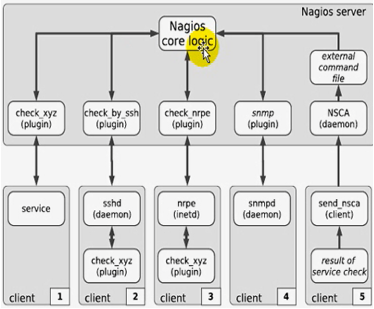
Nagios各组件调用

Nagios组成
Nagios通常由一个主程序(Nagios)、一个插件程序(Nagios-plugins)和四个可选的ADDON(NRPE、NSCA、NSClient++和NDOUtils)组成。Nagios的监控工作都是通过插件实现的,因此,Nagios和Nagios-plugins是服务器端工作所必须的组件,而四个ADDON中
(1)NRPE: 用来在监控的远程Linux/Unix主机上执行脚本插件以实现对这些主机资源的监控
(2)NSCA: 用来让被监控的远程Linux/Unix主机主动将监控信息发送给Nagios服务器(这在冗余监控模式中特别要用到)
宏:变量
[root@localhost ~]# yum -y groupinstall "Development Libraries" "Development Tools"(通过yum源安装开发库和开发工具)
[root@localhost ~]# yum -y install httpd gcc glibc glibc-common gd gd-devel php php-mysql mysql mysql-devel mysql-server(通过yum源安装软件
,-y所有询问回答yes)
[root@localhost ~]# groupadd  nagcmd(创建组nagcmd)
[root@localhost ~]# useradd -G nagcmd nagios(创建nagios并添加到附加组nagcmd)
[root@localhost ~]# id nagios(查看nagios用户信息)
uid=501(nagios) gid=502(nagios) groups=502(nagios),501(nagcmd) context=root:system_r:unconfined_t:SystemLow-SystemHigh
[root@localhost ~]# usermod -a -G nagcmd apache(将apache用户添加附加组,-a和-G一起使用,添加附加组)
[root@localhost ~]# lftp 172.16.0.1(连接ftp服务器)
cd ok, cwd=/pub
lftp 172.16.0.1:/pub> cd Sources/nagios(切换到Sources/nagios目录)
lftp 172.16.0.1:/pub>/Sources/nagios> get nagios-3.3.1.tar.gz nagios-plugins-1.4.15.tar.gz(下nagios和nagios-plugins)
3810049 bytes transferred
Total 2 files transferred
lftp 172.16.0.1:/pub>/Sources/nagios> bye(退出)
[root@localhost ~]# ls(查看当前目录文件及子目录)
anaconda-ks.cfg  install.log  install.log.syslog  nagios-3.3.1.tar.gz  nagios-plugins-1.4.15.tar.gz
[root@localhost ~]# date(查看系统时间)
Sat Nov 22 03:04:18 CST 2014
[root@localhost ~]# date 0922215616(修改系统时间)
Thu Sep 22 21:56:00 CST 2016
[root@localhost ~]# tar zvxf nagios-3.3.1_.tar.gz(解压nagios,z代表gip格式压缩,v显示过程,x解压,f后面跟文件名)
[root@localhost ~]# cd nagios(切换到nagios目录)
[root@localhost nagios]# ls(查看当前目录文件及子目录)
base       config.guess  contrib         include        install-sh   make-tarball  OutputTrap.pm  README         tap     update-version
cgi        config.sub    daemon-init.in  indent-all.sh  LEGAL        mkpackage     p1.pl          sample-config  THANKS  UPGRADING
Changelog  configure     functions       indent.sh      LICENSE      module        pkg            subst.in       tools   xdata
common     configure.in  html            INSTALLING     Makefile.in  nagios.spec   pkginfo.in     t              t-tap
[root@localhost nagios]# ./configure --help | less(查看nagios配置选项)
`configure' configures this package to adapt to many kinds of systems.

Usage: ./configure [OPTION]... [VAR=VALUE]...

To assign environment variables (e.g., CC, CFLAGS...), specify them as
VAR=VALUE.  See below for descriptions of some of the useful variables.

Defaults for the options are specified in brackets.

Configuration:
  -h, --help              display this help and exit
      --help=short        display options specific to this package
      --help=recursive    display the short help of all the included packages
  -V, --version           display version information and exit
  -q, --quiet, --silent   do not print `checking...' messages
      --cache-file=FILE   cache test results in FILE [disabled]
  -C, --config-cache      alias for `--cache-file=config.cache'
  -n, --no-create         do not create output files
      --srcdir=DIR        find the sources in DIR [configure dir or `..']

Installation directories:
  --prefix=PREFIX         install architecture-independent files in PREFIX
			  [/usr/local/nagios]
  --exec-prefix=EPREFIX   install architecture-dependent files in EPREFIX
			  [PREFIX]

By default, `make install' will install all the files in
`/usr/local/nagios/bin', `/usr/local/nagios/lib' etc.  You can specify
an installation prefix other than `/usr/local/nagios' using `--prefix',
for instance `--prefix=$HOME'.

For better control, use the options below.

Fine tuning of the installation directories:
  --bindir=DIR           user executables [EPREFIX/bin]
  --sbindir=DIR          system admin executables [EPREFIX/sbin]
  --libexecdir=DIR       program executables [EPREFIX/libexec]
  --datadir=DIR          read-only architecture-independent data [PREFIX/share]
  --sysconfdir=DIR       read-only single-machine data [PREFIX/etc]
  --sharedstatedir=DIR   modifiable architecture-independent data [PREFIX/com]
  --localstatedir=DIR    modifiable single-machine data [PREFIX/var]
  --libdir=DIR           object code libraries [EPREFIX/lib]
  --includedir=DIR       C header files [PREFIX/include]
  --oldincludedir=DIR    C header files for non-gcc [/usr/include]
  --infodir=DIR          info documentation [PREFIX/info]
  --mandir=DIR           man documentation [PREFIX/man]

System types:
  --build=BUILD     configure for building on BUILD [guessed]
  --host=HOST       cross-compile to build programs to run on HOST [BUILD]

Optional Features:
  --disable-FEATURE       do not include FEATURE (same as --enable-FEATURE=no)
  --enable-FEATURE[=ARG]  include FEATURE [ARG=yes]
--disable-statusmap=disables compilation of statusmap CGI
--disable-statuswrl=disables compilation of statuswrl (VRML) CGI
--enable-nanosleep enables use of nanosleep (instead of sleep) in event timing
--enable-event-broker enables integration of event broker routines
--enable-embedded-perl will enable embedded Perl interpreter
--enable-cygwin enables building under the CYGWIN environment
  --enable-libtap         Enable built-in libtap for unit-testing (default:
                          no).

Optional Packages:
  --with-PACKAGE[=ARG]    use PACKAGE [ARG=yes]
  --without-PACKAGE       do not use PACKAGE (same as --with-PACKAGE=no)
  --with-nagios-user=<user>
                          sets user name to run nagios
  --with-nagios-group=<grp>
                          sets group name to run nagios
  --with-command-user=<user>
                          sets user name for command access
  --with-command-group=<grp>
                          sets group name for command access
--with-mail=<path_to_mail> sets path to equivalent program to mail
--with-httpd-conf=<path_to_conf> sets path to Apache conf.d directory
--with-checkresult-dir=<path> sets path to check results spool directory
--with-temp-dir=<path> sets path to temp directory
--with-init-dir=<path> sets directory to place init script into
--with-lockfile=<path> sets path and file name for lock file
--with-gd-lib=DIR sets location of the gd library
--with-gd-inc=DIR sets location of the gd include files
--with-cgiurl=<local-url> sets URL for cgi programs (do not use a trailing slash)
--with-htmurl=<local-url> sets URL for public html
--with-perlcache turns on cacheing of internally compiled Perl scripts

Some influential environment variables:
  CC          C compiler command
  CFLAGS      C compiler flags
  LDFLAGS     linker flags, e.g. -L<lib dir> if you have libraries in a
              nonstandard directory <lib dir>
  CPPFLAGS    C/C++ preprocessor flags, e.g. -I<include dir> if you have
              headers in a nonstandard directory <include dir>
  CPP         C preprocessor

Use these variables to override the choices made by `configure' or to help
it to find libraries and programs with nonstandard names/locations.
[root@localhost nagios]# ./configure --sysconfdir=/etc/nagios --with-command-group=nagcmd --enable-event-broker(配置nagios)
[root@localhost nagios]# make all(编译所有内容)
[root@localhost nagios]# make install(安装nagios)
[root@localhost nagios]# make install-init(安装服务脚本)
[root@localhost nagios]# make install-commandmode(安装命令)
[root@localhost nagios]# make install-config(安装配置文件)
[root@localhost nagios]# make install-webconf(安装web接口)
[root@localhost nagios]# ls /usr/local/nagios/share/(查看/usr/local/nagios/share目录文件及子目录)
config.inc.php  contexthelp  docs  images  includes  index.php  main.php  media  robots.txt  side.php  ssi  stylesheets
[root@localhost nagios]# htpasswd -c /etc/nagios/htpasswd.users nagiosadmin(创建一个登录nagios)
New password:
Re-type new password:
Adding password for user nagiosadmin
[root@localhost nagios]# cd /etc/httpd/conf.d/(切换到/etc/httpd/conf.d目录)
[root@localhost conf.d]# less nagios.conf(分页显示nagios.conf文件内容)

   AuthUserFile /etc/nagios/htpasswd.users(读取登录nagios配置文件目录)

[root@localhost conf.d]# service httpd start(启动httpd服务)
Starting httpd:                                            [  OK  ]
[root@localhost conf.d]# chkconfig --add nagios(将nagios添加到服务列表)
[root@localhost conf.d]# chkconfig nagios on(让nagios开机自动启动)
[root@localhost conf.d]# service nagios start(启动nagios服务)
Starting nagios: done.
[root@localhost conf.d]# cd(切换到用户家目录)
[root@localhost ~]# tar zvxf nagios-plugins-1.4.15.tar.gz(解压nagios-plugins,z代表gzip类型压缩,v显示过程,x解压,f后面跟文件名)
[root@localhost ~]# cd nagios-plugins-1.4.15(切换到nagios-plugins目录)
[root@localhost nagios-plugins-1.4.15]# ./configure --with-nagios-user=nagios --with-nagios-group=nagios(配置nagios-plugins)
[root@localhost nagios-plugins-1.4.15]# ./configure --help(查看nagios-plugins配置帮助)
`configure' configures nagios-plugins 1.4.15 to adapt to many kinds of systems.

Usage: ./configure [OPTION]... [VAR=VALUE]...

To assign environment variables (e.g., CC, CFLAGS...), specify them as
VAR=VALUE.  See below for descriptions of some of the useful variables.

Defaults for the options are specified in brackets.

Configuration:
  -h, --help              display this help and exit
      --help=short        display options specific to this package
      --help=recursive    display the short help of all the included packages
  -V, --version           display version information and exit
  -q, --quiet, --silent   do not print `checking...' messages
      --cache-file=FILE   cache test results in FILE [disabled]
  -C, --config-cache      alias for `--cache-file=config.cache'
  -n, --no-create         do not create output files
      --srcdir=DIR        find the sources in DIR [configure dir or `..']

Installation directories:
  --prefix=PREFIX         install architecture-independent files in PREFIX
			  [/usr/local/nagios]
  --exec-prefix=EPREFIX   install architecture-dependent files in EPREFIX
			  [PREFIX]

By default, `make install' will install all the files in
`/usr/local/nagios/bin', `/usr/local/nagios/lib' etc.  You can specify
an installation prefix other than `/usr/local/nagios' using `--prefix',
for instance `--prefix=$HOME'.

For better control, use the options below.

Fine tuning of the installation directories:
  --bindir=DIR           user executables [EPREFIX/bin]
  --sbindir=DIR          system admin executables [EPREFIX/sbin]
  --libexecdir=DIR       program executables [EPREFIX/libexec]
  --sysconfdir=DIR       read-only single-machine data [PREFIX/etc]
  --sharedstatedir=DIR   modifiable architecture-independent data [PREFIX/com]
  --localstatedir=DIR    modifiable single-machine data [PREFIX/var]
  --libdir=DIR           object code libraries [EPREFIX/lib]
  --includedir=DIR       C header files [PREFIX/include]
  --oldincludedir=DIR    C header files for non-gcc [/usr/include]
  --datarootdir=DIR      read-only arch.-independent data root [PREFIX/share]
  --datadir=DIR          read-only architecture-independent data [DATAROOTDIR]
  --infodir=DIR          info documentation [DATAROOTDIR/info]
  --localedir=DIR        locale-dependent data [DATAROOTDIR/locale]
  --mandir=DIR           man documentation [DATAROOTDIR/man]
  --docdir=DIR           documentation root [DATAROOTDIR/doc/nagios-plugins]
  --htmldir=DIR          html documentation [DOCDIR]
  --dvidir=DIR           dvi documentation [DOCDIR]
  --pdfdir=DIR           pdf documentation [DOCDIR]
  --psdir=DIR            ps documentation [DOCDIR]

Program names:
  --program-prefix=PREFIX            prepend PREFIX to installed program names
  --program-suffix=SUFFIX            append SUFFIX to installed program names
  --program-transform-name=PROGRAM   run sed PROGRAM on installed program names

System types:
  --build=BUILD     configure for building on BUILD [guessed]
  --host=HOST       cross-compile to build programs to run on HOST [BUILD]

Optional Features:
  --disable-FEATURE       do not include FEATURE (same as --enable-FEATURE=no)
  --enable-FEATURE[=ARG]  include FEATURE [ARG=yes]
  --disable-dependency-tracking  speeds up one-time build
  --enable-dependency-tracking   do not reject slow dependency extractors
  --enable-shared[=PKGS]  build shared libraries [default=yes]
  --enable-static[=PKGS]  build static libraries [default=yes]
  --enable-fast-install[=PKGS]
                          optimize for fast installation [default=yes]
  --disable-libtool-lock  avoid locking (might break parallel builds)
  --disable-largefile     omit support for large files
  --enable-libtap         Enable built-in libtap for unit-testing (default:
                          autodetect system library).
  --enable-extra-opts     Enables parsing of plugins ini config files for
                          extra options (default: no)
  --disable-nls           do not use Native Language Support
  --disable-rpath         do not hardcode runtime library paths
  --enable-redhat-pthread-workaround
                          force Redhat patch to be applied (default: test
                          system)
  --enable-perl-modules   Enables installation of Nagios::Plugin and its
                          dependencies (default: no)

Optional Packages:
  --with-PACKAGE[=ARG]    use PACKAGE [ARG=yes]
  --without-PACKAGE       do not use PACKAGE (same as --with-PACKAGE=no)
  --with-nagios-user=USER Installs executables with this user. Defaults to install user
  --with-nagios-group=GROUP Installs executables with this group. Defaults to install user
  --without-world-permissions Installs executables without world permissions
  --with-pic              try to use only PIC/non-PIC objects [default=use
                          both]
  --with-gnu-ld           assume the C compiler uses GNU ld [default=no]
  --with-cgiurl=DIR       sets URL for cgi programs
  --with-trusted-path=PATH sets trusted path for executables called by scripts (default=/bin:/sbin:/usr/bin:/usr/sbin)
  --with-perl=PATH        sets path to perl executable
  --with-openssl=DIR      path to openssl installation
  --with-gnutls=PATH      path to gnutls installation root
  --with-pgsql=DIR        sets path to pgsql installation
  --with-mysql=DIR        Locates mysql libraries. Expects
                          DIR/bin/mysql_config. Default to search for
                          mysql_config in PATH
  --with-ipv6             support IPv6 [default=check]
  --with-ps-command=PATH  Verbatim command to execute for ps
  --with-ps-format=FORMAT Format string for scanning ps output
  --with-ps-cols=NUM      Number of columns in ps command
  --with-ps-varlist=LIST  Variable list for sscanf of 'ps' output
  --with-ping-command=SYNTAX sets syntax for ICMP ping
  --with-ping6-command=SYNTAX sets syntax for ICMPv6 ping
  --with-nslookup-command=PATH sets path to nslookup executable
  --with-uptime-command=PATH sets path to uptime
  --with-rpcinfo-command=PATH sets path to rpcinfo
  --with-smbclient-command=PATH sets path to smbclient
  --with-snmpget-command=PATH Path to snmpget command
  --with-snmpgetnext-command=PATH Path to snmpgetnext command
  --with-qstat-command=PATH Path to qstat command
  --with-fping-command=PATH Path to fping command
  --with-ssh-command=PATH sets path for ssh
  --with-mailq-command=PATH sets path to mailq
  --with-proc-meminfo=PATH path to /proc/meminfo or equivalent
  --with-dig-command=PATH Path to dig command
  --with-apt-get-command=PATH Path to apt-get command
  --with-gnu-ld           assume the C compiler uses GNU ld default=no
  --with-libiconv-prefix[=DIR]  search for libiconv in DIR/include and DIR/lib
  --without-libiconv-prefix     don't search for libiconv in includedir and libdir
  --with-libintl-prefix[=DIR]  search for libintl in DIR/include and DIR/lib
  --without-libintl-prefix     don't search for libintl in includedir and libdir
  --without-included-regex
                          don't compile regex; this is the default on systems
                          with recent-enough versions of the GNU C Library
                          (use with caution on other systems).

Some influential environment variables:
  CC          C compiler command
  CFLAGS      C compiler flags
  LDFLAGS     linker flags, e.g. -L<lib dir> if you have libraries in a
              nonstandard directory <lib dir>
  LIBS        libraries to pass to the linker, e.g. -l<library>
  CPPFLAGS    C/C++/Objective C preprocessor flags, e.g. -I<include dir> if
              you have headers in a nonstandard directory <include dir>
  CPP         C preprocessor

Use these variables to override the choices made by `configure' or to help
it to find libraries and programs with nonstandard names/locations.
[root@localhost nagios-plugins-1.4.15]# make(编译)
[root@localhost nagios-plugins-1.4.15]# make install(安装)
[root@localhost nagios-plugins-1.4.15]# service nagios restart(重启nagios服务)
Running configuration check...done.
Stopping nagios: done.
[root@localhost nagios-plugins-1.4.15]# setenforce 0(关闭selinux)
登录:通过Windows的ie浏览器访问http://172.16.100.1/nagios/,输入帐号nagiosadmin
密码smoke520登录;

点击Hosts,查看当前所监控的主机,默认监控本地主机,状态是up

点击localhost,查看当前都有那些监控;


点击services,查看监控那些服务;

[root@localhost nagios-plugins-1.4.15]# cd /etc/nagios/(切换到/etc/nagios目录)
[root@localhost nagios]# ls(查看当前目录文件及子目录)
cgi.cfg  htpasswd.users  nagios.cfg(主配置文件)  objects(对象)  resource.cfg
[root@localhost nagios]# cd objects/(切换到objects目录)
[root@localhost objects]# ls(查看当前目录文件及子目录)
commands.cfg(命令)  contacts.cfg(联系人)  localhost.cfg(本地主机配置文件)  printer.cfg(打印机配置文件)  switch.cfg(交换机配置文件)
templates.cfg(模版) timeperiods.cfg(时段的)             windows.cfg(windows主机的)
[root@localhost objects]# cd ..(切换到上级目录)
[root@localhost nagios]# ls(查看当前目录文件及子目录)
cgi.cfg  htpasswd.users  nagios.cfg  objects  resource.cfg
[root@localhost nagios]# vim nagios.cfg(编辑nagios.cfg配置文件)

log_file=/usr/local/nagios/var/nagios.log(日志文件)

cfg_file=/etc/nagios/objects/commands.cfg(主配置文件要附加的其他配置文件)
cfg_file=/etc/nagios/objects/contacts.cfg
cfg_file=/etc/nagios/objects/timeperiods.cfg
cfg_file=/etc/nagios/objects/templates.cfg

cfg_file=/etc/nagios/objects/localhost.cfg

#cfg_dir=/etc/nagios/servers(目录下的所有文件都包含进来)
#cfg_dir=/etc/nagios/printers
#cfg_dir=/etc/nagios/switches
#cfg_dir=/etc/nagios/routers

resource_file=/etc/nagios/resource.cfg

[root@localhost ~]# cd /etc/nagios/(切换到/etc/nagios目录)
[root@localhost nagios]# less resource.cfg(分页显示resource.cfg配置文件,resource.cfg定义宏的配置文件)

###########################################################################
#
# RESOURCE.CFG - Sample Resource File for Nagios 3.3.1
#
# Last Modified: 09-10-2003
#
# You can define $USERx$ macros in this file, which can in turn be used
# in command definitions in your host config file(s).  $USERx$ macros are
# useful for storing sensitive information such as usernames, passwords,
# etc.  They are also handy for specifying the path to plugins and
# event handlers - if you decide to move the plugins or event handlers to
# a different directory in the future, you can just update one or two
# $USERx$ macros, instead of modifying a lot of command definitions.
#
# The CGIs will not attempt to read the contents of resource files, so
# you can set restrictive permissions (600 or 660) on them.
#
# Nagios supports up to 32 $USERx$ macros ($USER1$ through $USER32$)
#
# Resource files may also be used to store configuration directives for
# external data sources like MySQL...
#
###########################################################################

# Sets $USER1$ to be the path to the plugins
$USER1$=/usr/local/nagios/libexec(宏,变量,全局的,这些变量一共是32个)

# Sets $USER2$ to be the path to event handlers
#$USER2$=/usr/local/nagios/libexec/eventhandlers

# Store some usernames and passwords (hidden from the CGIs)
#$USER3$=someuser
#$USER4$=somepassword

[root@localhost nagios]# ls /usr/local/nagios/libexec/(查看当前目录文件及子目录)
check_apt       check_file_age      check_ldap         check_nntps     check_real     check_udp
check_breeze    check_flexlm        check_ldaps        check_nt        check_rpc      check_ups
check_by_ssh    check_ftp           check_load         check_ntp       check_sensors  check_users
check_clamd     check_http          check_log          check_ntp_peer  check_simap    check_wave
check_cluster   check_icmp          check_mailq        check_ntp_time  check_smtp     negate
check_dhcp      check_ide_smart     check_mrtg         check_nwstat    check_spop     urlize
check_dig       check_ifoperstatus  check_mrtgtraf     check_oracle    check_ssh      utils.pm
check_disk      check_ifstatus      check_mysql        check_overcr    check_ssmtp    utils.sh
check_disk_smb  check_imap          check_mysql_query  check_ping      check_swap
check_dns       check_ircd          check_nagios       check_pop       check_tcp
check_dummy     check_jabber        check_nntp         check_procs     check_time
[root@localhost nagios]# less resource.cfg(分页显示resource.cfg文件内容)
###########################################################################
#
# RESOURCE.CFG - Sample Resource File for Nagios 3.3.1
#
# Last Modified: 09-10-2003
#
# You can define $USERx$ macros in this file, which can in turn be used
# in command definitions in your host config file(s).  $USERx$ macros are
# useful for storing sensitive information such as usernames, passwords,
# etc.  They are also handy for specifying the path to plugins and
# event handlers - if you decide to move the plugins or event handlers to
# a different directory in the future, you can just update one or two
# $USERx$ macros, instead of modifying a lot of command definitions.
#
# The CGIs will not attempt to read the contents of resource files, so
# you can set restrictive permissions (600 or 660) on them.
#
# Nagios supports up to 32 $USERx$ macros ($USER1$ through $USER32$)
#
# Resource files may also be used to store configuration directives for
# external data sources like MySQL...
#
###########################################################################

# Sets $USER1$ to be the path to the plugins
$USER1$=/usr/local/nagios/libexec

# Sets $USER2$ to be the path to event handlers
#$USER2$=/usr/local/nagios/libexec/eventhandlers

# Store some usernames and passwords (hidden from the CGIs)
#$USER3$=someuser(定义用户名)
#$USER4$=somepassword(定义密码)

[root@localhost nagios]# vim nagios.cfg(编辑nagios主配置文件)

status_file=/usr/local/nagios/var/status.dat(状态数据信息文件)

status_update_interval=10(status更新间隔)

nagios_user=nagios(运行nagios用户)

nagios_group=nagios(运行nagios组)

command_check_interval=-1(command多长时间检查一次,-1代表尽可能多监控)

command_file=/usr/local/nagios/var/rw/nagios.cmd(命令定义相关文件,定义command执行权限和身份)

lock_file=/usr/local/nagios/var/nagios.lock(锁文件)

temp_file=/usr/local/nagios/var/nagios.tmp(临时文件)

temp_path=/tmp(临时文件所在目录)

log_rotation_method=d(log是否自动做滚动的)

[root@localhost nagios]# ls(查看当前目录文件及子目录)
cgi.cfg  htpasswd.users  nagios.cfg  objects  resource.cfg
[root@localhost nagios]# cd objects/(切换到objects目录)
[root@localhost objects]# ls(查看当前目录文件及子目录)
commands.cfg  localhost.cfg  switch.cfg     timeperiods.cfg
contacts.cfg  printer.cfg    templates.cfg  windows.cfg
[root@localhost objects]# less commands.cfg(分页显示commands.cfg配置文件)

###############################################################################
# COMMANDS.CFG - SAMPLE COMMAND DEFINITIONS FOR NAGIOS 3.3.1
#
# Last Modified: 05-31-2007
#
# NOTES: This config file provides you with some example command definitions
#        that you can reference in host, service, and contact definitions.
#
#        You don't need to keep commands in a separate file from your other
#        object definitions.  This has been done just to make things easier to
#        understand.
#
###############################################################################


################################################################################
#
# SAMPLE NOTIFICATION COMMANDS
#
# These are some example notification commands.  They may or may not work on
# your system without modification.  As an example, some systems will require
# you to use "/usr/bin/mailx" instead of "/usr/bin/mail" in the commands below.
#
################################################################################


# 'notify-host-by-email' command definition
define command{
        command_name    notify-host-by-email
        command_line    /usr/bin/printf "%b" "***** Nagios *****\n\nNotification Type: $NOTIFICATIONTYPE$\nHost: $HOSTNAME$\nState: $
HOSTSTATE$\nAddress: $HOSTADDRESS$\nInfo: $HOSTOUTPUT$\n\nDate/Time: $LONGDATETIME$\n" | /bin/mail -s "** $NOTIFICATIONTYPE$ Host Ale
rt: $HOSTNAME$ is $HOSTSTATE$ **" $CONTACTEMAIL$
        }

# 'notify-service-by-email' command definition
define command{
        command_name    notify-service-by-email
        command_line    /usr/bin/printf "%b" "***** Nagios *****\n\nNotification Type: $NOTIFICATIONTYPE$\n\nService: $SERVICEDESC$\n
Host: $HOSTALIAS$\nAddress: $HOSTADDRESS$\nState: $SERVICESTATE$\n\nDate/Time: $LONGDATETIME$\n\nAdditional Info:\n\n$SERVICEOUTPUT$\n
" | /bin/mail -s "** $NOTIFICATIONTYPE$ Service Alert: $HOSTALIAS$/$SERVICEDESC$ is $SERVICESTATE$ **" $CONTACTEMAIL$
        }


################################################################################
#
# SAMPLE HOST CHECK COMMANDS
#
################################################################################


# This command checks to see if a host is "alive" by pinging it
# The check must result in a 100% packet loss or 5 second (5000ms) round trip
# average time to produce a critical error.
# Note: Five ICMP echo packets are sent (determined by the '-p 5' argument)

# 'check-host-alive' command definition
define command{
        command_name    check-host-alive
        command_line    $USER1$/check_ping -H $HOSTADDRESS$ -w 3000.0,80% -c 5000.0,100% -p 5
        }


################################################################################
#
# SAMPLE SERVICE CHECK COMMANDS
#
# These are some example service check commands.  They may or may not work on
# your system, as they must be modified for your plugins.  See the HTML
# documentation on the plugins for examples of how to configure command definitions.
#
# NOTE:  The following 'check_local_...' functions are designed to monitor
#        various metrics on the host that Nagios is running on (i.e. this one).
################################################################################

# 'check_local_disk' command definition
define command{
        command_name    check_local_disk
        command_line    $USER1$/check_disk -w $ARG1$ -c $ARG2$ -p $ARG3$
        }


# 'check_local_load' command definition
define command{
        command_name    check_local_load
        command_line    $USER1$/check_load -w $ARG1$ -c $ARG2$
        }


# 'check_local_procs' command definition
define command{
        command_name    check_local_procs
        command_line    $USER1$/check_procs -w $ARG1$ -c $ARG2$ -s $ARG3$
        }


# 'check_local_users' command definition
define command{
        command_name    check_local_users
        command_line    $USER1$/check_users -w $ARG1$ -c $ARG2$
        }


# 'check_local_swap' command definition
define command{
        command_name    check_local_swap
        command_line    $USER1$/check_swap -w $ARG1$ -c $ARG2$
        }


# 'check_local_mrtgtraf' command definition
define command{
        command_name    check_local_mrtgtraf
        command_line    $USER1$/check_mrtgtraf -F $ARG1$ -a $ARG2$ -w $ARG3$ -c $ARG4$ -e $ARG5$
        }


################################################################################
# NOTE:  The following 'check_...' commands are used to monitor services on
#        both local and remote hosts.
################################################################################

# 'check_ftp' command definition
define command{
        command_name    check_ftp
        command_line    $USER1$/check_ftp -H $HOSTADDRESS$ $ARG1$
        }


# 'check_hpjd' command definition
define command{
        command_name    check_hpjd
        command_line    $USER1$/check_hpjd -H $HOSTADDRESS$ $ARG1$
        }


# 'check_snmp' command definition
define command{
        command_name    check_snmp
        command_line    $USER1$/check_snmp -H $HOSTADDRESS$ $ARG1$
        }


# 'check_http' command definition
define command{
        command_name    check_http
        command_line    $USER1$/check_http -I $HOSTADDRESS$ $ARG1$
        }


# 'check_ssh' command definition
define command{
        command_name    check_ssh
        command_line    $USER1$/check_ssh $ARG1$ $HOSTADDRESS$
        }


# 'check_dhcp' command definition
define command{
        command_name    check_dhcp
        command_line    $USER1$/check_dhcp $ARG1$
        }


# 'check_ping' command definition
define command{
        command_name    check_ping
        command_line    $USER1$/check_ping -H $HOSTADDRESS$ -w $ARG1$ -c $ARG2$ -p 5
        }


# 'check_pop' command definition
define command{
        command_name    check_pop
        command_line    $USER1$/check_pop -H $HOSTADDRESS$ $ARG1$
        }


# 'check_imap' command definition
define command{
        command_name    check_imap
        command_line    $USER1$/check_imap -H $HOSTADDRESS$ $ARG1$
        }


# 'check_smtp' command definition
define command{
        command_name    check_smtp
        command_line    $USER1$/check_smtp -H $HOSTADDRESS$ $ARG1$
        }


# 'check_tcp' command definition
define command{
        command_name    check_tcp
        command_line    $USER1$/check_tcp -H $HOSTADDRESS$ -p $ARG1$ $ARG2$
        }


# 'check_udp' command definition
define command{
        command_name    check_udp
        command_line    $USER1$/check_udp -H $HOSTADDRESS$ -p $ARG1$ $ARG2$
        }


# 'check_nt' command definition
define command{
        command_name    check_nt
        command_line    $USER1$/check_nt -H $HOSTADDRESS$ -p 12489 -v $ARG1$ $ARG2$
        }


################################################################################
#
# SAMPLE PERFORMANCE DATA COMMANDS
#
# These are sample performance data commands that can be used to send performance
# data output to two text files (one for hosts, another for services).  If you
# plan on simply writing performance data out to a file, consider using the
# host_perfdata_file and service_perfdata_file options in the main config file.
#
################################################################################


# 'process-host-perfdata' command definition
define command{
        command_name    process-host-perfdata
        command_line    /usr/bin/printf "%b" "$LASTHOSTCHECK$\t$HOSTNAME$\t$HOSTSTATE$\t$HOSTATTEMPT$\t$HOSTSTATETYPE$\t$HOSTEXECUTIO
NTIME$\t$HOSTOUTPUT$\t$HOSTPERFDATA$\n" >> /usr/local/nagios/var/host-perfdata.out
        }


# 'process-service-perfdata' command definition
define command{
        command_name    process-service-perfdata
        command_line    /usr/bin/printf "%b" "$LASTSERVICECHECK$\t$HOSTNAME$\t$SERVICEDESC$\t$SERVICESTATE$\t$SERVICEATTEMPT$\t$SERVI
CESTATETYPE$\t$SERVICEEXECUTIONTIME$\t$SERVICELATENCY$\t$SERVICEOUTPUT$\t$SERVICEPERFDATA$\n" >> /usr/local/nagios/var/service-perfda
ta.out
        }

[root@localhost objects]# cat contacts.cfg(查看contacts.cfg文件内容)
###############################################################################
# CONTACTS.CFG - SAMPLE CONTACT/CONTACTGROUP DEFINITIONS
#
# Last Modified: 05-31-2007
#
# NOTES: This config file provides you with some example contact and contact
#        group definitions that you can reference in host and service
#        definitions.
#
#        You don't need to keep these definitions in a separate file from your
#        other object definitions.  This has been done just to make things
#        easier to understand.
#
###############################################################################


###############################################################################
###############################################################################
#
# CONTACTS
#
###############################################################################
###############################################################################

# Just one contact defined by default - the Nagios admin (that's you)
# This contact definition inherits a lot of default values from the 'generic-contact'
# template which is defined elsewhere.

define contact{
        contact_name                    nagiosadmin		; Short name of user
	use				generic-contact		; Inherit default values from generic-contact template (defined above)
        alias                           Nagios Admin		; Full name of user

        email                           nagios@localhost	; <<***** CHANGE THIS TO YOUR EMAIL ADDRESS ******
        }


###############################################################################
###############################################################################
#
# CONTACT GROUPS
#
###############################################################################
###############################################################################

# We only have one contact in this simple configuration file, so there is
# no need to create more than one contact group.

define contactgroup{
        contactgroup_name       admins
        alias                   Nagios Administrators
        members                 nagiosadmin
        }

[root@localhost objects]# cat timeperiods.cfg(查看timeperiods.cfg配置文件内容)

###############################################################################
# TIMEPERIODS.CFG - SAMPLE TIMEPERIOD DEFINITIONS
#
# Last Modified: 05-31-2007
#
# NOTES: This config file provides you with some example timeperiod definitions
#        that you can reference in host, service, contact, and dependency
#        definitions.
#
#        You don't need to keep timeperiods in a separate file from your other
#        object definitions.  This has been done just to make things easier to
#        understand.
#
###############################################################################


###############################################################################
###############################################################################
#
# TIME PERIODS
#
###############################################################################
###############################################################################

# This defines a timeperiod where all times are valid for checks,
# notifications, etc.  The classic "24x7" support nightmare. :-)
define timeperiod{
        timeperiod_name 24x7
        alias           24 Hours A Day, 7 Days A Week
        sunday          00:00-24:00
        monday          00:00-24:00
        tuesday         00:00-24:00
        wednesday       00:00-24:00
        thursday        00:00-24:00
        friday          00:00-24:00
        saturday        00:00-24:00
        }


# 'workhours' timeperiod definition
define timeperiod{
	timeperiod_name	workhours
	alias		Normal Work Hours
	monday		09:00-17:00
	tuesday		09:00-17:00
	wednesday	09:00-17:00
	thursday	09:00-17:00
	friday		09:00-17:00
	}


# 'none' timeperiod definition
define timeperiod{
	timeperiod_name	none
	alias		No Time Is A Good Time
	}


# Some U.S. holidays
# Note: The timeranges for each holiday are meant to *exclude* the holidays from being
# treated as a valid time for notifications, etc.  You probably don't want your pager
# going off on New Year's.  Although you're employer might... :-)
define timeperiod{
	name			us-holidays
        timeperiod_name         us-holidays
        alias                   U.S. Holidays

        january 1               00:00-00:00     ; New Years
        monday -1 may           00:00-00:00     ; Memorial Day (last Monday in May)
        july 4                  00:00-00:00     ; Independence Day
        monday 1 september      00:00-00:00     ; Labor Day (first Monday in September)
        thursday 4 november     00:00-00:00     ; Thanksgiving (4th Thursday in November)
        december 25             00:00-00:00     ; Christmas
        }


# This defines a modified "24x7" timeperiod that covers every day of the
# year, except for U.S. holidays (defined in the timeperiod above).
define timeperiod{
        timeperiod_name 24x7_sans_holidays
        alias           24x7 Sans Holidays

	use		us-holidays		; Get holiday exceptions from other timeperiod

        sunday          00:00-24:00
        monday          00:00-24:00
        tuesday         00:00-24:00
        wednesday       00:00-24:00
        thursday        00:00-24:00
        friday          00:00-24:00
        saturday        00:00-24:00
        }

[root@localhost objects]# less localhost.cfg(分页显示localhost.cfg配置文件内容)

###############################################################################
# LOCALHOST.CFG - SAMPLE OBJECT CONFIG FILE FOR MONITORING THIS MACHINE
#
# Last Modified: 05-31-2007
#
# NOTE: This config file is intended to serve as an *extremely* simple
#       example of how you can create configuration entries to monitor
#       the local (Linux) machine.
#
###############################################################################


###############################################################################
###############################################################################
#
# HOST DEFINITION
#
###############################################################################
###############################################################################

# Define a host for the local machine

define host{
        use                     linux-server            ; Name of host template to use
                                                        ; This host definition will inherit all variables that are defined
                                                        ; in (or inherited by) the linux-server host template definition.
        host_name               localhost
        alias                   localhost
        address                 127.0.0.1
        }


###############################################################################
###############################################################################
#
# HOST GROUP DEFINITION
#
###############################################################################
###############################################################################

# Define an optional hostgroup for Linux machines

define hostgroup{
        hostgroup_name  linux-servers ; The name of the hostgroup
        alias           Linux Servers ; Long name of the group
        members         localhost     ; Comma separated list of hosts that belong to this group
        }


###############################################################################
###############################################################################
#
# SERVICE DEFINITIONS
#
###############################################################################
###############################################################################


# Define a service to "ping" the local machine

define service{
        use                             local-service         ; Name of service template to use
        host_name                       localhost
        service_description             PING
        check_command                   check_ping!100.0,20%!500.0,60%
        }


# Define a service to check the disk space of the root partition
# on the local machine.  Warning if < 20% free, critical if
# < 10% free space on partition.

define service{
        use                             local-service         ; Name of service template to use
        host_name                       localhost
        service_description             Root Partition
        check_command                   check_local_disk!20%!10%!/
        }


# Define a service to check the number of currently logged in
# users on the local machine.  Warning if > 20 users, critical
# if > 50 users.

define service{
        use                             local-service         ; Name of service template to use
        host_name                       localhost
        service_description             Current Users
        check_command                   check_local_users!20!50
        }


# Define a service to check the number of currently running procs
# on the local machine.  Warning if > 250 processes, critical if
# > 400 users.

define service{
        use                             local-service         ; Name of service template to use
        host_name                       localhost
        service_description             Total Processes
        check_command                   check_local_procs!250!400!RSZDT
        }


# Define a service to check the load on the local machine.

define service{
        use                             local-service         ; Name of service template to use
        host_name                       localhost
        service_description             Current Load
        check_command                   check_local_load!5.0,4.0,3.0!10.0,6.0,4.0
        }


# Define a service to check the swap usage the local machine.
# Critical if less than 10% of swap is free, warning if less than 20% is free

define service{
        use                             local-service         ; Name of service template to use
        host_name                       localhost
        service_description             Swap Usage
        check_command                   check_local_swap!20!10
        }


# Define a service to check SSH on the local machine.
# Disable notifications for this service by default, as not all users may have SSH enabled.

define service{
        use                             local-service         ; Name of service template to use
        host_name                       localhost
        service_description             SSH
        check_command                   check_ssh
        notifications_enabled           0
        }


# Define a service to check HTTP on the local machine.
# Disable notifications for this service by default, as not all users may have HTTP enabled.

define service{
        use                             local-service         ; Name of service template to use
        host_name                       localhost
        service_description             HTTP
        check_command                   check_http
        notifications_enabled           0
        }

[root@localhost objects]# less commands.cfg(分页显示commands.cfg文件内容)

# 'check_ping' command definition
define command{
        command_name    check_ping
        command_line    $USER1$/check_ping -H $HOSTADDRESS$ -w $ARG1$ -c $ARG2$ -p 5
        }
监控windows主机:

使用check_nrpe检测linux:

nrpe监听5666端口
nrpe依赖nagios-plugins
Overview of NRPE

Overview of NSCA

通过nagios监控windows主机:
windows:
C:\Documents and Settings\Administrator>ipconfig /all

Ethernet adapter 本地连接:

        Connection-specific DNS Suffix  . :
        Description . . . . . . . . . . . : VMware Accelerated AMD PCNet Adapter

        Physical Address. . . . . . . . . : 00-0C-29-7F-48-68
        Dhcp Enabled. . . . . . . . . . . : No
        IP Address. . . . . . . . . . . . : 172.16.100.66
        Subnet Mask . . . . . . . . . . . : 255.255.0.0
在windows主机上安装NSClient++-0.3.8-Win32;
Allowed hosts:(this is the IP of the nagios (or other) server) 允许谁到这里来检测;
NSClient password(only used via check_nt): 密码
Modules to load:
Enable common check plugins: 是不是允许其他常见的检查插件;
Enable nsclient server(check_nt): 是否允许check_nt方式检测;
Enable NRPE server(check_nrpe): 是不是允许check_nrpe方式检测;
Enable NSCA client(dont enable unless you really use NSCA): 是不是允许NSCA方式检测;
Enable WMI checks: 是不是允许WMI方式检测;

安装完成,start service,在开始--运行--cmd(命令提示符),查看监听端口12489,12489就是check_nt插件跟NSClient++通信端口,只不过默认是1234,而5566是nrpe所使用的端口;
C:\Documents and Settings\Administrator>netstat -an

Active Connections

  Proto  Local Address          Foreign Address        State
  TCP    0.0.0.0:80             0.0.0.0:0              LISTENING
  TCP    0.0.0.0:135            0.0.0.0:0              LISTENING
  TCP    0.0.0.0:443            0.0.0.0:0              LISTENING
  TCP    0.0.0.0:1029           0.0.0.0:0              LISTENING
  TCP    0.0.0.0:5666           0.0.0.0:0              LISTENING
  TCP    0.0.0.0:9069           0.0.0.0:0              LISTENING
  TCP    0.0.0.0:9090           0.0.0.0:0              LISTENING
  TCP    0.0.0.0:12489          0.0.0.0:0              LISTENING
  TCP    127.0.0.1:1035         0.0.0.0:0              LISTENING
  TCP    127.0.0.1:8888         0.0.0.0:0              LISTENING
  TCP    172.16.100.66:139      0.0.0.0:0              LISTENING
  TCP    192.168.209.134:139    0.0.0.0:0              LISTENING
  TCP    [::]:135               [::]:0                 LISTENING       0
  TCP    [::]:1029              [::]:0                 LISTENING       0
  TCP    [::]:3306              [::]:0                 LISTENING       0
  UDP    0.0.0.0:162            *:*
  UDP    0.0.0.0:1025           *:*
  UDP    0.0.0.0:1026           *:*
  UDP    0.0.0.0:1028           *:*
  UDP    0.0.0.0:3456           *:*
  UDP    127.0.0.1:123          *:*
  UDP    127.0.0.1:1065         *:*
  UDP    127.0.0.1:1900         *:*
  UDP    172.16.100.66:123      *:*
  UDP    172.16.100.66:137      *:*
  UDP    172.16.100.66:138      *:*
  UDP    172.16.100.66:1900     *:*
  UDP    192.168.209.134:123    *:*
  UDP    192.168.209.134:137    *:*
  UDP    192.168.209.134:138    *:*
  UDP    192.168.209.134:1900   *:*
  UDP    [::]:162               *:*
  UDP    [::]:1025              *:*
  UDP    [::]:1027              *:*
nagios:
[root@localhost ~]# cd /usr/local/nagios/libexec/(切换到/usr/local/nagios/libexec目录)
[root@localhost libexec]# ls(查看当前目录文件及子目录)
check_apt      check_disk_smb  check_ide_smart     check_load         check_nntp      check_overcr   check_smtp   check_ups
check_breeze   check_dns       check_ifoperstatus  check_log          check_nntps     check_ping     check_spop   check_users
check_by_ssh   check_dummy     check_ifstatus      check_mailq        check_nt        check_pop      check_ssh    check_wave
check_clamd    check_file_age  check_imap          check_mrtg         check_ntp       check_procs    check_ssmtp  negate
check_cluster  check_flexlm    check_ircd          check_mrtgtraf     check_ntp_peer  check_real     check_swap   urlize
check_dhcp     check_ftp       check_jabber        check_mysql        check_ntp_time  check_rpc      check_tcp    utils.pm
check_dig      check_http      check_ldap          check_mysql_query  check_nwstat    check_sensors  check_time   utils.sh
check_disk     check_icmp      check_ldaps         check_nagios       check_oracle    check_simap    check_udp
[root@localhost libexec]# ./check_nt -h(查看check_nt的帮助)
check_nt v1.4.15 (nagios-plugins 1.4.15)
Copyright (c) 2000 Yves Rubin (rubiyz@yahoo.com)
Copyright (c) 2000-2007 Nagios Plugin Development Team
	<nagiosplug-devel@lists.sourceforge.net>

This plugin collects data from the NSClient service running on a
Windows NT/2000/XP/2003 server.


Usage:
check_nt -H host(指定检测的主机) -v variable(使用什么样的检测命令的) [-p port](指定对方端口,默认端口1248) [-w warning](警告数值) [-c critic
al](紧急的连接值)
[-l params](额外参数) [-d SHOWALL] [-u] [-t timeout]

Options:
 -h, --help
    Print detailed help screen
 -V, --version
    Print version information
Options:
 -H, --hostname=HOST
   Name of the host to check
 -p, --port=INTEGER
   Optional port number (default: 1248)
 -s, --secret=<password>
   Password needed for the request
 -w, --warning=INTEGER
   Threshold which will result in a warning status
 -c, --critical=INTEGER
   Threshold which will result in a critical status
 -t, --timeout=INTEGER
   Seconds before connection attempt times out (default:  -l, --params=<parameters>
   Parameters passed to specified check (see below) -d, --display={SHOWALL}
   Display options (currently only SHOWALL works) -u, --unknown-timeout
   Return UNKNOWN on timeouts10)
 -h, --help
   Print this help screen
 -V, --version
   Print version information
 -v, --variable=STRING
   Variable to check

Valid variables are:
 CLIENTVERSION = Get the NSClient version
  If -l <version> is specified, will return warning if versions differ.
 CPULOAD =(cpu负载)
  Average CPU load on last x minutes.
  Request a -l parameter with the following syntax:
  -l <minutes range>,<warning threshold>,<critical threshold>.
  <minute range> should be less than 24*60.
  Thresholds are percentage and up to 10 requests can be done in one shot.
  ie: -l 60,90,95,120,90,95
 UPTIME =(启动时间)
  Get the uptime of the machine.
  No specific parameters. No warning or critical threshold
 USEDDISKSPACE =(磁盘空间使用情况)
  Size and percentage of disk use.
  Request a -l parameter containing the drive letter only.
  Warning and critical thresholds can be specified with -w and -c.
 MEMUSE =(内存使用情况)
  Memory use.
  Warning and critical thresholds can be specified with -w and -c.
 SERVICESTATE =(服务状态)
  Check the state of one or several services.
  Request a -l parameters with the following syntax:
  -l <service1>,<service2>,<service3>,...
  You can specify -d SHOWALL in case you want to see working services
  in the returned string.
 PROCSTATE =(进程状态)
  Check if one or several process are running.
  Same syntax as SERVICESTATE.
 COUNTER =(性能计数器)
  Check any performance counter of Windows NT/2000.
	Request a -l parameters with the following syntax:
	-l "\\<performance object>\\counter","<description>
	The <description> parameter is optional and is given to a printf
  output command which requires a float parameter.
  If <description> does not include "%%", it is used as a label.
  Some examples:
  "Paging file usage is %%.2f %%%%"
  "%%.f %%%% paging file used."
 INSTANCES =
  Check any performance counter object of Windows NT/2000.
  Syntax: check_nt -H <hostname> -p <port> -v INSTANCES -l <counter object>
  <counter object> is a Windows Perfmon Counter object (eg. Process),
  if it is two words, it should be enclosed in quotes
  The returned results will be a comma-separated list of instances on
   the selected computer for that object.
  The purpose of this is to be run from command line to determine what instances
   are available for monitoring without having to log onto the Windows server
    to run Perfmon directly.
  It can also be used in scripts that automatically create Nagios service
   configuration files.
  Some examples:
  check_nt -H 192.168.1.1 -p 1248 -v INSTANCES -l Process

Notes:
 - The NSClient service should be running on the server to get any information
   (http://nsclient.ready2run.nl).
 - Critical thresholds should be lower than warning thresholds
 - Default port 1248 is sometimes in use by other services. The error
   output when this happens contains "Cannot map xxxxx to protocol number".
   One fix for this is to change the port to something else on check_nt
   and on the client service it's connecting to.

Send email to nagios-users@lists.sourceforge.net if you have questions
regarding use of this software. To submit patches or suggest improvements,
send email to nagiosplug-devel@lists.sourceforge.net
[root@localhost libexec]# ./check_nt -H 172.16.100.66 -v UPTIME(检测172.16.100.66主机运行时间,-v指定检测命令,UPTIME运行时间)
Connection refused(连接拒绝,没有指定端口)
could not fetch information from server
[root@localhost libexec]# ./check_nt -H 172.16.100.66 -p 12489 -v UPTIME(检测172.16.100.66主机,-H指定主机,-p指定端口,-v指定检测命令,UPTI
ME运行时间)
System Uptime - 34 day(s) 4 hour(s) 0 minute(s)
[root@localhost libexec]# ./check_nt -H 172.16.100.66 -p 12489 -v CPULOAD -w 80 -c 90 -l 5,80,90(检测172.16.100.66的cpu负载,-H指定主机,
-p指定端口,-v指定检测命令,-w指定警告比例,-c指定紧急比例,-l指定检测参数,过去5分钟平均值,80%为警告,90%为紧急)
CPU Load 3% (5 min average)(一般信息) |   '5 min avg Load'=3%;80;90;0;100(性能信息,一般信息和性能信息显示之间要使用|竖线隔开的)
[root@localhost libexec]# ./check_nt -H 172.16.100.66 -p 12489 -v USEDDISKSPACE -w 80 -c 90 -l C(检测172.16.100.66主机,-H注定主机,-p指
定端口,-v指定检测命令,-w指定警告比例,-c指定紧急比例,-l指定检测参数,C代表C盘)
C:\ - total: 20.00 Gb - used: 11.06 Gb (55%) - free 8.94 Gb (45%) | 'C:\ Used Space'=11.06Gb;16.00;18.00;0.00;20.00
[root@localhost libexec]# cd /etc/nagios/(切换到/etc/nagios目录)
[root@localhost nagios]# ls(查看当前目录文件及子目录)
cgi.cfg  htpasswd.users  nagios.cfg  objects  resource.cfg
[root@localhost nagios]# cd objects/(切换到objects目录)
[root@localhost objects]# ls(查看当前目录文件及子目录)
commands.cfg  contacts.cfg  localhost.cfg  printer.cfg  switch.cfg  templates.cfg  timeperiods.cfg  windows.cfg
[root@localhost objects]# vim commands.cfg(编辑commands.cfg配置文件,定义命令)

define command{
        command_name    check_nt
        command_line    $USER1$/check_nt -H $HOSTADDRESS$ -p 12489 -v $ARG1$ $ARG2$($USER1插件所在目录,-H指定主机地址,$HOSTADDRESS$用到那
个主机就用那个主机地址,-p指定端口,-s指定密码,-v指定参数)
        }

[root@localhost objects]# vim windows.cfg(编辑windows.cfg文件)

define host{(定义主机)
        use             windows-server
        host_name       winhost
        alias           My Windows Server
        address         172.16.100.66
        }

define service{(检测服务)
        use                     generic-service
        host_name               winhost
        service_description     NSClient++ Version(NSClient++版本)
        check_command           check_nt!CLIENTVERSION
        }

define service{
        use                     generic-service
        host_name               winhost
        service_description     Uptime(检测主机运行时间)
        check_command           check_nt!UPTIME
        }

define service{
        use                     generic-service
        host_name               winhost
        service_description     CPU Load(检测cpu负载)
        check_command           check_nt!CPULOAD!-l 5,80,90(!叹号可以后面整个当作参数来传递的)
        }

define service{
        use                     generic-service
        host_name               winhost
        service_description     Memory Usage(检测内存)
        check_command           check_nt!MEMUSE!-w 80 -c 90
        }

define service{
        use                     generic-service
        host_name               winhost
        service_description     C:\ Drive Space(C盘磁盘空间情况)
        check_command           check_nt!USEDDISKSPACE!-l c -w 80 -c 90
        }

define service{
        use                     generic-service
        host_name               winhost
        service_description     W3SVC(检测服务)
        check_command           check_nt!SERVICESTATE!-d SHOWALL -l W3SVC
        }

define service{
        use                     generic-service
        host_name               winhost
        service_description     Explorer(进程状态)
        check_command           check_nt!PROCSTATE!-d SHOWALL -l Explorer.exe
        }

:.,$s/winserver/winhost/g(搜索当前行到最后一行搜索winserver更改为winhost)

[root@localhost objects]# cd ..(切换到上级目录)
[root@localhost nagios]# vim nagios.cfg(编辑nagios.cfg配置文件)

cfg_file=/etc/nagios/objects/commands.cfg
cfg_file=/etc/nagios/objects/contacts.cfg
cfg_file=/etc/nagios/objects/timeperiods.cfg
cfg_file=/etc/nagios/objects/templates.cfg
cfg_file=/etc/nagios/objects/windows.cfg

[root@localhost nagios]# ls objects/(查看objects目录文件及子目录)
commands.cfg  contacts.cfg  localhost.cfg  printer.cfg  switch.cfg  templates.cfg  timeperiods.cfg  windows.cfg

[root@localhost nagios]# /usr/local/nagios/bin/nagios -v /etc/nagios/nagios.cfg(检查nagios.cfg配置文件语法)

Nagios Core 3.3.1
Copyright (c) 2009-2011 Nagios Core Development Team and Community Contributors
Copyright (c) 1999-2009 Ethan Galstad
Last Modified: 07-25-2011
License: GPL

Website: http://www.nagios.org
Reading configuration data...
   Read main config file okay...
Processing object config file '/etc/nagios/objects/commands.cfg'...
Warning: Duplicate definition found for command 'check_nt' (config file '/etc/nagios/objects/commands.cfg', starting on line 240)(重复
的check_nt命令名字)
Error: Could not add object property in file '/etc/nagios/objects/commands.cfg' on line 241.(在commands.cfg配置文件的241行有问题)
   Error processing object config files!


***> One or more problems was encountered while processing the config files...

     Check your configuration file(s) to ensure that they contain valid
     directives and data defintions.  If you are upgrading from a previous
     version of Nagios, you should be aware that some variables/definitions
     may have been removed or modified in this version.  Make sure to read
     the HTML documentation regarding the config files, as well as the
     'Whats New' section to find out what has changed.

[root@localhost nagios]# vim objects/commands.cfg(编辑commands.cfg配置文件)

#define command{
#       command_name    check_nt
#       command_line    $USER1$/check_nt -H $HOSTADDRESS$ -p 12489 -s PASSWORD -v $ARG1$ $ARG2$
#       }

提示:上面已经定义了check_nt命令,所以注释掉刚才的定义;
[root@localhost nagios]# /usr/local/nagios/bin/nagios -v /etc/nagios/nagios.cfg(检查nagios.cfg配置文件语法)

Nagios Core 3.3.1
Copyright (c) 2009-2011 Nagios Core Development Team and Community Contributors
Copyright (c) 1999-2009 Ethan Galstad
Last Modified: 07-25-2011
License: GPL

Website: http://www.nagios.org
Reading configuration data...
   Read main config file okay...
Processing object config file '/etc/nagios/objects/commands.cfg'...
Processing object config file '/etc/nagios/objects/contacts.cfg'...
Processing object config file '/etc/nagios/objects/timeperiods.cfg'...
Processing object config file '/etc/nagios/objects/templates.cfg'...
Processing object config file '/etc/nagios/objects/windows.cfg'...
Processing object config file '/etc/nagios/objects/localhost.cfg'...
   Read object config files okay...

Running pre-flight check on configuration data...

Checking services...
	Checked 15 services.
Checking hosts...
	Checked 2 hosts.
Checking host groups...
	Checked 2 host groups.
Checking service groups...
	Checked 0 service groups.
Checking contacts...
	Checked 1 contacts.
Checking contact groups...
	Checked 1 contact groups.
Checking service escalations...
	Checked 0 service escalations.
Checking service dependencies...
	Checked 0 service dependencies.
Checking host escalations...
	Checked 0 host escalations.
Checking host dependencies...
	Checked 0 host dependencies.
Checking commands...
	Checked 24 commands.
Checking time periods...
	Checked 5 time periods.
Checking for circular paths between hosts...
Checking for circular host and service dependencies...
Checking global event handlers...
Checking obsessive compulsive processor commands...
Checking misc settings...

Total Warnings: 0
Total Errors:   0

Things look okay - No serious problems were detected during the pre-flight check
[root@localhost nagios]# service nagios restart(重启nagios服务)
Running configuration check...done.
Stopping nagios: done.
Starting nagios: done.
通过windows的ie浏览器访问http://172.16.100.1/nagios/;
点击Hosts,windows主机已经监控

点击winhost,查看主机性能数据;

点击Services,windows的服务正在探测;

使用check_nrpe监测远程主机:
使用nrpe方式监测linux;
linux:
[root@localhost ~]# ifconfig eth0
eth0      Link encap:Ethernet  HWaddr 00:0C:29:B8:44:39
          inet addr:172.16.100.11  Bcast:172.16.100.255  Mask:255.255.255.0
          inet6 addr: fe80::20c:29ff:feb8:4439/64 Scope:Link
          UP BROADCAST RUNNING MULTICAST  MTU:1500  Metric:1
          RX packets:42 errors:0 dropped:0 overruns:0 frame:0
          TX packets:103 errors:0 dropped:0 overruns:0 carrier:0
          collisions:0 txqueuelen:1000
          RX bytes:5363 (5.2 KiB)  TX bytes:17963 (17.5 KiB)
          Interrupt:67 Base address:0x2000
[root@localhost ~]# yum grouplist(查看yum源包组)
Loaded plugins: katello, product-id, security, subscription-manager
Updating certificate-based repositories.
Unable to read consumer identity
Setting up Group Process
Installed Groups:
   Administration Tools
   Editors
   GNOME Desktop Environment
   Games and Entertainment
   Graphical Internet
   Graphics
   Legacy Network Server
   Legacy Software Development
   Legacy Software Support
   Mail Server
   Network Servers
   Office/Productivity
   Printing Support
   Server Configuration Tools
   Sound and Video
   System Tools
   Text-based Internet
   X Window System
Available Groups:
   Authoring and Publishing
   Cluster Storage
   Clustering
   DNS Name Server
   Development Libraries
   Development Tools
   Engineering and Scientific
   FTP Server
   GNOME Software Development
   Java Development
   KDE (K Desktop Environment)
   KDE Software Development
   MySQL Database
   News Server
   OpenFabrics Enterprise Distribution
   PostgreSQL Database
   Web Server
   Windows File Server
   X Software Development
   Xen
Done
[root@localhost ~]# yum -y groupinstall "Development Libraries" "Development Tools"(安装开发库和开发工具,-y所有询问回答yes)
[root@localhost ~]# lftp 17.16.0.1(连接ftp服务器)
cd ok, cwd=/pub
lftp 17.16.0.1:/pub> cd Sources/nagios(切换到Sources/nagios目录)
lftp 17.16.0.1/Sources/nagios> get nagios-plugins-1.4.15.tar.gz(下载nagios-plugins软件)
2095419 bytes transferred in 2 seconds (1.3M/s)
lftp 17.16.0.1/Sources/nagios> get nrpe-2.12.tar.gz(下载nrpe软件)
405725 bytes transferred
lftp 17.16.0.1/Sources/nagios> bye(退出)
[root@localhost ~]# date(查看系统时间)
2016年 09月 14日 星期三 07:31:31 CST
[root@localhost ~]# date 0913233116(修改系统时间)
2016年 09月 13日 星期二 23:31:00 CST
[root@localhost ~]# tar zvxf nagios-plugins-1.4.15.tar.gz(解压nagios-plugins文件,z代表gzip格式压缩,v显示过程,x解压,f后面跟文件)
[root@localhost ~]# useradd -s /sbin/nologin nagios(创建nagios用户,-s指定默认shell)
[root@localhost ~]# cd nagios-plugins-1.4.15(切换到nagios-plugins目录)
[root@localhost nagios-plugins-1.4.15]# ./configure --with-nagios-user=nagios --with-nagios-group=nagios(配置nagios-plugins)
[root@localhost nagios-plugins-1.4.15]# make all(编译)
[root@localhost nagios-plugins-1.4.15]# make install(安装)
[root@localhost nagios-plugins-1.4.15]# cd(切换到用户家目录)
[root@localhost ~]# tar zvxf nrpe-2.12.tar.gz(解压nrpe,z代表gzip格式下所,v显示过程,x解压,f后面跟文件名)
[root@localhost ~]# cd nrpe-2.12(切换到nrpe目录)
[root@localhost nrpe-2.12]# ./configure --with-nrpe-user=nagios \(配置nrpe)
>      --with-nrpe-group=nagios \
>      --with-nagios-user=nagios \
>      --with-nagios-group=nagios \
>      --enable-command-args \
>      --enable-ssl
[root@localhost nrpe-2.12]# make all(编译)
[root@localhost nrpe-2.12]# make install-plugin(安装插件)
[root@localhost nrpe-2.12]# make install-daemon(安装守护进程)
[root@localhost nrpe-2.12]# make install-daemon-config(安装配置文件)
[root@localhost nrpe-2.12]# vim /usr/local/nagios/etc/nrpe.cfg(编辑nrpe.cfg配置文件)

log_facility=daemon

pid_file=/var/run/nrpe.pid

server_port=5666

#server_address=127.0.0.1

nrpe_user=nagios

nrpe_group=nagios

allowed_hosts=172.16.100.1

dont_blame_nrpe=0

debug=0

command_timeout=60

connection_timeout=300

command[check_users]=/usr/local/nagios/libexec/check_users -w 5 -c 10
command[check_load]=/usr/local/nagios/libexec/check_load -w 15,10,5 -c 30,25,20
command[check_hda1]=/usr/local/nagios/libexec/check_disk -w 20% -c 10% -p /dev/hda1
command[check_zombie_procs]=/usr/local/nagios/libexec/check_procs -w 5 -c 10 -s Z
command[check_total_procs]=/usr/local/nagios/libexec/check_procs -w 150 -c 200

[root@localhost nrpe-2.12]# df -lh(查看文件系统使用情况)
文件系统              容量  已用 可用 已用% 挂载点
/dev/sda2              20G  2.8G   16G  15% /
/dev/sda1              99M   12M   83M  13% /boot
tmpfs                 506M     0  506M   0% /dev/shm
/dev/sr0              3.3G  3.3G     0 100% /media
[root@localhost nrpe-2.12]# fdisk -l(查看磁盘分区)

Disk /dev/sda: 53.6 GB, 53687091200 bytes
255 heads, 63 sectors/track, 6527 cylinders
Units = cylinders of 16065 * 512 = 8225280 bytes

   Device Boot      Start         End      Blocks   Id  System
/dev/sda1   *           1          13      104391   83  Linux
/dev/sda2              14        2624    20972857+  83  Linux
/dev/sda3            2625        2755     1052257+  82  Linux swap / Solaris
[root@localhost nrpe-2.12]# vim /usr/local/nagios/etc/nrpe.cfg(编辑nrpe.cfg配置文件)

command[check_users]=/usr/local/nagios/libexec/check_users -w 5 -c 10
command[check_load]=/usr/local/nagios/libexec/check_load -w 15,10,5 -c 30,25,20
command[check_sda1]=/usr/local/nagios/libexec/check_disk -w 20% -c 10% -p /dev/sda1
command[check_sda2]=/usr/local/nagios/libexec/check_disk -w 20% -c 10% -p /dev/sda2
command[check_zombie_procs]=/usr/local/nagios/libexec/check_procs -w 5 -c 10 -s Z
command[check_total_procs]=/usr/local/nagios/libexec/check_procs -w 150 -c 200

[root@localhost nrpe-2.12]# vim /etc/init.d/nrped(编辑nrped配置文件)

#!/bin/bash
# chkconfig: 2345 88 12
# description: NRPE DAEMON

NRPE=/usr/local/nagios/bin/nrpe
NRPECONF=/usr/local/nagios/etc/nrpe.cfg

case "$1" in
	start)
		echo -n "Starting NRPE daemon..."
		$NRPE -c $NRPECONF -d
		echo " done."
		;;
	stop)
		echo -n "Stopping NRPE daemon..."
		pkill -u nagios nrpe
		echo " done."
	;;
	restart)
		$0 stop
		sleep 2
		$0 start
		;;
	*)
		echo "Usage: $0 start|stop|restart"
		;;
	esac
exit 0

[root@localhost nrpe-2.12]# chkconfig --add nrped(将nrped添加到服务列表)
[root@localhost nrpe-2.12]# chkconfig --list nrped(查看nrped在相应系统级别启动情况)
nrped          	0:关闭	1:关闭	2:启用	3:启用	4:启用	5:启用	6:关闭
[root@localhost nrpe-2.12]# chmod +x /etc/init.d/nrped(给nrped执行权限)
[root@localhost nrpe-2.12]# service nrped start(启动nrped服务)
Starting NRPE daemon... done.
[root@localhost nrpe-2.12]# netstat -tnlp(查看系统服务,-t代表tcp,-n以数字显示,-l监听端口,-p显示服务名称)
Active Internet connections (only servers)
Proto Recv-Q Send-Q Local Address               Foreign Address             State       PID/Program name
tcp        0      0 127.0.0.1:2208              0.0.0.0:*                   LISTEN      3289/./hpiod
tcp        0      0 0.0.0.0:5666                0.0.0.0:*                   LISTEN      27832/nrpe
tcp        0      0 0.0.0.0:620                 0.0.0.0:*                   LISTEN      2982/rpc.statd
tcp        0      0 0.0.0.0:111                 0.0.0.0:*                   LISTEN      2941/portmap
tcp        0      0 0.0.0.0:22                  0.0.0.0:*                   LISTEN      3312/sshd
tcp        0      0 127.0.0.1:631               0.0.0.0:*                   LISTEN      3326/cupsd
tcp        0      0 127.0.0.1:25                0.0.0.0:*                   LISTEN      3367/sendmail
tcp        0      0 127.0.0.1:6010              0.0.0.0:*                   LISTEN      4455/sshd
tcp        0      0 127.0.0.1:2207              0.0.0.0:*                   LISTEN      3294/python
tcp        0      0 :::22                       :::*                        LISTEN      3312/sshd
tcp        0      0 ::1:6010                    :::*                        LISTEN      4455/sshd
提示:5666端口监听了;
nagios:
[root@localhost ~]# lftp 172.16.0.1(连接ftp服务器)
cd ok, cwd=/pub
lftp 172.16.0.1:/pub> cd Sources/nagios(切换到Sources/nagios目录)
lftp 172.16.0.1:/pub> get nrpe-2.12.tar.gz(下载nrpe)
405725 bytes transferred
lftp 172.16.0.1:/pub/Sources/nagios> bye(退出)
[root@localhost ~]# ls(查看当前目录文件及子目录)
anaconda-ks.cfg  install.log.syslog  nagios-3.3.1_.tar.gz   nagios-plugins-1.4.15.tar.gz
install.log      nagios              nagios-plugins-1.4.15  nrpe-2.12.tar.gz
[root@localhost ~]# tar zvxf nrpe-2.12.tar.gz(解压nrpe,z代表gzip格式压缩,v显示过程,x解压,f后面跟文件)
[root@localhost ~]# cd nrpe-2.12(切换到nrpe)
[root@localhost nrpe-2.12]# ./configure --with-nrpe-user=nagios \(配置nrpe)
>      --with-nrpe-group=nagios \
>      --with-nagios-user=nagios \
>      --with-nagios-group=nagios \
>      --enable-command-args \
>      --enable-ssl
[root@localhost nrpe-2.12]# make all(编译)
[root@localhost nrpe-2.12]# make install-plugin(安装插件)
[root@localhost nrpe-2.12]# cd /usr/local/nagios/libexec/(切换到/usr/local/nagios/libexec目录)
[root@localhost libexec]# ls(查看当前目录文件及子目录)
check_apt      check_disk_smb  check_ide_smart     check_load         check_nntp      check_oracle   check_simap  check_udp
check_breeze   check_dns       check_ifoperstatus  check_log          check_nntps     check_overcr   check_smtp   check_ups
check_by_ssh   check_dummy     check_ifstatus      check_mailq        check_nrpe      check_ping     check_spop   check_users
check_clamd    check_file_age  check_imap          check_mrtg         check_nt        check_pop      check_ssh    check_wave
check_cluster  check_flexlm    check_ircd          check_mrtgtraf     check_ntp       check_procs    check_ssmtp  negate
check_dhcp     check_ftp       check_jabber        check_mysql        check_ntp_peer  check_real     check_swap   urlize
check_dig      check_http      check_ldap          check_mysql_query  check_ntp_time  check_rpc      check_tcp    utils.pm
check_disk     check_icmp      check_ldaps         check_nagios       check_nwstat    check_sensors  check_time   utils.sh
[root@localhost libexec]# ./check_nrpe -H 172.16.100.11(测试到远程主机172.16.100.11)
NRPE v2.12
[root@localhost libexec]# cd /etc/nagios/(切换到/etc/nagios目录)
[root@localhost nagios]# cd objects/(切到objects目录)
[root@localhost objects]# ls(查看当前目录文件及子目录)
commands.cfg  contacts.cfg  localhost.cfg  printer.cfg  switch.cfg  templates.cfg  timeperiods.cfg  windows.cfg
[root@localhost objects]# vim commands.cfg(编辑commands.cfg配置文件)

define command{
        command_name    check_nrpe
        command_line    $USER1$/check_nrpe -H "$HOSTADDRESS$" -c $ARG1$
        }

[root@localhost objects]# ls(查看当前目录文件及子目录)
commands.cfg  contacts.cfg  localhost.cfg  printer.cfg  switch.cfg  templates.cfg  timeperiods.cfg  windows.cfg
[root@localhost objects]# cp windows.cfg linhost.cfg(复制windows.cfg为linhost.cfg)
[root@localhost objects]# vim linhost.cfg(编辑linhost.cfg)

define host{
        use             linux-server
        host_name       linhost
        alias           My Linux Host
        address         172.16.100.11
        }

define service{
        use                     generic-service
        host_name               linhost
        service_description     CHECK USERS
        check_command           check_nrpe!check_users
        }

define service{
        use                     generic-service
        host_name               linhost
        service_description     Load
        check_command           check_nrpe!check_load
        }

define service{
        use                     generic-service
        host_name               linhost
        service_description     SDA1
        check_command           check_nrpe!check_sda1
        }

define service{
        use                     generic-service
        host_name               linhost
        service_description     SDA2
        check_command           check_nrpe!check_sda2
        }

define service{
        use                     generic-service
        host_name               linhost
        service_description     Zombie
        check_command           check_nrpe!check_zombie_procs
        }

define service{
        use                     generic-service
        host_name               linhost
        service_description     Total_procs
        check_command           check_nrpe!check_total_procs
        }

:.,$d
linux:
[root@localhost nrpe-2.12]# vim /usr/local/nagios/etc/nrpe.cfg(编辑nrpe.cfg配置文件)

command[check_users]=/usr/local/nagios/libexec/check_users -w 5 -c 10
command[check_load]=/usr/local/nagios/libexec/check_load -w 15,10,5 -c 30,25,20
command[check_sda1]=/usr/local/nagios/libexec/check_disk -w 20% -c 10% -p /dev/sda1
command[check_sda2]=/usr/local/nagios/libexec/check_disk -w 20% -c 10% -p /dev/sda2
command[check_zombie_procs]=/usr/local/nagios/libexec/check_procs -w 5 -c 10 -s Z
command[check_total_procs]=/usr/local/nagios/libexec/check_procs -w 150 -c 200

nagios:
[root@localhost objects]# cd ..(切换到上级目录)
[root@localhost nagios]# vim nagios.cfg(编辑nagios.cfg配置文件)

cfg_file=/etc/nagios/objects/commands.cfg
cfg_file=/etc/nagios/objects/contacts.cfg
cfg_file=/etc/nagios/objects/timeperiods.cfg
cfg_file=/etc/nagios/objects/templates.cfg
cfg_file=/etc/nagios/objects/windows.cfg
cfg_file=/etc/nagios/objects/linhost.cfg

[root@localhost nagios]# /usr/local/nagios/bin/nagios -v /etc/nagios/nagios.cfg(检查配置文件语法)

Nagios Core 3.3.1
Copyright (c) 2009-2011 Nagios Core Development Team and Community Contributors
Copyright (c) 1999-2009 Ethan Galstad
Last Modified: 07-25-2011
License: GPL

Website: http://www.nagios.org
Reading configuration data...
   Read main config file okay...
Processing object config file '/etc/nagios/objects/commands.cfg'...
Processing object config file '/etc/nagios/objects/contacts.cfg'...
Processing object config file '/etc/nagios/objects/timeperiods.cfg'...
Processing object config file '/etc/nagios/objects/templates.cfg'...
Processing object config file '/etc/nagios/objects/windows.cfg'...
Processing object config file '/etc/nagios/objects/linhost.cfg'...
Processing object config file '/etc/nagios/objects/localhost.cfg'...
   Read object config files okay...

Running pre-flight check on configuration data...

Checking services...
	Checked 21 services.
Checking hosts...
	Checked 3 hosts.
Checking host groups...
	Checked 2 host groups.
Checking service groups...
	Checked 0 service groups.
Checking contacts...
	Checked 1 contacts.
Checking contact groups...
	Checked 1 contact groups.
Checking service escalations...
	Checked 0 service escalations.
Checking service dependencies...
	Checked 0 service dependencies.
Checking host escalations...
	Checked 0 host escalations.
Checking host dependencies...
	Checked 0 host dependencies.
Checking commands...
	Checked 25 commands.
Checking time periods...
	Checked 5 time periods.
Checking for circular paths between hosts...
Checking for circular host and service dependencies...
Checking global event handlers...
Checking obsessive compulsive processor commands...
Checking misc settings...

Total Warnings: 0
Total Errors:   0

Things look okay - No serious problems were detected during the pre-flight check
[root@localhost nagios]# service nagios restart(重启nagios服务)
Running configuration check...done.
Stopping nagios: done.
Starting nagios: done.
监控:通过Windows的ie浏览器访问172.16.100.1/nagios;
点击Services;


linux:
[root@localhost nrpe-2.12]# vim /usr/local/nagios/etc/nrpe.cfg(编辑nrpe.cfg配置文件)

#command[check_users]=/usr/local/nagios/libexec/check_users -w $ARG1$ -c $ARG2$
#command[check_load]=/usr/local/nagios/libexec/check_load -w $ARG1$ -c $ARG2$
#command[check_disk]=/usr/local/nagios/libexec/check_disk -w $ARG1$ -c $ARG2$ -p $ARG3$
#command[check_procs]=/usr/local/nagios/libexec/check_procs -w $ARG1$ -c $ARG2$ -s $ARG3$
windows使用npre监控:
windows:
C:\Documents and Settings\Administrator>netstat -an

Active Connections

  Proto  Local Address          Foreign Address        State
  TCP    0.0.0.0:80             0.0.0.0:0              LISTENING
  TCP    0.0.0.0:135            0.0.0.0:0              LISTENING
  TCP    0.0.0.0:443            0.0.0.0:0              LISTENING
  TCP    0.0.0.0:1029           0.0.0.0:0              LISTENING
  TCP    0.0.0.0:5666           0.0.0.0:0              LISTENING
  TCP    0.0.0.0:9069           0.0.0.0:0              LISTENING
  TCP    0.0.0.0:9090           0.0.0.0:0              LISTENING
  TCP    0.0.0.0:12489          0.0.0.0:0              LISTENING
  TCP    127.0.0.1:1035         0.0.0.0:0              LISTENING
  TCP    127.0.0.1:8888         0.0.0.0:0              LISTENING
  TCP    172.16.100.66:139      0.0.0.0:0              LISTENING
  TCP    192.168.209.134:139    0.0.0.0:0              LISTENING
  TCP    [::]:135               [::]:0                 LISTENING       0
  TCP    [::]:1029              [::]:0                 LISTENING       0
  TCP    [::]:3306              [::]:0                 LISTENING       0
  UDP    0.0.0.0:162            *:*
  UDP    0.0.0.0:1025           *:*
  UDP    0.0.0.0:1026           *:*
  UDP    0.0.0.0:1028           *:*
  UDP    0.0.0.0:3456           *:*
  UDP    127.0.0.1:123          *:*
  UDP    127.0.0.1:1065         *:*
  UDP    127.0.0.1:1900         *:*
  UDP    172.16.100.66:123      *:*
  UDP    172.16.100.66:137      *:*
  UDP    172.16.100.66:138      *:*
  UDP    172.16.100.66:1900     *:*
  UDP    192.168.209.134:123    *:*
  UDP    192.168.209.134:137    *:*
  UDP    192.168.209.134:138    *:*
  UDP    192.168.209.134:1900   *:*
  UDP    [::]:162               *:*
  UDP    [::]:1025              *:*
  UDP    [::]:1027              *:*
找到NSClient++的安装位置C:\Program Files\NSClient++,找到NSC文件,这是NSClient的配置文件;

[modules](定义启动的模块)
NRPEListener.dll
NSClientListener.dll
NSCAAgent.dll
CheckWMI.dll
FileLogger.dll
CheckSystem.dll
CheckDisk.dll
CheckEventLog.dll
CheckHelpers.dll

allowed_hosts=172.16.100.1

allow_arguments=1(是否允许传递参数)

allow_nasty_meta_chars=1(传递参数是否允许包含特殊字符)

;use_ssl=1(强制使用ssl)

; bind_to_address=(绑定那个地址上)

;allowed_hosts=

重启服务,点击开始--程序--NSClient++,先点击Stop NSClient++,再点击Start NSClient++;

命令行重启服务:
C:\Documents and Settings\Administrator>cd \

C:\>cd "Program Files"

C:\Program Files>cd "NSClient++"

C:\Program Files\NSClient++>"nsclient++.exe" /stop
Stopping service.

C:\Program Files\NSClient++>"nsclient++.exe" /start
Starting NSClientpp
nagios:
[root@localhost nagios]# cd /usr/local/nagios/libexec/(切换到/usr/local/nagios/libexec目录)
[root@localhost libexec]# ./check_nrpe -H 172.16.100.66(测试监控172.16.100.66)
I (0.3.8.75 2010-05-27) seem to be doing fine...
[root@localhost libexec]# ./check_nrpe -h(查看check_npre的帮助)

NRPE Plugin for Nagios
Copyright (c) 1999-2008 Ethan Galstad (nagios@nagios.org)
Version: 2.12
Last Modified: 03-10-2008
License: GPL v2 with exemptions (-l for more info)
SSL/TLS Available: Anonymous DH Mode, OpenSSL 0.9.6 or higher required

Usage: check_nrpe -H <host> [-n] [-u] [-p <port>] [-t <timeout>] [-c <command>](指定使用什么样的检测命令) [-a <arglist...>]

Options:
 -n         = Do no use SSL
 -u         = Make socket timeouts return an UNKNOWN state instead of CRITICAL
 <host>     = The address of the host running the NRPE daemon
 [port]     = The port on which the daemon is running (default=5666)
 [timeout]  = Number of seconds before connection times out (default=10)
 [command]  = The name of the command that the remote daemon should run
 [arglist]  = Optional arguments that should be passed to the command.  Multiple
              arguments should be separated by a space.  If provided, this must be
              the last option supplied on the command line.

Note:
This plugin requires that you have the NRPE daemon running on the remote host.
You must also have configured the daemon to associate a specific plugin command
with the [command] option you are specifying here.  Upon receipt of the
[command] argument, the NRPE daemon will run the appropriate plugin command and
send the plugin output and return code back to *this* plugin.  This allows you
to execute plugins on remote hosts and 'fake' the results to make Nagios think
the plugin is being run locally.
[root@localhost libexec]# ./check_nrpe -H 172.16.100.66 -c checkCPU -a warn=80 crit=90 time=20 time=10 time=5(检测172.16.100.66主机20
分钟、10分钟、5分钟cpu平均值,警告值为80,紧急值为90)
OK CPU Load ok.|'20'=2%;80;90; '10'=2%;80;90; '5'=2%;80;90;
www.it-adv.net 飞信机器人
windows主机已经配置好了web服务和Mysql服务;
测试:通过windows的ie浏览器访问172.16.100.66,正常访问;

nagios:
[root@localhost ~]# mysql -uroot -h172.16.100.66 -psmoke520(连接mysql服务器,-u指定用户,-h指定主机,-p指定密码)
Welcome to the MySQL monitor.  Commands end with ; or \g.
Your MySQL connection id is 1
Server version: 5.5.19 MySQL Community Server (GPL)

Type 'help;' or '\h' for help. Type '\c' to clear the buffer.

mysql> \q(退出)
Bye
[root@localhost ~]# cd /usr/local/nagios/libexec/(切换到/usr/loca/nagios/libexec目录)
[root@localhost libexec]# ls(查看当前目录文件及子目录)
check_apt       check_dummy         check_ircd      check_mysql_query  check_oracle   check_spop   negate
check_breeze    check_file_age      check_jabber    check_nagios       check_overcr   check_ssh    urlize
check_by_ssh    check_flexlm        check_ldap      check_nntp         check_ping     check_ssmtp  utils.pm
check_clamd     check_ftp           check_ldaps     check_nntps        check_pop      check_swap   utils.sh
check_cluster   check_http(专门用于检测web服务)          check_load      check_nrpe         check_procs    check_tcp
check_dhcp      check_icmp          check_log       check_nt           check_real     check_time
check_dig       check_ide_smart     check_mailq     check_ntp          check_rpc      check_udp
check_disk      check_ifoperstatus  check_mrtg      check_ntp_peer     check_sensors  check_ups
check_disk_smb  check_ifstatus      check_mrtgtraf  check_ntp_time     check_simap    check_users
check_dns       check_imap          check_mysql(用于检测mysql的)     check_nwstat       check_smtp     check_wave
[root@localhost libexec]# ./check_http -h(查看check_http命令帮助)
check_http v1.4.15 (nagios-plugins 1.4.15)
Copyright (c) 1999 Ethan Galstad <nagios@nagios.org>
Copyright (c) 1999-2008 Nagios Plugin Development Team
	<nagiosplug-devel@lists.sourceforge.net>

This plugin tests the HTTP service on the specified host. It can test
normal (http) and secure (https) servers, follow redirects, search for
strings and regular expressions, check connection times, and report on
certificate expiration times.


Usage:
 check_http -H <vhost>(指定主机) | -I <IP-address> [-u <uri>] [-p <port>]
       [-w <warn time>] [-c <critical time>] [-t <timeout>] [-L] [-a auth]
       [-b proxy_auth] [-f <ok|warning|critcal|follow|sticky|stickyport>]
       [-e <expect>](获取什么样的数据) [-s string] [-l] [-r <regex> | -R <case-insensitive regex>]
       [-P string] [-m <min_pg_size>:<max_pg_size>] [-4|-6] [-N] [-M <age>]
       [-A string] [-k string] [-S] [--sni] [-C <age>] [-T <content-type>]
       [-j method]
NOTE: One or both of -H and -I must be specified

Options:
 -h, --help
    Print detailed help screen
 -V, --version
    Print version information
 -H, --hostname=ADDRESS
    Host name argument for servers using host headers (virtual host)
    Append a port to include it in the header (eg: example.com:5000)
 -I, --IP-address=ADDRESS
    IP address or name (use numeric address if possible to bypass DNS lookup).
 -p, --port=INTEGER
    Port number (default: 80)
 -4, --use-ipv4
    Use IPv4 connection
 -6, --use-ipv6
    Use IPv6 connection
 -S, --ssl
   Connect via SSL. Port defaults to 443
 --sni
   Enable SSL/TLS hostname extension support (SNI)
 -C, --certificate=INTEGER
   Minimum number of days a certificate has to be valid. Port defaults to 443
   (when this option is used the URL is not checked.)

 -e, --expect=STRING
    Comma-delimited list of strings, at least one of them is expected in
    the first (status) line of the server response (default: HTTP/1.)
    If specified skips all other status line logic (ex: 3xx, 4xx, 5xx processing)
 -s, --string=STRING
    String to expect in the content
 -u, --url=PATH
    URL to GET or POST (default: /)
 -P, --post=STRING
    URL encoded http POST data
 -j, --method=STRING  (for example: HEAD, OPTIONS, TRACE, PUT, DELETE)
    Set HTTP method.
 -N, --no-body
    Don't wait for document body: stop reading after headers.
    (Note that this still does an HTTP GET or POST, not a HEAD.)
 -M, --max-age=SECONDS
    Warn if document is more than SECONDS old. the number can also be of
    the form "10m" for minutes, "10h" for hours, or "10d" for days.
 -T, --content-type=STRING
    specify Content-Type header media type when POSTing

 -l, --linespan
    Allow regex to span newlines (must precede -r or -R)
 -r, --regex, --ereg=STRING
    Search page for regex STRING
 -R, --eregi=STRING
    Search page for case-insensitive regex STRING
 --invert-regex
    Return CRITICAL if found, OK if not

 -a, --authorization=AUTH_PAIR
    Username:password on sites with basic authentication
 -b, --proxy-authorization=AUTH_PAIR
 	Username:password on proxy-servers with basic authentication
 -A, --useragent=STRING
    String to be sent in http header as "User Agent"
 -k, --header=STRING
     Any other tags to be sent in http header. Use multiple times for additional headers
 -L, --link
    Wrap output in HTML link (obsoleted by urlize)
 -f, --onredirect=<ok|warning|critical|follow|sticky|stickyport>
    How to handle redirected pages. sticky is like follow but stick to the
    specified IP address. stickyport also ensure post stays the same.
 -m, --pagesize=INTEGER<:INTEGER>
    Minimum page size required (bytes) : Maximum page size required (bytes)
 -w, --warning=DOUBLE
    Response time to result in warning status (seconds)
 -c, --critical=DOUBLE
    Response time to result in critical status (seconds)
 -t, --timeout=INTEGER
    Seconds before connection times out (default: 10)
 -v, --verbose
    Show details for command-line debugging (Nagios may truncate output)

Notes:
 This plugin will attempt to open an HTTP connection with the host.
 Successful connects return STATE_OK, refusals and timeouts return STATE_CRITICAL
 other errors return STATE_UNKNOWN.  Successful connects, but incorrect reponse
 messages from the host result in STATE_WARNING return values.  If you are
 checking a virtual server that uses 'host headers' you must supply the FQDN
 (fully qualified domain name) as the [host_name] argument.

 This plugin can also check whether an SSL enabled web server is able to
 serve content (optionally within a specified time) or whether the X509
 certificate is still valid for the specified number of days.

Examples:
 CHECK CONTENT: check_http -w 5 -c 10 --ssl -H www.verisign.com

 When the 'www.verisign.com' server returns its content within 5 seconds,
 a STATE_OK will be returned. When the server returns its content but exceeds
 the 5-second threshold, a STATE_WARNING will be returned. When an error occurs,
 a STATE_CRITICAL will be returned.

 CHECK CERTIFICATE: check_http -H www.verisign.com -C 14

 When the certificate of 'www.verisign.com' is valid for more than 14 days,
 a STATE_OK is returned. When the certificate is still valid, but for less than
 14 days, a STATE_WARNING is returned. A STATE_CRITICAL will be returned when
 the certificate is expired.

Send email to nagios-users@lists.sourceforge.net if you have questions
regarding use of this software. To submit patches or suggest improvements,
send email to nagiosplug-devel@lists.sourceforge.net
[root@localhost libexec]# ./check_http -H 172.16.100.66(检测172.16.100.66主机的http)
HTTP OK: HTTP/1.1 200 OK - 331 bytes in 0.004 second response time |time=0.004405s;;;0.000000 size=331B;;;0
[root@localhost libexec]# cd /etc/nagios/(切换到/etc/nagios目录)
[root@localhost nagios]# vim objects/commands.cfg(编辑commands.cfg配置文件)

# 'check_http' command definition
define command{
        command_name    check_http
        command_line    $USER1$/check_http -I $HOSTADDRESS$ $ARG1$
        }

/http

[root@localhost nagios]# vim objects/windows.cfg(编辑windows.cfg文件)

define service{
        use                     generic-service
        host_name               winhost
        service_description     Web Server
        check_command           check_http
        }

[root@localhost nagios]# /usr/local/nagios/bin/nagios -v /etc/nagios/nagios.cfg(检查配置文件语法)

Nagios Core 3.3.1
Copyright (c) 2009-2011 Nagios Core Development Team and Community Contributors
Copyright (c) 1999-2009 Ethan Galstad
Last Modified: 07-25-2011
License: GPL

Website: http://www.nagios.org
Reading configuration data...
   Read main config file okay...
Processing object config file '/etc/nagios/objects/commands.cfg'...
Processing object config file '/etc/nagios/objects/contacts.cfg'...
Processing object config file '/etc/nagios/objects/timeperiods.cfg'...
Processing object config file '/etc/nagios/objects/templates.cfg'...
Processing object config file '/etc/nagios/objects/windows.cfg'...
Processing object config file '/etc/nagios/objects/linhost.cfg'...
Processing object config file '/etc/nagios/objects/localhost.cfg'...
   Read object config files okay...

Running pre-flight check on configuration data...

Checking services...
	Checked 22 services.
Checking hosts...
	Checked 3 hosts.
Checking host groups...
	Checked 2 host groups.
Checking service groups...
	Checked 0 service groups.
Checking contacts...
	Checked 1 contacts.
Checking contact groups...
	Checked 1 contact groups.
Checking service escalations...
	Checked 0 service escalations.
Checking service dependencies...
	Checked 0 service dependencies.
Checking host escalations...
	Checked 0 host escalations.
Checking host dependencies...
	Checked 0 host dependencies.
Checking commands...
	Checked 25 commands.
Checking time periods...
	Checked 5 time periods.
Checking for circular paths between hosts...
Checking for circular host and service dependencies...
Checking global event handlers...
Checking obsessive compulsive processor commands...
Checking misc settings...

Total Warnings: 0
Total Errors:   0

Things look okay - No serious problems were detected during the pre-flight check
[root@localhost nagios]# service nagios restart(重启nagios服务)
Running configuration check...done.
Stopping nagios: done.
Starting nagios: done.
检测:通过windows的ie浏览器访问172.16.100.1/nagios;
点击services

[root@localhost nagios]# vim objects/commands.cfg(编辑commands.cfg配置文件)

define command{
        command_name    check_mysql
        command_line    $USER1$/check_mysql -H "$HOSTADDRESS$" -u $ARG1$ -p $ARG2$
        }

[root@localhost nagios]# vim objects/windows.cfg(编辑windows.cfg配置文件)

define service{
        use                     generic-service
        host_name               winhost
        service_description     Mysql Server
        check_command           check_mysql!root!smoke520
        }

[root@localhost nagios]# /usr/local/nagios/bin/nagios -v /etc/nagios/nagios.cfg(检查配置文件语法)

Nagios Core 3.3.1
Copyright (c) 2009-2011 Nagios Core Development Team and Community Contributors
Copyright (c) 1999-2009 Ethan Galstad
Last Modified: 07-25-2011
License: GPL

Website: http://www.nagios.org
Reading configuration data...
   Read main config file okay...
Processing object config file '/etc/nagios/objects/commands.cfg'...
Processing object config file '/etc/nagios/objects/contacts.cfg'...
Processing object config file '/etc/nagios/objects/timeperiods.cfg'...
Processing object config file '/etc/nagios/objects/templates.cfg'...
Processing object config file '/etc/nagios/objects/windows.cfg'...
Processing object config file '/etc/nagios/objects/linhost.cfg'...
Processing object config file '/etc/nagios/objects/localhost.cfg'...
   Read object config files okay...

Running pre-flight check on configuration data...

Checking services...
	Checked 23 services.
Checking hosts...
	Checked 3 hosts.
Checking host groups...
	Checked 2 host groups.
Checking service groups...
	Checked 0 service groups.
Checking contacts...
	Checked 1 contacts.
Checking contact groups...
	Checked 1 contact groups.
Checking service escalations...
	Checked 0 service escalations.
Checking service dependencies...
	Checked 0 service dependencies.
Checking host escalations...
	Checked 0 host escalations.
Checking host dependencies...
	Checked 0 host dependencies.
Checking commands...
	Checked 26 commands.
Checking time periods...
	Checked 5 time periods.
Checking for circular paths between hosts...
Checking for circular host and service dependencies...
Checking global event handlers...
Checking obsessive compulsive processor commands...
Checking misc settings...

Total Warnings: 0
Total Errors:   0

Things look okay - No serious problems were detected during the pre-flight check

[root@localhost nagios]# service nagios restart(重启nagios服务)
Running configuration check...done.
Stopping nagios: done.
Starting nagios: done.
检测:通过windows的ie浏览器访问172.16.100.1/nagios;
点击services

[root@localhost nagios]# less objects/templates.cfg(分页显示templates.cfg文件)

define host{
        name                            linux-server    ; The name of this host template
        use                             generic-host    ; This template inherits other values from the generic-host template
        check_period                    24x7            ; By default, Linux hosts are checked round the clock
        check_interval                  5               ; Actively check the host every 5 minutes
        retry_interval                  1               ; Schedule host check retries at 1 minute intervals
        max_check_attempts              10              ; Check each Linux host 10 times (max)
        check_command                   check-host-alive ; Default command to check Linux hosts
        notification_period             workhours       ; Linux admins hate to be woken up, so we only notify during the day
                                                        ; Note that the notification_period variable is being overridden from
                                                        ; the value that is inherited from the generic-host template!
        notification_interval           120             ; Resend notifications every 2 hours
        notification_options            d,u,r           ; Only send notifications for specific host states
        contact_groups                  admins          ; Notifications get sent to the admins by default
        register                        0               ; DONT REGISTER THIS DEFINITION - ITS NOT A REAL HOST, JUST A TEMPLATE!
        }

define host{
        name                    windows-server  ; The name of this host template
        use                     generic-host    ; Inherit default values from the generic-host template
        check_period            24x7            ; By default, Windows servers are monitored round the clock
        check_interval          5               ; Actively check the server every 5 minutes
        retry_interval          1               ; Schedule host check retries at 1 minute intervals
        max_check_attempts      10              ; Check each server 10 times (max)
        check_command           check-host-alive        ; Default command to check if servers are "alive"
        notification_period     24x7            ; Send notification out at any time - day or night
        notification_interval   30              ; Resend notifications every 30 minutes
        notification_options    d,r             ; Only send notifications for specific host states
        contact_groups          admins          ; Notifications get sent to the admins by default
        hostgroups              windows-servers ; Host groups that Windows servers should be a member of
        register                0               ; DONT REGISTER THIS - ITS JUST A TEMPLATE
        }

define service{
        name                            generic-service         ; The 'name' of this service template
        active_checks_enabled           1                       ; Active service checks are enabled
        passive_checks_enabled          1                       ; Passive service checks are enabled/accepted
        parallelize_check               1                       ; Active service checks should be parallelized (disabling this can lead
 to major performance problems)
        obsess_over_service             1                       ; We should obsess over this service (if necessary)
        check_freshness                 0                       ; Default is to NOT check service 'freshness'
        notifications_enabled           1                       ; Service notifications are enabled
        event_handler_enabled           1                       ; Service event handler is enabled
        flap_detection_enabled          1                       ; Flap detection is enabled
        failure_prediction_enabled      1                       ; Failure prediction is enabled
        process_perf_data               1                       ; Process performance data
        retain_status_information       1                       ; Retain status information across program restarts
        retain_nonstatus_information    1                       ; Retain non-status information across program restarts
        is_volatile                     0                       ; The service is not volatile
        check_period                    24x7                    ; The service can be checked at any time of the day
        max_check_attempts              3                       ; Re-check the service up to 3 times in order to determine its final
(hard) state
        normal_check_interval           10                      ; Check the service every 10 minutes under normal conditions
        retry_check_interval            2                       ; Re-check the service every two minutes until a hard state can be det
ermined
        contact_groups                  admins                  ; Notifications get sent out to everyone in the 'admins' group
        notification_options            w(警告),u(未知),c(严重),r(恢复)                 ; Send notifications about warning, unknown,
 critical, and recovery events
        notification_interval           60                      ; Re-notify about service problems every hour
        notification_period             24x7                    ; Notifications can be sent out at any time
         register                        0                      ; DONT REGISTER THIS DEFINITION - ITS NOT A REAL SERVICE, JUST A TEMPL
ATE!
        }

[root@localhost nagios]# vim objects/contacts.cfg(编辑contacts.cfg配置文件)

define contact{
        contact_name                    nagiosadmin             ; Short name of user
        use                             generic-contact         ; Inherit default values from generic-contact template (defined above)
        alias                           Nagios Admin            ; Full name of user

        email                           nagios@localhost        ; <<***** CHANGE THIS TO YOUR EMAIL ADDRESS ******
        }

define contactgroup{
        contactgroup_name       admins
        alias                   Nagios Administrators
        members                 nagiosadmin
        }

[root@localhost nagios]# less objects/templates.cfg(分页显示templates.cfg配置文件)

define contact{
        name                            generic-contact         ; The name of this contact template
        service_notification_period     24x7                    ; service notifications can be sent anytime
        host_notification_period        24x7                    ; host notifications can be sent anytime
        service_notification_options    w,u,c,r,f,s             ; send notifications for all service states, flapping events, and sched
uled downtime events
        host_notification_options       d,u,r,f,s               ; send notifications for all host states, flapping events, and schedule
d downtime events
        service_notification_commands   notify-service-by-email ; send service notifications via email
        host_notification_commands      notify-host-by-email    ; send host notifications via email
        register                        0                       ; DONT REGISTER THIS DEFINITION - ITS NOT A REAL CONTACT, JUST A TEMPLA
TE!
        }

[root@localhost nagios]# less objects/commands.cfg(分页显示commands.cfg配置文件)


define command{
        command_name    notify-host-by-email
        command_line    /usr/bin/printf "%b" "***** Nagios *****\n\nNotification Type: $NOTIFICATIONTYPE$\nHost: $HOSTNAME$\nState: $H
OSTSTATE$\nAddress: $HOSTADDRESS$\nInfo: $HOSTOUTPUT$\n\nDate/Time: $LONGDATETIME$\n" | /bin/mail -s "** $NOTIFICATIONTYPE$ Host Alert:
$HOSTNAME$ is $HOSTSTATE$ **" $CONTACTEMAIL$
        }

# 'notify-service-by-email' command definition
define command{
        command_name    notify-service-by-email
        command_line    /usr/bin/printf "%b" "***** Nagios *****\n\nNotification Type: $NOTIFICATIONTYPE$\n\nService: $SERVICEDESC$\nHo
st: $HOSTALIAS$\nAddress: $HOSTADDRESS$\nState: $SERVICESTATE$\n\nDate/Time: $LONGDATETIME$\n\nAdditional Info:\n\n$SERVICEOUTPUT$\n" |
 /bin/mail -s "** $NOTIFICATIONTYPE$ Service Alert: $HOSTALIAS$/$SERVICEDESC$ is $SERVICESTATE$ **" $CONTACTEMAIL$
        }

[root@localhost ~]# lftp 172.16.0.1(连接ftp服务器)
cd ok, cwd=/pub
lftp 172.16.0.1:/pub> cd Sources/nagios(切换到Sources/nagios目录)
lftp 172.16.0.1:/pub/Sources/nagios> mirror liunxso_2010113/(映射到本地)
Total: 1 directory,5files, 0 symliks
New: 5 files, 0 symlinks
13527593 bytes transferred
lftp 172.16.0.1:/pub/Sources/nagios> bye(退出)

我这里使用源文件安装;
[root@localhost ~]# tar zvxf fetion_for_x32.gz(解压fetion,z代表gzip格式压缩,v显示过程,x解压,f后面跟文件)
[root@localhost ~]# cd fetion_for_x32(切换到fetion目录)
[root@localhost fetion_for_x32]# cd usr/(切换到usr目录)
[root@localhost usr]# ls(查看当前目录文件及子目录)
lib  local
[root@localhost usr]# cd lib/(切换到lib目录)
[root@localhost lib]# ls(查看当前目录文件及子目录)
libACE-5.7.2.so  libACE_SSL-5.7.2.so  libcrypto.so.4  libssl.so.4
提示:飞信机器人依赖的库文件;
[root@localhost lib]# cd ../local/fetion/(切换到fetion目录)
[root@localhost fetion]# ls(查看当前目录文件及子目录)
fetion
提示:飞信机器人文件;
[root@localhost ~]# mkdir linuxso_20101113
[root@localhost ~]# mv fetion_for_x32/usr/lib/* linuxso_20101113/
[root@localhost ~]# mv fetion_for_x32/usr/local/fetion/fetion linuxso_20101113/
[root@localhost ~]# rm -rf fetion_for_x32(删除fetion_for_x32目录,-r递归删除,-f强制删除)
[root@localhost ~]# cd linuxso_20101113/(切换到linuxso_20101113目录)
[root@localhost linuxso_20101113]# chmod +x lib*(给所有lib开头文件执行权限)
[root@localhost linuxso_20101113]# ll(查看当前目录文件及子目录详细信息)
total 13272
-rwxr-xr-x 1 root root   503425 Apr 10  2012 fetion
-rwxr-xr-x 1 root root 11317349 Nov 17  2009 libACE-5.7.2.so
-rwxr-xr-x 1 root root   548099 Nov 17  2009 libACE_SSL-5.7.2.so
-rwxr-xr-x 1 root root   945120 Nov 17  2009 libcrypto.so.4
-rwxr-xr-x 1 root root   213600 Nov 17  2009 libssl.so.4
[root@localhost linuxso_20101113]# cd(切换到用户家目录)
[root@localhost ~]# mv linuxso_20101113/ /usr/local/fetion(将linuxso移动到/usr/local目录叫fetion)
[root@localhost ~]# cd /usr/local/fetion/(切换到/usr/local/fetion目录)
[root@localhost fetion]# ls(查看当前目录文件及子目录)
fetion  libACE-5.7.2.so  libACE_SSL-5.7.2.so  libcrypto.so.4  libssl.so.4
[root@localhost fetion]# vim /etc/ld.so.conf.d/fetion.conf(编辑fetion.conf配置文件)

/usr/local/fetion

[root@localhost fetion]# ldconfig(搜索动态链接库)
[root@localhost fetion]# /usr/local/fetion/fetion(执行fetion命令)
 ************************ IMPORTANT STATEMENT ************************
 **                                                                 **
 **   PLEASE DON'T USE THIS SOFTWARE TO SEND JUNK SHORT MESSAGES.   **
 **   OTHERWISE PLEASE BEAR YOUR OWN CONSEQUENCES.                  **
 **                                                                 **
 **                                Version:[20101205002-linux]      **
 *********************************************************************
 This program is the console version of China Fetion!
 It's free for personal user.
 This project website: http://www.it-adv.net/

 AUTHOR:KelvinH MSN/EMAIL:shichangguo@msn.com

 Usage:
    --mobile=[mobile](注册发送飞信的手机号)
    --sid=[sid](飞信号码)
    --pwd=[pwd](密码)
    --config=[config file] *format:index mobile password
    --index=[index no in config file,refer to sample.conf]

    --debug  *debug mode on
    --hide  *login fetion in hidden state
    --to=[mobile/sid](发送给谁,接收飞信的号码或者sid)
    --command-path=[command file path]
    --robotmode
    --daemon(linux only)
    --proxy-ip(http proxy ip)
    --proxy-port(http proxy port)
    --msg-gb=[gb2312/gbk message](指定编码)
    --msg-utf8=[utf8 message](指定编码)
    --msg-type=[0/1/2 sms longsms smartmsg](指定类型)
    --file-gb=[gb2312/gbk file]
    --file-utf8=[utf8 file]
    --query-cmcc-no
    --auto-retry
    --exit-on-verifycode
    --t3key=[http://www.tui3.com/page/smssend/]

[root@localhost fetion]# /usr/local/fetion/fetion --mobile=15109274818 --pwd=smoke520 --to=17791325971 --msg-utf8="Fetion test messa
ge."(发送飞信,--mobile指定发送手机,--pwd指定密码,--to指定收信息手机,--msg-utf8指定信息内容及编码)
HTTP/1.1 200 OK
Connection: close
Date: Sun, 18 Sep 2016 15:01:00 GMT
Server: Microsoft-IIS/6.0
X-Powered-By: ASP.NET
X-AspNet-Version: 4.0.30319
Cache-Control: private
Content-Type: text/html; charset=utf-8
Content-Length: 2581

<?xml version="1.0" encoding="UTF-8"?><results><pic-certificate id="f0567f23-af86-48a5-92c9-35c2ad0e3cc6" pic="/9j/4AAQSkZJRgABAQEAYA
BgAAD/2wBDAAgGBgcGBQgHBwcJCQgKDBQNDAsLDBkSEw8UHRofHh0aHBwgJC4nICIsIxwcKDcpLDAxNDQ0Hyc5PTgyPC4zNDL/2wBDAQkJCQwLDBgNDRgyIRwhMjIyMjIyMjI
yMjIyMjIyMjIyMjIyMjIyMjIyMjIyMjIyMjIyMjIyMjIyMjIyMjIyMjL/wAARCAAkAFoDASIAAhEBAxEB/8QAHwAAAQUBAQEBAQEAAAAAAAAAAAECAwQFBgcICQoL/8QAtRAA
AgEDAwIEAwUFBAQAAAF9AQIDAAQRBRIhMUEGE1FhByJxFDKBkaEII0KxwRVS0fAkM2JyggkKFhcYGRolJicoKSo0NTY3ODk6Q0RFRkdISUpTVFVWV1hZWmNkZWZnaGlqc3R1d
nd4eXqDhIWGh4iJipKTlJWWl5iZmqKjpKWmp6ipqrKztLW2t7i5usLDxMXGx8jJytLT1NXW19jZ2uHi4+Tl5ufo6erx8vP09fb3+Pn6/8QAHwEAAwEBAQEBAQEBAQAAAAAAAA
ECAwQFBgcICQoL/8QAtREAAgECBAQDBAcFBAQAAQJ3AAECAxEEBSExBhJBUQdhcRMiMoEIFEKRobHBCSMzUvAVYnLRChYkNOEl8RcYGRomJygpKjU2Nzg5OkNERUZHSElKU1R
VVldYWVpjZGVmZ2hpanN0dXZ3eHl6goOEhYaHiImKkpOUlZaXmJmaoqOkpaanqKmqsrO0tba3uLm6wsPExcbHyMnK0tPU1dbX2Nna4uPk5ebn6Onq8vP09fb3+Pn6/9oADAMB
AAIRAxEAPwD32SRIo2kkdURQWZmOAAOpJpQQyhlIIIyCO9NmMiwyGJFeQKSiM20MccAnBx9cGvnGxsDoX7QctvP4asJXvUM1tY+YrJE5UOHRmUAEFGwcDGcChaySB6RufSNFe
D6x8QfEcHxb0G5ltbyHRZme1isYbpNt04LRs3LBCRIQAWIHyjnmuk1vWfGN94nNtoq+IdPjhtzNdWzQ6dMELDEIUhmIBZXLZYnHQAHNK+ifr+A7atHqlFfP/g3RfiHH4inufG
dv4nvLBonKR22qshWUsMEBJlwMbhjpz0qr4N+KOuaT8RLjw3O2pavpT3csEEN0Vku4iGbA3lvmOeDliMDjFUldpdxPRN9j6IEiM7IHUuuNyg8jPTNOr5x+NWty6n4q8PWWl6T
eabrytuWZgiXDbmCxhWRieobqRXoE+s654P8ABN01vFr91NaRmb7Vr0UM6gAElS0cqNgnuSxHvwKm/uuTHb3lFHaeIPF3h/wrB5ut6tbWeRuWN2zI4zjKoMswz6A4rmb74nmT
wzda/wCHPDd/rOnW5Ym682KCJlX77AFjLx6GP9Oaw9K8c6h8UPBGsWo8GX3lTxParNb3MLR7yvUmRkIwSp4DVw/wb1XxJcaDr3hDRrKxadg8puL+5KJBuAQjYqMX6ewHfryNS
95dbXX9egJqyfS9mew/Dr4i2XxC0q4uIbV7O7tXCz2zSB9uc7WDYGQQD2HIP1PZ14B8NPE1n8O/EK+BdY8PyWGo3MwWbUPtQlE0jf6vjaAEwcDBPJ5HJx7/AFbs7SjsSr3s9w
rx34peF9cvviT4S1fQIJzNnyJbmOIstsA2d7noBh269cY5r2Kiotqn2H0a7nivx10YaV4T8Oalpysp0a6SOMk5KqQME+p3Iv51W+KPiLxD4W8D2VzbNNY6lr1w019PGcPANo2
Qhh90hcLkf3Ce9e51Q1jRdN8QaZLpurWcV3aSjDRyD9QRyD6EYIpNNprzv+V/yGrXXkv6+654P4G8I+H/ABD8PdR8a+M7i41u7RZSTc3suYViBwpIYEk9eT0K4xznkPgja2rf
EAarfSJBZ6ZbvcPI5wqE/ICT2A3E5PAAyfWveU+DPgGKK4SHQURpoWhLtPJIUDD7y72YBh2OMisPwL8Kdb+H3ihrnTNdsrrSrpNt2lxassuAcqEAbGeo3Egc/dPFXF+/fbT8d
SZL3Lef4HEaJBZfFT486jez5m0m1RmTa5QuiAIhBBDD5juyMEVvfG9X8L+DVsbTXtWeLU7kJ9hubhZ12KAWIeRTLjITjfj5umOK9el8OaNLqyasdNt01JXD/bIk8uZsDGGdcF
lxxtJIPcVwfj74TXnjK9tr7/hJp5HtN7Q2l9bo0JJIIQGMIVXjBJ3tjHpzFvdjH7y0/ecvuN/4Y6Ivhn4b6TazEJIYPtM5Y42s/wA5z9AQPwrynw1pniHRfjHrGu+GvDd9qej
XDSESN/oySxSEMTG8oAbDdMdQOuOa+gLP7R9jh+1Qwwz7RvjhkMiKfRWKqSPwFT1o37/N6mcV7nKeYx/DS81/4iR+MvE72kDW/lm206ycygFACpkkZVyQ2eAvpzxz6dRRU9LL
YrrcKKKKACiiigAooooAKKKKACiiigAooooA/9k=" /></results>
图形验证码已经生成,文件名为:15109274818.jpg请识别后输入图形验证码:
提示:第一次发送不出去,飞信机器人第一次发送信息,中国移动要输入验证码,在飞信目录下有个图片,将图片下载到Windows系统,打开按照提示输入;
waHB

您输入的识别码是:waHB
[root@localhost fetion]# /usr/local/fetion/fetion --mobile=15109274818 --pwd=smoke520 --to=17791325971 --msg-utf8="Fetion test message.
"(发送飞信,--mobile指定发送手机,--pwd指定密码,--to指定收信息手机,--msg-utf8指定信息内容及编码)
[root@localhost ~]# /usr/local/fetion/fetion --mobile=18700838332 --pwd=tong584520 --to=15109274818 --msg-utf8="Fetion test message."
 (发送飞信,--mobile指定发送手机,--pwd指定密码,--to指定收信息手机,--msg-utf8指定信息内容及编码)
[root@localhost fetion]# vim /etc/nagios/objects/commands.cfg(编辑commands.cfg配置文件)

define command{
        command_name    notify-host-by-fetion
        command_line    /usr/local/fetion/fetion --mobile=18700838332 --pwd=password --msg-utf8="$NOTIFICATIONTYPE$ Host: $HOSTNAME$ St
ate: $HOSTSTATE$ Address: $HOSTADDRESS$ Info: $HOSTOUTPUT$ Date/Time: $LONGDATETIME$" --to=$CONTACTPAGER
        }

define command{
        command_name    notify-service-by-fetion
        command_line    /usr/local/fetion/fetion --mobile=18700838332 --pwd=password --msg-utf8="$NOTIFICATIONTYPE$ Host: $HOSTNAME$ St
ate: $HOSTSTATE$ Address: $HOSTADDRESS$ Info: $HOSTOUTPUT$ Date/Time: $LONGDATETIME$" --to=$CONTACTPAGER
        }

[root@localhost fetion]# vim /etc/nagios/objects/contacts.cfg(编辑contacts.cfg配置文件)

define contact{
        contact_name                    nagiosadmin             ; Short name of user
        use                             generic-contact         ; Inherit default values from generic-contact template (defined above)
        alias                           Nagios Admin            ; Full name of user

        email                           nagios@localhost        ; <<***** CHANGE THIS TO YOUR EMAIL ADDRESS ******
        pager                           15109274818
        service-notification-commands notify-service-by-fetion,notify-service-by-email
        host-notification-commands notify-host-by-fetion,notify-service-by-email
         }

[root@localhost fetion]# /usr/local/nagios/bin/nagios -v /etc/nagios/nagios.cfg(检查配置文件语法,)

Nagios Core 3.3.1
Copyright (c) 2009-2011 Nagios Core Development Team and Community Contributors
Copyright (c) 1999-2009 Ethan Galstad
Last Modified: 07-25-2011
License: GPL

Website: http://www.nagios.org
Reading configuration data...
   Read main config file okay...
Processing object config file '/etc/nagios/objects/commands.cfg'...
Processing object config file '/etc/nagios/objects/contacts.cfg'...
Error: Invalid contact object directive 'service-notification-commands'.
Error: Could not add object property in file '/etc/nagios/objects/contacts.cfg' on line 37.(37行错误)
   Error processing object config files!


***> One or more problems was encountered while processing the config files...

     Check your configuration file(s) to ensure that they contain valid
     directives and data defintions.  If you are upgrading from a previous
     version of Nagios, you should be aware that some variables/definitions
     may have been removed or modified in this version.  Make sure to read
     the HTML documentation regarding the config files, as well as the
     'Whats New' section to find out what has changed.

[root@localhost fetion]# vim /etc/nagios/objects/contacts.cfg(编辑contacts.cfg配置文件)

define contact{
        contact_name                    nagiosadmin             ; Short name of user
        use                             generic-contact         ; Inherit default values from generic-contact template (defined above)
        alias                           Nagios Admin            ; Full name of user

        email                           nagios@localhost        ; <<***** CHANGE THIS TO YOUR EMAIL ADDRESS ******
        pager                           15109274818
         }

[root@localhost fetion]# vim /etc/nagios/objects/templates.cfg(编辑templates.cfg配置文件)

define contact{
        name                            generic-contact         ; The name of this contact template
        service_notification_period     24x7                    ; service notifications can be sent anytime
        host_notification_period        24x7                    ; host notifications can be sent anytime
        service_notification_options    w,u,c,r,f,s             ; send notifications for all service states, flapping events, and sche
duled downtime events
        host_notification_options       d,u,r,f,s               ; send notifications for all host states, flapping events, and schedul
ed downtime events
        service_notification_commands   notify-service-by-fetion,notify-service-by-email        ; send service notifications via email
        host_notification_commands      notify-host-by-fetion,notify-host-by-email      ; send host notifications via email
        register                        0                       ; DONT REGISTER THIS DEFINITION - ITS NOT A REAL CONTACT, JUST A TEMPL
ATE!
        }

[root@localhost fetion]# /usr/local/nagios/bin/nagios -v /etc/nagios/nagios.cfg(检查配置文件语法)

Nagios Core 3.3.1
Copyright (c) 2009-2011 Nagios Core Development Team and Community Contributors
Copyright (c) 1999-2009 Ethan Galstad
Last Modified: 07-25-2011
License: GPL

Website: http://www.nagios.org
Reading configuration data...
   Read main config file okay...
Processing object config file '/etc/nagios/objects/commands.cfg'...
Processing object config file '/etc/nagios/objects/contacts.cfg'...
Processing object config file '/etc/nagios/objects/timeperiods.cfg'...
Processing object config file '/etc/nagios/objects/templates.cfg'...
Processing object config file '/etc/nagios/objects/windows.cfg'...
Processing object config file '/etc/nagios/objects/linhost.cfg'...
Processing object config file '/etc/nagios/objects/localhost.cfg'...
   Read object config files okay...

Running pre-flight check on configuration data...

Checking services...
	Checked 23 services.
Checking hosts...
	Checked 3 hosts.
Checking host groups...
	Checked 2 host groups.
Checking service groups...
	Checked 0 service groups.
Checking contacts...
	Checked 1 contacts.
Checking contact groups...
	Checked 1 contact groups.
Checking service escalations...
	Checked 0 service escalations.
Checking service dependencies...
	Checked 0 service dependencies.
Checking host escalations...
	Checked 0 host escalations.
Checking host dependencies...
	Checked 0 host dependencies.
Checking commands...
	Checked 28 commands.
Checking time periods...
	Checked 5 time periods.
Checking for circular paths between hosts...
Checking for circular host and service dependencies...
Checking global event handlers...
Checking obsessive compulsive processor commands...
Checking misc settings...

Total Warnings: 0
Total Errors:   0

Things look okay - No serious problems were detected during the pre-flight check

[root@localhost fetion]# service nagios restart(重启nagios服务)
Running configuration check...done.
Stopping nagios: done.
Starting nagios: done.
测试:挂起windows主机,通过Windows的ie浏览器访问172.16.100.1/nagios;


 浙公网安备 33010602011771号