
SCSI and iSCSI
计算机体系结构

SCSI的定义:
SCSI: Small Computer System Interface
SCSI是一种I/O技术
SCSI规范了一种并行的I/O总线和相关协议
SCSI的数据传输是以块的方式进行的
SCSI的特点:
设备无关性
多设备并行
高带宽
低系统开销
SCSI总线:
SCSI总线是SCSI设备之间传输数据的通路
SCSI总线又被称为SCSI通道

SCSI ID:
一个独立的SCSI总线按照规格不同可以支持8或16个SCSI设备,设备的编号需要通过SCSI ID来进行控制
系统中每个SCSI设备都必须有自己唯一的SCSI ID,SCSI ID实际上就是这些设备的地址
窄SCSI总线最多允许8个、宽SCSI总线最多允许16个不同的SCSI设备和它进行连接
LUN:
LUN(Logical Unit Number,逻辑单元号)是为了使用和描述更多设备及对象而引进的一个方法
每个SCSI ID上最多32个LUN,一个LUN对应一个逻辑设备
SCSI的标准:
SCSI-1
1976年ANSI标准
SCSI-2
SCSI-1的后续接口
SCSI-3
更高速度的接口类型:Ultra-2/Ultra-160/Ultra-320
SCSI & SAS
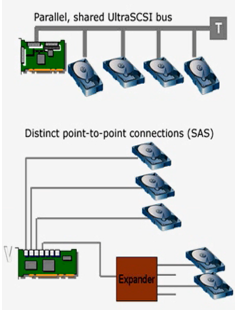
iscsi
SAN

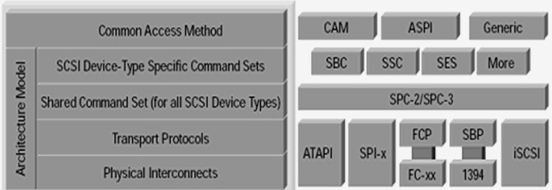
SCSI-3 SCSI model:
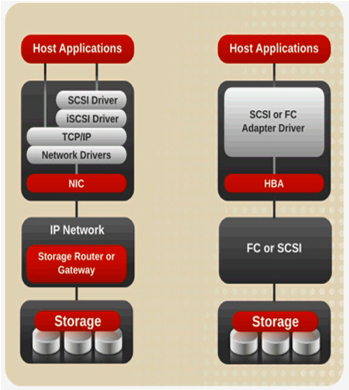
iSCSI versus SCSI/FC access to storage:
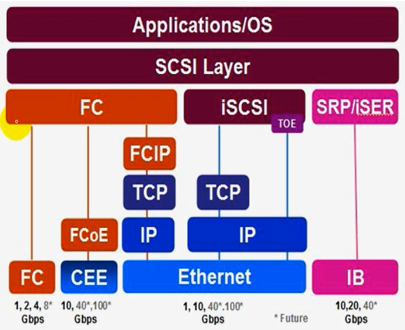
FCoE vs FC vs ISCSI vs IB
SAN vs NAS

iSCSI Protocol:

iSCSI HBA卡:
采用内建SCSI指令及TOE引擎的ASIC芯片的适配卡,在三种iSCSI Initiator中,价格最贵,但性能最佳
iSCSI TOE卡:
内建TOE引擎的ASIC芯片适配卡,由于SCSI指令仍以软件方式运作,所以仍会吃掉些许的CPU资源
ISCSI Initiator驱动程序:
目前不论Micriosoft Windows、IBM AIX、HP-UX、Linux、Novell Netware等各家操作系统,皆已陆续提供这方面的服务,其中以微软最为积极,也最全面。在价格上,比起前两种方案,远为低廉,甚至完全免费
但由于Initiator驱动程序工作时会耗费大量的CPU使用率及系统资源,所以性能最差
iscsi: 监听在tcp3260端口;

iSCSI Target: scsi-target-utils
3260
客户端认证方式:
1、基于IP
2、基于用户,CHAP
iSCSI Initiator: iscsi-initiator-utils
open-iscsi
tgtadm模式化命令:
--mode
常用模式:target、logicalunit、account
target --op
new、delete、show、update、bind、unbind
logicalunit --op
new、delete
account --op
new、delete、bind、unbind
--lld, -L:指定驱动;
--tid, -t:指定target的id号;
--lun, -l:指定逻辑单元号;
--backing-store <path>, -b:指定存储设备;
--initiator-address <address>, -I:指定绑定IP地址;
--targetname <targetname>, -T:指定target名称;
trgetname:
iqn.yyyy-mm.<reversed domain name>[:identifier]:全局唯一标识名,yyyy年,mm月,reversed domain name公司域名反过来写;
iqn.2013-05.com.magedu:tstore.disk1
iscsiadm模式化命令:
-m {discovery|node|session|iface}
discovery: 发现某服务器是否有target输出,以及输出了那些target;
node: 管理跟某target的关联关系;
session: 会话管理
iface: 接口管理
iscsiadm -m discovery [ -d debug_level ] [ -P printlevel ] [ -I iface -t type -p ip:port [ -l ] ] | [ [ -p
ip:port ] [ -l | -D ] ]
-d: 指定调试级别,0-8;
-I: 指定那个接口;
-t type: 指定类型,SendTargets(st), SLP, and iSNS;
-p: IP:port:指定IP和端口;
iscsiadm -m discovery -d 2 -t st -p 172.16.100.100
iiscsiadm -m node [ -d debug_level ] [ -P printlevel ] | [ -L all,manual,automatic ] [ -U all,manual,automatic ] [ -S ] [ [ -T targetname -p ip:port -I ifaceN ] [ -l | -u | -R | -s] ] [ [ -o operation ] [ -n name ] [ -v value ] ]
-L all,manual,automatic:登录,all登录所有target,manual手动登录,automatic自动登录;
-U all,manual,automatic:登出;
-S:显示
-T targetname :登录到那个target名字;
-p ip:port:那个服务器的target;
-I ifaceN:指定那个网卡登录;
-l:登录;
-u:登出;
-R:重新登录;
-o operation:操作
-n name:名字
-v value:值
iscsi服务端:
[root@steppingstone ~]# fdisk -l(查看分区情况)

Disk /dev/sda: 53.6 GB, 53687091200 bytes
255 heads, 63 sectors/track, 6527 cylinders
Units = cylinders of 16065 * 512 = 8225280 bytes

   Device Boot      Start         End      Blocks   Id  System
/dev/sda1   *           1          13      104391   83  Linux
/dev/sda2              14        2624    20972857+  83  Linux
/dev/sda3            2625        2755     1052257+  82  Linux swap / Solaris
/dev/sda4            2756        6527    30298590    5  Extended
/dev/sda5            2756        5188    19543041   8e  Linux LVM
[root@steppingstone ~]# fdisk /dev/sda(磁盘管理,进入交互模式)

The number of cylinders for this disk is set to 6527.
There is nothing wrong with that, but this is larger than 1024,
and could in certain setups cause problems with:
1) software that runs at boot time (e.g., old versions of LILO)
2) booting and partitioning software from other OSs
   (e.g., DOS FDISK, OS/2 FDISK)

Command (m for help): n(创建分区)
Command action
   e   extended
   p   primary partition (1-4)
e(扩展分区)
Selected partition 4(指定分区号)
First cylinder (2756-6527, default 2756):
Using default value 2756
Last cylinder or +size or +sizeM or +sizeK (2756-6527, default 6527):
Using default value 6527
Command (m for help): n
First cylinder (2756-6527, default 2756):
Using default value 2756
Last cylinder or +size or +sizeM or +sizeK (2756-6527, default 6527): +10G(新建10G分区)


Command (m for help): p(显示分区情况)

Disk /dev/sda: 53.6 GB, 53687091200 bytes
255 heads, 63 sectors/track, 6527 cylinders
Units = cylinders of 16065 * 512 = 8225280 bytes

   Device Boot      Start         End      Blocks   Id  System
/dev/sda1   *           1          13      104391   83  Linux
/dev/sda2              14        2624    20972857+  83  Linux
/dev/sda3            2625        2755     1052257+  82  Linux swap / Solaris
/dev/sda4            2756        6527    30298590    5  Extended
/dev/sda5            2756        3972     9775521   83  Linux


Command (m for help): n(新建分区)
First cylinder (3973-6527, default 3973):
Using default value 3973
Last cylinder or +size or +sizeM or +sizeK (3973-6527, default 6527): +10G(创建10G分区)


Command (m for help): p(显示分区情况)

Disk /dev/sda: 53.6 GB, 53687091200 bytes
255 heads, 63 sectors/track, 6527 cylinders
Units = cylinders of 16065 * 512 = 8225280 bytes

   Device Boot      Start         End      Blocks   Id  System
/dev/sda1   *           1          13      104391   83  Linux
/dev/sda2              14        2624    20972857+  83  Linux
/dev/sda3            2625        2755     1052257+  82  Linux swap / Solaris
/dev/sda4            2756        6527    30298590    5  Extended
/dev/sda5            2756        3972     9775521   83  Linux
/dev/sda6            3973        5189     9775521   83  Linux


Command (m for help): w(保存退出)
The partition table has been altered!

Calling ioctl() to re-read partition table.

WARNING: Re-reading the partition table failed with error 16: 设备或资源忙.
The kernel still uses the old table.
The new table will be used at the next reboot.
Syncing disks.
[root@steppingstone ~]# partprobe /dev/sda(让内核重新加载/dev/sda分区表)
[root@steppingstone ~]# yum -y install scsi-target-utils(通过yum源安装scsi-target-utils软件,-y所有询问回答yes)
[root@steppingstone ~]# rpm -ql scsi-target-utils(查看scsi-target-utils安装生成那些文件)
/etc/rc.d/init.d/tgtd(服务器端脚本)
/etc/sysconfig/tgtd
/etc/tgt/targets.conf(配置文件)
/usr/sbin/tgt-admin
/usr/sbin/tgt-setup-lun
/usr/sbin/tgtadm(在命令行创建target和lun工具)
/usr/sbin/tgtd
/usr/sbin/tgtimg
/usr/share/doc/scsi-target-utils-1.0.14
/usr/share/doc/scsi-target-utils-1.0.14/README
/usr/share/doc/scsi-target-utils-1.0.14/README.iscsi
/usr/share/doc/scsi-target-utils-1.0.14/README.iser
/usr/share/doc/scsi-target-utils-1.0.14/README.lu_configuration
/usr/share/doc/scsi-target-utils-1.0.14/README.mmc
/usr/share/man/man8/tgt-admin.8.gz
/usr/share/man/man8/tgt-setup-lun.8.gz
/usr/share/man/man8/tgtadm.8.gz
[root@steppingstone ~]# service tgtd start(启动tgtd服务)
Starting SCSI target daemon: Starting target framework daemon
[root@steppingstone ~]# netstat -tnlp(查看系统服务,-t代表tcp,-n以数字显示,-l监听端口,-p显示服务名称)
Active Internet connections (only servers)
Proto Recv-Q Send-Q Local Address               Foreign Address             State       PID/Program name
tcp        0      0 127.0.0.1:2208              0.0.0.0:*                   LISTEN      3586/./hpiod
tcp        0      0 0.0.0.0:929                 0.0.0.0:*                   LISTEN      3718/rpc.mountd
tcp        0      0 0.0.0.0:2049                0.0.0.0:*                   LISTEN      -
tcp        0      0 0.0.0.0:34243               0.0.0.0:*                   LISTEN      -
tcp        0      0 0.0.0.0:901                 0.0.0.0:*                   LISTEN      3689/rpc.rquotad
tcp        0      0 0.0.0.0:911                 0.0.0.0:*                   LISTEN      3273/rpc.statd
tcp        0      0 0.0.0.0:111                 0.0.0.0:*                   LISTEN      3232/portmap
tcp        0      0 0.0.0.0:22                  0.0.0.0:*                   LISTEN      3609/sshd
tcp        0      0 127.0.0.1:631               0.0.0.0:*                   LISTEN      3623/cupsd
tcp        0      0 127.0.0.1:25                0.0.0.0:*                   LISTEN      3768/sendmail
tcp        0      0 127.0.0.1:6010              0.0.0.0:*                   LISTEN      3976/sshd
tcp        0      0 0.0.0.0:3260                0.0.0.0:*                   LISTEN      4071/tgtd
tcp        0      0 127.0.0.1:2207              0.0.0.0:*                   LISTEN      3591/python
tcp        0      0 :::22                       :::*                        LISTEN      3609/sshd
tcp        0      0 ::1:6010                    :::*                        LISTEN      3976/sshd
tcp        0      0 :::3260                     :::*                        LISTEN      4071/tgtd 提示:tgtd监听tcp的3260端口;
[root@steppingstone ~]# chkconfig tgtd on(让tgtd服务开机自动启动)
[root@steppingstone ~]# tgtadm -h(查看tgtadm命令的帮助)
Usage: tgtadm [OPTION]
Linux SCSI Target Framework Administration Utility, version

  --lld <driver> --mode(模式) target(操作target) --op(操作) new(新建target) --tid <id> --targetname <name>
                        add a new target with <id> and <name>. <id> must not be zero.
  --lld <driver> --mode target --op delete(删除target) --tid <id>
                        delete the specific target with <id>. The target must
                        have no activity.
  --lld <driver> --mode target --op show(显示target)
                        show all the targets.
  --lld <driver> --mode target --op show --tid <id>
                        show the specific target's parameters.
  --lld <driver> --mode target --op update(更新target) --tid <id> --name <param> --value <value>
                        change the target parameters of the specific
                        target with <id>.
  --lld <driver> --mode target --op bind(绑定target) --tid <id> --initiator-address <src>(将某个initiator的IP地址和target绑定,做基于IP授权)
                        enable the target to accept the specific initiators.
  --lld <driver> --mode target --op unbind(解绑target) --tid <id> --initiator-address <src>
                        disable the specific permitted initiators.
  --lld <driver> --mode logicalunit(操作逻辑单元) --op new(创建logicalunit) --tid <id>(target) --lun <lun> (逻辑单元号)\
                        --backing-store <path> --bstype <type> --bsoflags <options>
                        add a new logical unit with <lun> to the specific
                        target with <id>. The logical unit is offered
                        to the initiators. <path> must be block device files
                        (including LVM and RAID devices) or regular files.
                        bstype option is optional.
                        bsoflags supported options are sync and direct
                        (sync:direct for both).
  --lld <driver> --mode logicalunit --op delete(删除logicalunit) --tid <id> --lun <lun>
                        delete the specific logical unit with <lun> that
                        the target with <id> has.
  --lld <driver> --mode account(绑定用户) --op new(创建帐号) --user <name> --password <pass>
                        add a new account with <name> and <pass>.
  --lld <driver> --mode account --op delete --user <name>
                        delete the specific account having <name>.
  --lld <driver> --mode account --op bind(绑定帐号) --tid <id> --user <name> [--outgoing]
                        add the specific account having <name> to
                        the specific target with <id>.
                        <user> could be <IncomingUser> or <OutgoingUser>.
                        If you use --outgoing option, the account will
                        be added as an outgoing account.
  --lld <driver> --mode account --op unbind(解除绑定) --tid <id> --user <name>
                        delete the specific account having <name> from specific
                        target.
  --control-port <port> use control port <port>
  --help                display this help and exit

Report bugs to <stgt@vger.kernel.org>.
[root@steppingstone ~]# man tgtadm(查看tgtadm的man手册)

       tgtadm - Linux SCSI Target Administration Utility

       tgtadm [OPTIONS]... [-C --control-port <port>] [-L --lld <driver>] [-o --op <operation>] [-m --mode <mode>]
                           [-t --tid <id>] [-T --targetname <targetname>] [-Y --device-type <type>] [-l --lun <lun>]
                           [-b --backing-store <path>] [-E --bstype <type>] [-I --initiator-address <address>]
                           [-n --name <parameter>] [-v --value <value>] [-P --params <param=value[,param=value...]>]
                           [-h --help]
[root@steppingstone ~]# fdisk -l(查看磁盘分区情况)

Disk /dev/sda: 53.6 GB, 53687091200 bytes
255 heads, 63 sectors/track, 6527 cylinders
Units = cylinders of 16065 * 512 = 8225280 bytes

   Device Boot      Start         End      Blocks   Id  System
/dev/sda1   *           1          13      104391   83  Linux
/dev/sda2              14        2624    20972857+  83  Linux
/dev/sda3            2625        2755     1052257+  82  Linux swap / Solaris
/dev/sda4            2756        6527    30298590    5  Extended
/dev/sda5            2756        3972     9775521   83  Linux
/dev/sda6            3973        5189     9775521   83  Linux
[root@steppingstone ~]# tgtadm --lld iscsi --mode target --op new --targetname iqn.2013-05.com.magedu:teststore.disk1 --tid 1(新建target,
--lld指定驱动为iscsi,--mode指定模式为target,--op操作为new新建,--targetname名字,--tid指定target的id号,千万不能指定为0,0为保留为当前主机,)
[root@steppingstone ~]# tgtadm --lld iscsi --mode target --op show(查看target,--lld指定驱动,--mode指定模式,--op操作)
Target 1: iqn.2013-05.com.magedu:teststore.disk1
    System information:
        Driver: iscsi
        State: ready
    I_T nexus information:
    LUN information:
        LUN: 0(逻辑单元号为0,一个target最多有32个LUN)
            Type: controller
            SCSI ID: IET     00010000
            SCSI SN: beaf10
            Size: 0 MB, Block size: 1
            Online: Yes
            Removable media: No
            Readonly: No
            Backing store type: null
            Backing store path: None
            Backing store flags:
    Account information:(没有绑定任何账户)
    ACL information:(没有绑定任何initiator的IP地址)
提示:建立target没有关联到某个设备,target只是模拟的是个控制芯片,这个target要能被别人使用要关联到某个存储设备上去;
[root@steppingstone ~]# tgtadm --lld iscsi --mode logicalunit --op new --tid 1 --lun 1 --backing-store /dev/sda5(创建逻辑单元,--lld指定驱动,
--mode指定模式,--op操作,--tid指定target的id号,--lun指定逻辑单元号,自己的逻辑单元号,0已经被占用了,--backing-store指定存储设备,)
[root@steppingstone ~]# tgtadm --lld iscsi --mode target --op show(查看target,--lld指定驱动,--mode指定模式,--op操作)
Target 1: iqn.2013-05.com.magedu:teststore.disk1
    System information:
        Driver: iscsi
        State: ready
    I_T nexus information:
    LUN information:
        LUN: 0
            Type: controller(控制器)
            SCSI ID: IET     00010000
            SCSI SN: beaf10
            Size: 0 MB, Block size: 1
            Online: Yes
            Removable media: No
            Readonly: No
            Backing store type: null
            Backing store path: None
            Backing store flags:
        LUN: 1
            Type: disk(磁盘)
            SCSI ID: IET     00010001
            SCSI SN: beaf11
            Size: 10010 MB, Block size: 512(磁盘大小10G,块大小512)
            Online: Yes(在线)
            Removable media: No(是否可以直接拔掉的设备)
            Readonly: No(是否只读)
            Backing store type: rdwr(存储设备类型读写都可以)
            Backing store path: /dev/sda5(真正存储设备)
            Backing store flags:
    Account information:
    ACL information:
[root@steppingstone ~]# tgtadm --lld iscsi --mode target --op bind --tid 1 --initiator-address 172.16.0.0/16(绑定target让172.16.0.0/16网段使用,
--lld指定驱动,--mode指定模式,--op操作,--tid指定target的id号)
[root@steppingstone ~]# tgtadm --lld iscsi --mode target --op show(查看target,--lld指定驱动,--mode指定模式,--op操作)
Target 1: iqn.2013-05.com.magedu:teststore.disk1
    System information:
        Driver: iscsi
        State: ready
    I_T nexus information:
    LUN information:
        LUN: 0
            Type: controller
            SCSI ID: IET     00010000
            SCSI SN: beaf10
            Size: 0 MB, Block size: 1
            Online: Yes
            Removable media: No
            Readonly: No
            Backing store type: null
            Backing store path: None
            Backing store flags:
        LUN: 1
            Type: disk
            SCSI ID: IET     00010001
            SCSI SN: beaf11
            Size: 10010 MB, Block size: 512
            Online: Yes
            Removable media: No
            Readonly: No
            Backing store type: rdwr
            Backing store path: /dev/sda5
            Backing store flags:
    Account information:
    ACL information:
        172.16.0.0/16
iscsi client_1:
[root@node1 ~]# yum -y install iscsi-initiator-utils(安装iscsi-initator-utils软件,-y所有询问回答yes)
[root@node1 ~]# rpm -ql iscsi-initiator-utils(查看iscsi-initiator-utils安装生成那些文件)
/etc/iscsi(配置文件)
/etc/iscsi/iscsid.conf
/etc/logrotate.d/iscsiuiolog
/etc/rc.d/init.d/iscsi(脚本,只要启动iscsi,iscsid会自动启动)
/etc/rc.d/init.d/iscsid(脚本)
/sbin/iscsi-iname
/sbin/iscsiadm(客户端管理工具)
/sbin/iscsid
/sbin/iscsistart(启动iscsi功能)
/sbin/iscsiuio
/usr/include/fw_context.h(头文件)
/usr/include/iscsi_list.h
/usr/include/libiscsi.h
/usr/lib/libfwparam.a(库文件)
/usr/lib/libiscsi.so
/usr/lib/libiscsi.so.0
/usr/lib/python2.4/site-packages/libiscsimodule.so
/usr/share/doc/iscsi-initiator-utils-6.2.0.872
/usr/share/doc/iscsi-initiator-utils-6.2.0.872/README
/usr/share/doc/iscsi-initiator-utils-6.2.0.872/html
/usr/share/doc/iscsi-initiator-utils-6.2.0.872/html/annotated.html
/usr/share/doc/iscsi-initiator-utils-6.2.0.872/html/doxygen.css
/usr/share/doc/iscsi-initiator-utils-6.2.0.872/html/doxygen.png
/usr/share/doc/iscsi-initiator-utils-6.2.0.872/html/files.html
/usr/share/doc/iscsi-initiator-utils-6.2.0.872/html/functions.html
/usr/share/doc/iscsi-initiator-utils-6.2.0.872/html/functions_vars.html
/usr/share/doc/iscsi-initiator-utils-6.2.0.872/html/globals.html
/usr/share/doc/iscsi-initiator-utils-6.2.0.872/html/globals_defs.html
/usr/share/doc/iscsi-initiator-utils-6.2.0.872/html/globals_enum.html
/usr/share/doc/iscsi-initiator-utils-6.2.0.872/html/globals_eval.html
/usr/share/doc/iscsi-initiator-utils-6.2.0.872/html/globals_func.html
/usr/share/doc/iscsi-initiator-utils-6.2.0.872/html/globals_vars.html
/usr/share/doc/iscsi-initiator-utils-6.2.0.872/html/index.html
/usr/share/doc/iscsi-initiator-utils-6.2.0.872/html/libiscsi_8c.html
/usr/share/doc/iscsi-initiator-utils-6.2.0.872/html/libiscsi_8h-source.html
/usr/share/doc/iscsi-initiator-utils-6.2.0.872/html/libiscsi_8h.html
/usr/share/doc/iscsi-initiator-utils-6.2.0.872/html/namespaces.html
/usr/share/doc/iscsi-initiator-utils-6.2.0.872/html/namespacesetup.html
/usr/share/doc/iscsi-initiator-utils-6.2.0.872/html/pylibiscsi_8c.html
/usr/share/doc/iscsi-initiator-utils-6.2.0.872/html/setup_8py.html
/usr/share/doc/iscsi-initiator-utils-6.2.0.872/html/structPyIscsiChapAuthInfo.html
/usr/share/doc/iscsi-initiator-utils-6.2.0.872/html/structPyIscsiNode.html
/usr/share/doc/iscsi-initiator-utils-6.2.0.872/html/structlibiscsi__auth__info.html
/usr/share/doc/iscsi-initiator-utils-6.2.0.872/html/structlibiscsi__chap__auth__info.html
/usr/share/doc/iscsi-initiator-utils-6.2.0.872/html/structlibiscsi__context.html
/usr/share/doc/iscsi-initiator-utils-6.2.0.872/html/structlibiscsi__network__config.html
/usr/share/doc/iscsi-initiator-utils-6.2.0.872/html/structlibiscsi__node.html
/usr/share/doc/iscsi-initiator-utils-6.2.0.872/html/tab_b.gif
/usr/share/doc/iscsi-initiator-utils-6.2.0.872/html/tab_l.gif
/usr/share/doc/iscsi-initiator-utils-6.2.0.872/html/tab_r.gif
/usr/share/doc/iscsi-initiator-utils-6.2.0.872/html/tabs.css
/usr/share/man/man8/iscsi-iname.8.gz
/usr/share/man/man8/iscsiadm.8.gz
/usr/share/man/man8/iscsid.8.gz
/usr/share/man/man8/iscsistart.8.gz
/usr/share/man/man8/iscsiuio.8.gz
/var/lib/iscsi
/var/lib/iscsi/ifaces(各网卡接口,要跟target建立联系设置使用那块网卡)
/var/lib/iscsi/isns(统一命名方式)
/var/lib/iscsi/nodes(节点)
/var/lib/iscsi/send_targets(向target发送指令的)
/var/lib/iscsi/slp
/var/lib/iscsi/static
/var/lock/iscsi
[root@node1 ~]# iscsi-iname(查看initiator名称)
iqn.1994-05.com.redhat:9ca447ee550
[root@node1 ~]# iscsi-iname -p iqn.2013-05.com.magedu(修改initiator名称)
iqn.2013-05.com.magedu:13a41a8692c
[root@node1 ~]# vim /etc/iscsi/initiatorname.iscsi(编辑initiator名称配置文件)

InitiatorName=iqn.1994-05.com.redhat:82c8d9bdfb56

[root@node1 ~]# echo "InitiatorName=`iscsi-iname -p iqn.2013-05.com.magedu`" > /etc/iscsi/initiatorname.iscsi(命令替换,将输出结果输出到initiato
rname.iscsi文件)
[root@node1 ~]# cat /etc/iscsi/initiatorname.iscsi(查看initiatorname.iscsi文件内容)
InitiatorName=iqn.2013-05.com.magedu:983c58ae72f2
iscsi client_2:
[root@node2 ~]# cd /etc/iscsi/(切换到/etc/iscsi目录)
[root@node2 iscsi]# ls(查看当前目录文件及子目录)
initiatorname.iscsi  iscsid.conf
[root@node2 iscsi]# cat initiatorname.iscsi(查看initiatorname.iscsi文件内容)
InitiatorName=iqn.1994-05.com.redhat:5ad427f6d47
iscsi client_1:
[root@node1 ~]# vim /etc/iscsi/initiatorname.iscsi(编辑initiatorname.iscsi文件内容)

InitiatorName=iqn.2013-05.com.magedu:983c58ae72f2
InitiatorAlias=node1.magedu.com(别名)

[root@node1 ~]# iscsiadm -h(查看iscsiadm的命令帮助)
iscsiadm -m(模式化命令) discoverydb [ -hV ] [ -d debug_level ] [-P printlevel] [ -t type -p ip:port -I ifaceN ... [ -Dl ] ] | [ [ -p ip:port
 -t type] [ -o operation ] [ -n name ] [ -v value ] [ -lD ] ]
iscsiadm -m discovery [ -hV ] [ -d debug_level ] [-P printlevel] [ -t type -p ip:port -I ifaceN ... [ -l ] ] | [ [ -p ip:port ] [ -l | -D ] ]
iiscsiadm -m node [ -hV ] [ -d debug_level ] [ -P printlevel ] [ -L all,manual,automatic ] [ -U all,manual,automatic ] [ -S ] [ [ -T targetname
 -p ip:port -I ifaceN ] [ -l | -u | -R | -s] ] [ [ -o  operation  ] [ -n name ] [ -v value ] ]
iscsiadm -m session [ -hV ] [ -d debug_level ] [ -P  printlevel] [ -r sessionid | sysfsdir [ -R | -u | -s ] [ -o operation ] [ -n name ] [ -v
 value ] ]
iscsiadm -m iface [ -hV ] [ -d debug_level ] [ -P printlevel ] [ -I ifacename | -H hostno|MAC ] [ [ -o  operation  ] [ -n name ] [ -v value ] ]
iscsiadm -m fw [ -l ]
iscsiadm -m host [ -P printlevel ] [ -H hostno|MAC ]
iscsiadm -k priority
[root@node1 ~]# man iscsiadm(查看iscsiadm的man帮助)

       iscsiadm - open-iscsi administration utility

       iscsiadm -m discovery [ -hV ] [ -d debug_level ] [ -P printlevel ] [ -I iface -t type -p ip:port [ -l ] ] |  [  [  -p
       ip:port ] [ -l | -D ] ]

       -P,  --print=printlevel
              If  in node mode print nodes in tree format. If in session mode print sessions in tree format. If in discovery
              mode print the nodes in tree format.

DISCOVERY TYPES
       iSCSI defines 3 discovery types: SendTargets, SLP, and iSNS.

[root@node1 ~]# service iscsi start(启动iscsi服务)
iscsid (pid  2548) is running...
Setting up iSCSI targets: iscsiadm: No records found
                                                           [  OK  ]
[root@node1 ~]# iscsiadm -m discovery -t sendtargets -p 172.16.100.100(发现172.16.100.100服务器是否有target输出,-m指定模式,-t指定类型,-p指定服务器
地址)
172.16.100.100:3260,1 iqn.2013-05.com.magedu:teststore.disk1
[root@node1 ~]# ls /var/lib/iscsi/(查看/var/lib/iscsi目录文件及子目录)
ifaces  isns  nodes  send_targets  slp  static
[root@node1 ~]# ls /var/lib/iscsi/send_targets/(查看/var/lib/iscsi/send_targets目录文件及子目录)
172.16.100.100,3260
提示:在/var/lib/iscsi/send_targets/目录已经有数据了;
[root@node1 ~]# ls /var/lib/iscsi/send_targets/172.16.100.100,3260/(查看/var/lib/iscsi/send_targets/172.16.100.100,3260目录文件及子目录)
iqn.2013-05.com.magedu:teststore.disk1,172.16.100.100,3260,1,default  st_config
提示:一旦发现这些数据就会记录下来的,将来不想用了想重新发现需要将这些数据清空;
[root@node1 ~]# iscsiadm -h
iscsiadm -m discoverydb [ -hV ] [ -d debug_level ] [-P printlevel] [ -t type -p ip:port -I ifaceN ... [ -Dl ] ] | [ [ -p ip:port -t type]
 [ -o operation ] [ -n name ] [ -v value ] [ -lD ] ]
iscsiadm -m discovery [ -hV ] [ -d debug_level ] [-P printlevel] [ -t type -p ip:port -I ifaceN ... [ -l ] ] | [ [ -p ip:port ] [ -l | -D ] ]
iiscsiadm -m node [ -hV ] [ -d debug_level ] [ -P printlevel ] [ -L all,manual,automatic ] [ -U all,manual,automatic ] [ -S ] [ [ -T
targetname -p ip:port -I ifaceN ] [ -l | -u | -R | -s] ] [ [ -o  operation  ] [ -n name ] [ -v value ] ]
iscsiadm -m session [ -hV ] [ -d debug_level ] [ -P  printlevel] [ -r sessionid | sysfsdir [ -R | -u | -s ] [ -o operation ] [ -n name ]
[ -v value ] ]
iscsiadm -m iface [ -hV ] [ -d debug_level ] [ -P printlevel ] [ -I ifacename | -H hostno|MAC ] [ [ -o  operation  ] [ -n name ] [ -v value
 ] ]
iscsiadm -m fw [ -l ]
iscsiadm -m host [ -P printlevel ] [ -H hostno|MAC ]
iscsiadm -k priority
[root@node1 ~]# man iscsiadm(查看iscsiadm的man帮助)

       -L, --loginall==[all|manual|automatic](登录到所有target,把远程服务器target的LUN关联到本机,以后它就会识别成为本机的存储设备)
              For node mode, login all sessions with the node or conn startup values passed in or all running sesssion, except ones marked
              onboot, if all is passed in.

              This option is only valid for node mode (it is valid but not functional for session mode).

       -U, --logoutall==[all,manual,automatic](登出所有,)
              logout all sessions with the node or conn startup values passed in or all running sesssion, except ones  marked  onboot,  if
              all is passed in.

              This option is only valid for node mode (it is valid but not functional for session mode).

       -S, --show(显示)
              When displaying records, do not hide masked values, such as the CHAP secret (password).

              This option is only valid for node and session mode.

       -R,  --rescan
              In session mode, if sid is also passed in rescan the session. If no sid has been passed in  rescan all running sessions.

              In node mode, rescan a session running through the target, portal, iface tuple passed in.

       -s, --stats(显示session的统计数据)
              Display session statistics.

       -o, --op=op
              Specifies a database operator op. op must be one of new(自己为某个库某个条目创建条目), delete(删除此前发现的数据库), update(更新),
show(显示) or nonpersistent.

              For iface mode, apply and applyall  are also applicable.

              This  option  is  valid for all modes except fw. Delete should not be used on a running session. If it is iscsiadm will stop
              the session and then delete the record.

              new creates a new database record for a given object. In node mode, the recid is the target name and  portal  (IP:port).  In
              iface mode, the recid is the iface name. In discovery mode, the recid is the portal and discovery type.

              In session mode, the new operation logs in a new session using the same node database and iface information as the specified
              session.

              In discovery mode, if the recid and new operation is passed in, but the --discover argument is not, then iscsiadm will  only
              create  a discovery record (it will not perform discovery). If the --discover argument is passed in with the portal and dis-
              covery type, then iscsiadm will create the discovery record if needed, and it will create records for  portals  returned  by
              the target that do not yet have a node DB record.

              delete  deletes a specified recid. In discovery node, if iscsiadm is performing discovery it will delete records for portals
              that are no longer returned.

              update will update the recid with name to the specified value. In discovery node, if iscsiadm is  performing  discovery  the
              recid,  name   and  value arguments are not needed. The update operation will operate on the portals returned by the target,
              and will update the node records with info from the config file and command line.

              show is the default behaviour for node, discovery and iface mode. It is also used when there are  no  commands  passed  into
              session mode and a running sid is passed in.  name and value are currently ignored when used with show.

              nonpersistent instructs iscsiadm to not manipulate the node DB.

              apply will cause the network settings to take effect on the specified iface.

              applyall  will  cause the network settings to take effect on all the ifaces whose MAC address or host number matches that of
              the specific host.

       -n, --name=name
              Specify a field name in a record. For use with the update operator.

       -v, --value=value
              Specify a value for use with the update operator.

              This option is only valid for node mode.

[root@node1 ~]# iscsiadm -m node -T iqn.2013-05.com.magedu:teststore.disk1 -p 172.16.100.100 -l(登录172.16.100.100服务器的target,-T指定登录那个
target名字,-p指定服务器地址,-l登录)
Logging in to [iface: default, target: iqn.2013-05.com.magedu:teststore.disk1, portal: 172.16.100.100,3260] (multiple)
Login to [iface: default, target: iqn.2013-05.com.magedu:teststore.disk1, portal: 172.16.100.100,3260] successful.
[root@node1 ~]# fdisk -l(查看磁盘分区信息)

Disk /dev/sda: 53.6 GB, 53687091200 bytes
255 heads, 63 sectors/track, 6527 cylinders
Units = cylinders of 16065 * 512 = 8225280 bytes

   Device Boot      Start         End      Blocks   Id  System
/dev/sda1   *           1          13      104391   83  Linux
/dev/sda2              14        2624    20972857+  83  Linux
/dev/sda3            2625        2755     1052257+  82  Linux swap / Solaris

Disk /dev/sdb: 10.0 GB, 10010133504 bytes
64 heads, 32 sectors/track, 9546 cylinders
Units = cylinders of 2048 * 512 = 1048576 bytes

Disk /dev/sdb doesn't contain a valid partition table
[root@node1 ~]# fdisk /dev/sdb(管理sdb磁盘设备,进入交互模式)
Device contains neither a valid DOS partition table, nor Sun, SGI or OSF disklabel
Building a new DOS disklabel. Changes will remain in memory only,
until you decide to write them. After that, of course, the previous
content won't be recoverable.


The number of cylinders for this disk is set to 9546.
There is nothing wrong with that, but this is larger than 1024,
and could in certain setups cause problems with:
1) software that runs at boot time (e.g., old versions of LILO)
2) booting and partitioning software from other OSs
   (e.g., DOS FDISK, OS/2 FDISK)
Warning: invalid flag 0x0000 of partition table 4 will be corrected by w(rite)

Command (m for help): n(创建分区)
Command action
   e   extended
   p   primary partition (1-4)
p(主分区)
Partition number (1-4): 1(分区号)
First cylinder (1-9546, default 1):
Using default value 1
Last cylinder or +size or +sizeM or +sizeK (1-9546, default 9546): +2G(创建2G分区)

Command (m for help): w(保存退出)
The partition table has been altered!

Calling ioctl() to re-read partition table.

WARNING: Re-reading the partition table failed with error 16: Device or resource busy.
The kernel still uses the old table.
The new table will be used at the next reboot.
Syncing disks.
[root@node1 ~]# partprobe /dev/sdb(让内核重新加载/dev/sdb分区表)
[root@node1 ~]# fdisk -l(查看磁盘分区情况)

Disk /dev/sda: 53.6 GB, 53687091200 bytes
255 heads, 63 sectors/track, 6527 cylinders
Units = cylinders of 16065 * 512 = 8225280 bytes

   Device Boot      Start         End      Blocks   Id  System
/dev/sda1   *           1          13      104391   83  Linux
/dev/sda2              14        2624    20972857+  83  Linux
/dev/sda3            2625        2755     1052257+  82  Linux swap / Solaris

Disk /dev/sdb: 10.0 GB, 10010133504 bytes
64 heads, 32 sectors/track, 9546 cylinders
Units = cylinders of 2048 * 512 = 1048576 bytes

   Device Boot      Start         End      Blocks   Id  System
/dev/sdb1               1        1908     1953776   83  Linux
[root@node1 ~]# mkfs.ext3 /dev/sdb1(将/dev/sdb1格式化为ext3类型文件系统)
mke2fs 1.39 (29-May-2006)
Filesystem label=
OS type: Linux
Block size=4096 (log=2)
Fragment size=4096 (log=2)
244320 inodes, 488444 blocks
24422 blocks (5.00%) reserved for the super user
First data block=0
Maximum filesystem blocks=503316480
15 block groups
32768 blocks per group, 32768 fragments per group
16288 inodes per group
Superblock backups stored on blocks:
	32768, 98304, 163840, 229376, 294912

Writing inode tables: done
Creating journal (8192 blocks): done
Writing superblocks and filesystem accounting information: done

This filesystem will be automatically checked every 35 mounts or
180 days, whichever comes first.  Use tune2fs -c or -i to override.
[root@node1 ~]# mount /dev/sdb1 /mnt/(挂载/dev/sdb1到/mnt目录)
[root@node1 ~]# cp /etc/issue /mnt/(复制issue文件/mnt目录)
[root@node1 ~]# ls /mnt/(查看/mnt/目录文件及子目录)
issue  lost+found
[root@node1 ~]# umount /mnt/(卸载/mnt挂载的文件系统)
iscsi client_2:
[root@node2 iscsi]# vim initiatorname.iscsi(编辑initiator名称配置文件)

InitiatorName=iqn.2013-05.com.magedu:node2

[root@node2 iscsi]# service iscsi start(启动iscsi服务)
iscsid (pid  23071) 正在运行...
设置 iSCSI 目标:iscsiadm: No records found
                                                           [确定]
[root@node2 iscsi]# iscsiadm -m discovery -t st -p 172.16.100.100(发现172.16.100.100服务器是否有target输出,-m指定模式,-t指定类型,-p指定服务器地址)
172.16.100.100:3260,1 iqn.2013-05.com.magedu:teststore.disk1
[root@node2 iscsi]# iscsiadm -m node -T iqn.2013-05.com.magedu:teststore.disk1 -p 172.16.100.100 -l(登录172.16.100.100服务器的target,-T指定登录
那个target名字,-p指定服务器地址,-l登录)
Logging in to [iface: default, target: iqn.2013-05.com.magedu:teststore.disk1, portal: 172.16.100.100,3260] (multiple)
Login to [iface: default, target: iqn.2013-05.com.magedu:teststore.disk1, portal: 172.16.100.100,3260] successful.
[root@node2 iscsi]# fdisk -l(查看磁盘分区情况)

Disk /dev/sda: 53.6 GB, 53687091200 bytes
255 heads, 63 sectors/track, 6527 cylinders
Units = cylinders of 16065 * 512 = 8225280 bytes

   Device Boot      Start         End      Blocks   Id  System
/dev/sda1   *           1          13      104391   83  Linux
/dev/sda2              14        2624    20972857+  83  Linux
/dev/sda3            2625        2755     1052257+  82  Linux swap / Solaris

Disk /dev/sdb: 10.0 GB, 10010133504 bytes
64 heads, 32 sectors/track, 9546 cylinders
Units = cylinders of 2048 * 512 = 1048576 bytes

   Device Boot      Start         End      Blocks   Id  System
/dev/sdb1               1        1908     1953776   83  Linux
[root@node2 iscsi]# mount /dev/sdb1 /mnt/(挂载/dev/sdb1到/mnt目录)
[root@node2 iscsi]# ls /mnt/(查看/mnt目录文件及子目录)
issue  lost+found
[root@node2 iscsi]# cd /mnt/(切换到/mnt目录)
[root@node2 mnt]# ls(查看当前目录文件及子目录)
issue  lost+found
[root@node2 mnt]# cp /etc/inittab ./(复制/etc/inittab到当前目录)
[root@node2 mnt]# ls(查看当前目录文件及子目录)
inittab  issue  lost+found
iscsi client_1:
[root@node1 ~]# mount /dev/sdb1 /mnt/(挂载/dev/sdb1到/mnt目录)
[root@node1 ~]# ls /mnt/(查看当前目录文件及子目录)
inittab  issue  lost+found
[root@node1 ~]# cp /etc/fstab /mnt/(复制/etc/fstab文件到/mnt目录)
[root@node1 ~]# ls /mnt/(查看当前目录文件及子目录)
fstab  inittab  issue  lost+found
iscsi client_2:
[root@node2 mnt]# ls(查看当前目录文件及子目录)
inittab  issue  lost+found
提示:没有fstab文件;
[root@node2 mnt]# cd(切换到用户家目录)
[root@node2 ~]# umount /mnt/(卸载/mnt目录挂载的文件系统)
[root@node2 ~]# mount /dev/sdb1 /mnt/(挂载/dev/sdb1到/mnt目录)
[root@node2 ~]# ls /mnt/(查看/mnt目录文件及子目录)
inittab  issue  lost+found
提示:没有fstab文件,说明刚才的操作是在内存中完成,它有可能还没有同步到磁盘,压根就看不到,这就是单击文件系统坏处,所以两个节点编辑同一个文件会崩溃,如果使用集群文件系统,
任何时候在这里创建文件会立即通知给其他节点,所以其它节点会立即看到的;
iscsi-initiator-utils:
不支持discovery认证:
如果使用基于用户的认证,必须首先开放基于IP的认证;
cman, rgmanger, gfs2-utils
mkfs.gfs2
-j #: 指定日志区域个数,有几个就能够被几个节点所挂载,gfs2文件系统有可能被多个节点所挂载,每个节点都需要一个日志区域来实现文件的管理,包括各种修改操作都要使用日志区域的,如果指定两个,只能被两个节点挂载,默认情况下每个日志区大小为128M;
-J #: 指定日志区域大小,默认128M;
-p {lock_dlm|lock_nolock}: 指定锁协议名称,lock_dlm分布式文件锁,lock_nolock不使用锁,如果gfs2文件系统被一个节点使用不用使用分布式文件锁;
-t <name>: 指定锁表名称,格式clustername:locktablename,clustername集群名字要跟当前节点集群名称保持一致,而locktablename锁表名称可以自己取,但是不能跟其他节点的锁表名称相同,所以必须在集群内部唯一的,标识某个文件系统锁的持有情况;
iscsi client_1:
[root@node1 ~]# cd /var/lib/iscsi/(切换到/var/lib/iscsi目录)
[root@node1 iscsi]# ls(查看当前目录文件及子目录)
ifaces  isns  nodes  send_targets  slp  static
[root@node1 iscsi]# ls send_targets/(查看send_targets目录文件及子目录)
172.16.100.100,3260
[root@node1 iscsi]# ls send_targets/172.16.100.100,3260/(查看send_targets/172.16.100.100,3260目录文件及子目录)
iqn.2013-05.com.magedu:teststore.disk1,172.16.100.100,3260,1,default  st_config
[root@node1 iscsi]# ls ifaces/(查看ifaces目录文件及子目录)

提示:如果没有指定接口没有绑定到某个接口上;
[root@node1 iscsi]# cd(切换到用户家目录)
[root@node1 ~]# cd /etc/iscsi/(切换到/etc/iscsi目录文件及子目录)
[root@node1 iscsi]# ls(查看当前目录文件及子目录)
initiatorname.iscsi  iscsid.conf
[root@node1 iscsi]# vim iscsid.conf(编辑iscsid.conf文件)

#*****************
# Startup settings(服务刚启动设置,在登录每个target要定义的参数)
#*****************

node.startup = automatic(是不是自动启动节点,并登录进去)

node.leading_login = No

# *************
# CHAP Settings(如果要基于chap方式做用户认证)
# *************

#node.session.auth.authmethod = CHAP(基于那种方式认证)

#node.session.auth.username = username(登录服务器时认证用户名)
#node.session.auth.password = password(登陆服务器时认证密码)

#node.session.auth.username_in = username_in(客户端认证服务器端用户名)
#node.session.auth.password_in = password_in(客户端认证服务器端密码)

# ********
# Timeouts(会话超时时间)
# ********

node.session.timeo.replacement_timeout = 120(连接超时时间)

node.conn[0].timeo.login_timeout = 15(登录超时时间)

node.conn[0].timeo.logout_timeout = 15(登出超时时间)

node.conn[0].timeo.noop_out_interval = 5(检查间隔时间)

node.conn[0].timeo.noop_out_timeout = 5(重复检查间隔时间)
如何基于用户名的认证:
[root@node1 iscsi]# cd(切换到用户家目录)
[root@node1 ~]# iscsiadm -m node -T iqn.2013-05.com.magedu:teststore.disk1 -p 172.16.100.100 -u(登出172.16.100.100的target,-m模式,-T指定那个targ
et名字,-p指定服务器地址,-u登出)
Logging out of session [sid: 1, target: iqn.2013-05.com.magedu:teststore.disk1, portal: 172.16.100.100,3260]
Logout of [sid: 1, target: iqn.2013-05.com.magedu:teststore.disk1, portal: 172.16.100.100,3260] successful.
[root@node1 ~]# fdisk -l(查看磁盘分区情况)

Disk /dev/sda: 53.6 GB, 53687091200 bytes
255 heads, 63 sectors/track, 6527 cylinders
Units = cylinders of 16065 * 512 = 8225280 bytes

   Device Boot      Start         End      Blocks   Id  System
/dev/sda1   *           1          13      104391   83  Linux
/dev/sda2              14        2624    20972857+  83  Linux
/dev/sda3            2625        2755     1052257+  82  Linux swap / Solaris
[root@node1 ~]# chkconfig iscsi on(让iscsi服务在相应系统级别开机自动启动)
提示:只要数据库在,只要iscsi服务能够自动启动,它会自动登录到target上的,为了避免自动登录,可以将数据库删除;
[root@node1 ~]# iscsiadm -m node -T iqn.2013-05.com.magedu:teststore.disk1 -p 172.16.100.100 -o delete(向172.16.100.100相关的target数据库信息删除,
-m指定模式,-T指定target名字,-p指定服务器地址,-o指定操作)
[root@node1 ~]# ls /var/lib/iscsi/send_targets/(查看/var/lib/iscsi/send_targets目录文件及子目录)
172.16.100.100,3260
[root@node1 ~]# ls /var/lib/iscsi/send_targets/172.16.100.100,3260/(查看/var/lib/iscsi/send_targets/172.16.100.100,3260目录文件及子目录)
st_config
提示:iqn已经没有了;
[root@node1 ~]# rm -rf /var/lib/iscsi/send_targets/172.16.100.100,3260/(删除172.16.100.100,3260目录,-r目录,-f强制删除)
iscsi client_2:
[root@node2 ~]# iscsiadm -m node -T iqn.2013-05.com.magedu:teststore.disk1 -p 172.16.100.100 -u(登出172.16.100.100的target,-m模式,-T指定登出那
个target名字,-p指定服务器地址,-u登出)
Logging out of session [sid: 1, target: iqn.2013-05.com.magedu:teststore.disk1, portal: 172.16.100.100,3260]
Logout of [sid: 1, target: iqn.2013-05.com.magedu:teststore.disk1, portal: 172.16.100.100,3260] successful.
[root@node2 ~]# iscsiadm -m node -T iqn.2013-05.com.magedu:teststore.disk1 -p 172.16.100.100 -o delete(向172.16.100.100相关的target数据库删除,
-m指定模式,-T指定target名字,-p指定服务器地址,-o指定操作)
[root@node2 ~]# rm -rf /var/lib/iscsi/send_targets/172.16.100.100,3260/(删除172.16.100.100,3260目录,-r删除目录,-f强制删除)
steppingstone:
解除IP地址绑定只使用用户认证:
[root@steppingstone ~]# tgtadm --lld iscsi -m target --op unbind --tid 1 --initiator-address 172.16.0.0/16(解除绑定172.16.0.0/16网段使用,--lld
指定驱动,-m指定模式,--op操作,--tid指定target的id号)
[root@steppingstone ~]# tgtadm --lld iscsi --mode target --op show(查看target,--lld指定驱动,--mode指定模式,--op操作)
Target 1: iqn.2013-05.com.magedu:teststore.disk1
    System information:
        Driver: iscsi
        State: ready
    I_T nexus information:
    LUN information:
        LUN: 0
            Type: controller
            SCSI ID: IET     00010000
            SCSI SN: beaf10
            Size: 0 MB, Block size: 1
            Online: Yes
            Removable media: No
            Readonly: No
            Backing store type: null
            Backing store path: None
            Backing store flags:
        LUN: 1
            Type: disk
            SCSI ID: IET     00010001
            SCSI SN: beaf11
            Size: 10010 MB, Block size: 512
            Online: Yes
            Removable media: No
            Readonly: No
            Backing store type: rdwr
            Backing store path: /dev/sda5
            Backing store flags:
    Account information:
    ACL information:(information已经没有了)
[root@steppingstone ~]# tgtadm -h(查看tgtadm的帮助)
Usage: tgtadm [OPTION]
Linux SCSI Target Framework Administration Utility, version

  --lld <driver> --mode target --op new --tid <id> --targetname <name>
                        add a new target with <id> and <name>. <id> must not be zero.
  --lld <driver> --mode target --op delete --tid <id>
                        delete the specific target with <id>. The target must
                        have no activity.
  --lld <driver> --mode target --op show
                        show all the targets.
  --lld <driver> --mode target --op show --tid <id>
                        show the specific target's parameters.
  --lld <driver> --mode target --op update --tid <id> --name <param> --value <value>
                        change the target parameters of the specific
                        target with <id>.
  --lld <driver> --mode target --op bind --tid <id> --initiator-address <src>
                        enable the target to accept the specific initiators.
  --lld <driver> --mode target --op unbind --tid <id> --initiator-address <src>
                        disable the specific permitted initiators.
  --lld <driver> --mode logicalunit --op new --tid <id> --lun <lun> \
                        --backing-store <path> --bstype <type> --bsoflags <options>
                        add a new logical unit with <lun> to the specific
                        target with <id>. The logical unit is offered
                        to the initiators. <path> must be block device files
                        (including LVM and RAID devices) or regular files.
                        bstype option is optional.
                        bsoflags supported options are sync and direct
                        (sync:direct for both).
  --lld <driver> --mode logicalunit --op delete --tid <id> --lun <lun>
                        delete the specific logical unit with <lun> that
                        the target with <id> has.
  --lld <driver> --mode account --op new --user <name> --password <pass>
                        add a new account with <name> and <pass>.(创建帐号)
  --lld <driver> --mode account --op delete --user <name>
                        delete the specific account having <name>.(删除帐号)
  --lld <driver> --mode account --op bind --tid <id> --user <name> [--outgoing](出去的,绑定用来让客户端认证服务器端的帐号密码)
                        add the specific account having <name> to
                        the specific target with <id>.
                        <user> could be <IncomingUser> or <OutgoingUser>.
                        If you use --outgoing option, the account will
                        be added as an outgoing account.(往某个tid上将某个用户名绑定)
  --lld <driver> --mode account --op unbind --tid <id> --user <name>
                        delete the specific account having <name> from specific
                        target.
  --control-port <port> use control port <port>
  --help                display this help and exit

Report bugs to <stgt@vger.kernel.org>.
[root@steppingstone ~]# tgtadm --lld iscsi --mode account --op new --user iscsiuser --password iscsiuser(创建帐号,--lld指定驱动,--mode指定模式
,--op操作,--user指定用户,--password指定密码)
[root@steppingstone ~]# tgtadm --lld iscsi --mode account --op bind --tid 1 --user iscsiuser(绑定帐号,--lld指定驱动,--mode指定模式,--op操作,
--tid指定target的id号,--user指定用户)
[root@steppingstone ~]# tgtadm --lld iscsi --mode target --op show(查看target,--lld指定驱动,--mode指定模式,--op操作)
Target 1: iqn.2013-05.com.magedu:teststore.disk1
    System information:
        Driver: iscsi
        State: ready
    I_T nexus information:
    LUN information:
        LUN: 0
            Type: controller
            SCSI ID: IET     00010000
            SCSI SN: beaf10
            Size: 0 MB, Block size: 1
            Online: Yes
            Removable media: No
            Readonly: No
            Backing store type: null
            Backing store path: None
            Backing store flags:
        LUN: 1
            Type: disk
            SCSI ID: IET     00010001
            SCSI SN: beaf11
            Size: 10010 MB, Block size: 512
            Online: Yes
            Removable media: No
            Readonly: No
            Backing store type: rdwr
            Backing store path: /dev/sda5
            Backing store flags:
    Account information:(绑定user)
        iscsiuser
    ACL information:
iscsi client_1:
[root@node1 ~]# iscsiadm -m discovery -t st -p 172.16.100.100(发现172.16.100.100服务器是否有target输出,-m指定模式,-t指定类型,-p指定服务器地址)
iscsiadm: No portals found(没有发现)
[root@node1 ~]# iscsiadm -m discovery -d 2-t st -p 172.16.100.100(发现172.16.100.100服务器是否有target输出,-m指定模式,-d 调试,-t指定类型,-p指定服
务器地址)
iscsiadm: Max file limits 1024 1024

iscsiadm: starting sendtargets discovery, address 172.16.100.100:3260,
iscsiadm: connecting to 172.16.100.100:3260
iscsiadm: connected local port 37324 to 172.16.100.100:3260
iscsiadm: connected to discovery address 172.16.100.100
iscsiadm: login response status 0000(不让登录,没提供帐号密码)
iscsiadm: discovery process to 172.16.100.100:3260 exiting
iscsiadm: disconnecting conn 0x9b3dc30, fd 3
iscsiadm: No portals found
[root@node1 ~]# cd /etc/iscsi/(切换到/etc/iscsi目录)
[root@node1 iscsi]# ls(查看当前目录文件及子目录)
initiatorname.iscsi  iscsid.conf
[root@node1 iscsi]# vim iscsid.conf(编辑iscsid.conf配置文件)

discovery.sendtargets.auth.authmethod = CHAP

discovery.sendtargets.auth.username = iscsiuser
discovery.sendtargets.auth.password = iscsiuser

[root@node1 iscsi]# service iscsi restart(重启iscsi服务)
iscsiadm: No matching sessions found
Stopping iSCSI daemon:
iscsid is stopped                                          [  OK  ]
Starting iSCSI daemon:                                     [  OK  ]
                                                           [  OK  ]
Setting up iSCSI targets: iscsiadm: No records found
                                                           [  OK  ]
[root@node1 iscsi]# iscsiadm -m discovery -d 2 -t st -p 172.16.100.100(发现172.16.100.100服务器是否有target输出,-m指定模式,-d调试,-t指定类型,-p
指定服务器地址)
iscsiadm: Max file limits 1024 1024

iscsiadm: starting sendtargets discovery, address 172.16.100.100:3260,
iscsiadm: connecting to 172.16.100.100:3260
iscsiadm: connected local port 37325 to 172.16.100.100:3260
iscsiadm: connected to discovery address 172.16.100.100
iscsiadm: login response status 0000
iscsiadm: login response status 0000
iscsiadm: discovery process to 172.16.100.100:3260 exiting
iscsiadm: disconnecting conn 0x8568c30, fd 3
iscsiadm: No portals found
[root@node1 iscsi]# vim iscsid.conf(编辑iscsid.conf配置文件)

node.session.auth.authmethod = CHAP

node.session.auth.username = iscsiuser
node.session.auth.password = iscsiuser

[root@node1 iscsi]# service iscsi restart(重启iscsi服务)
iscsiadm: No matching sessions found
Stopping iSCSI daemon:
iscsid is stopped                                          [  OK  ]
Starting iSCSI daemon:                                     [  OK  ]
                                                           [  OK  ]
Setting up iSCSI targets: iscsiadm: No records found
                                                           [  OK  ]
[root@node1 iscsi]# iscsiadm -m discovery -d 2 -t st -p 172.16.100.100(发现172.16.100.100服务器是否有target输出,-m指定模式,-d调试,-t指定类型,-p
指定服务器地址)
iscsiadm: Max file limits 1024 1024

iscsiadm: starting sendtargets discovery, address 172.16.100.100:3260,
iscsiadm: connecting to 172.16.100.100:3260
iscsiadm: connected local port 37325 to 172.16.100.100:3260
iscsiadm: connected to discovery address 172.16.100.100
iscsiadm: login response status 0000
iscsiadm: login response status 0000
iscsiadm: discovery process to 172.16.100.100:3260 exiting
iscsiadm: disconnecting conn 0x8568c30, fd 3
iscsiadm: No portals found
[root@node1 iscsi]# vim iscsid.conf(编辑iscsid.conf配置文件)
[root@node1 iscsi]# iscsiadm -m discovery -d 5 -t st -p 172.16.100.100(发现172.16.100.100服务器是否有target输出,-m指定模式,-d调试,-t指定类型,-p
指定服务器地址)
iscsiadm: ip 172.16.100.100, port -1, tgpt -1
iscsiadm: Max file limits 1024 1024

iscsiadm: starting sendtargets discovery, address 172.16.100.100:3260,
iscsiadm: Matched transport be2iscsi

iscsiadm: sysfs_attr_get_value: open '/class/iscsi_transport/be2iscsi'/'handle'

iscsiadm: sysfs_attr_get_value: new uncached attribute '/sys/class/iscsi_transport/be2iscsi/handle'

iscsiadm: sysfs_attr_get_value: add to cache '/sys/class/iscsi_transport/be2iscsi/handle'

iscsiadm: sysfs_attr_get_value: cache '/sys/class/iscsi_transport/be2iscsi/handle' with attribute value '4176057344'

iscsiadm: sysfs_attr_get_value: open '/class/iscsi_transport/be2iscsi'/'caps'

iscsiadm: sysfs_attr_get_value: new uncached attribute '/sys/class/iscsi_transport/be2iscsi/caps'

iscsiadm: sysfs_attr_get_value: add to cache '/sys/class/iscsi_transport/be2iscsi/caps'

iscsiadm: sysfs_attr_get_value: cache '/sys/class/iscsi_transport/be2iscsi/caps' with attribute value '0x8b9'

iscsiadm: Matched transport bnx2i

iscsiadm: sysfs_attr_get_value: open '/class/iscsi_transport/bnx2i'/'handle'

iscsiadm: sysfs_attr_get_value: new uncached attribute '/sys/class/iscsi_transport/bnx2i/handle'

iscsiadm: sysfs_attr_get_value: add to cache '/sys/class/iscsi_transport/bnx2i/handle'

iscsiadm: sysfs_attr_get_value: cache '/sys/class/iscsi_transport/bnx2i/handle' with attribute value '4174119360'

iscsiadm: sysfs_attr_get_value: open '/class/iscsi_transport/bnx2i'/'caps'

iscsiadm: sysfs_attr_get_value: new uncached attribute '/sys/class/iscsi_transport/bnx2i/caps'

iscsiadm: sysfs_attr_get_value: add to cache '/sys/class/iscsi_transport/bnx2i/caps'

iscsiadm: sysfs_attr_get_value: cache '/sys/class/iscsi_transport/bnx2i/caps' with attribute value '0x8b9'

iscsiadm: Matched transport cxgb3i

iscsiadm: sysfs_attr_get_value: open '/class/iscsi_transport/cxgb3i'/'handle'

iscsiadm: sysfs_attr_get_value: new uncached attribute '/sys/class/iscsi_transport/cxgb3i/handle'

iscsiadm: sysfs_attr_get_value: add to cache '/sys/class/iscsi_transport/cxgb3i/handle'

iscsiadm: sysfs_attr_get_value: cache '/sys/class/iscsi_transport/cxgb3i/handle' with attribute value '4172473600'

iscsiadm: sysfs_attr_get_value: open '/class/iscsi_transport/cxgb3i'/'caps'

iscsiadm: sysfs_attr_get_value: new uncached attribute '/sys/class/iscsi_transport/cxgb3i/caps'

iscsiadm: sysfs_attr_get_value: add to cache '/sys/class/iscsi_transport/cxgb3i/caps'

iscsiadm: sysfs_attr_get_value: cache '/sys/class/iscsi_transport/cxgb3i/caps' with attribute value '0x3039'

iscsiadm: Matched transport iser

iscsiadm: sysfs_attr_get_value: open '/class/iscsi_transport/iser'/'handle'

iscsiadm: sysfs_attr_get_value: new uncached attribute '/sys/class/iscsi_transport/iser/handle'

iscsiadm: sysfs_attr_get_value: add to cache '/sys/class/iscsi_transport/iser/handle'

iscsiadm: sysfs_attr_get_value: cache '/sys/class/iscsi_transport/iser/handle' with attribute value '4174915296'

iscsiadm: sysfs_attr_get_value: open '/class/iscsi_transport/iser'/'caps'

iscsiadm: sysfs_attr_get_value: new uncached attribute '/sys/class/iscsi_transport/iser/caps'

iscsiadm: sysfs_attr_get_value: add to cache '/sys/class/iscsi_transport/iser/caps'

iscsiadm: sysfs_attr_get_value: cache '/sys/class/iscsi_transport/iser/caps' with attribute value '0x9'

iscsiadm: Matched transport tcp

iscsiadm: sysfs_attr_get_value: open '/class/iscsi_transport/tcp'/'handle'

iscsiadm: sysfs_attr_get_value: new uncached attribute '/sys/class/iscsi_transport/tcp/handle'

iscsiadm: sysfs_attr_get_value: add to cache '/sys/class/iscsi_transport/tcp/handle'

iscsiadm: sysfs_attr_get_value: cache '/sys/class/iscsi_transport/tcp/handle' with attribute value '4173924992'

iscsiadm: sysfs_attr_get_value: open '/class/iscsi_transport/tcp'/'caps'

iscsiadm: sysfs_attr_get_value: new uncached attribute '/sys/class/iscsi_transport/tcp/caps'

iscsiadm: sysfs_attr_get_value: add to cache '/sys/class/iscsi_transport/tcp/caps'

iscsiadm: sysfs_attr_get_value: cache '/sys/class/iscsi_transport/tcp/caps' with attribute value '0x39'

iscsiadm: sendtargets discovery to 172.16.100.100:3260 using isid 0x00023d000000
iscsiadm: resolved 172.16.100.100 to 172.16.100.100
iscsiadm: discovery timeouts: login 15, reopen_cnt 6, auth 45.
iscsiadm: connecting to 172.16.100.100:3260
iscsiadm: connected local port 37367 to 172.16.100.100:3260
iscsiadm: connected to discovery address 172.16.100.100
iscsiadm: discovery session to 172.16.100.100:3260 starting iSCSI login
iscsiadm: sending login PDU with current stage 0, next stage 1, transit 0x80, isid 0x00023d000000 exp_statsn 0
iscsiadm: >    InitiatorName=iqn.2013-05.com.magedu:983c58ae72f2
iscsiadm: >    InitiatorAlias=node1.magedu.com
iscsiadm: >    SessionType=Discovery
iscsiadm: >    AuthMethod=CHAP,None(认证方式为CHAP)
iscsiadm: wrote 48 bytes of PDU header
iscsiadm: wrote 128 bytes of PDU data
iscsiadm: read 48 bytes of PDU header
iscsiadm: read 48 PDU header bytes, opcode 0x23, dlength 39, data 0x8cfcde8, max 32768
iscsiadm: read 39 bytes of PDU data
iscsiadm: read 1 pad bytes
iscsiadm: finished reading login PDU, 48 hdr, 0 ah, 39 data, 1 pad
iscsiadm: login current stage 0, next stage 1, transit 0x80
iscsiadm: >    TargetPortalGroupTag=1
iscsiadm: >    AuthMethod=None
iscsiadm: login response status 0000
iscsiadm: sending login PDU with current stage 1, next stage 3, transit 0x80, isid 0x00023d000000 exp_statsn 1
iscsiadm: >    HeaderDigest=None
iscsiadm: >    DataDigest=None
iscsiadm: >    DefaultTime2Wait=2
iscsiadm: >    DefaultTime2Retain=0
iscsiadm: >    IFMarker=No
iscsiadm: >    OFMarker=No
iscsiadm: >    ErrorRecoveryLevel=0
iscsiadm: >    MaxRecvDataSegmentLength=32768
iscsiadm: wrote 48 bytes of PDU header
iscsiadm: wrote 152 bytes of PDU data
iscsiadm: read 48 bytes of PDU header
iscsiadm: read 48 PDU header bytes, opcode 0x23, dlength 119, data 0x8cfcde8, max 32768
iscsiadm: read 119 bytes of PDU data
iscsiadm: read 1 pad bytes
iscsiadm: finished reading login PDU, 48 hdr, 0 ah, 119 data, 1 pad
iscsiadm: login current stage 1, next stage 3, transit 0x80
iscsiadm: >    HeaderDigest=None
iscsiadm: >    DataDigest=None
iscsiadm: >    DefaultTime2Wait=2
iscsiadm: >    DefaultTime2Retain=0
iscsiadm: >    IFMarker=No
iscsiadm: >    OFMarker=No
iscsiadm: >    ErrorRecoveryLevel=0
iscsiadm: login response status 0000
iscsiadm: discovery login success to 172.16.100.100
iscsiadm: sending text pdu with CmdSN 1, exp_statsn 1
iscsiadm: >    SendTargets=All
iscsiadm: wrote 48 bytes of PDU header
iscsiadm: wrote 16 bytes of PDU data
iscsiadm: discovery process  172.16.100.100:3260 polling fd 3, timeout in 30.000000 seconds
iscsiadm: read 48 bytes of PDU header
iscsiadm: read 48 PDU header bytes, opcode 0x24, dlength 0, data 0x8cfcde8, max 32768
iscsiadm: discovery session to 172.16.100.100:3260 received text response, 0 data bytes, ttt 0xffffffff, final 0x80
iscsiadm: discovery process to 172.16.100.100:3260 exiting
iscsiadm: disconnecting conn 0x8cf4c30, fd 3
iscsiadm: No portals found
steppingstone:
[root@steppingstone ~]# tgtadm --lld iscsi --mode target --op bind --tid 1 --initiator-address 172.16.0.0/16(绑定172.16.0.0/16网络使用,--lld
指定驱动,--mode指定模式,--op操作,--tid指定target的id号,--initiator-address指定绑定地址)
[root@steppingstone ~]# tgtadm --lld iscsi --mode target --op show(显示targer,--lld指定驱动,--mode指定模式,--op指定操作)
Target 1: iqn.2013-05.com.magedu:teststore.disk1
    System information:
        Driver: iscsi
        State: ready
    I_T nexus information:
    LUN information:
        LUN: 0
            Type: controller
            SCSI ID: IET     00010000
            SCSI SN: beaf10
            Size: 0 MB, Block size: 1
            Online: Yes
            Removable media: No
            Readonly: No
            Backing store type: null
            Backing store path: None
            Backing store flags:
        LUN: 1
            Type: disk
            SCSI ID: IET     00010001
            SCSI SN: beaf11
            Size: 10010 MB, Block size: 512
            Online: Yes
            Removable media: No
            Readonly: No
            Backing store type: rdwr
            Backing store path: /dev/sda5
            Backing store flags:
    Account information:
        iscsiuser
    ACL information:
        172.16.0.0/16
iscsi client_2:
[root@node2 ~]# cd /etc/iscsi/(切换到/etc/iscsi目录)
[root@node2 iscsi]# ls(查看当前目录文件及子目录)
initiatorname.iscsi  iscsid.conf
[root@node2 iscsi]# vim iscsid.conf(编辑iscsid.conf配置文件)
[root@node2 iscsi]# iscsiadm -m discovery -t st -p 172.16.100.100(发现172.16.100.100服务器是否有target输出,-m指定模式,t指定类型,-p指定服务器地址)
172.16.100.100:3260,1 iqn.2013-05.com.magedu:teststore.disk1
[root@node2 iscsi]# iscsiadm -m node -T iqn.2013-05.com.magedu:teststore.disk1 -p 172.16.100.100 -l(登录172.16.100.100服务器的target,-T指定登录
那个target名字,-p指定服务器地址,-l登录)
Logging in to [iface: default, target: iqn.2013-05.com.magedu:teststore.disk1, portal: 172.16.100.100,3260] (multiple)
iscsiadm: Could not login to [iface: default, target: iqn.2013-05.com.magedu:teststore.disk1, portal: 172.16.100.100,3260].
iscsiadm: initiator reported error (24 - iSCSI login failed due to authorization failure)
iscsiadm: Could not log into all portals(认证失败)
[root@node2 iscsi]# ls(查看当前目录文件及子目录)
initiatorname.iscsi  iscsid.conf
[root@node2 iscsi]# vim iscsid.conf(编辑iscsid.conf配置文件)

node.session.auth.authmethod = CHAP

node.session.auth.username = iscsiuser
node.session.auth.password = iscsiuser

[root@node2 iscsi]# iscsiadm -m node -T iqn.2013-05.com.magedu:teststore.disk1 -p 172.16.100.100 -l(登录172.16.100.100服务器的target,-T指定登录
那个target名字,-p指定服务器地址,-l登录)
Logging in to [iface: default, target: iqn.2013-05.com.magedu:teststore.disk1, portal: 172.16.100.100,3260] (multiple)
iscsiadm: Could not login to [iface: default, target: iqn.2013-05.com.magedu:teststore.disk1, portal: 172.16.100.100,3260].
iscsiadm: initiator reported error (24 - iSCSI login failed due to authorization failure)
iscsiadm: Could not log into all portals(认证失败)
[root@node2 iscsi]# service iscsi restart(重启iscsi服务)
iscsiadm: No matching sessions found
Stopping iSCSI daemon:
iscsid 已停                                                [确定]
Starting iSCSI daemon:                                     [确定]
                                                           [确定]
设置 iSCSI 目标:Logging in to [iface: default, target: iqn.2013-05.com.magedu:teststore.disk1, portal: 172.16.100.100,3260] (multiple)
iscsiadm: Could not login to [iface: default, target: iqn.2013-05.com.magedu:teststore.disk1, portal: 172.16.100.100,3260].
iscsiadm: initiator reported error (24 - iSCSI login failed due to authorization failure)
iscsiadm: Could not log into all portals
                                                           [确定]
[root@node2 iscsi]# vim iscsid.conf(编辑iscsid.conf配置文件)
[root@node2 iscsi]# iscsiadm -m node -T iqn.2013-05.com.magedu:teststore.disk1 -p 172.16.100.100 -l(登录172.16.100.100服务器的target,-T指定登录
那个target名字,-p指定服务器地址,-l登录)
Logging in to [iface: default, target: iqn.2013-05.com.magedu:teststore.disk1, portal: 172.16.100.100,3260] (multiple)
iscsiadm: Could not login to [iface: default, target: iqn.2013-05.com.magedu:teststore.disk1, portal: 172.16.100.100,3260].
iscsiadm: initiator reported error (24 - iSCSI login failed due to authorization failure)
iscsiadm: Could not log into all portals(认证失败)
[root@node2 iscsi]# vim iscsid.conf(编辑iscsid.conf配置文件)
[root@node2 iscsi]# rm -rf /var/lib/iscsi/send_targets/172.16.100.100,3260/
[root@node2 iscsi]# iscsiadm -m discovery -t st -p 172.16.100.100(发现172.16.100.100服务器是否有target输出,-m指定模式,t指定类型,-p指定服务器地址)
172.16.100.100:3260,1 iqn.2013-05.com.magedu:teststore.disk1
[root@node2 iscsi]# iscsiadm -m node -T iqn.2013-05.com.magedu:teststore.disk1 -p 172.16.100.100 -l(登录172.16.100.100服务器target,-m指定模式,
-T指定target名称,-p指定服务器地址,-l登录)
Logging in to [iface: default, target: iqn.2013-05.com.magedu:teststore.disk1, portal: 172.16.100.100,3260] (multiple)
Login to [iface: default, target: iqn.2013-05.com.magedu:teststore.disk1, portal: 172.16.100.100,3260] successful.
iscsi client_1:
[root@node1 iscsi]# ls /var/lib/iscsi/send_targets/(查看/var/lib/iscsi/send_targets目录文件及子目录)
172.16.100.100,3260
[root@node1 iscsi]# ls /var/lib/iscsi/send_targets/172.16.100.100,3260/(查看/var/lib/iscsi/send_targets/172.16.100.100,3260目录文件及子目录)
st_config
[root@node1 iscsi]# rm -rf /var/lib/iscsi/send_targets/172.16.100.100,3260/(删除/var/lib/iscsi/send_targets/172.16.100.100,3260目录文件及子目录,
-r递归删除,-f强制删除)
[root@node1 iscsi]# vim iscsid.conf(编辑iscsid.conf配置文件)

#discovery.sendtargets.auth.authmethod = CHAP

#discovery.sendtargets.auth.username = iscsiuser
#discovery.sendtargets.auth.password = iscsiuser

[root@node1 iscsi]# service iscsi restart(重启iscsi服务)
iscsiadm: No matching sessions found
Stopping iSCSI daemon:
iscsid is stopped                                          [  OK  ]
Starting iSCSI daemon:                                     [  OK  ]
                                                           [  OK  ]
Setting up iSCSI targets: iscsiadm: No records found
                                                           [  OK  ]
steppingstone:
[root@steppingstone ~]# tgtadm --lld iscsi --mode target --op show(显示targer,--lld指定驱动,--mode指定模式,--op指定操作)
Target 1: iqn.2013-05.com.magedu:teststore.disk1
    System information:
        Driver: iscsi
        State: ready
    I_T nexus information:
    LUN information:
        LUN: 0
            Type: controller
            SCSI ID: IET     00010000
            SCSI SN: beaf10
            Size: 0 MB, Block size: 1
            Online: Yes
            Removable media: No
            Readonly: No
            Backing store type: null
            Backing store path: None
            Backing store flags:
        LUN: 1
            Type: disk
            SCSI ID: IET     00010001
            SCSI SN: beaf11
            Size: 10010 MB, Block size: 512
            Online: Yes
            Removable media: No
            Readonly: No
            Backing store type: rdwr
            Backing store path: /dev/sda5
            Backing store flags:
    Account information:
        iscsiuser
    ACL information:
        172.16.0.0/16
提示;包含了IP的认证,其次帐号也是相对应的;
iscsi client_1:
[root@node1 iscsi]#iscsiadm -m discovery -t st -p 172.16.100.100(发现172.16.100.100主机的target,-m指定模式,-t指定类型,-p指定服务器地址)
172.16.100.100:3260,1 iqn.2013-05.com.magedu:teststore.disk1
[root@node1 iscsi]# iscsiadm -m node -T iqn.2013-05.com.magedu:teststore.disk1 -p 172.16.100.100 -l(登录172.16.100.1000主机的target,-m指定模式,
-T指定登录那个target名字,-p指定服务器地址,-l登录)
Logging in to [iface: default, target: iqn.2013-05.com.magedu:teststore.disk1, portal: 172.16.100.100,3260] (multiple)
Login to [iface: default, target: iqn.2013-05.com.magedu:teststore.disk1, portal: 172.16.100.100,3260] successful.
[root@node1 iscsi]# cd(切换到用户家目录)
[root@node1 ~]# fdisk -l(查看磁盘分区情况)

Disk /dev/sda: 53.6 GB, 53687091200 bytes
255 heads, 63 sectors/track, 6527 cylinders
Units = cylinders of 16065 * 512 = 8225280 bytes

   Device Boot      Start         End      Blocks   Id  System
/dev/sda1   *           1          13      104391   83  Linux
/dev/sda2              14        2624    20972857+  83  Linux
/dev/sda3            2625        2755     1052257+  82  Linux swap / Solaris

Disk /dev/sdc: 10.0 GB, 10010133504 bytes
64 heads, 32 sectors/track, 9546 cylinders
Units = cylinders of 2048 * 512 = 1048576 bytes

   Device Boot      Start         End      Blocks   Id  System
/dev/sdc1               1        1908     1953776   83  Linux
提示:显示为/dev/sdc1,虽然刚才登出了,但是刚才的信息库还有;
iscsi client_2:
[root@node2 iscsi]# fdisk -l(查看磁盘分区情况)

Disk /dev/sda: 53.6 GB, 53687091200 bytes
255 heads, 63 sectors/track, 6527 cylinders
Units = cylinders of 16065 * 512 = 8225280 bytes

   Device Boot      Start         End      Blocks   Id  System
/dev/sda1   *           1          13      104391   83  Linux
/dev/sda2              14        2624    20972857+  83  Linux
/dev/sda3            2625        2755     1052257+  82  Linux swap / Solaris

Disk /dev/sdc: 10.0 GB, 10010133504 bytes
64 heads, 32 sectors/track, 9546 cylinders
Units = cylinders of 2048 * 512 = 1048576 bytes

   Device Boot      Start         End      Blocks   Id  System
/dev/sdc1               1        1908     1953776   83  Linux
提示:再登录再登录可能就是/dev/sdd1了,如果要给一个固定名称可能要依赖其他机制;
iscsi client_1:
[root@node1 ~]# service iscsi restart(重启iscsi服务)
Logging out of session [sid: 2, target: iqn.2013-05.com.magedu:teststore.disk1, portal: 172.16.100.100,3260]
Logout of [sid: 2, target: iqn.2013-05.com.magedu:teststore.disk1, portal: 172.16.100.100,3260] successful.
Stopping iSCSI daemon:
iscsid is stopped                                          [  OK  ]
Starting iSCSI daemon:                                     [  OK  ]
                                                           [  OK  ]
Setting up iSCSI targets: Logging in to [iface: default, target: iqn.2013-05.com.magedu:teststore.disk1, portal: 172.16.100.100,3260] (multiple)
Login to [iface: default, target: iqn.2013-05.com.magedu:teststore.disk1, portal: 172.16.100.100,3260] successful.
提示:重启iscsi服务会自动登录;
steppingstone:
[root@steppingstone ~]# vim /etc/rc.local
#!/bin/sh
#
# This script will be executed *after* all the other init scripts.
# You can put your own initialization stuff in here if you don't
# want to do the full Sys V style init stuff.

touch /var/lock/subsys/local

提示:刚才建立的内容都是在内核中工作的,内核中的所有内容都在内存中,这跟iptables、ipvs所建立的规则都是一样的道理,所以要想让它永久生效得额外写到/etc/rc.local当中,它会
每次开机都会创建一次,早起都是这么用的,现在不这么使用;
[root@steppingstone ~]# rpm -ql scsi-target-utils(查看安装scsi-target-utils软件生成那些文件)
/etc/rc.d/init.d/tgtd
/etc/sysconfig/tgtd
/etc/tgt/targets.conf(读取这个配置文件,创建target,如果target没有了,只要把内容定义到这里,下次开机也会生效的)
/usr/sbin/tgt-admin
/usr/sbin/tgt-setup-lun
/usr/sbin/tgtadm
/usr/sbin/tgtd
/usr/sbin/tgtimg
/usr/share/doc/scsi-target-utils-1.0.14
/usr/share/doc/scsi-target-utils-1.0.14/README
/usr/share/doc/scsi-target-utils-1.0.14/README.iscsi
/usr/share/doc/scsi-target-utils-1.0.14/README.iser
/usr/share/doc/scsi-target-utils-1.0.14/README.lu_configuration
/usr/share/doc/scsi-target-utils-1.0.14/README.mmc
/usr/share/man/man8/tgt-admin.8.gz
/usr/share/man/man8/tgt-setup-lun.8.gz
/usr/share/man/man8/tgtadm.8.gz
[root@steppingstone ~]# cd /etc/tgt/(切换到/etc/tgt目录)
[root@steppingstone tgt]# ls(查看当前目录文件及子目录)
targets.conf
[root@steppingstone tgt]# cp targets.conf targets.conf.backup(复制targets.conf为targets.conf.backup)
[root@steppingstone tgt]# vim targets.conf(编辑targets.conf配置文件)

default-driver iscsi(默认设备)

#ignore-errors yes(是不是忽略错误)

#<target iqn.2008-09.com.example:server.target1>(使用一个target作为容器来封装一个target)
#    backing-store /dev/LVM/somedevice
#</target>

<target iqn.2013-05.com.magedu:teststore.disk1>(iqn名字)
    backing-store /dev/sda5
    incominguser iscsiuser iscsiuser(进来认证用户和密码,如果有多个用户帐号写多份incominguser)
    initiator-address 172.16.0.0/16(指定允许发现的网段)
</target>

#<target iqn.2008-09.com.example:server.target2>
#    direct-store /dev/sdd
#    incominguser someuser secretpass12(进来的用户和它的密码)
#</target>

#    initiator-address 192.168.100.1(指定允许发现的网段)
#    initiator-address 192.168.200.5

[root@steppingstone tgt]# service tgtd restart(重启tgtd服务)
Stopping SCSI target daemon: Stopping target framework daemon
Some initiators are still connected - could not stop tgtd
提示:仍然有客户端登录,不允许重启;
iscsi client_1:
[root@node1 ~]# iscsiadm -m node -T iqn.2013-05.com.magedu:teststore.disk1 -p 172.16.100.100 -u(登出172.16.100.100的target,-m指定模式,-T指定
target名称,-p指定服务器地址,-u登出)
Logging out of session [sid: 3, target: iqn.2013-05.com.magedu:teststore.disk1, portal: 172.16.100.100,3260]
Logout of [sid: 3, target: iqn.2013-05.com.magedu:teststore.disk1, portal: 172.16.100.100,3260] successful.
iscsi client_2:
[root@node2 iscsi]# iscsiadm -m node -T iqn.2013-05.com.magedu:teststore.disk1 -p 172.16.100.100 -u(登出172.16.100.100的target,-m指定模式,-T
指定target名称,-p指定服务器地址,-u登出)
Logging out of session [sid: 9, target: iqn.2013-05.com.magedu:teststore.disk1, portal: 172.16.100.100,3260]
Logout of [sid: 9, target: iqn.2013-05.com.magedu:teststore.disk1, portal: 172.16.100.100,3260] successful.
steppingstone:
[root@steppingstone tgt]# service tgtd restart(重启tgtd服务)
Stopping SCSI target daemon: Stopping target framework daemon
                                                           [确定]
Starting SCSI target daemon: Starting target framework daemon
[root@steppingstone tgt]# tgtadm --lld iscsi --mode target --op show(显示target,--lld指定驱动,--mode指定模式,--ope操作)
Target 1: iqn.2013-05.com.magedu:teststore.disk1
    System information:
        Driver: iscsi
        State: ready
    I_T nexus information:
    LUN information:
        LUN: 0
            Type: controller
            SCSI ID: IET     00010000
            SCSI SN: beaf10
            Size: 0 MB, Block size: 1
            Online: Yes
            Removable media: No
            Readonly: No
            Backing store type: null
            Backing store path: None
            Backing store flags:
        LUN: 1
            Type: disk
            SCSI ID: IET     00010001
            SCSI SN: beaf11
            Size: 10010 MB, Block size: 512
            Online: Yes
            Removable media: No
            Readonly: No
            Backing store type: rdwr
            Backing store path: /dev/sda5
            Backing store flags:
    Account information:
        iscsiuser
    ACL information:
        172.16.0.0/16
[root@steppingstone tgt]# vim targets.conf(编辑targets.conf配置文件)

    # Outgoing user
#    outgoinguser userA secretpassA(指定出去的帐号密码,让客户端验证服务器端,服务器端所提供的密码)

<target iqn.2013-05.com.magedu:teststore.disk1>
    backing-store /dev/sda5
    backing-store /dev/sda6
    incominguser iscsiuser iscsiuser
    initiator-address 172.16.0.0/16
</target>

[root@steppingstone tgt]# service tgtd restart(重启tgtd服务)
Stopping SCSI target daemon: Stopping target framework daemon
                                                           [确定]
Starting SCSI target daemon: Starting target framework daemon
[root@steppingstone tgt]# tgtadm --lld iscsi --mode target --op show(显示target信息,--lld指定驱动,--mode指定模式,--op操作)
Target 1: iqn.2013-05.com.magedu:teststore.disk1
    System information:
        Driver: iscsi
        State: ready
    I_T nexus information:
    LUN information:
        LUN: 0
            Type: controller
            SCSI ID: IET     00010000
            SCSI SN: beaf10
            Size: 0 MB, Block size: 1
            Online: Yes
            Removable media: No
            Readonly: No
            Backing store type: null
            Backing store path: None
            Backing store flags:
        LUN: 1
            Type: disk
            SCSI ID: IET     00010001
            SCSI SN: beaf11
            Size: 10010 MB, Block size: 512
            Online: Yes
            Removable media: No
            Readonly: No
            Backing store type: rdwr
            Backing store path: /dev/sda5
            Backing store flags:
        LUN: 2
            Type: disk
            SCSI ID: IET     00010002
            SCSI SN: beaf12
            Size: 10010 MB, Block size: 512
            Online: Yes
            Removable media: No
            Readonly: No
            Backing store type: rdwr
            Backing store path: /dev/sda6
            Backing store flags:
    Account information:
        iscsiuser
    ACL information:
        172.16.0.0/16
提示:如果想让/dev/sd5为LUN2,想让/dev/sda6对应LUN1,调换次序,但是还可以使用另外一种办法;
[root@steppingstone tgt]# vim targets.conf(编辑targets.conf配置文件)

#    <direct-store /dev/sdd>(比backing-store优先之处,能让tgtd直接去读取这个硬件设备,这通常是个硬盘,不应该像演示那样是个分区,既然是硬盘这个硬盘有生产商,应
该有自己内部的序列号,当使用direct-store的时候它会把那个号码都读取出来,而且会输出出去的,而backing-store只会输出设备)
#       vendor_id VENDOR1
#       removable 1
#       device-type cd
#       lun 1(指定LUN号)
#    </direct-store>

<target iqn.2013-05.com.magedu:teststore.disk1>
    direct-store /dev/sda5
    backing-store /dev/sda6
    incominguser iscsiuser iscsiuser
    initiator-address 172.16.0.0/16
</target>
[root@steppingstone tgt]# service tgtd restart(重启tgtd服务)
Stopping SCSI target daemon: Stopping target framework daemon
                                                           [确定]
Starting SCSI target daemon: Starting target framework daemon
Command 'sg_inq' (needed by 'option direct-store') is not in your path - can't continue!(需要给它一个sg_inq号码)
[root@steppingstone tgt]# vim targets.conf(编辑targets.conf配置文件)

<target iqn.2013-05.com.magedu:teststore.disk1>
    <backing-store /dev/sda5>
        lun 6
    </backing-store>
    backing-store /dev/sda6
    incominguser iscsiuser iscsiuser
    initiator-address 172.16.0.0/16
</target>
[root@steppingstone tgt]# service tgtd restart(重启tgtd服务)
Stopping SCSI target daemon: Stopping target framework daemon
                                                           [确定]
Starting SCSI target daemon: Starting target framework daemon

Your config file is not supported. See targets.conf.example for details.
[root@steppingstone tgt]# vim targets.conf(编辑targets.conf配置文件)

<target iqn.2013-05.com.magedu:teststore.disk1>
    <backing-store /dev/sda5>
        vendor_id magedu
        lun 6
    </backing-store>
    backing-store /dev/sda6
    incominguser iscsiuser iscsiuser
    initiator-address 172.16.0.0/16
</target>
[root@steppingstone tgt]# service tgtd restart(重启tgtd服务)
Stopping SCSI target daemon: Stopping target framework daemon
                                                           [确定]
Starting SCSI target daemon: Starting target framework daemon

Your config file is not supported. See targets.conf.example for details.
[root@steppingstone tgt]# vim targets.conf(编辑targets.conf配置文件)

<target iqn.2013-05.com.magedu:teststore.disk1>
    <backing-store /dev/sda5>
        vendor_id magedu
        lun 6
    </backing-store>
    <backing-store /dev/sda6>
        vendor_id magedu
        lun 7
    </backing-store>
    incominguser iscsiuser iscsiuser
    initiator-address 172.16.0.0/16
</target>

[root@steppingstone tgt]# service tgtd restart(重启tgtd服务)
Stopping SCSI target daemon: Stopping target framework daemon
                                                           [确定]
Starting SCSI target daemon: Starting target framework daemon
提示:要封装,看来每一个都需要封装;
[root@steppingstone tgt]# tgtadm --lld iscsi --mode target --op show(显示target,--lld指定驱动,--mode指定模式,--op操作)
Target 1: iqn.2013-05.com.magedu:teststore.disk1
    System information:
        Driver: iscsi
        State: ready
    I_T nexus information:
    LUN information:
        LUN: 0
            Type: controller
            SCSI ID: IET     00010000
            SCSI SN: beaf10
            Size: 0 MB, Block size: 1
            Online: Yes
            Removable media: No
            Readonly: No
            Backing store type: null
            Backing store path: None
            Backing store flags:
        LUN: 6
            Type: disk
            SCSI ID: IET     00010006
            SCSI SN: beaf16
            Size: 10010 MB, Block size: 512
            Online: Yes
            Removable media: No
            Readonly: No
            Backing store type: rdwr
            Backing store path: /dev/sda5
            Backing store flags:
        LUN: 7
            Type: disk
            SCSI ID: IET     00010007
            SCSI SN: beaf17
            Size: 10010 MB, Block size: 512
            Online: Yes
            Removable media: No
            Readonly: No
            Backing store type: rdwr
            Backing store path: /dev/sda6
            Backing store flags:
    Account information:
        iscsiuser
    ACL information:
        172.16.0.0/16
提示:LUN一个6一个7,可以自己定义了,而且还有vendor_id生产商信息,这里没有显示;
[root@steppingstone tgt]# vim targets.conf(编辑targets.conf配置文件)
iscsi client_1:
[root@node1 ~]# iscsiadm -m node -T iqn.2013-05.com.magedu:teststore.disk1 -p 172.16.100.100 -l(登录172.16.100.100的target,-m指定模式,-T指定名称
,-p指定主机,-l登录)
Logging in to [iface: default, target: iqn.2013-05.com.magedu:teststore.disk1, portal: 172.16.100.100,3260] (multiple)
Login to [iface: default, target: iqn.2013-05.com.magedu:teststore.disk1, portal: 172.16.100.100,3260] successful.
[root@node1 ~]# fdisk -l(查看磁盘分区情况)

Disk /dev/sda: 53.6 GB, 53687091200 bytes
255 heads, 63 sectors/track, 6527 cylinders
Units = cylinders of 16065 * 512 = 8225280 bytes

   Device Boot      Start         End      Blocks   Id  System
/dev/sda1   *           1          13      104391   83  Linux
/dev/sda2              14        2624    20972857+  83  Linux
/dev/sda3            2625        2755     1052257+  82  Linux swap / Solaris

Disk /dev/sdc: 10.0 GB, 10010133504 bytes
64 heads, 32 sectors/track, 9546 cylinders
Units = cylinders of 2048 * 512 = 1048576 bytes

   Device Boot      Start         End      Blocks   Id  System
/dev/sdc1               1        1908     1953776   83  Linux

Disk /dev/sdd: 10.0 GB, 10010133504 bytes
64 heads, 32 sectors/track, 9546 cylinders
Units = cylinders of 2048 * 512 = 1048576 bytes

Disk /dev/sdd doesn't contain a valid partition table
提示:有两个LUN,它有两个设备硬盘,而提供的新硬盘没有做任何分区;
iscsi client_2:
[root@node2 iscsi]# iscsiadm -m node -T iqn.2013-05.com.magedu:teststore.disk1 -p 172.16.100.100 -l(登录172.16.100.100的target,-m指定模式,-T
指定名称,-p指定主机,-l登录)
Logging in to [iface: default, target: iqn.2013-05.com.magedu:teststore.disk1, portal: 172.16.100.100,3260] (multiple)
Login to [iface: default, target: iqn.2013-05.com.magedu:teststore.disk1, portal: 172.16.100.100,3260] successful.
[root@node2 iscsi]# fdisk -l(查看磁盘分区情况)

Disk /dev/sda: 53.6 GB, 53687091200 bytes
255 heads, 63 sectors/track, 6527 cylinders
Units = cylinders of 16065 * 512 = 8225280 bytes

   Device Boot      Start         End      Blocks   Id  System
/dev/sda1   *           1          13      104391   83  Linux
/dev/sda2              14        2624    20972857+  83  Linux
/dev/sda3            2625        2755     1052257+  82  Linux swap / Solaris

Disk /dev/sdc: 10.0 GB, 10010133504 bytes
64 heads, 32 sectors/track, 9546 cylinders
Units = cylinders of 2048 * 512 = 1048576 bytes

   Device Boot      Start         End      Blocks   Id  System
/dev/sdc1               1        1908     1953776   83  Linux

Disk /dev/sdd: 10.0 GB, 10010133504 bytes
64 heads, 32 sectors/track, 9546 cylinders
Units = cylinders of 2048 * 512 = 1048576 bytes

Disk /dev/sdd doesn't contain a valid partition table
提示:每一个LUN在你发现并登录的时候,target上的每一个LUN都能被客户端所使用的;
在三个节点发现iscsi设备之后将iscsi设备做成gfs文件系统,因为要使用RHCS集群至少三个节点:
iscsi client_3:
[root@node3 ~]# cd /etc/iscsi/(切换到/etc/iscsi目录)
[root@node3 iscsi]# ls(查看当前目录文件及子目录)
initiatorname.iscsi  iscsid.conf
[root@node3 iscsi]# vim initiatorname.iscsi(编辑initiatorname.iscsi)

InitiatorName=iqn.2013-05.com.magedu:node3

[root@node3 iscsi]# vim iscsid.conf(编辑iscsid.conf配置文件)

node.session.auth.authmethod = CHAP

node.session.auth.username = iscsiuser
node.session.auth.password = iscsiuser

[root@node3 iscsi]# service iscsi start(启动iscsi服务)
iscsid (pid  2515) is running...
Setting up iSCSI targets: iscsiadm: No records found
                                                           [  OK  ]
[root@node3 iscsi]# chkconfig iscsi on(让iscsi开机自动启动)
[root@node3 iscsi]# iscsiadm -m discovery -t st -p 172.16.100.100(发现172.16.100.100的target,-m指定模式,-t指定类型,-p指定主机地址)
172.16.100.100:3260,1 iqn.2013-05.com.magedu:teststore.disk1
[root@node3 iscsi]# iscsiadm -m node -T iqn.2013-05.com.magedu:teststore.disk1 -p 172.16.100.100 -l(登录172.16.100.100的target,-m指定模式,-T指
定target名称,-p指定主机,-l登录)
Logging in to [iface: default, target: iqn.2013-05.com.magedu:teststore.disk1, portal: 172.16.100.100,3260] (multiple)
Login to [iface: default, target: iqn.2013-05.com.magedu:teststore.disk1, portal: 172.16.100.100,3260] successful.
让三个节点都配置为高可用集群:
iscsi client_1:
[root@node1 ~]# fdisk -l(查看磁盘分区情况)

Disk /dev/sda: 53.6 GB, 53687091200 bytes
255 heads, 63 sectors/track, 6527 cylinders
Units = cylinders of 16065 * 512 = 8225280 bytes

   Device Boot      Start         End      Blocks   Id  System
/dev/sda1   *           1          13      104391   83  Linux
/dev/sda2              14        2624    20972857+  83  Linux
/dev/sda3            2625        2755     1052257+  82  Linux swap / Solaris

Disk /dev/sdc: 10.0 GB, 10010133504 bytes
64 heads, 32 sectors/track, 9546 cylinders
Units = cylinders of 2048 * 512 = 1048576 bytes

   Device Boot      Start         End      Blocks   Id  System
/dev/sdc1               1        1908     1953776   83  Linux

Disk /dev/sdd: 10.0 GB, 10010133504 bytes
64 heads, 32 sectors/track, 9546 cylinders
Units = cylinders of 2048 * 512 = 1048576 bytes

Disk /dev/sdd doesn't contain a valid partition table
iscsi client_2:
[root@node2 iscsi]# fdisk -l(查看磁盘分区情况)

Disk /dev/sda: 53.6 GB, 53687091200 bytes
255 heads, 63 sectors/track, 6527 cylinders
Units = cylinders of 16065 * 512 = 8225280 bytes

   Device Boot      Start         End      Blocks   Id  System
/dev/sda1   *           1          13      104391   83  Linux
/dev/sda2              14        2624    20972857+  83  Linux
/dev/sda3            2625        2755     1052257+  82  Linux swap / Solaris

Disk /dev/sdc: 10.0 GB, 10010133504 bytes
64 heads, 32 sectors/track, 9546 cylinders
Units = cylinders of 2048 * 512 = 1048576 bytes

   Device Boot      Start         End      Blocks   Id  System
/dev/sdc1               1        1908     1953776   83  Linux

Disk /dev/sdd: 10.0 GB, 10010133504 bytes
64 heads, 32 sectors/track, 9546 cylinders
Units = cylinders of 2048 * 512 = 1048576 bytes

Disk /dev/sdd doesn't contain a valid partition table
iscsi client_3:
[root@node3 iscsi]# fdisk -l(查看磁盘分区情况)

Disk /dev/sda: 53.6 GB, 53687091200 bytes
255 heads, 63 sectors/track, 6527 cylinders
Units = cylinders of 16065 * 512 = 8225280 bytes

   Device Boot      Start         End      Blocks   Id  System
/dev/sda1   *           1          13      104391   83  Linux
/dev/sda2              14        2624    20972857+  83  Linux
/dev/sda3            2625        2755     1052257+  82  Linux swap / Solaris

Disk /dev/sdb: 10.0 GB, 10010133504 bytes
64 heads, 32 sectors/track, 9546 cylinders
Units = cylinders of 2048 * 512 = 1048576 bytes

   Device Boot      Start         End      Blocks   Id  System
/dev/sdb1               1        1908     1953776   83  Linux

Disk /dev/sdc: 10.0 GB, 10010133504 bytes
64 heads, 32 sectors/track, 9546 cylinders
Units = cylinders of 2048 * 512 = 1048576 bytes

Disk /dev/sdc doesn't contain a valid partition table
iscsi client_1:
[root@node1 ~]# fdisk /dev/sdc(管理/dev/sdc磁盘,进入交互模式)

The number of cylinders for this disk is set to 9546.
There is nothing wrong with that, but this is larger than 1024,
and could in certain setups cause problems with:
1) software that runs at boot time (e.g., old versions of LILO)
2) booting and partitioning software from other OSs
   (e.g., DOS FDISK, OS/2 FDISK)

Command (m for help): n
Command action
   e   extended
   p   primary partition (1-4)
p
Partition number (1-4): 2
First cylinder (1909-9546, default 1909):
Using default value 1909
Last cylinder or +size or +sizeM or +sizeK (1909-9546, default 9546): +5G

Command (m for help): p

Disk /dev/sdc: 10.0 GB, 10010133504 bytes
64 heads, 32 sectors/track, 9546 cylinders
Units = cylinders of 2048 * 512 = 1048576 bytes

   Device Boot      Start         End      Blocks   Id  System
/dev/sdc1               1        1908     1953776   83  Linux
/dev/sdc2            1909        6677     4883456   83  Linux

Command (m for help): w
The partition table has been altered!

Calling ioctl() to re-read partition table.

WARNING: Re-reading the partition table failed with error 16: Device or resource busy.
The kernel still uses the old table.
The new table will be used at the next reboot.
Syncing disks.
[root@node1 ~]# partprobe /dev/sdc(让内核重新读取/dev/sdc磁盘分区)
iscsi client_2:
[root@node2 iscsi]# fdisk -l(查看磁盘分区情况)

Disk /dev/sda: 53.6 GB, 53687091200 bytes
255 heads, 63 sectors/track, 6527 cylinders
Units = cylinders of 16065 * 512 = 8225280 bytes

   Device Boot      Start         End      Blocks   Id  System
/dev/sda1   *           1          13      104391   83  Linux
/dev/sda2              14        2624    20972857+  83  Linux
/dev/sda3            2625        2755     1052257+  82  Linux swap / Solaris

Disk /dev/sdc: 10.0 GB, 10010133504 bytes
64 heads, 32 sectors/track, 9546 cylinders
Units = cylinders of 2048 * 512 = 1048576 bytes

   Device Boot      Start         End      Blocks   Id  System
/dev/sdc1               1        1908     1953776   83  Linux
/dev/sdc2            1909        6677     4883456   83  Linux

Disk /dev/sdd: 10.0 GB, 10010133504 bytes
64 heads, 32 sectors/track, 9546 cylinders
Units = cylinders of 2048 * 512 = 1048576 bytes

Disk /dev/sdd doesn't contain a valid partition table
You have new mail in /var/spool/mail/root
提示:/dev/sdc2立即出来了,但是格式化什么都干不了,必须要内核重读磁盘分区;
[root@node2 iscsi]# partprobe /dev/sdc(让内核重新读取/dev/sdc磁盘分区)
iscsi client_3:
[root@node3 iscsi]# fdisk -l(查看磁盘分区情况)

Disk /dev/sda: 53.6 GB, 53687091200 bytes
255 heads, 63 sectors/track, 6527 cylinders
Units = cylinders of 16065 * 512 = 8225280 bytes

   Device Boot      Start         End      Blocks   Id  System
/dev/sda1   *           1          13      104391   83  Linux
/dev/sda2              14        2624    20972857+  83  Linux
/dev/sda3            2625        2755     1052257+  82  Linux swap / Solaris

Disk /dev/sdb: 10.0 GB, 10010133504 bytes
64 heads, 32 sectors/track, 9546 cylinders
Units = cylinders of 2048 * 512 = 1048576 bytes

   Device Boot      Start         End      Blocks   Id  System
/dev/sdb1               1        1908     1953776   83  Linux
/dev/sdb2            1909        6677     4883456   83  Linux

Disk /dev/sdc: 10.0 GB, 10010133504 bytes
64 heads, 32 sectors/track, 9546 cylinders
Units = cylinders of 2048 * 512 = 1048576 bytes

Disk /dev/sdc doesn't contain a valid partition table
[root@node3 iscsi]# partprobe /dev/sdb(让内核重新读取磁盘分区)
steppingstone:
[root@steppingstone tgt]# cd(切换到用户家目录)
[root@steppingstone ~]# alias ha='for I in {1..3};do'(创建别名ha)
[root@steppingstone ~]# ha ssh node$I 'yum -y install gfs2-utils';done(for循环,远程在node$I主机安装gfs2-utils软件,$I取值1、2、3,循环3次)
iscsi client_1:
[root@node1 ~]# cman_tool status(查看集群状态)
Version: 6.2.0
Config Version: 7
Cluster Name: tcluster
Cluster Id: 28212
Cluster Member: Yes
Cluster Generation: 164
Membership state: Cluster-Member
Nodes: 3
Expected votes: 3
Total votes: 3
Node votes: 1
Quorum: 2
Active subsystems: 7
Flags: Dirty
Ports Bound: 0
Node name: node1.magedu.com
Node ID: 1
Multicast addresses: 239.192.110.162
Node addresses: 172.16.100.6
[root@node1 ~]# clustat(查看集群状态)
Cluster Status for tcluster @ Sat May 14 15:55:48 2016
Member Status: Quorate

 Member Name                                                     ID   Status
 ------ ----                                                     ---- ------
 node1.magedu.com                                                    1 Online, Local
 node2.magedu.com                                                    2 Online
 node3.magedu.com                                                    3 Online
[root@node1 ~]# rpm -ql gfs2-utils(查看安装gfs2-utils生成那些文件)
/etc/rc.d/init.d/gfs2
/sbin/fsck.gfs2
/sbin/gfs2_convert
/sbin/gfs2_edit
/sbin/gfs2_fsck
/sbin/gfs2_grow
/sbin/gfs2_jadd
/sbin/gfs2_quota
/sbin/gfs2_tool
/sbin/mkfs.gfs2(格式化创建gfs2文件系统)
/sbin/mount.gfs2(挂载gfs2文件系统)
/sbin/umount.gfs2(卸载gfs2文件系统)
/usr/share/man/man8/fsck.gfs2.8.gz
/usr/share/man/man8/gfs2.8.gz
/usr/share/man/man8/gfs2_convert.8.gz
/usr/share/man/man8/gfs2_edit.8.gz
/usr/share/man/man8/gfs2_fsck.8.gz
/usr/share/man/man8/gfs2_grow.8.gz
/usr/share/man/man8/gfs2_jadd.8.gz
/usr/share/man/man8/gfs2_mount.8.gz
/usr/share/man/man8/gfs2_quota.8.gz
/usr/share/man/man8/gfs2_tool.8.gz
/usr/share/man/man8/mkfs.gfs2.8.gz
/usr/share/man/man8/mount.gfs2.8.gz
[root@node1 ~]# mkfs.gfs2 -h(查看mkfs.gfs2命令帮助)
Usage:

mkfs.gfs2 [options] <device> [ block-count ]

Options:

  -b <bytes>       Filesystem block size(指定块大小)
  -c <MB>          Size of quota change file
  -D               Enable debugging code(开启调试)
  -h               Print this help, then exit
  -J <MB>          Size of journals(指定日志区域大小,默认128M)
  -j <num>         Number of journals(指定日志区域个数)
  -O               Don't ask for confirmation
  -p <name>        Name of the locking protocol(锁协议名称)
  -q               Don't print anything
  -r <MB>          Resource Group Size
  -t <name>        Name of the lock table(指定锁表名称)
  -u <MB>          Size of unlinked file
  -V               Print program version information, then exit
[root@node1 ~]# mkfs.gfs2 -j 2 -p lock_dlm -t tcluster:mysqlstore /dev/sdc2(格式化为gfs2文件系统,-j指定日志区域个数,-p指定锁协议名称,-t指定锁表名称,)
This will destroy any data on /dev/sdc2.

Are you sure you want to proceed? [y/n] y

Device:                    /dev/sdc2
Blocksize:                 4096
Device Size                4.66 GB (1220864 blocks)
Filesystem Size:           4.66 GB (1220861 blocks)
Journals:                  2(日志区域个数)
Resource Groups:           19
Locking Protocol:          "lock_dlm"(锁类型)
Lock Table:                "tcluster:mysqlstore"(锁名称)
UUID:                      E6874B4C-917C-8D2D-7C5A-738B3D4F8624
提示:格式化集群文件系统速度比较慢;
iscsi client_2:
[root@node2 iscsi]# rpm -ql gfs2-utils(查看安装gfs2-utils软件生成那些文件)
/etc/rc.d/init.d/gfs2
/sbin/fsck.gfs2(文件系统检查)
/sbin/gfs2_convert
/sbin/gfs2_edit
/sbin/gfs2_fsck
/sbin/gfs2_grow
/sbin/gfs2_jadd(添加日志区域)
/sbin/gfs2_quota
/sbin/gfs2_tool(是模式化工具,能实习gfs2文件系统的众多功能管理,比如调整性能参数,属性等等)
/sbin/mkfs.gfs2
/sbin/mount.gfs2
/sbin/umount.gfs2
/usr/share/man/man8/fsck.gfs2.8.gz
/usr/share/man/man8/gfs2.8.gz
/usr/share/man/man8/gfs2_convert.8.gz
/usr/share/man/man8/gfs2_edit.8.gz
/usr/share/man/man8/gfs2_fsck.8.gz
/usr/share/man/man8/gfs2_grow.8.gz
/usr/share/man/man8/gfs2_jadd.8.gz
/usr/share/man/man8/gfs2_mount.8.gz
/usr/share/man/man8/gfs2_quota.8.gz
/usr/share/man/man8/gfs2_tool.8.gz
/usr/share/man/man8/mkfs.gfs2.8.gz
/usr/share/man/man8/mount.gfs2.8.gz
iscsi client_1:
[root@node1 ~]# gfs2_tool -h(查看gfs2_tool命令帮助)
Clear a flag on a inode
  gfs2_tool clearflag flag <filenames>

Do a GFS2 specific "df":
  gfs2_tool df <mountpoint>(显示空间大小)

Freeze a GFS2 cluster:
  gfs2_tool freeze <mountpoint>

Print the current mount arguments of a mounted filesystem:
  gfs2_tool getargs <mountpoint>

Get tuneable parameters for a filesystem
  gfs2_tool gettune <mountpoint>

List the file system's journals:
  gfs2_tool journals <mountpoint>(显示日志个数)

List filesystems:
  gfs2_tool list

Have GFS2 dump its lock state:
  gfs2_tool lockdump <mountpoint> [buffersize]

Provide arguments for next mount:
  gfs2_tool margs <mountarguments>

Tune a GFS2 superblock
  gfs2_tool sb <device> proto [newval]
  gfs2_tool sb <device> table [newval]
  gfs2_tool sb <device> ondisk [newval]
  gfs2_tool sb <device> multihost [newval]
  gfs2_tool sb <device> all

Set a flag on a inode
  gfs2_tool setflag flag <filenames>

Tune a running filesystem
  gfs2_tool settune <mountpoint> <parameter> <value>

Shrink a filesystem's inode cache:
  gfs2_tool shrink <mountpoint>

Unfreeze a GFS2 cluster:
  gfs2_tool unfreeze <mountpoint>

Print tool version information
  gfs2_tool version

Withdraw this machine from participating in a filesystem:
  gfs2_tool withdraw <mountpoint>
[root@node1 ~]# gfs2_tool journals(查看日志个数)
gfs2_tool: can't open root directory (null): Bad address
提示:现在还没有挂载,不能查看
[root@node1 ~]# gfs2_tool list(列出来gfs2文件系统)
提示:没有挂载不能显示;
[root@node1 ~]# mount /dev/sdc2 /mnt/(挂载/dev/sdc2到/mnt目录)
[root@node1 ~]# ls /mnt/(查看/mnt目录文件及子目录)
[root@node1 ~]# cd /mnt/(切换到/mnt目录)
[root@node1 mnt]# ls(查看当前目录文件及子目录)
[root@node1 mnt]# touch a.txt(创建a.txt文件)
iscsi client_2:
[root@node2 /]# fdisk -l(查看磁盘分区情况)

Disk /dev/sda: 53.6 GB, 53687091200 bytes
255 heads, 63 sectors/track, 6527 cylinders
Units = cylinders of 16065 * 512 = 8225280 bytes

   Device Boot      Start         End      Blocks   Id  System
/dev/sda1   *           1          13      104391   83  Linux
/dev/sda2              14        2624    20972857+  83  Linux
/dev/sda3            2625        2755     1052257+  82  Linux swap / Solaris

Disk /dev/sdc: 10.0 GB, 10010133504 bytes
64 heads, 32 sectors/track, 9546 cylinders
Units = cylinders of 2048 * 512 = 1048576 bytes

   Device Boot      Start         End      Blocks   Id  System
/dev/sdc1               1        1908     1953776   83  Linux
/dev/sdc2            1909        6677     4883456   83  Linux

Disk /dev/sdd: 10.0 GB, 10010133504 bytes
64 heads, 32 sectors/track, 9546 cylinders
Units = cylinders of 2048 * 512 = 1048576 bytes

Disk /dev/sdd doesn't contain a valid partition table
[root@node2 /]# mount -t gfs2 /dev/sdc2 /mnt/(挂载/dev/sdc2到/mnt目录,-t指定文件系统类型)
[root@node2 /]# ls /mnt/(查看/mnt目录文件及子目录)
a.txt
[root@node2 /]# cd /mnt/(切换到/mnt目录)
[root@node2 mnt]# touch b.txt(创建b.txt文件)
iscsi client_1:
[root@node1 mnt]# ls(查看当前目录文件及子目录)
a.txt  b.txt
提示:可以看到node2创建的b.txt文件,它创建的文件会立即同步到磁盘上,而且通知给其他节点;
iscsi client_3:
[root@node3 iscsi]# mount -t gfs2 /dev/sdb2 /mnt(挂载/dev/sdb2到/mnt目录,-t指定文件系统类型)
/sbin/mount.gfs2: Too many nodes mounting filesystem, no free journals
提示:太多的节点,没有空闲的日志区域;
iscsi client_1:
[root@node1 mnt]# gfs2_jadd -h(查看gfs2_jadd的命令帮助)
Usage:

gfs2_jadd [options] /path/to/filesystem

Options:

  -c <MB>           Size of quota change file
  -D                Enable debugging code
  -h                Print this help, then exit
  -J <MB>           Size of journals
  -j <num>          Number of journals(指定日志区域个数)
  -q                Don't print anything
  -V                Print program version information, then exit
[root@node1 mnt]# gfs2_tool journals /dev/sdc2(查看/dev/sdc2设备日志区域个数)
journal1 - 128MB
journal0 - 128MB
2 journal(s) found.
[root@node1 mnt]# gfs2_jadd -j 3 /dev/sdc2(为/dev/sdc2添加日志区域,)
Filesystem:            /mnt
Old Journals           2
New Journals           5
提示:指的不是总共个数,而是新增的个数,一般集群文件系统不能超出16个节点,超出性能非常差;
iscsi client_3:
[root@node3 iscsi]# mount -t gfs2 /dev/sdb2 /mnt(挂载/dev/sdb2到/mnt目录,-t指定文件系统类型)
[root@node3 iscsi]# cd /mnt/(切换到/mnt目录)
[root@node3 mnt]# ls(查看当前目录文件及子目录)
a.txt  b.txt
[root@node3 mnt]# touch c.txt(创建c.txt文件)
iscsi client_2:
[root@node2 mnt]# ls /mnt(查看/mnt目录文件及子目录)
a.txt  b.txt  c.txt
iscsi client_1:
[root@node1 mnt]# ls /mnt/(查看/mnt目录文件及子目录)
a.txt  b.txt  c.txt
[root@node1 mnt]# gfs2_tool -h(查看gfs2_tool命令帮助)
Clear a flag on a inode
  gfs2_tool clearflag flag <filenames>

Do a GFS2 specific "df":
  gfs2_tool df <mountpoint>

Freeze a GFS2 cluster:
  gfs2_tool freeze <mountpoint>

Print the current mount arguments of a mounted filesystem:
  gfs2_tool getargs <mountpoint>

Get tuneable parameters for a filesystem
  gfs2_tool gettune <mountpoint>

List the file system's journals:
  gfs2_tool journals <mountpoint>

List filesystems:
  gfs2_tool list

Have GFS2 dump its lock state:
  gfs2_tool lockdump <mountpoint> [buffersize]

Provide arguments for next mount:
  gfs2_tool margs <mountarguments>

Tune a GFS2 superblock
  gfs2_tool sb <device> proto [newval]
  gfs2_tool sb <device> table [newval]
  gfs2_tool sb <device> ondisk [newval]
  gfs2_tool sb <device> multihost [newval]
  gfs2_tool sb <device> all

Set a flag on a inode
  gfs2_tool setflag flag <filenames>

Tune a running filesystem
  gfs2_tool settune <mountpoint> <parameter> <value>

Shrink a filesystem's inode cache:
  gfs2_tool shrink <mountpoint>

Unfreeze a GFS2 cluster:
  gfs2_tool unfreeze <mountpoint>

Print tool version information
  gfs2_tool version

Withdraw this machine from participating in a filesystem:
  gfs2_tool withdraw <mountpoint>
iSCSI Protocol

iscsi, iscsid
iscsi-initiator-utils
tgtd tgtadm
tgt-admin
/etc/tgt/targets.conf
scsi-target-utils
gfs2文件系统
全局文件
集群文件系统之一
日志,-j #日志个数
-p {lock_dlm|lock_nolock}
-t <name>
clustername:tablelockname
mount -t gfs2
cLVM: 共享存储做成逻辑卷,
借用HA的机制
/etc/lvm/lvm.conf
locking_type * 3
clvm,
gfs2_tool
gfs2_jadd -j
gfs2_grow
mkfs.gfs2
fsck.gfs2 检测gfs2文件系统
iscsi client_1:
[root@localhost ~]# ifconfig eth0(查看eth0网卡接口信息)
eth0      Link encap:Ethernet  HWaddr 00:0C:29:CC:FA:AE
          inet addr:172.16.100.6  Bcast:172.16.100.255  Mask:255.255.255.0
          inet6 addr: fe80::20c:29ff:fecc:faae/64 Scope:Link
          UP BROADCAST RUNNING MULTICAST  MTU:1500  Metric:1
          RX packets:253 errors:0 dropped:0 overruns:0 frame:0
          TX packets:181 errors:0 dropped:0 overruns:0 carrier:0
          collisions:0 txqueuelen:1000
          RX bytes:29798 (29.0 KiB)  TX bytes:26120 (25.5 KiB)
          Interrupt:67 Base address:0x2000
[root@localhost ~]# ntpdate 172.16.100.100(向ntp服务器同步时间)
22 May 22:13:39 ntpdate[5281]: adjust time server 172.16.100.100 offset 0.000013 sec
[root@localhost ~]# hostname node1.magedu.com(修改主机名称)
[root@localhost ~]# hostname(查看主机名称)
node1.magedu.com
[root@localhost ~]# vim /etc/sysconfig/network(编辑主机名称配置文件)

NETWORKING=yes
NETWORKING_IPV6=yes
HOSTNAME=node1.magedu.com

[root@localhost ~]# uname -n(查看主机名称)
node1.magedu.com
[root@node1 ~]# vim /etc/hosts(编辑本机解析文件)

# Do not remove the following line, or various programs
# that require network functionality will fail.
127.0.0.1               localhost.localdomain localhost
::1             localhost6.localdomain6 localhost6
172.16.100.6    node1.magedu.com node1
172.16.100.7    node2.magedu.com node2
172.16.100.8    node3.magedu.com node3
172.16.100.100  steppingstone.magedu.com steppingstone

[root@node1 ~]# mount /dev/cdrom /media/(将/dev/cdrom挂载到/media目录)
mount: block device /dev/cdrom is write-protected, mounting read-only
[root@node1 ~]# vim /etc/yum.repos.d/smoke.repo(编辑yum源配置文件)

[Server]
name=Server
baseurl=file:///media/Server
enabled=1
gpgcheck=0
[VT]
name=VT
baseurl=file:///media/VT
enabled=1
gpgcheck=0
[Cluster]
name=Cluster
baseurl=file:///media/Cluster
enabled=1
gpgcheck=0
[ClusterStorage]
name=ClusterStorage
baseurl=file:///media/ClusterStorage
enabled=1
gpgcheck=0
iscsi client_2:
[root@localhost ~]# ifconfig eth0(查看eth0接口信息)
eth0      Link encap:Ethernet  HWaddr 00:0C:29:B8:44:39
          inet addr:172.16.100.7  Bcast:172.16.100.255  Mask:255.255.255.0
          inet6 addr: fe80::20c:29ff:feb8:4439/64 Scope:Link
          UP BROADCAST RUNNING MULTICAST  MTU:1500  Metric:1
          RX packets:332 errors:0 dropped:0 overruns:0 frame:0
          TX packets:174 errors:0 dropped:0 overruns:0 carrier:0
          collisions:0 txqueuelen:1000
          RX bytes:42894 (41.8 KiB)  TX bytes:21750 (21.2 KiB)
          Interrupt:67 Base address:0x2000
[root@localhost ~]# ntpdate 172.16.100.100(向Ntp服务器同步时间)
22 May 22:20:33 ntpdate[4442]: step time server 172.16.100.100 offset -28797.759483 sec
[root@localhost ~]# hostname node2.magedu.com(修改主机名)
[root@localhost ~]# hostname(查看主机名)
node2.magedu.com
[root@localhost ~]# vim /etc/sysconfig/network(修改主机名配置文件)

NETWORKING=yes
NETWORKING_IPV6=yes
HOSTNAME=node2.magedu.com

[root@localhost ~]# uname -n(查看主机名)
node2.magedu.com
[root@node2 ~]# vim /etc/hosts(编辑本机解析配置文件)

# Do not remove the following line, or various programs
# that require network functionality will fail.
127.0.0.1               localhost.localdomain localhost
::1             localhost6.localdomain6 localhost6
172.16.100.6    node1.magedu.com node1
172.16.100.7    node2.magedu.com node2
172.16.100.8    node3.magedu.com node3
172.16.100.100  steppingstone.magedu.com steppingstone

[root@node2 ~]# mount /dev/cdrom /media/(将/dev/cdrom挂载到/media目录)
mount: block device /dev/cdrom is write-protected, mounting read-only
[root@node2 ~]# vim /etc/yum.repos.d/smoke.repo(编辑yum源配置文件)

[Server]
name=Server
baseurl=file:///media/Server
enabled=1
gpgcheck=0
[VT]
name=VT
baseurl=file:///media/VT
enabled=1
gpgcheck=0
[Cluster]
name=Cluster
baseurl=file:///media/Cluster
enabled=1
gpgcheck=0
[ClusterStorage]
name=ClusterStorage
baseurl=file:///media/ClusterStorage
enabled=1
gpgcheck=0
iscsi_client_3:
[root@localhost ~]# ifconfig eth0
eth0      Link encap:Ethernet  HWaddr 00:0C:29:D9:86:95
          inet addr:172.16.100.8  Bcast:172.16.100.255  Mask:255.255.255.0
          inet6 addr: fe80::20c:29ff:fed9:8695/64 Scope:Link
          UP BROADCAST RUNNING MULTICAST  MTU:1500  Metric:1
          RX packets:965 errors:0 dropped:0 overruns:0 frame:0
          TX packets:233 errors:0 dropped:0 overruns:0 carrier:0
          collisions:0 txqueuelen:1000
          RX bytes:92960 (90.7 KiB)  TX bytes:30910 (30.1 KiB)
          Interrupt:67 Base address:0x2000
[root@localhost ~]#  ntpdate 172.16.100.100(向ntp服务器同步时间)
13 May 17:49:01 ntpdate[21223]: step time server 172.16.100.100 offset 5391827.799032 sec
[root@localhost ~]# hostname node3.magedu.com(修改主机名称)
[root@localhost ~]# hostname(查看主机名称)
node3.magedu.com
[root@localhost ~]# vim /etc/sysconfig/network(编辑主机名配置文件)

NETWORKING=yes
NETWORKING_IPV6=yes
HOSTNAME=node3.magedu.com

[root@localhost ~]# uname -n(查看主机名称)
node3.magedu.com
[root@node3 ~]# vim /etc/hosts(编辑本机解析配置文件)

# Do not remove the following line, or various programs
# that require network functionality will fail.
127.0.0.1               localhost.localdomain localhost
::1             localhost6.localdomain6 localhost6
172.16.100.6    node1.magedu.com node1
172.16.100.7    node2.magedu.com node2
172.16.100.8    node3.magedu.com node3
172.16.100.100  steppingstone.magedu.com steppingstone

[root@node3 ~]# mount /dev/cdrom /media(将/dev/cdrom挂载到/media目录)
mount: block device /dev/cdrom is write-protected, mounting read-only
steppingstone:
[root@steppingstone ~]# ifconfig eth0(查看eth0网卡信息)
eth0      Link encap:Ethernet  HWaddr 00:0C:29:F4:69:6B
          inet addr:172.16.100.100  Bcast:172.16.100.255  Mask:255.255.255.0
          inet6 addr: fe80::20c:29ff:fef4:696b/64 Scope:Link
          UP BROADCAST RUNNING MULTICAST  MTU:1500  Metric:1
          RX packets:2061 errors:0 dropped:0 overruns:0 frame:0
          TX packets:1907 errors:0 dropped:0 overruns:0 carrier:0
          collisions:0 txqueuelen:1000
          RX bytes:173584 (169.5 KiB)  TX bytes:248934 (243.0 KiB)
          Interrupt:67 Base address:0x2000
[root@localhost ~]# hostname steppingstone.magedu.com(修改主机名称)
[root@localhost ~]# hostname(查看主机名称)
steppingstone.magedu.com
[root@localhost ~]# vim /etc/sysconfig/network(编辑主机名配置文件)

NETWORKING=yes
NETWORKING_IPV6=yes
HOSTNAME=steppingstone.magedu.com

[root@localhost ~]# uname  -n(查看主机名)
steppingstone.magedu.com
[root@steppingstone ~]# ssh-keygen -t rsa -f ~/.ssh/id_rsa -P ''(生存一对密钥,-t指定加密算法类型rsa或dsa,-f指定私钥文件保存位置,-P指定私钥密码)
Generating public/private rsa key pair.
/root/.ssh/id_rsa already exists.
Overwrite (y/n)? y
Your identification has been saved in /root/.ssh/id_rsa.
Your public key has been saved in /root/.ssh/id_rsa.pub.
The key fingerprint is:
8d:7b:29:a0:ab:70:50:26:ea:4c:f1:6c:db:73:f8:2f root@steppingstone.magedu.com
[root@steppingstone ~]# ssh-copy-id -i .ssh/id_rsa.pub root@172.16.100.6(通过ssh-copy-id将.ssh/id_rsa.pub公钥文件复制到远程主机172.16.100.6,以root
用户登录,-i指定公钥文件)
15
The authenticity of host '172.16.100.6 (172.16.100.6)' can't be established.
RSA key fingerprint is ea:32:fd:b5:e6:d2:75:e2:c2:c2:8c:63:d4:82:4c:48.
Are you sure you want to continue connecting (yes/no)? yes
Warning: Permanently added '172.16.100.6' (RSA) to the list of known hosts.
root@172.16.100.6's password:
Now try logging into the machine, with "ssh 'root@172.16.100.6'", and check in:

  .ssh/authorized_keys

to make sure we haven't added extra keys that you weren't expecting.


[root@steppingstone ~]# ssh-copy-id -i .ssh/id_rsa.pub root@172.16.100.7(通过ssh-copy-id将.ssh/id_rsa.pub公钥文件复制到远程主机172.16.100.7,以root
用户登录,-i指定公钥文件)
15
The authenticity of host '172.16.100.7 (172.16.100.7)' can't be established.
RSA key fingerprint is 89:76:bc:a3:db:68:83:e1:20:ce:d4:69:eb:73:0d:f1.
Are you sure you want to continue connecting (yes/no)? yes
Warning: Permanently added '172.16.100.7' (RSA) to the list of known hosts.
root@172.16.100.7's password:
Now try logging into the machine, with "ssh 'root@172.16.100.7'", and check in:

  .ssh/authorized_keys

to make sure we haven't added extra keys that you weren't expecting.

[root@steppingstone ~]# ssh-copy-id -i .ssh/id_rsa.pub root@172.16.100.8(通过ssh-copy-id将.ssh/id_rsa.pub公钥文件复制到远程主机172.16.100.8,以root
用户登录,-i指定公钥文件)
15
The authenticity of host '172.16.100.8 (172.16.100.8)' can't be established.
RSA key fingerprint is d4:9e:40:d8:96:90:df:12:8e:5e:42:c6:80:90:34:0c.
Are you sure you want to continue connecting (yes/no)? yes
Warning: Permanently added '172.16.100.8' (RSA) to the list of known hosts.
root@172.16.100.8's password:
Now try logging into the machine, with "ssh 'root@172.16.100.8'", and check in:

  .ssh/authorized_keys

to make sure we haven't added extra keys that you weren't expecting.

[root@steppingstone ~]# vim /etc/hosts(编辑本机解析配置文件)

# Do not remove the following line, or various programs
# that require network functionality will fail.
127.0.0.1               localhost.localdomain localhost
::1             localhost6.localdomain6 localhost6
172.16.100.6    node1.magedu.com node1
172.16.100.7    node2.magedu.com node2
172.16.100.8    node3.magedu.com node3
172.16.100.100  steppingstone.magedu.com steppingstone
[root@steppingstone ~]# fdisk -l(查看磁盘分区情况)

Disk /dev/sda: 53.6 GB, 53687091200 bytes
255 heads, 63 sectors/track, 6527 cylinders
Units = cylinders of 16065 * 512 = 8225280 bytes

   Device Boot      Start         End      Blocks   Id  System
/dev/sda1   *           1          13      104391   83  Linux
/dev/sda2              14        2624    20972857+  83  Linux
/dev/sda3            2625        2755     1052257+  82  Linux swap / Solaris

Disk /dev/sdb: 21.4 GB, 21474836480 bytes
255 heads, 63 sectors/track, 2610 cylinders
Units = cylinders of 16065 * 512 = 8225280 bytes

Disk /dev/sdb doesn't contain a valid partition table

Disk /dev/sdc: 21.4 GB, 21474836480 bytes
255 heads, 63 sectors/track, 2610 cylinders
Units = cylinders of 16065 * 512 = 8225280 bytes

Disk /dev/sdc doesn't contain a valid partition table
[root@steppingstone ~]# yum -y install scsi-target-utils(通过yum源安装scsi-target-utils软件)
[root@steppingstone ~]# vim /etc/tgt/targets.conf(编辑targets.conf配置文件)

<target iqn.2013-05.com.magedu:tsan.disk1>(iqn名称,使用target作为容器来封装一个target)
    <backing-store /dev/sdb>(块存储设备)
        vendor_id MageEdu(提供商名称)
        lun 1(逻辑单元号)
    </backing-store>

    initiator-address 172.16.0.0/16(指定允许被发现的网段)
    incominguser sanuser sanpass(进入认证用户和密码,如果有多个帐号写多份)
</target>

[root@steppingstone ~]# service tgtd start(启动tgtd服务)
Starting SCSI target daemon: Starting target framework daemon
[root@steppingstone ~]# tgtadm --lld iscsi --mode target --op show(查看target,--lld指定驱动,--mode指定模式,--op操作)
Target 1: iqn.2013-05.com.magedu:tsan.disk1
    System information:
        Driver: iscsi
        State: ready
    I_T nexus information:
    LUN information:
        LUN: 0
            Type: controller
            SCSI ID: IET     00010000
            SCSI SN: beaf10
            Size: 0 MB, Block size: 1
            Online: Yes
            Removable media: No
            Readonly: No
            Backing store type: null
            Backing store path: None
            Backing store flags:
        LUN: 1
            Type: disk
            SCSI ID: IET     00010001
            SCSI SN: beaf11
            Size: 21475 MB, Block size: 512
            Online: Yes
            Removable media: No
            Readonly: No
            Backing store type: rdwr
            Backing store path: /dev/sdb
            Backing store flags:
    Account information:
        sanuser
    ACL information:
        172.16.0.0/16
[root@steppingstone ~]# netstat -tnlp(查看系统服务,-t代表tcp,-n以数字显示,-l监听端口,-p显示服务名称)
Active Internet connections (only servers)
Proto Recv-Q Send-Q Local Address               Foreign Address             State       PID/Program name
tcp        0      0 127.0.0.1:2208              0.0.0.0:*                   LISTEN      3619/./hpiod
tcp        0      0 0.0.0.0:2049                0.0.0.0:*                   LISTEN      -
tcp        0      0 0.0.0.0:962                 0.0.0.0:*                   LISTEN      3751/rpc.mountd
tcp        0      0 0.0.0.0:934                 0.0.0.0:*                   LISTEN      3722/rpc.rquotad
tcp        0      0 0.0.0.0:111                 0.0.0.0:*                   LISTEN      3268/portmap
tcp        0      0 0.0.0.0:46547               0.0.0.0:*                   LISTEN      -
tcp        0      0 0.0.0.0:947                 0.0.0.0:*                   LISTEN      3309/rpc.statd
tcp        0      0 0.0.0.0:22                  0.0.0.0:*                   LISTEN      3642/sshd
tcp        0      0 127.0.0.1:631               0.0.0.0:*                   LISTEN      3656/cupsd
tcp        0      0 127.0.0.1:25                0.0.0.0:*                   LISTEN      3801/sendmail
tcp        0      0 127.0.0.1:6010              0.0.0.0:*                   LISTEN      4009/sshd
tcp        0      0 0.0.0.0:3260                0.0.0.0:*                   LISTEN      5027/tgtd
tcp        0      0 127.0.0.1:2207              0.0.0.0:*                   LISTEN      3624/python
tcp        0      0 :::22                       :::*                        LISTEN      3642/sshd
tcp        0      0 ::1:6010                    :::*                        LISTEN      4009/sshd
tcp        0      0 :::3260                     :::*                        LISTEN      5027/tgtd
提示:确保tcp的3260端口已经监听;
[root@steppingstone ~]# iptables -L -n(查看filter表规则,-L查看,-n以数字显示)
Chain INPUT (policy ACCEPT)
target     prot opt source               destination

Chain FORWARD (policy ACCEPT)
target     prot opt source               destination

Chain OUTPUT (policy ACCEPT)
target     prot opt source               destination
[root@steppingstone ~]# chkconfig tgtd on(让tgtd服务开机自动启动)
iscsi_client_1:
[root@node1 ~]# iscsi-iname -p iqn.2013-05.com.magedu(生成iqn名称)
iqn.2013-05.com.magedu:eca75ab1b4c

steppingstone:
[root@steppingstone ~]# alias ha='for I in {1..3}; do'(创建别名ha)
[root@steppingstone ~]# ha ssh node$I 'echo "InitiatorName=`iscsi-iname -p iqn.2013-05.com.magedu`" > /etc/iscsi/initiatorname.iscsi'; done
(for循环,ssh远程到node$I主机显示iscsi-iname -p命令执行结果赋予变了InitiatorName的值输出到/etc/iscsi/initiatorname.iscsi文件,$I取值1、2、3,执行3次)

iscsi_client_1:
[root@node1 ~]# cat /etc/iscsi/initiatorname.iscsi(查看initiatorname.iscsi文件内容)
InitiatorName=iqn.2013-05.com.magedu:804e7ad28de0
[root@node1 ~]# less /etc/iscsi/iscsid.conf(分页显示iscsid.conf配置文件内容)

#node.session.auth.authmethod = CHAP

#node.session.auth.username = username
#node.session.auth.password = password
steppingstone:
[root@steppingstone ~]# ha ssh node$I 'sed -i "s@#node.session.auth.authmethod = CHAP@node.session.auth.authmethod = CHAP@" /etc/iscsi/iscsid
.conf'; done(for循环,ssh远程在node$I主机通过sed -i直接需改iscsid.conf原文件查找#node.session.auth.authmethod = CHAP替换为node.session.auth.authmeth
od = CHAP,$I取值1、2、3,执行3次)
iscsi_client_1:
[root@node1 ~]# less /etc/iscsi/iscsid.conf(分页显示iscsid.conf配置文件)

node.session.auth.authmethod = CHAP
steppingstone:
[root@steppingstone ~]# vim iscsi.sed(编辑iscsi.sed文件)

s@#node.session.auth.username = username@node.session.auth.username = sanuser@
s@#node.session.auth.password = password@node.session.auth.password = sanpass@

[root@steppingstone ~]# scp /etc/iscsi/iscsid.conf ./(复制iscsid.conf到当前目录)
[root@steppingstone ~]# ls(查看当前目录文件及子目录)
anaconda-ks.cfg  install.log  install.log.syslog  iscsid.conf  iscsi.sed
[root@steppingstone ~]# sed -i -f iscsi.sed iscsid.conf(读取iscsi.sed文件应到到iscsid.conf文件,-i修改原文件,-f知趣保存脚步文件应用到某文件中)
[root@steppingstone ~]# less iscsid.conf(分页显示iscsid.conf文件)

node.session.auth.username = sanuser
node.session.auth.password = sanpass

[root@steppingstone ~]# ha scp iscsi.sed node$I:/tmp/; ssh node$I 'sed -i -f /tmp/iscsi.sed /etc/iscsi/iscsid.conf'; done(for循环,复制本地iscsi
.sed文件到node$I主机的/tmp目录,ssh远程到node$I主机执行读取iscsi.sed文件应用到iscsid.conf文件,-i修改原文件,-f读取保存脚本应用到某文件中,$I取值1、2、3,执行3次)
iscsi.sed                                                                                                   100%  158     0.2KB/s   00:00
iscsi.sed                                                                                                   100%  158     0.2KB/s   00:00
iscsi.sed                                                                                                   100%  158     0.2KB/s   00:00
iscsi_client_1:
[root@node1 ~]# less /etc/iscsi/iscsid.conf(分页显示iscsid.conf文件)

node.session.auth.username = sanuser
node.session.auth.password = sanpass
steppingstone:
[root@steppingstone ~]# ha ssh node$I 'service iscsi start'; 'chkconfig iscsi on'; done(for循环,ssh远程到node$I主机启动iscsi服务,再执行让iscsi开机
自动启动,$I取值1、2、3,执行3次)
iscsid (pid  2548) 正在运行...
设置 iSCSI 目标:[确定]
iscsid (pid  2521) 正在运行...
设置 iSCSI 目标:[确定]
iscsid (pid  2515) 正在运行...
设置 iSCSI 目标:iscsiadm: [确定]
[root@steppingstone ~]#  ha ssh node$I 'iscsiadm -m discovery -t st -p 172.16.100.100'; done(for循环,ssh远程在node$I主机执行发现172.16.100.100服务
器的target,-m指定模式,-t指定类型,-p指定服务器地址,$I取值1、2、3,执行3次)
172.16.100.100:3260,1 iqn.2013-05.com.magedu:tsan.disk1
172.16.100.100:3260,1 iqn.2013-05.com.magedu:tsan.disk1
172.16.100.100:3260,1 iqn.2013-05.com.magedu:tsan.disk1
[root@steppingstone ~]# ha ssh node$I 'iscsiadm -m node -T iqn.2013-05.com.magedu:tsan.disk1 -p 172.16.100.100 -l'; done(for循环,ssh远程执行node
$I主机登录172.16.100.100的target,-m指定模式,-T指定iqn名称,-p指定服务器地址,-l登录,$I取值1、2、3,循环3次)
Logging in to [iface: default, target: iqn.2013-05.com.magedu:tsan.disk1, portal: 172.16.100.100,3260] (multiple)
Login to [iface: default, target: iqn.2013-05.com.magedu:tsan.disk1, portal: 172.16.100.100,3260] successful.
Logging in to [iface: default, target: iqn.2013-05.com.magedu:tsan.disk1, portal: 172.16.100.100,3260] (multiple)
Login to [iface: default, target: iqn.2013-05.com.magedu:tsan.disk1, portal: 172.16.100.100,3260] successful.
Logging in to [iface: default, target: iqn.2013-05.com.magedu:tsan.disk1, portal: 172.16.100.100,3260] (multiple)
Login to [iface: default, target: iqn.2013-05.com.magedu:tsan.disk1, portal: 172.16.100.100,3260] successful.
iscsi_client_1:
[root@node1 ~]# fdisk -l(查看磁盘分区)

Disk /dev/sda: 53.6 GB, 53687091200 bytes
255 heads, 63 sectors/track, 6527 cylinders
Units = cylinders of 16065 * 512 = 8225280 bytes

   Device Boot      Start         End      Blocks   Id  System
/dev/sda1   *           1          13      104391   83  Linux
/dev/sda2              14        2624    20972857+  83  Linux
/dev/sda3            2625        2755     1052257+  82  Linux swap / Solaris

Disk /dev/sdb: 21.4 GB, 21474836480 bytes
64 heads, 32 sectors/track, 20480 cylinders
Units = cylinders of 2048 * 512 = 1048576 bytes

Disk /dev/sdb doesn't contain a valid partition table
steppingstone:
[root@steppingstone ~]# ha ssh node$I 'yum -y install cman rgmanager gfs2-utils lvm2-cluster'; done(for循环,通过ssh远程在node$I主机安装软件包,$I
取值1、2、3,循环3次)
iscsi_client_1:
[root@node1 ~]# cd /etc/lvm/(切换到/etc/lvm目录)
[root@node1 lvm]# vim lvm.conf(编辑lvm.conf文件)

    locking_type = 1

/type

[root@node1 lvm]# ccs_tool create tcluster(创建集群配置文件tcluster)
[root@node1 lvm]# ccs_tool addfence meatware fence_manual(创建fence设备meatware,fence_manual手工fence)
running ccs_tool update...
[root@node1 lvm]# ccs_tool lsfence(查看fence设备)
Name             Agent
meatware         fence_manual
[root@node1 lvm]# ccs_tool addnode -n 1 -f meatware node1.magedu.com(添加节点node1.magedu.com,-n指定当前节点编号,-f指定那个fence设备)
running ccs_tool update...
[root@node1 lvm]# ccs_tool addnode -n 2 -f meatware node2.magedu.com(添加节点node2.magedu.com,-n指定当前节点编号,-f指定那个fence设备)
running ccs_tool update...
[root@node1 lvm]# ccs_tool addnode -n 3 -f meatware node3.magedu.com(添加节点node3.magedu.com,-n指定当前节点编号,-f指定那个fence设备)
running ccs_tool update...
[root@node1 lvm]# ccs_tool lsnode(查看节点)

Cluster name: tcluster, config_version: 5

Nodename                        Votes Nodeid Fencetype
node1.magedu.com                   1    1    meatware
node2.magedu.com                   1    2    meatware
node3.magedu.com                   1    3    meatware
[root@node1 lvm]# service cman start(启动cman服务)
Starting cluster:
   Loading modules... done
   Mounting configfs... done
   Starting ccsd... done
   Starting cman... done
   Starting daemons... done
   Starting fencing... done
                                                           [  OK  ]
iscsi_client_2:
[root@node2 ~]# service cman start(启动cman服务)
Starting cluster:
   Loading modules... done
   Mounting configfs... done
   Starting ccsd... done
   Starting cman... done
   Starting daemons... done
   Starting fencing... done
                                                           [确定]
iscsi_client_3:
[root@node3 ~]# service cman start(启动cman服务)
Starting cluster:
   Loading modules... done
   Mounting configfs... done
   Starting ccsd... done
   Starting cman... done
   Starting daemons... done
   Starting fencing... done
                                                           [  OK  ]
iscsi_client_1:
[root@node1 cluster]# lvmconf -h
usage: /usr/sbin/lvmconf <command>

Commands:
Enable clvm:  --enable-cluster(修改locking_type为3) [--lockinglibdir <dir>] [--lockinglib <lib>]
Disable clvm: --disable-cluster
Set locking library: --lockinglibdir <dir> [--lockinglib <lib>]

Global options:
Config file location: --file <configfile>
steppingstone:
[root@steppingstone ~]# ha ssh node$I 'lvmconf --enable-cluster'; done(for循环,通过ssh远程执行node$I主机的locking_type为3,$I取值1、2、3,循环3次)

iscsi_client_1:
[root@node1 cluster]# cd /etc/lvm/(切换到/etc/lvm目录)
[root@node1 lvm]# grep "locking" lvm.conf(找出lvm.conf文件包含locking的段)
    # Type of locking to use. Defaults to local file-based locking (1).
    # Turn locking off by setting to 0 (dangerous: risks metadata corruption
    # Type 2 uses the external shared library locking_library.
    # Type 3 uses built-in clustered locking.
    # Type 4 uses read-only locking which forbids any operations that might
    locking_type = 3
    # If using external locking (type 2) and initialisation fails,
    # clustered locking.
    # If you are using a customised locking_library you should set this to 0.
    fallback_to_clustered_locking = 1
    # If an attempt to initialise type 2 or type 3 locking failed, perhaps
    # to 1 an attempt will be made to use local file-based locking (type 1).
    fallback_to_local_locking = 1
    locking_dir = "/var/lock/lvm"
    # NB. This option only affects locking_type = 1 viz. local file-based
    # locking.
    # The external locking library to load if locking_type is set to 2.
    #   locking_library = "liblvm2clusterlock.so"

Global options:
[root@steppingstone ~]# ha ssh node$I 'service clvmd start'; done(for循环,ssh远程执行node$I主机启动clvmd服务,$I取值1、2、3,循环3次)
Starting clvmd:
Activating VG(s):   No volume groups found
[确定]
Starting clvmd:
Activating VG(s):   No volume groups found
[确定]
Starting clvmd:
Activating VG(s):   [确定]
No volume groups found
[root@steppingstone ~]# ha ssh node$I 'service clvmd status'; done(for循环,ssh远程执行node$I主机查看clvmd服务状态,$I取值1、2、3,循环3次)
clvmd (pid  14648) 正在运行...
Clustered Volume Groups: (none)
Active clustered Logical Volumes: (none)
clvmd (pid  9442) 正在运行...
Clustered Volume Groups: (none)
Active clustered Logical Volumes: (none)
clvmd (pid  22779) 正在运行...
Clustered Volume Groups: (none)
Active clustered Logical Volumes: (none)
[root@steppingstone ~]# ha ssh node$I 'chkconfig clvmd on; chkconfig cman on; chkconfig rgmanager on'; done(for循环,ssh远程执行node$I主机开机自动
启动clvmd、cman、rgmanager服务,$I取值1、2、3,循环3次)
iscsi_client_1:
[root@node1 lvm]# cd(切换到用户家目录)
[root@node1 ~]# fdisk -l(查看磁盘分区情况)

Disk /dev/sda: 53.6 GB, 53687091200 bytes
255 heads, 63 sectors/track, 6527 cylinders
Units = cylinders of 16065 * 512 = 8225280 bytes

   Device Boot      Start         End      Blocks   Id  System
/dev/sda1   *           1          13      104391   83  Linux
/dev/sda2              14        2624    20972857+  83  Linux
/dev/sda3            2625        2755     1052257+  82  Linux swap / Solaris

Disk /dev/sdb: 21.4 GB, 21474836480 bytes
64 heads, 32 sectors/track, 20480 cylinders
Units = cylinders of 2048 * 512 = 1048576 bytes

Disk /dev/sdb doesn't contain a valid partition table
[root@node1 ~]# pvcreate /dev/sdb(将/dev/sdb做成物理卷)
  Writing physical volume data to disk "/dev/sdb"
  Physical volume "/dev/sdb" successfully created
[root@node1 ~]# pvs(显示物理卷)
  PV         VG   Fmt  Attr PSize  PFree
  /dev/sdb        lvm2 a--  20.00G 20.00G
iscsi_client_2:
[root@node2 ~]# pvs(显示物理卷)
  PV         VG   Fmt  Attr PSize  PFree
  /dev/sdb        lvm2 a--  20.00G 20.00G
iscsi_client_1:
[root@node1 ~]# vgcreate clustervg /dev/sdb(将物理卷/dev/sdb创建为卷组叫clustervg)
  Clustered volume group "clustervg" successfully created
[root@node1 ~]# vgs(查看卷组)
  VG        #PV #LV #SN Attr   VSize  VFree
  clustervg   1   0   0 wz--nc 20.00G 20.00G
iscsi_client_3:
[root@node3 ~]# vgs(查看卷组)
  VG        #PV #LV #SN Attr   VSize  VFree
  clustervg   1   0   0 wz--nc 20.00G 20.00G
iscsi_client_1:
[root@node1 ~]# lvcreate -L 10G -n clusterlv clustervg(创建逻辑卷clusterlv,-L指定逻辑卷大小,-n指定逻辑卷名称)
  Logical volume "clusterlv" created
iscsi_client_2:
[root@node2 ~]# lvs(查看逻辑卷)
  LV        VG        Attr   LSize  Origin Snap%  Move Log Copy%  Convert
  clusterlv clustervg -wi-a- 10.00G
iscsi_client_1:
[root@node1 ~]# mkfs.gfs2 -j 2 -p lock_dlm -t tcluster:lktb1 /dev/clustervg/clusterlv(格式化为gfs2文件系统,-j指定日志区域个数,-p指定锁协议名称,-t指
定锁表名称)
This will destroy any data on /dev/clustervg/clusterlv.

Are you sure you want to proceed? [y/n] y

Device:                    /dev/clustervg/clusterlv
Blocksize:                 4096
Device Size                10.00 GB (2621440 blocks)
Filesystem Size:           10.00 GB (2621438 blocks)
Journals:                  2
Resource Groups:           40
Locking Protocol:          "lock_dlm"
Lock Table:                "tcluter:lktb1"
UUID:                      8E55AD74-7F0B-9275-3C2F-AA4355794A50
[root@node1 ~]# mkdir /mydata(创建/mydata目录)
[root@node1 ~]# mount -t gfs2 /dev/clustervg/clusterlv /mydata/(将/dev/clustervg/clusterlv/mydata挂载到/mydata目录,-t指定文件系统类型)
[root@node1 ~]# gfs2_tool df /mydata/(查看gfs2文件系统信息)
/mydata:
  SB lock proto = "lock_dlm"(锁协议)
  SB lock table = "tcluster:lktb1"(锁表)
  SB ondisk format = 1801
  SB multihost format = 1900
  Block size = 4096
  Journals = 2(两个区域日志文件)
  Resource Groups = 40
  Mounted lock proto = "lock_dlm"
  Mounted lock table = "tcluster:lktb1"
  Mounted host data = "jid=0:id=196609:first=1"
  Journal number = 0
  Lock module flags = 0
  Local flocks = FALSE
  Local caching = FALSE

  Type           Total Blocks   Used Blocks    Free Blocks    use%
  ------------------------------------------------------------------------
  data           2621144        66195          2554949        3%
  inodes         2554965        16             2554949        0%
iscsi_client_2:
[root@node2 ~]# mkdir /mydata(创建/mydata目录)
[root@node2 ~]# mount -t gfs2 /dev/clustervg/clusterlv /mydata/(挂载/dev/clustervg/clusterlv文件系统到/mydata目录,-t指定文件系统类型)
[root@node2 ~]# ls /mydata/(查看/mydata目录文件及子目录)
[root@node2 ~]# cd /mydata/(切换到/mydata目录)
[root@node2 mydata]# touch a.txt(创建a.txt文件)
iscsi_client_1:
[root@node1 ~]# ls /mydata/(查看/mydata目录文件及子目录)
a.txt
提示:集群文件系统为了保证其他节点能够立即访问它所创建的数据,默认情况下都是同步的,所以数据不会在内存中停止太久,会立即同步磁盘上,所以发现性能很差;
[root@node1 ~]# gfs2_tool -h(查看gfs2_tool命令帮助)
Clear a flag on a inode
  gfs2_tool clearflag flag <filenames>

Do a GFS2 specific "df":
  gfs2_tool df <mountpoint>

Freeze a GFS2 cluster:
  gfs2_tool freeze <mountpoint>

Print the current mount arguments of a mounted filesystem:
  gfs2_tool getargs <mountpoint>

Get tuneable parameters for a filesystem
  gfs2_tool gettune <mountpoint>(可以获取到挂载文件系统设备的所有可调整参数)

List the file system's journals:
  gfs2_tool journals <mountpoint>

List filesystems:
  gfs2_tool list

Have GFS2 dump its lock state:
  gfs2_tool lockdump <mountpoint> [buffersize]

Provide arguments for next mount:
  gfs2_tool margs <mountarguments>

Tune a GFS2 superblock
  gfs2_tool sb <device> proto [newval]
  gfs2_tool sb <device> table [newval]
  gfs2_tool sb <device> ondisk [newval]
  gfs2_tool sb <device> multihost [newval]
  gfs2_tool sb <device> all

Set a flag on a inode
  gfs2_tool setflag flag <filenames>

Tune a running filesystem
  gfs2_tool settune <mountpoint> <parameter> <value>

Shrink a filesystem's inode cache:
  gfs2_tool shrink <mountpoint>

Unfreeze a GFS2 cluster:
  gfs2_tool unfreeze <mountpoint>

Print tool version information
  gfs2_tool version

Withdraw this machine from participating in a filesystem:
  gfs2_tool withdraw <mountpoint>
[root@node1 ~]# gfs2_tool gettune /mydata(查看挂载在/mydata目录的gfs2文件系统所有可调整参数)
new_files_directio = 0(directio直接i/o,这个数据是直接写到磁盘上的,默认为0,没有直接写到磁盘上去)
new_files_jdata = 0
quota_scale = 1.0000   (1, 1)
logd_secs = 1
recoverd_secs = 60
statfs_quantum = 30
stall_secs = 600
quota_cache_secs = 300
quota_simul_sync = 64
statfs_slow = 0
complain_secs = 10
max_readahead = 262144
quota_quantum = 60
quota_warn_period = 10
jindex_refresh_secs = 60
log_flush_secs = 60
incore_log_blocks = 1024
[root@node1 ~]# gfs2_tool -h(查看gfs2_tool命令的帮助)
Clear a flag on a inode
  gfs2_tool clearflag flag <filenames>

Do a GFS2 specific "df":
  gfs2_tool df <mountpoint>

Freeze a GFS2 cluster:
  gfs2_tool freeze <mountpoint>(冻结一个gfs2文件系统,)

Print the current mount arguments of a mounted filesystem:
  gfs2_tool getargs <mountpoint>(查看gfs2文件系统挂载参数)

Get tuneable parameters for a filesystem
  gfs2_tool gettune <mountpoint>

List the file system's journals:
  gfs2_tool journals <mountpoint>

List filesystems:
  gfs2_tool list

Have GFS2 dump its lock state:
  gfs2_tool lockdump <mountpoint> [buffersize]

Provide arguments for next mount:
  gfs2_tool margs <mountarguments>

Tune a GFS2 superblock
  gfs2_tool sb <device> proto [newval]
  gfs2_tool sb <device> table [newval]
  gfs2_tool sb <device> ondisk [newval]
  gfs2_tool sb <device> multihost [newval]
  gfs2_tool sb <device> all

Set a flag on a inode
  gfs2_tool setflag flag <filenames>

Tune a running filesystem
  gfs2_tool settune <mountpoint> <parameter> <value>(修改挂载文件系统gfs2设备的参数)

Shrink a filesystem's inode cache:
  gfs2_tool shrink <mountpoint>

Unfreeze a GFS2 cluster:
  gfs2_tool unfreeze <mountpoint>

Print tool version information
  gfs2_tool version

Withdraw this machine from participating in a filesystem:
  gfs2_tool withdraw <mountpoint>
[root@node1 ~]# gfs2_tool settune /mydata new_files_directio 1(修改挂载点/mydata上挂载的gfs2文件系统设备的new_files_directio参数值为1,立即同步到磁盘上)
[root@node1 ~]# gfs2_tool gettune /mydata(查看挂载点/mydata上挂载的gfs2文件系统的可调参数)
new_files_directio = 1(立即同步到磁盘上)
new_files_jdata = 0
quota_scale = 1.0000   (1, 1)
logd_secs = 1
recoverd_secs = 60
statfs_quantum = 30
stall_secs = 600
quota_cache_secs = 300
quota_simul_sync = 64
statfs_slow = 0
complain_secs = 10
max_readahead = 262144
quota_quantum = 60
quota_warn_period = 10
jindex_refresh_secs = 60
log_flush_secs = 60(文件系统日志每多长时间自动刷新一次)
incore_log_blocks = 1024
[root@node1 ~]# touch /mydata/b.txt(创建b.txt文件)
[root@node1 ~]# gfs2_tool freeze /mydata/(冻结挂载到/mydata目录的挂载的gfs2文件系统)
[root@node1 ~]# touch /mydata/c.txt(创建c.txt文件)

提示:不能创建,所以冻结一个gfs2文件系统也就意味着将其定义为只读;
iscsi_client_2:
[root@node2 ~]# cat /my
提示:冻结以后,无法访问;
iscsi_client_1:
[root@node1 ~]# gfs2_tool unfreeze /mydata(解冻/mydata目录挂载的gfs2文件系统)
[root@node1 ~]# gfs2_tool getargs /mydata(查看/mydata目录挂载的gfs2文件系统挂载参数)
statfs_percent 0
data 2
suiddir 0
quota 0
posix_acl 0
upgrade 0
debug 0
localflocks 0
localcaching 0
ignore_local_fs 0
spectator 0
hostdata jid=0:id=196609:first=1
locktable
lockproto
[root@node1 ~]# gfs2_tool journals /mydata(查看/mydata目录挂载的gfs2文件系统区域日志文件个数)
journal1 - 128MB
journal0 - 128MB
2 journal(s) found.
[root@node1 ~]# gfs2_jadd -h(查看gfs2_jadd命令的帮助)
Usage:

gfs2_jadd [options] /path/to/filesystem

Options:

  -c <MB>           Size of quota change file
  -D                Enable debugging code
  -h                Print this help, then exit
  -J <MB>           Size of journals
  -j <num>          Number of journals(添加几个区域日志文件)
  -q                Don't print anything
  -V                Print program version information, then exit
[root@node1 ~]# gfs2_jadd -j 1 /dev/clustervg/clusterlv(添加日志区域文件个数,-j指定添加几个区域数据文件)
提示:在node1主机添加区域数据文件,linux系统死机;

iscsi_client_2:
[root@node2 ~]# lvs(查看逻辑)
  Error locking on node node1.magedu.com: Command timed out
  LV        VG        Attr   LSize  Origin Snap%  Move Log Copy%  Convert
  clusterlv clustervg -wi-ao 10.00G
[root@node2 ~]# gfs2_jadd -j 1 /dev/clustervg/clusterlv(添加日志区域文件个数,-j指定添加几个区域数据文件)
Filesystem:            /mydata
Old Journals           2
New Journals           3
iscsi_client_1:
[root@node1 ~]# clustat(查看集群状态)
Cluster Status for tcluster @ Mon May 23 23:00:51 2016
Member Status: Quorate

 Member Name                                                     ID   Status
 ------ ----                                                     ---- ------
 node1.magedu.com                                                    1 Online, Local
 node2.magedu.com                                                    2 Online
 node3.magedu.com                                                    3 Online
[root@node1 ~]# lvs(查看逻辑卷)
  LV        VG        Attr   LSize  Origin Snap%  Move Log Copy%  Convert
  clusterlv clustervg -wi-a- 10.00G
[root@node1 ~]# mount -t gfs2 /dev/clustervg/clusterlv /mydata(挂载/dev/clustervg/clusterlv到/mydata目录,-t指定文件系统类型)
[root@node1 ~]# gfs2_tool journals /mydata(查看挂载到/mydata目录的gfs2文件系统日志区域文件个数)
journal2 - 128MB
journal1 - 128MB
journal0 - 128MB
3 journal(s) found.
iscsi_client_3:
[root@node3 ~]# mkdir /mydata(创建/mydata目录)
[root@node3 ~]# mount -t gfs2 /dev/clustervg/clusterlv /mydata/(将/dev/clustervg/clusterlv文件系统挂载到/mydata目录,-t指定文件系统类型)
steppingstone:
[root@steppingstone ~]# fdisk -l(查看磁盘分区情况)

Disk /dev/sda: 53.6 GB, 53687091200 bytes
255 heads, 63 sectors/track, 6527 cylinders
Units = cylinders of 16065 * 512 = 8225280 bytes

   Device Boot      Start         End      Blocks   Id  System
/dev/sda1   *           1          13      104391   83  Linux
/dev/sda2              14        2624    20972857+  83  Linux
/dev/sda3            2625        2755     1052257+  82  Linux swap / Solaris

Disk /dev/sdb: 21.4 GB, 21474836480 bytes
255 heads, 63 sectors/track, 2610 cylinders
Units = cylinders of 16065 * 512 = 8225280 bytes

Disk /dev/sdb doesn't contain a valid partition table

Disk /dev/sdc: 21.4 GB, 21474836480 bytes
255 heads, 63 sectors/track, 2610 cylinders
Units = cylinders of 16065 * 512 = 8225280 bytes

Disk /dev/sdc doesn't contain a valid partition table
iscsi_client_1:
[root@node1 ~]# lvs(查看逻辑卷)
  LV        VG        Attr   LSize  Origin Snap%  Move Log Copy%  Convert
  clusterlv clustervg -wi-ao 10.00G
[root@node1 ~]# lvextend -L 15G /dev/clustervg/clusterlv(扩展逻辑卷/dev/clustervg/clusterlv为15G,-L指定逻辑卷大小)
  Extending logical volume clusterlv to 15.00 GB
  Logical volume clusterlv successfully resized
[root@node1 ~]# lvs(查看逻辑卷)
  LV        VG        Attr   LSize  Origin Snap%  Move Log Copy%  Convert
  clusterlv clustervg -wi-ao 15.00G
[root@node1 ~]# mount(查看系统挂载的所有文件系统)
/dev/sda2 on / type ext3 (rw)
proc on /proc type proc (rw)
sysfs on /sys type sysfs (rw)
devpts on /dev/pts type devpts (rw,gid=5,mode=620)
/dev/sda1 on /boot type ext3 (rw)
tmpfs on /dev/shm type tmpfs (rw)
none on /proc/sys/fs/binfmt_misc type binfmt_misc (rw)
sunrpc on /var/lib/nfs/rpc_pipefs type rpc_pipefs (rw)
none on /sys/kernel/config type configfs (rw)
/dev/mapper/clustervg-clusterlv on /mydata type gfs2 (rw,hostdata=jid=0:id=196609:first=0)
[root@node1 ~]# df -lh(查看磁盘使用情况,-l显示,-h做单位换算)
Filesystem            Size  Used Avail Use% Mounted on
/dev/sda2              20G  2.2G   17G  12% /
/dev/sda1              99M   12M   83M  13% /boot
tmpfs                 506M     0  506M   0% /dev/shm
/dev/mapper/clustervg-clusterlv
                       10G  388M  9.7G   4% /mydata
iscsi_client_3:
[root@node3 ~]# lvs(查看逻辑卷)
  LV        VG        Attr   LSize  Origin Snap%  Move Log Copy%  Convert
  clusterlv clustervg -wi-ao 15.00G

iscsi_client_2:
[root@node2 ~]# lvs(查看逻辑卷)
  LV        VG        Attr   LSize  Origin Snap%  Move Log Copy%  Convert
  clusterlv clustervg -wi-ao 15.00G
steppingstone:
[root@steppingstone ~]# tgtadm --lld iscsi --mode target --op show(显示target,--lld指定驱动,--mode指定模式,--op操作)
Target 1: iqn.2013-05.com.magedu:tsan.disk1
    System information:
        Driver: iscsi
        State: ready
    I_T nexus information:
        I_T nexus: 4
            Initiator: iqn.1994-05.com.redhat:5ad427f6d47
            Connection: 0
                IP Address: 172.16.100.7
        I_T nexus: 5
            Initiator: iqn.1994-05.com.redhat:f25cc4d194f4
            Connection: 0
                IP Address: 172.16.100.8
        I_T nexus: 7
            Initiator: iqn.2013-05.com.magedu:804e7ad28de0
            Connection: 0
                IP Address: 172.16.100.6
    LUN information:
        LUN: 0
            Type: controller
            SCSI ID: IET     00010000
            SCSI SN: beaf10
            Size: 0 MB, Block size: 1
            Online: Yes
            Removable media: No
            Readonly: No
            Backing store type: null
            Backing store path: None
            Backing store flags:
        LUN: 1
            Type: disk
            SCSI ID: IET     00010001
            SCSI SN: beaf11
            Size: 21475 MB, Block size: 512
            Online: Yes
            Removable media: No
            Readonly: No
            Backing store type: rdwr
            Backing store path: /dev/sdb
            Backing store flags:
    Account information:
        sanuser
    ACL information:
        172.16.0.0/16
iscsi_client_1:
[root@node1 ~]# df -lh(查看分区使用情况,-l显示,-h单位换算)
Filesystem            Size  Used Avail Use% Mounted on
/dev/sda2              20G  2.2G   17G  12% /
/dev/sda1              99M   12M   83M  13% /boot
tmpfs                 506M     0  506M   0% /dev/shm
/dev/mapper/clustervg-clusterlv
                       10G  388M  9.7G   4% /mydata
[root@node1 ~]# gfs2_grow -h(查看gfs2_grow命令的帮助)
Usage:

gfs2_grow [options] /path/to/filesystem

Options:
  -h               Usage information
  -q               Quiet, reduce verbosity
  -T               Test, do everything except update FS(测试扩展)
  -V               Version information
  -v               Verbose, increase verbosity
[root@node1 ~]# gfs2_grow /dev/clustervg/clusterlv(扩展/dev/clustervg/clusterlv的gfs2文件系统为lvs的物理边界大小)
FS: Mount Point: /mydata
FS: Device:      /dev/mapper/clustervg-clusterlv
FS: Size:        2621438 (0x27fffe)
FS: RG size:     65533 (0xfffd)
DEV: Size:       3932160 (0x3c0000)
The file system grew by 5120MB.
Error fallocating extra space : File too large
gfs2_grow complete.
[root@node1 ~]# df -lh(查看分区使用情况,-l显示,-h单位换算)
Filesystem            Size  Used Avail Use% Mounted on
/dev/sda2              20G  2.2G   17G  12% /
/dev/sda1              99M   12M   83M  13% /boot
tmpfs                 506M     0  506M   0% /dev/shm
/dev/mapper/clustervg-clusterlv
                       15G  388M   15G   3% /mydata
keepalived:
HA:
ipvs --> HA
ipvs: --> VIP
vrrp: 虚拟路由冗余协议
vrrp:
1 master, n backup
ipvs HA
ipvs,
health check
fall_back:
1、所有realserver都down,如何处理?
2、自己写监测脚步,完成维护模式切换?
3、如何在vrrp事物发生时,发送警告给指定的管理员?
vrrp_script chk_haproxy {
script "killall -0 haproxy"(指定外部脚本,这个脚本能够完成某种服务的检测)
interval 2(多长时间执行一次这个脚本)
# check every 2 seconds
weight -2(一旦检测失败,让当前节点的优先级-2;)
# if failed, decrease 2 of the priority
fail 2(失败两次才算失败)
# require 2 failures for failures
rise 1(检测1次成功,立即成功)
# require 1 sucesses for ok
}
vrry_script chk_name(检测名称){
script ""(脚本路径)
interval #(脚本执行间隔)
weight #(权重变化)
fail 2(失败次数)
rise 1(成功次数)
}
track_script {(在什么时候执行这个脚本)
chk_haproxy
chk_schedown
}
当节点切换给管理员发邮件
标题:vip added to HA1
正文: 日期时间: HA1 's STATE from MASTER TO BACKUP'.
keepalived通知脚本进阶示例:
下面的脚本可以接受选项,其中:
-s, --service SERVICE,...:指定服务脚本名称,当状态切换时可自动启动、重启或关闭此服务;
-a, --address VIP: 指定相关虚拟路由器的VIP地址;
-m, --mode {mm|mb}:指定虚拟路由的模型,mm表示主主,mb表示主备;它们表示相对于同一种服务而方,其VIP的工作类型;
-n, --notify {master|backup|fault}:指定通知的类型,即vrrp角色切换的目标角色;
-h, --help:获取脚本的使用帮助;
#!/bin/bash
# Author: MageEdu <linuxedu@foxmail.com>
# description: An example of notify script
# Usage: notify.sh -m|--mode {mm|mb} -s|--service SERVICE1,... -a|--address VIP -n|--notify {master|backup|falut} -h|--help
#contact='linuxedu@foxmail.com'
helpflag=0
serviceflag=0
modeflag=0
addressflag=0
notifyflag=0
contact='root@localhost'(联系人)
Usage() {(使用方法)
echo "Usage: notify.sh [-m|--mode {mm|mb}] [-s|--service SERVICE1,...] <-a|--address VIP> <-n|--notify {master|backup|falut}>"
echo "Usage: notify.sh -h|--help"
}
ParseOptions() {
local I=1;(定义本地变量I=1)
if [ $# -gt 0 ]; then(参数个数大于0)
while [ $I -le $# ]; do(1小于参数个数,$#参数个数)
case $1 in(第一个参数)
-s|--service)(如果为-s|--service)
[ $# -lt 2 ] && return 3
serviceflag=1(服务标志为1)
services=(`echo $2|awk -F"," '{for(i=1;i<=NF;i++) print $i}'`)(获取服务,以,逗号为分割,循环逐个打印,将结果保存成数组放到services当中)
shift 2 ;;(踢掉两个,把services和它的参数踢掉)
-h|--help)(如果为-h|--help获取帮助)
helpflag=1(helpflag等于1)
return 0
shift
;;
-a|--address)
[ $# -lt 2 ] && return 3
addressflag=1
vip=$2
shift 2
;;
-m|--mode)
[ $# -lt 2 ] && return 3
mode=$2
shift 2
;;
-n|--notify)
[ $# -lt 2 ] && return 3
notifyflag=1
notify=$2
shift 2
;;
*)
echo "Wrong options..."
Usage
return 7
;;
esac
done
return 0
fi
}
#workspace=$(dirname $0)
RestartService() {(重启服务函数)
if [ ${#@} -gt 0 ]; then(如果整体个数大于0)
for I in $@; do
if [ -x /etc/rc.d/init.d/$I ]; then(判断服务脚本是否存在)
/etc/rc.d/init.d/$I restart(重启服务)
else
echo "$I is not a valid service..."(否则就显示服务脚本不存在)
fi
done
fi
}
StopService() {(停止服务函数)
if [ ${#@} -gt 0 ]; then
for I in $@; do
if [ -x /etc/rc.d/init.d/$I ]; then
/etc/rc.d/init.d/$I stop
else
echo "$I is not a valid service..."
fi
done
fi
}
Notify() {
mailsubject="`hostname` to be $1: $vip floating"
mailbody="`date '+%F %H:%M:%S'`, vrrp transition, `hostname` changed to be $1."
echo $mailbody | mail -s "$mailsubject" $contact
}
# Main Function
ParseOptions $@
[ $? -ne 0 ] && Usage && exit 5(函数参数个数如果为非0,返回帮助信息,非正常退出,说明传递的参数不对)
[ $helpflag -eq 1 ] && Usage && exit 0(获取帮助)
if [ $addressflag -ne 1 -o $notifyflag -ne 1 ]; then(如果地址标志不等于1,或者通知标志位不等于1,)
Usage
exit 2
fi
mode=${mode:-mb}(如果没传递模式,默认是master backup模式)
case $notify in
'master')
if [ $serviceflag -eq 1 ]; then(服务标志位等于1)
RestartService ${services[*]}(即要想管理员发送通知又要重启服务)
fi
Notify master
;;
'backup')
if [ $serviceflag -eq 1 ]; then(服务标志等于1)
if [ "$mode" == 'mb' ]; then(并且模式为主备模式)
StopService ${services[*]}(停止服务)
else
RestartService ${services[*]}(否则重启服务)
fi
fi
Notify backup
;;
'fault')
Notify fault
;;
*)
Usage
exit 4
;;
esac
在keepalived.conf配置文件中,其调用方法如下所示:
notify_master "/etc/keepalived/notify.sh -n master -a 172.16.100.1"
notify_backup "/etc/keepalived/notify.sh -n backup -a 172.16.100.1"
notify_fault "/etc/keepalived/notify.sh -n fault -a 172.16.100.1"
配置两个realserver服务器:
RS1:
[root@localhost ~]# ifconfig eth0
eth0      Link encap:Ethernet  HWaddr 00:0C:29:8A:44:AB
          inet addr:172.16.100.11  Bcast:172.16.100.255  Mask:255.255.255.0
          inet6 addr: fe80::20c:29ff:fe8a:44ab/64 Scope:Link
          UP BROADCAST RUNNING MULTICAST  MTU:1500  Metric:1
          RX packets:551 errors:0 dropped:0 overruns:0 frame:0
          TX packets:274 errors:0 dropped:0 overruns:0 carrier:0
          collisions:0 txqueuelen:1000
          RX bytes:57505 (56.1 KiB)  TX bytes:43440 (42.4 KiB)
          Interrupt:67 Base address:0x2000
RS2:
[root@localhost ~]# ifconfig eth0
eth0      Link encap:Ethernet  HWaddr 00:0C:29:1C:DC:B3
          inet addr:172.16.100.12  Bcast:172.16.100.255  Mask:255.255.255.0
          inet6 addr: fe80::20c:29ff:fe1c:dcb3/64 Scope:Link
          UP BROADCAST RUNNING MULTICAST  MTU:1500  Metric:1
          RX packets:495 errors:0 dropped:0 overruns:0 frame:0
          TX packets:289 errors:0 dropped:0 overruns:0 carrier:0
          collisions:0 txqueuelen:1000
          RX bytes:44016 (42.9 KiB)  TX bytes:45903 (44.8 KiB)
          Interrupt:67 Base address:0x2000
RS1:
[root@localhost ~]# cd /proc/sys/net/ipv4/(切换到/proc/sys/net/ipv4)
[root@localhost ipv4]# cd conf/(切换到conf文件)
[root@localhost conf]# sysctl -w net.ipv4.conf.eth0.arp_announce=2(修改内核参数net.ipv4.conf.eth0.arp_announce为2)
net.ipv4.conf.eth0.arp_announce = 2
[root@localhost conf]# cat eth0/arp_announce(查看arp_announce文件内容)
2
[root@localhost conf]# sysctl -w net.ipv4.conf.all.arp_announce=2(更改内核参数net.ipv4.conf.all.arp_announce为2)
net.ipv4.conf.all.arp_announce = 2
[root@localhost conf]# cat all/arp_announce(查看arp_announce文件内容)
2
[root@localhost conf]# echo 1 > /proc/sys/net/ipv4/conf/eth0/arp_ignore(将arp_ignore文件内容修改为1)
[root@localhost conf]# echo 1 > /proc/sys/net/ipv4/conf/all/arp_ignore(将arp_ignore文件内容修改为1)
[root@localhost conf]# ifconfig lo:0 172.16.100.1/16(给lo口添加别名地址)
RS2:
[root@localhost ~]# echo 2 > /proc/sys/net/ipv4/conf/all/arp_announce(修改arp_announce文件内容)
[root@localhost ~]# echo 2 > /proc/sys/net/ipv4/conf/eth0/arp_announce(修改arp_announce文件内容)
[root@localhost ~]# echo 1 > /proc/sys/net/ipv4/conf/eth0/arp_ignore(修改arp_ignore文件内容)
[root@localhost ~]# echo 1 > /proc/sys/net/ipv4/conf/all/arp_ignore(修改arp_ignore文件内容)
[root@localhost ~]# ifconfig lo:0 172.16.100.1/16(给lo接口配置别名地址)
RS1:
[root@localhost ~]# ifconfig lo:0 down(停止lo:0网卡)
[root@localhost ~]# ifconfig lo:0 172.16.100.1 broadcast 172.16.100.1 netmask 255.255.255.255 up(配置lo:0接口地址为172.16.100.1,广播地址为172.16
.100.1,掩码255.255.255.255,并且启用)
[root@localhost ~]# ifconfig lo:0(查看lo:0接口信息)
lo:0      Link encap:Local Loopback
          inet addr:172.16.100.1  Mask:255.255.255.255
          UP LOOPBACK RUNNING  MTU:16436  Metric:1
RS2:
[root@localhost ~]# ifconfig lo:0 down(停止lo:0接口)
[root@localhost ~]# ifconfig lo:0 172.16.100.1 broadcast 172.16.100.1 netmask 255.255.255.255 up(配置lo:0接口地址为172.16.100.1,广播地址172.16.
100.1,掩码255.255.255.255,并且启用)
[root@localhost ~]# ifconfig lo:0(查看lo:0接口信息)
lo:0      Link encap:Local Loopback
          inet addr:172.16.100.1  Mask:255.255.255.255
          UP LOOPBACK RUNNING  MTU:16436  Metric:1
[root@localhost ~]# route add -host 172.16.100.1 dev lo:0(添加路由到达主机172.16.100.1下一跳为lo:0)
RS1:
[root@localhost ~]# route add -host 172.16.100.1 dev lo:0(添加路由到达主机172.16.100.1下一跳为lo:0)
[root@localhost ~]# yum -y install httpd telnet-server(通过yum源安装httpd和telent服务,-y所有询问回答yes)
[root@localhost ~]# echo "RS1.magedu.com" > /var/www/html/index.html(显示RS1.magedu.com输出到index.html文件)
[root@localhost ~]# service httpd start(启动httpd服务)
启动 httpd:                                               [确定]
RS2:
[root@localhost ~]# yum -y install httpd telnet-server(通过yum源安装httpd和telent服务,-y所有询问回答yes)
[root@localhost ~]# echo "RS2.magedu.com" > /var/www/html/index.html(显示RS1.magedu.com输出到index.html文件)
[root@localhost ~]# service httpd start(启动httpd服务)
Starting httpd:                                            [  OK  ]
RS1:
[root@localhost conf]# cat /proc/sys/net/ipv4/conf/all/arp_ignore (查看arp_ignore文件内容)
1
[root@localhost conf]# cat /proc/sys/net/ipv4/conf/all/arp_announce(查看arp_announce文件内容)
2
[root@localhost conf]# netstat -tnlp(查看系统服务,-t代表tcp,-n以数字显示,-l监听端口,-p显示服务名称)
Active Internet connections (only servers)
Proto Recv-Q Send-Q Local Address               Foreign Address             State       PID/Program name
tcp        0      0 127.0.0.1:2208              0.0.0.0:*                   LISTEN      3454/./hpiod
tcp        0      0 0.0.0.0:111                 0.0.0.0:*                   LISTEN      3106/portmap
tcp        0      0 0.0.0.0:785                 0.0.0.0:*                   LISTEN      3147/rpc.statd
tcp        0      0 0.0.0.0:22                  0.0.0.0:*                   LISTEN      3477/sshd
tcp        0      0 127.0.0.1:631               0.0.0.0:*                   LISTEN      3491/cupsd
tcp        0      0 127.0.0.1:25                0.0.0.0:*                   LISTEN      3532/sendmail
tcp        0      0 127.0.0.1:6010              0.0.0.0:*                   LISTEN      4548/sshd
tcp        0      0 127.0.0.1:2207              0.0.0.0:*                   LISTEN      3459/python
tcp        0      0 :::80                       :::*                        LISTEN      4717/httpd
tcp        0      0 :::22                       :::*                        LISTEN      3477/sshd
tcp        0      0 ::1:6010                    :::*                        LISTEN      4548/sshd
RS2:
[root@localhost ~]# netstat -tnlp(查看系统服务,-t代表tcp,-n以数字显示,-l监听端口,-p显示服务名称)
Active Internet connections (only servers)
Proto Recv-Q Send-Q Local Address               Foreign Address             State       PID/Program name
tcp        0      0 127.0.0.1:2208              0.0.0.0:*                   LISTEN      3453/./hpiod
tcp        0      0 0.0.0.0:111                 0.0.0.0:*                   LISTEN      3105/portmap
tcp        0      0 0.0.0.0:784                 0.0.0.0:*                   LISTEN      3146/rpc.statd
tcp        0      0 0.0.0.0:22                  0.0.0.0:*                   LISTEN      3476/sshd
tcp        0      0 127.0.0.1:631               0.0.0.0:*                   LISTEN      3490/cupsd
tcp        0      0 127.0.0.1:25                0.0.0.0:*                   LISTEN      3531/sendmail
tcp        0      0 127.0.0.1:6010              0.0.0.0:*                   LISTEN      5322/sshd
tcp        0      0 127.0.0.1:2207              0.0.0.0:*                   LISTEN      3458/python
tcp        0      0 :::80                       :::*                        LISTEN      5480/httpd
tcp        0      0 :::22                       :::*                        LISTEN      3476/sshd
tcp        0      0 ::1:6010                    :::*                        LISTEN      5322/sshd
[root@localhost ~]# cat /proc/sys/net/ipv4/conf/all/arp_ignore(查看arp_ignore文件内容)
1
[root@localhost ~]# cat /proc/sys/net/ipv4/conf/all/arp_announce(查看arp_announce文件内容)
2
RS1:
[root@localhost conf]# ifconfig(查看网卡接口信息)
eth0      Link encap:Ethernet  HWaddr 00:0C:29:8A:44:AB
          inet addr:172.16.100.11  Bcast:172.16.100.255  Mask:255.255.255.0
          inet6 addr: fe80::20c:29ff:fe8a:44ab/64 Scope:Link
          UP BROADCAST RUNNING MULTICAST  MTU:1500  Metric:1
          RX packets:856 errors:0 dropped:0 overruns:0 frame:0
          TX packets:82 errors:0 dropped:0 overruns:0 carrier:0
          collisions:0 txqueuelen:1000
          RX bytes:93704 (91.5 KiB)  TX bytes:12845 (12.5 KiB)
          Interrupt:67 Base address:0x2000

lo        Link encap:Local Loopback
          inet addr:127.0.0.1  Mask:255.0.0.0
          inet6 addr: ::1/128 Scope:Host
          UP LOOPBACK RUNNING  MTU:16436  Metric:1
          RX packets:36 errors:0 dropped:0 overruns:0 frame:0
          TX packets:36 errors:0 dropped:0 overruns:0 carrier:0
          collisions:0 txqueuelen:0
          RX bytes:2968 (2.8 KiB)  TX bytes:2968 (2.8 KiB)

lo:0      Link encap:Local Loopback
          inet addr:172.16.100.1  Mask:255.255.255.255
          UP LOOPBACK RUNNING  MTU:16436  Metric:1

[root@localhost conf]# route -n(查看路由表,-n以数字显示)
Kernel IP routing table
Destination     Gateway         Genmask         Flags Metric Ref    Use Iface
172.16.100.1    0.0.0.0         255.255.255.255 UH    0      0        0 lo
172.16.100.0    0.0.0.0         255.255.255.0   U     0      0        0 eth0
RS2:
[root@localhost ~]# ifconfig(查看网卡接口信息)
eth0      Link encap:Ethernet  HWaddr 00:0C:29:1C:DC:B3
          inet addr:172.16.100.12  Bcast:172.16.100.255  Mask:255.255.255.0
          inet6 addr: fe80::20c:29ff:fe1c:dcb3/64 Scope:Link
          UP BROADCAST RUNNING MULTICAST  MTU:1500  Metric:1
          RX packets:791 errors:0 dropped:0 overruns:0 frame:0
          TX packets:121 errors:0 dropped:0 overruns:0 carrier:0
          collisions:0 txqueuelen:1000
          RX bytes:74502 (72.7 KiB)  TX bytes:19659 (19.1 KiB)
          Interrupt:67 Base address:0x2000

lo        Link encap:Local Loopback
          inet addr:127.0.0.1  Mask:255.0.0.0
          inet6 addr: ::1/128 Scope:Host
          UP LOOPBACK RUNNING  MTU:16436  Metric:1
          RX packets:34 errors:0 dropped:0 overruns:0 frame:0
          TX packets:34 errors:0 dropped:0 overruns:0 carrier:0
          collisions:0 txqueuelen:0
          RX bytes:2792 (2.7 KiB)  TX bytes:2792 (2.7 KiB)

lo:0      Link encap:Local Loopback
          inet addr:172.16.100.1  Mask:255.255.255.255
          UP LOOPBACK RUNNING  MTU:16436  Metric:1
[root@localhost ~]# route -n(查看路由表,-n以数字显示)
Kernel IP routing table
Destination     Gateway         Genmask         Flags Metric Ref    Use Iface
172.16.100.1    0.0.0.0         255.255.255.255 UH    0      0        0 lo
172.16.100.0    0.0.0.0         255.255.255.0   U     0      0        0 eth0
DR1:
[root@localhost ~]# ifconfig eth0
eth0      Link encap:Ethernet  HWaddr 00:0C:29:CC:FA:AE
          inet addr:172.16.100.6  Bcast:172.16.100.255  Mask:255.255.255.0
          inet6 addr: fe80::20c:29ff:fecc:faae/64 Scope:Link
          UP BROADCAST RUNNING MULTICAST  MTU:1500  Metric:1
          RX packets:128 errors:0 dropped:0 overruns:0 frame:0
          TX packets:118 errors:0 dropped:0 overruns:0 carrier:0
          collisions:0 txqueuelen:1000
          RX bytes:16624 (16.2 KiB)  TX bytes:17716 (17.3 KiB)
          Interrupt:67 Base address:0x2000
[root@localhost ~]# ntpdate 172.16.100.30(向ntp服务器同步时间)
12 Jun 23:00:11 ntpdate[13728]: adjust time server 172.16.100.30 offset 0.000019 sec
[root@localhost ~]# hostname node1.magedu.com(修改主机名称)
[root@localhost ~]# hostname(查看主机名称)
node1.magedu.com
[root@localhost ~]# vim /etc/sysconfig/network(编辑主机名配置文件)

NETWORKING=yes
NETWORKING_IPV6=yes
HOSTNAME=node1.magedu.com

[root@localhost ~]# uname -n(查看主机名称)
node1.magedu.com
[root@node1 ~]# vim /etc/hosts(编辑本机解析文件)

# Do not remove the following line, or various programs
# that require network functionality will fail.
127.0.0.1               localhost.localdomain localhost
::1             localhost6.localdomain6 localhost6
172.16.100.6    node1.magedu.com node1
172.16.100.7    node2.magedu.com node2
[root@node1 ~]# ssh-keygen -t rsa -f ~/.ssh/id_rsa -P ''(生成一对密钥,-t指定加密算法类型rsa或dsa,-f指定私钥文件保存位置,-P指定私钥密码)
Generating public/private rsa key pair.
Created directory '/root/.ssh'.
Your identification has been saved in /root/.ssh/id_rsa.
Your public key has been saved in /root/.ssh/id_rsa.pub.
The key fingerprint is:
d1:83:a2:3b:58:db:a0:4d:a3:69:0c:89:14:48:79:58 root@node1.magedu.com
[root@node1 ~]# ssh-copy-id -i .ssh/id_rsa.pub root@172.16.100.7(通过ssh-copy-id将.ssh/id_rsa.pub公钥文件复制到远程主机172.16.100.7,以root用户登录,
-i指定公钥文件)
15
The authenticity of host '172.16.100.7 (172.16.100.7)' can't be established.
RSA key fingerprint is 89:76:bc:a3:db:68:83:e1:20:ce:d4:69:eb:73:0d:f1.
Are you sure you want to continue connecting (yes/no)? yes
Warning: Permanently added '172.16.100.7' (RSA) to the list of known hosts.
root@172.16.100.7's password:
Now try logging into the machine, with "ssh 'root@172.16.100.7'", and check in:

  .ssh/authorized_keys

to make sure we haven't added extra keys that you weren't expecting.
DR2:
[root@localhost ~]# ifconfig eth0
eth0      Link encap:Ethernet  HWaddr 00:0C:29:B8:44:39
          inet addr:172.16.100.7  Bcast:172.16.100.255  Mask:255.255.255.0
          inet6 addr: fe80::20c:29ff:feb8:4439/64 Scope:Link
          UP BROADCAST RUNNING MULTICAST  MTU:1500  Metric:1
          RX packets:79 errors:0 dropped:0 overruns:0 frame:0
          TX packets:195 errors:0 dropped:0 overruns:0 carrier:0
          collisions:0 txqueuelen:1000
          RX bytes:8969 (8.7 KiB)  TX bytes:30131 (29.4 KiB)
          Interrupt:67 Base address:0x2000
[root@localhost ~]# ntpdate 172.16.100.30(想ntp服务器同步时间)
12 Jun 23:16:08 ntpdate[13774]: adjust time server 172.16.100.30 offset -0.000357 sec
[root@localhost ~]# hostname node2.magedu.com(修改主机名)
[root@localhost ~]# hostname(查看主机名)
node2.magedu.com
[root@localhost ~]# vim /etc/sysconfig/network(修改主机名配置文件)

NETWORKING=yes
NETWORKING_IPV6=yes
HOSTNAME=node2.magedu.com

[root@localhost ~]# uname -n(查看主机名)
node2.magedu.com
[root@node2 ~]# vim /etc/hosts(编辑本机解析配置文件)

# Do not remove the following line, or various programs
# that require network functionality will fail.
127.0.0.1               localhost.localdomain localhost
::1             localhost6.localdomain6 localhost6
172.16.100.6    node1.magedu.com node1
172.16.100.7    node2.magedu.com node2
[root@node2 ~]# ssh-keygen -t rsa -f ~/.ssh/id_rsa -P ''(生成一对密钥,-t指定加密算法类型rsa或dsa,-f指定密钥文件保存位置,-P指定私钥密码)
Generating public/private rsa key pair.
Your identification has been saved in /root/.ssh/id_rsa.
Your public key has been saved in /root/.ssh/id_rsa.pub.
The key fingerprint is:
74:72:62:23:5d:71:3d:18:86:00:d1:49:d5:b4:9d:d6 root@node2.magedu.com
[root@node2 ~]# ssh-copy-id -i .ssh/id_rsa.pub root@172.16.100.6(通过ssh-copy-id将.ssh/id_rsa.pub公钥文件复制到云彩主机172.16.100.6,以root用户登录,
-i指定公钥文件)
15
The authenticity of host '172.16.100.6 (172.16.100.6)' can't be established.
RSA key fingerprint is ea:32:fd:b5:e6:d2:75:e2:c2:c2:8c:63:d4:82:4c:48.
Are you sure you want to continue connecting (yes/no)? yes
Warning: Permanently added '172.16.100.6' (RSA) to the list of known hosts.
root@172.16.100.6's password:
Now try logging into the machine, with "ssh 'root@172.16.100.6'", and check in:

  .ssh/authorized_keys

to make sure we haven't added extra keys that you weren't expecting.
DR1:
[root@localhost ~]# lftp 172.16.0.1/pub/Sources(连接ftp服务器)
cd ok, cwd=/pub/Sources
lftp 172.16.0.1:/pub/Sources> cd keepalived/(切换到keepalived目录)
lftp 172.16.0.1:/pub/Sources/keepalived> get keepalived-1.2.7-5.el5.i386.rpm(下载keepalived软件)
128324 bytes
lftp 172.16.0.1:/pub/Sources/keepalived> bye(退出)
[root@node1 ~]# ls(查看当前目录文件及子目录)
anaconda-ks.cfg  install.log  install.log.syslog  keepalived-1.1.20-1.2.i386.rpm
[root@node1 ~]# yum -y --nogpgcheck localinstall keepalived-1.1.20-1.2.i386.rpm(安装本地rpm软件包,-y所有询问回答yes,--nogpgcheck不做gpg校验,)
[root@node1 ~]# scp keepalived-1.1.20-1.2.i386.rpm node2:/root/(复制本地keepalive到node2主机的/root目录)
keepalived-1.1.20-1.2.i386.rpm                                                                                 100%  137KB 136.7KB/s   00:00
[root@node1 ~]# yum -y install ipvsadm(通过yum源安装ipvsadm)
DR2:
[root@node2 ~]# yum -y --nogpgcheck localinstall keepalived-1.1.20-1.2.i386.rpm(安装本地rpm软件包,-y所有询问回答yes,--nogpgcheck不做gpg校验)
[root@node2 ~]# yum -y install ipvsadm(通过yum源安装ipvsadm)
DR1:
[root@node1 ~]# cd /etc/keepalived/(切换到/etc/keepalived目录)
[root@node1 keepalived]# ls(查看当前目录文件及子目录)
keepalived.conf
[root@node1 keepalived]# cp keepalived.conf keepalived.conf.bak(复制keepalived.conf为keepalived.conf.bak)
[root@node1 keepalived]# vim keepalived.conf(编辑keepalived.conf文件)

global_defs {
   notification_email {(出现故障向那个邮件发送email)
        root@localhost
   }
   notification_email_from keepalived@localhost(发送邮件的用户,系统存在这个用户不存在都可以)
   smtp_server 127.0.0.1(邮件服务器)
   smtp_connect_timeout 30(联系超时时间)
   router_id LVS_DEVEL(router id从LVS直接获取)
}

vrrp_instance VI_1 {(定义虚拟路由,vrrp实例)
    state MASTER(状态,初始一端为MASTER,一端为BACKUP)
    interface eth0(通告信息从那个接口发送,以及虚拟路由工作在那个物理接口)
    virtual_router_id 51(虚拟路由ID两端一样)
    priority 101(优先级,master应该比backup的优先级大)
    advert_int 1(每隔多长时间发送一次通告信息)
    authentication {(认证)
        auth_type PASS
        auth_pass keepalivedpass(认证密码,pass简单字符认证)
    }
    virtual_ipaddress {
        172.16.100.1(虚拟地址,它要配置在网卡接口上的,如果不定义网卡接口的别名,它会使用ip addr直接配置在网卡上)
    }

[root@node1 keepalived]# man keepalived.conf(查看keepalived.conf的man帮助手册)

           virtual_ipaddress {
               <IPADDR>/<MASK> brd <IPADDR>(广播地址) dev <STRING>(设备) scope <SCOPE>(作用域) label <LABEL>(标签别名)
               192.168.200.17/24 dev eth1
               192.168.200.18/24 dev eth2 label eth2:1
           }
}

[root@node1 keepalived]# vim keepalived.conf(编辑keepalived.conf文件)

vrrp_instance VI_1 {(定义虚拟路由,vrrp实例)
    state MASTER(状态,初始一端为MASTER,一端为BACKUP)
    interface eth0(通告信息从那个接口发送,以及虚拟路由工作在那个物理接口)
    virtual_router_id 51(虚拟路由ID两端一样)
    priority 101(优先级,master应该比backup的优先级大)
    advert_int 1(每隔多长时间发送一次通告信息)
    authentication {(认证)
        auth_type PASS
        auth_pass keepalivedpass(认证密码,pass简单字符认证)
    }
    virtual_ipaddress {
        172.16.100.1/16 dev eth0 label eth0:0(虚拟地址,它要配置在网卡接口上的,如果不定义网卡接口的别名,它会使用ip addr直接配置在网卡上,dev配置的设备,eth
0:0标签别名设备)
    }
}

virtual_server 172.16.100.1 80 {(虚拟服务,172.16.100.1的80服务)
    delay_loop 6
    lb_algo rr(调度算法)
    lb_kind DR(LVS模型为DR)
    nat_mask 255.255.0.0(网络掩码)
   # persistence_timeout 50(持久)
    protocol TCP(协议tcp)
    real_server 172.16.100.11 80 {(第一个realserver的地址)
        weight 1(权重,对于rr轮询调度算法权重没有意义)
        SSL_GET {(如何进行健康状态检测)
            url {
              path /
              digest ff20ad2481f97b1754ef3e12ecd3a9cc
            }
            url {
              path /mrtg/
              digest 9b3a0c85a887a256d6939da88aabd8cd
            }
            connect_timeout 3
            nb_get_retry 3
            delay_before_retry 3
        }
    }
}

[root@node1 keepalived]# man keepalived.conf(查看keepalived.conf的man手册)

                         # pick one healthchecker(监控状态检测方法)
                         # HTTP_GET(对http协议所对应的服务做健康状况检查的)|SSL_GET(对https协议做健康状况检查的)|TCP_CHECK(如果mysql可以使用tcp_check)
|SMTP_CHECK(邮件服务器健康状况检查)|MISC_CHECK(额外的)

                         # HTTP and SSL healthcheckers
                         HTTP_GET|SSL_GET(对于http和https健康检测)
                         {
                             # A url to test
                             # can have multiple entries here
                             url {(使用url说明这是一个基于url做检测的)
                               #eg path / , or path /mrtg2/
                               path <STRING>(指定获取的测试页面,指定测试页面的url路径)
                               # healthcheck needs status_code
                               # or status_code and digest
                               # Digest computed with genhash
                               # eg digest 9b3a0c85a887a256d6939da88aabd8cd
                               digest <STRING>(获得数据的结果,或者状态响应码的结果摘要码)
                               # status code returned in the HTTP header
                               # eg status_code 200
                               status_code <INT>(返回的状态码,如果服务存在,正常访问应该为200)
                             }
                             #IP, tcp port for service on realserver
                             connect_port <PORT>(连接服务的那个端口)
                             bindto <IPADDR>(绑定那个地址,检测realserver的那个地址)
                             # Timeout connection, sec
                             connect_timeout <INT>
                             # number of get retry
                             nb_get_retry <INT>(如果发生错误,最多重试的次数)
                             # delay before retry
                             delay_before_retry <INT>(重试延迟间隔)
                         } #HTTP_GET|SSL_GET

                         #TCP healthchecker (bind to IP port)
                         TCP_CHECK(使用tcp_check健康状况检查)
                         {
                             connect_port <PORT>(连接那个端口,如果是mysql检测3306端口,如果是pop3检测110)
                             bindto <IPADDR>(如果只检测realserver的rip地址bindto可以省略)
                             connect_timeout <INT>(最多检测多长时间超时)
                         } #TCP_CHECK

[root@node1 keepalived]# vim keepalived.conf(编辑keepalived.conf配置文件)

    real_server 172.16.100.11 80 {(第一个realserver的地址)
        weight 1(权重,对于rr轮询调度算法权重没有意义)
        HTTP_GET {(检测http健康状态)
            url {(使用url说明这是一个基于url做检测的)
              path /
              status_code 200(返回的状态码)
            connect_timeout 3(连接的超时时长)
            nb_get_retry 3(重试次数)
            delay_before_retry 3(延迟时间间隔)
        }
    }
    real_server 172.16.100.12 80 {
        weight 1
        HTTP_GET {
            url {
              path /
              status_code 200
            }
            connect_timeout 3
            nb_get_retry 3
            delay_before_retry 3
        }
    }
}

:.,$d(删除后面的内容)
:.,$-1y(重当前到倒数第二行复制)

[root@node1 keepalived]# scp keepalived.conf node2:/etc/keepalived/(复制keepalived.conf到node2主机的/etc/keepalived目录)
keepalived.conf                                                                                                100% 1154     1.1KB/s   00:00
DR2:
[root@node2 ~]# cd /etc/keepalived/(切换到/etc/keepalived目录)
[root@node2 keepalived]# vim keepalived.conf(编辑keepalived.conf文件)

global_defs {
   notification_email {
        root@localhost
   }
   notification_email_from keepalived@localhost
   smtp_server 127.0.0.1
   smtp_connect_timeout 30
   router_id LVS_DEVEL
}

vrrp_instance VI_1 {
    state BACKUP
    interface eth0
    virtual_router_id 51
    priority 100
    advert_int 1
    authentication {
        auth_type PASS
        auth_pass keepalivedpass
    }
    virtual_ipaddress {
        172.16.100.1/16 dev eth0 label eth0:0
    }
}

virtual_server 172.16.100.1 80 {
    delay_loop 6
    lb_algo rr
    lb_kind DR
    nat_mask 255.255.0.0
   # persistence_timeout 50
    protocol TCP

    real_server 172.16.100.11 80 {
        weight 1
        HTTP_GET {
            url {
              path /
              status_code 200
            }
            connect_timeout 3
            nb_get_retry 3
            delay_before_retry 3
        }
    }
    real_server 172.16.100.12 80 {
        weight 1
        HTTP_GET {
            url {
              path /
              status_code 200
            }
            connect_timeout 3
            nb_get_retry 3
            delay_before_retry 3
        }
    }
}

[root@node2 keepalived]# service keepalived start(启动keepalived服务)
启动 keepalived:                                          [确定]
DR1:
[root@node1 keepalived]# service keepalived start(启动keepalived服务)
Starting keepalived:                                       [  OK  ]
[root@node1 keepalived]# ifconfig(查看网卡接口信息)
eth0      Link encap:Ethernet  HWaddr 00:0C:29:CC:FA:AE
          inet addr:172.16.100.6  Bcast:172.16.100.255  Mask:255.255.255.0
          inet6 addr: fe80::20c:29ff:fecc:faae/64 Scope:Link
          UP BROADCAST RUNNING MULTICAST  MTU:1500  Metric:1
          RX packets:14392 errors:0 dropped:0 overruns:0 frame:0
          TX packets:15071 errors:0 dropped:0 overruns:0 carrier:0
          collisions:0 txqueuelen:1000
          RX bytes:1326840 (1.2 MiB)  TX bytes:3131774 (2.9 MiB)
          Interrupt:67 Base address:0x2000

lo        Link encap:Local Loopback
          inet addr:127.0.0.1  Mask:255.0.0.0
          inet6 addr: ::1/128 Scope:Host
          UP LOOPBACK RUNNING  MTU:16436  Metric:1
          RX packets:262 errors:0 dropped:0 overruns:0 frame:0
          TX packets:262 errors:0 dropped:0 overruns:0 carrier:0
          collisions:0 txqueuelen:0
          RX bytes:27758 (27.1 KiB)  TX bytes:27758 (27.1 KiB)
[root@node1 keepalived]# tail /var/log/messages(查看messages日志信息后10行)
Nov 11 04:58:42 localhost Keepalived_vrrp: Using LinkWatch kernel netlink reflector...
Nov 11 04:58:42 localhost Keepalived_vrrp: VRRP sockpool: [ifindex(2), proto(112), fd(11,12)]
Nov 11 04:58:43 localhost Keepalived_vrrp: VRRP_Instance(VI_1) Transition to MASTER STATE
Nov 11 04:58:44 localhost Keepalived_vrrp: VRRP_Instance(VI_1) Entering MASTER STATE
Nov 11 04:58:44 localhost Keepalived_vrrp: VRRP_Instance(VI_1) setting protocol VIPs.
Nov 11 04:58:44 localhost Keepalived_vrrp: VRRP_Instance(VI_1) Sending gratuitous ARPs on eth0 for 172.16.100.1
Nov 11 04:58:44 localhost Keepalived_vrrp: Netlink reflector reports IP 172.16.100.1 added
Nov 11 04:58:44 localhost avahi-daemon[3701]: Registering new address record for 172.16.100.1 on eth0.
Nov 11 04:58:44 localhost Keepalived_healthcheckers: Netlink reflector reports IP 172.16.100.1 added
Nov 11 04:58:49 localhost Keepalived_vrrp: VRRP_Instance(VI_1) Sending gratuitous ARPs on eth0 for 172.16.100.1
[root@node1 keepalived]# ifconfig(查看网卡接口信息)
eth0      Link encap:Ethernet  HWaddr 00:0C:29:CC:FA:AE
          inet addr:172.16.100.6  Bcast:172.16.100.255  Mask:255.255.255.0
          inet6 addr: fe80::20c:29ff:fecc:faae/64 Scope:Link
          UP BROADCAST RUNNING MULTICAST  MTU:1500  Metric:1
          RX packets:16393 errors:0 dropped:0 overruns:0 frame:0
          TX packets:18035 errors:0 dropped:0 overruns:0 carrier:0
          collisions:0 txqueuelen:1000
          RX bytes:1526428 (1.4 MiB)  TX bytes:3447278 (3.2 MiB)
          Interrupt:67 Base address:0x2000

eth0:0    Link encap:Ethernet  HWaddr 00:0C:29:CC:FA:AE
          inet addr:172.16.100.1  Bcast:0.0.0.0  Mask:255.255.0.0
          UP BROADCAST RUNNING MULTICAST  MTU:1500  Metric:1
          Interrupt:67 Base address:0x2000

lo        Link encap:Local Loopback
          inet addr:127.0.0.1  Mask:255.0.0.0
          inet6 addr: ::1/128 Scope:Host
          UP LOOPBACK RUNNING  MTU:16436  Metric:1
          RX packets:262 errors:0 dropped:0 overruns:0 frame:0
          TX packets:262 errors:0 dropped:0 overruns:0 carrier:0
          collisions:0 txqueuelen:0
          RX bytes:27758 (27.1 KiB)  TX bytes:27758 (27.1 KiB)
[root@node1 keepalived]# ipvsadm -L -n(查看集群服务规则)
IP Virtual Server version 1.2.1 (size=4096)
Prot LocalAddress:Port Scheduler Flags
  -> RemoteAddress:Port           Forward Weight ActiveConn InActConn
TCP  172.16.100.1:80 rr
  -> 172.16.100.12:80             Route   1      0          0
  -> 172.16.100.11:80             Route   1      0          0
测试:通过Windows的IE浏览器访问172.16.100.1,正常访问;

刷新页面,改变为realserver1的页面;

RS1:
[root@localhost ~]# service httpd stop(停止httpd服务)
停止 httpd:                                               [确定]
DR1:
[root@node1 keepalived]# ipvsadm -L -n(查看集群服务规则)
IP Virtual Server version 1.2.1 (size=4096)
Prot LocalAddress:Port Scheduler Flags
  -> RemoteAddress:Port           Forward Weight ActiveConn InActConn
TCP  172.16.100.1:80 rr
  -> 172.16.100.12:80             Route   1      0          0
提示:RS1的规则从ipvs中删除;
[root@node1 keepalived]# mail(收邮件)
Mail version 8.1 6/6/93.  Type ? for help.
"/var/spool/mail/root": 3 messages 3 new
>N  1 logwatch@localhost.l  Sat Nov 22 02:58  42/1578  "Logwatch for localhost.localdomain (Linux)"
 N  2 logwatch@localhost.l  Sat Nov 22 04:02  42/1578  "Logwatch for localhost.localdomain (Linux)"
 N  3 keepalived@localhost  Tue Nov 11 05:14  13/574   "[LVS_DEVEL] Realserver 172.16.100.11:80 - DOWN"(172.16.100.11:80服务DOWN机)
& 3(查看第三封邮件)
Message 3:
From keepalived@localhost.localdomain  Tue Nov 11 05:14:18 2014
Date: Mon, 10 Nov 2014 21:14:18 +0000
From: keepalived@localhost.localdomain
Subject: [LVS_DEVEL] Realserver 172.16.100.11:80 - DOWN
X-Mailer: Keepalived

=> CHECK failed on service : connection error <=

& q(退出)
Saved 1 message in mbox
RS1:
[root@localhost ~]# service httpd start(启动httpd服务)
启动 httpd:                                               [确定]

DR1:
[root@node1 keepalived]# ipvsadm -L -n(查看集群服务规则)
IP Virtual Server version 1.2.1 (size=4096)
Prot LocalAddress:Port Scheduler Flags
  -> RemoteAddress:Port           Forward Weight ActiveConn InActConn
TCP  172.16.100.1:80 rr
  -> 172.16.100.11:80             Route   1      0          0
  -> 172.16.100.12:80             Route   1      0          0
[root@node1 keepalived]# yum -y install httpd(通过yum源安装httpd服务)
DR2:
[root@node2 keepalived]# yum -y install httpd(通过yum源安装httpd服务)
DR1:
[root@node1 keepalived]# vim /var/www/html/index.html(编辑index.html文件)

Under Maintainence...

[root@node1 keepalived]# scp /var/www/html/index.html node2:/var/www/html/(复制index.html到node2主机的/var/www/html目录)
index.html                                                                                                                          100%   22
[root@node1 keepalived]# service httpd start(启动httpd服务)
Starting httpd:                                            [  OK  ]
RS2:
[root@node2 keepalived]# service httpd start(启动httpd服务)
启动 httpd:                                               [确定]
测试:通过Windows的IE浏览器访问172.16.100.6的页面,正常访问;

测试:通过Windows的IE浏览器访问172.16.100.7的页面,正常访问;

RS1:
[root@node1 keepalived]# vim keepalived.conf(编辑keepalived.conf文件)

virtual_server 172.16.100.1 80 {
    delay_loop 6
    lb_algo rr
    lb_kind DR
    nat_mask 255.255.0.0
   # persistence_timeout 50
    protocol TCP

    sorry_server 127.0.0.1 80(当两个realserver都发生故障提供的服务器页面)

    real_server 172.16.100.11 80 {
        weight 1
        HTTP_GET {
            url {
              path /
              status_code 200
            }
            connect_timeout 3
            nb_get_retry 3
            delay_before_retry 3
        }
    }
    real_server 172.16.100.12 80 {
        weight 1
        HTTP_GET {
            url {
              path /
              status_code 200
            }
            connect_timeout 3
            nb_get_retry 3
            delay_before_retry 3
        }
    }
}
RS2:
[root@node2 keepalived]# vim keepalived.conf(编辑keepalived.conf配置文件)

virtual_server 172.16.100.1 80 {
    delay_loop 6
    lb_algo rr
    lb_kind DR
    nat_mask 255.255.0.0
   # persistence_timeout 50
    protocol TCP

    sorry_server 127.0.0.1 80

    real_server 172.16.100.11 80 {
        weight 1
        HTTP_GET {
            url {
              path /
              status_code 200
            }
            connect_timeout 3
            nb_get_retry 3
            delay_before_retry 3
        }
    }
    real_server 172.16.100.12 80 {
        weight 1
        HTTP_GET {
            url {
              path /
              status_code 200
            }
            connect_timeout 3
            nb_get_retry 3
            delay_before_retry 3
        }
    }
}

[root@node2 keepalived]# service keepalived restart(重启keepalived服务)
停止 keepalived:                                          [确定]
启动 keepalived:                                          [确定]
RS1:
[root@node1 keepalived]# service keepalived restart(重启keepalived服务)
Stopping keepalived:                                       [  OK  ]
Starting keepalived:                                       [  OK  ]
[root@node1 keepalived]# tail /var/log/messages(查看messages日志文件后10行)
Nov 11 05:40:42 localhost Keepalived_vrrp: Using LinkWatch kernel netlink reflector...
Nov 11 05:40:42 localhost Keepalived_vrrp: VRRP sockpool: [ifindex(2), proto(112), fd(10,11)]
Nov 11 05:40:43 localhost Keepalived_vrrp: VRRP_Instance(VI_1) Transition to MASTER STATE
Nov 11 05:40:44 localhost Keepalived_vrrp: VRRP_Instance(VI_1) Entering MASTER STATE
Nov 11 05:40:44 localhost Keepalived_vrrp: VRRP_Instance(VI_1) setting protocol VIPs.
Nov 11 05:40:44 localhost Keepalived_healthcheckers: Netlink reflector reports IP 172.16.100.1 added
Nov 11 05:40:44 localhost avahi-daemon[3701]: Registering new address record for 172.16.100.1 on eth0.
Nov 11 05:40:44 localhost Keepalived_vrrp: VRRP_Instance(VI_1) Sending gratuitous ARPs on eth0 for 172.16.100.1
Nov 11 05:40:44 localhost Keepalived_vrrp: Netlink reflector reports IP 172.16.100.1 added
Nov 11 05:40:49 localhost Keepalived_vrrp: VRRP_Instance(VI_1) Sending gratuitous ARPs on eth0 for 172.16.100.1
[root@node1 keepalived]# ps auxf(查看所有终端进程,f显示进程树)
USER       PID %CPU %MEM    VSZ   RSS TTY      STAT START   TIME COMMAND
root         1  0.0  0.0   2164   608 ?        Ss   Nov10   0:00 init [3]
root         2  0.0  0.0      0     0 ?        S<   Nov10   0:00 [migration/0]
root         3  0.0  0.0      0     0 ?        SN   Nov10   0:00 [ksoftirqd/0]
root         4  0.0  0.0      0     0 ?        S<   Nov10   0:00 [events/0]
root         5  0.0  0.0      0     0 ?        S<   Nov10   0:00 [khelper]
root         6  0.0  0.0      0     0 ?        S<   Nov10   0:00 [kthread]
root         9  0.0  0.0      0     0 ?        S<   Nov10   0:00  \_ [kblockd/0]
root        10  0.0  0.0      0     0 ?        S<   Nov10   0:00  \_ [kacpid]
root       178  0.0  0.0      0     0 ?        S<   Nov10   0:00  \_ [cqueue/0]
root       181  0.0  0.0      0     0 ?        S<   Nov10   0:00  \_ [khubd]
root       183  0.0  0.0      0     0 ?        S<   Nov10   0:00  \_ [kseriod]
root       249  0.0  0.0      0     0 ?        S    Nov10   0:00  \_ [khungtaskd]
root       250  0.0  0.0      0     0 ?        S    Nov10   0:00  \_ [pdflush]
root       252  0.0  0.0      0     0 ?        S<   Nov10   0:00  \_ [kswapd0]
root       253  0.0  0.0      0     0 ?        S<   Nov10   0:00  \_ [aio/0]
root       470  0.0  0.0      0     0 ?        S<   Nov10   0:00  \_ [kpsmoused]
root       500  0.0  0.0      0     0 ?        S<   Nov10   0:00  \_ [mpt_poll_0]
root       501  0.0  0.0      0     0 ?        S<   Nov10   0:00  \_ [mpt/0]
root       502  0.0  0.0      0     0 ?        S<   Nov10   0:00  \_ [scsi_eh_0]
root       505  0.0  0.0      0     0 ?        S<   Nov10   0:00  \_ [ata/0]
root       506  0.0  0.0      0     0 ?        S<   Nov10   0:00  \_ [ata_aux]
root       511  0.0  0.0      0     0 ?        S<   Nov10   0:00  \_ [scsi_eh_1]
root       512  0.0  0.0      0     0 ?        S<   Nov10   0:03  \_ [scsi_eh_2]
root       513  0.0  0.0      0     0 ?        S<   Nov10   0:00  \_ [scsi_eh_3]
root       514  0.0  0.0      0     0 ?        S<   Nov10   0:00  \_ [scsi_eh_4]
root       515  0.0  0.0      0     0 ?        S<   Nov10   0:00  \_ [scsi_eh_5]
root       516  0.0  0.0      0     0 ?        S<   Nov10   0:00  \_ [scsi_eh_6]
root       517  0.0  0.0      0     0 ?        S<   Nov10   0:00  \_ [scsi_eh_7]
root       518  0.0  0.0      0     0 ?        S<   Nov10   0:00  \_ [scsi_eh_8]
root       519  0.0  0.0      0     0 ?        S<   Nov10   0:00  \_ [scsi_eh_9]
root       520  0.0  0.0      0     0 ?        S<   Nov10   0:00  \_ [scsi_eh_10]
root       521  0.0  0.0      0     0 ?        S<   Nov10   0:00  \_ [scsi_eh_11]
root       522  0.0  0.0      0     0 ?        S<   Nov10   0:00  \_ [scsi_eh_12]
root       523  0.0  0.0      0     0 ?        S<   Nov10   0:00  \_ [scsi_eh_13]
root       524  0.0  0.0      0     0 ?        S<   Nov10   0:00  \_ [scsi_eh_14]
root       525  0.0  0.0      0     0 ?        S<   Nov10   0:00  \_ [scsi_eh_15]
root       526  0.0  0.0      0     0 ?        S<   Nov10   0:00  \_ [scsi_eh_16]
root       527  0.0  0.0      0     0 ?        S<   Nov10   0:00  \_ [scsi_eh_17]
root       528  0.0  0.0      0     0 ?        S<   Nov10   0:00  \_ [scsi_eh_18]
root       529  0.0  0.0      0     0 ?        S<   Nov10   0:00  \_ [scsi_eh_19]
root       530  0.0  0.0      0     0 ?        S<   Nov10   0:00  \_ [scsi_eh_20]
root       531  0.0  0.0      0     0 ?        S<   Nov10   0:00  \_ [scsi_eh_21]
root       532  0.0  0.0      0     0 ?        S<   Nov10   0:00  \_ [scsi_eh_22]
root       533  0.0  0.0      0     0 ?        S<   Nov10   0:00  \_ [scsi_eh_23]
root       534  0.0  0.0      0     0 ?        S<   Nov10   0:00  \_ [scsi_eh_24]
root       535  0.0  0.0      0     0 ?        S<   Nov10   0:00  \_ [scsi_eh_25]
root       536  0.0  0.0      0     0 ?        S<   Nov10   0:00  \_ [scsi_eh_26]
root       537  0.0  0.0      0     0 ?        S<   Nov10   0:00  \_ [scsi_eh_27]
root       538  0.0  0.0      0     0 ?        S<   Nov10   0:00  \_ [scsi_eh_28]
root       539  0.0  0.0      0     0 ?        S<   Nov10   0:00  \_ [scsi_eh_29]
root       540  0.0  0.0      0     0 ?        S<   Nov10   0:00  \_ [scsi_eh_30]
root       545  0.0  0.0      0     0 ?        S<   Nov10   0:00  \_ [kstriped]
root       554  0.0  0.0      0     0 ?        S<   Nov10   0:02  \_ [kjournald]
root       582  0.0  0.0      0     0 ?        S<   Nov10   0:00  \_ [kauditd]
root      1353  0.0  0.0      0     0 ?        S<   Nov10   0:00  \_ [kgameportd]
root      2289  0.0  0.0      0     0 ?        S<   Nov10   0:00  \_ [kmpathd/0]
root      2290  0.0  0.0      0     0 ?        S<   Nov10   0:00  \_ [kmpath_handlerd]
root      2313  0.0  0.0      0     0 ?        S<   Nov10   0:00  \_ [kjournald]
root      2457  0.0  0.0      0     0 ?        S<   Nov10   0:00  \_ [iscsi_eh]
root      2491  0.0  0.0      0     0 ?        S<   Nov10   0:00  \_ [cnic_wq]
root      2494  0.0  0.0      0     0 ?        S<   Nov10   0:00  \_ [bnx2i_thread/0]
root      2507  0.0  0.0      0     0 ?        S<   Nov10   0:00  \_ [ib_addr]
root      2512  0.0  0.0      0     0 ?        S<   Nov10   0:00  \_ [ib_mcast]
root      2513  0.0  0.0      0     0 ?        S<   Nov10   0:00  \_ [ib_inform]
root      2514  0.0  0.0      0     0 ?        S<   Nov10   0:00  \_ [local_sa]
root      2516  0.0  0.0      0     0 ?        S<   Nov10   0:00  \_ [iw_cm_wq]
root      2523  0.0  0.0      0     0 ?        S<   Nov10   0:00  \_ [ib_cm/0]
root      2525  0.0  0.0      0     0 ?        S<   Nov10   0:00  \_ [rdma_cm]
root      3208  0.0  0.0      0     0 ?        S<   Nov10   0:00  \_ [rpciod/0]
root      8367  0.0  0.0      0     0 ?        S    00:49   0:00  \_ [pdflush]
root       613  0.0  0.1   3224  1704 ?        S<s  Nov10   0:00 /sbin/udevd -d
root      2541  0.0  3.1  32752 32736 ?        S<Lsl Nov10   0:00 iscsiuio
root      2547  0.0  0.0   2360   464 ?        Ss   Nov10   0:00 iscsid
root      2548  0.0  0.2   2824  2816 ?        S<Ls Nov10   0:00 iscsid
root      2589  0.0  0.0   2272   516 ?        Ss   Nov10   0:00 mcstransd
root      3059  0.0  0.0  12640   760 ?        S<sl Nov10   0:00 auditd
root      3061  0.0  0.0  12172   704 ?        S<sl Nov10   0:00  \_ /sbin/audispd
root      3081  0.0  1.0  12612 11004 ?        Ss   Nov10   0:00 /usr/sbin/restorecond
root      3093  0.0  0.0   1820   580 ?        Ss   Nov10   0:00 syslogd -m 0
root      3096  0.0  0.0   1768   408 ?        Ss   Nov10   0:00 klogd -x
rpc       3175  0.0  0.0   1916   548 ?        Ss   Nov10   0:00 portmap
rpcuser   3214  0.0  0.0   1968   740 ?        Ss   Nov10   0:00 rpc.statd
root      3248  0.0  0.0   5944   664 ?        Ss   Nov10   0:00 rpc.idmapd
dbus      3276  0.0  0.1  13200  1108 ?        Ssl  Nov10   0:00 dbus-daemon --system
root      3291  0.0  1.2  45088 12720 ?        Ssl  Nov10   0:01 /usr/bin/python -E /usr/sbin/setroubleshootd
root      3303  0.0  0.0   2260   816 ?        Ss   Nov10   0:00 /usr/sbin/hcid
root      3307  0.0  0.0   1836   496 ?        Ss   Nov10   0:00 /usr/sbin/sdpd
root      3319  0.0  0.0      0     0 ?        S<   Nov10   0:00 [krfcommd]
root      3362  0.0  0.1  12948  1356 ?        Ssl  Nov10   0:00 pcscd
root      3375  0.0  0.0   1764   536 ?        Ss   Nov10   0:00 /usr/sbin/acpid
68        3391  0.0  0.4   6956  4916 ?        Ss   Nov10   0:02 hald
root      3392  0.0  0.1   3268  1100 ?        S    Nov10   0:00  \_ hald-runner
68        3401  0.0  0.0   2112   832 ?        S    Nov10   0:00      \_ hald-addon-acpi: listening on acpid socket /var/run/acpid.socket
68        3411  0.0  0.0   2112   828 ?        S    Nov10   0:00      \_ hald-addon-keyboard: listening on /dev/input/event0
root      3420  0.0  0.0   2064   792 ?        S    Nov10   0:05      \_ hald-addon-storage: polling /dev/sr0
root      3440  0.0  0.0   2012   456 ?        Ss   Nov10   0:00 /usr/bin/hidd --server
root      3474  0.0  0.1  29444  1392 ?        Ssl  Nov10   0:00 automount
root      3494  0.0  0.0   5252   772 ?        Ss   Nov10   0:00 ./hpiod
root      3499  0.0  0.4  13652  4468 ?        S    Nov10   0:00 /usr/bin/python ./hpssd.py
root      3515  0.0  0.1   7220  1056 ?        Ss   Nov10   0:00 /usr/sbin/sshd
root     13991  0.0  0.2  10076  3016 ?        Ss   01:57   0:00  \_ sshd: root@pts/0
root     13993  0.0  0.1   4980  1500 pts/0    Ss+  01:57   0:00  |   \_ -bash
root     14290  0.1  0.2  10228  3068 ?        Ss   03:34   0:08  \_ sshd: root@pts/1
root     14292  0.0  0.1   4980  1484 pts/1    Ss   03:34   0:00      \_ -bash
root     14987  0.0  0.0   4692   928 pts/1    R+   05:42   0:00          \_ ps auxf
root      3527  0.0  1.0  18436 10416 ?        Ss   Nov10   0:00 cupsd
root      3543  0.0  0.0   2840   856 ?        Ss   Nov10   0:00 xinetd -stayalive -pidfile /var/run/xinetd.pid
root      3564  0.0  0.1   9360  1888 ?        Ss   Nov10   0:00 sendmail: accepting connections
smmsp     3573  0.0  0.1   8268  1496 ?        Ss   Nov10   0:00 sendmail: Queue runner@01:00:00 for /var/spool/clientmqueue
root      3586  0.0  0.0   1996   472 ?        Ss   Nov10   0:00 gpm -m /dev/input/mice -t exps2
root      3598  0.0  0.1   5608  1192 ?        Ss   Nov10   0:00 crond
xfs       3634  0.0  0.1   3940  1576 ?        Ss   Nov10   0:00 xfs -droppriv -daemon
root      3657  0.0  0.0   2364   456 ?        Ss   Nov10   0:00 /usr/sbin/atd
root      3675  0.0  0.0   2520   556 ?        Ss   Nov10   0:00 /usr/bin/rhsmcertd 240 1440
avahi     3701  0.0  0.1   2696  1316 ?        Ss   Nov10   0:01 avahi-daemon: running [localhost-3.local]
avahi     3702  0.0  0.0   2696   444 ?        Ss   Nov10   0:00  \_ avahi-daemon: chroot helper
root      3729  0.0  0.0   3612   432 ?        S    Nov10   0:00 /usr/sbin/smartd -q never
root      3733  0.0  0.1   2988  1316 ?        Ss   Nov10   0:00 login -- root
root      3929  0.0  0.1   4872  1504 tty1     Ss+  Nov10   0:00  \_ -bash
root      3734  0.0  0.0   1752   468 tty2     Ss+  Nov10   0:00 /sbin/mingetty tty2
root      3737  0.0  0.0   1752   460 tty3     Ss+  Nov10   0:00 /sbin/mingetty tty3
root      3740  0.0  0.0   1752   468 tty4     Ss+  Nov10   0:00 /sbin/mingetty tty4
root      3741  0.0  0.0   1752   468 tty5     Ss+  Nov10   0:00 /sbin/mingetty tty5
root      3746  0.0  0.0   1752   468 tty6     Ss+  Nov10   0:00 /sbin/mingetty tty6
root      3750  0.0  1.0  26128 10368 ?        SN   Nov10   0:00 /usr/bin/python -tt /usr/sbin/yum-updatesd
root      3752  0.0  0.1   2664  1188 ?        SN   Nov10   0:00 /usr/libexec/gam_server
root     14958  0.0  0.2  10092  2940 ?        Ss   05:33   0:00 /usr/sbin/httpd
apache   14959  0.0  0.2  10224  2640 ?        S    05:33   0:00  \_ /usr/sbin/httpd
apache   14960  0.0  0.2  10092  2624 ?        S    05:33   0:00  \_ /usr/sbin/httpd
apache   14961  0.0  0.1  10092  2056 ?        S    05:33   0:00  \_ /usr/sbin/httpd
apache   14962  0.0  0.1  10092  2056 ?        S    05:33   0:00  \_ /usr/sbin/httpd
apache   14963  0.0  0.1  10092  2056 ?        S    05:33   0:00  \_ /usr/sbin/httpd
apache   14964  0.0  0.1  10092  2056 ?        S    05:33   0:00  \_ /usr/sbin/httpd
apache   14966  0.0  0.1  10092  2056 ?        S    05:33   0:00  \_ /usr/sbin/httpd
apache   14967  0.0  0.1  10092  2056 ?        S    05:33   0:00  \_ /usr/sbin/httpd
root     14982  0.0  0.0   5056   580 ?        Ss   05:40   0:00 keepalived -D
root     14983  0.0  0.1   5104  1448 ?        S    05:40   0:00  \_ keepalived -D
root     14984  0.1  0.0   5104   956 ?        S    05:40   0:00  \_ keepalived -D
[root@node1 keepalived]# ifconfig(查看网卡接口信息)
eth0      Link encap:Ethernet  HWaddr 00:0C:29:CC:FA:AE
          inet addr:172.16.100.6  Bcast:172.16.100.255  Mask:255.255.255.0
          inet6 addr: fe80::20c:29ff:fecc:faae/64 Scope:Link
          UP BROADCAST RUNNING MULTICAST  MTU:1500  Metric:1
          RX packets:19167 errors:0 dropped:0 overruns:0 frame:0
          TX packets:23183 errors:0 dropped:0 overruns:0 carrier:0
          collisions:0 txqueuelen:1000
          RX bytes:1848233 (1.7 MiB)  TX bytes:3878246 (3.6 MiB)
          Interrupt:67 Base address:0x2000

eth0:0    Link encap:Ethernet  HWaddr 00:0C:29:CC:FA:AE
          inet addr:172.16.100.1  Bcast:0.0.0.0  Mask:255.255.0.0
          UP BROADCAST RUNNING MULTICAST  MTU:1500  Metric:1
          Interrupt:67 Base address:0x2000

lo        Link encap:Local Loopback
          inet addr:127.0.0.1  Mask:255.0.0.0
          inet6 addr: ::1/128 Scope:Host
          UP LOOPBACK RUNNING  MTU:16436  Metric:1
          RX packets:308 errors:0 dropped:0 overruns:0 frame:0
          TX packets:308 errors:0 dropped:0 overruns:0 carrier:0
          collisions:0 txqueuelen:0
          RX bytes:31562 (30.8 KiB)  TX bytes:31562 (30.8 KiB)
[root@node1 keepalived]# ipvsadm -L -n(查看集群服务规则)
IP Virtual Server version 1.2.1 (size=4096)
Prot LocalAddress:Port Scheduler Flags
  -> RemoteAddress:Port           Forward Weight ActiveConn InActConn
TCP  172.16.100.1:80 rr
  -> 172.16.100.12:80             Route   1      0          0
  -> 172.16.100.11:80             Route   1      0          0
RS2:
[root@localhost ~]# service httpd stop(停止httpd服务)
停止 httpd:                                               [确定]
DR1:
[root@node1 keepalived]# ipvsadm -L -n(查看集群服务规则)
IP Virtual Server version 1.2.1 (size=4096)
Prot LocalAddress:Port Scheduler Flags
  -> RemoteAddress:Port           Forward Weight ActiveConn InActConn
TCP  172.16.100.1:80 rr
  -> 172.16.100.11:80             Route   1      0          0
RS1:
[root@localhost ~]# service httpd stop(重启httpd服务)
停止 httpd:                                               [确定]
DR1:
[root@node1 keepalived]# ipvsadm -L -n(查看集群服务规则)
IP Virtual Server version 1.2.1 (size=4096)
Prot LocalAddress:Port Scheduler Flags
  -> RemoteAddress:Port           Forward Weight ActiveConn InActConn
TCP  172.16.100.1:80 rr
  -> 127.0.0.1:80                 Local   1      0          0
测试:通过Windows的IE浏览器访问172.16.100.1,访问的是故障页面;

RS1:
[root@localhost ~]# service httpd start(启动httpd服务)
启动 httpd:                                               [确定]
DR1:
[root@node1 keepalived]# ipvsadm -L -n(查看集群服务规则)
IP Virtual Server version 1.2.1 (size=4096)
Prot LocalAddress:Port Scheduler Flags
  -> RemoteAddress:Port           Forward Weight ActiveConn InActConn
TCP  172.16.100.1:80 rr
  -> 172.16.100.11:80             Route   1      0          0
[root@node1 keepalived]# man keepalived.conf(查看keepalived.conf的man手册)
[root@node1 keepalived]# vim keepalived.conf(编辑keepalived.conf配置文件)

global_defs {
   notification_email {
        root@localhost
   }
   notification_email_from keepalived@localhost
   smtp_server 127.0.0.1
   smtp_connect_timeout 30
   router_id LVS_DEVEL
}

vrrp_script chk_schedown {(脚本名称)
   script "[ -e /etc/keepalived/down ] && exit 1 || exit 0"(指定外部脚步,判断/etc/keepalived/目录是否有down文件,如果有就停止返回状态为1,如果没有停止返回状态为0)
   interval 1(多长时间执行一次这个脚本)
   weight -5(失败权重-5)
   fail 2(失败几次为真正失败)
   rais 1(成功一次为成功)
}

vrrp_instance VI_1 {
    state MASTER
    interface eth0
    virtual_router_id 51
    priority 101
    advert_int 1
    authentication {
        auth_type PASS
        auth_pass keepalivedpass
    }
    virtual_ipaddress {
        172.16.100.1/16 dev eth0 label eth0:0
    }
}

virtual_server 172.16.100.1 80 {
    delay_loop 6
    lb_algo rr
    lb_kind DR
    nat_mask 255.255.0.0
   # persistence_timeout 50
    protocol TCP

    sorry_server 127.0.0.1 80

    real_server 172.16.100.11 80 {
        weight 1
        HTTP_GET {
            url {
              path /
              status_code 200
            }
            connect_timeout 3
            nb_get_retry 3
            delay_before_retry 3
        }
    }
    real_server 172.16.100.12 80 {
        weight 1
        HTTP_GET {
            url {
              path /
              status_code 200
            }
            connect_timeout 3
            nb_get_retry 3
            delay_before_retry 3
        }
    }
}
DR2:
[root@node2 keepalived]# vim keepalived.conf(编辑keepalived.conf配置文件)

global_defs {
   notification_email {
        root@localhost
   }
   notification_email_from keepalived@localhost
   smtp_server 127.0.0.1
   smtp_connect_timeout 30
   router_id LVS_DEVEL
}

vrrp_script chk_schedown {
   script "[ -e /etc/keepalived/down ] && exit 1 || exit 0"
   interval 1
   weight -5
   fail 2
   rais 1
}

vrrp_instance VI_1 {
    state BACKUP
    interface eth0
    virtual_router_id 51
    priority 100
    advert_int 1
    authentication {
        auth_type PASS
        auth_pass keepalivedpass
    }
    virtual_ipaddress {
        172.16.100.1/16 dev eth0 label eth0:0
    }
}

virtual_server 172.16.100.1 80 {
    delay_loop 6
    lb_algo rr
    lb_kind DR
    nat_mask 255.255.0.0
   # persistence_timeout 50
    protocol TCP

    sorry_server 127.0.0.1 80

    real_server 172.16.100.11 80 {
        weight 1
        HTTP_GET {
            url {
              path /
              status_code 200
            }
            connect_timeout 3
            nb_get_retry 3
            delay_before_retry 3
        }
    }
    real_server 172.16.100.12 80 {
        weight 1
        HTTP_GET {
            url {
              path /
              status_code 200
            }
            connect_timeout 3
            nb_get_retry 3
            delay_before_retry 3
        }
    }
}
DR1:
[root@node1 keepalived]# vim keepalived.conf(编辑keepalived.conf文件)

global_defs {
   notification_email {
        root@localhost
   }
   notification_email_from keepalived@localhost
   smtp_server 127.0.0.1
   smtp_connect_timeout 30
   router_id LVS_DEVEL
}

vrrp_script chk_schedown {
   script "[ -e /etc/keepalived/down ] && exit 1 || exit 0"
   interval 1
   weight -5
   fail 2
   rais 1
}

vrrp_instance VI_1 {
    state MASTER
    interface eth0
    virtual_router_id 51
    priority 101
    advert_int 1
    authentication {
        auth_type PASS
        auth_pass keepalivedpass
    }
    virtual_ipaddress {
        172.16.100.1/16 dev eth0 label eth0:0
    }
    track_script {(什么时候执行vrrp_script脚本)
        chk_schedown
    }
}

virtual_server 172.16.100.1 80 {
    delay_loop 6
    lb_algo rr
    lb_kind DR
    nat_mask 255.255.0.0
   # persistence_timeout 50
    protocol TCP

    sorry_server 127.0.0.1 80

    real_server 172.16.100.11 80 {
        weight 1
        HTTP_GET {
            url {
              path /
              status_code 200
            }
           connect_timeout 3
            nb_get_retry 3
            delay_before_retry 3
        }
    }
    real_server 172.16.100.12 80 {
        weight 1
        HTTP_GET {
            url {
              path /
              status_code 200
            }
            connect_timeout 3
            nb_get_retry 3
            delay_before_retry 3
        }
    }
}
DR2:
[root@node2 keepalived]# vim keepalived.conf(编辑keepalived.conf文件)

global_defs {
   notification_email {
        root@localhost
   }
   notification_email_from keepalived@localhost
   smtp_server 127.0.0.1
   smtp_connect_timeout 30
   router_id LVS_DEVEL
}

vrrp_script chk_schedown {
   script "[ -e /etc/keepalived/down ] && exit 1 || exit 0"
   interval 1
   weight -5
   fail 2
   rais 1
}

vrrp_instance VI_1 {
    state BACKUP
    interface eth0
    virtual_router_id 51
    priority 100
    advert_int 1
    authentication {
        auth_type PASS
        auth_pass keepalivedpass
    }
    virtual_ipaddress {
        172.16.100.1/16 dev eth0 label eth0:0
    }
    track_script {
        chk_schedown
    }
}

virtual_server 172.16.100.1 80 {
    delay_loop 6
    lb_algo rr
    lb_kind DR
    nat_mask 255.255.0.0
   # persistence_timeout 50
    protocol TCP

    sorry_server 127.0.0.1 80

    real_server 172.16.100.11 80 {
        weight 1
        HTTP_GET {
            url {
              path /
              status_code 200
            }
            connect_timeout 3
            nb_get_retry 3
            delay_before_retry 3
        }
    }
    real_server 172.16.100.12 80 {
        weight 1
        HTTP_GET {
            url {
              path /
              status_code 200
            }
            connect_timeout 3
            nb_get_retry 3
            delay_before_retry 3
        }
    }
}

[root@node2 keepalived]# service keepalived restart(重启keepalived服务)
停止 keepalived:                                          [确定]
启动 keepalived:                                          [确定]
DR1:
[root@node1 keepalived]# service keepalived restart(重启keepalived服务)
Stopping keepalived:                                       [  OK  ]
Starting keepalived:                                       [  OK  ]
[root@node1 keepalived]# tail /var/log/messages(查看messages日志文件后10行)
Nov 11 06:19:12 localhost Keepalived_healthcheckers: Removing service [172.16.100.12:80] from VS [172.16.100.1:80]
Nov 11 06:19:12 localhost Keepalived_healthcheckers: Remote SMTP server [127.0.0.1:25] connected.
Nov 11 06:19:12 localhost Keepalived_healthcheckers: SMTP alert successfully sent.
Nov 11 06:19:13 localhost Keepalived_vrrp: VRRP_Instance(VI_1) Entering MASTER STATE
Nov 11 06:19:13 localhost Keepalived_vrrp: VRRP_Instance(VI_1) setting protocol VIPs.
Nov 11 06:19:13 localhost Keepalived_healthcheckers: Netlink reflector reports IP 172.16.100.1 added
Nov 11 06:19:13 localhost Keepalived_vrrp: VRRP_Instance(VI_1) Sending gratuitous ARPs on eth0 for 172.16.100.1
Nov 11 06:19:13 localhost Keepalived_vrrp: Netlink reflector reports IP 172.16.100.1 added
Nov 11 06:19:13 localhost avahi-daemon[3701]: Registering new address record for 172.16.100.1 on eth0.
Nov 11 06:19:18 localhost Keepalived_vrrp: VRRP_Instance(VI_1) Sending gratuitous ARPs on eth0 for 172.16.100.1
[root@node1 keepalived]# ifconfig(查看网卡接口信息)
eth0      Link encap:Ethernet  HWaddr 00:0C:29:CC:FA:AE
          inet addr:172.16.100.6  Bcast:172.16.100.255  Mask:255.255.255.0
          inet6 addr: fe80::20c:29ff:fecc:faae/64 Scope:Link
          UP BROADCAST RUNNING MULTICAST  MTU:1500  Metric:1
          RX packets:22393 errors:0 dropped:0 overruns:0 frame:0
          TX packets:28553 errors:0 dropped:0 overruns:0 carrier:0
          collisions:0 txqueuelen:1000
          RX bytes:2159716 (2.0 MiB)  TX bytes:4310444 (4.1 MiB)
          Interrupt:67 Base address:0x2000

eth0:0    Link encap:Ethernet  HWaddr 00:0C:29:CC:FA:AE
          inet addr:172.16.100.1  Bcast:0.0.0.0  Mask:255.255.0.0
          UP BROADCAST RUNNING MULTICAST  MTU:1500  Metric:1
          Interrupt:67 Base address:0x2000

lo        Link encap:Local Loopback
          inet addr:127.0.0.1  Mask:255.0.0.0
          inet6 addr: ::1/128 Scope:Host
          UP LOOPBACK RUNNING  MTU:16436  Metric:1
          RX packets:404 errors:0 dropped:0 overruns:0 frame:0
          TX packets:404 errors:0 dropped:0 overruns:0 carrier:0
          collisions:0 txqueuelen:0
          RX bytes:39450 (38.5 KiB)  TX bytes:39450 (38.5 KiB)
[root@node1 keepalived]# touch down(创建down文件)
[root@node1 keepalived]# tail /var/log/messages(查看messages日志文件后10行)
Nov 11 06:22:32 localhost Keepalived_healthcheckers: SMTP alert successfully sent.
Nov 11 06:22:39 localhost Keepalived_healthcheckers: Timeout connect, timeout server [172.16.100.12:80].
Nov 11 06:22:51 localhost Keepalived_healthcheckers: Timeout connect, timeout server [172.16.100.12:80].
Nov 11 13:08:26 localhost Keepalived_vrrp: VRRP_Script(chk_schedown) failed(检测到down)
Nov 11 13:08:27 localhost Keepalived_vrrp: VRRP_Instance(VI_1) Received higher prio advert(收到更高优先级的通告)
Nov 11 13:08:27 localhost Keepalived_vrrp: VRRP_Instance(VI_1) Entering BACKUP STATE(进入备节点模式)
Nov 11 13:08:27 localhost Keepalived_vrrp: VRRP_Instance(VI_1) removing protocol VIPs.(把当前VIP地址移除)
Nov 11 13:08:27 localhost Keepalived_vrrp: Netlink reflector reports IP 172.16.100.1 removed
Nov 11 13:08:27 localhost Keepalived_healthcheckers: Netlink reflector reports IP 172.16.100.1 removed
Nov 11 13:08:27 localhost avahi-daemon[3701]: Withdrawing address record for 172.16.100.1 on eth0.
[root@node1 keepalived]# ifconfig(查看网卡接口信息)
eth0      Link encap:Ethernet  HWaddr 00:0C:29:CC:FA:AE
          inet addr:172.16.100.6  Bcast:172.16.100.255  Mask:255.255.255.0
          inet6 addr: fe80::20c:29ff:fecc:faae/64 Scope:Link
          UP BROADCAST RUNNING MULTICAST  MTU:1500  Metric:1
          RX packets:23451 errors:0 dropped:0 overruns:0 frame:0
          TX packets:29721 errors:0 dropped:0 overruns:0 carrier:0
          collisions:0 txqueuelen:1000
          RX bytes:2251343 (2.1 MiB)  TX bytes:4395808 (4.1 MiB)
          Interrupt:67 Base address:0x2000

lo        Link encap:Local Loopback
          inet addr:127.0.0.1  Mask:255.0.0.0
          inet6 addr: ::1/128 Scope:Host
          UP LOOPBACK RUNNING  MTU:16436  Metric:1
          RX packets:499 errors:0 dropped:0 overruns:0 frame:0
          TX packets:499 errors:0 dropped:0 overruns:0 carrier:0
          collisions:0 txqueuelen:0
          RX bytes:47495 (46.3 KiB)  TX bytes:47495 (46.3 KiB)
DR2:
[root@node2 keepalived]# tail /var/log/messages(查看messages日志文件后10行)
Nov 11 06:22:48 localhost last message repeated 2 times
Nov 11 13:08:27 localhost Keepalived_vrrp: VRRP_Instance(VI_1) forcing a new MASTER election(重新选举master)
Nov 11 13:08:28 localhost Keepalived_vrrp: VRRP_Instance(VI_1) Transition to MASTER STATE
Nov 11 13:08:29 localhost Keepalived_vrrp: VRRP_Instance(VI_1) Entering MASTER STATE(进入master模式)
Nov 11 13:08:29 localhost Keepalived_vrrp: VRRP_Instance(VI_1) setting protocol VIPs.(设置VIP)
Nov 11 13:08:29 localhost Keepalived_vrrp: VRRP_Instance(VI_1) Sending gratuitous ARPs on eth0 for 172.16.100.1(发送ARP欺骗)
Nov 11 13:08:29 localhost Keepalived_vrrp: Netlink reflector reports IP 172.16.100.1 added
Nov 11 13:08:29 localhost Keepalived_healthcheckers: Netlink reflector reports IP 172.16.100.1 added
Nov 11 13:08:29 localhost avahi-daemon[3661]: Registering new address record for 172.16.100.1 on eth0.
Nov 11 13:08:34 localhost Keepalived_vrrp: VRRP_Instance(VI_1) Sending gratuitous ARPs on eth0 for 172.16.100.1
[root@node2 keepalived]# mail(收邮件)
Mail version 8.1 6/6/93.  Type ? for help.
"/var/spool/mail/root": 8 messages 8 unread
>U  1 keepalived@localhost  Tue Nov 11 05:14  14/584   "[LVS_DEVEL] Realserver 172.16.100.11:80 - DOWN"
 U  2 keepalived@localhost  Tue Nov 11 05:18  14/564   "[LVS_DEVEL] Realserver 172.16.100.11:80 - UP"
 U  3 keepalived@localhost  Tue Nov 11 05:44  14/584   "[LVS_DEVEL] Realserver 172.16.100.12:80 - DOWN"
 U  4 keepalived@localhost  Tue Nov 11 05:45  14/584   "[LVS_DEVEL] Realserver 172.16.100.11:80 - DOWN"
 U  5 keepalived@localhost  Tue Nov 11 05:47  14/564   "[LVS_DEVEL] Realserver 172.16.100.11:80 - UP"
 U  6 keepalived@localhost  Tue Nov 11 06:18  14/584   "[LVS_DEVEL] Realserver 172.16.100.12:80 - DOWN"
 U  7 keepalived@localhost  Tue Nov 11 06:21  16/589   "[LVS_DEVEL] Realserver 172.16.100.11:80 - DOWN"
 U  8 keepalived@localhost  Tue Nov 11 06:22  14/564   "[LVS_DEVEL] Realserver 172.16.100.11:80 - UP"
& 1(查看第一封邮件)
Message 1:
From keepalived@localhost.localdomain  Tue Nov 11 05:14:20 2014
Date: Mon, 10 Nov 2014 21:14:20 +0000
From: keepalived@localhost.localdomain
Subject: [LVS_DEVEL] Realserver 172.16.100.11:80 - DOWN
X-Mailer: Keepalived

=> CHECK failed on service : connection error <=

& quit(退出)
Saved 1 message in mbox
提示:只说realserver有问题,但是主备节点切换没有说明,按道理来讲realserver下线上线这种问题一般虽然需要引起关注但是它远远没有这样前端的两个HA两个节点宕机得到的关注度高
,在我们前端地址实现漂移的时候如果实现向管理员通告说地址漂移了,从那个主机漂移到那个主机上去了;
DR1:
[root@node1 keepalived]# man keepalived.conf(查看keepalived.conf配置文件man手册)

           # notify scripts and alerts are optional
           #
           # filenames of scripts to run on transitions
           # can be unquoted (if just filename)
           # or quoted (if has parameters)
           # to MASTER transition
           notify_master /path/to_master.sh(当节点从备变成主执行的脚步)
           # to BACKUP transition
           notify_backup /path/to_backup.sh(当节点从主变成备执行的脚本)
           # FAULT transition
           notify_fault "/path/fault.sh VG_1"(当节点故障执行的脚本)

[root@node1 keepalived]# vim new_notify.sh(编辑new_notify.sh脚本)

#!/bin/bash
#
contact='root@localhost'

Usage () {
  echo "Usage: `basename $0` {master|backup|fault} VIP"(basename $0取得文件基名)
}

Notify() {
  subject="`hostname`'s state changed to $1"
  mailbody="`date "+%F %T"`; `hostname`'s state change to $1, vip floating."
  echo $mailbody | mail -s "$subject" $contact(发送邮件)
}

[ $# -lt 2 ] && Usage && exit($#参数个数小于2,执行函数Usage并且退出)

VIP=$2

case $1 in
  master)
    Notify master
    ;;
  backup)
    Notify backup
    ;;
  fault)
    Notify fault
    ;;
  *)
    Usage
    exit 1
    ;;
esac

[root@node1 keepalived]# chmod +x new_notify.sh(给new_notify.sh执行权限)
[root@node1 keepalived]# bash -n new_notify.sh(检查new_notify.sh脚本语法)
[root@node1 keepalived]# bash -x new_notify.sh a(查看new_notify.sh脚本执行过程)
+ contact=root@localhost
+ '[' 1 -lt 2 ']'
+ Usage
++ basename new_notify.sh
+ echo 'Usage: new_notify.sh {master|backup|fault} VIP'
Usage: new_notify.sh {master|backup|fault} VIP
+ exit
[root@node1 keepalived]# bash -x new_notify.sh master 1.1.1.1(查看new_notify.sh脚本执行过程)
+ contact=root@localhost
+ '[' 2 -lt 2 ']'
+ VIP=1.1.1.1
+ case $1 in
+ Notify master
++ hostname
+ subject='node1.magedu.com'\''s state changed to master'
++ date '+%F %T'
++ hostname
+ mailbody='2014-11-11 13:55:53; node1.magedu.com'\''s state change to master, vip floating.'
+ echo 2014-11-11 '13:55:53;' 'node1.magedu.com'\''s' state change to master, vip floating.
+ mail -s 'node1.magedu.com'\''s state changed to master' root@localhost
[root@node1 keepalived]# mail(收邮件)
Mail version 8.1 6/6/93.  Type ? for help.
"/var/spool/mail/root": 9 messages 7 new 9 unread
 U  1 logwatch@localhost.l  Sat Nov 22 02:58  43/1588  "Logwatch for localhost.localdomain (Linux)"
 U  2 logwatch@localhost.l  Sat Nov 22 04:02  43/1588  "Logwatch for localhost.localdomain (Linux)"
>N  3 keepalived@localhost  Tue Nov 11 05:18  13/554   "[LVS_DEVEL] Realserver 172.16.100.11:80 - UP"
 N  4 keepalived@localhost  Tue Nov 11 05:44  13/574   "[LVS_DEVEL] Realserver 172.16.100.12:80 - DOWN"
 N  5 keepalived@localhost  Tue Nov 11 05:45  13/574   "[LVS_DEVEL] Realserver 172.16.100.11:80 - DOWN"
 N  6 keepalived@localhost  Tue Nov 11 05:47  13/554   "[LVS_DEVEL] Realserver 172.16.100.11:80 - UP"
 N  7 keepalived@localhost  Tue Nov 11 06:19  13/574   "[LVS_DEVEL] Realserver 172.16.100.12:80 - DOWN"
 N  8 keepalived@localhost  Tue Nov 11 06:21  15/579   "[LVS_DEVEL] Realserver 172.16.100.11:80 - DOWN"
 N  9 keepalived@localhost  Tue Nov 11 06:22  13/554   "[LVS_DEVEL] Realserver 172.16.100.11:80 - UP"
& q
Held 9 messages in /var/spool/mail/root
提示:没有发送出去;
[root@node1 keepalived]# tail /var/log/maillog(查看maillog日志文件后10行)
Nov 11 06:19:12 localhost sendmail[15051]: sAAMJCsw015051: from=<keepalived@localhost>, size=193, class=0, nrcpts=1, msgid=<201411102219.
sAAMJCsw015051@localhost.localdomain>, proto=SMTP, daemon=MTA, relay=localhost.localdomain [127.0.0.1]
Nov 11 06:19:12 localhost sendmail[15052]: sAAMJCsw015051: to=<root@localhost>, delay=00:00:00, xdelay=00:00:00, mailer=local, pri=30462,
dsn=2.0.0, stat=Sent
Nov 11 06:21:03 localhost sendmail[15363]: sAAML3Je015363: from=<keepalived@localhost>, size=198, class=0, nrcpts=1, msgid=<201411102221.
sAAML3Je015363@localhost.localdomain>, proto=SMTP, daemon=MTA, relay=localhost.localdomain [127.0.0.1]
Nov 11 06:21:03 localhost sendmail[15366]: sAAML3Je015363: to=<root@localhost>, delay=00:00:00, xdelay=00:00:00, mailer=local, pri=30467,
dsn=2.0.0, stat=Sent
Nov 11 06:22:32 localhost sendmail[15544]: sAAMMWg7015544: from=<keepalived@localhost>, size=173, class=0, nrcpts=1, msgid=<201411102222.
sAAMMWg7015544@localhost.localdomain>, proto=SMTP, daemon=MTA, relay=localhost.localdomain [127.0.0.1]
Nov 11 06:22:32 localhost sendmail[15547]: sAAMMWg7015544: to=<root@localhost>, delay=00:00:00, xdelay=00:00:00, mailer=local, pri=30442,
 dsn=2.0.0, stat=Sent
Nov 11 13:55:53 localhost sendmail[21799]: sAB5trpb021799: from=root, size=150, class=0, nrcpts=1, msgid=<201411110555.sAB5trpb021799@node1
.magedu.com>, relay=root@localhost
Nov 11 13:55:53 localhost sendmail[21800]: sAB5trrx021800: from=<root@node1.magedu.com>, size=436, class=0, nrcpts=1, msgid=<201411110555
.sAB5trpb021799@node1.magedu.com>, proto=ESMTP, daemon=MTA, relay=localhost.localdomain [127.0.0.1]
Nov 11 13:55:53 localhost sendmail[21802]: sAB5trrx021800: to=<root@node1.magedu.com>, delay=00:00:00, xdelay=00:00:00, mailer=esmtp, pri
=120436, relay=node1.magedu.com., dsn=4.0.0, stat=Deferred: Name server: node1.magedu.com.: host name lookup failure
Nov 11 13:55:53 localhost sendmail[21799]: sAB5trpb021799: to=root@localhost, ctladdr=root (0/0), delay=00:00:00, xdelay=00:00:00, mailer
=relay, pri=30150, relay=[127.0.0.1] [127.0.0.1], dsn=2.0.0, stat=Sent (sAB5trrx021800 Message accepted for delivery)
[root@node1 keepalived]# service sendmail restart(重启sendmail服务)
Shutting down sm-client:                                   [  OK  ]
Shutting down sendmail:                                    [  OK  ]
Starting sendmail:                                         [  OK  ]
Starting sm-client:                                        [  OK  ]
[root@node1 keepalived]# mail(收邮件)
Mail version 8.1 6/6/93.  Type ? for help.
"/var/spool/mail/root": 12 messages 3 new 12 unread
 U  1 logwatch@localhost.l  Sat Nov 22 02:58  43/1588  "Logwatch for localhost.localdomain (Linux)"
 U  2 logwatch@localhost.l  Sat Nov 22 04:02  43/1588  "Logwatch for localhost.localdomain (Linux)"
 U  3 keepalived@localhost  Tue Nov 11 05:18  14/564   "[LVS_DEVEL] Realserver 172.16.100.11:80 - UP"
 U  4 keepalived@localhost  Tue Nov 11 05:44  14/584   "[LVS_DEVEL] Realserver 172.16.100.12:80 - DOWN"
 U  5 keepalived@localhost  Tue Nov 11 05:45  14/584   "[LVS_DEVEL] Realserver 172.16.100.11:80 - DOWN"
 U  6 keepalived@localhost  Tue Nov 11 05:47  14/564   "[LVS_DEVEL] Realserver 172.16.100.11:80 - UP"
 U  7 keepalived@localhost  Tue Nov 11 06:19  14/584   "[LVS_DEVEL] Realserver 172.16.100.12:80 - DOWN"
 U  8 keepalived@localhost  Tue Nov 11 06:21  16/589   "[LVS_DEVEL] Realserver 172.16.100.11:80 - DOWN"
 U  9 keepalived@localhost  Tue Nov 11 06:22  14/564   "[LVS_DEVEL] Realserver 172.16.100.11:80 - UP"
>N 10 root@node1.magedu.co  Tue Nov 11 14:07  16/728   "node1.magedu.com's state changed to master"(node1.magedu.com's状态切换到了master)

& 12(查看12个邮件)
Message 12:
From root@node1.magedu.com  Tue Jun 14 22:12:58 2016
Date: Tue, 14 Jun 2016 22:12:58 +0800
From: root <root@node1.magedu.com>
To: root@node1.magedu.com
Subject: node1.magedu.com's state changed to master

2016-06-14 22:12:58; node1.magedu.com's state change to master, vip floating.

& q(退出)
Saved 1 message in mbox
提示:邮件收到了;
[root@node1 keepalived]# vim new_notify.sh(编辑new_notify.sh脚本)

#!/bin/bash
#
contact='root@localhost'

Usage () {
  echo "Usage: `basename $0` {master|backup|fault} VIP"
}

Notify() {
  subject="`hostname`'s state changed to $1"
  mailbody="`date "+%F %T"`; `hostname`'s state change to $1, $VIP floating."
  echo $mailbody | mail -s "$subject" $contact
}

[ $# -lt 2 ] && Usage && exit

VIP=$2

case $1 in
  master)
    Notify master
    ;;
  backup)
    Notify backup
    ;;
  fault)
    Notify fault
    ;;
  *)
    Usage
    exit 1
    ;;
esac

[root@node1 keepalived]# bash -x new_notify.sh master 1.1.1.1(查看new_notify.sh脚本执行过程)
+ contact=root@localhost
+ '[' 2 -lt 2 ']'
+ VIP=1.1.1.1
+ case $1 in
+ Notify master
++ hostname
+ subject='node1.magedu.com'\''s state changed to master'
++ date '+%F %T'
++ hostname
+ mailbody='2016-06-14 22:16:32; node1.magedu.com'\''s state change to master, 1.1.1.1 floating.'
+ echo 2016-06-14 '22:16:32;' 'node1.magedu.com'\''s' state change to master, 1.1.1.1 floating.
+ mail -s 'node1.magedu.com'\''s state changed to master' root@localhost
[root@node1 keepalived]# mail(收邮件)
Mail version 8.1 6/6/93.  Type ? for help.
"/var/spool/mail/root": 12 messages 1 new 12 unread
 U  1 logwatch@localhost.l  Sat Nov 22 02:58  43/1588  "Logwatch for localhost.localdomain (Linux)"
 U  2 logwatch@localhost.l  Sat Nov 22 04:02  43/1588  "Logwatch for localhost.localdomain (Linux)"
 U  3 keepalived@localhost  Tue Nov 11 05:18  14/564   "[LVS_DEVEL] Realserver 172.16.100.11:80 - UP"
 U  4 keepalived@localhost  Tue Nov 11 05:44  14/584   "[LVS_DEVEL] Realserver 172.16.100.12:80 - DOWN"
 U  5 keepalived@localhost  Tue Nov 11 05:45  14/584   "[LVS_DEVEL] Realserver 172.16.100.11:80 - DOWN"
 U  6 keepalived@localhost  Tue Nov 11 05:47  14/564   "[LVS_DEVEL] Realserver 172.16.100.11:80 - UP"
 U  7 keepalived@localhost  Tue Nov 11 06:19  14/584   "[LVS_DEVEL] Realserver 172.16.100.12:80 - DOWN"
 U  8 keepalived@localhost  Tue Nov 11 06:21  16/589   "[LVS_DEVEL] Realserver 172.16.100.11:80 - DOWN"
 U  9 keepalived@localhost  Tue Nov 11 06:22  14/564   "[LVS_DEVEL] Realserver 172.16.100.11:80 - UP"
 U 10 root@node1.magedu.co  Tue Nov 11 14:07  17/738   "node1.magedu.com's state changed to master"
 U 11 logwatch@node1.maged  Tue Nov 11 14:07  44/1590  "Logwatch for node1.magedu.com (Linux)"
>N 12 root@node1.magedu.co  Tue Jun 14 22:16  16/727   "node1.magedu.com's state changed to master"
& 12(查看第12封邮件)
Message 12:
From root@node1.magedu.com  Tue Jun 14 22:16:32 2016
Date: Tue, 14 Jun 2016 22:16:32 +0800
From: root <root@node1.magedu.com>
To: root@node1.magedu.com
Subject: node1.magedu.com's state changed to master

2016-06-14 22:16:32; node1.magedu.com's state change to master, 1.1.1.1 floating.

& q(退出)
Saved 1 message in mbox
[root@node1 keepalived]# vim keepalived.conf(编辑keepalived.conf配置文件)

global_defs {
   notification_email {
        root@localhost
   }
   notification_email_from keepalived@localhost
   smtp_server 127.0.0.1
   smtp_connect_timeout 30
   router_id LVS_DEVEL
}

vrrp_script chk_schedown {
   script "[ -e /etc/keepalived/down ] && exit 1 || exit 0"
   interval 1
   weight -5
   fail 2
   rais 1
}

vrrp_instance VI_1 {
    state MASTER
    interface eth0
    virtual_router_id 51
    priority 101
    advert_int 1
    authentication {
        auth_type PASS
        auth_pass keepalivedpass
    }
    virtual_ipaddress {
        172.16.100.1/16 dev eth0 label eth0:0
    }
    track_script {
        chk_schedown
    }

    notify-master "/etc/keepalived/new_notify.sh master 172.16.100.1"(当状态变为master执行脚本)
    notify-backup "/etc/keepalived/new_notify.sh backup 172.16.100.1"
    notify-fault "/etc/keepalived/new_notify.sh fault 172.16.100.1"
}

virtual_server 172.16.100.1 80 {
    delay_loop 6
    lb_algo rr
    lb_kind DR
    nat_mask 255.255.0.0
   # persistence_timeout 50
    protocol TCP

    sorry_server 127.0.0.1 80

    real_server 172.16.100.11 80 {
        weight 1
        HTTP_GET {
            url {
              path /
              status_code 200
            }
            connect_timeout 3
            nb_get_retry 3
            nb_get_retry 3
            delay_before_retry 3
        }
    }
    real_server 172.16.100.12 80 {
        weight 1
        HTTP_GET {
            url {
              path /
              status_code 200
            }
            connect_timeout 3
            nb_get_retry 3
            delay_before_retry 3
        }
    }
}
DR2:
[root@node2 keepalived]# vim keepalived.conf(编辑keepalived.conf配置文件)

global_defs {
   notification_email {
        root@localhost
   }
   notification_email_from keepalived@localhost
   smtp_server 127.0.0.1
   smtp_connect_timeout 30
   router_id LVS_DEVEL
}

vrrp_script chk_schedown {
   script "[ -e /etc/keepalived/down ] && exit 1 || exit 0"
   interval 1
   weight -5
   fail 2
   rais 1
}

vrrp_instance VI_1 {
    state BACKUP
    interface eth0
    virtual_router_id 51
    priority 100
    advert_int 1
    authentication {
        auth_type PASS
        auth_pass keepalivedpass
    }
    virtual_ipaddress {
        172.16.100.1/16 dev eth0 label eth0:0
    }
    track_script {
        chk_schedown
    }

    notify-master "/etc/keepalived/new_notify.sh master 172.16.100.1"
    notify-backup "/etc/keepalived/new_notify.sh backup 172.16.100.1"
    notify-fault "/etc/keepalived/new_notify.sh fault 172.16.100.1"

}

virtual_server 172.16.100.1 80 {
    delay_loop 6
    lb_algo rr
    lb_kind DR
    nat_mask 255.255.0.0
   # persistence_timeout 50
    protocol TCP

    sorry_server 127.0.0.1 80

    real_server 172.16.100.11 80 {
        weight 1
        HTTP_GET {
            url {
              path /
              status_code 200
            }
            connect_timeout 3
            nb_get_retry 3
            delay_before_retry 3
        }
    }
    real_server 172.16.100.12 80 {
        weight 1
        HTTP_GET {
            url {
              path /
              status_code 200
            }
            connect_timeout 3
            nb_get_retry 3
            delay_before_retry 3
        }
    }
}

[root@node2 keepalived]# service keepalived restart(重启keepalived服务)
停止 keepalived:                                          [确定]
启动 keepalived:                                          [确定]
DR1:
[root@node1 keepalived]# service keepalived restart(重启keepalived服务)
Stopping keepalived:                                       [  OK  ]
Starting keepalived:                                       [  OK  ]
[root@node1 keepalived]# ifconfig(查看网卡信息)
eth0      Link encap:Ethernet  HWaddr 00:0C:29:CC:FA:AE
          inet addr:172.16.100.6  Bcast:172.16.100.255  Mask:255.255.255.0
          inet6 addr: fe80::20c:29ff:fecc:faae/64 Scope:Link
          UP BROADCAST RUNNING MULTICAST  MTU:1500  Metric:1
          RX packets:35682 errors:0 dropped:0 overruns:0 frame:0
          TX packets:36902 errors:0 dropped:0 overruns:0 carrier:0
          collisions:0 txqueuelen:1000
          RX bytes:3257602 (3.1 MiB)  TX bytes:5115374 (4.8 MiB)
          Interrupt:67 Base address:0x2000

lo        Link encap:Local Loopback
          inet addr:127.0.0.1  Mask:255.0.0.0
          inet6 addr: ::1/128 Scope:Host
          UP LOOPBACK RUNNING  MTU:16436  Metric:1
          RX packets:697 errors:0 dropped:0 overruns:0 frame:0
          TX packets:697 errors:0 dropped:0 overruns:0 carrier:0
          collisions:0 txqueuelen:0
          RX bytes:64563 (63.0 KiB)  TX bytes:64563 (63.0 KiB)
DR2:
[root@node2 keepalived]# ifconfig(查看网卡接口信息)
eth0      Link encap:Ethernet  HWaddr 00:0C:29:B8:44:39
          inet addr:172.16.100.7  Bcast:172.16.100.255  Mask:255.255.255.0
          inet6 addr: fe80::20c:29ff:feb8:4439/64 Scope:Link
          UP BROADCAST RUNNING MULTICAST  MTU:1500  Metric:1
          RX packets:26044 errors:0 dropped:0 overruns:0 frame:0
          TX packets:27122 errors:0 dropped:0 overruns:0 carrier:0
          collisions:0 txqueuelen:1000
          RX bytes:2554983 (2.4 MiB)  TX bytes:3362779 (3.2 MiB)
          Interrupt:67 Base address:0x2000

eth0:0    Link encap:Ethernet  HWaddr 00:0C:29:B8:44:39
          inet addr:172.16.100.1  Bcast:0.0.0.0  Mask:255.255.0.0
          UP BROADCAST RUNNING MULTICAST  MTU:1500  Metric:1
          Interrupt:67 Base address:0x2000

lo        Link encap:Local Loopback
          inet addr:127.0.0.1  Mask:255.0.0.0
          inet6 addr: ::1/128 Scope:Host
          UP LOOPBACK RUNNING  MTU:16436  Metric:1
          RX packets:524 errors:0 dropped:0 overruns:0 frame:0
          TX packets:524 errors:0 dropped:0 overruns:0 carrier:0
          collisions:0 txqueuelen:0
          RX bytes:47843 (46.7 KiB)  TX bytes:47843 (46.7 KiB)
DR1:
[root@node1 keepalived]# rm down(删除down文件)
rm: remove regular empty file `down'? y
[root@node1 keepalived]# ifconfig(查看网卡接口信息)
eth0      Link encap:Ethernet  HWaddr 00:0C:29:CC:FA:AE
          inet addr:172.16.100.6  Bcast:172.16.100.255  Mask:255.255.255.0
          inet6 addr: fe80::20c:29ff:fecc:faae/64 Scope:Link
          UP BROADCAST RUNNING MULTICAST  MTU:1500  Metric:1
          RX packets:36376 errors:0 dropped:0 overruns:0 frame:0
          TX packets:37348 errors:0 dropped:0 overruns:0 carrier:0
          collisions:0 txqueuelen:1000
          RX bytes:3312963 (3.1 MiB)  TX bytes:5152108 (4.9 MiB)
          Interrupt:67 Base address:0x2000

eth0:0    Link encap:Ethernet  HWaddr 00:0C:29:CC:FA:AE
          inet addr:172.16.100.1  Bcast:0.0.0.0  Mask:255.255.0.0
          UP BROADCAST RUNNING MULTICAST  MTU:1500  Metric:1
          Interrupt:67 Base address:0x2000

lo        Link encap:Local Loopback
          inet addr:127.0.0.1  Mask:255.0.0.0
          inet6 addr: ::1/128 Scope:Host
          UP LOOPBACK RUNNING  MTU:16436  Metric:1
          RX packets:697 errors:0 dropped:0 overruns:0 frame:0
          TX packets:697 errors:0 dropped:0 overruns:0 carrier:0
          collisions:0 txqueuelen:0
          RX bytes:64563 (63.0 KiB)  TX bytes:64563 (63.0 KiB)
[root@node1 keepalived]# tail /var/log/messages(查看messages日志文件后10行)
Jun 14 22:31:57 localhost Keepalived_vrrp: VRRP_Script(chk_schedown) succeeded
Jun 14 22:31:58 localhost Keepalived_vrrp: VRRP_Instance(VI_1) forcing a new MASTER election
Jun 14 22:31:59 localhost Keepalived_vrrp: VRRP_Instance(VI_1) Transition to MASTER STATE
Jun 14 22:32:00 localhost Keepalived_vrrp: VRRP_Instance(VI_1) Entering MASTER STATE
Jun 14 22:32:00 localhost Keepalived_vrrp: VRRP_Instance(VI_1) setting protocol VIPs.
Jun 14 22:32:00 localhost Keepalived_vrrp: VRRP_Instance(VI_1) Sending gratuitous ARPs on eth0 for 172.16.100.1
Jun 14 22:32:00 localhost Keepalived_vrrp: Netlink reflector reports IP 172.16.100.1 added
Jun 14 22:32:00 localhost Keepalived_healthcheckers: Netlink reflector reports IP 172.16.100.1 added
Jun 14 22:32:00 localhost avahi-daemon[3701]: Registering new address record for 172.16.100.1 on eth0.
Jun 14 22:32:05 localhost Keepalived_vrrp: VRRP_Instance(VI_1) Sending gratuitous ARPs on eth0 for 172.16.100.1
[root@node1 keepalived]# mail(收邮件)
Mail version 8.1 6/6/93.  Type ? for help.
"/var/spool/mail/root": 12 messages 1 new 12 unread
 U  1 logwatch@localhost.l  Sat Nov 22 02:58  43/1588  "Logwatch for localhost.localdomain (Linux)"
 U  2 logwatch@localhost.l  Sat Nov 22 04:02  43/1588  "Logwatch for localhost.localdomain (Linux)"
 U  3 keepalived@localhost  Tue Nov 11 05:18  14/564   "[LVS_DEVEL] Realserver 172.16.100.11:80 - UP"
 U  4 keepalived@localhost  Tue Nov 11 05:44  14/584   "[LVS_DEVEL] Realserver 172.16.100.12:80 - DOWN"
 U  5 keepalived@localhost  Tue Nov 11 05:45  14/584   "[LVS_DEVEL] Realserver 172.16.100.11:80 - DOWN"
 U  6 keepalived@localhost  Tue Nov 11 05:47  14/564   "[LVS_DEVEL] Realserver 172.16.100.11:80 - UP"
 U  7 keepalived@localhost  Tue Nov 11 06:19  14/584   "[LVS_DEVEL] Realserver 172.16.100.12:80 - DOWN"
 U  8 keepalived@localhost  Tue Nov 11 06:21  16/589   "[LVS_DEVEL] Realserver 172.16.100.11:80 - DOWN"
 U  9 keepalived@localhost  Tue Nov 11 06:22  14/564   "[LVS_DEVEL] Realserver 172.16.100.11:80 - UP"
 U 10 root@node1.magedu.co  Tue Nov 11 14:07  17/738   "node1.magedu.com's state changed to master"
 U 11 logwatch@node1.maged  Tue Nov 11 14:07  44/1590  "Logwatch for node1.magedu.com (Linux)"
>N 12 keepalived@node1.mag  Tue Jun 14 22:25  13/549   "[LVS_DEVEL] Realserver 172.16.100.12:80 - DOWN"
& q
Held 12 messages in /var/spool/mail/root
提示:没有发送过来;
[root@node1 keepalived]# tail /var/log/maillog(查看maillog日志文件后10行)
Jun 14 22:12:58 localhost sendmail[24031]: u5EECwxl024031: from=root, size=150, class=0, nrcpts=1, msgid=<201606141412.u5EECwxl024031@node
1.magedu.com>, relay=root@localhost
Jun 14 22:12:58 localhost sendmail[24032]: u5EECwih024032: from=<root@node1.magedu.com>, size=436, class=0, nrcpts=1, msgid=<201606141412.
u5EECwxl024031@node1.magedu.com>, proto=ESMTP, daemon=MTA, relay=localhost.localdomain [127.0.0.1]
Jun 14 22:12:58 localhost sendmail[24031]: u5EECwxl024031: to=root@localhost, ctladdr=root (0/0), delay=00:00:00, xdelay=00:00:00, mailer=
relay, pri=30150, relay=[127.0.0.1] [127.0.0.1], dsn=2.0.0, stat=Sent (u5EECwih024032 Message accepted for delivery)
Jun 14 22:12:58 localhost sendmail[24033]: u5EECwih024032: to=<root@node1.magedu.com>, ctladdr=<root@node1.magedu.com> (0/0), delay=00:00:
00, xdelay=00:00:00, mailer=local, pri=30658, dsn=2.0.0, stat=Sent
Jun 14 22:16:32 localhost sendmail[24471]: u5EEGWph024471: from=root, size=154, class=0, nrcpts=1, msgid=<201606141416.u5EEGWph024471@node
1.magedu.com>, relay=root@localhost
Jun 14 22:16:32 localhost sendmail[24472]: u5EEGWvi024472: from=<root@node1.magedu.com>, size=440, class=0, nrcpts=1, msgid=<201606141416.
u5EEGWph024471@node1.magedu.com>, proto=ESMTP, daemon=MTA, relay=localhost.localdomain [127.0.0.1]
Jun 14 22:16:32 localhost sendmail[24471]: u5EEGWph024471: to=root@localhost, ctladdr=root (0/0), delay=00:00:00, xdelay=00:00:00, mailer=
relay, pri=30154, relay=[127.0.0.1] [127.0.0.1], dsn=2.0.0, stat=Sent (u5EEGWvi024472 Message accepted for delivery)
Jun 14 22:16:32 localhost sendmail[24473]: u5EEGWvi024472: to=<root@node1.magedu.com>, ctladdr=<root@node1.magedu.com> (0/0), delay=00:00:
00, xdelay=00:00:00, mailer=local, pri=30662, dsn=2.0.0, stat=Sent
Jun 14 22:25:47 localhost sendmail[25602]: u5EEPlck025602: from=<keepalived@localhost>, size=193, class=0, nrcpts=1, msgid=<201606141425.u
5EEPlck025602@node1.magedu.com>, proto=SMTP, daemon=MTA, relay=localhost.localdomain [127.0.0.1]
Jun 14 22:25:47 localhost sendmail[25603]: u5EEPlck025602: to=<root@localhost>, delay=00:00:00, xdelay=00:00:00, mailer=local, pri=30452,
dsn=2.0.0, stat=Sent
[root@node1 keepalived]# service sendmail restart(重启sendmail服务)
Shutting down sm-client:                                   [  OK  ]
Shutting down sendmail:                                    [  OK  ]
Starting sendmail:                                         [  OK  ]
Starting sm-client:                                        [  OK  ]
[root@node1 keepalived]# mail(收邮件)
Mail version 8.1 6/6/93.  Type ? for help.
"/var/spool/mail/root": 12 messages 12 unread
>U  1 logwatch@localhost.l  Sat Nov 22 02:58  43/1588  "Logwatch for localhost.localdomain (Linux)"
 U  2 logwatch@localhost.l  Sat Nov 22 04:02  43/1588  "Logwatch for localhost.localdomain (Linux)"
 U  3 keepalived@localhost  Tue Nov 11 05:18  14/564   "[LVS_DEVEL] Realserver 172.16.100.11:80 - UP"
 U  4 keepalived@localhost  Tue Nov 11 05:44  14/584   "[LVS_DEVEL] Realserver 172.16.100.12:80 - DOWN"
 U  5 keepalived@localhost  Tue Nov 11 05:45  14/584   "[LVS_DEVEL] Realserver 172.16.100.11:80 - DOWN"
 U  6 keepalived@localhost  Tue Nov 11 05:47  14/564   "[LVS_DEVEL] Realserver 172.16.100.11:80 - UP"
 U  7 keepalived@localhost  Tue Nov 11 06:19  14/584   "[LVS_DEVEL] Realserver 172.16.100.12:80 - DOWN"
 U  8 keepalived@localhost  Tue Nov 11 06:21  16/589   "[LVS_DEVEL] Realserver 172.16.100.11:80 - DOWN"
 U  9 keepalived@localhost  Tue Nov 11 06:22  14/564   "[LVS_DEVEL] Realserver 172.16.100.11:80 - UP"
 U 10 root@node1.magedu.co  Tue Nov 11 14:07  17/738   "node1.magedu.com's state changed to master"
 U 11 logwatch@node1.maged  Tue Nov 11 14:07  44/1590  "Logwatch for node1.magedu.com (Linux)"
 U 12 keepalived@node1.mag  Tue Jun 14 22:25  14/559   "[LVS_DEVEL] Realserver 172.16.100.12:80 - DOWN"
& q
Held 12 messages in /var/spool/mail/root
提示:还是没有发送过来;
[root@node1 keepalived]# tail /var/log/maillog(查看maillog日志文件后10行)
Jun 14 22:16:32 localhost sendmail[24471]: u5EEGWph024471: from=root, size=154, class=0, nrcpts=1, msgid=<201606141416.u5EEGWph024471@node1.
magedu.com>, relay=root@localhost
Jun 14 22:16:32 localhost sendmail[24472]: u5EEGWvi024472: from=<root@node1.magedu.com>, size=440, class=0, nrcpts=1, msgid=<201606141416.u
5EEGWph024471@node1.magedu.com>, proto=ESMTP, daemon=MTA, relay=localhost.localdomain [127.0.0.1]
Jun 14 22:16:32 localhost sendmail[24471]: u5EEGWph024471: to=root@localhost, ctladdr=root (0/0), delay=00:00:00, xdelay=00:00:00, mailer=r
elay, pri=30154, relay=[127.0.0.1] [127.0.0.1], dsn=2.0.0, stat=Sent (u5EEGWvi024472 Message accepted for delivery)
Jun 14 22:16:32 localhost sendmail[24473]: u5EEGWvi024472: to=<root@node1.magedu.com>, ctladdr=<root@node1.magedu.com> (0/0), delay=00:00:0
0, xdelay=00:00:00, mailer=local, pri=30662, dsn=2.0.0, stat=Sent
Jun 14 22:25:47 localhost sendmail[25602]: u5EEPlck025602: from=<keepalived@localhost>, size=193, class=0, nrcpts=1, msgid=<201606141425.u5
EEPlck025602@node1.magedu.com>, proto=SMTP, daemon=MTA, relay=localhost.localdomain [127.0.0.1]
Jun 14 22:25:47 localhost sendmail[25603]: u5EEPlck025602: to=<root@localhost>, delay=00:00:00, xdelay=00:00:00, mailer=local, pri=30452, d
sn=2.0.0, stat=Sent
Jun 14 22:35:22 localhost sendmail[26787]: alias database /etc/aliases rebuilt by root
Jun 14 22:35:22 localhost sendmail[26787]: /etc/aliases: 76 aliases, longest 10 bytes, 765 bytes total
Jun 14 22:35:22 localhost sendmail[26792]: starting daemon (8.13.8): SMTP+queueing@01:00:00
Jun 14 22:35:22 localhost sm-msp-queue[26801]: starting daemon (8.13.8): queueing@01:00:00
提示:另外一个节点没有now_notify.sh脚本;
[root@node1 keepalived]# ll(查看当前目录文件及子目录详细信息)
total 24
-rw-r--r-- 1 root root 1590 Jun 14 22:22 keepalived.conf
-rw-r--r-- 1 root root 3562 Nov 11  2014 keepalived.conf.bak
-rwxr-xr-x 1 root root  486 Jun 14 22:16 new_notify.sh
[root@node1 keepalived]# scp new_notify.sh node2:/etc/keepalived/(复制new_notify.sh到node2主机的/etc/keepalived目录)
new_notify.sh                                                                                                    100%  486     0.5KB/s   00:00
DR2:
[root@node2 keepalived]# ls(查看当前目录文件及子目录)
keepalived.conf  new_notify.sh
[root@node2 keepalived]# ./new_notify.sh backup 1.2.3.4(执行new_notify.sh脚本)
[root@node2 keepalived]# mail(收邮件)
Mail version 8.1 6/6/93.  Type ? for help.
"/var/spool/mail/root": 11 messages 4 new 11 unread
 U  1 keepalived@localhost  Tue Nov 11 05:18  14/564   "[LVS_DEVEL] Realserver 172.16.100.11:80 - UP"
 U  2 keepalived@localhost  Tue Nov 11 05:44  14/584   "[LVS_DEVEL] Realserver 172.16.100.12:80 - DOWN"
 U  3 keepalived@localhost  Tue Nov 11 05:45  14/584   "[LVS_DEVEL] Realserver 172.16.100.11:80 - DOWN"
 U  4 keepalived@localhost  Tue Nov 11 05:47  14/564   "[LVS_DEVEL] Realserver 172.16.100.11:80 - UP"
 U  5 keepalived@localhost  Tue Nov 11 06:18  14/584   "[LVS_DEVEL] Realserver 172.16.100.12:80 - DOWN"
 U  6 keepalived@localhost  Tue Nov 11 06:21  16/589   "[LVS_DEVEL] Realserver 172.16.100.11:80 - DOWN"
 U  7 keepalived@localhost  Tue Nov 11 06:22  14/564   "[LVS_DEVEL] Realserver 172.16.100.11:80 - UP"
>N  8 logwatch@node2.maged  Tue Nov 11 14:10  43/1580  "Logwatch for node2.magedu.com (Linux)"
 N  9 root@node2.magedu.co  Tue Nov 11 14:10  41/2152  "Cron <root@node2> run-parts /etc/cron.daily"
 N 10 keepalived@node2.mag  Tue Jun 14 22:24  13/549   "[LVS_DEVEL] Realserver 172.16.100.12:80 - DOWN"
 N 11 root@node2.magedu.co  Tue Jun 14 22:39  16/727   "node2.magedu.com's state changed to backup"
& q(退出)
Held 11 messages in /var/spool/mail/root
提示:邮件收到了;
DR1:
[root@node1 keepalived]# touch down(创建down文件)
[root@node1 keepalived]# ifconfig(查看网卡接口信息)
eth0      Link encap:Ethernet  HWaddr 00:0C:29:CC:FA:AE
          inet addr:172.16.100.6  Bcast:172.16.100.255  Mask:255.255.255.0
          inet6 addr: fe80::20c:29ff:fecc:faae/64 Scope:Link
          UP BROADCAST RUNNING MULTICAST  MTU:1500  Metric:1
          RX packets:37271 errors:0 dropped:0 overruns:0 frame:0
          TX packets:38792 errors:0 dropped:0 overruns:0 carrier:0
          collisions:0 txqueuelen:1000
          RX bytes:3397342 (3.2 MiB)  TX bytes:5272786 (5.0 MiB)
          Interrupt:67 Base address:0x2000

lo        Link encap:Local Loopback
          inet addr:127.0.0.1  Mask:255.0.0.0
          inet6 addr: ::1/128 Scope:Host
          UP LOOPBACK RUNNING  MTU:16436  Metric:1
          RX packets:697 errors:0 dropped:0 overruns:0 frame:0
          TX packets:697 errors:0 dropped:0 overruns:0 carrier:0
          collisions:0 txqueuelen:0
          RX bytes:64563 (63.0 KiB)  TX bytes:64563 (63.0 KiB)
[root@node1 keepalived]# mail(收邮件)
Mail version 8.1 6/6/93.  Type ? for help.
"/var/spool/mail/root": 12 messages 12 unread
>U  1 logwatch@localhost.l  Sat Nov 22 02:58  43/1588  "Logwatch for localhost.localdomain (Linux)"
 U  2 logwatch@localhost.l  Sat Nov 22 04:02  43/1588  "Logwatch for localhost.localdomain (Linux)"
 U  3 keepalived@localhost  Tue Nov 11 05:18  14/564   "[LVS_DEVEL] Realserver 172.16.100.11:80 - UP"
 U  4 keepalived@localhost  Tue Nov 11 05:44  14/584   "[LVS_DEVEL] Realserver 172.16.100.12:80 - DOWN"
 U  5 keepalived@localhost  Tue Nov 11 05:45  14/584   "[LVS_DEVEL] Realserver 172.16.100.11:80 - DOWN"
 U  6 keepalived@localhost  Tue Nov 11 05:47  14/564   "[LVS_DEVEL] Realserver 172.16.100.11:80 - UP"
 U  7 keepalived@localhost  Tue Nov 11 06:19  14/584   "[LVS_DEVEL] Realserver 172.16.100.12:80 - DOWN"
 U  8 keepalived@localhost  Tue Nov 11 06:21  16/589   "[LVS_DEVEL] Realserver 172.16.100.11:80 - DOWN"
 U  9 keepalived@localhost  Tue Nov 11 06:22  14/564   "[LVS_DEVEL] Realserver 172.16.100.11:80 - UP"
 U 10 root@node1.magedu.co  Tue Nov 11 14:07  17/738   "node1.magedu.com's state changed to master"
 U 11 logwatch@node1.maged  Tue Nov 11 14:07  44/1590  "Logwatch for node1.magedu.com (Linux)"
 U 12 keepalived@node1.mag  Tue Jun 14 22:25  14/559   "[LVS_DEVEL] Realserver 172.16.100.12:80 - DOWN"
& q(退出)
Held 12 messages in /var/spool/mail/root
提示:没有收到邮件;
DR2:
[root@node2 keepalived]# mail(收邮件)
Mail version 8.1 6/6/93.  Type ? for help.
"/var/spool/mail/root": 11 messages 11 unread
>U  1 keepalived@localhost  Tue Nov 11 05:18  14/564   "[LVS_DEVEL] Realserver 172.16.100.11:80 - UP"
 U  2 keepalived@localhost  Tue Nov 11 05:44  14/584   "[LVS_DEVEL] Realserver 172.16.100.12:80 - DOWN"
 U  3 keepalived@localhost  Tue Nov 11 05:45  14/584   "[LVS_DEVEL] Realserver 172.16.100.11:80 - DOWN"
 U  4 keepalived@localhost  Tue Nov 11 05:47  14/564   "[LVS_DEVEL] Realserver 172.16.100.11:80 - UP"
 U  5 keepalived@localhost  Tue Nov 11 06:18  14/584   "[LVS_DEVEL] Realserver 172.16.100.12:80 - DOWN"
 U  6 keepalived@localhost  Tue Nov 11 06:21  16/589   "[LVS_DEVEL] Realserver 172.16.100.11:80 - DOWN"
 U  7 keepalived@localhost  Tue Nov 11 06:22  14/564   "[LVS_DEVEL] Realserver 172.16.100.11:80 - UP"
 U  8 logwatch@node2.maged  Tue Nov 11 14:10  44/1590  "Logwatch for node2.magedu.com (Linux)"
 U  9 root@node2.magedu.co  Tue Nov 11 14:10  42/2162  "Cron <root@node2> run-parts /etc/cron.daily"
 U 10 keepalived@node2.mag  Tue Jun 14 22:24  14/559   "[LVS_DEVEL] Realserver 172.16.100.12:80 - DOWN"
 U 11 root@node2.magedu.co  Tue Jun 14 22:39  17/737   "node2.magedu.com's state changed to backup"
& q(退出)
Held 11 messages in /var/spool/mail/root
提示:没有收到邮件;
[root@node2 keepalived]# tail /var/log/maillog(查看maillog日志文件后10行)
Nov 11 14:10:43 localhost sendmail[23244]: starting daemon (8.13.8): SMTP+queueing@01:00:00
Nov 11 14:10:43 localhost sendmail[23245]: sAAK222H014234: to=<root@node2.magedu.com>, ctladdr=<root@node2.magedu.com> (0/0), delay=10:08:41,
 xdelay=00:00:00, mailer=local, pri=211288, dsn=2.0.0, stat=Sent
Nov 11 14:10:43 localhost sm-msp-queue[23254]: starting daemon (8.13.8): queueing@01:00:00
Nov 11 14:10:43 localhost sendmail[23245]: sAAK25VR014459: to=<root@node2.magedu.com>, ctladdr=<root@node2.magedu.com> (0/0), delay=10:08:38,
 xdelay=00:00:00, mailer=local, pri=211860, dsn=2.0.0, stat=Sent
Jun 14 22:24:50 localhost sendmail[24971]: u5EEOo7G024971: from=<keepalived@localhost>, size=193, class=0, nrcpts=1, msgid=<201606141424.u5E
EOo7G024971@node2.magedu.com>, proto=SMTP, daemon=MTA, relay=localhost.localdomain [127.0.0.1]
Jun 14 22:24:50 localhost sendmail[24972]: u5EEOo7G024971: to=<root@localhost>, delay=00:00:00, xdelay=00:00:00, mailer=local, pri=30452, ds
n=2.0.0, stat=Sent
Jun 14 22:39:37 localhost sendmail[26774]: u5EEdb46026774: from=root, size=154, class=0, nrcpts=1, msgid=<201606141439.u5EEdb46026774@node2.
magedu.com>, relay=root@localhost
Jun 14 22:39:37 localhost sendmail[26775]: u5EEdb9L026775: from=<root@node2.magedu.com>, size=440, class=0, nrcpts=1, msgid=<201606141439.u5
EEdb46026774@node2.magedu.com>, proto=ESMTP, daemon=MTA, relay=localhost.localdomain [127.0.0.1]
Jun 14 22:39:37 localhost sendmail[26774]: u5EEdb46026774: to=root@localhost, ctladdr=root (0/0), delay=00:00:00, xdelay=00:00:00, mailer=re
lay, pri=30154, relay=[127.0.0.1] [127.0.0.1], dsn=2.0.0, stat=Sent (u5EEdb9L026775 Message accepted for delivery)
Jun 14 22:39:37 localhost sendmail[26776]: u5EEdb9L026775: to=<root@node2.magedu.com>, ctladdr=<root@node2.magedu.com> (0/0), delay=00:00:00,
 xdelay=00:00:00, mailer=local, pri=30662, dsn=2.0.0, stat=Sent
DR1:
[root@node1 keepalived]# vim new_notify.sh(编辑new_notify.sh脚本)

#!/bin/bash
#
contact='keep@localhost'

Usage () {
  echo "Usage: `basename $0` {master|backup|fault} VIP"
}

Notify() {
  subject="`hostname`'s state changed to $1"
  mailbody="`date "+%F %T"`; `hostname`'s state change to $1, $VIP floating."
  echo $mailbody | mail -s "$subject" $contact
}

[ $# -lt 2 ] && Usage && exit

VIP=$2

case $1 in
  master)
    Notify master
    ;;
  backup)
    Notify backup
    ;;
  fault)
    Notify fault
    ;;
  *)
    Usage
    exit 1
    ;;
esac
DR2:
[root@node2 keepalived]# vim keepalived.conf(编辑keepalived.conf脚本)

#!/bin/bash
#
contact='root@localhost'

Usage () {
  echo "Usage: `basename $0` {master|backup|fault} VIP"
}

Notify() {
  subject="`hostname`'s state changed to $1"
  mailbody="`date "+%F %T"`; `hostname`'s state change to $1, $VIP floating."
  echo $mailbody | mail -s "$subject" $contact
}

[ $# -lt 2 ] && Usage && exit

VIP=$2

case $1 in
  master)
    Notify master
    ;;
  backup)
    Notify backup
    ;;
  fault)
    Notify fault
    ;;
  *)
    Usage
    exit 1
    ;;
esac
DR1:
[root@node1 keepalived]# useradd keep(添加用户keep)
DR2:
[root@node2 keepalived]# useradd keep(添加用户keep)
DR1:
[root@node1 keepalived]# ifconfig(查看网卡接口信息)
eth0      Link encap:Ethernet  HWaddr 00:0C:29:CC:FA:AE
          inet addr:172.16.100.6  Bcast:172.16.100.255  Mask:255.255.255.0
          inet6 addr: fe80::20c:29ff:fecc:faae/64 Scope:Link
          UP BROADCAST RUNNING MULTICAST  MTU:1500  Metric:1
          RX packets:38592 errors:0 dropped:0 overruns:0 frame:0
          TX packets:39597 errors:0 dropped:0 overruns:0 carrier:0
          collisions:0 txqueuelen:1000
          RX bytes:3507944 (3.3 MiB)  TX bytes:5355232 (5.1 MiB)
          Interrupt:67 Base address:0x2000

lo        Link encap:Local Loopback
          inet addr:127.0.0.1  Mask:255.0.0.0
          inet6 addr: ::1/128 Scope:Host
          UP LOOPBACK RUNNING  MTU:16436  Metric:1
          RX packets:697 errors:0 dropped:0 overruns:0 frame:0
          TX packets:697 errors:0 dropped:0 overruns:0 carrier:0
          collisions:0 txqueuelen:0
          RX bytes:64563 (63.0 KiB)  TX bytes:64563 (63.0 KiB)
[root@node1 keepalived]# rm down(删除down文件)
rm: remove regular empty file `down'? y
[root@node1 keepalived]# tail /var/log/messages(查看messages日志文件后10行)
Jun 14 22:50:03 localhost Keepalived_vrrp: VRRP_Script(chk_schedown) succeeded
Jun 14 22:50:04 localhost Keepalived_vrrp: VRRP_Instance(VI_1) forcing a new MASTER election
Jun 14 22:50:05 localhost Keepalived_vrrp: VRRP_Instance(VI_1) Transition to MASTER STATE
Jun 14 22:50:06 localhost Keepalived_vrrp: VRRP_Instance(VI_1) Entering MASTER STATE
Jun 14 22:50:06 localhost Keepalived_vrrp: VRRP_Instance(VI_1) setting protocol VIPs.
Jun 14 22:50:06 localhost Keepalived_vrrp: VRRP_Instance(VI_1) Sending gratuitous ARPs on eth0 for 172.16.100.1
Jun 14 22:50:06 localhost Keepalived_vrrp: Netlink reflector reports IP 172.16.100.1 added
Jun 14 22:50:06 localhost Keepalived_healthcheckers: Netlink reflector reports IP 172.16.100.1 added
Jun 14 22:50:06 localhost avahi-daemon[3701]: Registering new address record for 172.16.100.1 on eth0.
Jun 14 22:50:11 localhost Keepalived_vrrp: VRRP_Instance(VI_1) Sending gratuitous ARPs on eth0 for 172.16.100.1
[root@node1 keepalived]# mail(收邮件)
Mail version 8.1 6/6/93.  Type ? for help.
"/var/spool/mail/root": 12 messages 12 unread
>U  1 logwatch@localhost.l  Sat Nov 22 02:58  43/1588  "Logwatch for localhost.localdomain (Linux)"
 U  2 logwatch@localhost.l  Sat Nov 22 04:02  43/1588  "Logwatch for localhost.localdomain (Linux)"
 U  3 keepalived@localhost  Tue Nov 11 05:18  14/564   "[LVS_DEVEL] Realserver 172.16.100.11:80 - UP"
 U  4 keepalived@localhost  Tue Nov 11 05:44  14/584   "[LVS_DEVEL] Realserver 172.16.100.12:80 - DOWN"
 U  5 keepalived@localhost  Tue Nov 11 05:45  14/584   "[LVS_DEVEL] Realserver 172.16.100.11:80 - DOWN"
 U  6 keepalived@localhost  Tue Nov 11 05:47  14/564   "[LVS_DEVEL] Realserver 172.16.100.11:80 - UP"
 U  7 keepalived@localhost  Tue Nov 11 06:19  14/584   "[LVS_DEVEL] Realserver 172.16.100.12:80 - DOWN"
 U  8 keepalived@localhost  Tue Nov 11 06:21  16/589   "[LVS_DEVEL] Realserver 172.16.100.11:80 - DOWN"
 U  9 keepalived@localhost  Tue Nov 11 06:22  14/564   "[LVS_DEVEL] Realserver 172.16.100.11:80 - UP"
 U 10 root@node1.magedu.co  Tue Nov 11 14:07  17/738   "node1.magedu.com's state changed to master"
 U 11 logwatch@node1.maged  Tue Nov 11 14:07  44/1590  "Logwatch for node1.magedu.com (Linux)"
 U 12 keepalived@node1.mag  Tue Jun 14 22:25  14/559   "[LVS_DEVEL] Realserver 172.16.100.12:80 - DOWN"
& q(退出)
Held 12 messages in /var/spool/mail/root
提示:还是没有收到邮件;
[root@node1 keepalived]# tail /var/log/maillog(查看maillog日志文件后10行)
Jun 14 22:16:32 localhost sendmail[24471]: u5EEGWph024471: from=root, size=154, class=0, nrcpts=1, msgid=<201606141416.u5EEGWph024471@node1.
magedu.com>, relay=root@localhost
Jun 14 22:16:32 localhost sendmail[24472]: u5EEGWvi024472: from=<root@node1.magedu.com>, size=440, class=0, nrcpts=1, msgid=<201606141416.u
5EEGWph024471@node1.magedu.com>, proto=ESMTP, daemon=MTA, relay=localhost.localdomain [127.0.0.1]
Jun 14 22:16:32 localhost sendmail[24471]: u5EEGWph024471: to=root@localhost, ctladdr=root (0/0), delay=00:00:00, xdelay=00:00:00, mailer=r
elay, pri=30154, relay=[127.0.0.1] [127.0.0.1], dsn=2.0.0, stat=Sent (u5EEGWvi024472 Message accepted for delivery)
Jun 14 22:16:32 localhost sendmail[24473]: u5EEGWvi024472: to=<root@node1.magedu.com>, ctladdr=<root@node1.magedu.com> (0/0), delay=00:00:0
0, xdelay=00:00:00, mailer=local, pri=30662, dsn=2.0.0, stat=Sent
Jun 14 22:25:47 localhost sendmail[25602]: u5EEPlck025602: from=<keepalived@localhost>, size=193, class=0, nrcpts=1, msgid=<201606141425.u5
EEPlck025602@node1.magedu.com>, proto=SMTP, daemon=MTA, relay=localhost.localdomain [127.0.0.1]
Jun 14 22:25:47 localhost sendmail[25603]: u5EEPlck025602: to=<root@localhost>, delay=00:00:00, xdelay=00:00:00, mailer=local, pri=30452, d
sn=2.0.0, stat=Sent
Jun 14 22:35:22 localhost sendmail[26787]: alias database /etc/aliases rebuilt by root
Jun 14 22:35:22 localhost sendmail[26787]: /etc/aliases: 76 aliases, longest 10 bytes, 765 bytes total
Jun 14 22:35:22 localhost sendmail[26792]: starting daemon (8.13.8): SMTP+queueing@01:00:00
Jun 14 22:35:22 localhost sm-msp-queue[26801]: starting daemon (8.13.8): queueing@01:00:00
[root@node1 keepalived]# ps auxf(查看所有终端用户进程,f显示进程树)
USER       PID %CPU %MEM    VSZ   RSS TTY      STAT START   TIME COMMAND
root         1  0.0  0.0   2164   608 ?        Ss   14:21   0:00 init [3]
root         2  0.0  0.0      0     0 ?        S<   14:21   0:00 [migration/0]
root         3  0.0  0.0      0     0 ?        SN   14:21   0:00 [ksoftirqd/0]
root         4  0.0  0.0      0     0 ?        S<   14:21   0:00 [events/0]
root         5  0.0  0.0      0     0 ?        S<   14:21   0:00 [khelper]
root         6  0.0  0.0      0     0 ?        S<   14:21   0:00 [kthread]
root         9  0.0  0.0      0     0 ?        S<   14:21   0:00  \_ [kblockd/0]
root        10  0.0  0.0      0     0 ?        S<   14:21   0:00  \_ [kacpid]
root       178  0.0  0.0      0     0 ?        S<   14:21   0:00  \_ [cqueue/0]
root       181  0.0  0.0      0     0 ?        S<   14:21   0:00  \_ [khubd]
root       183  0.0  0.0      0     0 ?        S<   14:21   0:00  \_ [kseriod]
root       249  0.0  0.0      0     0 ?        S    14:21   0:00  \_ [khungtaskd]
root       250  0.0  0.0      0     0 ?        S    14:21   0:00  \_ [pdflush]
root       252  0.0  0.0      0     0 ?        S<   14:21   0:00  \_ [kswapd0]
root       253  0.0  0.0      0     0 ?        S<   14:21   0:00  \_ [aio/0]
root       470  0.0  0.0      0     0 ?        S<   14:21   0:00  \_ [kpsmoused]
root       500  0.0  0.0      0     0 ?        S<   14:21   0:00  \_ [mpt_poll_0]
root       501  0.0  0.0      0     0 ?        S<   14:21   0:00  \_ [mpt/0]
root       502  0.0  0.0      0     0 ?        S<   14:21   0:00  \_ [scsi_eh_0]
root       505  0.0  0.0      0     0 ?        S<   14:21   0:00  \_ [ata/0]
root       506  0.0  0.0      0     0 ?        S<   14:21   0:00  \_ [ata_aux]
root       511  0.0  0.0      0     0 ?        S<   14:21   0:00  \_ [scsi_eh_1]
root       512  0.0  0.0      0     0 ?        S<   14:21   0:03  \_ [scsi_eh_2]
root       513  0.0  0.0      0     0 ?        S<   14:21   0:00  \_ [scsi_eh_3]
root       514  0.0  0.0      0     0 ?        S<   14:21   0:00  \_ [scsi_eh_4]
root       515  0.0  0.0      0     0 ?        S<   14:21   0:00  \_ [scsi_eh_5]
root       516  0.0  0.0      0     0 ?        S<   14:21   0:00  \_ [scsi_eh_6]
root       517  0.0  0.0      0     0 ?        S<   14:21   0:00  \_ [scsi_eh_7]
root       518  0.0  0.0      0     0 ?        S<   14:21   0:00  \_ [scsi_eh_8]
root       519  0.0  0.0      0     0 ?        S<   14:21   0:00  \_ [scsi_eh_9]
root       520  0.0  0.0      0     0 ?        S<   14:21   0:00  \_ [scsi_eh_10]
root       521  0.0  0.0      0     0 ?        S<   14:21   0:00  \_ [scsi_eh_11]
root       522  0.0  0.0      0     0 ?        S<   14:21   0:00  \_ [scsi_eh_12]
root       523  0.0  0.0      0     0 ?        S<   14:21   0:00  \_ [scsi_eh_13]
root       524  0.0  0.0      0     0 ?        S<   14:21   0:00  \_ [scsi_eh_14]
root       525  0.0  0.0      0     0 ?        S<   14:21   0:00  \_ [scsi_eh_15]
root       526  0.0  0.0      0     0 ?        S<   14:21   0:00  \_ [scsi_eh_16]
root       527  0.0  0.0      0     0 ?        S<   14:21   0:00  \_ [scsi_eh_17]
root       528  0.0  0.0      0     0 ?        S<   14:21   0:00  \_ [scsi_eh_18]
root       529  0.0  0.0      0     0 ?        S<   14:21   0:00  \_ [scsi_eh_19]
root       530  0.0  0.0      0     0 ?        S<   14:21   0:00  \_ [scsi_eh_20]
root       531  0.0  0.0      0     0 ?        S<   14:21   0:00  \_ [scsi_eh_21]
root       532  0.0  0.0      0     0 ?        S<   14:21   0:00  \_ [scsi_eh_22]
root       533  0.0  0.0      0     0 ?        S<   14:21   0:00  \_ [scsi_eh_23]
root       534  0.0  0.0      0     0 ?        S<   14:21   0:00  \_ [scsi_eh_24]
root       535  0.0  0.0      0     0 ?        S<   14:21   0:00  \_ [scsi_eh_25]
root       536  0.0  0.0      0     0 ?        S<   14:21   0:00  \_ [scsi_eh_26]
root       537  0.0  0.0      0     0 ?        S<   14:21   0:00  \_ [scsi_eh_27]
root       538  0.0  0.0      0     0 ?        S<   14:21   0:00  \_ [scsi_eh_28]
root       539  0.0  0.0      0     0 ?        S<   14:21   0:00  \_ [scsi_eh_29]
root       540  0.0  0.0      0     0 ?        S<   14:21   0:00  \_ [scsi_eh_30]
root       545  0.0  0.0      0     0 ?        S<   14:21   0:00  \_ [kstriped]
root       554  0.0  0.0      0     0 ?        S<   14:21   0:03  \_ [kjournald]
root       582  0.0  0.0      0     0 ?        S<   14:21   0:00  \_ [kauditd]
root      1353  0.0  0.0      0     0 ?        S<   14:22   0:00  \_ [kgameportd]
root      2289  0.0  0.0      0     0 ?        S<   14:22   0:00  \_ [kmpathd/0]
root      2290  0.0  0.0      0     0 ?        S<   14:22   0:00  \_ [kmpath_handlerd]
root      2313  0.0  0.0      0     0 ?        S<   14:22   0:00  \_ [kjournald]
root      2457  0.0  0.0      0     0 ?        S<   14:22   0:00  \_ [iscsi_eh]
root      2491  0.0  0.0      0     0 ?        S<   14:22   0:00  \_ [cnic_wq]
root      2494  0.0  0.0      0     0 ?        S<   14:22   0:00  \_ [bnx2i_thread/0]
root      2507  0.0  0.0      0     0 ?        S<   14:22   0:00  \_ [ib_addr]
root      2512  0.0  0.0      0     0 ?        S<   14:22   0:00  \_ [ib_mcast]
root      2513  0.0  0.0      0     0 ?        S<   14:22   0:00  \_ [ib_inform]
root      2514  0.0  0.0      0     0 ?        S<   14:22   0:00  \_ [local_sa]
root      2516  0.0  0.0      0     0 ?        S<   14:22   0:00  \_ [iw_cm_wq]
root      2523  0.0  0.0      0     0 ?        S<   14:22   0:00  \_ [ib_cm/0]
root      2525  0.0  0.0      0     0 ?        S<   14:22   0:00  \_ [rdma_cm]
root      3208  0.0  0.0      0     0 ?        S<   14:22   0:00  \_ [rpciod/0]
root      8367  0.0  0.0      0     0 ?        S    15:30   0:00  \_ [pdflush]
root       613  0.0  0.1   3224  1704 ?        S<s  14:21   0:00 /sbin/udevd -d
root      2541  0.0  3.1  32752 32736 ?        S<Lsl 14:22   0:00 iscsiuio
root      2547  0.0  0.0   2360   464 ?        Ss   14:22   0:00 iscsid
root      2548  0.0  0.2   2824  2816 ?        S<Ls 14:22   0:00 iscsid
root      2589  0.0  0.0   2272   516 ?        Ss   14:22   0:00 mcstransd
root      3059  0.0  0.0  12640   760 ?        S<sl 14:22   0:00 auditd
root      3061  0.0  0.0  12172   704 ?        S<sl 14:22   0:00  \_ /sbin/audispd
root      3081  0.0  1.0  12612 11004 ?        Ss   14:22   0:00 /usr/sbin/restorecond
root      3093  0.0  0.0   1820   580 ?        Ss   14:22   0:00 syslogd -m 0
root      3096  0.0  0.0   1768   408 ?        Ss   14:22   0:00 klogd -x
rpc       3175  0.0  0.0   1916   548 ?        Ss   14:22   0:00 portmap
rpcuser   3214  0.0  0.0   1968   740 ?        Ss   14:22   0:00 rpc.statd
root      3248  0.0  0.0   5944   664 ?        Ss   14:22   0:00 rpc.idmapd
dbus      3276  0.0  0.1  13200  1108 ?        Ssl  14:22   0:00 dbus-daemon --system
root      3291  0.0  1.2  45088 12720 ?        Ssl  14:22   0:01 /usr/bin/python -E /usr/sbin/setroubleshootd
root      3303  0.0  0.0   2260   816 ?        Ss   14:22   0:00 /usr/sbin/hcid
root      3307  0.0  0.0   1836   496 ?        Ss   14:22   0:00 /usr/sbin/sdpd
root      3319  0.0  0.0      0     0 ?        S<   14:22   0:00 [krfcommd]
root      3362  0.0  0.1  12948  1356 ?        Ssl  14:22   0:00 pcscd
root      3375  0.0  0.0   1764   536 ?        Ss   14:22   0:00 /usr/sbin/acpid
68        3391  0.0  0.4   6956  4916 ?        Ss   14:22   0:02 hald
root      3392  0.0  0.1   3268  1100 ?        S    14:22   0:00  \_ hald-runner
68        3401  0.0  0.0   2112   832 ?        S    14:22   0:00      \_ hald-addon-acpi: listening on acpid socket /var/run/acpid.socket
68        3411  0.0  0.0   2112   828 ?        S    14:22   0:00      \_ hald-addon-keyboard: listening on /dev/input/event0
root      3420  0.0  0.0   2064   792 ?        S    14:22   0:07      \_ hald-addon-storage: polling /dev/sr0
root      3440  0.0  0.0   2012   456 ?        Ss   14:22   0:00 /usr/bin/hidd --server
root      3474  0.0  0.1  29444  1392 ?        Ssl  14:22   0:00 automount
root      3494  0.0  0.0   5252   772 ?        Ss   14:22   0:00 ./hpiod
root      3499  0.0  0.4  13652  4468 ?        S    14:22   0:00 /usr/bin/python ./hpssd.py
root      3515  0.0  0.1   7220  1056 ?        Ss   14:22   0:00 /usr/sbin/sshd
root     15679  0.0  0.2  10200  3024 ?        Ss   21:05   0:02  \_ sshd: root@pts/0
root     15689  0.0  0.1   4988  1492 pts/0    Ss   21:05   0:00      \_ -bash
root     28993  0.0  0.0   4692   928 pts/0    R+   22:53   0:00          \_ ps auxf
root      3527  0.0  1.0  18436 10416 ?        Ss   14:22   0:00 cupsd
root      3543  0.0  0.0   2840   856 ?        Ss   14:22   0:00 xinetd -stayalive -pidfile /var/run/xinetd.pid
root      3586  0.0  0.0   1996   472 ?        Ss   14:22   0:00 gpm -m /dev/input/mice -t exps2
root      3598  0.0  0.1   5608  1192 ?        Ss   14:22   0:00 crond
xfs       3634  0.0  0.1   3940  1576 ?        Ss   14:22   0:00 xfs -droppriv -daemon
root      3657  0.0  0.0   2364   456 ?        Ss   14:22   0:00 /usr/sbin/atd
root      3675  0.0  0.0   2520   556 ?        Ss   14:22   0:00 /usr/bin/rhsmcertd 240 1440
avahi     3701  0.0  0.1   2696  1316 ?        Ss   14:22   0:01 avahi-daemon: running [localhost-3.local]
avahi     3702  0.0  0.0   2696   444 ?        Ss   14:22   0:00  \_ avahi-daemon: chroot helper
root      3729  0.0  0.0   3612   432 ?        S    14:22   0:00 /usr/sbin/smartd -q never
root      3733  0.0  0.1   2988  1316 ?        Ss   14:22   0:00 login -- root
root      3929  0.0  0.1   4872  1504 tty1     Ss+  14:26   0:00  \_ -bash
root      3734  0.0  0.0   1752   468 tty2     Ss+  14:22   0:00 /sbin/mingetty tty2
root      3737  0.0  0.0   1752   460 tty3     Ss+  14:22   0:00 /sbin/mingetty tty3
root      3740  0.0  0.0   1752   468 tty4     Ss+  14:22   0:00 /sbin/mingetty tty4
root      3741  0.0  0.0   1752   468 tty5     Ss+  14:22   0:00 /sbin/mingetty tty5
root      3746  0.0  0.0   1752   468 tty6     Ss+  14:22   0:00 /sbin/mingetty tty6
root      3750  0.0  1.0  26128 10372 ?        SN   14:22   0:00 /usr/bin/python -tt /usr/sbin/yum-updatesd
root      3752  0.0  0.1   2664  1188 ?        SN   14:22   0:00 /usr/libexec/gam_server
root     14958  0.0  0.2  10092  2940 ?        Ss   20:14   0:00 /usr/sbin/httpd
apache   14959  0.0  0.2  10224  2640 ?        S    20:14   0:00  \_ /usr/sbin/httpd
apache   14960  0.0  0.2  10092  2624 ?        S    20:14   0:00  \_ /usr/sbin/httpd
apache   14961  0.0  0.2  10224  2640 ?        S    20:14   0:00  \_ /usr/sbin/httpd
apache   14962  0.0  0.1  10092  2056 ?        S    20:14   0:00  \_ /usr/sbin/httpd
apache   14963  0.0  0.1  10092  2056 ?        S    20:14   0:00  \_ /usr/sbin/httpd
apache   14964  0.0  0.1  10092  2056 ?        S    20:14   0:00  \_ /usr/sbin/httpd
apache   14966  0.0  0.1  10092  2056 ?        S    20:14   0:00  \_ /usr/sbin/httpd
apache   14967  0.0  0.1  10092  2056 ?        S    20:14   0:00  \_ /usr/sbin/httpd
root     25596  0.0  0.0   5056   576 ?        Ss   22:25   0:00 keepalived -D
root     25597  0.0  0.1   5104  1452 ?        S    22:25   0:00  \_ keepalived -D
root     25598  0.0  0.0   5104   956 ?        S    22:25   0:00  \_ keepalived -D
root     26792  0.0  0.1   9364  1680 ?        Ss   22:35   0:00 sendmail: accepting connections
smmsp    26801  0.0  0.1   8272  1488 ?        Ss   22:35   0:00 sendmail: Queue runner@01:00:00 for /var/spool/clientmqueue
[root@node1 keepalived]# vim keepalived.conf(编辑keepalived.conf脚本)

global_defs {
   notification_email {
        root@localhost
   }
   notification_email_from keepalived@localhost
   smtp_server 127.0.0.1
   smtp_connect_timeout 30
   router_id LVS_DEVEL
}

vrrp_script chk_schedown {
   script "[ -e /etc/keepalived/down ] && exit 1 || exit 0"
   interval 1
   weight -5
   fail 2
   rais 1
}

vrrp_instance VI_1 {
    state MASTER
    interface eth0
    virtual_router_id 51
    priority 101
    advert_int 1
    authentication {
        auth_type PASS
        auth_pass keepalivedpass
    }
    virtual_ipaddress {
        172.16.100.1/16 dev eth0 label eth0:0
    }
    track_script {
        chk_schedown
    }

    notify_master "/etc/keepalived/new_notify.sh master 172.16.100.1"
    notify_backup "/etc/keepalived/new_notify.sh backup 172.16.100.1"
    notify_fault "/etc/keepalived/new_notify.sh fault 172.16.100.1"
}

virtual_server 172.16.100.1 80 {
    delay_loop 6
    lb_algo rr
    lb_kind DR
    nat_mask 255.255.0.0
   # persistence_timeout 50
    protocol TCP

    sorry_server 127.0.0.1 80

    real_server 172.16.100.11 80 {
        weight 1
        HTTP_GET {
            url {
              path /
              status_code 200
            }
            connect_timeout 3
            nb_get_retry 3
            delay_before_retry 3
        }
    }
    real_server 172.16.100.12 80 {
        weight 1
        HTTP_GET {
            url {
              path /
              status_code 200
            }
            connect_timeout 3
            nb_get_retry 3
            delay_before_retry 3
        }
    }
}

提示:notify_master、notify_backup、notify_fault指令写错误,中间是下划线,写成中线了;
DR2:
[root@node2 keepalived]# vim keepalived.conf(编辑keepalived.conf文件)

global_defs {
   notification_email {
        root@localhost
   }
   notification_email_from keepalived@localhost
   smtp_server 127.0.0.1
   smtp_connect_timeout 30
   router_id LVS_DEVEL
}

vrrp_script chk_schedown {
   script "[ -e /etc/keepalived/down ] && exit 1 || exit 0"
   interval 1
   weight -5
   fail 2
   rais 1
}

vrrp_instance VI_1 {
    state BACKUP
    interface eth0
    virtual_router_id 51
    priority 100
    advert_int 1
    authentication {
        auth_type PASS
        auth_pass keepalivedpass
    }
    virtual_ipaddress {
        172.16.100.1/16 dev eth0 label eth0:0
    }
    track_script {
        chk_schedown
    }

    notify_master "/etc/keepalived/new_notify.sh master 172.16.100.1"
    notify_backup "/etc/keepalived/new_notify.sh backup 172.16.100.1"
    notify_fault "/etc/keepalived/new_notify.sh fault 172.16.100.1"

}

virtual_server 172.16.100.1 80 {
    delay_loop 6
    lb_algo rr
    lb_kind DR
    nat_mask 255.255.0.0
   # persistence_timeout 50
    protocol TCP

    sorry_server 127.0.0.1 80

    real_server 172.16.100.11 80 {
        weight 1
        HTTP_GET {
            url {
              path /
              status_code 200
            }
            connect_timeout 3
            nb_get_retry 3
            delay_before_retry 3
        }
    }
    real_server 172.16.100.12 80 {
        weight 1
        HTTP_GET {
            url {
              path /
              status_code 200
            }
            connect_timeout 3
            nb_get_retry 3
            delay_before_retry 3
        }
    }
}

[root@node2 keepalived]# service keepalived restart(重启keepalived服务)
停止 keepalived:                                          [确定]
启动 keepalived:                                          [确定]
DR1:
[root@node1 keepalived]# service keepalived restart(重启kepalived服务)
Stopping keepalived:                                       [  OK  ]
Starting keepalived:                                       [  OK  ]
[root@node1 keepalived]# tail /var/log/messages(查看messages日志文件后10行)
Jun 14 22:59:31 localhost Keepalived_healthcheckers: Remote SMTP server [127.0.0.1:25] connected.
Jun 14 22:59:31 localhost Keepalived_healthcheckers: SMTP alert successfully sent.
Jun 14 22:59:31 localhost Keepalived_vrrp: VRRP_Instance(VI_1) Transition to MASTER STATE
Jun 14 22:59:32 localhost Keepalived_vrrp: VRRP_Instance(VI_1) Entering MASTER STATE
Jun 14 22:59:32 localhost Keepalived_vrrp: VRRP_Instance(VI_1) setting protocol VIPs.
Jun 14 22:59:32 localhost Keepalived_healthcheckers: Netlink reflector reports IP 172.16.100.1 added
Jun 14 22:59:32 localhost avahi-daemon[3701]: Registering new address record for 172.16.100.1 on eth0.
Jun 14 22:59:32 localhost Keepalived_vrrp: VRRP_Instance(VI_1) Sending gratuitous ARPs on eth0 for 172.16.100.1
Jun 14 22:59:32 localhost Keepalived_vrrp: Netlink reflector reports IP 172.16.100.1 added
Jun 14 22:59:37 localhost Keepalived_vrrp: VRRP_Instance(VI_1) Sending gratuitous ARPs on eth0 for 172.16.100.1
[root@node1 keepalived]# touch down(创建down文件)
[root@node1 keepalived]# tail /var/log/messages(查看日志文件后10行)
Jun 14 22:59:32 localhost Keepalived_vrrp: VRRP_Instance(VI_1) Sending gratuitous ARPs on eth0 for 172.16.100.1
Jun 14 22:59:32 localhost Keepalived_vrrp: Netlink reflector reports IP 172.16.100.1 added
Jun 14 22:59:37 localhost Keepalived_vrrp: VRRP_Instance(VI_1) Sending gratuitous ARPs on eth0 for 172.16.100.1
Jun 14 23:00:36 localhost Keepalived_vrrp: VRRP_Script(chk_schedown) failed
Jun 14 23:00:37 localhost Keepalived_vrrp: VRRP_Instance(VI_1) Received higher prio advert
Jun 14 23:00:37 localhost Keepalived_vrrp: VRRP_Instance(VI_1) Entering BACKUP STATE
Jun 14 23:00:37 localhost Keepalived_vrrp: VRRP_Instance(VI_1) removing protocol VIPs.
Jun 14 23:00:37 localhost Keepalived_vrrp: Netlink reflector reports IP 172.16.100.1 removed
Jun 14 23:00:37 localhost Keepalived_healthcheckers: Netlink reflector reports IP 172.16.100.1 removed
Jun 14 23:00:37 localhost avahi-daemon[3701]: Withdrawing address record for 172.16.100.1 on eth0.
[root@node1 keepalived]# mail(收邮件)
Mail version 8.1 6/6/93.  Type ? for help.
"/var/spool/mail/root": 13 messages 1 new 13 unread
 U  1 logwatch@localhost.l  Sat Nov 22 02:58  43/1588  "Logwatch for localhost.localdomain (Linux)"
 U  2 logwatch@localhost.l  Sat Nov 22 04:02  43/1588  "Logwatch for localhost.localdomain (Linux)"
 U  3 keepalived@localhost  Tue Nov 11 05:18  14/564   "[LVS_DEVEL] Realserver 172.16.100.11:80 - UP"
 U  4 keepalived@localhost  Tue Nov 11 05:44  14/584   "[LVS_DEVEL] Realserver 172.16.100.12:80 - DOWN"
 U  5 keepalived@localhost  Tue Nov 11 05:45  14/584   "[LVS_DEVEL] Realserver 172.16.100.11:80 - DOWN"
 U  6 keepalived@localhost  Tue Nov 11 05:47  14/564   "[LVS_DEVEL] Realserver 172.16.100.11:80 - UP"
 U  7 keepalived@localhost  Tue Nov 11 06:19  14/584   "[LVS_DEVEL] Realserver 172.16.100.12:80 - DOWN"
 U  8 keepalived@localhost  Tue Nov 11 06:21  16/589   "[LVS_DEVEL] Realserver 172.16.100.11:80 - DOWN"
 U  9 keepalived@localhost  Tue Nov 11 06:22  14/564   "[LVS_DEVEL] Realserver 172.16.100.11:80 - UP"
 U 10 root@node1.magedu.co  Tue Nov 11 14:07  17/738   "node1.magedu.com's state changed to master"
 U 11 logwatch@node1.maged  Tue Nov 11 14:07  44/1590  "Logwatch for node1.magedu.com (Linux)"
 U 12 keepalived@node1.mag  Tue Jun 14 22:25  14/559   "[LVS_DEVEL] Realserver 172.16.100.12:80 - DOWN"
>N 13 keepalived@node1.mag  Tue Jun 14 22:59  13/549   "[LVS_DEVEL] Realserver 172.16.100.12:80 - DOWN"
& quit(退出)
Held 13 messages in /var/spool/mail/root
提示:还是没有收到邮件;
[root@node1 keepalived]# tail /var/log/maillog(查看maillog日志文件后10行)
Jun 14 22:59:31 localhost sendmail[29738]: u5EExVW9029738: from=<keepalived@localhost>, size=193, class=0, nrcpts=1, msgid=<201606141459.u5EE
xVW9029738@node1.magedu.com>, proto=SMTP, daemon=MTA, relay=localhost.localdomain [127.0.0.1]
Jun 14 22:59:31 localhost sendmail[29739]: u5EExVW9029738: to=<root@localhost>, delay=00:00:00, xdelay=00:00:00, mailer=local, pri=30452, dsn
=2.0.0, stat=Sent
Jun 14 22:59:32 localhost sendmail[29750]: u5EExWmc029750: from=root, size=159, class=0, nrcpts=1, msgid=<201606141459.u5EExWmc029750@node1.m
agedu.com>, relay=root@localhost
Jun 14 22:59:32 localhost sendmail[29753]: u5EExWuZ029753: from=<root@node1.magedu.com>, size=445, class=0, nrcpts=1, msgid=<201606141459.u5E
ExWmc029750@node1.magedu.com>, proto=ESMTP, daemon=MTA, relay=localhost.localdomain [127.0.0.1]
Jun 14 22:59:32 localhost sendmail[29750]: u5EExWmc029750: to=keep@localhost, ctladdr=root (0/0), delay=00:00:00, xdelay=00:00:00, mailer=rel
ay, pri=30159, relay=[127.0.0.1] [127.0.0.1], dsn=2.0.0, stat=Sent (u5EExWuZ029753 Message accepted for delivery)
Jun 14 22:59:32 localhost sendmail[29754]: u5EExWuZ029753: to=<keep@node1.magedu.com>, ctladdr=<root@node1.magedu.com> (0/0), delay=00:00:00,
 xdelay=00:00:00, mailer=local, pri=30667, dsn=2.0.0, stat=Sent
Jun 14 23:00:37 localhost sendmail[29895]: u5EF0bBw029895: from=root, size=159, class=0, nrcpts=1, msgid=<201606141500.u5EF0bBw029895@node1.m
agedu.com>, relay=root@localhost
Jun 14 23:00:37 localhost sendmail[29896]: u5EF0bQ8029896: from=<root@node1.magedu.com>, size=445, class=0, nrcpts=1, msgid=<201606141500.u5E
F0bBw029895@node1.magedu.com>, proto=ESMTP, daemon=MTA, relay=localhost.localdomain [127.0.0.1]
Jun 14 23:00:37 localhost sendmail[29895]: u5EF0bBw029895: to=keep@localhost, ctladdr=root (0/0), delay=00:00:00, xdelay=00:00:00, mailer=rel
ay, pri=30159, relay=[127.0.0.1] [127.0.0.1], dsn=2.0.0, stat=Sent (u5EF0bQ8029896 Message accepted for delivery)
Jun 14 23:00:37 localhost sendmail[29897]: u5EF0bQ8029896: to=<keep@node1.magedu.com>, ctladdr=<root@node1.magedu.com> (0/0), delay=00:00:00,
 xdelay=00:00:00, mailer=local, pri=30667, dsn=2.0.0, stat=Sent
[root@node1 keepalived]# su - keep(切换到keep用户)
[keep@node1 ~]$ mail(收邮件)
Mail version 8.1 6/6/93.  Type ? for help.
"/var/spool/mail/keep": 2 messages 2 unread
>U  1 root@node1.magedu.co  Tue Jun 14 22:59  17/742   "node1.magedu.com's state changed to master"
 U  2 root@node1.magedu.co  Tue Jun 14 23:00  17/742   "node1.magedu.com's state changed to backup"
& 1(查看第一封邮件)
Message 1:
From root@node1.magedu.com  Tue Jun 14 22:59:32 2016
Date: Tue, 14 Jun 2016 22:59:32 +0800
From: root <root@node1.magedu.com>
To: keep@node1.magedu.com
Subject: node1.magedu.com's state changed to master

2016-06-14 22:59:32; node1.magedu.com's state change to master, 172.16.100.1 floating.

& quit(退出)
Saved 1 message in mbox
[keep@node1 ~]$ exit(退出当前用户)
logout
[root@node1 keepalived]# vim new_notify.sh(编辑new_notify.sh脚本)

#!/bin/bash
#
contact='root@localhost'

Usage () {
  echo "Usage: `basename $0` {master|backup|fault} VIP"
}

Notify() {
  subject="`hostname`'s state changed to $1"
  mailbody="`date "+%F %T"`; `hostname`'s state change to $1, $VIP floating."
  echo $mailbody | mail -s "$subject" $contact
}

[ $# -lt 2 ] && Usage && exit

VIP=$2

case $1 in
  master)
    Notify master
    ;;
  backup)
    Notify backup
    ;;
  fault)
    Notify fault
    ;;
  *)
    Usage
    exit 1
    ;;
esac
DR2:
[root@node2 keepalived]# vim new_notify.sh(编辑new_notify.sh脚本)

#!/bin/bash
#
contact='root@localhost'

Usage () {
  echo "Usage: `basename $0` {master|backup|fault} VIP"
}

Notify() {
  subject="`hostname`'s state changed to $1"
  mailbody="`date "+%F %T"`; `hostname`'s state change to $1, $VIP floating."
  echo $mailbody | mail -s "$subject" $contact
}

[ $# -lt 2 ] && Usage && exit

VIP=$2

case $1 in
  master)
    Notify master
    ;;
  backup)
    Notify backup
    ;;
  fault)
    Notify fault
    ;;
  *)
    Usage
    exit 1
    ;;
esac

提示:在这个脚本当中如果发现了状态切换,实现让某个服务重启一下也很简单了,比如从master的变成backup的了,原来的master应该把这个服务停掉或重启都可以,反过来要从backup
变成master这个服务要确保是启动的;
[root@node2 keepalived]# vim new_notify.sh(编辑new_notify.sh脚本)
[root@node2 keepalived]# mv new_notify.sh old_notify.sh(重命名new_notify.sh脚本)
[root@node2 keepalived]# vim new_notify.sh(编辑new_notify.sh脚本)

#!/bin/bash
# Author: MageEdu <linuxedu@foxmail.com>
# description: An example of notify script
# Usage: notify.sh -m|--mode {mm|mb} -s|--service SERVICE1,... -a|--address VIP  -n|--notify {master|backup|falut} -h|--help

#contact='linuxedu@foxmail.com'
helpflag=0
serviceflag=0
modeflag=0
addressflag=0
notifyflag=0

contact='root@localhost'

Usage() {
  echo "Usage: notify.sh [-m|--mode {mm|mb}] [-s|--service SERVICE1,...] <-a|--address VIP>  <-n|--notify {master|backup|falut}>"
  echo "Usage: notify.sh -h|--help"
}

ParseOptions() {
  local I=1;
  if [ $# -gt 0 ]; then
    while [ $I -le $# ]; do
      case $1 in
	  -s|--service)
		[ $# -lt 2 ] && return 3
 	    serviceflag=1
 		services=(`echo $2|awk -F"," '{for(i=1;i<=NF;i++) print $i}'`)
		shift 2 ;;
	  -h|--help)
 		helpflag=1
		return 0
        shift
		;;
	  -a|--address)
		[ $# -lt 2 ] && return 3
	    addressflag=1
		vip=$2
		shift 2
		;;
	  -m|--mode)
		[ $# -lt 2 ] && return 3
		mode=$2
		shift 2
		;;
	  -n|--notify)
		[ $# -lt 2 ] && return 3
		notifyflag=1
		notify=$2
		shift 2
		;;
	  *)
		echo "Wrong options..."
		Usage
		return 7
		;;
       esac
    done
    return 0
  fi
}

#workspace=$(dirname $0)

RestartService() {
  if [ ${#@} -gt 0 ]; then
    for I in $@; do
      if [ -x /etc/rc.d/init.d/$I ]; then
        /etc/rc.d/init.d/$I restart
      else
        echo "$I is not a valid service..."
      fi
    done
  fi
}

StopService() {
  if [ ${#@} -gt 0 ]; then
    for I in $@; do
      if [ -x /etc/rc.d/init.d/$I ]; then
        /etc/rc.d/init.d/$I stop
      else
        echo "$I is not a valid service..."
      fi
    done
  fi
}


Notify() {
    mailsubject="`hostname` to be $1: $vip floating"
    mailbody="`date '+%F %H:%M:%S'`, vrrp transition, `hostname` changed to be $1."
    echo $mailbody | mail -s "$mailsubject" $contact
}


# Main Function
ParseOptions $@
[ $? -ne 0 ] && Usage && exit 5

[ $helpflag -eq 1 ] && Usage && exit 0

if [ $addressflag -ne 1 -o $notifyflag -ne 1 ]; then
  Usage
  exit 2
fi

mode=${mode:-mb}

case $notify in
'master')
  if [ $serviceflag -eq 1 ]; then
      RestartService ${services[*]}
  fi
  Notify master
  ;;
'backup')
  if [ $serviceflag -eq 1 ]; then
    if [ "$mode" == 'mb' ]; then
      StopService ${services[*]}
    else
      RestartService ${services[*]}
    fi
  fi
  Notify backup
  ;;
'fault')
  Notify fault
  ;;
*)
  Usage
  exit 4
  ;;
esac

[root@node2 keepalived]# chmod +x new_notify.sh(给new_notify.sh脚本执行权限)
[root@node2 keepalived]# ./new_notify.sh -h(查看new_notify.sh脚本的帮助)
Usage: notify.sh [-m|--mode {mm|mb}] [-s|--service SERVICE1,...] <-a|--address VIP>  <-n|--notify {master|backup|falut}>
Usage: notify.sh -h|--help
[root@node2 keepalived]# ./new_notify.sh --help(查看new_notify.sh脚本帮助)
Usage: notify.sh [-m|--mode {mm|mb}] [-s|--service SERVICE1,...] <-a|--address VIP>  <-n|--notify {master|backup|falut}>
Usage: notify.sh -h|--help
[root@node2 keepalived]# ./new_notify.sh -m mm -a 1.1.1.1(执行new_notify.sh脚本)
Usage: notify.sh [-m|--mode {mm|mb}] [-s|--service SERVICE1,...] <-a|--address VIP>  <-n|--notify {master|backup|falut}>
Usage: notify.sh -h|--help
[root@node2 keepalived]# ./new_notify.sh -m mm -a 1.1.1.1 -n master(执行new_notfisy.sh脚本)
[root@node2 keepalived]# mail(收邮件)
Mail version 8.1 6/6/93.  Type ? for help.
"/var/spool/mail/root": 15 messages 4 new 15 unread
 U  1 keepalived@localhost  Tue Nov 11 05:18  14/564   "[LVS_DEVEL] Realserver 172.16.100.11:80 - UP"
 U  2 keepalived@localhost  Tue Nov 11 05:44  14/584   "[LVS_DEVEL] Realserver 172.16.100.12:80 - DOWN"
 U  3 keepalived@localhost  Tue Nov 11 05:45  14/584   "[LVS_DEVEL] Realserver 172.16.100.11:80 - DOWN"
 U  4 keepalived@localhost  Tue Nov 11 05:47  14/564   "[LVS_DEVEL] Realserver 172.16.100.11:80 - UP"
 U  5 keepalived@localhost  Tue Nov 11 06:18  14/584   "[LVS_DEVEL] Realserver 172.16.100.12:80 - DOWN"
 U  6 keepalived@localhost  Tue Nov 11 06:21  16/589   "[LVS_DEVEL] Realserver 172.16.100.11:80 - DOWN"
 U  7 keepalived@localhost  Tue Nov 11 06:22  14/564   "[LVS_DEVEL] Realserver 172.16.100.11:80 - UP"
 U  8 logwatch@node2.maged  Tue Nov 11 14:10  44/1590  "Logwatch for node2.magedu.com (Linux)"
 U  9 root@node2.magedu.co  Tue Nov 11 14:10  42/2162  "Cron <root@node2> run-parts /etc/cron.daily"
 U 10 keepalived@node2.mag  Tue Jun 14 22:24  14/559   "[LVS_DEVEL] Realserver 172.16.100.12:80 - DOWN"
 U 11 root@node2.magedu.co  Tue Jun 14 22:39  17/737   "node2.magedu.com's state changed to backup"
>N 12 keepalived@node2.mag  Tue Jun 14 22:59  13/549   "[LVS_DEVEL] Realserver 172.16.100.12:80 - DOWN"
 N 13 keepalived@node2.mag  Tue Jun 14 23:45  15/554   "[LVS_DEVEL] Realserver 172.16.100.11:80 - DOWN"
 N 14 keepalived@node2.mag  Tue Jun 14 23:45  13/529   "[LVS_DEVEL] Realserver 172.16.100.11:80 - UP"
 N 15 root@node2.magedu.co  Wed Jun 15 00:07  16/727   "node2.magedu.com to be master: 1.1.1.1 floating"
& 15(查看第15封邮件)
Message 15:
From root@node2.magedu.com  Wed Jun 15 00:07:27 2016
Date: Wed, 15 Jun 2016 00:07:27 +0800
From: root <root@node2.magedu.com>
To: root@node2.magedu.com
Subject: node2.magedu.com to be master: 1.1.1.1 floating

2016-06-15 00:07:27, vrrp transition, node2.magedu.com changed to be master.(vrrp事物发生,Node2成为master)

& q(退出)
Saved 1 message in mbox
Held 14 messages in /var/spool/mail/root
[root@node2 keepalived]# scp new_notify.sh node1:/etc/keepalived/(复制new_notify.sh到node1主机的/etc/keepalived目录)
The authenticity of host 'node1 (172.16.100.6)' can't be established.
RSA key fingerprint is ea:32:fd:b5:e6:d2:75:e2:c2:c2:8c:63:d4:82:4c:48.
Are you sure you want to continue connecting (yes/no)? yes
Warning: Permanently added 'node1' (RSA) to the list of known hosts.
new_notify.sh                                                                               100% 2403     2.4KB/s   00:00
DR1:
[root@node1 keepalived]# vim keepalived.conf(编辑keepalived.conf文件)

global_defs {
   notification_email {
        root@localhost
   }
   notification_email_from keepalived@localhost
   smtp_server 127.0.0.1
   smtp_connect_timeout 30
   router_id LVS_DEVEL
}

vrrp_script chk_schedown {
   script "[ -e /etc/keepalived/down ] && exit 1 || exit 0"
   interval 1
   weight -5
   fail 2
   rais 1
}

vrrp_instance VI_1 {
    state MASTER
    interface eth0
    virtual_router_id 51
    priority 101
    advert_int 1
    authentication {
        auth_type PASS
        auth_pass keepalivedpass
    }
    virtual_ipaddress {
        172.16.100.1/16 dev eth0 label eth0:0
    }
    track_script {
        chk_schedown
    }

    notify_master "/etc/keepalived/new_notify.sh -n master -d 172.16.100.1 -s sendmail"
    notify_backup "/etc/keepalived/new_notify.sh -n backup -d 172.16.100.1 -s sendmail"
    notify_fault "/etc/keepalived/new_notify.sh -n fault -d 172.16.100.1"
}

virtual_server 172.16.100.1 80 {
    delay_loop 6
    lb_algo rr
    lb_kind DR
    nat_mask 255.255.0.0
   # persistence_timeout 50
    protocol TCP

    sorry_server 127.0.0.1 80

    real_server 172.16.100.11 80 {
        weight 1
        HTTP_GET {
            url {
              path /
              status_code 200
            }
            connect_timeout 3
            nb_get_retry 3
            delay_before_retry 3
        }
    }
    real_server 172.16.100.12 80 {
        weight 1
        HTTP_GET {
            url {
              path /
              status_code 200
            }
            connect_timeout 3
            nb_get_retry 3
            delay_before_retry 3
        }
    }
}
DR2:
[root@node2 keepalived]# vim keepalived.conf(编辑keepalived.conf文件)

global_defs {
   notification_email {
        root@localhost
   }
   notification_email_from keepalived@localhost
   smtp_server 127.0.0.1
   smtp_connect_timeout 30
   router_id LVS_DEVEL
}

vrrp_script chk_schedown {
   script "[ -e /etc/keepalived/down ] && exit 1 || exit 0"
   interval 1
   weight -5
   fail 2
   rais 1
}

vrrp_instance VI_1 {
    state BACKUP
    interface eth0
    virtual_router_id 51
    priority 100
    advert_int 1
    authentication {
        auth_type PASS
        auth_pass keepalivedpass
    }
    virtual_ipaddress {
        172.16.100.1/16 dev eth0 label eth0:0
    }
    track_script {
        chk_schedown
    }

    notify_master "/etc/keepalived/new_notify.sh -n master -d 172.16.100.1 -s sendmail"
    notify_backup "/etc/keepalived/new_notify.sh -n backup -d 172.16.100.1 -s sendmail"
    notify_fault "/etc/keepalived/new_notify.sh -n fault -d 172.16.100.1"

}

virtual_server 172.16.100.1 80 {
    delay_loop 6
    lb_algo rr
    lb_kind DR
    nat_mask 255.255.0.0
   # persistence_timeout 50
    protocol TCP

    sorry_server 127.0.0.1 80

    real_server 172.16.100.11 80 {
        weight 1
        HTTP_GET {
            url {
              path /
              status_code 200
            }
            connect_timeout 3
            nb_get_retry 3
            delay_before_retry 3
        }
    }
    real_server 172.16.100.12 80 {
        weight 1
        HTTP_GET {
            url {
              path /
              status_code 200
            }
            connect_timeout 3
            nb_get_retry 3
            delay_before_retry 3
        }
    }
}

[root@node1 keepalived]# rm down(删除down文件)
rm: remove regular empty file `down'? y
[root@node1 keepalived]# tail /var/log/maillog(查看maillog日志文件后10行)
Jun 14 22:59:31 localhost sendmail[29738]: u5EExVW9029738: from=<keepalived@localhost>, size=193, class=0, nrcpts=1, msgid=<201606141459.u5EE
xVW9029738@node1.magedu.com>, proto=SMTP, daemon=MTA, relay=localhost.localdomain [127.0.0.1]
Jun 14 22:59:31 localhost sendmail[29739]: u5EExVW9029738: to=<root@localhost>, delay=00:00:00, xdelay=00:00:00, mailer=local, pri=30452, dsn
=2.0.0, stat=Sent
Jun 14 22:59:32 localhost sendmail[29750]: u5EExWmc029750: from=root, size=159, class=0, nrcpts=1, msgid=<201606141459.u5EExWmc029750@node1.m
agedu.com>, relay=root@localhost
Jun 14 22:59:32 localhost sendmail[29753]: u5EExWuZ029753: from=<root@node1.magedu.com>, size=445, class=0, nrcpts=1, msgid=<201606141459.u5E
ExWmc029750@node1.magedu.com>, proto=ESMTP, daemon=MTA, relay=localhost.localdomain [127.0.0.1]
Jun 14 22:59:32 localhost sendmail[29750]: u5EExWmc029750: to=keep@localhost, ctladdr=root (0/0), delay=00:00:00, xdelay=00:00:00, mailer=rel
ay, pri=30159, relay=[127.0.0.1] [127.0.0.1], dsn=2.0.0, stat=Sent (u5EExWuZ029753 Message accepted for delivery)
Jun 14 22:59:32 localhost sendmail[29754]: u5EExWuZ029753: to=<keep@node1.magedu.com>, ctladdr=<root@node1.magedu.com> (0/0), delay=00:00:00,
 xdelay=00:00:00, mailer=local, pri=30667, dsn=2.0.0, stat=Sent
Jun 14 23:00:37 localhost sendmail[29895]: u5EF0bBw029895: from=root, size=159, class=0, nrcpts=1, msgid=<201606141500.u5EF0bBw029895@node1.m
agedu.com>, relay=root@localhost
Jun 14 23:00:37 localhost sendmail[29896]: u5EF0bQ8029896: from=<root@node1.magedu.com>, size=445, class=0, nrcpts=1, msgid=<201606141500.u5E
F0bBw029895@node1.magedu.com>, proto=ESMTP, daemon=MTA, relay=localhost.localdomain [127.0.0.1]
Jun 14 23:00:37 localhost sendmail[29895]: u5EF0bBw029895: to=keep@localhost, ctladdr=root (0/0), delay=00:00:00, xdelay=00:00:00, mailer=rel
ay, pri=30159, relay=[127.0.0.1] [127.0.0.1], dsn=2.0.0, stat=Sent (u5EF0bQ8029896 Message accepted for delivery)
Jun 14 23:00:37 localhost sendmail[29897]: u5EF0bQ8029896: to=<keep@node1.magedu.com>, ctladdr=<root@node1.magedu.com> (0/0), delay=00:00:00,
 xdelay=00:00:00, mailer=local, pri=30667, dsn=2.0.0, stat=Sent
[root@node1 keepalived]# mail(收邮件)
Mail version 8.1 6/6/93.  Type ? for help.
"/var/spool/mail/root": 13 messages 13 unread
>U  1 logwatch@localhost.l  Sat Nov 22 02:58  43/1588  "Logwatch for localhost.localdomain (Linux)"
 U  2 logwatch@localhost.l  Sat Nov 22 04:02  43/1588  "Logwatch for localhost.localdomain (Linux)"
 U  3 keepalived@localhost  Tue Nov 11 05:18  14/564   "[LVS_DEVEL] Realserver 172.16.100.11:80 - UP"
 U  4 keepalived@localhost  Tue Nov 11 05:44  14/584   "[LVS_DEVEL] Realserver 172.16.100.12:80 - DOWN"
 U  5 keepalived@localhost  Tue Nov 11 05:45  14/584   "[LVS_DEVEL] Realserver 172.16.100.11:80 - DOWN"
 U  6 keepalived@localhost  Tue Nov 11 05:47  14/564   "[LVS_DEVEL] Realserver 172.16.100.11:80 - UP"
 U  7 keepalived@localhost  Tue Nov 11 06:19  14/584   "[LVS_DEVEL] Realserver 172.16.100.12:80 - DOWN"
 U  8 keepalived@localhost  Tue Nov 11 06:21  16/589   "[LVS_DEVEL] Realserver 172.16.100.11:80 - DOWN"
 U  9 keepalived@localhost  Tue Nov 11 06:22  14/564   "[LVS_DEVEL] Realserver 172.16.100.11:80 - UP"
 U 10 root@node1.magedu.co  Tue Nov 11 14:07  17/738   "node1.magedu.com's state changed to master"
 U 11 logwatch@node1.maged  Tue Nov 11 14:07  44/1590  "Logwatch for node1.magedu.com (Linux)"
 U 12 keepalived@node1.mag  Tue Jun 14 22:25  14/559   "[LVS_DEVEL] Realserver 172.16.100.12:80 - DOWN"
 U 13 keepalived@node1.mag  Tue Jun 14 22:59  14/559   "[LVS_DEVEL] Realserver 172.16.100.12:80 - DOWN"
& q
Held 13 messages in /var/spool/mail/root
[root@node1 keepalived]# tail /var/log/messages(查看messages日志文件后10行)
Jun 15 00:14:33 localhost Keepalived_vrrp: VRRP_Script(chk_schedown) succeeded
Jun 15 00:14:33 localhost Keepalived_vrrp: VRRP_Instance(VI_1) forcing a new MASTER election
Jun 15 00:14:34 localhost Keepalived_vrrp: VRRP_Instance(VI_1) Transition to MASTER STATE
Jun 15 00:14:35 localhost Keepalived_vrrp: VRRP_Instance(VI_1) Entering MASTER STATE
Jun 15 00:14:35 localhost Keepalived_vrrp: VRRP_Instance(VI_1) setting protocol VIPs.
Jun 15 00:14:35 localhost Keepalived_vrrp: VRRP_Instance(VI_1) Sending gratuitous ARPs on eth0 for 172.16.100.1
Jun 15 00:14:35 localhost Keepalived_healthcheckers: Netlink reflector reports IP 172.16.100.1 added
Jun 15 00:14:35 localhost avahi-daemon[3701]: Registering new address record for 172.16.100.1 on eth0.
Jun 15 00:14:35 localhost Keepalived_vrrp: Netlink reflector reports IP 172.16.100.1 added
Jun 15 00:14:40 localhost Keepalived_vrrp: VRRP_Instance(VI_1) Sending gratuitous ARPs on eth0 for 172.16.100.1
[root@node1 keepalived]# ./new_notify.sh -s sendmail -m mb -a 172.16.100.8 -n master(执行new_notfiy.sh脚本)
Shutting down sm-client:                                   [  OK  ]
Shutting down sendmail:                                    [  OK  ]
Starting sendmail:                                         [  OK  ]
Starting sm-client:                                        [  OK  ]
[root@node1 keepalived]# tail /var/log/messages(查看messages日志文件后10行)
Jun 15 00:14:33 localhost Keepalived_vrrp: VRRP_Script(chk_schedown) succeeded
Jun 15 00:14:33 localhost Keepalived_vrrp: VRRP_Instance(VI_1) forcing a new MASTER election
Jun 15 00:14:34 localhost Keepalived_vrrp: VRRP_Instance(VI_1) Transition to MASTER STATE
Jun 15 00:14:35 localhost Keepalived_vrrp: VRRP_Instance(VI_1) Entering MASTER STATE
Jun 15 00:14:35 localhost Keepalived_vrrp: VRRP_Instance(VI_1) setting protocol VIPs.
Jun 15 00:14:35 localhost Keepalived_vrrp: VRRP_Instance(VI_1) Sending gratuitous ARPs on eth0 for 172.16.100.1
Jun 15 00:14:35 localhost Keepalived_healthcheckers: Netlink reflector reports IP 172.16.100.1 added
Jun 15 00:14:35 localhost avahi-daemon[3701]: Registering new address record for 172.16.100.1 on eth0.
Jun 15 00:14:35 localhost Keepalived_vrrp: Netlink reflector reports IP 172.16.100.1 added
Jun 15 00:14:40 localhost Keepalived_vrrp: VRRP_Instance(VI_1) Sending gratuitous ARPs on eth0 for 172.16.100.1
keepalived:
HA:
ipvs --> HA
ipvs: --> VIP
vrrp: 虚拟路由冗余协议
vrrp:
1 master, n backup
ipvs HA
ipvs,
health check
fall_back:
1、所有realserver都down,如何处理?
2、自己写监测脚步,完成维护模式切换?
3、如何在vrrp事物发生时,发送警告给指定的管理员?
vrrp_script chk_haproxy {
script "killall -0 haproxy"(指定外部脚本,这个脚本能够完成某种服务的检测)
interval 2(多长时间执行一次这个脚本)
# check every 2 seconds
weight -2(一旦检测失败,让当前节点的优先级-2;)
# if failed, decrease 2 of the priority
fail 2(失败两次才算失败)
# require 2 failures for failures
rise 1(检测1次成功,立即成功)
# require 1 sucesses for ok
}
vrry_script chk_name(检测名称){
script ""(脚本路径)
interval #(脚本执行间隔)
weight #(权重变化)
fail 2(失败次数)
rise 1(成功次数)
}
track_script {(在什么时候执行这个脚本)
chk_haproxy
chk_schedown
}
当节点切换给管理员发邮件
标题:vip added to HA1
正文: 日期时间: HA1 's STATE from MASTER TO BACKUP'.
keepalived通知脚本进阶示例:
下面的脚本可以接受选项,其中:
-s, --service SERVICE,...:指定服务脚本名称,当状态切换时可自动启动、重启或关闭此服务;
-a, --address VIP: 指定相关虚拟路由器的VIP地址;
-m, --mode {mm|mb}:指定虚拟路由的模型,mm表示主主,mb表示主备;它们表示相对于同一种服务而方,其VIP的工作类型;
-n, --notify {master|backup|fault}:指定通知的类型,即vrrp角色切换的目标角色;
-h, --help:获取脚本的使用帮助;
#!/bin/bash
# Author: MageEdu <linuxedu@foxmail.com>
# description: An example of notify script
# Usage: notify.sh -m|--mode {mm|mb} -s|--service SERVICE1,... -a|--address VIP -n|--notify {master|backup|falut} -h|--help
#contact='linuxedu@foxmail.com'
helpflag=0
serviceflag=0
modeflag=0
addressflag=0
notifyflag=0
contact='root@localhost'(联系人)
Usage() {(使用方法)
echo "Usage: notify.sh [-m|--mode {mm|mb}] [-s|--service SERVICE1,...] <-a|--address VIP> <-n|--notify {master|backup|falut}>"
echo "Usage: notify.sh -h|--help"
}
ParseOptions() {
local I=1;(定义本地变量I=1)
if [ $# -gt 0 ]; then(参数个数大于0)
while [ $I -le $# ]; do(1小于参数个数,$#参数个数)
case $1 in(第一个参数)
-s|--service)(如果为-s|--service)
[ $# -lt 2 ] && return 3
serviceflag=1(服务标志为1)
services=(`echo $2|awk -F"," '{for(i=1;i<=NF;i++) print $i}'`)(获取服务,以,逗号为分割,循环逐个打印,将结果保存成数组放到services当中)
shift 2 ;;(踢掉两个,把services和它的参数踢掉)
-h|--help)(如果为-h|--help获取帮助)
helpflag=1(helpflag等于1)
return 0
shift
;;
-a|--address)
[ $# -lt 2 ] && return 3
addressflag=1
vip=$2
shift 2
;;
-m|--mode)
[ $# -lt 2 ] && return 3
mode=$2
shift 2
;;
-n|--notify)
[ $# -lt 2 ] && return 3
notifyflag=1
notify=$2
shift 2
;;
*)
echo "Wrong options..."
Usage
return 7
;;
esac
done
return 0
fi
}
#workspace=$(dirname $0)
RestartService() {(重启服务函数)
if [ ${#@} -gt 0 ]; then(如果整体个数大于0)
for I in $@; do
if [ -x /etc/rc.d/init.d/$I ]; then(判断服务脚本是否存在)
/etc/rc.d/init.d/$I restart(重启服务)
else
echo "$I is not a valid service..."(否则就显示服务脚本不存在)
fi
done
fi
}
StopService() {(停止服务函数)
if [ ${#@} -gt 0 ]; then
for I in $@; do
if [ -x /etc/rc.d/init.d/$I ]; then
/etc/rc.d/init.d/$I stop
else
echo "$I is not a valid service..."
fi
done
fi
}
Notify() {
mailsubject="`hostname` to be $1: $vip floating"
mailbody="`date '+%F %H:%M:%S'`, vrrp transition, `hostname` changed to be $1."
echo $mailbody | mail -s "$mailsubject" $contact
}
# Main Function
ParseOptions $@
[ $? -ne 0 ] && Usage && exit 5(函数参数个数如果为非0,返回帮助信息,非正常退出,说明传递的参数不对)
[ $helpflag -eq 1 ] && Usage && exit 0(获取帮助)
if [ $addressflag -ne 1 -o $notifyflag -ne 1 ]; then(如果地址标志不等于1,或者通知标志位不等于1,)
Usage
exit 2
fi
mode=${mode:-mb}(如果没传递模式,默认是master backup模式)
case $notify in
'master')
if [ $serviceflag -eq 1 ]; then(服务标志位等于1)
RestartService ${services[*]}(即要想管理员发送通知又要重启服务)
fi
Notify master
;;
'backup')
if [ $serviceflag -eq 1 ]; then(服务标志等于1)
if [ "$mode" == 'mb' ]; then(并且模式为主备模式)
StopService ${services[*]}(停止服务)
else
RestartService ${services[*]}(否则重启服务)
fi
fi
Notify backup
;;
'fault')
Notify fault
;;
*)
Usage
exit 4
;;
esac
在keepalived.conf配置文件中,其调用方法如下所示:
notify_master "/etc/keepalived/notify.sh -n master -a 172.16.100.1"
notify_backup "/etc/keepalived/notify.sh -n backup -a 172.16.100.1"
notify_fault "/etc/keepalived/notify.sh -n fault -a 172.16.100.1"
配置两个realserver服务器:
RS1:
[root@localhost ~]# ifconfig eth0
eth0      Link encap:Ethernet  HWaddr 00:0C:29:8A:44:AB
          inet addr:172.16.100.11  Bcast:172.16.100.255  Mask:255.255.255.0
          inet6 addr: fe80::20c:29ff:fe8a:44ab/64 Scope:Link
          UP BROADCAST RUNNING MULTICAST  MTU:1500  Metric:1
          RX packets:551 errors:0 dropped:0 overruns:0 frame:0
          TX packets:274 errors:0 dropped:0 overruns:0 carrier:0
          collisions:0 txqueuelen:1000
          RX bytes:57505 (56.1 KiB)  TX bytes:43440 (42.4 KiB)
          Interrupt:67 Base address:0x2000

RS2:
[root@localhost ~]# ifconfig eth0
eth0      Link encap:Ethernet  HWaddr 00:0C:29:1C:DC:B3
          inet addr:172.16.100.12  Bcast:172.16.100.255  Mask:255.255.255.0
          inet6 addr: fe80::20c:29ff:fe1c:dcb3/64 Scope:Link
          UP BROADCAST RUNNING MULTICAST  MTU:1500  Metric:1
          RX packets:495 errors:0 dropped:0 overruns:0 frame:0
          TX packets:289 errors:0 dropped:0 overruns:0 carrier:0
          collisions:0 txqueuelen:1000
          RX bytes:44016 (42.9 KiB)  TX bytes:45903 (44.8 KiB)
          Interrupt:67 Base address:0x2000
RS1:
[root@localhost ~]# cd /proc/sys/net/ipv4/(切换到/proc/sys/net/ipv4)
[root@localhost ipv4]# cd conf/(切换到conf文件)
[root@localhost conf]# sysctl -w net.ipv4.conf.eth0.arp_announce=2(修改内核参数net.ipv4.conf.eth0.arp_announce为2)
net.ipv4.conf.eth0.arp_announce = 2
[root@localhost conf]# cat eth0/arp_announce(查看arp_announce文件内容)
2
[root@localhost conf]# sysctl -w net.ipv4.conf.all.arp_announce=2(更改内核参数net.ipv4.conf.all.arp_announce为2)
net.ipv4.conf.all.arp_announce = 2
[root@localhost conf]# cat all/arp_announce(查看arp_announce文件内容)
2
[root@localhost conf]# echo 1 > /proc/sys/net/ipv4/conf/eth0/arp_ignore(将arp_ignore文件内容修改为1)
[root@localhost conf]# echo 1 > /proc/sys/net/ipv4/conf/all/arp_ignore(将arp_ignore文件内容修改为1)
[root@localhost conf]# ifconfig lo:0 172.16.100.1/16(给lo口添加别名地址)
RS2:
[root@localhost ~]# echo 2 > /proc/sys/net/ipv4/conf/all/arp_announce(修改arp_announce文件内容)
[root@localhost ~]# echo 2 > /proc/sys/net/ipv4/conf/eth0/arp_announce(修改arp_announce文件内容)
[root@localhost ~]# echo 1 > /proc/sys/net/ipv4/conf/eth0/arp_ignore(修改arp_ignore文件内容)
[root@localhost ~]# echo 1 > /proc/sys/net/ipv4/conf/all/arp_ignore(修改arp_ignore文件内容)
[root@localhost ~]# ifconfig lo:0 172.16.100.1/16(给lo接口配置别名地址)
RS1:
[root@localhost ~]# ifconfig lo:0 down(停止lo:0网卡)
[root@localhost ~]# ifconfig lo:0 172.16.100.1 broadcast 172.16.100.1 netmask 255.255.255.255 up(配置lo:0接口地址为172.16.100.1,广播地址为172.16
.100.1,掩码255.255.255.255,并且启用)
[root@localhost ~]# ifconfig lo:0(查看lo:0接口信息)
lo:0      Link encap:Local Loopback
          inet addr:172.16.100.1  Mask:255.255.255.255
          UP LOOPBACK RUNNING  MTU:16436  Metric:1
RS2:
[root@localhost ~]# ifconfig lo:0 down(停止lo:0接口)
[root@localhost ~]# ifconfig lo:0 172.16.100.1 broadcast 172.16.100.1 netmask 255.255.255.255 up(配置lo:0接口地址为172.16.100.1,广播地址172.16.
100.1,掩码255.255.255.255,并且启用)
[root@localhost ~]# ifconfig lo:0(查看lo:0接口信息)
lo:0      Link encap:Local Loopback
          inet addr:172.16.100.1  Mask:255.255.255.255
          UP LOOPBACK RUNNING  MTU:16436  Metric:1
[root@localhost ~]# route add -host 172.16.100.1 dev lo:0(添加路由到达主机172.16.100.1下一跳为lo:0)
RS1:
[root@localhost ~]# route add -host 172.16.100.1 dev lo:0(添加路由到达主机172.16.100.1下一跳为lo:0)
[root@localhost ~]# yum -y install httpd telnet-server(通过yum源安装httpd和telent服务,-y所有询问回答yes)
[root@localhost ~]# echo "RS1.magedu.com" > /var/www/html/index.html(显示RS1.magedu.com输出到index.html文件)
[root@localhost ~]# service httpd start(启动httpd服务)
启动 httpd:                                               [确定]
RS2:
[root@localhost ~]# yum -y install httpd telnet-server(通过yum源安装httpd和telent服务,-y所有询问回答yes)
[root@localhost ~]# echo "RS2.magedu.com" > /var/www/html/index.html(显示RS1.magedu.com输出到index.html文件)
[root@localhost ~]# service httpd start(启动httpd服务)
Starting httpd:                                            [  OK  ]
RS1:
[root@localhost conf]# cat /proc/sys/net/ipv4/conf/all/arp_ignore (查看arp_ignore文件内容)
1
[root@localhost conf]# cat /proc/sys/net/ipv4/conf/all/arp_announce(查看arp_announce文件内容)
2
[root@localhost conf]# netstat -tnlp(查看系统服务,-t代表tcp,-n以数字显示,-l监听端口,-p显示服务名称)
Active Internet connections (only servers)
Proto Recv-Q Send-Q Local Address               Foreign Address             State       PID/Program name
tcp        0      0 127.0.0.1:2208              0.0.0.0:*                   LISTEN      3454/./hpiod
tcp        0      0 0.0.0.0:111                 0.0.0.0:*                   LISTEN      3106/portmap
tcp        0      0 0.0.0.0:785                 0.0.0.0:*                   LISTEN      3147/rpc.statd
tcp        0      0 0.0.0.0:22                  0.0.0.0:*                   LISTEN      3477/sshd
tcp        0      0 127.0.0.1:631               0.0.0.0:*                   LISTEN      3491/cupsd
tcp        0      0 127.0.0.1:25                0.0.0.0:*                   LISTEN      3532/sendmail
tcp        0      0 127.0.0.1:6010              0.0.0.0:*                   LISTEN      4548/sshd
tcp        0      0 127.0.0.1:2207              0.0.0.0:*                   LISTEN      3459/python
tcp        0      0 :::80                       :::*                        LISTEN      4717/httpd
tcp        0      0 :::22                       :::*                        LISTEN      3477/sshd
tcp        0      0 ::1:6010                    :::*                        LISTEN      4548/sshd
RS2:
[root@localhost ~]# netstat -tnlp(查看系统服务,-t代表tcp,-n以数字显示,-l监听端口,-p显示服务名称)
Active Internet connections (only servers)
Proto Recv-Q Send-Q Local Address               Foreign Address             State       PID/Program name
tcp        0      0 127.0.0.1:2208              0.0.0.0:*                   LISTEN      3453/./hpiod
tcp        0      0 0.0.0.0:111                 0.0.0.0:*                   LISTEN      3105/portmap
tcp        0      0 0.0.0.0:784                 0.0.0.0:*                   LISTEN      3146/rpc.statd
tcp        0      0 0.0.0.0:22                  0.0.0.0:*                   LISTEN      3476/sshd
tcp        0      0 127.0.0.1:631               0.0.0.0:*                   LISTEN      3490/cupsd
tcp        0      0 127.0.0.1:25                0.0.0.0:*                   LISTEN      3531/sendmail
tcp        0      0 127.0.0.1:6010              0.0.0.0:*                   LISTEN      5322/sshd
tcp        0      0 127.0.0.1:2207              0.0.0.0:*                   LISTEN      3458/python
tcp        0      0 :::80                       :::*                        LISTEN      5480/httpd
tcp        0      0 :::22                       :::*                        LISTEN      3476/sshd
tcp        0      0 ::1:6010                    :::*                        LISTEN      5322/sshd
[root@localhost ~]# cat /proc/sys/net/ipv4/conf/all/arp_ignore(查看arp_ignore文件内容)
1
[root@localhost ~]# cat /proc/sys/net/ipv4/conf/all/arp_announce(查看arp_announce文件内容)
2
RS1:
[root@localhost conf]# ifconfig(查看网卡接口信息)
eth0      Link encap:Ethernet  HWaddr 00:0C:29:8A:44:AB
          inet addr:172.16.100.11  Bcast:172.16.100.255  Mask:255.255.255.0
          inet6 addr: fe80::20c:29ff:fe8a:44ab/64 Scope:Link
          UP BROADCAST RUNNING MULTICAST  MTU:1500  Metric:1
          RX packets:856 errors:0 dropped:0 overruns:0 frame:0
          TX packets:82 errors:0 dropped:0 overruns:0 carrier:0
          collisions:0 txqueuelen:1000
          RX bytes:93704 (91.5 KiB)  TX bytes:12845 (12.5 KiB)
          Interrupt:67 Base address:0x2000

lo        Link encap:Local Loopback
          inet addr:127.0.0.1  Mask:255.0.0.0
          inet6 addr: ::1/128 Scope:Host
          UP LOOPBACK RUNNING  MTU:16436  Metric:1
          RX packets:36 errors:0 dropped:0 overruns:0 frame:0
          TX packets:36 errors:0 dropped:0 overruns:0 carrier:0
          collisions:0 txqueuelen:0
          RX bytes:2968 (2.8 KiB)  TX bytes:2968 (2.8 KiB)

lo:0      Link encap:Local Loopback
          inet addr:172.16.100.1  Mask:255.255.255.255
          UP LOOPBACK RUNNING  MTU:16436  Metric:1

[root@localhost conf]# route -n(查看路由表,-n以数字显示)
Kernel IP routing table
Destination     Gateway         Genmask         Flags Metric Ref    Use Iface
172.16.100.1    0.0.0.0         255.255.255.255 UH    0      0        0 lo
172.16.100.0    0.0.0.0         255.255.255.0   U     0      0        0 eth0
RS2:
[root@localhost ~]# ifconfig(查看网卡接口信息)
eth0      Link encap:Ethernet  HWaddr 00:0C:29:1C:DC:B3
          inet addr:172.16.100.12  Bcast:172.16.100.255  Mask:255.255.255.0
          inet6 addr: fe80::20c:29ff:fe1c:dcb3/64 Scope:Link
          UP BROADCAST RUNNING MULTICAST  MTU:1500  Metric:1
          RX packets:791 errors:0 dropped:0 overruns:0 frame:0
          TX packets:121 errors:0 dropped:0 overruns:0 carrier:0
          collisions:0 txqueuelen:1000
          RX bytes:74502 (72.7 KiB)  TX bytes:19659 (19.1 KiB)
          Interrupt:67 Base address:0x2000

lo        Link encap:Local Loopback
          inet addr:127.0.0.1  Mask:255.0.0.0
          inet6 addr: ::1/128 Scope:Host
          UP LOOPBACK RUNNING  MTU:16436  Metric:1
          RX packets:34 errors:0 dropped:0 overruns:0 frame:0
          TX packets:34 errors:0 dropped:0 overruns:0 carrier:0
          collisions:0 txqueuelen:0
          RX bytes:2792 (2.7 KiB)  TX bytes:2792 (2.7 KiB)

lo:0      Link encap:Local Loopback
          inet addr:172.16.100.1  Mask:255.255.255.255
          UP LOOPBACK RUNNING  MTU:16436  Metric:1
[root@localhost ~]# route -n(查看路由表,-n以数字显示)
Kernel IP routing table
Destination     Gateway         Genmask         Flags Metric Ref    Use Iface
172.16.100.1    0.0.0.0         255.255.255.255 UH    0      0        0 lo
172.16.100.0    0.0.0.0         255.255.255.0   U     0      0        0 eth0
DR1:
[root@localhost ~]# ifconfig eth0
eth0      Link encap:Ethernet  HWaddr 00:0C:29:CC:FA:AE
          inet addr:172.16.100.6  Bcast:172.16.100.255  Mask:255.255.255.0
          inet6 addr: fe80::20c:29ff:fecc:faae/64 Scope:Link
          UP BROADCAST RUNNING MULTICAST  MTU:1500  Metric:1
          RX packets:128 errors:0 dropped:0 overruns:0 frame:0
          TX packets:118 errors:0 dropped:0 overruns:0 carrier:0
          collisions:0 txqueuelen:1000
          RX bytes:16624 (16.2 KiB)  TX bytes:17716 (17.3 KiB)
          Interrupt:67 Base address:0x2000
[root@localhost ~]# ntpdate 172.16.100.30(向ntp服务器同步时间)
12 Jun 23:00:11 ntpdate[13728]: adjust time server 172.16.100.30 offset 0.000019 sec
[root@localhost ~]# hostname node1.magedu.com(修改主机名称)
[root@localhost ~]# hostname(查看主机名称)
node1.magedu.com
[root@localhost ~]# vim /etc/sysconfig/network(编辑主机名配置文件)

NETWORKING=yes
NETWORKING_IPV6=yes
HOSTNAME=node1.magedu.com

[root@localhost ~]# uname -n(查看主机名称)
node1.magedu.com
[root@node1 ~]# vim /etc/hosts(编辑本机解析文件)

# Do not remove the following line, or various programs
# that require network functionality will fail.
127.0.0.1               localhost.localdomain localhost
::1             localhost6.localdomain6 localhost6
172.16.100.6    node1.magedu.com node1
172.16.100.7    node2.magedu.com node2
[root@node1 ~]# ssh-keygen -t rsa -f ~/.ssh/id_rsa -P ''(生成一对密钥,-t指定加密算法类型rsa或dsa,-f指定私钥文件保存位置,-P指定私钥密码)
Generating public/private rsa key pair.
Created directory '/root/.ssh'.
Your identification has been saved in /root/.ssh/id_rsa.
Your public key has been saved in /root/.ssh/id_rsa.pub.
The key fingerprint is:
d1:83:a2:3b:58:db:a0:4d:a3:69:0c:89:14:48:79:58 root@node1.magedu.com
[root@node1 ~]# ssh-copy-id -i .ssh/id_rsa.pub root@172.16.100.7(通过ssh-copy-id将.ssh/id_rsa.pub公钥文件复制到远程主机172.16.100.7,以root用户登录
,-i指定公钥文件)
15
The authenticity of host '172.16.100.7 (172.16.100.7)' can't be established.
RSA key fingerprint is 89:76:bc:a3:db:68:83:e1:20:ce:d4:69:eb:73:0d:f1.
Are you sure you want to continue connecting (yes/no)? yes
Warning: Permanently added '172.16.100.7' (RSA) to the list of known hosts.
root@172.16.100.7's password:
Now try logging into the machine, with "ssh 'root@172.16.100.7'", and check in:

  .ssh/authorized_keys

to make sure we haven't added extra keys that you weren't expecting.
DR2:
[root@localhost ~]# ifconfig eth0
eth0      Link encap:Ethernet  HWaddr 00:0C:29:B8:44:39
          inet addr:172.16.100.7  Bcast:172.16.100.255  Mask:255.255.255.0
          inet6 addr: fe80::20c:29ff:feb8:4439/64 Scope:Link
          UP BROADCAST RUNNING MULTICAST  MTU:1500  Metric:1
          RX packets:79 errors:0 dropped:0 overruns:0 frame:0
          TX packets:195 errors:0 dropped:0 overruns:0 carrier:0
          collisions:0 txqueuelen:1000
          RX bytes:8969 (8.7 KiB)  TX bytes:30131 (29.4 KiB)
          Interrupt:67 Base address:0x2000
[root@localhost ~]# ntpdate 172.16.100.30(想ntp服务器同步时间)
12 Jun 23:16:08 ntpdate[13774]: adjust time server 172.16.100.30 offset -0.000357 sec
[root@localhost ~]# hostname node2.magedu.com(修改主机名)
[root@localhost ~]# hostname(查看主机名)
node2.magedu.com
[root@localhost ~]# vim /etc/sysconfig/network(修改主机名配置文件)

NETWORKING=yes
NETWORKING_IPV6=yes
HOSTNAME=node2.magedu.com

[root@localhost ~]# uname -n(查看主机名)
node2.magedu.com
[root@node2 ~]# vim /etc/hosts(编辑本机解析配置文件)

# Do not remove the following line, or various programs
# that require network functionality will fail.
127.0.0.1               localhost.localdomain localhost
::1             localhost6.localdomain6 localhost6
172.16.100.6    node1.magedu.com node1
172.16.100.7    node2.magedu.com node2
[root@node2 ~]# ssh-keygen -t rsa -f ~/.ssh/id_rsa -P ''(生成一对密钥,-t指定加密算法类型rsa或dsa,-f指定密钥文件保存位置,-P指定私钥密码)
Generating public/private rsa key pair.
Your identification has been saved in /root/.ssh/id_rsa.
Your public key has been saved in /root/.ssh/id_rsa.pub.
The key fingerprint is:
74:72:62:23:5d:71:3d:18:86:00:d1:49:d5:b4:9d:d6 root@node2.magedu.com
[root@node2 ~]# ssh-copy-id -i .ssh/id_rsa.pub root@172.16.100.6(通过ssh-copy-id将.ssh/id_rsa.pub公钥文件复制到云彩主机172.16.100.6,以root用户登录
,-i指定公钥文件)
15
The authenticity of host '172.16.100.6 (172.16.100.6)' can't be established.
RSA key fingerprint is ea:32:fd:b5:e6:d2:75:e2:c2:c2:8c:63:d4:82:4c:48.
Are you sure you want to continue connecting (yes/no)? yes
Warning: Permanently added '172.16.100.6' (RSA) to the list of known hosts.
root@172.16.100.6's password:
Now try logging into the machine, with "ssh 'root@172.16.100.6'", and check in:

  .ssh/authorized_keys

to make sure we haven't added extra keys that you weren't expecting.
DR1:
[root@localhost ~]# lftp 172.16.0.1/pub/Sources(连接ftp服务器)
cd ok, cwd=/pub/Sources
lftp 172.16.0.1:/pub/Sources> cd keepalived/(切换到keepalived目录)
lftp 172.16.0.1:/pub/Sources/keepalived> get keepalived-1.2.7-5.el5.i386.rpm(下载keepalived软件)
128324 bytes
lftp 172.16.0.1:/pub/Sources/keepalived> bye(退出)
[root@node1 ~]# ls(查看当前目录文件及子目录)
anaconda-ks.cfg  install.log  install.log.syslog  keepalived-1.1.20-1.2.i386.rpm
[root@node1 ~]# yum -y --nogpgcheck localinstall keepalived-1.1.20-1.2.i386.rpm(安装本地rpm软件包,-y所有询问回答yes,--nogpgcheck不做gpg校验,)
[root@node1 ~]# scp keepalived-1.1.20-1.2.i386.rpm node2:/root/(复制本地keepalive到node2主机的/root目录)
keepalived-1.1.20-1.2.i386.rpm                                                                                 100%  137KB 136.7KB/s   00:00
[root@node1 ~]# yum -y install ipvsadm(通过yum源安装ipvsadm)
DR2:
[root@node2 ~]# yum -y --nogpgcheck localinstall keepalived-1.1.20-1.2.i386.rpm(安装本地rpm软件包,-y所有询问回答yes,--nogpgcheck不做gpg校验)
[root@node2 ~]# yum -y install ipvsadm(通过yum源安装ipvsadm)
DR1:
[root@node1 ~]# cd /etc/keepalived/(切换到/etc/keepalived目录)
[root@node1 keepalived]# ls(查看当前目录文件及子目录)
keepalived.conf
[root@node1 keepalived]# cp keepalived.conf keepalived.conf.bak(复制keepalived.conf为keepalived.conf.bak)
[root@node1 keepalived]# vim keepalived.conf(编辑keepalived.conf文件)

global_defs {
   notification_email {(出现故障向那个邮件发送email)
        root@localhost
   }
   notification_email_from keepalived@localhost(发送邮件的用户,系统存在这个用户不存在都可以)
   smtp_server 127.0.0.1(邮件服务器)
   smtp_connect_timeout 30(联系超时时间)
   router_id LVS_DEVEL(router id从LVS直接获取)
}

vrrp_instance VI_1 {(定义虚拟路由,vrrp实例)
    state MASTER(状态,初始一端为MASTER,一端为BACKUP)
    interface eth0(通告信息从那个接口发送,以及虚拟路由工作在那个物理接口)
    virtual_router_id 51(虚拟路由ID两端一样)
    priority 101(优先级,master应该比backup的优先级大)
    advert_int 1(每隔多长时间发送一次通告信息)
    authentication {(认证)
        auth_type PASS
        auth_pass keepalivedpass(认证密码,pass简单字符认证)
    }
    virtual_ipaddress {
        172.16.100.1(虚拟地址,它要配置在网卡接口上的,如果不定义网卡接口的别名,它会使用ip addr直接配置在网卡上)
    }

[root@node1 keepalived]# man keepalived.conf(查看keepalived.conf的man帮助手册)

           virtual_ipaddress {
               <IPADDR>/<MASK> brd <IPADDR>(广播地址) dev <STRING>(设备) scope <SCOPE>(作用域) label <LABEL>(标签别名)
               192.168.200.17/24 dev eth1
               192.168.200.18/24 dev eth2 label eth2:1
           }
}

[root@node1 keepalived]# vim keepalived.conf(编辑keepalived.conf文件)

vrrp_instance VI_1 {(定义虚拟路由,vrrp实例)
    state MASTER(状态,初始一端为MASTER,一端为BACKUP)
    interface eth0(通告信息从那个接口发送,以及虚拟路由工作在那个物理接口)
    virtual_router_id 51(虚拟路由ID两端一样)
    priority 101(优先级,master应该比backup的优先级大)
    advert_int 1(每隔多长时间发送一次通告信息)
    authentication {(认证)
        auth_type PASS
        auth_pass keepalivedpass(认证密码,pass简单字符认证)
    }
    virtual_ipaddress {
        172.16.100.1/16 dev eth0 label eth0:0(虚拟地址,它要配置在网卡接口上的,如果不定义网卡接口的别名,它会使用ip addr直接配置在网卡上,dev配置的设备,eth
0:0标签别名设备)
    }
}

virtual_server 172.16.100.1 80 {(虚拟服务,172.16.100.1的80服务)
    delay_loop 6
    lb_algo rr(调度算法)
    lb_kind DR(LVS模型为DR)
    nat_mask 255.255.0.0(网络掩码)
   # persistence_timeout 50(持久)
    protocol TCP(协议tcp)
    real_server 172.16.100.11 80 {(第一个realserver的地址)
        weight 1(权重,对于rr轮询调度算法权重没有意义)
        SSL_GET {(如何进行健康状态检测)
            url {
              path /
              digest ff20ad2481f97b1754ef3e12ecd3a9cc
            }
            url {
              path /mrtg/
              digest 9b3a0c85a887a256d6939da88aabd8cd
            }
            connect_timeout 3
            nb_get_retry 3
            delay_before_retry 3
        }
    }
}

[root@node1 keepalived]# man keepalived.conf(查看keepalived.conf的man手册)

                         # pick one healthchecker(监控状态检测方法)
                         # HTTP_GET(对http协议所对应的服务做健康状况检查的)|SSL_GET(对https协议做健康状况检查的)|TCP_CHECK(如果mysql可以使用tcp_check
)|SMTP_CHECK(邮件服务器健康状况检查)|MISC_CHECK(额外的)

                         # HTTP and SSL healthcheckers
                         HTTP_GET|SSL_GET(对于http和https健康检测)
                         {
                             # A url to test
                             # can have multiple entries here
                             url {(使用url说明这是一个基于url做检测的)
                               #eg path / , or path /mrtg2/
                               path <STRING>(指定获取的测试页面,指定测试页面的url路径)
                               # healthcheck needs status_code
                               # or status_code and digest
                               # Digest computed with genhash
                               # eg digest 9b3a0c85a887a256d6939da88aabd8cd
                               digest <STRING>(获得数据的结果,或者状态响应码的结果摘要码)
                               # status code returned in the HTTP header
                               # eg status_code 200
                               status_code <INT>(返回的状态码,如果服务存在,正常访问应该为200)
                             }
                             #IP, tcp port for service on realserver
                             connect_port <PORT>(连接服务的那个端口)
                             bindto <IPADDR>(绑定那个地址,检测realserver的那个地址)
                             # Timeout connection, sec
                             connect_timeout <INT>
                             # number of get retry
                             nb_get_retry <INT>(如果发生错误,最多重试的次数)
                             # delay before retry
                             delay_before_retry <INT>(重试延迟间隔)
                         } #HTTP_GET|SSL_GET

                         #TCP healthchecker (bind to IP port)
                         TCP_CHECK(使用tcp_check健康状况检查)
                         {
                             connect_port <PORT>(连接那个端口,如果是mysql检测3306端口,如果是pop3检测110)
                             bindto <IPADDR>(如果只检测realserver的rip地址bindto可以省略)
                             connect_timeout <INT>(最多检测多长时间超时)
                         } #TCP_CHECK

[root@node1 keepalived]# vim keepalived.conf(编辑keepalived.conf配置文件)

    real_server 172.16.100.11 80 {(第一个realserver的地址)
        weight 1(权重,对于rr轮询调度算法权重没有意义)
        HTTP_GET {(检测http健康状态)
            url {(使用url说明这是一个基于url做检测的)
              path /
              status_code 200(返回的状态码)
            connect_timeout 3(连接的超时时长)
            nb_get_retry 3(重试次数)
            delay_before_retry 3(延迟时间间隔)
        }
    }
    real_server 172.16.100.12 80 {
        weight 1
        HTTP_GET {
            url {
              path /
              status_code 200
            }
            connect_timeout 3
            nb_get_retry 3
            delay_before_retry 3
        }
    }
}

:.,$d(删除后面的内容)
:.,$-1y(重当前到倒数第二行复制)

[root@node1 keepalived]# scp keepalived.conf node2:/etc/keepalived/(复制keepalived.conf到node2主机的/etc/keepalived目录)
keepalived.conf                                                                                               100% 1154     1.1KB/s   00:00
DR2:
[root@node2 ~]# cd /etc/keepalived/(切换到/etc/keepalived目录)
[root@node2 keepalived]# vim keepalived.conf(编辑keepalived.conf文件)

global_defs {
   notification_email {
        root@localhost
   }
   notification_email_from keepalived@localhost
   smtp_server 127.0.0.1
   smtp_connect_timeout 30
   router_id LVS_DEVEL
}

vrrp_instance VI_1 {
    state BACKUP
    interface eth0
    virtual_router_id 51
    priority 100
    advert_int 1
    authentication {
        auth_type PASS
        auth_pass keepalivedpass
    }
    virtual_ipaddress {
        172.16.100.1/16 dev eth0 label eth0:0
    }
}

virtual_server 172.16.100.1 80 {
    delay_loop 6
    lb_algo rr
    lb_kind DR
    nat_mask 255.255.0.0
   # persistence_timeout 50
    protocol TCP

    real_server 172.16.100.11 80 {
        weight 1
        HTTP_GET {
            url {
              path /
              status_code 200
            }
            connect_timeout 3
            nb_get_retry 3
            delay_before_retry 3
        }
    }
    real_server 172.16.100.12 80 {
        weight 1
        HTTP_GET {
            url {
              path /
              status_code 200
            }
            connect_timeout 3
            nb_get_retry 3
            delay_before_retry 3
        }
    }
}

[root@node2 keepalived]# service keepalived start(启动keepalived服务)
启动 keepalived:                                          [确定]
DR1:
[root@node1 keepalived]# service keepalived start(启动keepalived服务)
Starting keepalived:                                       [  OK  ]
[root@node1 keepalived]# ifconfig(查看网卡接口信息)
eth0      Link encap:Ethernet  HWaddr 00:0C:29:CC:FA:AE
          inet addr:172.16.100.6  Bcast:172.16.100.255  Mask:255.255.255.0
          inet6 addr: fe80::20c:29ff:fecc:faae/64 Scope:Link
          UP BROADCAST RUNNING MULTICAST  MTU:1500  Metric:1
          RX packets:14392 errors:0 dropped:0 overruns:0 frame:0
          TX packets:15071 errors:0 dropped:0 overruns:0 carrier:0
          collisions:0 txqueuelen:1000
          RX bytes:1326840 (1.2 MiB)  TX bytes:3131774 (2.9 MiB)
          Interrupt:67 Base address:0x2000

lo        Link encap:Local Loopback
          inet addr:127.0.0.1  Mask:255.0.0.0
          inet6 addr: ::1/128 Scope:Host
          UP LOOPBACK RUNNING  MTU:16436  Metric:1
          RX packets:262 errors:0 dropped:0 overruns:0 frame:0
          TX packets:262 errors:0 dropped:0 overruns:0 carrier:0
          collisions:0 txqueuelen:0
          RX bytes:27758 (27.1 KiB)  TX bytes:27758 (27.1 KiB)
[root@node1 keepalived]# tail /var/log/messages(查看messages日志信息后10行)
Nov 11 04:58:42 localhost Keepalived_vrrp: Using LinkWatch kernel netlink reflector...
Nov 11 04:58:42 localhost Keepalived_vrrp: VRRP sockpool: [ifindex(2), proto(112), fd(11,12)]
Nov 11 04:58:43 localhost Keepalived_vrrp: VRRP_Instance(VI_1) Transition to MASTER STATE
Nov 11 04:58:44 localhost Keepalived_vrrp: VRRP_Instance(VI_1) Entering MASTER STATE
Nov 11 04:58:44 localhost Keepalived_vrrp: VRRP_Instance(VI_1) setting protocol VIPs.
Nov 11 04:58:44 localhost Keepalived_vrrp: VRRP_Instance(VI_1) Sending gratuitous ARPs on eth0 for 172.16.100.1
Nov 11 04:58:44 localhost Keepalived_vrrp: Netlink reflector reports IP 172.16.100.1 added
Nov 11 04:58:44 localhost avahi-daemon[3701]: Registering new address record for 172.16.100.1 on eth0.
Nov 11 04:58:44 localhost Keepalived_healthcheckers: Netlink reflector reports IP 172.16.100.1 added
Nov 11 04:58:49 localhost Keepalived_vrrp: VRRP_Instance(VI_1) Sending gratuitous ARPs on eth0 for 172.16.100.1
[root@node1 keepalived]# ifconfig(查看网卡接口信息)
eth0      Link encap:Ethernet  HWaddr 00:0C:29:CC:FA:AE
          inet addr:172.16.100.6  Bcast:172.16.100.255  Mask:255.255.255.0
          inet6 addr: fe80::20c:29ff:fecc:faae/64 Scope:Link
          UP BROADCAST RUNNING MULTICAST  MTU:1500  Metric:1
          RX packets:16393 errors:0 dropped:0 overruns:0 frame:0
          TX packets:18035 errors:0 dropped:0 overruns:0 carrier:0
          collisions:0 txqueuelen:1000
          RX bytes:1526428 (1.4 MiB)  TX bytes:3447278 (3.2 MiB)
          Interrupt:67 Base address:0x2000

eth0:0    Link encap:Ethernet  HWaddr 00:0C:29:CC:FA:AE
          inet addr:172.16.100.1  Bcast:0.0.0.0  Mask:255.255.0.0
          UP BROADCAST RUNNING MULTICAST  MTU:1500  Metric:1
          Interrupt:67 Base address:0x2000

lo        Link encap:Local Loopback
          inet addr:127.0.0.1  Mask:255.0.0.0
          inet6 addr: ::1/128 Scope:Host
          UP LOOPBACK RUNNING  MTU:16436  Metric:1
          RX packets:262 errors:0 dropped:0 overruns:0 frame:0
          TX packets:262 errors:0 dropped:0 overruns:0 carrier:0
          collisions:0 txqueuelen:0
          RX bytes:27758 (27.1 KiB)  TX bytes:27758 (27.1 KiB)
[root@node1 keepalived]# ipvsadm -L -n(查看集群服务规则)
IP Virtual Server version 1.2.1 (size=4096)
Prot LocalAddress:Port Scheduler Flags
  -> RemoteAddress:Port           Forward Weight ActiveConn InActConn
TCP  172.16.100.1:80 rr
  -> 172.16.100.12:80             Route   1      0          0
  -> 172.16.100.11:80             Route   1      0          0
测试:通过Windows的IE浏览器访问172.16.100.1,正常访问;

刷新页面,改变为realserver1的页面;

RS1:
[root@localhost ~]# service httpd stop(停止httpd服务)
停止 httpd:                                               [确定]
DR1:
[root@node1 keepalived]# ipvsadm -L -n(查看集群服务规则)
IP Virtual Server version 1.2.1 (size=4096)
Prot LocalAddress:Port Scheduler Flags
  -> RemoteAddress:Port           Forward Weight ActiveConn InActConn
TCP  172.16.100.1:80 rr
  -> 172.16.100.12:80             Route   1      0          0
提示:RS1的规则从ipvs中删除;
[root@node1 keepalived]# mail(收邮件)
Mail version 8.1 6/6/93.  Type ? for help.
"/var/spool/mail/root": 3 messages 3 new
>N  1 logwatch@localhost.l  Sat Nov 22 02:58  42/1578  "Logwatch for localhost.localdomain (Linux)"
 N  2 logwatch@localhost.l  Sat Nov 22 04:02  42/1578  "Logwatch for localhost.localdomain (Linux)"
 N  3 keepalived@localhost  Tue Nov 11 05:14  13/574   "[LVS_DEVEL] Realserver 172.16.100.11:80 - DOWN"(172.16.100.11:80服务DOWN机)
& 3(查看第三封邮件)
Message 3:
From keepalived@localhost.localdomain  Tue Nov 11 05:14:18 2014
Date: Mon, 10 Nov 2014 21:14:18 +0000
From: keepalived@localhost.localdomain
Subject: [LVS_DEVEL] Realserver 172.16.100.11:80 - DOWN
X-Mailer: Keepalived

=> CHECK failed on service : connection error <=

& q(退出)
Saved 1 message in mbox
RS1:
[root@localhost ~]# service httpd start(启动httpd服务)
启动 httpd:                                               [确定]
DR1:
[root@node1 keepalived]# ipvsadm -L -n(查看集群服务规则)
IP Virtual Server version 1.2.1 (size=4096)
Prot LocalAddress:Port Scheduler Flags
  -> RemoteAddress:Port           Forward Weight ActiveConn InActConn
TCP  172.16.100.1:80 rr
  -> 172.16.100.11:80             Route   1      0          0
  -> 172.16.100.12:80             Route   1      0          0
[root@node1 keepalived]# yum -y install httpd(通过yum源安装httpd服务)
DR2:
[root@node2 keepalived]# yum -y install httpd(通过yum源安装httpd服务)
DR1:
[root@node1 keepalived]# vim /var/www/html/index.html(编辑index.html文件)

Under Maintainence...

[root@node1 keepalived]# scp /var/www/html/index.html node2:/var/www/html/(复制index.html到node2主机的/var/www/html目录)
index.html                                                                                                                     100%   22
[root@node1 keepalived]# service httpd start(启动httpd服务)
Starting httpd:                                            [  OK  ]
RS2:
[root@node2 keepalived]# service httpd start(启动httpd服务)
启动 httpd:                                               [确定]
测试:通过Windows的IE浏览器访问172.16.100.6的页面,正常访问;

测试:通过Windows的IE浏览器访问172.16.100.7的页面,正常访问;

RS1:
[root@node1 keepalived]# vim keepalived.conf(编辑keepalived.conf文件)

virtual_server 172.16.100.1 80 {
    delay_loop 6
    lb_algo rr
    lb_kind DR
    nat_mask 255.255.0.0
   # persistence_timeout 50
    protocol TCP

    sorry_server 127.0.0.1 80(当两个realserver都发生故障提供的服务器页面)

    real_server 172.16.100.11 80 {
        weight 1
        HTTP_GET {
            url {
              path /
              status_code 200
            }
            connect_timeout 3
            nb_get_retry 3
            delay_before_retry 3
        }
    }
    real_server 172.16.100.12 80 {
        weight 1
        HTTP_GET {
            url {
              path /
              status_code 200
            }
            connect_timeout 3
            nb_get_retry 3
            delay_before_retry 3
        }
    }
}
RS2:
[root@node2 keepalived]# vim keepalived.conf(编辑keepalived.conf配置文件)

virtual_server 172.16.100.1 80 {
    delay_loop 6
    lb_algo rr
    lb_kind DR
    nat_mask 255.255.0.0
   # persistence_timeout 50
    protocol TCP

    sorry_server 127.0.0.1 80

    real_server 172.16.100.11 80 {
        weight 1
        HTTP_GET {
            url {
              path /
              status_code 200
            }
            connect_timeout 3
            nb_get_retry 3
            delay_before_retry 3
        }
    }
    real_server 172.16.100.12 80 {
        weight 1
        HTTP_GET {
            url {
              path /
              status_code 200
            }
            connect_timeout 3
            nb_get_retry 3
            delay_before_retry 3
        }
    }
}

[root@node2 keepalived]# service keepalived restart(重启keepalived服务)
停止 keepalived:                                          [确定]
启动 keepalived:                                          [确定]
RS1:
[root@node1 keepalived]# service keepalived restart(重启keepalived服务)
Stopping keepalived:                                       [  OK  ]
Starting keepalived:                                       [  OK  ]
[root@node1 keepalived]# tail /var/log/messages(查看messages日志文件后10行)
Nov 11 05:40:42 localhost Keepalived_vrrp: Using LinkWatch kernel netlink reflector...
Nov 11 05:40:42 localhost Keepalived_vrrp: VRRP sockpool: [ifindex(2), proto(112), fd(10,11)]
Nov 11 05:40:43 localhost Keepalived_vrrp: VRRP_Instance(VI_1) Transition to MASTER STATE
Nov 11 05:40:44 localhost Keepalived_vrrp: VRRP_Instance(VI_1) Entering MASTER STATE
Nov 11 05:40:44 localhost Keepalived_vrrp: VRRP_Instance(VI_1) setting protocol VIPs.
Nov 11 05:40:44 localhost Keepalived_healthcheckers: Netlink reflector reports IP 172.16.100.1 added
Nov 11 05:40:44 localhost avahi-daemon[3701]: Registering new address record for 172.16.100.1 on eth0.
Nov 11 05:40:44 localhost Keepalived_vrrp: VRRP_Instance(VI_1) Sending gratuitous ARPs on eth0 for 172.16.100.1
Nov 11 05:40:44 localhost Keepalived_vrrp: Netlink reflector reports IP 172.16.100.1 added
Nov 11 05:40:49 localhost Keepalived_vrrp: VRRP_Instance(VI_1) Sending gratuitous ARPs on eth0 for 172.16.100.1
[root@node1 keepalived]# ps auxf(查看所有终端进程,f显示进程树)
USER       PID %CPU %MEM    VSZ   RSS TTY      STAT START   TIME COMMAND
root         1  0.0  0.0   2164   608 ?        Ss   Nov10   0:00 init [3]
root         2  0.0  0.0      0     0 ?        S<   Nov10   0:00 [migration/0]
root         3  0.0  0.0      0     0 ?        SN   Nov10   0:00 [ksoftirqd/0]
root         4  0.0  0.0      0     0 ?        S<   Nov10   0:00 [events/0]
root         5  0.0  0.0      0     0 ?        S<   Nov10   0:00 [khelper]
root         6  0.0  0.0      0     0 ?        S<   Nov10   0:00 [kthread]
root         9  0.0  0.0      0     0 ?        S<   Nov10   0:00  \_ [kblockd/0]
root        10  0.0  0.0      0     0 ?        S<   Nov10   0:00  \_ [kacpid]
root       178  0.0  0.0      0     0 ?        S<   Nov10   0:00  \_ [cqueue/0]
root       181  0.0  0.0      0     0 ?        S<   Nov10   0:00  \_ [khubd]
root       183  0.0  0.0      0     0 ?        S<   Nov10   0:00  \_ [kseriod]
root       249  0.0  0.0      0     0 ?        S    Nov10   0:00  \_ [khungtaskd]
root       250  0.0  0.0      0     0 ?        S    Nov10   0:00  \_ [pdflush]
root       252  0.0  0.0      0     0 ?        S<   Nov10   0:00  \_ [kswapd0]
root       253  0.0  0.0      0     0 ?        S<   Nov10   0:00  \_ [aio/0]
root       470  0.0  0.0      0     0 ?        S<   Nov10   0:00  \_ [kpsmoused]
root       500  0.0  0.0      0     0 ?        S<   Nov10   0:00  \_ [mpt_poll_0]
root       501  0.0  0.0      0     0 ?        S<   Nov10   0:00  \_ [mpt/0]
root       502  0.0  0.0      0     0 ?        S<   Nov10   0:00  \_ [scsi_eh_0]
root       505  0.0  0.0      0     0 ?        S<   Nov10   0:00  \_ [ata/0]
root       506  0.0  0.0      0     0 ?        S<   Nov10   0:00  \_ [ata_aux]
root       511  0.0  0.0      0     0 ?        S<   Nov10   0:00  \_ [scsi_eh_1]
root       512  0.0  0.0      0     0 ?        S<   Nov10   0:03  \_ [scsi_eh_2]
root       513  0.0  0.0      0     0 ?        S<   Nov10   0:00  \_ [scsi_eh_3]
root       514  0.0  0.0      0     0 ?        S<   Nov10   0:00  \_ [scsi_eh_4]
root       515  0.0  0.0      0     0 ?        S<   Nov10   0:00  \_ [scsi_eh_5]
root       516  0.0  0.0      0     0 ?        S<   Nov10   0:00  \_ [scsi_eh_6]
root       517  0.0  0.0      0     0 ?        S<   Nov10   0:00  \_ [scsi_eh_7]
root       518  0.0  0.0      0     0 ?        S<   Nov10   0:00  \_ [scsi_eh_8]
root       519  0.0  0.0      0     0 ?        S<   Nov10   0:00  \_ [scsi_eh_9]
root       520  0.0  0.0      0     0 ?        S<   Nov10   0:00  \_ [scsi_eh_10]
root       521  0.0  0.0      0     0 ?        S<   Nov10   0:00  \_ [scsi_eh_11]
root       522  0.0  0.0      0     0 ?        S<   Nov10   0:00  \_ [scsi_eh_12]
root       523  0.0  0.0      0     0 ?        S<   Nov10   0:00  \_ [scsi_eh_13]
root       524  0.0  0.0      0     0 ?        S<   Nov10   0:00  \_ [scsi_eh_14]
root       525  0.0  0.0      0     0 ?        S<   Nov10   0:00  \_ [scsi_eh_15]
root       526  0.0  0.0      0     0 ?        S<   Nov10   0:00  \_ [scsi_eh_16]
root       527  0.0  0.0      0     0 ?        S<   Nov10   0:00  \_ [scsi_eh_17]
root       528  0.0  0.0      0     0 ?        S<   Nov10   0:00  \_ [scsi_eh_18]
root       529  0.0  0.0      0     0 ?        S<   Nov10   0:00  \_ [scsi_eh_19]
root       530  0.0  0.0      0     0 ?        S<   Nov10   0:00  \_ [scsi_eh_20]
root       531  0.0  0.0      0     0 ?        S<   Nov10   0:00  \_ [scsi_eh_21]
root       532  0.0  0.0      0     0 ?        S<   Nov10   0:00  \_ [scsi_eh_22]
root       533  0.0  0.0      0     0 ?        S<   Nov10   0:00  \_ [scsi_eh_23]
root       534  0.0  0.0      0     0 ?        S<   Nov10   0:00  \_ [scsi_eh_24]
root       535  0.0  0.0      0     0 ?        S<   Nov10   0:00  \_ [scsi_eh_25]
root       536  0.0  0.0      0     0 ?        S<   Nov10   0:00  \_ [scsi_eh_26]
root       537  0.0  0.0      0     0 ?        S<   Nov10   0:00  \_ [scsi_eh_27]
root       538  0.0  0.0      0     0 ?        S<   Nov10   0:00  \_ [scsi_eh_28]
root       539  0.0  0.0      0     0 ?        S<   Nov10   0:00  \_ [scsi_eh_29]
root       540  0.0  0.0      0     0 ?        S<   Nov10   0:00  \_ [scsi_eh_30]
root       545  0.0  0.0      0     0 ?        S<   Nov10   0:00  \_ [kstriped]
root       554  0.0  0.0      0     0 ?        S<   Nov10   0:02  \_ [kjournald]
root       582  0.0  0.0      0     0 ?        S<   Nov10   0:00  \_ [kauditd]
root      1353  0.0  0.0      0     0 ?        S<   Nov10   0:00  \_ [kgameportd]
root      2289  0.0  0.0      0     0 ?        S<   Nov10   0:00  \_ [kmpathd/0]
root      2290  0.0  0.0      0     0 ?        S<   Nov10   0:00  \_ [kmpath_handlerd]
root      2313  0.0  0.0      0     0 ?        S<   Nov10   0:00  \_ [kjournald]
root      2457  0.0  0.0      0     0 ?        S<   Nov10   0:00  \_ [iscsi_eh]
root      2491  0.0  0.0      0     0 ?        S<   Nov10   0:00  \_ [cnic_wq]
root      2494  0.0  0.0      0     0 ?        S<   Nov10   0:00  \_ [bnx2i_thread/0]
root      2507  0.0  0.0      0     0 ?        S<   Nov10   0:00  \_ [ib_addr]
root      2512  0.0  0.0      0     0 ?        S<   Nov10   0:00  \_ [ib_mcast]
root      2513  0.0  0.0      0     0 ?        S<   Nov10   0:00  \_ [ib_inform]
root      2514  0.0  0.0      0     0 ?        S<   Nov10   0:00  \_ [local_sa]
root      2516  0.0  0.0      0     0 ?        S<   Nov10   0:00  \_ [iw_cm_wq]
root      2523  0.0  0.0      0     0 ?        S<   Nov10   0:00  \_ [ib_cm/0]
root      2525  0.0  0.0      0     0 ?        S<   Nov10   0:00  \_ [rdma_cm]
root      3208  0.0  0.0      0     0 ?        S<   Nov10   0:00  \_ [rpciod/0]
root      8367  0.0  0.0      0     0 ?        S    00:49   0:00  \_ [pdflush]
root       613  0.0  0.1   3224  1704 ?        S<s  Nov10   0:00 /sbin/udevd -d
root      2541  0.0  3.1  32752 32736 ?        S<Lsl Nov10   0:00 iscsiuio
root      2547  0.0  0.0   2360   464 ?        Ss   Nov10   0:00 iscsid
root      2548  0.0  0.2   2824  2816 ?        S<Ls Nov10   0:00 iscsid
root      2589  0.0  0.0   2272   516 ?        Ss   Nov10   0:00 mcstransd
root      3059  0.0  0.0  12640   760 ?        S<sl Nov10   0:00 auditd
root      3061  0.0  0.0  12172   704 ?        S<sl Nov10   0:00  \_ /sbin/audispd
root      3081  0.0  1.0  12612 11004 ?        Ss   Nov10   0:00 /usr/sbin/restorecond
root      3093  0.0  0.0   1820   580 ?        Ss   Nov10   0:00 syslogd -m 0
root      3096  0.0  0.0   1768   408 ?        Ss   Nov10   0:00 klogd -x
rpc       3175  0.0  0.0   1916   548 ?        Ss   Nov10   0:00 portmap
rpcuser   3214  0.0  0.0   1968   740 ?        Ss   Nov10   0:00 rpc.statd
root      3248  0.0  0.0   5944   664 ?        Ss   Nov10   0:00 rpc.idmapd
dbus      3276  0.0  0.1  13200  1108 ?        Ssl  Nov10   0:00 dbus-daemon --system
root      3291  0.0  1.2  45088 12720 ?        Ssl  Nov10   0:01 /usr/bin/python -E /usr/sbin/setroubleshootd
root      3303  0.0  0.0   2260   816 ?        Ss   Nov10   0:00 /usr/sbin/hcid
root      3307  0.0  0.0   1836   496 ?        Ss   Nov10   0:00 /usr/sbin/sdpd
root      3319  0.0  0.0      0     0 ?        S<   Nov10   0:00 [krfcommd]
root      3362  0.0  0.1  12948  1356 ?        Ssl  Nov10   0:00 pcscd
root      3375  0.0  0.0   1764   536 ?        Ss   Nov10   0:00 /usr/sbin/acpid
68        3391  0.0  0.4   6956  4916 ?        Ss   Nov10   0:02 hald
root      3392  0.0  0.1   3268  1100 ?        S    Nov10   0:00  \_ hald-runner
68        3401  0.0  0.0   2112   832 ?        S    Nov10   0:00      \_ hald-addon-acpi: listening on acpid socket /var/run/acpid.socket
68        3411  0.0  0.0   2112   828 ?        S    Nov10   0:00      \_ hald-addon-keyboard: listening on /dev/input/event0
root      3420  0.0  0.0   2064   792 ?        S    Nov10   0:05      \_ hald-addon-storage: polling /dev/sr0
root      3440  0.0  0.0   2012   456 ?        Ss   Nov10   0:00 /usr/bin/hidd --server
root      3474  0.0  0.1  29444  1392 ?        Ssl  Nov10   0:00 automount
root      3494  0.0  0.0   5252   772 ?        Ss   Nov10   0:00 ./hpiod
root      3499  0.0  0.4  13652  4468 ?        S    Nov10   0:00 /usr/bin/python ./hpssd.py
root      3515  0.0  0.1   7220  1056 ?        Ss   Nov10   0:00 /usr/sbin/sshd
root     13991  0.0  0.2  10076  3016 ?        Ss   01:57   0:00  \_ sshd: root@pts/0
root     13993  0.0  0.1   4980  1500 pts/0    Ss+  01:57   0:00  |   \_ -bash
root     14290  0.1  0.2  10228  3068 ?        Ss   03:34   0:08  \_ sshd: root@pts/1
root     14292  0.0  0.1   4980  1484 pts/1    Ss   03:34   0:00      \_ -bash
root     14987  0.0  0.0   4692   928 pts/1    R+   05:42   0:00          \_ ps auxf
root      3527  0.0  1.0  18436 10416 ?        Ss   Nov10   0:00 cupsd
root      3543  0.0  0.0   2840   856 ?        Ss   Nov10   0:00 xinetd -stayalive -pidfile /var/run/xinetd.pid
root      3564  0.0  0.1   9360  1888 ?        Ss   Nov10   0:00 sendmail: accepting connections
smmsp     3573  0.0  0.1   8268  1496 ?        Ss   Nov10   0:00 sendmail: Queue runner@01:00:00 for /var/spool/clientmqueue
root      3586  0.0  0.0   1996   472 ?        Ss   Nov10   0:00 gpm -m /dev/input/mice -t exps2
root      3598  0.0  0.1   5608  1192 ?        Ss   Nov10   0:00 crond
xfs       3634  0.0  0.1   3940  1576 ?        Ss   Nov10   0:00 xfs -droppriv -daemon
root      3657  0.0  0.0   2364   456 ?        Ss   Nov10   0:00 /usr/sbin/atd
root      3675  0.0  0.0   2520   556 ?        Ss   Nov10   0:00 /usr/bin/rhsmcertd 240 1440
avahi     3701  0.0  0.1   2696  1316 ?        Ss   Nov10   0:01 avahi-daemon: running [localhost-3.local]
avahi     3702  0.0  0.0   2696   444 ?        Ss   Nov10   0:00  \_ avahi-daemon: chroot helper
root      3729  0.0  0.0   3612   432 ?        S    Nov10   0:00 /usr/sbin/smartd -q never
root      3733  0.0  0.1   2988  1316 ?        Ss   Nov10   0:00 login -- root
root      3929  0.0  0.1   4872  1504 tty1     Ss+  Nov10   0:00  \_ -bash
root      3734  0.0  0.0   1752   468 tty2     Ss+  Nov10   0:00 /sbin/mingetty tty2
root      3737  0.0  0.0   1752   460 tty3     Ss+  Nov10   0:00 /sbin/mingetty tty3
root      3740  0.0  0.0   1752   468 tty4     Ss+  Nov10   0:00 /sbin/mingetty tty4
root      3741  0.0  0.0   1752   468 tty5     Ss+  Nov10   0:00 /sbin/mingetty tty5
root      3746  0.0  0.0   1752   468 tty6     Ss+  Nov10   0:00 /sbin/mingetty tty6
root      3750  0.0  1.0  26128 10368 ?        SN   Nov10   0:00 /usr/bin/python -tt /usr/sbin/yum-updatesd
root      3752  0.0  0.1   2664  1188 ?        SN   Nov10   0:00 /usr/libexec/gam_server
root     14958  0.0  0.2  10092  2940 ?        Ss   05:33   0:00 /usr/sbin/httpd
apache   14959  0.0  0.2  10224  2640 ?        S    05:33   0:00  \_ /usr/sbin/httpd
apache   14960  0.0  0.2  10092  2624 ?        S    05:33   0:00  \_ /usr/sbin/httpd
apache   14961  0.0  0.1  10092  2056 ?        S    05:33   0:00  \_ /usr/sbin/httpd
apache   14962  0.0  0.1  10092  2056 ?        S    05:33   0:00  \_ /usr/sbin/httpd
apache   14963  0.0  0.1  10092  2056 ?        S    05:33   0:00  \_ /usr/sbin/httpd
apache   14964  0.0  0.1  10092  2056 ?        S    05:33   0:00  \_ /usr/sbin/httpd
apache   14966  0.0  0.1  10092  2056 ?        S    05:33   0:00  \_ /usr/sbin/httpd
apache   14967  0.0  0.1  10092  2056 ?        S    05:33   0:00  \_ /usr/sbin/httpd
root     14982  0.0  0.0   5056   580 ?        Ss   05:40   0:00 keepalived -D
root     14983  0.0  0.1   5104  1448 ?        S    05:40   0:00  \_ keepalived -D
root     14984  0.1  0.0   5104   956 ?        S    05:40   0:00  \_ keepalived -D
[root@node1 keepalived]# ifconfig(查看网卡接口信息)
eth0      Link encap:Ethernet  HWaddr 00:0C:29:CC:FA:AE
          inet addr:172.16.100.6  Bcast:172.16.100.255  Mask:255.255.255.0
          inet6 addr: fe80::20c:29ff:fecc:faae/64 Scope:Link
          UP BROADCAST RUNNING MULTICAST  MTU:1500  Metric:1
          RX packets:19167 errors:0 dropped:0 overruns:0 frame:0
          TX packets:23183 errors:0 dropped:0 overruns:0 carrier:0
          collisions:0 txqueuelen:1000
          RX bytes:1848233 (1.7 MiB)  TX bytes:3878246 (3.6 MiB)
          Interrupt:67 Base address:0x2000

eth0:0    Link encap:Ethernet  HWaddr 00:0C:29:CC:FA:AE
          inet addr:172.16.100.1  Bcast:0.0.0.0  Mask:255.255.0.0
          UP BROADCAST RUNNING MULTICAST  MTU:1500  Metric:1
          Interrupt:67 Base address:0x2000

lo        Link encap:Local Loopback
          inet addr:127.0.0.1  Mask:255.0.0.0
          inet6 addr: ::1/128 Scope:Host
          UP LOOPBACK RUNNING  MTU:16436  Metric:1
          RX packets:308 errors:0 dropped:0 overruns:0 frame:0
          TX packets:308 errors:0 dropped:0 overruns:0 carrier:0
          collisions:0 txqueuelen:0
          RX bytes:31562 (30.8 KiB)  TX bytes:31562 (30.8 KiB)
[root@node1 keepalived]# ipvsadm -L -n(查看集群服务规则)
IP Virtual Server version 1.2.1 (size=4096)
Prot LocalAddress:Port Scheduler Flags
  -> RemoteAddress:Port           Forward Weight ActiveConn InActConn
TCP  172.16.100.1:80 rr
  -> 172.16.100.12:80             Route   1      0          0
  -> 172.16.100.11:80             Route   1      0          0
RS2:
[root@localhost ~]# service httpd stop(停止httpd服务)
停止 httpd:                                               [确定]
DR1:
[root@node1 keepalived]# ipvsadm -L -n(查看集群服务规则)
IP Virtual Server version 1.2.1 (size=4096)
Prot LocalAddress:Port Scheduler Flags
  -> RemoteAddress:Port           Forward Weight ActiveConn InActConn
TCP  172.16.100.1:80 rr
  -> 172.16.100.11:80             Route   1      0          0
RS1:
[root@localhost ~]# service httpd stop(重启httpd服务)
停止 httpd:                                               [确定]
DR1:
[root@node1 keepalived]# ipvsadm -L -n(查看集群服务规则)
IP Virtual Server version 1.2.1 (size=4096)
Prot LocalAddress:Port Scheduler Flags
  -> RemoteAddress:Port           Forward Weight ActiveConn InActConn
TCP  172.16.100.1:80 rr
  -> 127.0.0.1:80                 Local   1      0          0
测试:通过Windows的IE浏览器访问172.16.100.1,访问的是故障页面;

RS1:
[root@localhost ~]# service httpd start(启动httpd服务)
启动 httpd:                                               [确定]
DR1:
[root@node1 keepalived]# ipvsadm -L -n(查看集群服务规则)
IP Virtual Server version 1.2.1 (size=4096)
Prot LocalAddress:Port Scheduler Flags
  -> RemoteAddress:Port           Forward Weight ActiveConn InActConn
TCP  172.16.100.1:80 rr
  -> 172.16.100.11:80             Route   1      0          0
[root@node1 keepalived]# man keepalived.conf(查看keepalived.conf的man手册)
[root@node1 keepalived]# vim keepalived.conf(编辑keepalived.conf配置文件)

global_defs {
   notification_email {
        root@localhost
   }
   notification_email_from keepalived@localhost
   smtp_server 127.0.0.1
   smtp_connect_timeout 30
   router_id LVS_DEVEL
}

vrrp_script chk_schedown {(脚本名称)
   script "[ -e /etc/keepalived/down ] && exit 1 || exit 0"(指定外部脚步,判断/etc/keepalived/目录是否有down文件,如果有就停止返回状态为1,如果没有停止返回状态为0)
   interval 1(多长时间执行一次这个脚本)
   weight -5(失败权重-5)
   fail 2(失败几次为真正失败)
   rais 1(成功一次为成功)
}

vrrp_instance VI_1 {
    state MASTER
    interface eth0
    virtual_router_id 51
    priority 101
    advert_int 1
    authentication {
        auth_type PASS
        auth_pass keepalivedpass
    }
    virtual_ipaddress {
        172.16.100.1/16 dev eth0 label eth0:0
    }
}

virtual_server 172.16.100.1 80 {
    delay_loop 6
    lb_algo rr
    lb_kind DR
    nat_mask 255.255.0.0
   # persistence_timeout 50
    protocol TCP

    sorry_server 127.0.0.1 80

    real_server 172.16.100.11 80 {
        weight 1
        HTTP_GET {
            url {
              path /
              status_code 200
            }
            connect_timeout 3
            nb_get_retry 3
            delay_before_retry 3
        }
    }
    real_server 172.16.100.12 80 {
        weight 1
        HTTP_GET {
            url {
              path /
              status_code 200
            }
            connect_timeout 3
            nb_get_retry 3
            delay_before_retry 3
        }
    }
}
DR2:
[root@node2 keepalived]# vim keepalived.conf(编辑keepalived.conf配置文件)

global_defs {
   notification_email {
        root@localhost
   }
   notification_email_from keepalived@localhost
   smtp_server 127.0.0.1
   smtp_connect_timeout 30
   router_id LVS_DEVEL
}

vrrp_script chk_schedown {
   script "[ -e /etc/keepalived/down ] && exit 1 || exit 0"
   interval 1
   weight -5
   fail 2
   rais 1
}

vrrp_instance VI_1 {
    state BACKUP
    interface eth0
    virtual_router_id 51
    priority 100
    advert_int 1
    authentication {
        auth_type PASS
        auth_pass keepalivedpass
    }
    virtual_ipaddress {
        172.16.100.1/16 dev eth0 label eth0:0
    }
}

virtual_server 172.16.100.1 80 {
    delay_loop 6
    lb_algo rr
    lb_kind DR
    nat_mask 255.255.0.0
   # persistence_timeout 50
    protocol TCP

    sorry_server 127.0.0.1 80

    real_server 172.16.100.11 80 {
        weight 1
        HTTP_GET {
            url {
              path /
              status_code 200
            }
            connect_timeout 3
            nb_get_retry 3
            delay_before_retry 3
        }
    }
    real_server 172.16.100.12 80 {
        weight 1
        HTTP_GET {
            url {
              path /
              status_code 200
            }
            connect_timeout 3
            nb_get_retry 3
            delay_before_retry 3
        }
    }
}
DR1:
[root@node1 keepalived]# vim keepalived.conf(编辑keepalived.conf文件)

global_defs {
   notification_email {
        root@localhost
   }
   notification_email_from keepalived@localhost
   smtp_server 127.0.0.1
   smtp_connect_timeout 30
   router_id LVS_DEVEL
}

vrrp_script chk_schedown {
   script "[ -e /etc/keepalived/down ] && exit 1 || exit 0"
   interval 1
   weight -5
   fail 2
   rais 1
}

vrrp_instance VI_1 {
    state MASTER
    interface eth0
    virtual_router_id 51
    priority 101
    advert_int 1
    authentication {
        auth_type PASS
        auth_pass keepalivedpass
    }
    virtual_ipaddress {
        172.16.100.1/16 dev eth0 label eth0:0
    }
    track_script {(什么时候执行vrrp_script脚本)
        chk_schedown
    }
}

virtual_server 172.16.100.1 80 {
    delay_loop 6
    lb_algo rr
    lb_kind DR
    nat_mask 255.255.0.0
   # persistence_timeout 50
    protocol TCP

    sorry_server 127.0.0.1 80

    real_server 172.16.100.11 80 {
        weight 1
        HTTP_GET {
            url {
              path /
              status_code 200
            }
           connect_timeout 3
            nb_get_retry 3
            delay_before_retry 3
        }
    }
    real_server 172.16.100.12 80 {
        weight 1
        HTTP_GET {
            url {
              path /
              status_code 200
            }
            connect_timeout 3
            nb_get_retry 3
            delay_before_retry 3
        }
    }
}
DR2:
[root@node2 keepalived]# vim keepalived.conf(编辑keepalived.conf文件)

global_defs {
   notification_email {
        root@localhost
   }
   notification_email_from keepalived@localhost
   smtp_server 127.0.0.1
   smtp_connect_timeout 30
   router_id LVS_DEVEL
}

vrrp_script chk_schedown {
   script "[ -e /etc/keepalived/down ] && exit 1 || exit 0"
   interval 1
   weight -5
   fail 2
   rais 1
}

vrrp_instance VI_1 {
    state BACKUP
    interface eth0
    virtual_router_id 51
    priority 100
    advert_int 1
    authentication {
        auth_type PASS
        auth_pass keepalivedpass
    }
    virtual_ipaddress {
        172.16.100.1/16 dev eth0 label eth0:0
    }
    track_script {
        chk_schedown
    }
}

virtual_server 172.16.100.1 80 {
    delay_loop 6
    lb_algo rr
    lb_kind DR
    nat_mask 255.255.0.0
   # persistence_timeout 50
    protocol TCP

    sorry_server 127.0.0.1 80

    real_server 172.16.100.11 80 {
        weight 1
        HTTP_GET {
            url {
              path /
              status_code 200
            }
            connect_timeout 3
            nb_get_retry 3
            delay_before_retry 3
        }
    }
    real_server 172.16.100.12 80 {
        weight 1
        HTTP_GET {
            url {
              path /
              status_code 200
            }
            connect_timeout 3
            nb_get_retry 3
            delay_before_retry 3
        }
    }
}

[root@node2 keepalived]# service keepalived restart(重启keepalived服务)
停止 keepalived:                                          [确定]
启动 keepalived:                                          [确定]
DR1:
[root@node1 keepalived]# service keepalived restart(重启keepalived服务)
Stopping keepalived:                                       [  OK  ]
Starting keepalived:                                       [  OK  ]
[root@node1 keepalived]# tail /var/log/messages(查看messages日志文件后10行)
Nov 11 06:19:12 localhost Keepalived_healthcheckers: Removing service [172.16.100.12:80] from VS [172.16.100.1:80]
Nov 11 06:19:12 localhost Keepalived_healthcheckers: Remote SMTP server [127.0.0.1:25] connected.
Nov 11 06:19:12 localhost Keepalived_healthcheckers: SMTP alert successfully sent.
Nov 11 06:19:13 localhost Keepalived_vrrp: VRRP_Instance(VI_1) Entering MASTER STATE
Nov 11 06:19:13 localhost Keepalived_vrrp: VRRP_Instance(VI_1) setting protocol VIPs.
Nov 11 06:19:13 localhost Keepalived_healthcheckers: Netlink reflector reports IP 172.16.100.1 added
Nov 11 06:19:13 localhost Keepalived_vrrp: VRRP_Instance(VI_1) Sending gratuitous ARPs on eth0 for 172.16.100.1
Nov 11 06:19:13 localhost Keepalived_vrrp: Netlink reflector reports IP 172.16.100.1 added
Nov 11 06:19:13 localhost avahi-daemon[3701]: Registering new address record for 172.16.100.1 on eth0.
Nov 11 06:19:18 localhost Keepalived_vrrp: VRRP_Instance(VI_1) Sending gratuitous ARPs on eth0 for 172.16.100.1
[root@node1 keepalived]# ifconfig(查看网卡接口信息)
eth0      Link encap:Ethernet  HWaddr 00:0C:29:CC:FA:AE
          inet addr:172.16.100.6  Bcast:172.16.100.255  Mask:255.255.255.0
          inet6 addr: fe80::20c:29ff:fecc:faae/64 Scope:Link
          UP BROADCAST RUNNING MULTICAST  MTU:1500  Metric:1
          RX packets:22393 errors:0 dropped:0 overruns:0 frame:0
          TX packets:28553 errors:0 dropped:0 overruns:0 carrier:0
          collisions:0 txqueuelen:1000
          RX bytes:2159716 (2.0 MiB)  TX bytes:4310444 (4.1 MiB)
          Interrupt:67 Base address:0x2000

eth0:0    Link encap:Ethernet  HWaddr 00:0C:29:CC:FA:AE
          inet addr:172.16.100.1  Bcast:0.0.0.0  Mask:255.255.0.0
          UP BROADCAST RUNNING MULTICAST  MTU:1500  Metric:1
          Interrupt:67 Base address:0x2000

lo        Link encap:Local Loopback
          inet addr:127.0.0.1  Mask:255.0.0.0
          inet6 addr: ::1/128 Scope:Host
          UP LOOPBACK RUNNING  MTU:16436  Metric:1
          RX packets:404 errors:0 dropped:0 overruns:0 frame:0
          TX packets:404 errors:0 dropped:0 overruns:0 carrier:0
          collisions:0 txqueuelen:0
          RX bytes:39450 (38.5 KiB)  TX bytes:39450 (38.5 KiB)
[root@node1 keepalived]# touch down(创建down文件)
[root@node1 keepalived]# tail /var/log/messages(查看messages日志文件后10行)
Nov 11 06:22:32 localhost Keepalived_healthcheckers: SMTP alert successfully sent.
Nov 11 06:22:39 localhost Keepalived_healthcheckers: Timeout connect, timeout server [172.16.100.12:80].
Nov 11 06:22:51 localhost Keepalived_healthcheckers: Timeout connect, timeout server [172.16.100.12:80].
Nov 11 13:08:26 localhost Keepalived_vrrp: VRRP_Script(chk_schedown) failed(检测到down)
Nov 11 13:08:27 localhost Keepalived_vrrp: VRRP_Instance(VI_1) Received higher prio advert(收到更高优先级的通告)
Nov 11 13:08:27 localhost Keepalived_vrrp: VRRP_Instance(VI_1) Entering BACKUP STATE(进入备节点模式)
Nov 11 13:08:27 localhost Keepalived_vrrp: VRRP_Instance(VI_1) removing protocol VIPs.(把当前VIP地址移除)
Nov 11 13:08:27 localhost Keepalived_vrrp: Netlink reflector reports IP 172.16.100.1 removed
Nov 11 13:08:27 localhost Keepalived_healthcheckers: Netlink reflector reports IP 172.16.100.1 removed
Nov 11 13:08:27 localhost avahi-daemon[3701]: Withdrawing address record for 172.16.100.1 on eth0.
[root@node1 keepalived]# ifconfig(查看网卡接口信息)
eth0      Link encap:Ethernet  HWaddr 00:0C:29:CC:FA:AE
          inet addr:172.16.100.6  Bcast:172.16.100.255  Mask:255.255.255.0
          inet6 addr: fe80::20c:29ff:fecc:faae/64 Scope:Link
          UP BROADCAST RUNNING MULTICAST  MTU:1500  Metric:1
          RX packets:23451 errors:0 dropped:0 overruns:0 frame:0
          TX packets:29721 errors:0 dropped:0 overruns:0 carrier:0
          collisions:0 txqueuelen:1000
          RX bytes:2251343 (2.1 MiB)  TX bytes:4395808 (4.1 MiB)
          Interrupt:67 Base address:0x2000

lo        Link encap:Local Loopback
          inet addr:127.0.0.1  Mask:255.0.0.0
          inet6 addr: ::1/128 Scope:Host
          UP LOOPBACK RUNNING  MTU:16436  Metric:1
          RX packets:499 errors:0 dropped:0 overruns:0 frame:0
          TX packets:499 errors:0 dropped:0 overruns:0 carrier:0
          collisions:0 txqueuelen:0
          RX bytes:47495 (46.3 KiB)  TX bytes:47495 (46.3 KiB)
DR2:
[root@node2 keepalived]# tail /var/log/messages(查看messages日志文件后10行)
Nov 11 06:22:48 localhost last message repeated 2 times
Nov 11 13:08:27 localhost Keepalived_vrrp: VRRP_Instance(VI_1) forcing a new MASTER election(重新选举master)
Nov 11 13:08:28 localhost Keepalived_vrrp: VRRP_Instance(VI_1) Transition to MASTER STATE
Nov 11 13:08:29 localhost Keepalived_vrrp: VRRP_Instance(VI_1) Entering MASTER STATE(进入master模式)
Nov 11 13:08:29 localhost Keepalived_vrrp: VRRP_Instance(VI_1) setting protocol VIPs.(设置VIP)
Nov 11 13:08:29 localhost Keepalived_vrrp: VRRP_Instance(VI_1) Sending gratuitous ARPs on eth0 for 172.16.100.1(发送ARP欺骗)
Nov 11 13:08:29 localhost Keepalived_vrrp: Netlink reflector reports IP 172.16.100.1 added
Nov 11 13:08:29 localhost Keepalived_healthcheckers: Netlink reflector reports IP 172.16.100.1 added
Nov 11 13:08:29 localhost avahi-daemon[3661]: Registering new address record for 172.16.100.1 on eth0.
Nov 11 13:08:34 localhost Keepalived_vrrp: VRRP_Instance(VI_1) Sending gratuitous ARPs on eth0 for 172.16.100.1
[root@node2 keepalived]# mail(收邮件)
Mail version 8.1 6/6/93.  Type ? for help.
"/var/spool/mail/root": 8 messages 8 unread
>U  1 keepalived@localhost  Tue Nov 11 05:14  14/584   "[LVS_DEVEL] Realserver 172.16.100.11:80 - DOWN"
 U  2 keepalived@localhost  Tue Nov 11 05:18  14/564   "[LVS_DEVEL] Realserver 172.16.100.11:80 - UP"
 U  3 keepalived@localhost  Tue Nov 11 05:44  14/584   "[LVS_DEVEL] Realserver 172.16.100.12:80 - DOWN"
 U  4 keepalived@localhost  Tue Nov 11 05:45  14/584   "[LVS_DEVEL] Realserver 172.16.100.11:80 - DOWN"
 U  5 keepalived@localhost  Tue Nov 11 05:47  14/564   "[LVS_DEVEL] Realserver 172.16.100.11:80 - UP"
 U  6 keepalived@localhost  Tue Nov 11 06:18  14/584   "[LVS_DEVEL] Realserver 172.16.100.12:80 - DOWN"
 U  7 keepalived@localhost  Tue Nov 11 06:21  16/589   "[LVS_DEVEL] Realserver 172.16.100.11:80 - DOWN"
 U  8 keepalived@localhost  Tue Nov 11 06:22  14/564   "[LVS_DEVEL] Realserver 172.16.100.11:80 - UP"
& 1(查看第一封邮件)
Message 1:
From keepalived@localhost.localdomain  Tue Nov 11 05:14:20 2014
Date: Mon, 10 Nov 2014 21:14:20 +0000
From: keepalived@localhost.localdomain
Subject: [LVS_DEVEL] Realserver 172.16.100.11:80 - DOWN
X-Mailer: Keepalived

=> CHECK failed on service : connection error <=

& quit(退出)
Saved 1 message in mbox
提示:只说realserver有问题,但是主备节点切换没有说明,按道理来讲realserver下线上线这种问题一般虽然需要引起关注但是它远远没有这样前端的两个HA两个节点宕机得到的关注度
高,在我们前端地址实现漂移的时候如果实现向管理员通告说地址漂移了,从那个主机漂移到那个主机上去了;
DR1:
[root@node1 keepalived]# man keepalived.conf(查看keepalived.conf配置文件man手册)

           # notify scripts and alerts are optional
           #
           # filenames of scripts to run on transitions
           # can be unquoted (if just filename)
           # or quoted (if has parameters)
           # to MASTER transition
           notify_master /path/to_master.sh(当节点从备变成主执行的脚步)
           # to BACKUP transition
           notify_backup /path/to_backup.sh(当节点从主变成备执行的脚本)
           # FAULT transition
           notify_fault "/path/fault.sh VG_1"(当节点故障执行的脚本)

[root@node1 keepalived]# vim new_notify.sh(编辑new_notify.sh脚本)

#!/bin/bash
#
contact='root@localhost'

Usage () {
  echo "Usage: `basename $0` {master|backup|fault} VIP"(basename $0取得文件基名)
}

Notify() {
  subject="`hostname`'s state changed to $1"
  mailbody="`date "+%F %T"`; `hostname`'s state change to $1, vip floating."
  echo $mailbody | mail -s "$subject" $contact(发送邮件)
}

[ $# -lt 2 ] && Usage && exit($#参数个数小于2,执行函数Usage并且退出)

VIP=$2

case $1 in
  master)
    Notify master
    ;;
  backup)
    Notify backup
    ;;
  fault)
    Notify fault
    ;;
  *)
    Usage
    exit 1
    ;;
esac

[root@node1 keepalived]# chmod +x new_notify.sh(给new_notify.sh执行权限)
[root@node1 keepalived]# bash -n new_notify.sh(检查new_notify.sh脚本语法)
[root@node1 keepalived]# bash -x new_notify.sh a(查看new_notify.sh脚本执行过程)
+ contact=root@localhost
+ '[' 1 -lt 2 ']'
+ Usage
++ basename new_notify.sh
+ echo 'Usage: new_notify.sh {master|backup|fault} VIP'
Usage: new_notify.sh {master|backup|fault} VIP
+ exit
[root@node1 keepalived]# bash -x new_notify.sh master 1.1.1.1(查看new_notify.sh脚本执行过程)
+ contact=root@localhost
+ '[' 2 -lt 2 ']'
+ VIP=1.1.1.1
+ case $1 in
+ Notify master
++ hostname
+ subject='node1.magedu.com'\''s state changed to master'
++ date '+%F %T'
++ hostname
+ mailbody='2014-11-11 13:55:53; node1.magedu.com'\''s state change to master, vip floating.'
+ echo 2014-11-11 '13:55:53;' 'node1.magedu.com'\''s' state change to master, vip floating.
+ mail -s 'node1.magedu.com'\''s state changed to master' root@localhost
[root@node1 keepalived]# mail(收邮件)
Mail version 8.1 6/6/93.  Type ? for help.
"/var/spool/mail/root": 9 messages 7 new 9 unread
 U  1 logwatch@localhost.l  Sat Nov 22 02:58  43/1588  "Logwatch for localhost.localdomain (Linux)"
 U  2 logwatch@localhost.l  Sat Nov 22 04:02  43/1588  "Logwatch for localhost.localdomain (Linux)"
>N  3 keepalived@localhost  Tue Nov 11 05:18  13/554   "[LVS_DEVEL] Realserver 172.16.100.11:80 - UP"
 N  4 keepalived@localhost  Tue Nov 11 05:44  13/574   "[LVS_DEVEL] Realserver 172.16.100.12:80 - DOWN"
 N  5 keepalived@localhost  Tue Nov 11 05:45  13/574   "[LVS_DEVEL] Realserver 172.16.100.11:80 - DOWN"
 N  6 keepalived@localhost  Tue Nov 11 05:47  13/554   "[LVS_DEVEL] Realserver 172.16.100.11:80 - UP"
 N  7 keepalived@localhost  Tue Nov 11 06:19  13/574   "[LVS_DEVEL] Realserver 172.16.100.12:80 - DOWN"
 N  8 keepalived@localhost  Tue Nov 11 06:21  15/579   "[LVS_DEVEL] Realserver 172.16.100.11:80 - DOWN"
 N  9 keepalived@localhost  Tue Nov 11 06:22  13/554   "[LVS_DEVEL] Realserver 172.16.100.11:80 - UP"
& q
Held 9 messages in /var/spool/mail/root
提示:没有发送出去;
[root@node1 keepalived]# tail /var/log/maillog(查看maillog日志文件后10行)
Nov 11 06:19:12 localhost sendmail[15051]: sAAMJCsw015051: from=<keepalived@localhost>, size=193, class=0, nrcpts=1, msgid=<201411102219.
sAAMJCsw015051@localhost.localdomain>, proto=SMTP, daemon=MTA, relay=localhost.localdomain [127.0.0.1]
Nov 11 06:19:12 localhost sendmail[15052]: sAAMJCsw015051: to=<root@localhost>, delay=00:00:00, xdelay=00:00:00, mailer=local, pri=30462,
 dsn=2.0.0, stat=Sent
Nov 11 06:21:03 localhost sendmail[15363]: sAAML3Je015363: from=<keepalived@localhost>, size=198, class=0, nrcpts=1, msgid=<201411102221.
sAAML3Je015363@localhost.localdomain>, proto=SMTP, daemon=MTA, relay=localhost.localdomain [127.0.0.1]
Nov 11 06:21:03 localhost sendmail[15366]: sAAML3Je015363: to=<root@localhost>, delay=00:00:00, xdelay=00:00:00, mailer=local, pri=30467,
 dsn=2.0.0, stat=Sent
Nov 11 06:22:32 localhost sendmail[15544]: sAAMMWg7015544: from=<keepalived@localhost>, size=173, class=0, nrcpts=1, msgid=<201411102222.
sAAMMWg7015544@localhost.localdomain>, proto=SMTP, daemon=MTA, relay=localhost.localdomain [127.0.0.1]
Nov 11 06:22:32 localhost sendmail[15547]: sAAMMWg7015544: to=<root@localhost>, delay=00:00:00, xdelay=00:00:00, mailer=local, pri=30442,
dsn=2.0.0, stat=Sent
Nov 11 13:55:53 localhost sendmail[21799]: sAB5trpb021799: from=root, size=150, class=0, nrcpts=1, msgid=<201411110555.sAB5trpb021799@node
1.magedu.com>, relay=root@localhost
Nov 11 13:55:53 localhost sendmail[21800]: sAB5trrx021800: from=<root@node1.magedu.com>, size=436, class=0, nrcpts=1, msgid=<201411110555.
sAB5trpb021799@node1.magedu.com>, proto=ESMTP, daemon=MTA, relay=localhost.localdomain [127.0.0.1]
Nov 11 13:55:53 localhost sendmail[21802]: sAB5trrx021800: to=<root@node1.magedu.com>, delay=00:00:00, xdelay=00:00:00, mailer=esmtp, pri=
120436, relay=node1.magedu.com., dsn=4.0.0, stat=Deferred: Name server: node1.magedu.com.: host name lookup failure
Nov 11 13:55:53 localhost sendmail[21799]: sAB5trpb021799: to=root@localhost, ctladdr=root (0/0), delay=00:00:00, xdelay=00:00:00, mailer=
relay, pri=30150, relay=[127.0.0.1] [127.0.0.1], dsn=2.0.0, stat=Sent (sAB5trrx021800 Message accepted for delivery)
[root@node1 keepalived]# service sendmail restart(重启sendmail服务)
Shutting down sm-client:                                   [  OK  ]
Shutting down sendmail:                                    [  OK  ]
Starting sendmail:                                         [  OK  ]
Starting sm-client:                                        [  OK  ]
[root@node1 keepalived]# mail(收邮件)
Mail version 8.1 6/6/93.  Type ? for help.
"/var/spool/mail/root": 12 messages 3 new 12 unread
 U  1 logwatch@localhost.l  Sat Nov 22 02:58  43/1588  "Logwatch for localhost.localdomain (Linux)"
 U  2 logwatch@localhost.l  Sat Nov 22 04:02  43/1588  "Logwatch for localhost.localdomain (Linux)"
 U  3 keepalived@localhost  Tue Nov 11 05:18  14/564   "[LVS_DEVEL] Realserver 172.16.100.11:80 - UP"
 U  4 keepalived@localhost  Tue Nov 11 05:44  14/584   "[LVS_DEVEL] Realserver 172.16.100.12:80 - DOWN"
 U  5 keepalived@localhost  Tue Nov 11 05:45  14/584   "[LVS_DEVEL] Realserver 172.16.100.11:80 - DOWN"
 U  6 keepalived@localhost  Tue Nov 11 05:47  14/564   "[LVS_DEVEL] Realserver 172.16.100.11:80 - UP"
 U  7 keepalived@localhost  Tue Nov 11 06:19  14/584   "[LVS_DEVEL] Realserver 172.16.100.12:80 - DOWN"
 U  8 keepalived@localhost  Tue Nov 11 06:21  16/589   "[LVS_DEVEL] Realserver 172.16.100.11:80 - DOWN"
 U  9 keepalived@localhost  Tue Nov 11 06:22  14/564   "[LVS_DEVEL] Realserver 172.16.100.11:80 - UP"
>N 10 root@node1.magedu.co  Tue Nov 11 14:07  16/728   "node1.magedu.com's state changed to master"(node1.magedu.com's状态切换到了master)

& 12(查看12个邮件)
Message 12:
From root@node1.magedu.com  Tue Jun 14 22:12:58 2016
Date: Tue, 14 Jun 2016 22:12:58 +0800
From: root <root@node1.magedu.com>
To: root@node1.magedu.com
Subject: node1.magedu.com's state changed to master

2016-06-14 22:12:58; node1.magedu.com's state change to master, vip floating.

& q(退出)
Saved 1 message in mbox
提示:邮件收到了;
[root@node1 keepalived]# vim new_notify.sh(编辑new_notify.sh脚本)

#!/bin/bash
#
contact='root@localhost'

Usage () {
  echo "Usage: `basename $0` {master|backup|fault} VIP"
}

Notify() {
  subject="`hostname`'s state changed to $1"
  mailbody="`date "+%F %T"`; `hostname`'s state change to $1, $VIP floating."
  echo $mailbody | mail -s "$subject" $contact
}

[ $# -lt 2 ] && Usage && exit

VIP=$2

case $1 in
  master)
    Notify master
    ;;
  backup)
    Notify backup
    ;;
  fault)
    Notify fault
    ;;
  *)
    Usage
    exit 1
    ;;
esac

[root@node1 keepalived]# bash -x new_notify.sh master 1.1.1.1(查看new_notify.sh脚本执行过程)
+ contact=root@localhost
+ '[' 2 -lt 2 ']'
+ VIP=1.1.1.1
+ case $1 in
+ Notify master
++ hostname
+ subject='node1.magedu.com'\''s state changed to master'
++ date '+%F %T'
++ hostname
+ mailbody='2016-06-14 22:16:32; node1.magedu.com'\''s state change to master, 1.1.1.1 floating.'
+ echo 2016-06-14 '22:16:32;' 'node1.magedu.com'\''s' state change to master, 1.1.1.1 floating.
+ mail -s 'node1.magedu.com'\''s state changed to master' root@localhost
[root@node1 keepalived]# mail(收邮件)
Mail version 8.1 6/6/93.  Type ? for help.
"/var/spool/mail/root": 12 messages 1 new 12 unread
 U  1 logwatch@localhost.l  Sat Nov 22 02:58  43/1588  "Logwatch for localhost.localdomain (Linux)"
 U  2 logwatch@localhost.l  Sat Nov 22 04:02  43/1588  "Logwatch for localhost.localdomain (Linux)"
 U  3 keepalived@localhost  Tue Nov 11 05:18  14/564   "[LVS_DEVEL] Realserver 172.16.100.11:80 - UP"
 U  4 keepalived@localhost  Tue Nov 11 05:44  14/584   "[LVS_DEVEL] Realserver 172.16.100.12:80 - DOWN"
 U  5 keepalived@localhost  Tue Nov 11 05:45  14/584   "[LVS_DEVEL] Realserver 172.16.100.11:80 - DOWN"
 U  6 keepalived@localhost  Tue Nov 11 05:47  14/564   "[LVS_DEVEL] Realserver 172.16.100.11:80 - UP"
 U  7 keepalived@localhost  Tue Nov 11 06:19  14/584   "[LVS_DEVEL] Realserver 172.16.100.12:80 - DOWN"
 U  8 keepalived@localhost  Tue Nov 11 06:21  16/589   "[LVS_DEVEL] Realserver 172.16.100.11:80 - DOWN"
 U  9 keepalived@localhost  Tue Nov 11 06:22  14/564   "[LVS_DEVEL] Realserver 172.16.100.11:80 - UP"
 U 10 root@node1.magedu.co  Tue Nov 11 14:07  17/738   "node1.magedu.com's state changed to master"
 U 11 logwatch@node1.maged  Tue Nov 11 14:07  44/1590  "Logwatch for node1.magedu.com (Linux)"
>N 12 root@node1.magedu.co  Tue Jun 14 22:16  16/727   "node1.magedu.com's state changed to master"
& 12(查看第12封邮件)
Message 12:
From root@node1.magedu.com  Tue Jun 14 22:16:32 2016
Date: Tue, 14 Jun 2016 22:16:32 +0800
From: root <root@node1.magedu.com>
To: root@node1.magedu.com
Subject: node1.magedu.com's state changed to master

2016-06-14 22:16:32; node1.magedu.com's state change to master, 1.1.1.1 floating.

& q(退出)
Saved 1 message in mbox
[root@node1 keepalived]# vim keepalived.conf(编辑keepalived.conf配置文件)

global_defs {
   notification_email {
        root@localhost
   }
   notification_email_from keepalived@localhost
   smtp_server 127.0.0.1
   smtp_connect_timeout 30
   router_id LVS_DEVEL
}

vrrp_script chk_schedown {
   script "[ -e /etc/keepalived/down ] && exit 1 || exit 0"
   interval 1
   weight -5
   fail 2
   rais 1
}

vrrp_instance VI_1 {
    state MASTER
    interface eth0
    virtual_router_id 51
    priority 101
    advert_int 1
    authentication {
        auth_type PASS
        auth_pass keepalivedpass
    }
    virtual_ipaddress {
        172.16.100.1/16 dev eth0 label eth0:0
    }
    track_script {
        chk_schedown
    }

    notify-master "/etc/keepalived/new_notify.sh master 172.16.100.1"(当状态变为master执行脚本)
    notify-backup "/etc/keepalived/new_notify.sh backup 172.16.100.1"
    notify-fault "/etc/keepalived/new_notify.sh fault 172.16.100.1"
}

virtual_server 172.16.100.1 80 {
    delay_loop 6
    lb_algo rr
    lb_kind DR
    nat_mask 255.255.0.0
   # persistence_timeout 50
    protocol TCP

    sorry_server 127.0.0.1 80

    real_server 172.16.100.11 80 {
        weight 1
        HTTP_GET {
            url {
              path /
              status_code 200
            }
            connect_timeout 3
            nb_get_retry 3
            nb_get_retry 3
            delay_before_retry 3
        }
    }
    real_server 172.16.100.12 80 {
        weight 1
        HTTP_GET {
            url {
              path /
              status_code 200
            }
            connect_timeout 3
            nb_get_retry 3
            delay_before_retry 3
        }
    }
}
DR2:
[root@node2 keepalived]# vim keepalived.conf(编辑keepalived.conf配置文件)

global_defs {
   notification_email {
        root@localhost
   }
   notification_email_from keepalived@localhost
   smtp_server 127.0.0.1
   smtp_connect_timeout 30
   router_id LVS_DEVEL
}

vrrp_script chk_schedown {
   script "[ -e /etc/keepalived/down ] && exit 1 || exit 0"
   interval 1
   weight -5
   fail 2
   rais 1
}

vrrp_instance VI_1 {
    state BACKUP
    interface eth0
    virtual_router_id 51
    priority 100
    advert_int 1
    authentication {
        auth_type PASS
        auth_pass keepalivedpass
    }
    virtual_ipaddress {
        172.16.100.1/16 dev eth0 label eth0:0
    }
    track_script {
        chk_schedown
    }

    notify-master "/etc/keepalived/new_notify.sh master 172.16.100.1"
    notify-backup "/etc/keepalived/new_notify.sh backup 172.16.100.1"
    notify-fault "/etc/keepalived/new_notify.sh fault 172.16.100.1"

}

virtual_server 172.16.100.1 80 {
    delay_loop 6
    lb_algo rr
    lb_kind DR
    nat_mask 255.255.0.0
   # persistence_timeout 50
    protocol TCP

    sorry_server 127.0.0.1 80

    real_server 172.16.100.11 80 {
        weight 1
        HTTP_GET {
            url {
              path /
              status_code 200
            }
            connect_timeout 3
            nb_get_retry 3
            delay_before_retry 3
        }
    }
    real_server 172.16.100.12 80 {
        weight 1
        HTTP_GET {
            url {
              path /
              status_code 200
            }
            connect_timeout 3
            nb_get_retry 3
            delay_before_retry 3
        }
    }
}

[root@node2 keepalived]# service keepalived restart(重启keepalived服务)
停止 keepalived:                                          [确定]
启动 keepalived:                                          [确定]
DR1:
[root@node1 keepalived]# service keepalived restart(重启keepalived服务)
Stopping keepalived:                                       [  OK  ]
Starting keepalived:                                       [  OK  ]
[root@node1 keepalived]# ifconfig(查看网卡信息)
eth0      Link encap:Ethernet  HWaddr 00:0C:29:CC:FA:AE
          inet addr:172.16.100.6  Bcast:172.16.100.255  Mask:255.255.255.0
          inet6 addr: fe80::20c:29ff:fecc:faae/64 Scope:Link
          UP BROADCAST RUNNING MULTICAST  MTU:1500  Metric:1
          RX packets:35682 errors:0 dropped:0 overruns:0 frame:0
          TX packets:36902 errors:0 dropped:0 overruns:0 carrier:0
          collisions:0 txqueuelen:1000
          RX bytes:3257602 (3.1 MiB)  TX bytes:5115374 (4.8 MiB)
          Interrupt:67 Base address:0x2000

lo        Link encap:Local Loopback
          inet addr:127.0.0.1  Mask:255.0.0.0
          inet6 addr: ::1/128 Scope:Host
          UP LOOPBACK RUNNING  MTU:16436  Metric:1
          RX packets:697 errors:0 dropped:0 overruns:0 frame:0
          TX packets:697 errors:0 dropped:0 overruns:0 carrier:0
          collisions:0 txqueuelen:0
          RX bytes:64563 (63.0 KiB)  TX bytes:64563 (63.0 KiB)
DR2:
[root@node2 keepalived]# ifconfig(查看网卡接口信息)
eth0      Link encap:Ethernet  HWaddr 00:0C:29:B8:44:39
          inet addr:172.16.100.7  Bcast:172.16.100.255  Mask:255.255.255.0
          inet6 addr: fe80::20c:29ff:feb8:4439/64 Scope:Link
          UP BROADCAST RUNNING MULTICAST  MTU:1500  Metric:1
          RX packets:26044 errors:0 dropped:0 overruns:0 frame:0
          TX packets:27122 errors:0 dropped:0 overruns:0 carrier:0
          collisions:0 txqueuelen:1000
          RX bytes:2554983 (2.4 MiB)  TX bytes:3362779 (3.2 MiB)
          Interrupt:67 Base address:0x2000

eth0:0    Link encap:Ethernet  HWaddr 00:0C:29:B8:44:39
          inet addr:172.16.100.1  Bcast:0.0.0.0  Mask:255.255.0.0
          UP BROADCAST RUNNING MULTICAST  MTU:1500  Metric:1
          Interrupt:67 Base address:0x2000

lo        Link encap:Local Loopback
          inet addr:127.0.0.1  Mask:255.0.0.0
          inet6 addr: ::1/128 Scope:Host
          UP LOOPBACK RUNNING  MTU:16436  Metric:1
          RX packets:524 errors:0 dropped:0 overruns:0 frame:0
          TX packets:524 errors:0 dropped:0 overruns:0 carrier:0
          collisions:0 txqueuelen:0
          RX bytes:47843 (46.7 KiB)  TX bytes:47843 (46.7 KiB)
DR1:
[root@node1 keepalived]# rm down(删除down文件)
rm: remove regular empty file `down'? y
[root@node1 keepalived]# ifconfig(查看网卡接口信息)
eth0      Link encap:Ethernet  HWaddr 00:0C:29:CC:FA:AE
          inet addr:172.16.100.6  Bcast:172.16.100.255  Mask:255.255.255.0
          inet6 addr: fe80::20c:29ff:fecc:faae/64 Scope:Link
          UP BROADCAST RUNNING MULTICAST  MTU:1500  Metric:1
          RX packets:36376 errors:0 dropped:0 overruns:0 frame:0
          TX packets:37348 errors:0 dropped:0 overruns:0 carrier:0
          collisions:0 txqueuelen:1000
          RX bytes:3312963 (3.1 MiB)  TX bytes:5152108 (4.9 MiB)
          Interrupt:67 Base address:0x2000

eth0:0    Link encap:Ethernet  HWaddr 00:0C:29:CC:FA:AE
          inet addr:172.16.100.1  Bcast:0.0.0.0  Mask:255.255.0.0
          UP BROADCAST RUNNING MULTICAST  MTU:1500  Metric:1
          Interrupt:67 Base address:0x2000

lo        Link encap:Local Loopback
          inet addr:127.0.0.1  Mask:255.0.0.0
          inet6 addr: ::1/128 Scope:Host
          UP LOOPBACK RUNNING  MTU:16436  Metric:1
          RX packets:697 errors:0 dropped:0 overruns:0 frame:0
          TX packets:697 errors:0 dropped:0 overruns:0 carrier:0
          collisions:0 txqueuelen:0
          RX bytes:64563 (63.0 KiB)  TX bytes:64563 (63.0 KiB)
[root@node1 keepalived]# tail /var/log/messages(查看messages日志文件后10行)
Jun 14 22:31:57 localhost Keepalived_vrrp: VRRP_Script(chk_schedown) succeeded
Jun 14 22:31:58 localhost Keepalived_vrrp: VRRP_Instance(VI_1) forcing a new MASTER election
Jun 14 22:31:59 localhost Keepalived_vrrp: VRRP_Instance(VI_1) Transition to MASTER STATE
Jun 14 22:32:00 localhost Keepalived_vrrp: VRRP_Instance(VI_1) Entering MASTER STATE
Jun 14 22:32:00 localhost Keepalived_vrrp: VRRP_Instance(VI_1) setting protocol VIPs.
Jun 14 22:32:00 localhost Keepalived_vrrp: VRRP_Instance(VI_1) Sending gratuitous ARPs on eth0 for 172.16.100.1
Jun 14 22:32:00 localhost Keepalived_vrrp: Netlink reflector reports IP 172.16.100.1 added
Jun 14 22:32:00 localhost Keepalived_healthcheckers: Netlink reflector reports IP 172.16.100.1 added
Jun 14 22:32:00 localhost avahi-daemon[3701]: Registering new address record for 172.16.100.1 on eth0.
Jun 14 22:32:05 localhost Keepalived_vrrp: VRRP_Instance(VI_1) Sending gratuitous ARPs on eth0 for 172.16.100.1
[root@node1 keepalived]# mail(收邮件)
Mail version 8.1 6/6/93.  Type ? for help.
"/var/spool/mail/root": 12 messages 1 new 12 unread
 U  1 logwatch@localhost.l  Sat Nov 22 02:58  43/1588  "Logwatch for localhost.localdomain (Linux)"
 U  2 logwatch@localhost.l  Sat Nov 22 04:02  43/1588  "Logwatch for localhost.localdomain (Linux)"
 U  3 keepalived@localhost  Tue Nov 11 05:18  14/564   "[LVS_DEVEL] Realserver 172.16.100.11:80 - UP"
 U  4 keepalived@localhost  Tue Nov 11 05:44  14/584   "[LVS_DEVEL] Realserver 172.16.100.12:80 - DOWN"
 U  5 keepalived@localhost  Tue Nov 11 05:45  14/584   "[LVS_DEVEL] Realserver 172.16.100.11:80 - DOWN"
 U  6 keepalived@localhost  Tue Nov 11 05:47  14/564   "[LVS_DEVEL] Realserver 172.16.100.11:80 - UP"
 U  7 keepalived@localhost  Tue Nov 11 06:19  14/584   "[LVS_DEVEL] Realserver 172.16.100.12:80 - DOWN"
 U  8 keepalived@localhost  Tue Nov 11 06:21  16/589   "[LVS_DEVEL] Realserver 172.16.100.11:80 - DOWN"
 U  9 keepalived@localhost  Tue Nov 11 06:22  14/564   "[LVS_DEVEL] Realserver 172.16.100.11:80 - UP"
 U 10 root@node1.magedu.co  Tue Nov 11 14:07  17/738   "node1.magedu.com's state changed to master"
 U 11 logwatch@node1.maged  Tue Nov 11 14:07  44/1590  "Logwatch for node1.magedu.com (Linux)"
>N 12 keepalived@node1.mag  Tue Jun 14 22:25  13/549   "[LVS_DEVEL] Realserver 172.16.100.12:80 - DOWN"
& q
Held 12 messages in /var/spool/mail/root
提示:没有发送过来;
[root@node1 keepalived]# tail /var/log/maillog(查看maillog日志文件后10行)
Jun 14 22:12:58 localhost sendmail[24031]: u5EECwxl024031: from=root, size=150, class=0, nrcpts=1, msgid=<201606141412.u5EECwxl024031@node1.ma
gedu.com>, relay=root@localhost
Jun 14 22:12:58 localhost sendmail[24032]: u5EECwih024032: from=<root@node1.magedu.com>, size=436, class=0, nrcpts=1, msgid=<201606141412.u5EE
Cwxl024031@node1.magedu.com>, proto=ESMTP, daemon=MTA, relay=localhost.localdomain [127.0.0.1]
Jun 14 22:12:58 localhost sendmail[24031]: u5EECwxl024031: to=root@localhost, ctladdr=root (0/0), delay=00:00:00, xdelay=00:00:00, mailer=rela
y, pri=30150, relay=[127.0.0.1] [127.0.0.1], dsn=2.0.0, stat=Sent (u5EECwih024032 Message accepted for delivery)
Jun 14 22:12:58 localhost sendmail[24033]: u5EECwih024032: to=<root@node1.magedu.com>, ctladdr=<root@node1.magedu.com> (0/0), delay=00:00:00,
xdelay=00:00:00, mailer=local, pri=30658, dsn=2.0.0, stat=Sent
Jun 14 22:16:32 localhost sendmail[24471]: u5EEGWph024471: from=root, size=154, class=0, nrcpts=1, msgid=<201606141416.u5EEGWph024471@node1.ma
gedu.com>, relay=root@localhost
Jun 14 22:16:32 localhost sendmail[24472]: u5EEGWvi024472: from=<root@node1.magedu.com>, size=440, class=0, nrcpts=1, msgid=<201606141416.u5EE
GWph024471@node1.magedu.com>, proto=ESMTP, daemon=MTA, relay=localhost.localdomain [127.0.0.1]
Jun 14 22:16:32 localhost sendmail[24471]: u5EEGWph024471: to=root@localhost, ctladdr=root (0/0), delay=00:00:00, xdelay=00:00:00, mailer=rela
y, pri=30154, relay=[127.0.0.1] [127.0.0.1], dsn=2.0.0, stat=Sent (u5EEGWvi024472 Message accepted for delivery)
Jun 14 22:16:32 localhost sendmail[24473]: u5EEGWvi024472: to=<root@node1.magedu.com>, ctladdr=<root@node1.magedu.com> (0/0), delay=00:00:00,
xdelay=00:00:00, mailer=local, pri=30662, dsn=2.0.0, stat=Sent
Jun 14 22:25:47 localhost sendmail[25602]: u5EEPlck025602: from=<keepalived@localhost>, size=193, class=0, nrcpts=1, msgid=<201606141425.u5EEP
lck025602@node1.magedu.com>, proto=SMTP, daemon=MTA, relay=localhost.localdomain [127.0.0.1]
Jun 14 22:25:47 localhost sendmail[25603]: u5EEPlck025602: to=<root@localhost>, delay=00:00:00, xdelay=00:00:00, mailer=local, pri=30452, dsn=
2.0.0, stat=Sent
[root@node1 keepalived]# service sendmail restart(重启sendmail服务)
Shutting down sm-client:                                   [  OK  ]
Shutting down sendmail:                                    [  OK  ]
Starting sendmail:                                         [  OK  ]
Starting sm-client:                                        [  OK  ]
[root@node1 keepalived]# mail(收邮件)
Mail version 8.1 6/6/93.  Type ? for help.
"/var/spool/mail/root": 12 messages 12 unread
>U  1 logwatch@localhost.l  Sat Nov 22 02:58  43/1588  "Logwatch for localhost.localdomain (Linux)"
 U  2 logwatch@localhost.l  Sat Nov 22 04:02  43/1588  "Logwatch for localhost.localdomain (Linux)"
 U  3 keepalived@localhost  Tue Nov 11 05:18  14/564   "[LVS_DEVEL] Realserver 172.16.100.11:80 - UP"
 U  4 keepalived@localhost  Tue Nov 11 05:44  14/584   "[LVS_DEVEL] Realserver 172.16.100.12:80 - DOWN"
 U  5 keepalived@localhost  Tue Nov 11 05:45  14/584   "[LVS_DEVEL] Realserver 172.16.100.11:80 - DOWN"
 U  6 keepalived@localhost  Tue Nov 11 05:47  14/564   "[LVS_DEVEL] Realserver 172.16.100.11:80 - UP"
 U  7 keepalived@localhost  Tue Nov 11 06:19  14/584   "[LVS_DEVEL] Realserver 172.16.100.12:80 - DOWN"
 U  8 keepalived@localhost  Tue Nov 11 06:21  16/589   "[LVS_DEVEL] Realserver 172.16.100.11:80 - DOWN"
 U  9 keepalived@localhost  Tue Nov 11 06:22  14/564   "[LVS_DEVEL] Realserver 172.16.100.11:80 - UP"
 U 10 root@node1.magedu.co  Tue Nov 11 14:07  17/738   "node1.magedu.com's state changed to master"
 U 11 logwatch@node1.maged  Tue Nov 11 14:07  44/1590  "Logwatch for node1.magedu.com (Linux)"
 U 12 keepalived@node1.mag  Tue Jun 14 22:25  14/559   "[LVS_DEVEL] Realserver 172.16.100.12:80 - DOWN"
& q
Held 12 messages in /var/spool/mail/root
提示:还是没有发送过来;
[root@node1 keepalived]# tail /var/log/maillog(查看maillog日志文件后10行)
Jun 14 22:16:32 localhost sendmail[24471]: u5EEGWph024471: from=root, size=154, class=0, nrcpts=1, msgid=<201606141416.u5EEGWph024471@node1.ma
gedu.com>, relay=root@localhost
Jun 14 22:16:32 localhost sendmail[24472]: u5EEGWvi024472: from=<root@node1.magedu.com>, size=440, class=0, nrcpts=1, msgid=<201606141416.u5EE
GWph024471@node1.magedu.com>, proto=ESMTP, daemon=MTA, relay=localhost.localdomain [127.0.0.1]
Jun 14 22:16:32 localhost sendmail[24471]: u5EEGWph024471: to=root@localhost, ctladdr=root (0/0), delay=00:00:00, xdelay=00:00:00, mailer=rela
y, pri=30154, relay=[127.0.0.1] [127.0.0.1], dsn=2.0.0, stat=Sent (u5EEGWvi024472 Message accepted for delivery)
Jun 14 22:16:32 localhost sendmail[24473]: u5EEGWvi024472: to=<root@node1.magedu.com>, ctladdr=<root@node1.magedu.com> (0/0), delay=00:00:00,
xdelay=00:00:00, mailer=local, pri=30662, dsn=2.0.0, stat=Sent
Jun 14 22:25:47 localhost sendmail[25602]: u5EEPlck025602: from=<keepalived@localhost>, size=193, class=0, nrcpts=1, msgid=<201606141425.u5EEP
lck025602@node1.magedu.com>, proto=SMTP, daemon=MTA, relay=localhost.localdomain [127.0.0.1]
Jun 14 22:25:47 localhost sendmail[25603]: u5EEPlck025602: to=<root@localhost>, delay=00:00:00, xdelay=00:00:00, mailer=local, pri=30452, dsn=
2.0.0, stat=Sent
Jun 14 22:35:22 localhost sendmail[26787]: alias database /etc/aliases rebuilt by root
Jun 14 22:35:22 localhost sendmail[26787]: /etc/aliases: 76 aliases, longest 10 bytes, 765 bytes total
Jun 14 22:35:22 localhost sendmail[26792]: starting daemon (8.13.8): SMTP+queueing@01:00:00
Jun 14 22:35:22 localhost sm-msp-queue[26801]: starting daemon (8.13.8): queueing@01:00:00
提示:另外一个节点没有now_notify.sh脚本;
[root@node1 keepalived]# ll(查看当前目录文件及子目录详细信息)
total 24
-rw-r--r-- 1 root root 1590 Jun 14 22:22 keepalived.conf
-rw-r--r-- 1 root root 3562 Nov 11  2014 keepalived.conf.bak
-rwxr-xr-x 1 root root  486 Jun 14 22:16 new_notify.sh
[root@node1 keepalived]# scp new_notify.sh node2:/etc/keepalived/(复制new_notify.sh到node2主机的/etc/keepalived目录)
new_notify.sh                                                                                                   100%  486     0.5KB/s   00:00
DR2:
[root@node2 keepalived]# ls(查看当前目录文件及子目录)
keepalived.conf  new_notify.sh
[root@node2 keepalived]# ./new_notify.sh backup 1.2.3.4(执行new_notify.sh脚本)
[root@node2 keepalived]# mail(收邮件)
Mail version 8.1 6/6/93.  Type ? for help.
"/var/spool/mail/root": 11 messages 4 new 11 unread
 U  1 keepalived@localhost  Tue Nov 11 05:18  14/564   "[LVS_DEVEL] Realserver 172.16.100.11:80 - UP"
 U  2 keepalived@localhost  Tue Nov 11 05:44  14/584   "[LVS_DEVEL] Realserver 172.16.100.12:80 - DOWN"
 U  3 keepalived@localhost  Tue Nov 11 05:45  14/584   "[LVS_DEVEL] Realserver 172.16.100.11:80 - DOWN"
 U  4 keepalived@localhost  Tue Nov 11 05:47  14/564   "[LVS_DEVEL] Realserver 172.16.100.11:80 - UP"
 U  5 keepalived@localhost  Tue Nov 11 06:18  14/584   "[LVS_DEVEL] Realserver 172.16.100.12:80 - DOWN"
 U  6 keepalived@localhost  Tue Nov 11 06:21  16/589   "[LVS_DEVEL] Realserver 172.16.100.11:80 - DOWN"
 U  7 keepalived@localhost  Tue Nov 11 06:22  14/564   "[LVS_DEVEL] Realserver 172.16.100.11:80 - UP"
>N  8 logwatch@node2.maged  Tue Nov 11 14:10  43/1580  "Logwatch for node2.magedu.com (Linux)"
 N  9 root@node2.magedu.co  Tue Nov 11 14:10  41/2152  "Cron <root@node2> run-parts /etc/cron.daily"
 N 10 keepalived@node2.mag  Tue Jun 14 22:24  13/549   "[LVS_DEVEL] Realserver 172.16.100.12:80 - DOWN"
 N 11 root@node2.magedu.co  Tue Jun 14 22:39  16/727   "node2.magedu.com's state changed to backup"
& q(退出)
Held 11 messages in /var/spool/mail/root
提示:邮件收到了;
DR1:
[root@node1 keepalived]# touch down(创建down文件)
[root@node1 keepalived]# ifconfig(查看网卡接口信息)
eth0      Link encap:Ethernet  HWaddr 00:0C:29:CC:FA:AE
          inet addr:172.16.100.6  Bcast:172.16.100.255  Mask:255.255.255.0
          inet6 addr: fe80::20c:29ff:fecc:faae/64 Scope:Link
          UP BROADCAST RUNNING MULTICAST  MTU:1500  Metric:1
          RX packets:37271 errors:0 dropped:0 overruns:0 frame:0
          TX packets:38792 errors:0 dropped:0 overruns:0 carrier:0
          collisions:0 txqueuelen:1000
          RX bytes:3397342 (3.2 MiB)  TX bytes:5272786 (5.0 MiB)
          Interrupt:67 Base address:0x2000

lo        Link encap:Local Loopback
          inet addr:127.0.0.1  Mask:255.0.0.0
          inet6 addr: ::1/128 Scope:Host
          UP LOOPBACK RUNNING  MTU:16436  Metric:1
          RX packets:697 errors:0 dropped:0 overruns:0 frame:0
          TX packets:697 errors:0 dropped:0 overruns:0 carrier:0
          collisions:0 txqueuelen:0
          RX bytes:64563 (63.0 KiB)  TX bytes:64563 (63.0 KiB)
[root@node1 keepalived]# mail(收邮件)
Mail version 8.1 6/6/93.  Type ? for help.
"/var/spool/mail/root": 12 messages 12 unread
>U  1 logwatch@localhost.l  Sat Nov 22 02:58  43/1588  "Logwatch for localhost.localdomain (Linux)"
 U  2 logwatch@localhost.l  Sat Nov 22 04:02  43/1588  "Logwatch for localhost.localdomain (Linux)"
 U  3 keepalived@localhost  Tue Nov 11 05:18  14/564   "[LVS_DEVEL] Realserver 172.16.100.11:80 - UP"
 U  4 keepalived@localhost  Tue Nov 11 05:44  14/584   "[LVS_DEVEL] Realserver 172.16.100.12:80 - DOWN"
 U  5 keepalived@localhost  Tue Nov 11 05:45  14/584   "[LVS_DEVEL] Realserver 172.16.100.11:80 - DOWN"
 U  6 keepalived@localhost  Tue Nov 11 05:47  14/564   "[LVS_DEVEL] Realserver 172.16.100.11:80 - UP"
 U  7 keepalived@localhost  Tue Nov 11 06:19  14/584   "[LVS_DEVEL] Realserver 172.16.100.12:80 - DOWN"
 U  8 keepalived@localhost  Tue Nov 11 06:21  16/589   "[LVS_DEVEL] Realserver 172.16.100.11:80 - DOWN"
 U  9 keepalived@localhost  Tue Nov 11 06:22  14/564   "[LVS_DEVEL] Realserver 172.16.100.11:80 - UP"
 U 10 root@node1.magedu.co  Tue Nov 11 14:07  17/738   "node1.magedu.com's state changed to master"
 U 11 logwatch@node1.maged  Tue Nov 11 14:07  44/1590  "Logwatch for node1.magedu.com (Linux)"
 U 12 keepalived@node1.mag  Tue Jun 14 22:25  14/559   "[LVS_DEVEL] Realserver 172.16.100.12:80 - DOWN"
& q(退出)
Held 12 messages in /var/spool/mail/root
提示:没有收到邮件;
DR2:
[root@node2 keepalived]# mail(收邮件)
Mail version 8.1 6/6/93.  Type ? for help.
"/var/spool/mail/root": 11 messages 11 unread
>U  1 keepalived@localhost  Tue Nov 11 05:18  14/564   "[LVS_DEVEL] Realserver 172.16.100.11:80 - UP"
 U  2 keepalived@localhost  Tue Nov 11 05:44  14/584   "[LVS_DEVEL] Realserver 172.16.100.12:80 - DOWN"
 U  3 keepalived@localhost  Tue Nov 11 05:45  14/584   "[LVS_DEVEL] Realserver 172.16.100.11:80 - DOWN"
 U  4 keepalived@localhost  Tue Nov 11 05:47  14/564   "[LVS_DEVEL] Realserver 172.16.100.11:80 - UP"
 U  5 keepalived@localhost  Tue Nov 11 06:18  14/584   "[LVS_DEVEL] Realserver 172.16.100.12:80 - DOWN"
 U  6 keepalived@localhost  Tue Nov 11 06:21  16/589   "[LVS_DEVEL] Realserver 172.16.100.11:80 - DOWN"
 U  7 keepalived@localhost  Tue Nov 11 06:22  14/564   "[LVS_DEVEL] Realserver 172.16.100.11:80 - UP"
 U  8 logwatch@node2.maged  Tue Nov 11 14:10  44/1590  "Logwatch for node2.magedu.com (Linux)"
 U  9 root@node2.magedu.co  Tue Nov 11 14:10  42/2162  "Cron <root@node2> run-parts /etc/cron.daily"
 U 10 keepalived@node2.mag  Tue Jun 14 22:24  14/559   "[LVS_DEVEL] Realserver 172.16.100.12:80 - DOWN"
 U 11 root@node2.magedu.co  Tue Jun 14 22:39  17/737   "node2.magedu.com's state changed to backup"
& q(退出)
Held 11 messages in /var/spool/mail/root
提示:没有收到邮件;
[root@node2 keepalived]# tail /var/log/maillog(查看maillog日志文件后10行)
Nov 11 14:10:43 localhost sendmail[23244]: starting daemon (8.13.8): SMTP+queueing@01:00:00
Nov 11 14:10:43 localhost sendmail[23245]: sAAK222H014234: to=<root@node2.magedu.com>, ctladdr=<root@node2.magedu.com> (0/0), delay=10:08:41,
 xdelay=00:00:00, mailer=local, pri=211288, dsn=2.0.0, stat=Sent
Nov 11 14:10:43 localhost sm-msp-queue[23254]: starting daemon (8.13.8): queueing@01:00:00
Nov 11 14:10:43 localhost sendmail[23245]: sAAK25VR014459: to=<root@node2.magedu.com>, ctladdr=<root@node2.magedu.com> (0/0), delay=10:08:38,
 xdelay=00:00:00, mailer=local, pri=211860, dsn=2.0.0, stat=Sent
Jun 14 22:24:50 localhost sendmail[24971]: u5EEOo7G024971: from=<keepalived@localhost>, size=193, class=0, nrcpts=1, msgid=<201606141424.u5EE
Oo7G024971@node2.magedu.com>, proto=SMTP, daemon=MTA, relay=localhost.localdomain [127.0.0.1]
Jun 14 22:24:50 localhost sendmail[24972]: u5EEOo7G024971: to=<root@localhost>, delay=00:00:00, xdelay=00:00:00, mailer=local, pri=30452, ds
n=2.0.0, stat=Sent
Jun 14 22:39:37 localhost sendmail[26774]: u5EEdb46026774: from=root, size=154, class=0, nrcpts=1, msgid=<201606141439.u5EEdb46026774@node2.
magedu.com>, relay=root@localhost
Jun 14 22:39:37 localhost sendmail[26775]: u5EEdb9L026775: from=<root@node2.magedu.com>, size=440, class=0, nrcpts=1, msgid=<201606141439.u5
EEdb46026774@node2.magedu.com>, proto=ESMTP, daemon=MTA, relay=localhost.localdomain [127.0.0.1]
Jun 14 22:39:37 localhost sendmail[26774]: u5EEdb46026774: to=root@localhost, ctladdr=root (0/0), delay=00:00:00, xdelay=00:00:00, mailer=re
lay, pri=30154, relay=[127.0.0.1] [127.0.0.1], dsn=2.0.0, stat=Sent (u5EEdb9L026775 Message accepted for delivery)
Jun 14 22:39:37 localhost sendmail[26776]: u5EEdb9L026775: to=<root@node2.magedu.com>, ctladdr=<root@node2.magedu.com> (0/0), delay=00:00:00
, xdelay=00:00:00, mailer=local, pri=30662, dsn=2.0.0, stat=Sent
DR1:
[root@node1 keepalived]# vim new_notify.sh(编辑new_notify.sh脚本)

#!/bin/bash
#
contact='keep@localhost'

Usage () {
  echo "Usage: `basename $0` {master|backup|fault} VIP"
}

Notify() {
  subject="`hostname`'s state changed to $1"
  mailbody="`date "+%F %T"`; `hostname`'s state change to $1, $VIP floating."
  echo $mailbody | mail -s "$subject" $contact
}

[ $# -lt 2 ] && Usage && exit

VIP=$2

case $1 in
  master)
    Notify master
    ;;
  backup)
    Notify backup
    ;;
  fault)
    Notify fault
    ;;
  *)
    Usage
    exit 1
    ;;
esac

DR2:
[root@node2 keepalived]# vim keepalived.conf(编辑keepalived.conf脚本)

#!/bin/bash
#
contact='root@localhost'

Usage () {
  echo "Usage: `basename $0` {master|backup|fault} VIP"
}

Notify() {
  subject="`hostname`'s state changed to $1"
  mailbody="`date "+%F %T"`; `hostname`'s state change to $1, $VIP floating."
  echo $mailbody | mail -s "$subject" $contact
}

[ $# -lt 2 ] && Usage && exit

VIP=$2

case $1 in
  master)
    Notify master
    ;;
  backup)
    Notify backup
    ;;
  fault)
    Notify fault
    ;;
  *)
    Usage
    exit 1
    ;;
esac
DR1:
[root@node1 keepalived]# useradd keep(添加用户keep)
DR2:
[root@node2 keepalived]# useradd keep(添加用户keep)
DR1:
[root@node1 keepalived]# ifconfig(查看网卡接口信息)
eth0      Link encap:Ethernet  HWaddr 00:0C:29:CC:FA:AE
          inet addr:172.16.100.6  Bcast:172.16.100.255  Mask:255.255.255.0
          inet6 addr: fe80::20c:29ff:fecc:faae/64 Scope:Link
          UP BROADCAST RUNNING MULTICAST  MTU:1500  Metric:1
          RX packets:38592 errors:0 dropped:0 overruns:0 frame:0
          TX packets:39597 errors:0 dropped:0 overruns:0 carrier:0
          collisions:0 txqueuelen:1000
          RX bytes:3507944 (3.3 MiB)  TX bytes:5355232 (5.1 MiB)
          Interrupt:67 Base address:0x2000

lo        Link encap:Local Loopback
          inet addr:127.0.0.1  Mask:255.0.0.0
          inet6 addr: ::1/128 Scope:Host
          UP LOOPBACK RUNNING  MTU:16436  Metric:1
          RX packets:697 errors:0 dropped:0 overruns:0 frame:0
          TX packets:697 errors:0 dropped:0 overruns:0 carrier:0
          collisions:0 txqueuelen:0
          RX bytes:64563 (63.0 KiB)  TX bytes:64563 (63.0 KiB)
[root@node1 keepalived]# rm down(删除down文件)
rm: remove regular empty file `down'? y
[root@node1 keepalived]# tail /var/log/messages(查看messages日志文件后10行)
Jun 14 22:50:03 localhost Keepalived_vrrp: VRRP_Script(chk_schedown) succeeded
Jun 14 22:50:04 localhost Keepalived_vrrp: VRRP_Instance(VI_1) forcing a new MASTER election
Jun 14 22:50:05 localhost Keepalived_vrrp: VRRP_Instance(VI_1) Transition to MASTER STATE
Jun 14 22:50:06 localhost Keepalived_vrrp: VRRP_Instance(VI_1) Entering MASTER STATE
Jun 14 22:50:06 localhost Keepalived_vrrp: VRRP_Instance(VI_1) setting protocol VIPs.
Jun 14 22:50:06 localhost Keepalived_vrrp: VRRP_Instance(VI_1) Sending gratuitous ARPs on eth0 for 172.16.100.1
Jun 14 22:50:06 localhost Keepalived_vrrp: Netlink reflector reports IP 172.16.100.1 added
Jun 14 22:50:06 localhost Keepalived_healthcheckers: Netlink reflector reports IP 172.16.100.1 added
Jun 14 22:50:06 localhost avahi-daemon[3701]: Registering new address record for 172.16.100.1 on eth0.
Jun 14 22:50:11 localhost Keepalived_vrrp: VRRP_Instance(VI_1) Sending gratuitous ARPs on eth0 for 172.16.100.1
[root@node1 keepalived]# mail(收邮件)
Mail version 8.1 6/6/93.  Type ? for help.
"/var/spool/mail/root": 12 messages 12 unread
>U  1 logwatch@localhost.l  Sat Nov 22 02:58  43/1588  "Logwatch for localhost.localdomain (Linux)"
 U  2 logwatch@localhost.l  Sat Nov 22 04:02  43/1588  "Logwatch for localhost.localdomain (Linux)"
 U  3 keepalived@localhost  Tue Nov 11 05:18  14/564   "[LVS_DEVEL] Realserver 172.16.100.11:80 - UP"
 U  4 keepalived@localhost  Tue Nov 11 05:44  14/584   "[LVS_DEVEL] Realserver 172.16.100.12:80 - DOWN"
 U  5 keepalived@localhost  Tue Nov 11 05:45  14/584   "[LVS_DEVEL] Realserver 172.16.100.11:80 - DOWN"
 U  6 keepalived@localhost  Tue Nov 11 05:47  14/564   "[LVS_DEVEL] Realserver 172.16.100.11:80 - UP"
 U  7 keepalived@localhost  Tue Nov 11 06:19  14/584   "[LVS_DEVEL] Realserver 172.16.100.12:80 - DOWN"
 U  8 keepalived@localhost  Tue Nov 11 06:21  16/589   "[LVS_DEVEL] Realserver 172.16.100.11:80 - DOWN"
 U  9 keepalived@localhost  Tue Nov 11 06:22  14/564   "[LVS_DEVEL] Realserver 172.16.100.11:80 - UP"
 U 10 root@node1.magedu.co  Tue Nov 11 14:07  17/738   "node1.magedu.com's state changed to master"
 U 11 logwatch@node1.maged  Tue Nov 11 14:07  44/1590  "Logwatch for node1.magedu.com (Linux)"
 U 12 keepalived@node1.mag  Tue Jun 14 22:25  14/559   "[LVS_DEVEL] Realserver 172.16.100.12:80 - DOWN"
& q(退出)
Held 12 messages in /var/spool/mail/root
提示:还是没有收到邮件;
[root@node1 keepalived]# tail /var/log/maillog(查看maillog日志文件后10行)
Jun 14 22:16:32 localhost sendmail[24471]: u5EEGWph024471: from=root, size=154, class=0, nrcpts=1, msgid=<201606141416.u5EEGWph024471@node1.m
agedu.com>, relay=root@localhost
Jun 14 22:16:32 localhost sendmail[24472]: u5EEGWvi024472: from=<root@node1.magedu.com>, size=440, class=0, nrcpts=1, msgid=<201606141416.u5E
EGWph024471@node1.magedu.com>, proto=ESMTP, daemon=MTA, relay=localhost.localdomain [127.0.0.1]
Jun 14 22:16:32 localhost sendmail[24471]: u5EEGWph024471: to=root@localhost, ctladdr=root (0/0), delay=00:00:00, xdelay=00:00:00, mailer=rel
ay, pri=30154, relay=[127.0.0.1] [127.0.0.1], dsn=2.0.0, stat=Sent (u5EEGWvi024472 Message accepted for delivery)
Jun 14 22:16:32 localhost sendmail[24473]: u5EEGWvi024472: to=<root@node1.magedu.com>, ctladdr=<root@node1.magedu.com> (0/0), delay=00:00:00,
 xdelay=00:00:00, mailer=local, pri=30662, dsn=2.0.0, stat=Sent
Jun 14 22:25:47 localhost sendmail[25602]: u5EEPlck025602: from=<keepalived@localhost>, size=193, class=0, nrcpts=1, msgid=<201606141425.u5EE
Plck025602@node1.magedu.com>, proto=SMTP, daemon=MTA, relay=localhost.localdomain [127.0.0.1]
Jun 14 22:25:47 localhost sendmail[25603]: u5EEPlck025602: to=<root@localhost>, delay=00:00:00, xdelay=00:00:00, mailer=local, pri=30452, dsn
=2.0.0, stat=Sent
Jun 14 22:35:22 localhost sendmail[26787]: alias database /etc/aliases rebuilt by root
Jun 14 22:35:22 localhost sendmail[26787]: /etc/aliases: 76 aliases, longest 10 bytes, 765 bytes total
Jun 14 22:35:22 localhost sendmail[26792]: starting daemon (8.13.8): SMTP+queueing@01:00:00
Jun 14 22:35:22 localhost sm-msp-queue[26801]: starting daemon (8.13.8): queueing@01:00:00
[root@node1 keepalived]# ps auxf(查看所有终端用户进程,f显示进程树)
USER       PID %CPU %MEM    VSZ   RSS TTY      STAT START   TIME COMMAND
root         1  0.0  0.0   2164   608 ?        Ss   14:21   0:00 init [3]
root         2  0.0  0.0      0     0 ?        S<   14:21   0:00 [migration/0]
root         3  0.0  0.0      0     0 ?        SN   14:21   0:00 [ksoftirqd/0]
root         4  0.0  0.0      0     0 ?        S<   14:21   0:00 [events/0]
root         5  0.0  0.0      0     0 ?        S<   14:21   0:00 [khelper]
root         6  0.0  0.0      0     0 ?        S<   14:21   0:00 [kthread]
root         9  0.0  0.0      0     0 ?        S<   14:21   0:00  \_ [kblockd/0]
root        10  0.0  0.0      0     0 ?        S<   14:21   0:00  \_ [kacpid]
root       178  0.0  0.0      0     0 ?        S<   14:21   0:00  \_ [cqueue/0]
root       181  0.0  0.0      0     0 ?        S<   14:21   0:00  \_ [khubd]
root       183  0.0  0.0      0     0 ?        S<   14:21   0:00  \_ [kseriod]
root       249  0.0  0.0      0     0 ?        S    14:21   0:00  \_ [khungtaskd]
root       250  0.0  0.0      0     0 ?        S    14:21   0:00  \_ [pdflush]
root       252  0.0  0.0      0     0 ?        S<   14:21   0:00  \_ [kswapd0]
root       253  0.0  0.0      0     0 ?        S<   14:21   0:00  \_ [aio/0]
root       470  0.0  0.0      0     0 ?        S<   14:21   0:00  \_ [kpsmoused]
root       500  0.0  0.0      0     0 ?        S<   14:21   0:00  \_ [mpt_poll_0]
root       501  0.0  0.0      0     0 ?        S<   14:21   0:00  \_ [mpt/0]
root       502  0.0  0.0      0     0 ?        S<   14:21   0:00  \_ [scsi_eh_0]
root       505  0.0  0.0      0     0 ?        S<   14:21   0:00  \_ [ata/0]
root       506  0.0  0.0      0     0 ?        S<   14:21   0:00  \_ [ata_aux]
root       511  0.0  0.0      0     0 ?        S<   14:21   0:00  \_ [scsi_eh_1]
root       512  0.0  0.0      0     0 ?        S<   14:21   0:03  \_ [scsi_eh_2]
root       513  0.0  0.0      0     0 ?        S<   14:21   0:00  \_ [scsi_eh_3]
root       514  0.0  0.0      0     0 ?        S<   14:21   0:00  \_ [scsi_eh_4]
root       515  0.0  0.0      0     0 ?        S<   14:21   0:00  \_ [scsi_eh_5]
root       516  0.0  0.0      0     0 ?        S<   14:21   0:00  \_ [scsi_eh_6]
root       517  0.0  0.0      0     0 ?        S<   14:21   0:00  \_ [scsi_eh_7]
root       518  0.0  0.0      0     0 ?        S<   14:21   0:00  \_ [scsi_eh_8]
root       519  0.0  0.0      0     0 ?        S<   14:21   0:00  \_ [scsi_eh_9]
root       520  0.0  0.0      0     0 ?        S<   14:21   0:00  \_ [scsi_eh_10]
root       521  0.0  0.0      0     0 ?        S<   14:21   0:00  \_ [scsi_eh_11]
root       522  0.0  0.0      0     0 ?        S<   14:21   0:00  \_ [scsi_eh_12]
root       523  0.0  0.0      0     0 ?        S<   14:21   0:00  \_ [scsi_eh_13]
root       524  0.0  0.0      0     0 ?        S<   14:21   0:00  \_ [scsi_eh_14]
root       525  0.0  0.0      0     0 ?        S<   14:21   0:00  \_ [scsi_eh_15]
root       526  0.0  0.0      0     0 ?        S<   14:21   0:00  \_ [scsi_eh_16]
root       527  0.0  0.0      0     0 ?        S<   14:21   0:00  \_ [scsi_eh_17]
root       528  0.0  0.0      0     0 ?        S<   14:21   0:00  \_ [scsi_eh_18]
root       529  0.0  0.0      0     0 ?        S<   14:21   0:00  \_ [scsi_eh_19]
root       530  0.0  0.0      0     0 ?        S<   14:21   0:00  \_ [scsi_eh_20]
root       531  0.0  0.0      0     0 ?        S<   14:21   0:00  \_ [scsi_eh_21]
root       532  0.0  0.0      0     0 ?        S<   14:21   0:00  \_ [scsi_eh_22]
root       533  0.0  0.0      0     0 ?        S<   14:21   0:00  \_ [scsi_eh_23]
root       534  0.0  0.0      0     0 ?        S<   14:21   0:00  \_ [scsi_eh_24]
root       535  0.0  0.0      0     0 ?        S<   14:21   0:00  \_ [scsi_eh_25]
root       536  0.0  0.0      0     0 ?        S<   14:21   0:00  \_ [scsi_eh_26]
root       537  0.0  0.0      0     0 ?        S<   14:21   0:00  \_ [scsi_eh_27]
root       538  0.0  0.0      0     0 ?        S<   14:21   0:00  \_ [scsi_eh_28]
root       539  0.0  0.0      0     0 ?        S<   14:21   0:00  \_ [scsi_eh_29]
root       540  0.0  0.0      0     0 ?        S<   14:21   0:00  \_ [scsi_eh_30]
root       545  0.0  0.0      0     0 ?        S<   14:21   0:00  \_ [kstriped]
root       554  0.0  0.0      0     0 ?        S<   14:21   0:03  \_ [kjournald]
root       582  0.0  0.0      0     0 ?        S<   14:21   0:00  \_ [kauditd]
root      1353  0.0  0.0      0     0 ?        S<   14:22   0:00  \_ [kgameportd]
root      2289  0.0  0.0      0     0 ?        S<   14:22   0:00  \_ [kmpathd/0]
root      2290  0.0  0.0      0     0 ?        S<   14:22   0:00  \_ [kmpath_handlerd]
root      2313  0.0  0.0      0     0 ?        S<   14:22   0:00  \_ [kjournald]
root      2457  0.0  0.0      0     0 ?        S<   14:22   0:00  \_ [iscsi_eh]
root      2491  0.0  0.0      0     0 ?        S<   14:22   0:00  \_ [cnic_wq]
root      2494  0.0  0.0      0     0 ?        S<   14:22   0:00  \_ [bnx2i_thread/0]
root      2507  0.0  0.0      0     0 ?        S<   14:22   0:00  \_ [ib_addr]
root      2512  0.0  0.0      0     0 ?        S<   14:22   0:00  \_ [ib_mcast]
root      2513  0.0  0.0      0     0 ?        S<   14:22   0:00  \_ [ib_inform]
root      2514  0.0  0.0      0     0 ?        S<   14:22   0:00  \_ [local_sa]
root      2516  0.0  0.0      0     0 ?        S<   14:22   0:00  \_ [iw_cm_wq]
root      2523  0.0  0.0      0     0 ?        S<   14:22   0:00  \_ [ib_cm/0]
root      2525  0.0  0.0      0     0 ?        S<   14:22   0:00  \_ [rdma_cm]
root      3208  0.0  0.0      0     0 ?        S<   14:22   0:00  \_ [rpciod/0]
root      8367  0.0  0.0      0     0 ?        S    15:30   0:00  \_ [pdflush]
root       613  0.0  0.1   3224  1704 ?        S<s  14:21   0:00 /sbin/udevd -d
root      2541  0.0  3.1  32752 32736 ?        S<Lsl 14:22   0:00 iscsiuio
root      2547  0.0  0.0   2360   464 ?        Ss   14:22   0:00 iscsid
root      2548  0.0  0.2   2824  2816 ?        S<Ls 14:22   0:00 iscsid
root      2589  0.0  0.0   2272   516 ?        Ss   14:22   0:00 mcstransd
root      3059  0.0  0.0  12640   760 ?        S<sl 14:22   0:00 auditd
root      3061  0.0  0.0  12172   704 ?        S<sl 14:22   0:00  \_ /sbin/audispd
root      3081  0.0  1.0  12612 11004 ?        Ss   14:22   0:00 /usr/sbin/restorecond
root      3093  0.0  0.0   1820   580 ?        Ss   14:22   0:00 syslogd -m 0
root      3096  0.0  0.0   1768   408 ?        Ss   14:22   0:00 klogd -x
rpc       3175  0.0  0.0   1916   548 ?        Ss   14:22   0:00 portmap
rpcuser   3214  0.0  0.0   1968   740 ?        Ss   14:22   0:00 rpc.statd
root      3248  0.0  0.0   5944   664 ?        Ss   14:22   0:00 rpc.idmapd
dbus      3276  0.0  0.1  13200  1108 ?        Ssl  14:22   0:00 dbus-daemon --system
root      3291  0.0  1.2  45088 12720 ?        Ssl  14:22   0:01 /usr/bin/python -E /usr/sbin/setroubleshootd
root      3303  0.0  0.0   2260   816 ?        Ss   14:22   0:00 /usr/sbin/hcid
root      3307  0.0  0.0   1836   496 ?        Ss   14:22   0:00 /usr/sbin/sdpd
root      3319  0.0  0.0      0     0 ?        S<   14:22   0:00 [krfcommd]
root      3362  0.0  0.1  12948  1356 ?        Ssl  14:22   0:00 pcscd
root      3375  0.0  0.0   1764   536 ?        Ss   14:22   0:00 /usr/sbin/acpid
68        3391  0.0  0.4   6956  4916 ?        Ss   14:22   0:02 hald
root      3392  0.0  0.1   3268  1100 ?        S    14:22   0:00  \_ hald-runner
68        3401  0.0  0.0   2112   832 ?        S    14:22   0:00      \_ hald-addon-acpi: listening on acpid socket /var/run/acpid.socket
68        3411  0.0  0.0   2112   828 ?        S    14:22   0:00      \_ hald-addon-keyboard: listening on /dev/input/event0
root      3420  0.0  0.0   2064   792 ?        S    14:22   0:07      \_ hald-addon-storage: polling /dev/sr0
root      3440  0.0  0.0   2012   456 ?        Ss   14:22   0:00 /usr/bin/hidd --server
root      3474  0.0  0.1  29444  1392 ?        Ssl  14:22   0:00 automount
root      3494  0.0  0.0   5252   772 ?        Ss   14:22   0:00 ./hpiod
root      3499  0.0  0.4  13652  4468 ?        S    14:22   0:00 /usr/bin/python ./hpssd.py
root      3515  0.0  0.1   7220  1056 ?        Ss   14:22   0:00 /usr/sbin/sshd
root     15679  0.0  0.2  10200  3024 ?        Ss   21:05   0:02  \_ sshd: root@pts/0
root     15689  0.0  0.1   4988  1492 pts/0    Ss   21:05   0:00      \_ -bash
root     28993  0.0  0.0   4692   928 pts/0    R+   22:53   0:00          \_ ps auxf
root      3527  0.0  1.0  18436 10416 ?        Ss   14:22   0:00 cupsd
root      3543  0.0  0.0   2840   856 ?        Ss   14:22   0:00 xinetd -stayalive -pidfile /var/run/xinetd.pid
root      3586  0.0  0.0   1996   472 ?        Ss   14:22   0:00 gpm -m /dev/input/mice -t exps2
root      3598  0.0  0.1   5608  1192 ?        Ss   14:22   0:00 crond
xfs       3634  0.0  0.1   3940  1576 ?        Ss   14:22   0:00 xfs -droppriv -daemon
root      3657  0.0  0.0   2364   456 ?        Ss   14:22   0:00 /usr/sbin/atd
root      3675  0.0  0.0   2520   556 ?        Ss   14:22   0:00 /usr/bin/rhsmcertd 240 1440
avahi     3701  0.0  0.1   2696  1316 ?        Ss   14:22   0:01 avahi-daemon: running [localhost-3.local]
avahi     3702  0.0  0.0   2696   444 ?        Ss   14:22   0:00  \_ avahi-daemon: chroot helper
root      3729  0.0  0.0   3612   432 ?        S    14:22   0:00 /usr/sbin/smartd -q never
root      3733  0.0  0.1   2988  1316 ?        Ss   14:22   0:00 login -- root
root      3929  0.0  0.1   4872  1504 tty1     Ss+  14:26   0:00  \_ -bash
root      3734  0.0  0.0   1752   468 tty2     Ss+  14:22   0:00 /sbin/mingetty tty2
root      3737  0.0  0.0   1752   460 tty3     Ss+  14:22   0:00 /sbin/mingetty tty3
root      3740  0.0  0.0   1752   468 tty4     Ss+  14:22   0:00 /sbin/mingetty tty4
root      3741  0.0  0.0   1752   468 tty5     Ss+  14:22   0:00 /sbin/mingetty tty5
root      3746  0.0  0.0   1752   468 tty6     Ss+  14:22   0:00 /sbin/mingetty tty6
root      3750  0.0  1.0  26128 10372 ?        SN   14:22   0:00 /usr/bin/python -tt /usr/sbin/yum-updatesd
root      3752  0.0  0.1   2664  1188 ?        SN   14:22   0:00 /usr/libexec/gam_server
root     14958  0.0  0.2  10092  2940 ?        Ss   20:14   0:00 /usr/sbin/httpd
apache   14959  0.0  0.2  10224  2640 ?        S    20:14   0:00  \_ /usr/sbin/httpd
apache   14960  0.0  0.2  10092  2624 ?        S    20:14   0:00  \_ /usr/sbin/httpd
apache   14961  0.0  0.2  10224  2640 ?        S    20:14   0:00  \_ /usr/sbin/httpd
apache   14962  0.0  0.1  10092  2056 ?        S    20:14   0:00  \_ /usr/sbin/httpd
apache   14963  0.0  0.1  10092  2056 ?        S    20:14   0:00  \_ /usr/sbin/httpd
apache   14964  0.0  0.1  10092  2056 ?        S    20:14   0:00  \_ /usr/sbin/httpd
apache   14966  0.0  0.1  10092  2056 ?        S    20:14   0:00  \_ /usr/sbin/httpd
apache   14967  0.0  0.1  10092  2056 ?        S    20:14   0:00  \_ /usr/sbin/httpd
root     25596  0.0  0.0   5056   576 ?        Ss   22:25   0:00 keepalived -D
root     25597  0.0  0.1   5104  1452 ?        S    22:25   0:00  \_ keepalived -D
root     25598  0.0  0.0   5104   956 ?        S    22:25   0:00  \_ keepalived -D
root     26792  0.0  0.1   9364  1680 ?        Ss   22:35   0:00 sendmail: accepting connections
smmsp    26801  0.0  0.1   8272  1488 ?        Ss   22:35   0:00 sendmail: Queue runner@01:00:00 for /var/spool/clientmqueue
[root@node1 keepalived]# vim keepalived.conf(编辑keepalived.conf脚本)

global_defs {
   notification_email {
        root@localhost
   }
   notification_email_from keepalived@localhost
   smtp_server 127.0.0.1
   smtp_connect_timeout 30
   router_id LVS_DEVEL
}

vrrp_script chk_schedown {
   script "[ -e /etc/keepalived/down ] && exit 1 || exit 0"
   interval 1
   weight -5
   fail 2
   rais 1
}

vrrp_instance VI_1 {
    state MASTER
    interface eth0
    virtual_router_id 51
    priority 101
    advert_int 1
    authentication {
        auth_type PASS
        auth_pass keepalivedpass
    }
    virtual_ipaddress {
        172.16.100.1/16 dev eth0 label eth0:0
    }
    track_script {
        chk_schedown
    }

    notify_master "/etc/keepalived/new_notify.sh master 172.16.100.1"
    notify_backup "/etc/keepalived/new_notify.sh backup 172.16.100.1"
    notify_fault "/etc/keepalived/new_notify.sh fault 172.16.100.1"
}

virtual_server 172.16.100.1 80 {
    delay_loop 6
    lb_algo rr
    lb_kind DR
    nat_mask 255.255.0.0
   # persistence_timeout 50
    protocol TCP

    sorry_server 127.0.0.1 80

    real_server 172.16.100.11 80 {
        weight 1
        HTTP_GET {
            url {
              path /
              status_code 200
            }
            connect_timeout 3
            nb_get_retry 3
            delay_before_retry 3
        }
    }
    real_server 172.16.100.12 80 {
        weight 1
        HTTP_GET {
            url {
              path /
              status_code 200
            }
            connect_timeout 3
            nb_get_retry 3
            delay_before_retry 3
        }
    }
}

提示:notify_master、notify_backup、notify_fault指令写错误,中间是下划线,写成中线了;
DR2:
[root@node2 keepalived]# vim keepalived.conf(编辑keepalived.conf文件)

global_defs {
   notification_email {
        root@localhost
   }
   notification_email_from keepalived@localhost
   smtp_server 127.0.0.1
   smtp_connect_timeout 30
   router_id LVS_DEVEL
}

vrrp_script chk_schedown {
   script "[ -e /etc/keepalived/down ] && exit 1 || exit 0"
   interval 1
   weight -5
   fail 2
   rais 1
}

vrrp_instance VI_1 {
    state BACKUP
    interface eth0
    virtual_router_id 51
    priority 100
    advert_int 1
    authentication {
        auth_type PASS
        auth_pass keepalivedpass
    }
    virtual_ipaddress {
        172.16.100.1/16 dev eth0 label eth0:0
    }
    track_script {
        chk_schedown
    }

    notify_master "/etc/keepalived/new_notify.sh master 172.16.100.1"
    notify_backup "/etc/keepalived/new_notify.sh backup 172.16.100.1"
    notify_fault "/etc/keepalived/new_notify.sh fault 172.16.100.1"

}

virtual_server 172.16.100.1 80 {
    delay_loop 6
    lb_algo rr
    lb_kind DR
    nat_mask 255.255.0.0
   # persistence_timeout 50
    protocol TCP

    sorry_server 127.0.0.1 80

    real_server 172.16.100.11 80 {
        weight 1
        HTTP_GET {
            url {
              path /
              status_code 200
            }
            connect_timeout 3
            nb_get_retry 3
            delay_before_retry 3
        }
    }
    real_server 172.16.100.12 80 {
        weight 1
        HTTP_GET {
            url {
              path /
              status_code 200
            }
            connect_timeout 3
            nb_get_retry 3
            delay_before_retry 3
        }
    }
}

[root@node2 keepalived]# service keepalived restart(重启keepalived服务)
停止 keepalived:                                          [确定]
启动 keepalived:                                          [确定]
DR1:
[root@node1 keepalived]# service keepalived restart(重启kepalived服务)
Stopping keepalived:                                       [  OK  ]
Starting keepalived:                                       [  OK  ]
[root@node1 keepalived]# tail /var/log/messages(查看messages日志文件后10行)
Jun 14 22:59:31 localhost Keepalived_healthcheckers: Remote SMTP server [127.0.0.1:25] connected.
Jun 14 22:59:31 localhost Keepalived_healthcheckers: SMTP alert successfully sent.
Jun 14 22:59:31 localhost Keepalived_vrrp: VRRP_Instance(VI_1) Transition to MASTER STATE
Jun 14 22:59:32 localhost Keepalived_vrrp: VRRP_Instance(VI_1) Entering MASTER STATE
Jun 14 22:59:32 localhost Keepalived_vrrp: VRRP_Instance(VI_1) setting protocol VIPs.
Jun 14 22:59:32 localhost Keepalived_healthcheckers: Netlink reflector reports IP 172.16.100.1 added
Jun 14 22:59:32 localhost avahi-daemon[3701]: Registering new address record for 172.16.100.1 on eth0.
Jun 14 22:59:32 localhost Keepalived_vrrp: VRRP_Instance(VI_1) Sending gratuitous ARPs on eth0 for 172.16.100.1
Jun 14 22:59:32 localhost Keepalived_vrrp: Netlink reflector reports IP 172.16.100.1 added
Jun 14 22:59:37 localhost Keepalived_vrrp: VRRP_Instance(VI_1) Sending gratuitous ARPs on eth0 for 172.16.100.1
[root@node1 keepalived]# touch down(创建down文件)
[root@node1 keepalived]# tail /var/log/messages(查看日志文件后10行)
Jun 14 22:59:32 localhost Keepalived_vrrp: VRRP_Instance(VI_1) Sending gratuitous ARPs on eth0 for 172.16.100.1
Jun 14 22:59:32 localhost Keepalived_vrrp: Netlink reflector reports IP 172.16.100.1 added
Jun 14 22:59:37 localhost Keepalived_vrrp: VRRP_Instance(VI_1) Sending gratuitous ARPs on eth0 for 172.16.100.1
Jun 14 23:00:36 localhost Keepalived_vrrp: VRRP_Script(chk_schedown) failed
Jun 14 23:00:37 localhost Keepalived_vrrp: VRRP_Instance(VI_1) Received higher prio advert
Jun 14 23:00:37 localhost Keepalived_vrrp: VRRP_Instance(VI_1) Entering BACKUP STATE
Jun 14 23:00:37 localhost Keepalived_vrrp: VRRP_Instance(VI_1) removing protocol VIPs.
Jun 14 23:00:37 localhost Keepalived_vrrp: Netlink reflector reports IP 172.16.100.1 removed
Jun 14 23:00:37 localhost Keepalived_healthcheckers: Netlink reflector reports IP 172.16.100.1 removed
Jun 14 23:00:37 localhost avahi-daemon[3701]: Withdrawing address record for 172.16.100.1 on eth0.
[root@node1 keepalived]# mail(收邮件)
Mail version 8.1 6/6/93.  Type ? for help.
"/var/spool/mail/root": 13 messages 1 new 13 unread
 U  1 logwatch@localhost.l  Sat Nov 22 02:58  43/1588  "Logwatch for localhost.localdomain (Linux)"
 U  2 logwatch@localhost.l  Sat Nov 22 04:02  43/1588  "Logwatch for localhost.localdomain (Linux)"
 U  3 keepalived@localhost  Tue Nov 11 05:18  14/564   "[LVS_DEVEL] Realserver 172.16.100.11:80 - UP"
 U  4 keepalived@localhost  Tue Nov 11 05:44  14/584   "[LVS_DEVEL] Realserver 172.16.100.12:80 - DOWN"
 U  5 keepalived@localhost  Tue Nov 11 05:45  14/584   "[LVS_DEVEL] Realserver 172.16.100.11:80 - DOWN"
 U  6 keepalived@localhost  Tue Nov 11 05:47  14/564   "[LVS_DEVEL] Realserver 172.16.100.11:80 - UP"
 U  7 keepalived@localhost  Tue Nov 11 06:19  14/584   "[LVS_DEVEL] Realserver 172.16.100.12:80 - DOWN"
 U  8 keepalived@localhost  Tue Nov 11 06:21  16/589   "[LVS_DEVEL] Realserver 172.16.100.11:80 - DOWN"
 U  9 keepalived@localhost  Tue Nov 11 06:22  14/564   "[LVS_DEVEL] Realserver 172.16.100.11:80 - UP"
 U 10 root@node1.magedu.co  Tue Nov 11 14:07  17/738   "node1.magedu.com's state changed to master"
 U 11 logwatch@node1.maged  Tue Nov 11 14:07  44/1590  "Logwatch for node1.magedu.com (Linux)"
 U 12 keepalived@node1.mag  Tue Jun 14 22:25  14/559   "[LVS_DEVEL] Realserver 172.16.100.12:80 - DOWN"
>N 13 keepalived@node1.mag  Tue Jun 14 22:59  13/549   "[LVS_DEVEL] Realserver 172.16.100.12:80 - DOWN"
& quit(退出)
Held 13 messages in /var/spool/mail/root
提示:还是没有收到邮件;
[root@node1 keepalived]# tail /var/log/maillog(查看maillog日志文件后10行)
Jun 14 22:59:31 localhost sendmail[29738]: u5EExVW9029738: from=<keepalived@localhost>, size=193, class=0, nrcpts=1, msgid=<201606141459.u5EE
xVW9029738@node1.magedu.com>, proto=SMTP, daemon=MTA, relay=localhost.localdomain [127.0.0.1]
Jun 14 22:59:31 localhost sendmail[29739]: u5EExVW9029738: to=<root@localhost>, delay=00:00:00, xdelay=00:00:00, mailer=local, pri=30452, dsn
=2.0.0, stat=Sent
Jun 14 22:59:32 localhost sendmail[29750]: u5EExWmc029750: from=root, size=159, class=0, nrcpts=1, msgid=<201606141459.u5EExWmc029750@node1.m
agedu.com>, relay=root@localhost
Jun 14 22:59:32 localhost sendmail[29753]: u5EExWuZ029753: from=<root@node1.magedu.com>, size=445, class=0, nrcpts=1, msgid=<201606141459.u5E
ExWmc029750@node1.magedu.com>, proto=ESMTP, daemon=MTA, relay=localhost.localdomain [127.0.0.1]
Jun 14 22:59:32 localhost sendmail[29750]: u5EExWmc029750: to=keep@localhost, ctladdr=root (0/0), delay=00:00:00, xdelay=00:00:00, mailer=rel
ay, pri=30159, relay=[127.0.0.1] [127.0.0.1], dsn=2.0.0, stat=Sent (u5EExWuZ029753 Message accepted for delivery)
Jun 14 22:59:32 localhost sendmail[29754]: u5EExWuZ029753: to=<keep@node1.magedu.com>, ctladdr=<root@node1.magedu.com> (0/0), delay=00:00:00,
 xdelay=00:00:00, mailer=local, pri=30667, dsn=2.0.0, stat=Sent
Jun 14 23:00:37 localhost sendmail[29895]: u5EF0bBw029895: from=root, size=159, class=0, nrcpts=1, msgid=<201606141500.u5EF0bBw029895@node1.m
agedu.com>, relay=root@localhost
Jun 14 23:00:37 localhost sendmail[29896]: u5EF0bQ8029896: from=<root@node1.magedu.com>, size=445, class=0, nrcpts=1, msgid=<201606141500.u5E
F0bBw029895@node1.magedu.com>, proto=ESMTP, daemon=MTA, relay=localhost.localdomain [127.0.0.1]
Jun 14 23:00:37 localhost sendmail[29895]: u5EF0bBw029895: to=keep@localhost, ctladdr=root (0/0), delay=00:00:00, xdelay=00:00:00, mailer=rel
ay, pri=30159, relay=[127.0.0.1] [127.0.0.1], dsn=2.0.0, stat=Sent (u5EF0bQ8029896 Message accepted for delivery)
Jun 14 23:00:37 localhost sendmail[29897]: u5EF0bQ8029896: to=<keep@node1.magedu.com>, ctladdr=<root@node1.magedu.com> (0/0), delay=00:00:00,
 xdelay=00:00:00, mailer=local, pri=30667, dsn=2.0.0, stat=Sent
[root@node1 keepalived]# su - keep(切换到keep用户)
[keep@node1 ~]$ mail(收邮件)
Mail version 8.1 6/6/93.  Type ? for help.
"/var/spool/mail/keep": 2 messages 2 unread
>U  1 root@node1.magedu.co  Tue Jun 14 22:59  17/742   "node1.magedu.com's state changed to master"
 U  2 root@node1.magedu.co  Tue Jun 14 23:00  17/742   "node1.magedu.com's state changed to backup"
& 1(查看第一封邮件)
Message 1:
From root@node1.magedu.com  Tue Jun 14 22:59:32 2016
Date: Tue, 14 Jun 2016 22:59:32 +0800
From: root <root@node1.magedu.com>
To: keep@node1.magedu.com
Subject: node1.magedu.com's state changed to master

2016-06-14 22:59:32; node1.magedu.com's state change to master, 172.16.100.1 floating.

& quit(退出)
Saved 1 message in mbox
[keep@node1 ~]$ exit(退出当前用户)
logout
[root@node1 keepalived]# vim new_notify.sh(编辑new_notify.sh脚本)

#!/bin/bash
#
contact='root@localhost'

Usage () {
  echo "Usage: `basename $0` {master|backup|fault} VIP"
}

Notify() {
  subject="`hostname`'s state changed to $1"
  mailbody="`date "+%F %T"`; `hostname`'s state change to $1, $VIP floating."
  echo $mailbody | mail -s "$subject" $contact
}

[ $# -lt 2 ] && Usage && exit

VIP=$2

case $1 in
  master)
    Notify master
    ;;
  backup)
    Notify backup
    ;;
  fault)
    Notify fault
    ;;
  *)
    Usage
    exit 1
    ;;
esac
DR2:
[root@node2 keepalived]# vim new_notify.sh(编辑new_notify.sh脚本)

#!/bin/bash
#
contact='root@localhost'

Usage () {
  echo "Usage: `basename $0` {master|backup|fault} VIP"
}

Notify() {
  subject="`hostname`'s state changed to $1"
  mailbody="`date "+%F %T"`; `hostname`'s state change to $1, $VIP floating."
  echo $mailbody | mail -s "$subject" $contact
}

[ $# -lt 2 ] && Usage && exit

VIP=$2

case $1 in
  master)
    Notify master
    ;;
  backup)
    Notify backup
    ;;
  fault)
    Notify fault
    ;;
  *)
    Usage
    exit 1
    ;;
esac

提示:在这个脚本当中如果发现了状态切换,实现让某个服务重启一下也很简单了,比如从master的变成backup的了,原来的master应该把这个服务停掉或重启都可以,反过来要从backup
变成master这个服务要确保是启动的;
[root@node2 keepalived]# vim new_notify.sh(编辑new_notify.sh脚本)
[root@node2 keepalived]# mv new_notify.sh old_notify.sh(重命名new_notify.sh脚本)
[root@node2 keepalived]# vim new_notify.sh(编辑new_notify.sh脚本)

#!/bin/bash
# Author: MageEdu <linuxedu@foxmail.com>
# description: An example of notify script
# Usage: notify.sh -m|--mode {mm|mb} -s|--service SERVICE1,... -a|--address VIP  -n|--notify {master|backup|falut} -h|--help

#contact='linuxedu@foxmail.com'
helpflag=0
serviceflag=0
modeflag=0
addressflag=0
notifyflag=0

contact='root@localhost'

Usage() {
  echo "Usage: notify.sh [-m|--mode {mm|mb}] [-s|--service SERVICE1,...] <-a|--address VIP>  <-n|--notify {master|backup|falut}>"
  echo "Usage: notify.sh -h|--help"
}

ParseOptions() {
  local I=1;
  if [ $# -gt 0 ]; then
    while [ $I -le $# ]; do
      case $1 in
	  -s|--service)
		[ $# -lt 2 ] && return 3
 	    serviceflag=1
 		services=(`echo $2|awk -F"," '{for(i=1;i<=NF;i++) print $i}'`)
		shift 2 ;;
	  -h|--help)
 		helpflag=1
		return 0
        shift
		;;
	  -a|--address)
		[ $# -lt 2 ] && return 3
	    addressflag=1
		vip=$2
		shift 2
		;;
	  -m|--mode)
		[ $# -lt 2 ] && return 3
		mode=$2
		shift 2
		;;
	  -n|--notify)
		[ $# -lt 2 ] && return 3
		notifyflag=1
		notify=$2
		shift 2
		;;
	  *)
		echo "Wrong options..."
		Usage
		return 7
		;;
       esac
    done
    return 0
  fi
}

#workspace=$(dirname $0)

RestartService() {
  if [ ${#@} -gt 0 ]; then
    for I in $@; do
      if [ -x /etc/rc.d/init.d/$I ]; then
        /etc/rc.d/init.d/$I restart
      else
        echo "$I is not a valid service..."
      fi
    done
  fi
}

StopService() {
  if [ ${#@} -gt 0 ]; then
    for I in $@; do
      if [ -x /etc/rc.d/init.d/$I ]; then
        /etc/rc.d/init.d/$I stop
      else
        echo "$I is not a valid service..."
      fi
    done
  fi
}


Notify() {
    mailsubject="`hostname` to be $1: $vip floating"
    mailbody="`date '+%F %H:%M:%S'`, vrrp transition, `hostname` changed to be $1."
    echo $mailbody | mail -s "$mailsubject" $contact
}


# Main Function
ParseOptions $@
[ $? -ne 0 ] && Usage && exit 5

[ $helpflag -eq 1 ] && Usage && exit 0

if [ $addressflag -ne 1 -o $notifyflag -ne 1 ]; then
  Usage
  exit 2
fi

mode=${mode:-mb}

case $notify in
'master')
  if [ $serviceflag -eq 1 ]; then
      RestartService ${services[*]}
  fi
  Notify master
  ;;
'backup')
  if [ $serviceflag -eq 1 ]; then
    if [ "$mode" == 'mb' ]; then
      StopService ${services[*]}
    else
      RestartService ${services[*]}
    fi
  fi
  Notify backup
  ;;
'fault')
  Notify fault
  ;;
*)
  Usage
  exit 4
  ;;
esac

[root@node2 keepalived]# chmod +x new_notify.sh(给new_notify.sh脚本执行权限)
[root@node2 keepalived]# ./new_notify.sh -h(查看new_notify.sh脚本的帮助)
Usage: notify.sh [-m|--mode {mm|mb}] [-s|--service SERVICE1,...] <-a|--address VIP>  <-n|--notify {master|backup|falut}>
Usage: notify.sh -h|--help
[root@node2 keepalived]# ./new_notify.sh --help(查看new_notify.sh脚本帮助)
Usage: notify.sh [-m|--mode {mm|mb}] [-s|--service SERVICE1,...] <-a|--address VIP>  <-n|--notify {master|backup|falut}>
Usage: notify.sh -h|--help
[root@node2 keepalived]# ./new_notify.sh -m mm -a 1.1.1.1(执行new_notify.sh脚本)
Usage: notify.sh [-m|--mode {mm|mb}] [-s|--service SERVICE1,...] <-a|--address VIP>  <-n|--notify {master|backup|falut}>
Usage: notify.sh -h|--help
[root@node2 keepalived]# ./new_notify.sh -m mm -a 1.1.1.1 -n master(执行new_notfisy.sh脚本)
[root@node2 keepalived]# mail(收邮件)
Mail version 8.1 6/6/93.  Type ? for help.
"/var/spool/mail/root": 15 messages 4 new 15 unread
 U  1 keepalived@localhost  Tue Nov 11 05:18  14/564   "[LVS_DEVEL] Realserver 172.16.100.11:80 - UP"
 U  2 keepalived@localhost  Tue Nov 11 05:44  14/584   "[LVS_DEVEL] Realserver 172.16.100.12:80 - DOWN"
 U  3 keepalived@localhost  Tue Nov 11 05:45  14/584   "[LVS_DEVEL] Realserver 172.16.100.11:80 - DOWN"
 U  4 keepalived@localhost  Tue Nov 11 05:47  14/564   "[LVS_DEVEL] Realserver 172.16.100.11:80 - UP"
 U  5 keepalived@localhost  Tue Nov 11 06:18  14/584   "[LVS_DEVEL] Realserver 172.16.100.12:80 - DOWN"
 U  6 keepalived@localhost  Tue Nov 11 06:21  16/589   "[LVS_DEVEL] Realserver 172.16.100.11:80 - DOWN"
 U  7 keepalived@localhost  Tue Nov 11 06:22  14/564   "[LVS_DEVEL] Realserver 172.16.100.11:80 - UP"
 U  8 logwatch@node2.maged  Tue Nov 11 14:10  44/1590  "Logwatch for node2.magedu.com (Linux)"
 U  9 root@node2.magedu.co  Tue Nov 11 14:10  42/2162  "Cron <root@node2> run-parts /etc/cron.daily"
 U 10 keepalived@node2.mag  Tue Jun 14 22:24  14/559   "[LVS_DEVEL] Realserver 172.16.100.12:80 - DOWN"
 U 11 root@node2.magedu.co  Tue Jun 14 22:39  17/737   "node2.magedu.com's state changed to backup"
>N 12 keepalived@node2.mag  Tue Jun 14 22:59  13/549   "[LVS_DEVEL] Realserver 172.16.100.12:80 - DOWN"
 N 13 keepalived@node2.mag  Tue Jun 14 23:45  15/554   "[LVS_DEVEL] Realserver 172.16.100.11:80 - DOWN"
 N 14 keepalived@node2.mag  Tue Jun 14 23:45  13/529   "[LVS_DEVEL] Realserver 172.16.100.11:80 - UP"
 N 15 root@node2.magedu.co  Wed Jun 15 00:07  16/727   "node2.magedu.com to be master: 1.1.1.1 floating"
& 15(查看第15封邮件)
Message 15:
From root@node2.magedu.com  Wed Jun 15 00:07:27 2016
Date: Wed, 15 Jun 2016 00:07:27 +0800
From: root <root@node2.magedu.com>
To: root@node2.magedu.com
Subject: node2.magedu.com to be master: 1.1.1.1 floating

2016-06-15 00:07:27, vrrp transition, node2.magedu.com changed to be master.(vrrp事物发生,Node2成为master)

& q(退出)
Saved 1 message in mbox
Held 14 messages in /var/spool/mail/root
[root@node2 keepalived]# scp new_notify.sh node1:/etc/keepalived/(复制new_notify.sh到node1主机的/etc/keepalived目录)
The authenticity of host 'node1 (172.16.100.6)' can't be established.
RSA key fingerprint is ea:32:fd:b5:e6:d2:75:e2:c2:c2:8c:63:d4:82:4c:48.
Are you sure you want to continue connecting (yes/no)? yes
Warning: Permanently added 'node1' (RSA) to the list of known hosts.
new_notify.sh                                                                               100% 2403     2.4KB/s   00:00
DR1:
[root@node1 keepalived]# vim keepalived.conf(编辑keepalived.conf文件)

global_defs {
   notification_email {
        root@localhost
   }
   notification_email_from keepalived@localhost
   smtp_server 127.0.0.1
   smtp_connect_timeout 30
   router_id LVS_DEVEL
}

vrrp_script chk_schedown {
   script "[ -e /etc/keepalived/down ] && exit 1 || exit 0"
   interval 1
   weight -5
   fail 2
   rais 1
}

vrrp_instance VI_1 {
    state MASTER
    interface eth0
    virtual_router_id 51
    priority 101
    advert_int 1
    authentication {
        auth_type PASS
        auth_pass keepalivedpass
    }
    virtual_ipaddress {
        172.16.100.1/16 dev eth0 label eth0:0
    }
    track_script {
        chk_schedown
    }

    notify_master "/etc/keepalived/new_notify.sh -n master -d 172.16.100.1 -s sendmail"
    notify_backup "/etc/keepalived/new_notify.sh -n backup -d 172.16.100.1 -s sendmail"
    notify_fault "/etc/keepalived/new_notify.sh -n fault -d 172.16.100.1"
}

virtual_server 172.16.100.1 80 {
    delay_loop 6
    lb_algo rr
    lb_kind DR
    nat_mask 255.255.0.0
   # persistence_timeout 50
    protocol TCP

    sorry_server 127.0.0.1 80

    real_server 172.16.100.11 80 {
        weight 1
        HTTP_GET {
            url {
              path /
              status_code 200
            }
            connect_timeout 3
            nb_get_retry 3
            delay_before_retry 3
        }
    }
    real_server 172.16.100.12 80 {
        weight 1
        HTTP_GET {
            url {
              path /
              status_code 200
            }
            connect_timeout 3
            nb_get_retry 3
            delay_before_retry 3
        }
    }
}
DR2:
[root@node2 keepalived]# vim keepalived.conf(编辑keepalived.conf文件)

global_defs {
   notification_email {
        root@localhost
   }
   notification_email_from keepalived@localhost
   smtp_server 127.0.0.1
   smtp_connect_timeout 30
   router_id LVS_DEVEL
}

vrrp_script chk_schedown {
   script "[ -e /etc/keepalived/down ] && exit 1 || exit 0"
   interval 1
   weight -5
   fail 2
   rais 1
}

vrrp_instance VI_1 {
    state BACKUP
    interface eth0
    virtual_router_id 51
    priority 100
    advert_int 1
    authentication {
        auth_type PASS
        auth_pass keepalivedpass
    }
    virtual_ipaddress {
        172.16.100.1/16 dev eth0 label eth0:0
    }
    track_script {
        chk_schedown
    }

    notify_master "/etc/keepalived/new_notify.sh -n master -d 172.16.100.1 -s sendmail"
    notify_backup "/etc/keepalived/new_notify.sh -n backup -d 172.16.100.1 -s sendmail"
    notify_fault "/etc/keepalived/new_notify.sh -n fault -d 172.16.100.1"

}

virtual_server 172.16.100.1 80 {
    delay_loop 6
    lb_algo rr
    lb_kind DR
    nat_mask 255.255.0.0
   # persistence_timeout 50
    protocol TCP

    sorry_server 127.0.0.1 80

    real_server 172.16.100.11 80 {
        weight 1
        HTTP_GET {
            url {
              path /
              status_code 200
            }
            connect_timeout 3
            nb_get_retry 3
            delay_before_retry 3
        }
    }
    real_server 172.16.100.12 80 {
        weight 1
        HTTP_GET {
            url {
              path /
              status_code 200
            }
            connect_timeout 3
            nb_get_retry 3
            delay_before_retry 3
        }
    }
}
DR1:
[root@node1 keepalived]# rm down(删除down文件)
rm: remove regular empty file `down'? y
[root@node1 keepalived]# tail /var/log/maillog(查看maillog日志文件后10行)
Jun 14 22:59:31 localhost sendmail[29738]: u5EExVW9029738: from=<keepalived@localhost>, size=193, class=0, nrcpts=1, msgid=<201606141459.u5EE
xVW9029738@node1.magedu.com>, proto=SMTP, daemon=MTA, relay=localhost.localdomain [127.0.0.1]
Jun 14 22:59:31 localhost sendmail[29739]: u5EExVW9029738: to=<root@localhost>, delay=00:00:00, xdelay=00:00:00, mailer=local, pri=30452, dsn
=2.0.0, stat=Sent
Jun 14 22:59:32 localhost sendmail[29750]: u5EExWmc029750: from=root, size=159, class=0, nrcpts=1, msgid=<201606141459.u5EExWmc029750@node1.m
agedu.com>, relay=root@localhost
Jun 14 22:59:32 localhost sendmail[29753]: u5EExWuZ029753: from=<root@node1.magedu.com>, size=445, class=0, nrcpts=1, msgid=<201606141459.u5E
ExWmc029750@node1.magedu.com>, proto=ESMTP, daemon=MTA, relay=localhost.localdomain [127.0.0.1]
Jun 14 22:59:32 localhost sendmail[29750]: u5EExWmc029750: to=keep@localhost, ctladdr=root (0/0), delay=00:00:00, xdelay=00:00:00, mailer=rel
ay, pri=30159, relay=[127.0.0.1] [127.0.0.1], dsn=2.0.0, stat=Sent (u5EExWuZ029753 Message accepted for delivery)
Jun 14 22:59:32 localhost sendmail[29754]: u5EExWuZ029753: to=<keep@node1.magedu.com>, ctladdr=<root@node1.magedu.com> (0/0), delay=00:00:00,
 xdelay=00:00:00, mailer=local, pri=30667, dsn=2.0.0, stat=Sent
Jun 14 23:00:37 localhost sendmail[29895]: u5EF0bBw029895: from=root, size=159, class=0, nrcpts=1, msgid=<201606141500.u5EF0bBw029895@node1.m
agedu.com>, relay=root@localhost
Jun 14 23:00:37 localhost sendmail[29896]: u5EF0bQ8029896: from=<root@node1.magedu.com>, size=445, class=0, nrcpts=1, msgid=<201606141500.u5E
F0bBw029895@node1.magedu.com>, proto=ESMTP, daemon=MTA, relay=localhost.localdomain [127.0.0.1]
Jun 14 23:00:37 localhost sendmail[29895]: u5EF0bBw029895: to=keep@localhost, ctladdr=root (0/0), delay=00:00:00, xdelay=00:00:00, mailer=rel
ay, pri=30159, relay=[127.0.0.1] [127.0.0.1], dsn=2.0.0, stat=Sent (u5EF0bQ8029896 Message accepted for delivery)
Jun 14 23:00:37 localhost sendmail[29897]: u5EF0bQ8029896: to=<keep@node1.magedu.com>, ctladdr=<root@node1.magedu.com> (0/0), delay=00:00:00,
 xdelay=00:00:00, mailer=local, pri=30667, dsn=2.0.0, stat=Sent
[root@node1 keepalived]# mail(收邮件)
Mail version 8.1 6/6/93.  Type ? for help.
"/var/spool/mail/root": 13 messages 13 unread
>U  1 logwatch@localhost.l  Sat Nov 22 02:58  43/1588  "Logwatch for localhost.localdomain (Linux)"
 U  2 logwatch@localhost.l  Sat Nov 22 04:02  43/1588  "Logwatch for localhost.localdomain (Linux)"
 U  3 keepalived@localhost  Tue Nov 11 05:18  14/564   "[LVS_DEVEL] Realserver 172.16.100.11:80 - UP"
 U  4 keepalived@localhost  Tue Nov 11 05:44  14/584   "[LVS_DEVEL] Realserver 172.16.100.12:80 - DOWN"
 U  5 keepalived@localhost  Tue Nov 11 05:45  14/584   "[LVS_DEVEL] Realserver 172.16.100.11:80 - DOWN"
 U  6 keepalived@localhost  Tue Nov 11 05:47  14/564   "[LVS_DEVEL] Realserver 172.16.100.11:80 - UP"
 U  7 keepalived@localhost  Tue Nov 11 06:19  14/584   "[LVS_DEVEL] Realserver 172.16.100.12:80 - DOWN"
 U  8 keepalived@localhost  Tue Nov 11 06:21  16/589   "[LVS_DEVEL] Realserver 172.16.100.11:80 - DOWN"
 U  9 keepalived@localhost  Tue Nov 11 06:22  14/564   "[LVS_DEVEL] Realserver 172.16.100.11:80 - UP"
 U 10 root@node1.magedu.co  Tue Nov 11 14:07  17/738   "node1.magedu.com's state changed to master"
 U 11 logwatch@node1.maged  Tue Nov 11 14:07  44/1590  "Logwatch for node1.magedu.com (Linux)"
 U 12 keepalived@node1.mag  Tue Jun 14 22:25  14/559   "[LVS_DEVEL] Realserver 172.16.100.12:80 - DOWN"
 U 13 keepalived@node1.mag  Tue Jun 14 22:59  14/559   "[LVS_DEVEL] Realserver 172.16.100.12:80 - DOWN"
& q
Held 13 messages in /var/spool/mail/root
[root@node1 keepalived]# tail /var/log/messages(查看messages日志文件后10行)
Jun 15 00:14:33 localhost Keepalived_vrrp: VRRP_Script(chk_schedown) succeeded
Jun 15 00:14:33 localhost Keepalived_vrrp: VRRP_Instance(VI_1) forcing a new MASTER election
Jun 15 00:14:34 localhost Keepalived_vrrp: VRRP_Instance(VI_1) Transition to MASTER STATE
Jun 15 00:14:35 localhost Keepalived_vrrp: VRRP_Instance(VI_1) Entering MASTER STATE
Jun 15 00:14:35 localhost Keepalived_vrrp: VRRP_Instance(VI_1) setting protocol VIPs.
Jun 15 00:14:35 localhost Keepalived_vrrp: VRRP_Instance(VI_1) Sending gratuitous ARPs on eth0 for 172.16.100.1
Jun 15 00:14:35 localhost Keepalived_healthcheckers: Netlink reflector reports IP 172.16.100.1 added
Jun 15 00:14:35 localhost avahi-daemon[3701]: Registering new address record for 172.16.100.1 on eth0.
Jun 15 00:14:35 localhost Keepalived_vrrp: Netlink reflector reports IP 172.16.100.1 added
Jun 15 00:14:40 localhost Keepalived_vrrp: VRRP_Instance(VI_1) Sending gratuitous ARPs on eth0 for 172.16.100.1
[root@node1 keepalived]# ./new_notify.sh -s sendmail -m mb -a 172.16.100.8 -n master(执行new_notfiy.sh脚本)
Shutting down sm-client:                                   [  OK  ]
Shutting down sendmail:                                    [  OK  ]
Starting sendmail:                                         [  OK  ]
Starting sm-client:                                        [  OK  ]
[root@node1 keepalived]# tail /var/log/messages(查看messages日志文件后10行)
Jun 15 00:14:33 localhost Keepalived_vrrp: VRRP_Script(chk_schedown) succeeded
Jun 15 00:14:33 localhost Keepalived_vrrp: VRRP_Instance(VI_1) forcing a new MASTER election
Jun 15 00:14:34 localhost Keepalived_vrrp: VRRP_Instance(VI_1) Transition to MASTER STATE
Jun 15 00:14:35 localhost Keepalived_vrrp: VRRP_Instance(VI_1) Entering MASTER STATE
Jun 15 00:14:35 localhost Keepalived_vrrp: VRRP_Instance(VI_1) setting protocol VIPs.
Jun 15 00:14:35 localhost Keepalived_vrrp: VRRP_Instance(VI_1) Sending gratuitous ARPs on eth0 for 172.16.100.1
Jun 15 00:14:35 localhost Keepalived_healthcheckers: Netlink reflector reports IP 172.16.100.1 added
Jun 15 00:14:35 localhost avahi-daemon[3701]: Registering new address record for 172.16.100.1 on eth0.
Jun 15 00:14:35 localhost Keepalived_vrrp: Netlink reflector reports IP 172.16.100.1 added
Jun 15 00:14:40 localhost Keepalived_vrrp: VRRP_Instance(VI_1) Sending gratuitous ARPs on eth0 for 172.16.100.1

 浙公网安备 33010602011771号