
DMS:非军事化区域;
View: 视图
内核编译:
2.6 --> 3.0
单内核: 模块化(文件系统,驱动,安全)
配置: .config (/proc/cpuinfo查看cpu信息, lspi查看pci相关信息, lsusb查看usb信息, hal-device查看每个硬件详细信息)
make menuconfig: 配置内核
make gconfig: 配置内核
make config: 配置内核
make oldconfig: 配置内核
编译
make
只编译部分源码;
make SUBDIR=arch/
make drivers/net/pcnet32.ko:只编译pcnet32.ko模块;
make dir/:只编译这个目录下的所有内核源码;
转存编译结果
make o=/path/somewhere
安装内核模块
make modules_install
安装内核
make install
make clean: 清除内核编译结果;
make mrproper: 重新整理内核源码数;
busybox+kernel = Linux
ulibc
iptables: 二、三、四
string
p2p, qq, msn
netfilter: http, smtp,
netfilter: rules,
iptables: 语法正确
layer7 -- l7
应用:xunlei, qq, netfilter<--patch
-m layer7 --l7proto xunlei -j DROP
1、给内核打补丁,并重新编译内核
2、给iptables源码打补丁,并重新编译iptables
3、安装l7proto
kernel, patch
iptables, patch
Kernel Patch(向内核打补丁)
# tar zxvf linux-2.6.28.10.tar.gz -C /usr/src
# tar zxvf netfilter-layer7-v2.22.tar.gz -C /usr/src
# cd /usr/src
# ln –s linux-2.6.28.10 linux
# cd /usr/src/linux/
# patch -p1 < ../netfilter-layer7-v2.22/kernel-2.6.25-2.6.28-layer7-2.22.patch
# cp /boot/config-2.6.18-164.el5 /usr/src/linux/.config
# make menuconfig
Networking support → Networking Options →Network packet filtering framework →Core Netfilter Configuration
<M> Netfilter connection tracking support
<M> “layer7” match support
<M> “string” match support
<M> “time” match support
<M> “iprange” match support
<M> “connlimit” match support
<M> “state” match support
<M> “conntrack” connection match support
<M> “mac” address match support
<M> "multiport" Multiple port match support
Networking support → Networking Options →Network packet filtering framework → IP: Netfilter Configuration
<M> IPv4 connection tracking support (required for NAT)
<M> Full NAT
<M> MASQUERADE target support
<M> NETMAP target support
<M> REDIRECT target support
# make
# make modules_install
# make install
Compiles iptables :
# cp /etc/init.d/iptables ~/iptables
# cp /etc/sysconfig/iptables-config ~/
# rpm -e iptables-ipv6 iptables iptstate --nodeps
# tar jxvf iptables-1.4.6.tar.bz2 –C /usr/src
# cd /usr/src/iptables-1.4.6
# cp ../netfilter-layer7-v2.22/iptables-1.4.3forward-for-kernel-2.6.20forward/libxt_layer7.* ./extensions/
# ./configure --prefix=/usr --with-ksource=/usr/src/linux
# make
# make install
# tar zxvf l7-protocols-2009-05-28.tar.gz
# cd l7-protocols-2009-05-28
# make install
# mv ~/iptables /etc/rc.d/init.d/
# service iptables start
l7-filter uses the standard iptables extension syntax
# iptables [specify table & chain] -m layer7 --l7proto [protocol name] -j [action]
[root@Smoke ~]# uname -r(查看内核版本)
2.6.18-308.el5
[root@Smoke ~]# lftp 172.16.0.1(连接ftp服务器)
lftp 172.16.0.1:~> cd pub/Sources/kernel(切换到pub/Sources/kernel目录)
lftp 172.16.0.1:/pub/Sources/kernel> get linux-2.6.28.tar.gz(下载linux-2.6.28文件)
66796955 bytes transferred in 8 seconds (7.79M/s)
lftp 172.16.0.1:/pub/Sources/kernel> cd ..(切换到上级目录)
lftp 172.16.0.1:/pub/Sources> cd iptables/(切换到iptables目录)
lftp 172.16.0.1:/pub/Sources/iptables> get iptables-1.4.6.tar.bz2 l7-protocols-2009-05-28.tar.gz netfilter-layer7-v2.22.tar.gz(下载iptabl
es-1.4.6、l7-protocols、netfilter-layer7-v2.22软件)
780661 bytes transferred
Total 3 files transferred
lftp 172.16.0.1:/pub/Sources/iptables> bye(退出)
[root@Smoke ~]# ls(查看当前目录文件及子目录)
anaconda-ks.cfg  install.log.syslog      l7-protocols-2009-05-28.tar.gz  netfilter-layer7-v2.22.tar.gz  pam_mysql-0.7RC1.tar.gz
install.log      iptables-1.4.6.tar.bz2  linux-2.6.28.tar.gz             pam_mysql-0.7RC1
[root@Smoke ~]# tar xf linux-2.6.28.tar.gz -C /usr/src/(解压linux-2.6.28到/usr/src目录,x解压,f后面跟解压文件名,-C更改解压后保存目录)
[root@Smoke ~]# tar xf netfilter-layer7-v2.22.tar.gz -C /usr/src/(解压netfilter-layer7-v2.22到/usr/src目录,x解压,f后面跟解压文件名,-C更改解
压后保存目录)
[root@Smoke ~]# cd /usr/src/(切换到/usr/src目录)
[root@Smoke src]# ls(查看当前目录文件及子目录)
debug  kernels  linux-2.6.28  netfilter-layer7-v2.22  redhat
[root@Smoke src]# ln -sv linux-2.6.28/ linux(给linux-2.6.28创建软连接叫linux,-s软连接,-v显示创建国产)
create symbolic link `linux' to `linux-2.6.28/'
[root@Smoke src]# ll(查看当前目录文件及子目录详细信息)
total 44
drwxr-xr-x  2 root root 4096 Oct  1  2009 debug
drwxr-xr-x  3 root root 4096 Nov 22 18:11 kernels
lrwxrwxrwx  1 root root   13 Nov 25 07:44 linux -> linux-2.6.28/
drwxr-xr-x 22 root root 4096 Dec 25  2008 linux-2.6.28
drwxr-xr-x  5 1000 1000 4096 Jul 14  2009 netfilter-layer7-v2.22
drwxr-xr-x  7 root root 4096 Nov 22 18:09 redhat
[root@Smoke src]# cd linux(切换到linux目录)
[root@Smoke linux]# ls(查看当前目录文件及子目录)
arch   COPYING  crypto         drivers   fs       init  Kbuild  lib          Makefile  net     REPORTING-BUGS  scripts   sound  virt
block  CREDITS  Documentation  firmware  include  ipc   kernel  MAINTAINERS  mm        README  samples         security  usr
[root@Smoke linux]# patch -p1 < ../netfilter-layer7-v2.22/kernel-2.6.25-2.6.28-layer7-2.22.patch(为netfilter打补丁,-p1设置欲剥离几层路径名称)
patching file net/netfilter/Kconfig
patching file net/netfilter/Makefile
patching file net/netfilter/xt_layer7.c
patching file net/netfilter/regexp/regexp.c
patching file net/netfilter/regexp/regexp.h
patching file net/netfilter/regexp/regmagic.h
patching file net/netfilter/regexp/regsub.c
patching file net/netfilter/nf_conntrack_core.c
patching file net/netfilter/nf_conntrack_standalone.c
patching file include/net/netfilter/nf_conntrack.h
patching file include/linux/netfilter/xt_layer7.h
[root@Smoke linux]# cp /boot/config-2.6.18-308.el5 .config(复制config-2.6.18-308.el5内核编译配置文件到当前目录叫.config)
[root@Smoke linux]# yum grouplist(查看yum软件包组)
Loaded plugins: katello, product-id, security, subscription-manager
Updating certificate-based repositories.
Unable to read consumer identity
Setting up Group Process
Installed Groups:
   Administration Tools
   Development Libraries
   Development Tools
   Editors
   FTP Server
   GNOME Desktop Environment
   GNOME Software Development
   Games and Entertainment
   Graphical Internet
   Graphics
   Legacy Network Server
   Legacy Software Development
   Legacy Software Support
   Mail Server
   MySQL Database
   Network Servers
   Office/Productivity
   Printing Support
   Server Configuration Tools
   Sound and Video
   System Tools
   Text-based Internet
   Web Server
   X Window System
Available Groups:
   Authoring and Publishing
   Cluster Storage
   Clustering
   DNS Name Server
   Engineering and Scientific
   Java Development
   KDE (K Desktop Environment)
   KDE Software Development
   News Server
   OpenFabrics Enterprise Distribution
   PostgreSQL Database
   Windows File Server
   X Software Development
   Xen
Done
提示:确保Development Libraries(开发库)、Development Tools(开发工具)安装完成了;
[root@Smoke linux]# make menuconfig(配置内核)
选择General setup --->选项点击回车;

选择 () Local version - append to kernel release,点击回车,给内核增加版本号,叫-l7,点击 < Ok > ;

选择< Exit >返回到主菜单,选择Processor type and features --->点击回车

选择Processor family (Pentium-Pro) --->点击回车;

将处理器选择为跟自己计算机处理器最接近的,选择( ) Core 2/newer Xeon,点击回车;

点击< Exit >返回上级菜单,选择-*- Networking support --->点击确定 ;

选择Networking options --->点击确认;

选择[*] Network packet filtering framework (Netfilter) --->点击确认,

选择Core Netfilter Configuration --->点击确认;

选择<M> Netfilter connection tracking support,并启用为模块方式;

再向下翻页找到 <M> "layer7" match support,启用为模块方式;

再向下翻页找到<M> "time" match support,启用为模块方式;

再向上翻页找到 <M> "iprange" address range match support,启用为模块方式;

在向上翻页找到 <M> FTP protocol support,启用为模块方式;

再找到<M> Connection tracking netlink interface,启用为模块方式;

选择< Exit >范围上一页,选择IP: Netfilter Configuration ---> 点击确认,

找到<M> IPv4 connection tracking support (required for NAT),启用为模块方式;
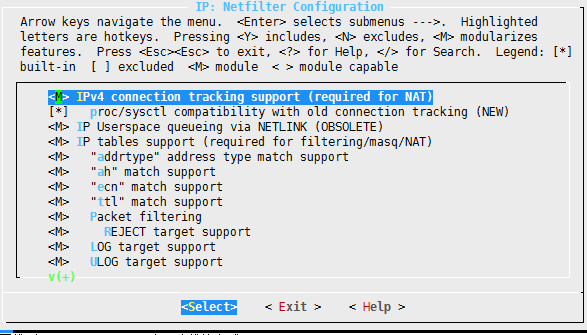
再找到<M> Full NAT,启用为模块方式;

选择 < Exit > --- < Exit > --- < Exit >,选择[ ] Wireless (NEW) --->,关闭启用;

再找到 < > Bluetooth subsystem support --->,关闭启用;

选择< Exit >,返回到上级菜单,选择Device Drivers --->点击确认;

找到< > Sound card support --->,点击关闭启用;

再找到 < > InfiniBand support --->,点击关闭启用;

找到[*] Network device support --->,点击确认;

找到[ ] Ethernet (1000 Mbit) --->、 [ ] Ethernet (10000 Mbit) --->、[ ] Token Ring driver support --->、 [ ] PCMCIA network device support --->、[ ] ATM drivers --->、[ ] FDDI driver support 关闭启用,

点击< Exit > --- < Exit >,选择[ ] Virtualization --->关闭启用;

再选择 File systems --->点击确认;

找到< > GFS2 file system support、< > OCFS2 file system support,关闭启用;

找打 DOS/FAT/NT Filesystems --->,点击确认;

如果需要使用NTFS,可以把< > NTFS file system support启用;

点击< Exit > --- < Exit > --- < Exit >退出,选择Yes保存内核配置;

[root@Smoke linux]# screen(Screen是一款由GNU计划开发的用于命令行终端切换的自由软件,可以防止编译内核时断开)
[root@Smoke linux]# make(编译内核)
使用Ctrl-a d -> detach,暂时离开当前session,将目前的 screen session (可能含有多个 windows) 丢到后台执行,并会回到还没进 screen 时的状态,此时在 screen
session 里,每个 window 内运行的 process (无论是前台/后台)都在继续执行,即使 logout 也不影响。
layer7 -- l7
应用:xunlei, qq, netfilter<--patch
-m layer7 --l7proto xunlei -j DROP
1、给内核打补丁,并重新编译内核
2、给iptables源码打补丁,并重新编译iptables
3、安装l7proto
kernel, patch
iptables, patch
Kernel Patch(向内核打补丁)
# tar zxvf linux-2.6.28.10.tar.gz -C /usr/src
# tar zxvf netfilter-layer7-v2.22.tar.gz -C /usr/src
# cd /usr/src
# ln –s linux-2.6.28.10 linux
# cd /usr/src/linux/
# patch -p1 < ../netfilter-layer7-v2.22/kernel-2.6.25-2.6.28-layer7-2.22.patch
# cp /boot/config-2.6.18-164.el5 /usr/src/linux/.config
# make menuconfig
Networking support → Networking Options →Network packet filtering framework →Core Netfilter Configuration
<M> Netfilter connection tracking support
<M> “layer7” match support
<M> “string” match support
<M> “time” match support
<M> “iprange” match support
<M> “connlimit” match support
<M> “state” match support
<M> “conntrack” connection match support
<M> “mac” address match support
<M> "multiport" Multiple port match support
Networking support → Networking Options →Network packet filtering framework → IP: Netfilter Configuration
<M> IPv4 connection tracking support (required for NAT)
<M> Full NAT
<M> MASQUERADE target support
<M> NETMAP target support
<M> REDIRECT target support
# make
# make modules_install
# make install
Compiles iptables :
# cp /etc/init.d/iptables ~/iptables
# cp /etc/sysconfig/iptables-config ~/
# rpm -e iptables-ipv6 iptables iptstate --nodeps
# tar jxvf iptables-1.4.6.tar.bz2 –C /usr/src
# cd /usr/src/iptables-1.4.6
# cp ../netfilter-layer7-v2.22/iptables-1.4.3forward-for-kernel-2.6.20forward/libxt_layer7.* ./extensions/
# ./configure --prefix=/usr --with-ksource=/usr/src/linux
# make
# make install
# tar zxvf l7-protocols-2009-05-28.tar.gz
# cd l7-protocols-2009-05-28
# make install
# mv ~/iptables /etc/rc.d/init.d/
# service iptables start
l7-filter uses the standard iptables extension syntax
# iptables [specify table & chain] -m layer7 --l7proto [protocol name] -j [action]
172.16.100.1
192.168.10.1
iptables -t nat -A POSTROUTING -s 192.168.10.0/24 -j SNAT --to-source 172.16.100.1
iptables -A FORWARD -s 192.168.10.0/24 -m layer7 --l7proto qq -j DROP
QQ: UDP
-m time
--datestart --datestop: 指定从哪年哪月哪日哪时哪分哪秒开始,哪年哪月哪日哪时哪分哪秒时间结束;
--timestart --timestop: 指定从那时哪分哪秒开始,哪时哪分哪秒结束;
--monthdays: 指定几日;
--weekdays: 指定周几;
iptables -A FORWARD -s 192.168.10.0/24 -m time --timestart 08:10:00 --timestop 12:00:00 -j DROP
iptables -A FORWARD -s 192.168.10.0/24 -m time --timestart 14:30:00 --timestop 18:20:00 -j DROP
service iptables save
iptables-save > /etc/sysconfig/iptables.tus
iptables-restore < /etc/sysconfig/iptables.tus
iptables脚本:
#!/bin/bash
#
ipt=/usr/sbin/iptables
einterface=eth1
iinterface=eth0
eip=172.16.100.1
iip=192.168.10.1
$ipt -t nat -F
$ipt -t filter -F
$ipt -t mangle -F
$ipt -N clean_up
$ipt -A clean_up -d 255.255.255.255 -p icmp -j DROP
$ipt -A clean_up -j RETURN
$iptables -A
POST-->MBR(bootloader)-->Kernel(initrd)-->init (/etc/inittab)
1、设置默认级别
2、 系统初始化脚本
3、 运行指定级别的服务
/etc/rc.d/rc 0
/etc/rc.d/rcN.d
S*
K*
S99local
/etc/rc.d/rc.local: 想要脚本开机自动启动可以将命令写在rc.local脚本中,在开机启动最后会执行;
/etc/rc.local
IDS: 入侵检测系统
nids: snort(开源软件) + iptables = NIPS(网络入侵防御系统) 网络入侵检测系统
hids: 主机入侵检测系统
xen, kvm: iptables: 虚拟
[root@Smoke linux]# make modules_install(安装内核模块)
[root@Smoke linux]# make install(安装内核)
sh /usr/src/linux-2.6.28/arch/x86/boot/install.sh 2.6.28-l7 arch/x86/boot/bzImage System.map "/boot"
[root@Smoke ~]# vim /etc/grub.conf(编辑grub.conf配置文件)
# grub.conf generated by anaconda
#
# Note that you do not have to rerun grub after making changes to this file
# NOTICE: You have a /boot partition. This means that
# all kernel and initrd paths are relative to /boot/, eg.
# root (hd0,0)
# kernel /vmlinuz-version ro root=/dev/sda2
# initrd /initrd-version.img
#boot=/dev/sda
default=0(定义默认启动的内核,0标识第一个title下内容为默认启动的内核)
timeout=5
splashimage=(hd0,0)/grub/splash.xpm.gz
hiddenmenu
title Red Hat Enterprise Linux Server (2.6.28-l7)
root (hd0,0)
kernel /vmlinuz-2.6.28-l7 ro root=LABEL=/ rhgb quiet
initrd /initrd-2.6.28-l7.img
title Red Hat Enterprise Linux Server (2.6.18-308.el5)
root (hd0,0)
kernel /vmlinuz-2.6.18-308.el5 ro root=LABEL=/ rhgb quiet
initrd /initrd-2.6.18-308.el5.img
[root@Smoke ~]# shutdown -r now(立即重启系统)
[root@Smoke ~]# uname -r(查看内核版本)
2.6.28-l7
[root@Smoke ~]# cp /etc/init.d/iptables ~/(复制ptables文件到用户家目录)
[root@Smoke ~]# cp /etc/sysconfig/iptables-config ~/(复制iptables-config文件到用户家目录)
[root@Smoke ~]# cp /etc/sysconfig/iptables ~/iptables.rules(复制iptables文件到用户家目录叫iptables.rules)
[root@Smoke ~]# service iptables stop(停止iptables服务)
Flushing firewall rules: [ OK ]
Setting chains to policy ACCEPT: filter [ OK ]
Unloading iptables modules: [ OK ]
[root@Smoke ~]# chkconfig iptables off(关闭iptables在系统响应级别开机自动启动)
[root@Smoke ~]# rpm -e iptables-ipv6 iptables iptstate --nodeps(卸载iptables-ipv6、iptables、iptstate软件,-e卸载rpm软件,--nodeps忽略依赖关系)
warning: /etc/sysconfig/iptables-config saved as /etc/sysconfig/iptables-config.rpmsave
[root@Smoke ~]# ls(查看当前目录文件及子目录)
anaconda-ks.cfg install.log.syslog iptables-1.4.6.tar.bz2 iptables.rules linux-2.6.28.tar.gz pam_mysql-0.7RC1
install.log iptables iptables-config l7-protocols-2009-05-28.tar.gz netfilter-layer7-v2.22.tar.gz pam_mysql-0.7RC1
.tar.gz
[root@Smoke ~]# tar xf iptables-1.4.6.tar.bz2 -C /usr/src/(解压iptables-1.4.6到/usr/src目录,x解压,f后面跟要解压文件,-C更改解压目录)
[root@Smoke ~]# cd /usr/src/iptables-1.4.6/(切换到/usr/src/iptables-1.4.6目录)
[root@Smoke iptables-1.4.6]# ls(查看当前目录文件及子目录)
aclocal.m4 config.sub include ip6tables-multi.c ip6tables-standalone.c iptables-multi.h iptables-xml.8
autogen.sh configure INCOMPATIBILITIES ip6tables-multi.h iptables.8.in iptables-restore.8 iptables-xml.c
COMMIT_NOTES configure.ac INSTALL ip6tables-restore.8 iptables-apply iptables-restore.c iptables.xslt
compile COPYING install-sh ip6tables-restore.c iptables-apply.8 iptables-save.8 libipq
config.guess depcomp ip6tables.8.in ip6tables-save.8 iptables.c iptables-save.c libiptc
config.h.in extensions ip6tables.c ip6tables-save.c iptables-multi.c iptables-standalone.c libiptc.pc.in
ltmain.sh xshared.c m4 xshared.h Makefile.am xtables.c Makefile.in
xtables.pc.in missing release.sh
提示:extensions目录是扩展;
[root@Smoke iptables-1.4.6]# ls extensions/(查看extensions目录文件及子目录)
dscp_helper.c libip6t_rt.c libipt_REDIRECT.c libxt_comment.man libxt_iprange.man libxt_policy.c
GNUmakefile.in libip6t_rt.man libipt_REDIRECT.man libxt_connbytes.c libxt_length.c libxt_policy.man
libip6t_ah.c libipt_addrtype.c libipt_REJECT.c libxt_connbytes.man libxt_length.man libxt_quota.c
libip6t_ah.man libipt_addrtype.man libipt_REJECT.man libxt_connlimit.c libxt_limit.c libxt_quota.man
libip6t_dst.c libipt_ah.c libipt_SAME.c libxt_connlimit.man libxt_limit.man libxt_rateest.c
libip6t_dst.man libipt_ah.man libipt_SAME.man libxt_connmark.c libxt_mac.c libxt_RATEEST.c
libip6t_eui64.c libipt_CLUSTERIP.c libipt_set.c libxt_CONNMARK.c libxt_mac.man libxt_rateest.man
libip6t_eui64.man libipt_CLUSTERIP.man libipt_SET.c libxt_connmark.man libxt_mark.c libxt_RATEEST.man
libip6t_frag.c libipt_DNAT.c libipt_set.h libxt_CONNMARK.man libxt_MARK.c libxt_recent.c
libip6t_frag.man libipt_DNAT.man libipt_set.man libxt_CONNSECMARK.c libxt_mark.man libxt_recent.man
libip6t_hbh.c libipt_ecn.c libipt_SET.man libxt_CONNSECMARK.man libxt_MARK.man libxt_sctp.c
libip6t_hbh.man libipt_ECN.c libipt_SNAT.c libxt_conntrack.c libxt_multiport.c libxt_sctp.man
libip6t_hl.c libipt_ecn.man libipt_SNAT.man libxt_conntrack.man libxt_multiport.man libxt_SECMARK.c
libip6t_HL.c libipt_ECN.man libipt_ttl.c libxt_dccp.c libxt_NFLOG.c libxt_SECMARK.man
libip6t_hl.man libipt_icmp.c libipt_TTL.c libxt_dccp.man libxt_NFLOG.man libxt_socket.c
libip6t_HL.man libipt_icmp.man libipt_ttl.man libxt_dscp.c libxt_NFQUEUE.c libxt_socket.man
libip6t_icmp6.c libipt_LOG.c libipt_TTL.man libxt_DSCP.c libxt_NFQUEUE.man libxt_standard.c
libip6t_icmp6.man libipt_LOG.man libipt_ULOG.c libxt_dscp.man libxt_NOTRACK.c libxt_state.c
libip6t_ipv6header.c libipt_MASQUERADE.c libipt_ULOG.man libxt_DSCP.man libxt_NOTRACK.man libxt_state.man
libip6t_ipv6header.man libipt_MASQUERADE.man libipt_unclean.c libxt_esp.c libxt_osf.c libxt_statistic.c
libip6t_LOG.c libipt_MIRROR.c libipt_unclean.man libxt_esp.man libxt_owner.c libxt_statistic.man
libip6t_LOG.man libipt_MIRROR.man libxt_CLASSIFY.c libxt_hashlimit.c libxt_owner.man libxt_string.c
libip6t_mh.c libipt_NETMAP.c libxt_CLASSIFY.man libxt_hashlimit.man libxt_physdev.c libxt_string.man
libip6t_mh.man libipt_NETMAP.man libxt_cluster.c libxt_helper.c libxt_physdev.man libxt_tcp.c
libip6t_REJECT.c libipt_realm.c libxt_cluster.man libxt_helper.man libxt_pkttype.c libxt_tcp.man
libip6t_REJECT.man libipt_realm.man libxt_comment.c libxt_iprange.c libxt_pkttype.man libxt_tcpmss.c
libxt_TCPMSS.c libxt_tcpmss.man libxt_TCPMSS.man libxt_TCPOPTSTRIP.c libxt_TCPOPTSTRIP.man libxt_time.c
libxt_time.man libxt_tos.c libxt_TOS.c libxt_tos.man libxt_TOS.man libxt_TPROXY.c
libxt_TPROXY.man libxt_TRACE.c libxt_TRACE.man libxt_u32.c libxt_u32.man libxt_udp.c
libxt_udp.man tos_values.c
[root@Smoke iptables-1.4.6]# cd /usr/src/(切换到/usr/src目录)
[root@Smoke src]# ls(查看当前目录文件及子目录)
debug iptables-1.4.6 kernels linux linux-2.6.28 netfilter-layer7-v2.22 redhat
[root@Smoke src]# cd netfilter-layer7-v2.22/(切换到netfilter-layer7-v2.22目录)
[root@Smoke netfilter-layer7-v2.22]# ls(查看当前目录文件及子目录)
CHANGELOG for_older_kernels kernel-2.4-layer7-2.22.patch README
for_older_iptables iptables-1.4.3forward-for-kernel-2.6.20forward kernel-2.6.25-2.6.28-layer7-2.22.patch
[root@Smoke netfilter-layer7-v2.22]# ls iptables-1.4.3forward-for-kernel-2.6.20forward/(查看iptables-1.4.3forward-for-kernel-2.6.20
forward目录文件及子目录)
libxt_layer7.c libxt_layer7.man
[root@Smoke netfilter-layer7-v2.22]# cp iptables-1.4.3forward-for-kernel-2.6.20forward/libxt_layer7.* ../iptables-1.4.6/extensions/
(复制libxt_layer7.开头所有文件到/usr/src/iptables-1.4.6/extensions/目录)
[root@Smoke netfilter-layer7-v2.22]# cd ../iptables-1.4.6/extensions/(切换到上级目录/iptables-1.4.6/extensions/)
[root@Smoke extensions]# ls(查看当前目录文件及子目录)
dscp_helper.c libip6t_rt.c libipt_REDIRECT.c libxt_comment.man libxt_iprange.man libxt_pkttype.c
libxt_tcp.man GNUmakefile.in libip6t_rt.man libipt_REDIRECT.man libxt_connbytes.c libxt_layer7.c
libxt_pkttype.man libxt_tcpmss.c libip6t_ah.c libipt_addrtype.c libipt_REJECT.c libxt_connbytes.man
libxt_layer7.man libxt_policy.c libxt_TCPMSS.c libip6t_ah.man libipt_addrtype.man libipt_REJECT.man
libxt_connlimit.c libxt_length.c libxt_policy.man libxt_tcpmss.man libip6t_dst.c libipt_ah.c
libipt_SAME.c libxt_connlimit.man libxt_length.man libxt_quota.c libxt_TCPMSS.man libip6t_dst.man
libipt_ah.man libipt_SAME.man libxt_connmark.c libxt_limit.c libxt_quota.man libxt_TCPOPTSTRIP.c
libip6t_eui64.c libipt_CLUSTERIP.c libipt_set.c libxt_CONNMARK.c libxt_limit.man libxt_rateest.c
libxt_TCPOPTSTRIP.man libip6t_eui64.man libipt_CLUSTERIP.man libipt_SET.c libxt_connmark.man libxt_mac.c
libxt_RATEEST.c libxt_time.c libip6t_frag.c libipt_DNAT.c libipt_set.h libxt_CONNMARK.man
libxt_mac.man libxt_rateest.man libxt_time.man libip6t_frag.man libipt_DNAT.man libipt_set.man
libxt_CONNSECMARK.c libxt_mark.c libxt_RATEEST.man libxt_tos.c libip6t_hbh.c libipt_ecn.c
libipt_SET.man libxt_CONNSECMARK.man libxt_MARK.c libxt_recent.c libxt_TOS.c libip6t_hbh.man
libipt_ECN.c libipt_SNAT.c libxt_conntrack.c libxt_mark.man libxt_recent.man libxt_tos.man
libip6t_hl.c libipt_ecn.man libipt_SNAT.man libxt_conntrack.man libxt_MARK.man libxt_sctp.c
libxt_TOS.man libip6t_HL.c libipt_ECN.man libipt_ttl.c libxt_dccp.c libxt_multiport.c
libxt_sctp.man libxt_TPROXY.c libip6t_hl.man libipt_icmp.c libipt_TTL.c libxt_dccp.man
libxt_multiport.man libxt_SECMARK.c libxt_TPROXY.man libip6t_HL.man libipt_icmp.man libipt_ttl.man
libxt_dscp.c libxt_NFLOG.c libxt_SECMARK.man libxt_TRACE.c libip6t_icmp6.c libipt_LOG.c
libipt_TTL.man libxt_DSCP.c libxt_NFLOG.man libxt_socket.c libxt_TRACE.man libip6t_icmp6.man
libipt_LOG.man libipt_ULOG.c libxt_dscp.man libxt_NFQUEUE.c libxt_socket.man libxt_u32.c
libip6t_ipv6header.c libipt_MASQUERADE.c libipt_ULOG.man libxt_DSCP.man libxt_NFQUEUE.man libxt_standard.c
libxt_u32.man libip6t_ipv6header.man libipt_MASQUERADE.man libipt_unclean.c libxt_esp.c libxt_NOTRACK.c
libxt_state.c libxt_udp.c libip6t_LOG.c libipt_MIRROR.c libipt_unclean.man libxt_esp.man
libxt_NOTRACK.man libxt_state.man libxt_udp.man libip6t_LOG.man libipt_MIRROR.man libxt_CLASSIFY.c
libxt_hashlimit.c libxt_osf.c libxt_statistic.c tos_values.c libip6t_mh.c libipt_NETMAP.c
libxt_CLASSIFY.man libxt_hashlimit.man libxt_owner.c libxt_statistic.man libip6t_mh.man libipt_NETMAP.man
libxt_cluster.c libxt_helper.c libxt_owner.man libxt_string.c libip6t_REJECT.c libipt_realm.c
libxt_cluster.man libxt_helper.man libxt_physdev.c libxt_string.man libip6t_REJECT.man libipt_realm.man
libxt_comment.c libxt_iprange.c libxt_physdev.man libxt_tcp.c
[root@Smoke extensions]# cd ..(切换到上级目录)
[root@Smoke iptables-1.4.6]# pwd(查看当前所处的路径)
/usr/src/iptables-1.4.6
[root@Smoke iptables-1.4.6]# ./configure --prefix=/usr --with-ksource=/usr/src/linux(配置iptables,--prefix安装目录,--with-ksource指定内
核源码目录)
[root@Smoke iptables-1.4.6]# make(编译)
[root@Smoke iptables-1.4.6]# make install(安装)
[root@Smoke iptables-1.4.6]# which iptables(查找iptables命令的绝对路径)
/usr/sbin/iptables
[root@Smoke iptables-1.4.6]# cd(切换到用户家目录)
[root@Smoke ~]# ls(查看当前目录文件及子目录)
anaconda-ks.cfg install.log.syslog iptables-1.4.6.tar.bz2 iptables.rules linux-2.6.28.tar.gz
pam_mysql-0.7RC1 install.log iptables iptables-config l7-protocols-2009-05-28.tar.gz
netfilter-layer7-v2.22.tar.gz pam_mysql-0.7RC1.tar.gz
[root@Smoke ~]# vim iptables(编辑iptables文件)
#!/bin/sh
#
# iptables Start iptables firewall
#
# chkconfig: 2345 08 92
# description: Starts, stops and saves iptables firewall
#
# config: /etc/sysconfig/iptables
# config: /etc/sysconfig/iptables-config
# Source function library.
. /etc/init.d/functions
IPTABLES=iptables
IPTABLES_DATA=/etc/sysconfig/$IPTABLES
IPTABLES_CONFIG=/etc/sysconfig/${IPTABLES}-config
IPV=${IPTABLES%tables} # ip for ipv4 | ip6 for ipv6
PROC_IPTABLES_NAMES=/proc/net/${IPV}_tables_names
VAR_SUBSYS_IPTABLES=/var/lock/subsys/$IPTABLES
if [ ! -x /usr/sbin/$IPTABLES ]; then(更改/sbin/$IPTABLES为/usr/sbin/$IPTABLES)
echo -n $"/usr/sbin/$IPTABLES does not exist."; warning; echo(更改/sbin/$IPTABLES为/usr/sbin/$IPTABLES)
exit 0
fi
if lsmod 2>/dev/null | grep -q ipchains ; then
echo -n $"ipchains and $IPTABLES can not be used together."; warning; echo
exit 1
fi
# Old or new modutils
/sbin/modprobe --version 2>&1 | grep -q module-init-tools \
&& NEW_MODUTILS=1 \
|| NEW_MODUTILS=0
# Default firewall configuration:
IPTABLES_MODULES=""
IPTABLES_MODULES_UNLOAD="yes"
IPTABLES_SAVE_ON_STOP="no"
IPTABLES_SAVE_ON_RESTART="no"
IPTABLES_SAVE_COUNTER="no"
IPTABLES_STATUS_NUMERIC="yes"
IPTABLES_SYSCTL_LOAD_LIST=""
# Load firewall configuration.
[ -f "$IPTABLES_CONFIG" ] && . "$IPTABLES_CONFIG"
rmmod_r() {
# Unload module with all referring modules.
# At first all referring modules will be unloaded, then the module itself.
local mod=$1
local ret=0
local ref=
# Get referring modules.
# New modutils have another output format.
[ $NEW_MODUTILS = 1 ] \
&& ref=`lsmod | awk "/^${mod}/ { print \\\$4; }" | tr ',' ' '` \
|| ref=`lsmod | grep ^${mod} | cut -d "[" -s -f 2 | cut -d "]" -s -f 1`
# recursive call for all referring modules
for i in $ref; do
rmmod_r $i
let ret+=$?;
done
# Unload module.
# The extra test is for 2.6: The module might have autocleaned,
# after all referring modules are unloaded.
if grep -q "^${mod}" /proc/modules ; then
modprobe -r $mod > /dev/null 2>&1
let ret+=$?;
fi
return $ret
}
flush_n_delete() {
# Flush firewall rules and delete chains.
[ -e "$PROC_IPTABLES_NAMES" ] || return 1
# Check if firewall is configured (has tables)
tables=`cat $PROC_IPTABLES_NAMES 2>/dev/null`
[ -z "$tables" ] && return 1
echo -n $"Flushing firewall rules: "
ret=0
# For all tables
for i in $tables; do
# Flush firewall rules.
$IPTABLES -t $i -F;
let ret+=$?;
# Delete firewall chains.
$IPTABLES -t $i -X;
let ret+=$?;
# Set counter to zero.
$IPTABLES -t $i -Z;
let ret+=$?;
done
[ $ret -eq 0 ] && success || failure
echo
return $ret
}
set_policy() {
# Set policy for configured tables.
policy=$1
# Check if iptable module is loaded
[ ! -e "$PROC_IPTABLES_NAMES" ] && return 1
# Check if firewall is configured (has tables)
tables=`cat $PROC_IPTABLES_NAMES 2>/dev/null`
[ -z "$tables" ] && return 1
echo -n $"Setting chains to policy $policy: "
ret=0
for i in $tables; do
echo -n "$i "
case "$i" in
raw)
$IPTABLES -t raw -P PREROUTING $policy \
&& $IPTABLES -t raw -P OUTPUT $policy \
|| let ret+=1
;;
filter)
$IPTABLES -t filter -P INPUT $policy \
&& $IPTABLES -t filter -P OUTPUT $policy \
&& $IPTABLES -t filter -P FORWARD $policy \
|| let ret+=1
;;
nat)
$IPTABLES -t nat -P PREROUTING $policy \
&& $IPTABLES -t nat -P POSTROUTING $policy \
&& $IPTABLES -t filter -P FORWARD $policy \
|| let ret+=1
;;
nat)
$IPTABLES -t nat -P PREROUTING $policy \
&& $IPTABLES -t nat -P POSTROUTING $policy \
&& $IPTABLES -t nat -P OUTPUT $policy \
|| let ret+=1
;;
mangle)
$IPTABLES -t mangle -P PREROUTING $policy \
&& $IPTABLES -t mangle -P POSTROUTING $policy \
&& $IPTABLES -t mangle -P INPUT $policy \
&& $IPTABLES -t mangle -P OUTPUT $policy \
&& $IPTABLES -t mangle -P FORWARD $policy \
|| let ret+=1
;;
*)
let ret+=1
;;
esac
done
[ $ret -eq 0 ] && success || failure
echo
return $ret
}
load_sysctl() {
# load matched sysctl values
if [ -n "$IPTABLES_SYSCTL_LOAD_LIST" ]; then
echo -n $"Loading sysctl settings: "
ret=0
for item in $IPTABLES_SYSCTL_LOAD_LIST; do
fgrep $item /etc/sysctl.conf | sysctl -p - >/dev/null
let ret+=$?;
done
[ $ret -eq 0 ] && success || failure
echo
fi
return $ret
}
start() {
# Do not start if there is no config file.
[ -f "$IPTABLES_DATA" ] || return 1
echo -n $"Applying $IPTABLES firewall rules: "
OPT=
[ "x$IPTABLES_SAVE_COUNTER" = "xyes" ] && OPT="-c"
$IPTABLES-restore $OPT $IPTABLES_DATA
if [ $? -eq 0 ]; then
success; echo
else
failure; echo; return 1
fi
# Load additional modules (helpers)
if [ -n "$IPTABLES_MODULES" ]; then
echo -n $"Loading additional $IPTABLES modules: "
ret=0
for mod in $IPTABLES_MODULES; do
echo -n "$mod "
modprobe $mod > /dev/null 2>&1
let ret+=$?;
done
[ $ret -eq 0 ] && success || failure
echo
fi
# Load sysctl settings
load_sysctl
touch $VAR_SUBSYS_IPTABLES
return $ret
}
stop() {
# Do not stop if iptables module is not loaded.
[ -e "$PROC_IPTABLES_NAMES" ] || return 1
flush_n_delete
set_policy ACCEPT
if [ "x$IPTABLES_MODULES_UNLOAD" = "xyes" ]; then
echo -n $"Unloading $IPTABLES modules: "
ret=0
rmmod_r ${IPV}_tables
let ret+=$?;
rmmod_r ${IPV}_conntrack
let ret+=$?;
[ $ret -eq 0 ] && success || failure
echo
fi
rm -f $VAR_SUBSYS_IPTABLES
return $ret
}
save() {
# Check if iptable module is loaded
[ ! -e "$PROC_IPTABLES_NAMES" ] && return 1
# Check if firewall is configured (has tables)
tables=`cat $PROC_IPTABLES_NAMES 2>/dev/null`
[ -z "$tables" ] && return 1
echo -n $"Saving firewall rules to $IPTABLES_DATA: "
OPT=
[ "x$IPTABLES_SAVE_COUNTER" = "xyes" ] && OPT="-c"
ret=0
TMP_FILE=`/bin/mktemp -q /tmp/$IPTABLES.XXXXXX` \
&& chmod 600 "$TMP_FILE" \
&& $IPTABLES-save $OPT > $TMP_FILE 2>/dev/null \
&& size=`stat -c '%s' $TMP_FILE` && [ $size -gt 0 ] \
|| ret=1
if [ $ret -eq 0 ]; then
if [ -e $IPTABLES_DATA ]; then
cp -f $IPTABLES_DATA $IPTABLES_DATA.save \
&& chmod 600 $IPTABLES_DATA.save \
|| ret=1
fi
if [ $ret -eq 0 ]; then
cp -f $TMP_FILE $IPTABLES_DATA \
&& chmod 600 $IPTABLES_DATA \
|| ret=1
fi
fi
[ $ret -eq 0 ] && success || failure
echo
rm -f $TMP_FILE
return $ret
}
status() {
tables=`cat $PROC_IPTABLES_NAMES 2>/dev/null`
# Do not print status if lockfile is missing and iptables modules are not
# loaded.
# Check if iptable module is loaded
if [ ! -f "$VAR_SUBSYS_IPTABLES" -a -z "$tables" ]; then
echo $"Firewall is stopped."
return 1
fi
# Check if firewall is configured (has tables)
if [ ! -e "$PROC_IPTABLES_NAMES" ]; then
echo $"Firewall is not configured. "
return 1
fi
if [ -z "$tables" ]; then
echo $"Firewall is not configured. "
return 1
fi
NUM=
[ "x$IPTABLES_STATUS_NUMERIC" = "xyes" ] && NUM="-n"
VERBOSE=
[ "x$IPTABLES_STATUS_VERBOSE" = "xyes" ] && VERBOSE="--verbose"
COUNT=
[ "x$IPTABLES_STATUS_LINENUMBERS" = "xyes" ] && COUNT="--line-numbers"
for table in $tables; do
echo $"Table: $table"
$IPTABLES -t $table --list $NUM $VERBOSE $COUNT && echo
done
return 0
}
reload() {
IPTABLES_MODULES_UNLOAD="no"
restart
}
restart() {
[ "x$IPTABLES_SAVE_ON_RESTART" = "xyes" ] && save
stop
start
}
case "$1" in
start)
stop
start
RETVAL=$?
;;
stop)
[ "x$IPTABLES_SAVE_ON_STOP" = "xyes" ] && save
stop
RETVAL=$?
;;
reload)
[ -e "$VAR_SUBSYS_IPTABLES" ] && reload
;;
restart)
restart
RETVAL=$?
;;
condrestart)
[ -e "$VAR_SUBSYS_IPTABLES" ] && restart
;;
status)
status
RETVAL=$?
;;
panic)
flush_n_delete
set_policy DROP
RETVAL=$?
;;
save)
save
RETVAL=$?
;;
*)
echo $"Usage: $0 {start|stop|reload|restart|condrestart|status|panic|save}"
exit 1
;;
esac
exit $RETVAL
/sbin
提示:将所有/sbin/$IPTABLES目录改为/usr/sbin/$IPTABLES;
[root@Smoke ~]# cp iptables /etc/init.d/(复制iptables到/etc/init.d目录)
[root@Smoke ~]# chkconfig --add iptables(将iptables加到服务列表)
[root@Smoke ~]# chkconfig --list iptables(查看iptables在相关系统级别启动情况)
iptables 0:off 1:off 2:on 3:on 4:on 5:on 6:off
[root@Smoke ~]# ls(查看当前目录文件及子目录)
anaconda-ks.cfg install.log.syslog iptables-1.4.6.tar.bz2 iptables.rules linux-2.6.28.tar.gz
pam_mysql-0.7RC1 install.log iptables iptables-config l7-protocols-2009-05-28.tar.gz
netfilter-layer7-v2.22.tar.gz pam_mysql-0.7RC1.tar.gz
[root@Smoke ~]# cp iptables-config /etc/sysconfig/(复制iptables-config到/etc/sysconfig目录)
[root@Smoke ~]# vim iptables.rules(编辑iptables.rules文件)
# Generated by iptables-save v1.3.5 on Mon Nov 24 16:15:25 2014
*filter
:INPUT ACCEPT [0:0]
:FORWARD ACCEPT [0:0]
:OUTPUT ACCEPT [0:0]
:clean_in - [0:0]
COMMIT
# Completed on Mon Nov 24 16:15:25 2014
[root@Smoke ~]# service iptables start(启动iptables服务)
Applying iptables firewall rules: [ OK ]
[root@Smoke ~]# lsmod(查看内核已加载那些模块)
Module Size Used by
nf_nat_ftp 6656 0
nf_nat 20244 1 nf_nat_ftp
nf_conntrack_ipv4 15628 2 nf_nat
nf_defrag_ipv4 6016 1 nf_conntrack_ipv4
nf_conntrack_ftp 10660 1 nf_nat_ftp
xt_state 6144 0
xt_string 6144 0
nfsd 193836 17
nfs_acl 7040 1 nfsd
auth_rpcgss 34592 1 nfsd
exportfs 7936 1 nfsd
autofs4 24324 3
lockd 61356 1 nfsd
sunrpc 166592 12 nfsd,nfs_acl,auth_rpcgss,lockd
ipv6 216180 18
xt_connlimit 7688 0
nf_conntrack 57912 6 nf_nat_ftp,nf_nat,nf_conntrack_ipv4,nf_conntrack_ftp,xt_state,xt_connlimit
xt_tcpudp 6912 0
xt_multiport 6912 0
x_tables 17412 5 xt_state,xt_string,xt_connlimit,xt_tcpudp,xt_multiport
iscsi_tcp 19080 0
libiscsi 30720 1 iscsi_tcp
scsi_transport_iscsi 31256 4 iscsi_tcp,libiscsi
dm_mirror 16128 0
dm_multipath 17932 0
scsi_dh 10116 1 dm_multipath
wmi 10792 0
rfkill 14028 0
input_polldev 7816 0
sbs 15240 0
sbshc 9344 1 sbs
battery 14340 0
lp 13060 0
sg 29108 0
floppy 51588 0
sr_mod 17348 0
cdrom 34208 1 sr_mod
serio_raw 8964 0
parport_pc 27300 1
parport 34924 2 lp,parport_pc
ac 8324 0
rtc_cmos 13356 0
button 10256 0
rtc_core 17820 1 rtc_cmos
rtc_lib 6912 1 rtc_core
pcnet32 33156 0
mii 8960 1 pcnet32
i2c_piix4 12816 0
pcspkr 6528 0
i2c_core 25108 1 i2c_piix4
dm_region_hash 13952 1 dm_mirror
dm_log 12292 2 dm_mirror,dm_region_hash
dm_mod 50504 3 dm_mirror,dm_multipath,dm_log
ahci 30476 0
ata_piix 24708 0
libata 151008 2 ahci,ata_piix
mptspi 19208 3
mptscsih 33152 1 mptspi
mptbase 73956 2 mptspi,mptscsih
scsi_transport_spi 23296 1 mptspi
sd_mod 27416 4
scsi_mod 138132 11 iscsi_tcp,libiscsi,scsi_transport_iscsi,scsi_dh,sg,sr_mod,libata,mptspi,mptscsih,scsi_transport_spi,sd_mod
ext3 109320 2
jbd 43412 1 ext3
uhci_hcd 22672 0
ohci_hcd 23568 0
ehci_hcd 33036 0
[root@Smoke ~]# ls(查看当前目录文件及子目录)
anaconda-ks.cfg iptables iptables.rules netfilter-layer7-v2.22.tar.gz
install.log iptables-1.4.6.tar.bz2 l7-protocols-2009-05-28.tar.gz pam_mysql-0.7RC1
install.log.syslog iptables-config linux-2.6.28.tar.gz pam_mysql-0.7RC1.tar.gz
[root@Smoke ~]# tar xf l7-protocols-2009-05-28.tar.gz(解压l7-protocols文件,x解压,f后面跟文件名)
[root@Smoke ~]# cd l7-protocols-2009-05-28(切换到l7-protocols目录)
[root@Smoke l7-protocols-2009-05-28]# make install(安装)
mkdir -p /etc/l7-protocols
cp -R * /etc/l7-protocols
[root@Smoke l7-protocols-2009-05-28]# service iptables restart(重启iptables服务)
Flushing firewall rules: [ OK ]
Setting chains to policy ACCEPT: nat [ OK ]
Unloading iptables modules: [ OK ]
Applying iptables firewall rules: [ OK ]
[root@Smoke l7-protocols-2009-05-28]# cd(切换到用户家目录)
[root@Smoke ~]# ls /etc/l7-protocols/(查看/etc/l7-protocols目录文件及子目录)
CHANGELOG extra groups.sh l7-protocols.spec Makefile protocols testing
example_traffic file_types HOWTO LICENSE malware README WANTED
[root@Smoke ~]# ls /etc/l7-protocols/protocols/(查看/etc/l7-protocols/protocols目录文件及子目录)
100bao.pat dazhihui.pat hotline.pat ncp.pat shoutcast.pat tesla.pat
aim.pat dhcp.pat http.pat netbios.pat sip.pat tftp.pat
aimwebcontent.pat directconnect.pat http-rtsp.pat nntp.pat skypeout.pat thecircle.pat
applejuice.pat dns.pat ident.pat ntp.pat skypetoskype.pat tonghuashun.pat
ares.pat doom3.pat imap.pat openft.pat smb.pat tor.pat
armagetron.pat edonkey.pat imesh.pat pcanywhere.pat smtp.pat tsp.pat
battlefield1942.pat fasttrack.pat ipp.pat poco.pat snmp.pat unknown.pat
battlefield2142.pat finger.pat irc.pat pop3.pat socks.pat unset.pat
battlefield2.pat freenet.pat jabber.pat pplive.pat soribada.pat uucp.pat
bgp.pat ftp.pat kugoo.pat qq.pat soulseek.pat validcertssl.pat
biff.pat gkrellm.pat live365.pat quake1.pat ssdp.pat ventrilo.pat
bittorrent.pat gnucleuslan.pat liveforspeed.pat quake-halflife.pat ssh.pat vnc.pat
chikka.pat gnutella.pat lpd.pat radmin.pat ssl.pat whois.pat
cimd.pat goboogy.pat mohaa.pat rdp.pat stun.pat worldofwarcraft.pat
ciscovpn.pat gopher.pat msn-filetransfer.pat replaytv-ivs.pat subspace.pat x11.pat
citrix.pat guildwars.pat msnmessenger.pat rlogin.pat subversion.pat xboxlive.pat
counterstrike-source.pat h323.pat mute.pat rtp.pat teamfortress2.pat xunlei.pat
cvs.pat halflife2-deathmatch.pat napster.pat rtsp.pat teamspeak.pat yahoo.pat
dayofdefeat-source.pat hddtemp.pat nbns.pat runesofmagic.pat telnet.pat zmaap.pat
提示:/etc/l7-protocols/protocols/是l7-protocols所支持的协议;
实现环境:
启动二台虚拟机,一台Linux系统的虚拟机作为Firewall,有两块网卡,其中eth0的IP地址为172.16.100.1,eth1网卡地址为使用NAT模式上网,自动获取的IP地址为192.168.40.128,另一台Windows XP虚拟机作为客户端测试机网卡地址为172.16.100.2,网关为172.16.100.1,DNS为192.168.40.2;
Firewall:
[root@Smoke ~]# ifconfig(查看网卡接口信息)
eth0      Link encap:Ethernet  HWaddr 00:0C:29:CC:FA:AE
          inet addr:172.16.100.1  Bcast:172.16.255.255  Mask:255.255.0.0
          inet6 addr: fe80::20c:29ff:fecc:faae/64 Scope:Link
          UP BROADCAST RUNNING MULTICAST  MTU:1500  Metric:1
          RX packets:18816 errors:0 dropped:0 overruns:0 frame:0
          TX packets:17639 errors:0 dropped:0 overruns:0 carrier:0
          collisions:0 txqueuelen:1000
          RX bytes:1682409 (1.6 MiB)  TX bytes:3545061 (3.3 MiB)
          Interrupt:19 Base address:0x2000

eth1      Link encap:Ethernet  HWaddr 00:0C:29:CC:FA:B8
          inet addr:192.168.40.128  Bcast:192.168.40.255  Mask:255.255.255.0
          inet6 addr: fe80::20c:29ff:fecc:fab8/64 Scope:Link
          UP BROADCAST RUNNING MULTICAST  MTU:1500  Metric:1
          RX packets:243 errors:0 dropped:0 overruns:0 frame:0
          TX packets:240 errors:0 dropped:0 overruns:0 carrier:0
          collisions:0 txqueuelen:1000
          RX bytes:23522 (22.9 KiB)  TX bytes:25744 (25.1 KiB)
          Interrupt:16 Base address:0x2080

lo        Link encap:Local Loopback
          inet addr:127.0.0.1  Mask:255.0.0.0
          inet6 addr: ::1/128 Scope:Host
          UP LOOPBACK RUNNING  MTU:16436  Metric:1
          RX packets:188 errors:0 dropped:0 overruns:0 frame:0
          TX packets:188 errors:0 dropped:0 overruns:0 carrier:0
          collisions:0 txqueuelen:0
          RX bytes:14940 (14.5 KiB)  TX bytes:14940 (14.5 KiB)
[root@Smoke ~]# iptables -t nat -A POSTROUTING -s 172.16.100.0/16 -j SNAT --to-source 192.168.40.128(向nat表的POSTROUTING链附加规则,来自17
2.16.100.0/16网络做SNAT转换为192.168.40.128,-A附加规则,-s源地址,-j动作,--to-source转换后的服务器公网地址)
[root@Smoke ~]# iptables -A FORWARD -s 172.16.100.0/16 -m layer7 --l7proto qq -j REJECT(向filter表的FORWARD链添加规则拒绝源地址172.16.100.0
/16网段访问qq协议,-A附加规则,-s源地址,-m显示扩展,--l7proto七层协议过滤,-j动作)
[root@Smoke ~]# iptables -L -n(查看filter表中的规则并以数字显示,-L显示指定表中的规则,-n以数字显示)
Chain INPUT (policy ACCEPT)
target     prot opt source               destination

Chain FORWARD (policy ACCEPT)
target     prot opt source               destination
REJECT     all  --  192.168.10.0/24      0.0.0.0/0           LAYER7 l7proto qq reject-with icmp-port-unreachable

Chain OUTPUT (policy ACCEPT)
target     prot opt source               destination
[root@Smoke ~]# vim /etc/resolv.conf(编辑resolv.conf的DNS服务器指定文件)

; generated by /sbin/dhclient-script
search localdomain
nameserver 192.168.40.2

[root@Smoke ~]# ping www.baidu.com(ping测试www.baidu.com)
PING www.a.shifen.com (180.97.33.108) 56(84) bytes of data.
64 bytes from 180.97.33.108: icmp_seq=1 ttl=128 time=31.8 ms
64 bytes from 180.97.33.108: icmp_seq=2 ttl=128 time=31.9 ms
64 bytes from 180.97.33.108: icmp_seq=3 ttl=128 time=30.8 ms
^C
--- www.a.shifen.com ping statistics ---
3 packets transmitted, 3 received, 0% packet loss, time 2003ms
rtt min/avg/max/mdev = 30.899/31.549/31.939/0.506 ms
提示:通过Firewall测试到达互联网可达;
Windows XP:
C:\Documents and Settings\Administrator>ipconfig /all

Windows IP Configuration

        Host Name . . . . . . . . . . . . : L2ONFSGJ0XI6NYT
        Primary Dns Suffix  . . . . . . . :
        Node Type . . . . . . . . . . . . : Hybrid
        IP Routing Enabled. . . . . . . . : Yes
        WINS Proxy Enabled. . . . . . . . : No

Ethernet adapter 本地连接:

        Connection-specific DNS Suffix  . :
        Description . . . . . . . . . . . : VMware Accelerated AMD PCNet Adapter

        Physical Address. . . . . . . . . : 00-0C-29-7F-48-68
        Dhcp Enabled. . . . . . . . . . . : No
        IP Address. . . . . . . . . . . . : 172.16.100.2
        Subnet Mask . . . . . . . . . . . : 255.255.0.0
        IP Address. . . . . . . . . . . . : fe80::20c:29ff:fe7f:4868%4
        Default Gateway . . . . . . . . . : 172.16.100.1
        DNS Servers . . . . . . . . . . . : 192.168.40.2
C:\Documents and Settings\Administrator>ping www.baidu.com

Pinging www.a.shifen.com [180.97.33.107] with 32 bytes of data:

Reply from 180.97.33.107: bytes=32 time=39ms TTL=127
Reply from 180.97.33.107: bytes=32 time=42ms TTL=127
Reply from 180.97.33.107: bytes=32 time=46ms TTL=127
Reply from 180.97.33.107: bytes=32 time=39ms TTL=127

Ping statistics for 180.97.33.107:
    Packets: Sent = 4, Received = 4, Lost = 0 (0% loss),
Approximate round trip times in milli-seconds:
    Minimum = 39ms, Maximum = 46ms, Average = 41ms
提示:通过Windows XP测试到达互联网可达;
测试:通过Windows XP安装QQ软件进行测试登录,无法登录QQ;

Firewall:
[root@Smoke ~]# iptables -t filter -L -n -v(查看filter表中的规则并以数字显示,-L显示指定表中的规则,-n以数字显示,-v显示详细信息)
Chain INPUT (policy ACCEPT 132 packets, 10510 bytes)
 pkts bytes target     prot opt in     out     source               destination

Chain FORWARD (policy ACCEPT 124K packets, 102M bytes)
 pkts bytes target     prot opt in     out     source               destination
  802  143K REJECT     all  --  *      *       172.16.0.0/16        0.0.0.0/0           LAYER7 l7proto qq reject-with icmp-port-unreachable

Chain OUTPUT (policy ACCEPT 345 packets, 61174 bytes)
 pkts bytes target     prot opt in     out     source               destination
提示:过滤QQ协议的规则匹配到数据报文;
[root@Smoke ~]# iptables -D FORWARD 1(删除filter表的FORWARD链第一条规则,-D删除指定链中规则)
Windows XP:
测试:通过Windows XP安装QQ软件进行测试登录,可以正常登录;

Firewall:
[root@Smoke ~]# man iptables(查看iptables的man帮助手册)

   time
       This matches if the packet arrival time/date is within a given range. All options are optional, but are ANDed when specified.

       --datestart YYYY[-MM[-DD[Thh[:mm[:ss]]]]](从哪年哪月哪日哪时哪分哪秒开始)

       --datestop YYYY[-MM[-DD[Thh[:mm[:ss]]]]](到哪年哪月哪日哪时哪分哪秒结束)

              Only   match  during  the  given  time,  which  must  be  in  ISO  8601  "T"  notation.   The  possible  time  range  is
              1970-01-01T00:00:00 to 2038-01-19T04:17:07.

              If --datestart or --datestop are not specified, it will default to 1970-01-01 and 2038-01-19, respectively.

       --timestart hh:mm[:ss](每天时间都生效)

       --timestop hh:mm[:ss]

              Only match during the given daytime. The possible time range is 00:00:00 to 23:59:59. Leading zeroes are  allowed  (e.g.
              "06:03") and correctly interpreted as base-10.

       [!] --monthdays day[,day...](指定几号控制)

              Only match on the given days of the month. Possible values are 1 to 31. Note that specifying 31 will of course not match
              on months which do not have a 31st day; the same goes for 28- or 29-day February.

       [!] --weekdays day[,day...](指定周几控制)

              Only match on the given weekdays. Possible values are Mon, Tue, Wed, Thu, Fri, Sat, Sun, or values from 1 to 7,  respec-
              tively. You may also use two-character variants (Mo, Tu, etc.).

       --utc

              Interpret the times given for --datestart, --datestop, --timestart and --timestop to be UTC.

       --localtz

              Interpret the times given for --datestart, --datestop, --timestart and --timestop to be local kernel time. (Default)

       EXAMPLES. To match on weekends, use:

              -m time --weekdays Sa,Su

       Or, to match (once) on a national holiday block:

              -m time --datestart 2007-12-24 --datestop 2007-12-27

       Since the stop time is actually inclusive, you would need the following stop time to not match the first second of the new day:

              -m time --datestart 2007-01-01T17:00 --datestop 2007-01-01T23:59:59

       During lunch hour:

              -m time --timestart 12:30 --timestop 13:30

       The fourth Friday in the month:

              -m time --weekdays Fr --monthdays 22,23,24,25,26,27,28

       (Note that this exploits a certain mathematical property. It is not possible to say "fourth Thursday OR fourth Friday"  in  one
       rule. It is possible with multiple rules, though.)

/time
[root@Smoke ~]# cd /etc/rc.d/init.d/(切换到/etc/rc.d/init.d目录)
[root@Smoke init.d]# ls(查看当前目录文件及子目录)
acpid           conman              haldaemon   iscsid        messagebus      nfslock          readahead_later  single          xfs
anacron         cpuspeed            halt        isdn          microcode_ctl   nscd             restorecond      smartd          xinetd
apmd            crond               hidd        kdump         multipathd      ntpd             rhnsd            sshd            ypbind
atd             cups                hplip       killall       mysqld          pand             rhsmcertd        svnserve        yum-updatesd
auditd          cups-config-daemon  httpd       krb524        netconsole      pcscd            rpcgssd          syslog
autofs          dnsmasq             ipmi        kudzu         netfs           portmap          rpcidmapd        vncserver
avahi-daemon    dund                iptables    lvm2-monitor  netplugd        psacct           rpcsvcgssd       vsftpd
avahi-dnsconfd  firstboot           irda        mcstrans      network         rawdevices       saslauthd        wdaemon
bluetooth       functions           irqbalance  mdmonitor     NetworkManager  rdisc            sendmail         winbind
capi            gpm                 iscsi       mdmpd         nfs             readahead_early  setroubleshoot   wpa_supplicant
[root@Smoke init.d]# cd ..(切换到上级目录)
[root@Smoke rc.d]# ls(查看当前目录文件及子目录)
init.d  rc  rc0.d  rc1.d  rc2.d  rc3.d  rc4.d  rc5.d  rc6.d  rc.local  rc.sysinit
[root@Smoke rc.d]# cd rc3.d/(切换到rc3.d目录)
[root@Smoke rc3.d]# ls(查看当前目录文件及子目录)
K01dnsmasq         K35vncserver   K80kdump            S00microcode_ctl    S12syslog      S23setroubleshoot  S50hplip       S95anacron
K02avahi-dnsconfd  K35winbind     K85mdmpd            S04readahead_early  S13cpuspeed    S25bluetooth       S55sshd        S95atd
K02NetworkManager  K36mysqld      K87multipathd       S05kudzu            S13irqbalance  S25netfs           S56cups        S97rhnsd
K05conman          K50netconsole  K88wpa_supplicant   S07iscsid           S13iscsi       S25pcscd           S56rawdevices  S97rhsmcertd
K05saslauthd       K50vsftpd      K89dund             S08iptables         S13portmap     S26acpid           S56xinetd      S97yum-updatesd
K05wdaemon         K69rpcsvcgssd  K89netplugd         S08mcstrans         S14nfslock     S26apmd            S60nfs         S98avahi-daemon
K10psacct          K73ypbind      K89pand             S09isdn             S15mdmonitor   S26haldaemon       S80sendmail    S99firstboot
K15httpd           K74ipmi        K89rdisc            S10network          S18rpcidmapd   S26hidd            S85gpm         S99local
K15svnserve        K74nscd        K91capi             S11auditd           S19rpcgssd     S26lvm2-monitor    S90crond       S99smartd
K24irda            K74ntpd        K99readahead_later  S12restorecond      S22messagebus  S28autofs          S90xfs
[root@Smoke rc3.d]# cat S99local(查看S99local文件内容)

#!/bin/sh
#
# This script will be executed *after* all the other init scripts.
# You can put your own initialization stuff in here if you don't
# want to do the full Sys V style init stuff.

touch /var/lock/subsys/local

[root@Smoke rc3.d]# ll S99local(查看S99lcaol文件详细信息)
lrwxrwxrwx 1 root root 11 Nov 22 09:24 S99local -> ../rc.local
[root@Smoke rc3.d]# cd ../(切换到上级目录)
[root@Smoke rc.d]# ls(查看当前目录文件及子目录)
init.d  rc  rc0.d  rc1.d  rc2.d  rc3.d  rc4.d  rc5.d  rc6.d  rc.local  rc.sysinit
[root@Smoke rc.d]# pwd(查看当前所处的路径)
/etc/rc.d
[root@Smoke rc.d]# vim rc.local(编辑rc.local文件内容)

#!/bin/sh
#
# This script will be executed *after* all the other init scripts.
# You can put your own initialization stuff in here if you don't
# want to do the full Sys V style init stuff.

touch /var/lock/subsys/local

#/usr/local/sbin/ipt

提示:所有卸载//etc/rc.d/rc.local文件中的命令系统启动的最后会执行一遍,所以可以把想要开机启动的脚本写在里面就可以了;
FTP
TCP/IP: 应用层
NFS(RPC远程过程调用)
CIFS/SMB, NETBIOS
CIFS: Common Internet File System 通用互联网文件系统;
SMB: Service Message Block 服务信息块;
NetBIOS: 网络基本输入系统,通过广播形式在Windows同一个工作组之内或同一个网络之内实现主机名称解析的协议;(WINS)类似于DNS服务,但它只为Windows主机内部,类似于基于NetBIOS一样来解析主机名的,但是它是单播的,再不需要广播,当得到一个地址以后直接向WINS请求它的名称是什么,或者向WINS请求当前网络内有多少台主机,有什么样的名称等等;
UNC: \\IP\Shared_path
Linux/Unix:
NetBIOS
CIFS/SMB
Winbind: 让Linux主机加入到AD域中的进程;
LDAP(Openldap):轻量级目录访问协议;
Windows
137/udp(netbios),138/udp(netbios)
139/tcp(netbios)
445/tcp(共享文件)
SMB
samba
Samba
帐号: 系统用户;
密码: samba密码,加密存放;
安全级别:
user: 默认级别
share: 允许匿名访问
server:
domain:
UNC
\\IP\software: 在本地文件系统上,路径不同,而共享名称也不能相同;
共享权限
文件系统权限
samba进程:
Nmbd: NetBIOS, 137/udp(netbios), 138/udp(netbios), 139/tcp(netbios)
smbd: Shared, 445/tcp(共享文件)
winbindd: doamin
/etc/rc.d/init.d/smb: samba服务脚本;
/etc/samba/: 配置文件目录;
smb.conf: 主配置文件
宏: 变量
[shared name]
comment = 注释
path = 资源路径
browseable = 是否允许被浏览
public = 是否允许被所有用户读
read only = 是是只读
writable = 是否可写
write list = user1, user2具有写权限用户列表
@group, +group表示这个组内用户都可写
valid users = 共享只允许那些用户访问;
invalid users = 那些用户不能访问;
/share/test
[tools]
[root@Smoke ~]# yum list all samba*(查看yum源所有软件,只显示samba*相关)
Loaded plugins: katello, product-id, security, subscription-manager
Updating certificate-based repositories.
Unable to read consumer identity
Installed Packages
samba-client.i386                                                      3.0.33-3.37.el5                                              installed
samba-common.i386                                                      3.0.33-3.37.el5                                              installed
Available Packages
samba.i386                                                             3.0.33-3.37.el5                                              Server
samba-swat.i386                                                        3.0.33-3.37.el5                                              Server
samba3x.i386(服务器端)                                                 3.5.10-0.107.el5                                             Server
samba3x-client.i386(客户端)                                            3.5.10-0.107.el5                                             Server
samba3x-common.i386(通用组件)                                          3.5.10-0.107.el5                                             Server
samba3x-doc.i386                                                       3.5.10-0.107.el5                                             Server
samba3x-domainjoin-gui.i386                                            3.5.10-0.107.el5                                             Server
samba3x-swat.i386(通过web访问samba服务器工具)                            3.5.10-0.107.el5                                             Server
samba3x-winbind.i386                                                   3.5.10-0.107.el5                                             Server
samba3x-winbind-devel.i386                                             3.5.10-0.107.el5                                             Server
提示:samba提供了两种版本,3.0.33和3.5.10的,想用3.5.10的就卸载两个3.0.33的,否则直接使用3.0.33的也行;
[root@Smoke ~]# rpm -e samba-client samba-common(卸载samba客户端和samba客户端和服务器端需要的组件)
[root@Smoke ~]# yum -y install samba3x samba3x-client samba3x-common(通过yum源安装samba3x服务器端,samba3x-client客户端,samba3x-common通用组
件等软件,-y所有询问回答yes)
[root@Smoke ~]# ls /etc/samba/(查看/etc/samba目录文件及子目录)
lmhosts  smb.conf  smbusers
提示:lmhosts是windows上实现名称解析的,当windows上实现名称解析的时候,先去查本地的hosts,没有WINS,再没有DNS,再没有lmhosts,smbusers将linux用的用户映
射成windows用户;
[root@Smoke ~]# cat /etc/hosts(查看hosts文件内容)
# Do not remove the following line, or various programs
# that require network functionality will fail.
127.0.0.1		localhost.localdomain localhost
::1		localhost6.localdomain6 localhost6
127.0.0.1	Smoke.com
[root@Smoke samba]# cp smb.conf smb.conf.bak(复制smb.conf文件叫smb.conf.bak)
[root@Smoke samba]# vim smb.conf(编辑smb.conf配置文件)

提示:所有#号开头的和;分号开头的都是注释,但是;分号开头的是可以启用的参数或指令;
[root@Smoke samba]# grep -i 'settings' smb.conf(查找smb.conf文件包含settings的段,-i忽略大小写)
#======================= Global Settings =====================================
[root@Smoke samba]# vim smb.conf(编辑smb.conf配置文件)

#======================= Global Settings =====================================(全局设置)

[global]

        workgroup = WORKGROUP(工作组)
        server string = Samba Server Version %v(描述,%v宏,软件版本)

;       netbios name = MYSERVER(当前主机netbios名称,如果没启用就是当前主机主机名的第一段)

;       interfaces = lo eth0 192.168.12.2/24 192.168.13.2/24
;       hosts allow = 127. 192.168.12. 192.168.13.

# --------------------------- Logging Options -----------------------------(日志定义)

        # logs split per machine
        log file = /var/log/samba/log.%m(%m宏,表示客户端主机自己的名字,或者IP地址,每个客户端到主机访问使用独立的日志)
        # max 50KB per log file, then rotate
        max log size = 50(日志文件最大大小)

# ----------------------- Standalone Server Options ------------------------(独立守护进程)

        security = user(安全级别)
        passdb backend = tdbsam(用户帐号密码存放的格式)

# ----------------------- Browser Control Options ----------------------------(浏览控制信息)

;       local master = no
;       os level = 33
;       preferred master = yes

#----------------------------- Name Resolution -------------------------------(名称解析)

;       wins support = yes(支持wins)
;       wins server = w.x.y.z
;       wins proxy = yes

;       dns proxy = yes(支持dns代理)

# --------------------------- Printing Options -----------------------------(打印机选项)

        load printers = yes(是否加载打印机)
        cups options = raw(那种驱动程序向外共享,cups通用unix打印服务)

;       printcap name = /etc/printcap
        #obtain list of printers automatically on SystemV
;       printcap name = lpstat
;       printing = cups

# --------------------------- Filesystem Options ---------------------------(文件系统选项)

;       map archive = no
;       map hidden = no
;       map read only = no
;       map system = no
;       store dos attributes = yes


#============================ Share Definitions ==============================(共享定义)

[homes](家目录定义,每个用户是否可以访问自己的家目录)
        comment = Home Directories(注释)
        browseable = no(是否可以被浏览,除了用户自己之外其它人都不允许看到)
        writable = yes(是否具有写权限)
;       valid users = %S
;       valid users = MYDOMAIN\%S

[printers](打印机)
        comment = All Printers(所有打印机)
        path = /var/spool/samba(打印机目录)
        browseable = no(不能被浏览)
        guest ok = no(是否允许来宾帐号访问)
        writable = no(是否可写)
        printable = yes(是否允许打印)

[root@Smoke samba]# mkdir /shared/test -pv(创建目录/shared/test,-p递归创建,-v显示创建过程)
mkdir: created directory `/shared/test'
[root@Smoke samba]# vim smb.conf(编辑smb.conf配置文件)

[tools]
        comment = Shared Testing(描述)
        path = /shared/test(共享目录)
        public = yes(允许所有人访问)
        writable = yes(可写)

[root@Smoke samba]# testparm(测试/etc/samba/smb.conf配置文件语法)
Load smb config files from /etc/samba/smb.conf
rlimit_max: increasing rlimit_max (1024) to minimum Windows limit (16384)
Processing section "[homes]"
Processing section "[printers]"
Processing section "[tools]"
Loaded services file OK.
Server role: ROLE_STANDALONE(独立运行服务器)
Press enter to see a dump of your service definitions(敲回车可以查看整个服务定义的有效信息)

[global]
	server string = Samba Server Version %v
	log file = /var/log/samba/log.%m
	max log size = 50
	cups options = raw

[homes]
	comment = Home Directories
	read only = No
	browseable = No

[printers]
	comment = All Printers
	path = /var/spool/samba
	printable = Yes
	browseable = No

[tools]
	comment = Shared Testing
	path = /share/test
	read only = No
	guest ok = Yes

[root@Smoke samba]# service smb start(启动samba服务)
Starting SMB services:                                     [  OK  ]
[root@Smoke samba]# getenforce(查看selinux状态)
Permissive
[root@Smoke samba]# netstat -tunlp(查看系统服务,-t代表tcp,-u代表udp,-n以数字显示,-l监听端口,-p显示服务名称)
Active Internet connections (only servers)
Proto Recv-Q Send-Q Local Address               Foreign Address             State       PID/Program name
tcp        0      0 127.0.0.1:2208              0.0.0.0:*                   LISTEN      3669/./hpiod
tcp        0      0 0.0.0.0:2049                0.0.0.0:*                   LISTEN      -
tcp        0      0 0.0.0.0:610                 0.0.0.0:*                   LISTEN      3396/rpc.statd
tcp        0      0 0.0.0.0:32803               0.0.0.0:*                   LISTEN      -
tcp        0      0 0.0.0.0:875                 0.0.0.0:*                   LISTEN      3762/rpc.rquotad
tcp        0      0 0.0.0.0:111                 0.0.0.0:*                   LISTEN      3356/portmap
tcp        0      0 0.0.0.0:22                  0.0.0.0:*                   LISTEN      3690/sshd
tcp        0      0 127.0.0.1:631               0.0.0.0:*                   LISTEN      3702/cupsd
tcp        0      0 127.0.0.1:25                0.0.0.0:*                   LISTEN      3831/sendmail
tcp        0      0 127.0.0.1:6010              0.0.0.0:*                   LISTEN      14868/sshd
tcp        0      0 0.0.0.0:892                 0.0.0.0:*                   LISTEN      3787/rpc.mountd
tcp        0      0 127.0.0.1:2207              0.0.0.0:*                   LISTEN      3674/python
tcp        0      0 :::139                      :::*                        LISTEN      17431/smbd
tcp        0      0 :::22                       :::*                        LISTEN      3690/sshd
tcp        0      0 ::1:6010                    :::*                        LISTEN      14868/sshd
tcp        0      0 :::445                      :::*                        LISTEN      17431/smbd
udp        0      0 0.0.0.0:32769               0.0.0.0:*                               -
udp        0      0 0.0.0.0:2049                0.0.0.0:*                               -
udp        0      0 0.0.0.0:58297               0.0.0.0:*                               3975/avahi-daemon
udp        0      0 0.0.0.0:68                  0.0.0.0:*                               14470/dhclient
udp        0      0 0.0.0.0:604                 0.0.0.0:*                               3396/rpc.statd
udp        0      0 0.0.0.0:607                 0.0.0.0:*                               3396/rpc.statd
udp        0      0 0.0.0.0:5353                0.0.0.0:*                               3975/avahi-daemon
udp        0      0 0.0.0.0:875                 0.0.0.0:*                               3762/rpc.rquotad
udp        0      0 0.0.0.0:111                 0.0.0.0:*                               3356/portmap
udp        0      0 0.0.0.0:631                 0.0.0.0:*                               3702/cupsd
udp        0      0 0.0.0.0:892                 0.0.0.0:*                               3787/rpc.mountd
udp        0      0 :::44880                    :::*                                    3975/avahi-daemon
udp        0      0 :::5353                     :::*                                    3975/avahi-daemon
提示:tcp 139、tcp 445都启用;
启动一台windows xp系统,通过command(命令提示符)查看监听的端口;
C:\Documents and Settings\Administrator>netstat -an

Active Connections

  Proto  Local Address          Foreign Address        State
  TCP    0.0.0.0:80             0.0.0.0:0              LISTENING
  TCP    0.0.0.0:135            0.0.0.0:0              LISTENING
  TCP    0.0.0.0:443            0.0.0.0:0              LISTENING
  TCP    0.0.0.0:1029           0.0.0.0:0              LISTENING
  TCP    0.0.0.0:5666           0.0.0.0:0              LISTENING
  TCP    0.0.0.0:9069           0.0.0.0:0              LISTENING
  TCP    0.0.0.0:9090           0.0.0.0:0              LISTENING
  TCP    0.0.0.0:12489          0.0.0.0:0              LISTENING
  TCP    127.0.0.1:1035         0.0.0.0:0              LISTENING
  TCP    127.0.0.1:8888         0.0.0.0:0              LISTENING
  TCP    172.16.100.2:139       0.0.0.0:0              LISTENING
  TCP    [::]:135               [::]:0                 LISTENING       0
  TCP    [::]:1029              [::]:0                 LISTENING       0
  TCP    [::]:3306              [::]:0                 LISTENING       0
  UDP    0.0.0.0:162            *:*
  UDP    0.0.0.0:1025           *:*
  UDP    0.0.0.0:1026           *:*
  UDP    0.0.0.0:1028           *:*
  UDP    0.0.0.0:1765           *:*
  UDP    0.0.0.0:1766           *:*
  UDP    0.0.0.0:3456           *:*
  UDP    127.0.0.1:123          *:*
  UDP    127.0.0.1:1030         *:*
  UDP    127.0.0.1:1232         *:*
  UDP    127.0.0.1:1900         *:*
  UDP    172.16.100.2:123       *:*
  UDP    172.16.100.2:137       *:*
  UDP    172.16.100.2:138       *:*
  UDP    172.16.100.2:1900      *:*
  UDP    [::]:162               *:*
  UDP    [::]:1025              *:*
  UDP    [::]:1027              *:*
提示:监听udp137、udp138端口;
[root@Smoke samba]# useradd eucalyptus(添加eucalyptus用户)
[root@Smoke samba]# passwd eucalyptus(为eucalyptus用户添加密码)
Changing password for user eucalyptus.
New UNIX password:
BAD PASSWORD: it is based on a dictionary word
Retype new UNIX password:
passwd: all authentication tokens updated successfully.
[root@Smoke samba]# id eucalyptus
uid=511(eucalyptus) gid=511(eucalyptus) groups=511(eucalyptus) context=root:system_r:unconfined_t:SystemLow-SystemHigh
[root@Smoke samba]# man smbpasswd(查看smbpasswd的man帮助文档)

       smbpasswd - change a user´s SMB password(改变用户为smb密码)

       smbpasswd [-a] [-c <config file>] [-x](删除用户帐号) [-d](禁用) [-e](启用) [-D debuglevel] [-n] [-r <remote machine>]
        [-R <name resolve order>] [-m] [-U username[%password]] [-h] [-s] [-w pass] [-W] [-i] [-L] [username]

       -a(添加为当前的smb上的用户帐号)
           This option specifies that the username following should be added to the local smbpasswd file, with the
           new password typed (type <Enter> for the old password). This option is ignored if the username following
           already exists in the smbpasswd file and it is treated like a regular change password command. Note that
           the default passdb backends require the user to already exist in the system password file (usually
           /etc/passwd), else the request to add the user will fail.

           This option is only available when running smbpasswd as root.

[root@Smoke samba]# smbpasswd -a eucalyptus(将encalyptus用户添加为smb帐号)
New SMB password:
Retype new SMB password:
Added user eucalyptus.
提示:这个密码最好不要和系统上eucalyptus的密码相同;
[root@Smoke samba]# ll(查看当前目录文件或子目录详细信息)
total 48
-rw-r--r-- 1 root root   20 Jan  5  2012 lmhosts
-rw-r--r-- 1 root root 9867 Nov 26 04:18 smb.conf
-rw-r--r-- 1 root root 9778 Nov 25 22:48 smb.conf.bak
-rw-r--r-- 1 root root   97 Jan  5  2012 smbusers
测试:通过打开windows xp系统使用用户eucalyptus密码redhat访问Linux系统共享的目录,可以创建文件;

[root@Smoke samba]# su - eucalyptus(切换到eucalyptus用户)
[eucalyptus@Smoke ~]$ ls(查看当前目录文件及子目录)
abc.txt
提示:可以看到创建的abc.txt文件;
测试:通过打开windows xp系统使用用户eucalyptus密码redhat访问共享的tools,无法创建文件;

[eucalyptus@Smoke ~]$ exit(退出当前用户)
logout
[root@Smoke samba]# ll -d /shared/test/(查看/shared/test目录自身详细信息)
drwxr-xr-x 2 root root 4096 Nov 26 04:14 /shared/test/
[root@Smoke samba]# setfacl -m u:eucalyptus:rwx /shared/test/(通过文件访问控制列表给用户eucalyptus对目录/shared/test/读写执行权限)
测试:通过打开windows xp系统使用用户eucalyptus密码redhat访问共享的tools,可以创建文件;

[root@Smoke samba]# ls /shared/test/(查看/shared/test目录文件及子目录)
abc.txt
提示:创建的abc.txt文件;
[root@Smoke samba]# ls -l /shared/test/(查看/shared/test目录文件及子目录详细信息)
total 4
-rwxr--r--  1 eucalyptus eucalyptus 0 Nov 26 04:55 abc.txt
提示:属主有执行权限;
测试:通过打开windows xp系统,通过我的电脑--右键属性--映射网络驱动器;

点击完成,就会将共享的目录映射为本地目录,在abc.txt写入字符abc,点击保存;

[root@Smoke samba]# cat /shared/test/abc.txt(查看abc.txt文件内容)
abc[root@Smoke samba]#
打开Windows xp系统的我的电脑可以看到映射的盘符,可以查看到Samba Server Version %v的信息;

smbclient:
-L NetBIOS_Name: 指定对方的主机名或IP地址;
-U username: 指定用户名;
新建一个共享,共享名tools, 开放给组mygrp中的所有用户具有读写权限,其他用户只有读权限;
public = yes
write list = @mygrp
[tools]
comment =
path =
guest ok = yes
write list = @mygrp
samba: 基于IP的访问控制
iptables:
139, 445
137, 138
samba
hosts allow = 172.16. 127. (访问控制白名单,允许172.16.0.0和127.0.0.0网络主机访问samba)
hosts deny = (访问控制黑名单)
samba-swat
web GUI: 基于web的图形配置工具;
守护进程:
standalone: 独立守护进程
transient: 瞬时守护进程;
瞬时守护进程:
瞬时守护进程平时自己不启动,前端启动一个代理进程,这个进程叫做超级守护进程(xinetd),超级守护进程自身并不提供任何服务,它可以为那些不经常被访问的服务代为监听端口,向samba-swat,偶尔配置才用到它,所以samba-swat本身服务不用启动,假设samba-swat监听在tcp的901端口上,服务不启动901端口就没法监听,由超级守护进程(xinetd)帮助去监听901端口,所以当有人访问我们的tcp 901端口的时候将先送给超级守护进程(xinetd),xinetd收到这个请求以后它发现这是访问的是我们这里定义了tcp 901端口事实是samba-swat服务,于是xinetd此时会启动临时的将这个进程启动起来,并将这个请求转交给samba-swat,一旦响应结束了,它又关闭进程,tcp 901端口仍然由xinetd监听,xinetd之所以叫超级守护进程它可以为多个这样的进程提供服务的,比如samba-swat、tftp、telnet、ftp等等,它可以同时监听N个端口,当你访问samba-swat就转交给samba-swat,当有客户端访问ftp就转交给ftp,一旦响应结束了,进程中止以后,xinetd仍代为继续监听其它端口,而xinetd是独立守护进程,而其它的都是瞬时守护进程,因此samba-swat是依赖xinetd的,所以安装samba-swat以后xinetd会自动安装;
在Windows XP系统创建目录C:\share\test,将test目录共享,并允许用户有写权限;

[root@Smoke ~]# man smbclient(查看smbclient的man帮助手册)

       smbclient - ftp-like client to access SMB/CIFS resources on servers

       smbclient [-b <buffer size>] [-d debuglevel] [-e] [-L <netbios name>](指定对方主机名称) [-U username](指定用户名)
        [-I destinationIP] [-M <netbios name>] [-m maxprotocol] [-A authfile] [-N] [-C] [-g] [-i scope]
        [-O <socket options>] [-p port] [-R <name resolve order>] [-s <smb config file>] [-k] [-P](等待提示输入密码)
        [-c <command>]

       smbclient {servicename} [password] [-b <buffer size>] [-d debuglevel] [-e] [-D Directory]
        [-U username] [-W workgroup] [-M <netbios name>] [-m maxprotocol] [-A authfile] [-N] [-C] [-g]
        [-l log-basename] [-I destinationIP] [-E] [-c <command string>] [-i scope] [-O <socket options>]
        [-p port] [-R <name resolve order>] [-s <smb config file>] [-T<c|x>IXFqgbNan] [-k]

提示: smbclient是一个类似ftp的客户端,基于命令行的smb客户端工具;
[root@Smoke ~]# ping 172.16.100.2(ping测试到达172.16.100.2)
PING 172.16.100.2 (172.16.100.2) 56(84) bytes of data.
64 bytes from 172.16.100.2: icmp_seq=1 ttl=128 time=5.86 ms
64 bytes from 172.16.100.2: icmp_seq=2 ttl=128 time=0.445 ms
64 bytes from 172.16.100.2: icmp_seq=3 ttl=128 time=0.508 ms
^C
--- 172.16.100.2 ping statistics ---
3 packets transmitted, 3 received, 0% packet loss, time 2005ms
rtt min/avg/max/mdev = 0.445/2.273/5.867/2.541 ms
提示:通过Linux主机测试到达Windows XP主机可达;
[root@Smoke ~]# smbclient -L 172.16.100.2(访问172.16.100.2的共享资源,-L指定NetBIOS名或IP地址)
Enter root's password:
session request to 172.16.100.2 failed (Called name not present)(会话请求失败)
session request to 172 failed (Called name not present)
Domain=[L2ONFSGJ0XI6NYT] OS=[Windows 5.1] Server=[Windows 2000 LAN Manager]

	Sharename       Type      Comment
	---------       ----      -------
	IPC$            IPC
                                  ڠIPC
	test            Disk
session request to 172.16.100.2 failed (Called name not present)
session request to 172 failed (Called name not present)
Domain=[L2ONFSGJ0XI6NYT] OS=[Windows 5.1] Server=[Windows 2000 LAN Manager]

	Server               Comment
	---------            -------

	Workgroup            Master
	---------            -------
提示:通过匿名用户访问172.16.100.2主机的共享资源,密码为空,但是会话请求失败;
在Windows XP主机通过我的电脑--右键--管理--本地用户和组--用户,查看Guest用户是否启用,Guest用户是启动的;

通过在Windows XP主机通过我的电脑--右键--管理--本地用户和组--用户,建立用户wuser,密码为redhat;

[root@Smoke ~]# smbclient -L 172.16.100.2 -U wuser(访问172.16.100.2的共享资源,-L指定NetBIOS名或IP地址,-U指定用户名)
Enter wuser's password:
session request to 172.16.100.2 failed (Called name not present)(名字不存在)
session request to 172 failed (Called name not present)
Domain=[L2ONFSGJ0XI6NYT] OS=[Windows 5.1] Server=[Windows 2000 LAN Manager]

	Sharename       Type      Comment
	---------       ----      -------
	IPC$            IPC
                                  ?IPC
	test            Disk
session request to 172.16.100.2 failed (Called name not present)
session request to 172 failed (Called name not present)
Domain=[L2ONFSGJ0XI6NYT] OS=[Windows 5.1] Server=[Windows 2000 LAN Manager]

	Server               Comment
	---------            -------

	Workgroup            Master
	---------            -------
[root@Smoke ~]# smbclient //172.16.100.2/test -U wuser(通过wuser用户访问172.16.100.2主机的test共享目录,-U指定用户名)
Enter wuser's password:
session request to 172.16.100.2 failed (Called name not present)
session request to 172 failed (Called name not present)
Domain=[L2ONFSGJ0XI6NYT] OS=[Windows 5.1] Server=[Windows 2000 LAN Manager]
smb: \> ls
  .                                   D        0  Tue Jan 19 21:33:35 2016
  ..                                  D        0  Tue Jan 19 21:33:35 2016

		40957 blocks of size 524288. 20770 blocks available
smb: \>
通过Windows XP在C:\share\test共享目录创建文件叫abc.txt;

[root@Smoke ~]# smbclient //172.16.100.2/test -U wuser(访问172.16.100.2的共享资源,-L指定NetBIOS名或IP地址,-U指定用户名)
Enter wuser's password:
session request to 172.16.100.2 failed (Called name not present)
session request to 172 failed (Called name not present)
Domain=[L2ONFSGJ0XI6NYT] OS=[Windows 5.1] Server=[Windows 2000 LAN Manager]
smb: \> ls
. D 0 Tue Jan 19 21:33:35 2016
.. D 0 Tue Jan 19 21:33:35 2016
40957 blocks of size 524288. 20770 blocks available
smb: \> ls
. D 0 Tue Jan 19 21:58:27 2016
.. D 0 Tue Jan 19 21:58:27 2016
abc.txt A 0 Tue Jan 19 21:58:24 2016
40957 blocks of size 524288. 20770 blocks available
smb: \>
提示: 在Linux主机可以查看到在Windows XP主机上创建的abc.txt文件;
[root@Smoke ~]# smbclient -L 172.16.100.1(访问172.16.100.1主机共享资源)
Enter root's password:
Anonymous login successful(匿名用户认证成功)
Domain=[WORKGROUP] OS=[Unix] Server=[Samba 3.5.10-0.107.el5]
Sharename Type Comment
--------- ---- -------
IPC$ IPC IPC Service (Samba Server Version 3.5.10-0.107.el5)
tools Disk Shared Testing
Anonymous login successful
Domain=[WORKGROUP] OS=[Unix] Server=[Samba 3.5.10-0.107.el5]
Server Comment
--------- -------
Workgroup Master
--------- -------
[root@Smoke ~]# smbclient //172.16.100.1/tools -U eucalyptus(通过eucalyptus用户访问172.16.100.1主机的tools共享目录,-U指定用户名)
Enter eucalyptus's password:
Domain=[WORKGROUP] OS=[Unix] Server=[Samba 3.5.10-0.107.el5]
smb: \> help
? allinfo altname archive blocksize
cancel case_sensitive cd chmod chown
close del dir du echo
exit get getfacl hardlink help
history iosize lcd link lock
lowercase ls l mask md
mget mkdir more mput newer
open posix posix_encrypt posix_open posix_mkdir
posix_rmdir posix_unlink print prompt put
pwd q queue quit readlink
rd recurse reget rename reput
rm rmdir showacls setmode stat
symlink tar tarmode translate unlock
volume vuid wdel logon listconnect
showconnect .. !
smb: \> lcd /etc/(切换本地目录到/etc)
smb: \> put fstab(上传fstab文件)
putting file fstab as \fstab (259.8 kb/s) (average 259.8 kb/s)
smb: \>
[root@Smoke ~]# ls /shared/test/(查看/shared/test目录文件及子目录)
abc.txt fstab
提示:上传成功的fstab文件;
smb: \> cd(切换到用户家目录)
Current directory is \
smb: \> pwd(查看所处的路径)
Current directory is \\172.16.100.1\tools\
smb: \> !pwd(查看本地所处的路径)
/etc
smb: \> lcd /home/eucalyptus/(切换本地目录到/home/eucalyptus目录)
smb: \> !pwd(查看本地所处的路径)
/home/eucalyptus
smb: \> get fstab(下载fstab文件)
getting file \fstab of size 532 as fstab (5320000.0 KiloBytes/sec) (average inf KiloBytes/sec)
smb: \> exit(退出)
[root@Smoke ~]# ls(查看当前目录文件及子目录)
anaconda-ks.cfg iptables iptables.rules linux-2.6.28.tar.gz pam_mysql-0.7RC1.tar.gz
install.log iptables-1.4.6.tar.bz2 l7-protocols-2009-05-28 netfilter-layer7-v2.22.tar.gz
install.log.syslog iptables-config l7-protocols-2009-05-28.tar.gz pam_mysql-0.7RC1
[root@Smoke ~]# su - eucalyptus(切换到eucalyptus用户)
[eucalyptus@Smoke ~]$ ls(查看当前目录文件及子目录)
abc.txt fstab
提示:下载再来的fstab文件;
[eucalyptus@Smoke ~]$ exit(退出当前用户)
logout
[root@Smoke ~]# mount -t cifs //172.16.100.1/tools /mnt -o username=eucalyptus(将172.16.100.1共享的tools目录挂载到/mnt目录,-t文件系统类型,-o指定
额外挂载选项,username=eucalyptus以eucalyptus用户身份挂载)
Password:
[root@Smoke ~]# cp /etc/issue /mnt/(复制issue文件到/mnt目录)
[root@Smoke ~]# ls /mnt/(查看/mnt目录文件及子目录)
abc.txt fstab issue
[root@Smoke ~]# ls /shared/test/(查看/shared/test目录文件及子目录)
abc.txt fstab issue
[root@Smoke ~]# vim /etc/fstab(编辑fstab文件系统开机自动挂载配置文件)
LABEL=/ / ext3 defaults 1 1
LABEL=/boot /boot ext3 defaults 1 2
tmpfs /dev/shm tmpfs defaults 0 0
devpts /dev/pts devpts gid=5,mode=620 0 0
sysfs /sys sysfs defaults 0 0
proc /proc proc defaults 0 0
LABEL=SWAP-sda3 swap swap defaults 0 0
//172.16.100.1/tools /mnt cifs credentials=/etc/samba/cred.passwd(挂载选项,指定凭证文件在/etc/samba/cred.passwd) 0 0
[root@Smoke ~]# vim /etc/samba/cred.passwd(编辑cred.passwd文件)
username=eucalyptus
password=redhat
[root@Smoke ~]# chmod og=--- /etc/samba/cred.passwd(更改组和其它用户对cred.passwd文件没有任何权限)
[root@Smoke ~]# umount /mnt(卸载/mnt挂载的挂载的文件系统)
[root@Smoke ~]# ls /mnt/(查看/mnt目录文件及子目录)
[root@Smoke ~]# mount -a(挂载/etc/fstab文件中所有的文件系统)
[root@Smoke ~]# ls /mnt/(查看/mnt目录文件及子目录)
abc.txt fstab issue
[root@Smoke ~]# vim /etc/fstab(编辑fstab文件系统挂载配置文件)
LABEL=/ / ext3 defaults 1 1
LABEL=/boot /boot ext3 defaults 1 2
tmpfs /dev/shm tmpfs defaults 0 0
devpts /dev/pts devpts gid=5,mode=620 0 0
sysfs /sys sysfs defaults 0 0
proc /proc proc defaults 0 0
LABEL=SWAP-sda3 swap swap defaults 0 0
//172.16.100.1/tools /mnt cifs credentials=/etc/samba/cred.passwd 0 0
[root@Smoke samba]# vim smb.conf(编辑smb.conf配置文件)
; hosts allow = 127. 192.168.12. 192.168.13.(允许那些主机访问)
[root@Smoke samba]# yum -y install samba3x-swat(通过yum源安装samba3x-swat软件,-y所有询问回答yes)
提示:瞬时守护进程平时自己不启动,前端启动一个代理进程,这个进程叫做超级守护进程(xinetd),超级守护进程自身并不提供任何服务,它可以为那些不经常被访问的服务代为监听
端口,向samba-swat,偶尔配置才用到它,所以samba-swat本身服务不用启动,假设samba-swat监听在tcp的901端口上,服务不启动901端口就没法监听,由超级守护进程(xinetd)
帮助去监听901端口,所以当有人访问我们的tcp 901端口的时候将先送给超级守护进程(xinetd),xinetd收到这个请求以后它发现这是访问的是我们这里定义了tcp 901端口事实是
samba-swat服务,于是xinetd此时会启动临时的将这个进程启动起来,并将这个请求转交给samba-swat,一旦响应结束了,它又关闭进程,tcp 901端口仍然由xinetd监听,xinetd
之所以叫超级守护进程它可以为多个这样的进程提供服务的,比如samba-swat、tftp、telnet、ftp等等,它可以同时监听N个端口,当你访问samba-swat就转交给samba-swat,当
有客户端访问ftp就转交给ftp,一旦响应结束了,进程中止以后,xinetd仍代为继续监听其它端口,而xinetd是独立守护进程,而其它的都是瞬时守护进程,因此samba-swat是依赖
xinetd的,所以安装samba-swat以后xinetd会自动安装,而我们启动samba-swat服务也不用启动samba-swat,而是启动xinetd即可;
[root@Smoke samba]# service xinetd start(启动xinetd服务)
Starting xinetd: [ OK ]
[root@Smoke samba]# chkconfig --list xinetd(查看xinetd服务在相应系统级别启动情况)
xinetd 0:off 1:off 2:off 3:on 4:on 5:on 6:off
[root@Smoke samba]# chkconfig --list(查看系统服务在相应系统级别启动情况)
NetworkManager 0:off 1:off 2:off 3:off 4:off 5:off 6:off
acpid 0:off 1:off 2:on 3:on 4:on 5:on 6:off
anacron 0:off 1:off 2:on 3:on 4:on 5:on 6:off
apmd 0:off 1:off 2:on 3:on 4:on 5:on 6:off
atd 0:off 1:off 2:off 3:on 4:on 5:on 6:off
auditd 0:off 1:off 2:on 3:on 4:on 5:on 6:off
autofs 0:off 1:off 2:off 3:on 4:on 5:on 6:off
avahi-daemon 0:off 1:off 2:off 3:on 4:on 5:on 6:off
avahi-dnsconfd 0:off 1:off 2:off 3:off 4:off 5:off 6:off
bluetooth 0:off 1:off 2:on 3:on 4:on 5:on 6:off
capi 0:off 1:off 2:off 3:off 4:off 5:off 6:off
conman 0:off 1:off 2:off 3:off 4:off 5:off 6:off
cpuspeed 0:off 1:on 2:on 3:on 4:on 5:on 6:off
crond 0:off 1:off 2:on 3:on 4:on 5:on 6:off
cups 0:off 1:off 2:on 3:on 4:on 5:on 6:off
dnsmasq 0:off 1:off 2:off 3:off 4:off 5:off 6:off
dund 0:off 1:off 2:off 3:off 4:off 5:off 6:off
firstboot 0:off 1:off 2:off 3:on 4:off 5:on 6:off
gpm 0:off 1:off 2:on 3:on 4:on 5:on 6:off
haldaemon 0:off 1:off 2:off 3:on 4:on 5:on 6:off
hidd 0:off 1:off 2:on 3:on 4:on 5:on 6:off
hplip 0:off 1:off 2:on 3:on 4:on 5:on 6:off
httpd 0:off 1:off 2:off 3:off 4:off 5:off 6:off
ipmi 0:off 1:off 2:off 3:off 4:off 5:off 6:off
iptables 0:off 1:off 2:on 3:on 4:on 5:on 6:off
irda 0:off 1:off 2:off 3:off 4:off 5:off 6:off
irqbalance 0:off 1:off 2:on 3:on 4:on 5:on 6:off
iscsi 0:off 1:off 2:off 3:on 4:on 5:on 6:off
iscsid 0:off 1:off 2:off 3:on 4:on 5:on 6:off
isdn 0:off 1:off 2:on 3:on 4:on 5:on 6:off
kdump 0:off 1:off 2:off 3:off 4:off 5:off 6:off
kudzu 0:off 1:off 2:off 3:on 4:on 5:on 6:off
lvm2-monitor 0:off 1:on 2:on 3:on 4:on 5:on 6:off
mcstrans 0:off 1:off 2:on 3:on 4:on 5:on 6:off
mdmonitor 0:off 1:off 2:on 3:on 4:on 5:on 6:off
mdmpd 0:off 1:off 2:off 3:off 4:off 5:off 6:off
messagebus 0:off 1:off 2:off 3:on 4:on 5:on 6:off
microcode_ctl 0:off 1:off 2:on 3:on 4:on 5:on 6:off
multipathd 0:off 1:off 2:off 3:off 4:off 5:off 6:off
mysqld 0:off 1:off 2:off 3:off 4:off 5:off 6:off
netconsole 0:off 1:off 2:off 3:off 4:off 5:off 6:off
netfs 0:off 1:off 2:off 3:on 4:on 5:on 6:off
netplugd 0:off 1:off 2:off 3:off 4:off 5:off 6:off
network 0:off 1:off 2:on 3:on 4:on 5:on 6:off
nfs 0:off 1:off 2:on 3:on 4:on 5:on 6:off
nfslock 0:off 1:off 2:off 3:on 4:on 5:on 6:off
nmb 0:off 1:off 2:off 3:off 4:off 5:off 6:off
nscd 0:off 1:off 2:off 3:off 4:off 5:off 6:off
ntpd 0:off 1:off 2:off 3:off 4:off 5:off 6:off
pand 0:off 1:off 2:off 3:off 4:off 5:off 6:off
pcscd 0:off 1:off 2:on 3:on 4:on 5:on 6:off
portmap 0:off 1:off 2:off 3:on 4:on 5:on 6:off
psacct 0:off 1:off 2:off 3:off 4:off 5:off 6:off
rawdevices 0:off 1:off 2:off 3:on 4:on 5:on 6:off
rdisc 0:off 1:off 2:off 3:off 4:off 5:off 6:off
readahead_early 0:off 1:off 2:on 3:on 4:on 5:on 6:off
readahead_later 0:off 1:off 2:off 3:off 4:off 5:on 6:off
restorecond 0:off 1:off 2:on 3:on 4:on 5:on 6:off
rhnsd 0:off 1:off 2:off 3:on 4:on 5:on 6:off
rhsmcertd 0:off 1:off 2:off 3:on 4:on 5:on 6:off
rpcgssd 0:off 1:off 2:off 3:on 4:on 5:on 6:off
rpcidmapd 0:off 1:off 2:off 3:on 4:on 5:on 6:off
rpcsvcgssd 0:off 1:off 2:off 3:off 4:off 5:off 6:off
saslauthd 0:off 1:off 2:off 3:off 4:off 5:off 6:off
sendmail 0:off 1:off 2:on 3:on 4:on 5:on 6:off
setroubleshoot 0:off 1:off 2:off 3:on 4:on 5:on 6:off
smartd 0:off 1:off 2:on 3:on 4:on 5:on 6:off
smb 0:off 1:off 2:off 3:off 4:off 5:off 6:off
sshd 0:off 1:off 2:on 3:on 4:on 5:on 6:off
svnserve 0:off 1:off 2:off 3:off 4:off 5:off 6:off
syslog 0:off 1:off 2:on 3:on 4:on 5:on 6:off
vncserver 0:off 1:off 2:off 3:off 4:off 5:off 6:off
vsftpd 0:off 1:off 2:off 3:off 4:off 5:off 6:off
wdaemon 0:off 1:off 2:off 3:off 4:off 5:off 6:off
winbind 0:off 1:off 2:off 3:off 4:off 5:off 6:off
wpa_supplicant 0:off 1:off 2:off 3:off 4:off 5:off 6:off
xfs 0:off 1:off 2:on 3:on 4:on 5:on 6:off
xinetd 0:off 1:off 2:off 3:on 4:on 5:on 6:off
ypbind 0:off 1:off 2:off 3:off 4:off 5:off 6:off
yum-updatesd 0:off 1:off 2:on 3:on 4:on 5:on 6:off
xinetd based services:(基于xinetd服务)
chargen-dgram: off
chargen-stream: off
daytime-dgram: off
daytime-stream: off
discard-dgram: off
discard-stream: off
echo-dgram: off
echo-stream: off
eklogin: off
ekrb5-telnet: off
gssftp: off
klogin: off
krb5-telnet: off
kshell: off
rmcp: off
rsync: off
swat: off
tcpmux-server: off
tftp: off
time-dgram: off
time-stream: off
[root@Smoke samba]# netstat -tnlp(查看系统服务,-t代表tcp,-n以数字显示,-l监听端口,-p显示服务名称)
Active Internet connections (only servers)
Proto Recv-Q Send-Q Local Address Foreign Address State PID/Program name
tcp 0 0 127.0.0.1:2208 0.0.0.0:* LISTEN 3669/./hpiod
tcp 0 0 0.0.0.0:2049 0.0.0.0:* LISTEN -
tcp 0 0 0.0.0.0:610 0.0.0.0:* LISTEN 3396/rpc.statd
tcp 0 0 0.0.0.0:32803 0.0.0.0:* LISTEN -
tcp 0 0 0.0.0.0:875 0.0.0.0:* LISTEN 3762/rpc.rquotad
tcp 0 0 0.0.0.0:111 0.0.0.0:* LISTEN 3356/portmap
tcp 0 0 0.0.0.0:22 0.0.0.0:* LISTEN 3690/sshd
tcp 0 0 127.0.0.1:631 0.0.0.0:* LISTEN 3702/cupsd
tcp 0 0 127.0.0.1:25 0.0.0.0:* LISTEN 3831/sendmail
tcp 0 0 127.0.0.1:6010 0.0.0.0:* LISTEN 18540/sshd
tcp 0 0 127.0.0.1:6011 0.0.0.0:* LISTEN 18572/sshd
tcp 0 0 0.0.0.0:892 0.0.0.0:* LISTEN 3787/rpc.mountd
tcp 0 0 127.0.0.1:2207 0.0.0.0:* LISTEN 3674/python
tcp 0 0 :::139 :::* LISTEN 17700/smbd
tcp 0 0 :::22 :::* LISTEN 3690/sshd
tcp 0 0 ::1:6010 :::* LISTEN 18540/sshd
tcp 0 0 ::1:6011 :::* LISTEN 18572/sshd
tcp 0 0 :::445 :::* LISTEN 17700/smbd
[root@Smoke samba]# chkconfig swat on(让swat服务启动)
[root@Smoke samba]# chkconfig --list(查看系统服务在相应系统级别启动情况)
NetworkManager 0:off 1:off 2:off 3:off 4:off 5:off 6:off
acpid 0:off 1:off 2:on 3:on 4:on 5:on 6:off
anacron 0:off 1:off 2:on 3:on 4:on 5:on 6:off
apmd 0:off 1:off 2:on 3:on 4:on 5:on 6:off
atd 0:off 1:off 2:off 3:on 4:on 5:on 6:off
auditd 0:off 1:off 2:on 3:on 4:on 5:on 6:off
autofs 0:off 1:off 2:off 3:on 4:on 5:on 6:off
avahi-daemon 0:off 1:off 2:off 3:on 4:on 5:on 6:off
avahi-dnsconfd 0:off 1:off 2:off 3:off 4:off 5:off 6:off
bluetooth 0:off 1:off 2:on 3:on 4:on 5:on 6:off
capi 0:off 1:off 2:off 3:off 4:off 5:off 6:off
conman 0:off 1:off 2:off 3:off 4:off 5:off 6:off
cpuspeed 0:off 1:on 2:on 3:on 4:on 5:on 6:off
crond 0:off 1:off 2:on 3:on 4:on 5:on 6:off
cups 0:off 1:off 2:on 3:on 4:on 5:on 6:off
dnsmasq 0:off 1:off 2:off 3:off 4:off 5:off 6:off
dund 0:off 1:off 2:off 3:off 4:off 5:off 6:off
firstboot 0:off 1:off 2:off 3:on 4:off 5:on 6:off
gpm 0:off 1:off 2:on 3:on 4:on 5:on 6:off
haldaemon 0:off 1:off 2:off 3:on 4:on 5:on 6:off
hidd 0:off 1:off 2:on 3:on 4:on 5:on 6:off
hplip 0:off 1:off 2:on 3:on 4:on 5:on 6:off
httpd 0:off 1:off 2:off 3:off 4:off 5:off 6:off
ipmi 0:off 1:off 2:off 3:off 4:off 5:off 6:off
iptables 0:off 1:off 2:on 3:on 4:on 5:on 6:off
irda 0:off 1:off 2:off 3:off 4:off 5:off 6:off
irqbalance 0:off 1:off 2:on 3:on 4:on 5:on 6:off
iscsi 0:off 1:off 2:off 3:on 4:on 5:on 6:off
iscsid 0:off 1:off 2:off 3:on 4:on 5:on 6:off
isdn 0:off 1:off 2:on 3:on 4:on 5:on 6:off
kdump 0:off 1:off 2:off 3:off 4:off 5:off 6:off
kudzu 0:off 1:off 2:off 3:on 4:on 5:on 6:off
lvm2-monitor 0:off 1:on 2:on 3:on 4:on 5:on 6:off
mcstrans 0:off 1:off 2:on 3:on 4:on 5:on 6:off
mdmonitor 0:off 1:off 2:on 3:on 4:on 5:on 6:off
mdmpd 0:off 1:off 2:off 3:off 4:off 5:off 6:off
messagebus 0:off 1:off 2:off 3:on 4:on 5:on 6:off
microcode_ctl 0:off 1:off 2:on 3:on 4:on 5:on 6:off
multipathd 0:off 1:off 2:off 3:off 4:off 5:off 6:off
mysqld 0:off 1:off 2:off 3:off 4:off 5:off 6:off
netconsole 0:off 1:off 2:off 3:off 4:off 5:off 6:off
netfs 0:off 1:off 2:off 3:on 4:on 5:on 6:off
netplugd 0:off 1:off 2:off 3:off 4:off 5:off 6:off
network 0:off 1:off 2:on 3:on 4:on 5:on 6:off
nfs 0:off 1:off 2:on 3:on 4:on 5:on 6:off
nfslock 0:off 1:off 2:off 3:on 4:on 5:on 6:off
nmb 0:off 1:off 2:off 3:off 4:off 5:off 6:off
nscd 0:off 1:off 2:off 3:off 4:off 5:off 6:off
ntpd 0:off 1:off 2:off 3:off 4:off 5:off 6:off
pand 0:off 1:off 2:off 3:off 4:off 5:off 6:off
pcscd 0:off 1:off 2:on 3:on 4:on 5:on 6:off
portmap 0:off 1:off 2:off 3:on 4:on 5:on 6:off
psacct 0:off 1:off 2:off 3:off 4:off 5:off 6:off
rawdevices 0:off 1:off 2:off 3:on 4:on 5:on 6:off
rdisc 0:off 1:off 2:off 3:off 4:off 5:off 6:off
readahead_early 0:off 1:off 2:on 3:on 4:on 5:on 6:off
readahead_later 0:off 1:off 2:off 3:off 4:off 5:on 6:off
restorecond 0:off 1:off 2:on 3:on 4:on 5:on 6:off
rhnsd 0:off 1:off 2:off 3:on 4:on 5:on 6:off
rhsmcertd 0:off 1:off 2:off 3:on 4:on 5:on 6:off
rpcgssd 0:off 1:off 2:off 3:on 4:on 5:on 6:off
rpcidmapd 0:off 1:off 2:off 3:on 4:on 5:on 6:off
rpcsvcgssd 0:off 1:off 2:off 3:off 4:off 5:off 6:off
saslauthd 0:off 1:off 2:off 3:off 4:off 5:off 6:off
sendmail 0:off 1:off 2:on 3:on 4:on 5:on 6:off
setroubleshoot 0:off 1:off 2:off 3:on 4:on 5:on 6:off
smartd 0:off 1:off 2:on 3:on 4:on 5:on 6:off
smb 0:off 1:off 2:off 3:off 4:off 5:off 6:off
sshd 0:off 1:off 2:on 3:on 4:on 5:on 6:off
svnserve 0:off 1:off 2:off 3:off 4:off 5:off 6:off
syslog 0:off 1:off 2:on 3:on 4:on 5:on 6:off
vncserver 0:off 1:off 2:off 3:off 4:off 5:off 6:off
vsftpd 0:off 1:off 2:off 3:off 4:off 5:off 6:off
wdaemon 0:off 1:off 2:off 3:off 4:off 5:off 6:off
winbind 0:off 1:off 2:off 3:off 4:off 5:off 6:off
wpa_supplicant 0:off 1:off 2:off 3:off 4:off 5:off 6:off
xfs 0:off 1:off 2:on 3:on 4:on 5:on 6:off
xinetd 0:off 1:off 2:off 3:on 4:on 5:on 6:off
ypbind 0:off 1:off 2:off 3:off 4:off 5:off 6:off
yum-updatesd 0:off 1:off 2:on 3:on 4:on 5:on 6:off
xinetd based services:
chargen-dgram: off
chargen-stream: off
daytime-dgram: off
daytime-stream: off
discard-dgram: off
discard-stream: off
echo-dgram: off
echo-stream: off
eklogin: off
ekrb5-telnet: off
gssftp: off
klogin: off
krb5-telnet: off
kshell: off
rmcp: off
rsync: off
swat: on(swat服务已经on起来)
tcpmux-server: off
tftp: off
time-dgram: off
time-stream: off
[root@Smoke samba]# service xinetd restart(重启xinetd服务)
Stopping xinetd: [ OK ]
Starting xinetd: [ OK ]
[root@Smoke samba]# netstat -tnlp(查看系统服务,-t代表tcp,-n以数字显示,-l监听端口,-p显示服务名称)
Active Internet connections (only servers)
Proto Recv-Q Send-Q Local Address Foreign Address State PID/Program name
tcp 0 0 127.0.0.1:2208 0.0.0.0:* LISTEN 3669/./hpiod
tcp 0 0 0.0.0.0:2049 0.0.0.0:* LISTEN -
tcp 0 0 0.0.0.0:610 0.0.0.0:* LISTEN 3396/rpc.statd
tcp 0 0 0.0.0.0:32803 0.0.0.0:* LISTEN -
tcp 0 0 0.0.0.0:901 0.0.0.0:* LISTEN 18670/xinetd
tcp 0 0 0.0.0.0:875 0.0.0.0:* LISTEN 3762/rpc.rquotad
tcp 0 0 0.0.0.0:111 0.0.0.0:* LISTEN 3356/portmap
tcp 0 0 0.0.0.0:22 0.0.0.0:* LISTEN 3690/sshd
tcp 0 0 127.0.0.1:631 0.0.0.0:* LISTEN 3702/cupsd
tcp 0 0 127.0.0.1:25 0.0.0.0:* LISTEN 3831/sendmail
tcp 0 0 127.0.0.1:6010 0.0.0.0:* LISTEN 18540/sshd
tcp 0 0 127.0.0.1:6011 0.0.0.0:* LISTEN 18572/sshd
tcp 0 0 0.0.0.0:892 0.0.0.0:* LISTEN 3787/rpc.mountd
tcp 0 0 127.0.0.1:2207 0.0.0.0:* LISTEN 3674/python
tcp 0 0 :::139 :::* LISTEN 17700/smbd
tcp 0 0 :::22 :::* LISTEN 3690/sshd
tcp 0 0 ::1:6010 :::* LISTEN 18540/sshd
tcp 0 0 ::1:6011 :::* LISTEN 18572/sshd
tcp 0 0 :::445 :::* LISTEN 17700/smbd
提示:对应的xinetd服务监听在tcp的901端口,swat自身就是个web服务,而且是自己独立的web服务,不需要使用apache,也不需要其他的web服务器,而且是监听在901端口上,
尽管如此并不意味着通过901直接能够访问swat服务;
[root@Smoke samba]# cd /etc/xinetd.d/(切换到/etc/xinetd.d目录)
[root@Smoke xinetd.d]# ls(查看当前目录文件及子目录)
chargen-dgram daytime-dgram discard-dgram echo-dgram eklogin gssftp krb5-telnet rmcp swat tftp time-stream
chargen-stream daytime-stream discard-stream echo-stream ekrb5-telnet klogin kshell rsync tcpmux-server time-dgram
提示:每一个非独立守护进程都有一个单独的配置文件在/etc/xinetd.d目录下,名字跟服务的名字相同;
[root@Smoke xinetd.d]# vim swat(编辑swat配置文件)
# default: off
# description: SWAT is the Samba Web Admin Tool. Use swat \
# to configure your Samba server. To use SWAT, \
# connect to port 901 with your favorite web browser.
service swat
{
disable = yes(是不是禁用)
port = 901
socket_type = stream
wait = no
only_from = 127.0.0.1
user = root
server = /usr/sbin/swat
log_on_failure += USERID
}
[root@Smoke xinetd.d]# service xinetd restart(重启xinetd服务)
Stopping xinetd: [ OK ]
Starting xinetd: [ OK ]
[root@Smoke xinetd.d]# netstat -tnlp(查看系统服务,-t代表tcp,-n以数字显示,-l监听端口,-p显示服务名称)
Active Internet connections (only servers)
Proto Recv-Q Send-Q Local Address Foreign Address State PID/Program name
tcp 0 0 127.0.0.1:2208 0.0.0.0:* LISTEN 3669/./hpiod
tcp 0 0 0.0.0.0:2049 0.0.0.0:* LISTEN -
tcp 0 0 0.0.0.0:610 0.0.0.0:* LISTEN 3396/rpc.statd
tcp 0 0 0.0.0.0:32803 0.0.0.0:* LISTEN -
tcp 0 0 0.0.0.0:875 0.0.0.0:* LISTEN 3762/rpc.rquotad
tcp 0 0 0.0.0.0:111 0.0.0.0:* LISTEN 3356/portmap
tcp 0 0 0.0.0.0:22 0.0.0.0:* LISTEN 3690/sshd
tcp 0 0 127.0.0.1:631 0.0.0.0:* LISTEN 3702/cupsd
tcp 0 0 127.0.0.1:25 0.0.0.0:* LISTEN 3831/sendmail
tcp 0 0 127.0.0.1:6010 0.0.0.0:* LISTEN 18540/sshd
tcp 0 0 127.0.0.1:6011 0.0.0.0:* LISTEN 18572/sshd
tcp 0 0 0.0.0.0:892 0.0.0.0:* LISTEN 3787/rpc.mountd
tcp 0 0 127.0.0.1:2207 0.0.0.0:* LISTEN 3674/python
tcp 0 0 :::139 :::* LISTEN 17700/smbd
tcp 0 0 :::22 :::* LISTEN 3690/sshd
tcp 0 0 ::1:6010 :::* LISTEN 18540/sshd
tcp 0 0 ::1:6011 :::* LISTEN 18572/sshd
tcp 0 0 :::445 :::* LISTEN 17700/smbd
提示:xinetd服务tcp的901端口已经没有了,所以开启服务的第二种办法就是编辑它的配置文件将disable = no禁止关闭;
[root@Smoke xinetd.d]# vim swat(编辑swat配置文件)
# default: off
# description: SWAT is the Samba Web Admin Tool. Use swat \
# to configure your Samba server. To use SWAT, \
# connect to port 901 with your favorite web browser.
service swat
{
disable = no(是不是禁用)
port = 901
socket_type = stream
wait = no
only_from = 127.0.0.1
user = root
server = /usr/sbin/swat
log_on_failure += USERID
}
[root@Smoke xinetd.d]# service xinetd restart(重启xinetd服务)
Stopping xinetd: [ OK ]
Starting xinetd: [ OK ]
[root@Smoke xinetd.d]# netstat -tnlp(查看系统服务,-t代表tcp,-n以数字显示,-l监听端口,-p显示服务名称)
Active Internet connections (only servers)
Proto Recv-Q Send-Q Local Address Foreign Address State PID/Program name
tcp 0 0 127.0.0.1:2208 0.0.0.0:* LISTEN 3669/./hpiod
tcp 0 0 0.0.0.0:2049 0.0.0.0:* LISTEN -
tcp 0 0 0.0.0.0:610 0.0.0.0:* LISTEN 3396/rpc.statd
tcp 0 0 0.0.0.0:32803 0.0.0.0:* LISTEN -
tcp 0 0 0.0.0.0:901 0.0.0.0:* LISTEN 18721/xinetd
tcp 0 0 0.0.0.0:875 0.0.0.0:* LISTEN 3762/rpc.rquotad
tcp 0 0 0.0.0.0:111 0.0.0.0:* LISTEN 3356/portmap
tcp 0 0 0.0.0.0:22 0.0.0.0:* LISTEN 3690/sshd
tcp 0 0 127.0.0.1:631 0.0.0.0:* LISTEN 3702/cupsd
tcp 0 0 127.0.0.1:25 0.0.0.0:* LISTEN 3831/sendmail
tcp 0 0 127.0.0.1:6010 0.0.0.0:* LISTEN 18540/sshd
tcp 0 0 127.0.0.1:6011 0.0.0.0:* LISTEN 18572/sshd
tcp 0 0 0.0.0.0:892 0.0.0.0:* LISTEN 3787/rpc.mountd
tcp 0 0 127.0.0.1:2207 0.0.0.0:* LISTEN 3674/python
tcp 0 0 :::139 :::* LISTEN 17700/smbd
tcp 0 0 :::22 :::* LISTEN 3690/sshd
tcp 0 0 ::1:6010 :::* LISTEN 18540/sshd
tcp 0 0 ::1:6011 :::* LISTEN 18572/sshd
tcp 0 0 :::445 :::* LISTEN 17700/smbd
[root@Smoke xinetd.d]# vim swat(编辑swat配置文件)
# default: off
# description: SWAT is the Samba Web Admin Tool. Use swat \
# to configure your Samba server. To use SWAT, \
# connect to port 901 with your favorite web browser.
service swat
{
disable = no(是不是禁用)
port = 901(监听那个端口)
socket_type = stream(套接字类型,stream表tcp协议)
wait = no(是不是可以两个以上的用户同时访问swat,yes表示如果一个用户访问,其他用户必须等待,no表示可以同时访问,可以多个进程响应)
only_from = 172.16.100.0/16(白名单,仅允许通过127.0.0.1来访问901端口,因为swat能够直接操作samba,因此访问swat需要输入帐号密码,第一次访
问输入帐号密码是当前系统管理员帐号密码,以后可以更改,但是第一次必须是管理员)
user = root(以root用户身份运行这个服务)
server = /usr/sbin/swat(服务程序)
log_on_failure += USERID(一旦产生错误就将用户的ID号记录下来)
}
[root@Smoke xinetd.d]# service xinetd restart(重启xinetd服务)
Stopping xinetd: [ OK ]
Starting xinetd: [ OK ]
测试:通过Windows系统的ie浏览器访问172.16.100.1:901,输入用户名root,密码smoke520登录;

登录成功后,有HOME(当前主页)、GLOBALS(全局设定)、SHARES(共享设定)、PRINTES(打印机)、WIZARD(向导)、STATUS(状态)、VIEW、PASSWORD主页面;

点击STATUS(状态)主页面,smbd状态running,nmbd状态not running,使用startd nmdb启动nmbd服务;
Server Status
Refresh Interval:
version:3.5.10-0.107.el5
smbd:running
nmbd:not running
winbindd:not running
Active Connections
PIDClientIP addressDateKill
17703l2onfsgj0xi6nyt::ffff:172.16.100.2Wed Nov 26 04:50:11 2014
17703l2onfsgj0xi6nyt::ffff:172.16.100.2Wed Nov 26 04:59:27 2014
18288__ffff_192.168.40.128::ffff:192.168.40.128Wed Nov 26 06:01:39 2014
Active Shares
ShareUserGroupPIDClientDate
IPC$eucalyptuseucalyptus17703l2onfsgj0xi6nytWed Nov 26 04:50:11 2014
toolseucalyptuseucalyptus17703l2onfsgj0xi6nytWed Nov 26 04:59:27 2014
toolseucalyptuseucalyptus18288__ffff_192.168.40.128Wed Nov 26 06:01:39 2014
Open Files
PIDUIDSharingR/WOplockFileDate
17703511DENY_DOSRDWRNONE.Wed Nov 26 04:59:27 2014
17703511DENY_DOSRDWRNONE.Wed Nov 26 04:59:28 2014
[root@Smoke xinetd.d]# service smb restart(重启smb服务)
Shutting down SMB services:                                [  OK  ]
Starting SMB services:                                     [  OK  ]
[root@Smoke xinetd.d]# service nmb restart(重启nmb服务)
Shutting down NMB services:                                [  OK  ]
Starting NMB services:                                     [  OK  ]
[root@Smoke xinetd.d]# smbclient -L 172.16.100.2(访问172.16.100.2共享资源,-L指定NetBIOS或IP地址)
Enter root's password:
session request to 172.16.100.2 failed (Called name not present)
session request to 172 failed (Called name not present)
Domain=[L2ONFSGJ0XI6NYT] OS=[Windows 5.1] Server=[Windows 2000 LAN Manager]

	Sharename       Type      Comment
	---------       ----      -------
	IPC$            IPC
                                  ڠIPC
	test            Disk
session request to 172.16.100.2 failed (Called name not present)
session request to 172 failed (Called name not present)
Domain=[L2ONFSGJ0XI6NYT] OS=[Windows 5.1] Server=[Windows 2000 LAN Manager]

	Server               Comment
	---------            -------

	Workgroup            Master
	---------            -------
点击GLOBALS(全局设定),可以直接更改响应参数;
Global Parameters
Current View Is: Basic Advanced
Change View To:
Base Options
Help workgroup
Help realm
Help netbios name
Help netbios aliases
Help server string
Help interfaces
Security Options
Help security
Help auth methods
Help encrypt passwords
Help client schannel
Help server schannel
Help guest account
Help invalid users
Help valid users
Help admin users
Help read list
Help write list
Help printer admin
Help hosts allow
Help hosts deny
Help preload modules
Logging Options
Help log file
Help max log size
Protocol Options
Help svcctl list
Tuning Options
Help cluster addresses
Printing Options
Help cups options
Logon Options
Help init logon delayed hosts
Browse Options
Help os level
Help preferred master
Help local master
Help domain master
WINS Options
Help wins server
Help wins support
EventLog Options
Help eventlog list
Miscellaneous Options
Help usershare prefix allow list
Help usershare prefix deny list
Winbind options
Help winbind nss info
点击SHARED(共享)主页面,点击Choose Share选择tools共享目录;
Share Parameters
Current View Is: Basic Advanced
Change View To:
Base Options
Help comment
Help path
Security Options
Help invalid users
Help valid users
Help admin users
Help read list
Help write list
Help read only
Help guest ok
Help hosts allow
Help hosts deny
Browse Options
Help browseable
Help access based share enum
Miscellaneous Options
Help available
VFS module options
Help vfs objects
[root@Smoke xinetd.d]# cd /etc/samba/(切换到/etc/samba目录)
[root@Smoke samba]# ls(查看当前目录文件及子目录)
cred.passwd  lmhosts  smb.conf  smb.conf.bak  smbusers
[root@Smoke samba]# vim smb.conf(编辑smb.conf配置文件)

[tools]
        comment = Shared Testing
        path = /shared/test
        public = yes
        writable = yes

提示:任何时候在swat上保存参数以后所有参数会自动写入smb.conf配置文件,覆盖原有的配置文件,因此原有的配置需要留存需要复制备份,而且写完以后会立即生效,swat会重新激
活进程重读配置文件;
点击PASSWORD页面,第一次登录完成以后最后将用户帐号密码更改,不要使用root用户登录;
Server Password Management
User Name :
New Password :
Re-type New Password :
Client/Server Password Management
User Name :
Old Password :
New Password :
Re-type New Password :
Remote Machine :

 浙公网安备 33010602011771号